1
- Using the body reader as a template mark and then drill two (four) openings 6mm in diameter and 35mm
deep
- Secure the mounting plate on a wall using plastic nailing plugs and screws
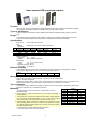
To mount the iPR-6, iPR-7 readers proceeds as follows:
- Remove cover from reader
- Connect the reader to the control panel's cable
- Secure the mounting plate on a wall using plastic nailing plugs and screws
- Secure cover to the reader. Ensure thet all locking tabs are securely.
To mount the iPR-8, iPR-9 readers proceeds as follows:
- Remove the boot in the bottom part of the reader with loosing the screw
- Push mounting panel towards the screw and remove it from the reader
- Using the mounting panel as a template mark and then drill two openings 6mm in diameter and 35mm deep
- Pass the wire through central opening
- Secure the mounting plate on a wall using plastic nailing plugs and screws
- Connect the reader to the control panel's cable
- Put on the reader on the mounting plate, push the case down against stop and secure the reader with the
screw
- Put on the boot
The Reader Operation
Reading of identificator code
The code reading is annunciated by built-in buzzer and two-color LED according to interface type and
annunciation mode (refer to «Data transfer and Annunciation»).
Repeated reading will be available after 0.8 sec if the identificator is moved away from the reader sensing
area.
Hold Mode
Reader is turned to the hold mode while yellow wire is closed to the ground. In this mode reader does not
read cards, thus current consumption decreases to 25mA.
!
Do not apply voltage to hold outlet!
Data transfer and Annunciation
The reader is provided with two-color LED and built-in buzzer. LED and buzzer function according to interface
type programmed and annunciation mode.
Wiegand or TouchMemory Interface
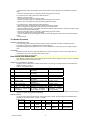
х
00
01
02
03
04
05
06
07
08
Engaging of LED and buzzer is possible automatically or by closing of corresponding wire to the black wire
(GND) according to Table 2.
Table 2. Annunciation mode:
Buzzer
Red LED
Gren LED
Beep on card read
Normally ON, switched OFF Blinks at reading
at reading
Outside control
Normally ON, switched OFF Blinks at reading
at reading
Beep on card read
Switched OFF
Blinks at reading
Outside control
Switched OFF
Blinks at reading
Beep on card read
Normally ON, switched OFF Outside control
at reading
Outside control
Normally ON, switched OFF Outside control
at reading
Beep on card read
Outside control
Outside control
Outside control
Outside control
Outside control
Beep on card read. Normally ON, switched OFF Blinks at reading.
Availability to switch ON at reading. Availability to Availability to switch
from outside
switch OFF from outside
ON from outside
Data transmissions from reader comply with the standard specified. Protocol for TouchMemory interface from
family 01 (to satisfy the requirements DS1990).
RS232 interface
To control annunciation send three-byte control packet to the reader. Packets should be transmitted with 2
400 bits per second, 8 bit data, no parity, 1 stop bit.
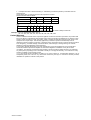
Packet format:
Bit
7
6
5
4
3
2
1
0
byte 0
0
1
0
0
1
0
0
1
byte 1
red
red
blinks
steady
byte 2
green
green
buzzer
buzzer
steady
blinks
pulsatory
uninterruptedly
Smart Innovations
2