1
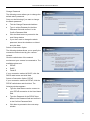
TV-IP501W Internet Camera User Manual Change Password The following screen allows you to change the default admin password. Carry out the following if you want to change the admin password: Tick the Change Password checkbox Type in a New Password in the New Password field and confirm it in the Confirm Password field Click the Next button to proceed to the next Setup window If you don’t want to change the admin password, leave the checkbox un-ticked and click Next Select a Connection Option The following window allows you to specify the connection method used by your camera network. Click the radio button of the network environment your camera is connected to. The available options are: PPPoE DHCP Fixed IP If your connection method is DHCP, click the DHCP radio button and click Next. Select a Connection Option- PPPoE If your connection method is PPPoE, click the PPPoE radio button and click Next. The following window appears. Type the User Name used to connect to your PPPoE connection in the User Name field. Type the Password of the PPPoE User Name in the Password field and confirm it in the Confirm Password field. Click Next to proceed to the next setup window 13