1
BIOS Setup Information
CHAPTER 4
BIOS Setup Information
ROBO-485/515 is equipped with the AMI BIOS stored in Flash ROM. This BIOS has
a built-in Setup program that allows users to modify the basic system configuration
easily. This type of information is stored in CMOS RAM so that it is retained during
power-off periods. When system is turned on, ROBO-485/515 communicates with
peripheral devices and check its hardware resources against the configuration
information stored in the CMOS memory. If any error is detected, or the CMOS
parameters need to be initially defined, the diagnostic program will prompt the user to
enter the SETUP program. Some errors are significant enough to abort the start-up.
4.1 Entering Setup
Turn on or reboot the computer. When the message “Hit <DEL> if you want to
run SETUP” appears, press <Del> key immediately to enter BIOS setup program.
If the message disappears before you respond, but you still wish to enter Setup,
please restart the system to try “COLD START” again by turning it OFF and then
ON, or touch the "RESET" button. You may also restart from “WARM START”
by pressing <Ctrl>, <Alt>, and <Delete> keys simultaneously. If you do not
press the keys at the right time and the system will not boot, an error message will
be displayed and you will again be asked to,
Press <F1> to Run SETUP or Resume
In HIFLEX BIOS setup, you can use the keyboard to choose among options or
modify the system parameters to match the options with your system. The table
below will show you all of keystroke functions in BIOS setup.
EDITING KEYS
<Tab>
←↑→↓
<Enter>
+ /–
<Esc>
<PgUp>
<PgDn>
<F2>/<F3>
<F10>
FUNCTION
Move to the next field
Move the next field to the left, above, right, or below
Select in the current field
Increments / Decrements a value
Close the current operation and return to previous level
Returns to the previous option
Advances to the next option
Select background color
Show “Save current settings and exit (Y/N)” in main menu
ROBO-485/515 User’s Manual
4-1
BIOS Setup Information
4.2 Main Menu
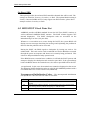
Once you enter ROBO-485/515 AMI BIOS CMOS Setup Utility, the Main Menu
will appear on the screen. The Main Menu allows you to select from seven setup
functions and two exit choices. Use arrow keys to switch the items and press
<Enter> to accept or enter the sub-menu.
AMI BIOS HIFLEX SETUP UTILITY-VERSION 1.20
(C) 1998 American Megatrends , Inc. All Rights Reserved
Standard CMOS Setup
Advanced CMOS Setup
Advanced Chipset Setup
Power Management Setup
Peripheral Setup
Auto-Detect Hard Disks
Change User Password
Change Supervisor Password
Auto Configuration with Optimal Settings
Auto Configuration with Fail Safe Settings
Save Settings and Exit
Exit Without Saving
Standard CMOS setup for changing time, date, hard disk type, etc.
ESC : Exit ↑↓:
↑↓ Sel F2/F3 : Color F10 : Save & Exit
NOTE : It is strongly recommended to reload Optimal
Setting if CMOS is lost or BIOS is updated.
ROBO-485/515 User’s Manual
4-2
BIOS Setup Information
4.3 Standard CMOS Setup Menu
This setup page includes all the items in a standard compatible BIOS. Use the
arrow keys to highlight the item and then use the <PgUp>/<PgDn> or <+>/<->
keys to select the value or number you want in each item and press <Enter> key
to certify it.
Follow command keys in CMOS Setup table to change Date, Time, Drive type,
and Boot Sector Virus Protection Status.
Boot Sector Virus Protection Status
When enabled, this BIOS function will warn the user when any program attempts
to write or format the boot sector and allows the user to intervene. The default
setting is Disabled.
4.4 Advanced CMOS Setup Menu
This setup includes all of the advanced features in the system. The detail
descriptions are specified as belows.
Boot Up Sequence
This category includes six items to determine which drive computer searches first
for the Disk Operating System (DOS). The reference default setting is :
* 1st Boot Device
* 2nd Boot Device
* 3rd Boot Device
* 4th Boot Device
* Try Other Boot Devices
* S.M.A.R.T. for Hard Disks
IDE-0
Floppy
ARMD-HDD
Disabled
Yes
Disabled
The default ARMD (ATAPI Removable Media Device) emulation type is set to
popular drive type; such as floppy for LS-120, hard disk for MO, and removable
hard disk for IOMEGA Zip etc. There are many choices of booting devices to boot
up system. User can select Disabled, IDE-0, IDE-1, IDE-2, IDE-3, Floppy,
ARMD-FDD, ARMD-HDD, CDROM, SCSI, or NETWORK.
ROBO-485/515 User’s Manual
4-3
BIOS Setup Information
Quick Boot
Select Enabled to skip minor BIOS test items to get quick boot response. The
optimal default setting is Disabled.
Boot Up Num-Lock
Select “On” to enable numeric function of the numeric keypad, or “Off” to
disregard it. The optimal default setting is On.
PS/2 Mouse Support
Select “Enabled” to enable PS/2 mouse function, or “Disabled” to release IRQ12
interrupt for other ISA-bus I/O devices. The default setting is Enabled.
System Keyboard
This option will be used to neglect “keyboard error” while you choose Absent
setting in your BIOS setup and system has no keyboard attached.
Primary Display
Chooses Absent, VGA/EGA, CGA40x25, CGA80x25, or Mono to meet your
monitor type. If you select Absent, the “CMOS Display Type Wrong” message will
be ignored for mismatched display card in CMOS setting. The default setting is
Absent.
Password Check
This option enables the password checking when the system boots up or runs
CMOS Setup. It only takes effect after setting Change Supervisor Password. The
default setting is Setup.
Setup : This option will force system to check password before running Setup if
you have already entered the current user password in “Change User
Password”. By that time, the system will be only able to boot but deny
accessing Setup.
Always : Password prompt appears every boot-up. The system will not boot and
deny access Setup with invalid password. The best way is to clear
CMOS or try to reload BIOS Setup to boot up system.
ROBO-485/515 User’s Manual
4-4
BIOS Setup Information
Boot to OS/2, DRAM 64MB or Above
Set this option to Yes to permit BIOS to run properly if OS/2 or any other operating
system that not support Plug and Play is to be run on this computer. If running OS/2
in a computer with 64MB or more of system memory, set this option to Yes. The
optimal default setting is No.
Internal Cache
This option is used to enable or disable internal CPU L1 cache. Set this option
to WriteBack to acquire better system performance. If you select Disabled,
neither L1 internal cache memory on the CPU or L2 secondary cache memory is
enabled. The final system performance will be slower than normal setting. The
optimal default setting is WriteBack.
External Cache (For ROBO-515 only)
This option specifies the caching algorithm used for L2 secondary (external) cache
memory. Set this option to WriteBack to improve overall system performance. If
you select Disabled, the external L2 cache will be not available and the system
performance will be slower than normal setting. The optimal default setting is
WriteBack.
System BIOS Cacheable
Set this option to “Enabled” to enhance system performance by shadowing and
caching function , or ignore this BIOS shadow function by setting “Disabled”. The
optimal default setting is Enabled.
Shadow Memory (from address C000 – DFFF, 16K per segment)
Each of segments provides three options “Disabled”, “Enabled”, and “Cached”
for faster adapter’s ROM execution. However this shadow function is Chipset
oriented and dependent on system hardware feature. The optimal default setting for
each of all segments are Disabled except for C000 and C400. In general, this area
C000 – C7FF (32KB) is allocated for VGA BIOS and set to Cached to get higher
display performance by shadowing and caching feature. If user chooses Enabled
setting, only BIOS shadow function is active.
ROBO-485/515 User’s Manual
4-5
BIOS Setup Information
4.5 Advanced Chipset Setup Menu
This setup is very important to keep system stability. If you are not technical
person, do not attempt to change any parameters. The best way is to choose optimal
default setting.
USB Function (For ROBO-515 only)
This option will enable on-chip USB function to support USB (Universal Serial
Bus) peripheral devices if a user chooses the “Enabled” setting. The optimal
default setting is Disabled.
USB Keyboard/Mouse Legacy Support (For ROBO-515 only)
This feature will be automatically disabled and hidden if user chooses the
“Disabled” setting from the foregoing USB Function option. Otherwise, enabling
this option can support USB-keyboard or USB-Mouse without auxiliary driver
under DOS environment.
SDRAM CAS Latency/ RAS to CAS
This option is used to control read data valid wait states after a read command has
been issued. The “2/2” means a CAS# latency of 2 HCLKs and a RAS# to CAS#
delay of 2 HCLKs is provided for all SDRAM cycles. Here HCLK means the
CPU-clock period. The optimal default setting is 2/2.
SDRAM Speculative Read Logic
This option relates to SDRAM pipeline function and Back-to-back Burst Read
Page Hit . You can choose the “Disabled” setting for safe system performance or
for low-speed SDRAM module. The Disabled setting means the next memory
access can begin after the previous memory access is finished. However, you can
select Enabled to optimize the memory data sequence to gain better SDRAM
performance. This option is only effective if SDRAM system memory is installed
in the computer. The optimal default setting is Disabled.
ROBO-485/515 User’s Manual
4-6
BIOS Setup Information
Fast EDO Read Cycle Timing
This item is used to control EDO DRAM read timing. If you are using low-speed
EDO DRAM (more than 70ns) or running higher CPU clock speed, it is necessary
to select option “Disabled”. Or you can select “Enabled” setting to get better
system performance. This option is only effective if EDO system memory is
installed in the computer. The optimal default setting is Disabled.
DRAM Refresh RAS Cycles (HCLK’s)
This option sets the number of DRAM refresh RAS cycles (in HCLKs). The
settings are 4 or 5. The optimal default setting is 5.
Memory Hole
This option allows the end user to specify the location of a memory hole for
memory space requirement from ISA-bus cards. The settings are “Disabled”, “512640KB”, “15-16MB”, or “14-16MB”. The optimal default setting is Disabled.
8bit I/O Recovery Time
This option specifies the length of the delay (in SYSCLKs) inserted between
consecutive 8-bit I/O operations. The settings are Disabled, 8, 1, 2, 3, 4, 5, 6, or
7 Sysclks. The optimal default setting is Disabled.
16bit I/O Recovery Time
This option specifies the length of the delay (in SYSCLKs) inserted between
consecutive 16-bit I/O operations. The settings are Disabled, 4, 1, 2, or 3 Sysclks.
The optimal default setting is Disabled.
4.6 Power Management Setup Menu
This APM (Advanced Power Management) determines how much power energy
can be saved by setting below items to handle system power resource. The
following descriptions will specify the detail meaning or definition of each item.
ROBO-485/515 User’s Manual
4-7
BIOS Setup Information
Power Management/APM
Using this feature to control system power resources. The default setting is
Enabled to enable power management function and effective based on following
parameter settings.
Green PC Monitor Power State
This option specifies the power state that the green PC-compliant video monitor
enters when BIOS places it in a power savings state after the specified period of
display inactivity has expired. There are three options “Stand By”, “Suspend”, and
“Off” in this feature. The Stand By option is to turn off light power by handling of
monitor signals. The other Suspend mode is to turn off heavy power. Another one,
Off state, is really to turn off the power of the monitor. The optimal default setting
is Off.
Video Power Down Mode
This option specifies the power conserving state that the VESA VGA video
subsystem enters after the specified period of display inactivity has expired. There
are three options “Disabled”, “Stand By”, and “Suspend” in this field. The optimal
default setting is Disabled. If user select another options, it will be controlled by
“Stand by Time out” and “Suspend Time out”.
Hard Disk Power Down Mode
This option specifies the power management state that the HDD enters after the
specified period of hard drive inactivity has expired. It is the same as video power
control. The optimal default setting is Disabled. If user chooses Stand By or
Suspend, it will depend on period of parameter “Stand By Time out”or “Suspend
Time out”.
Stand by Time out (Minute)
This option specifies the length of the period of system inactivity while the
computer is in Full-On power state before the computer is placed in Standby mode.
When this length of time expires, the computer enters Standby Timeout state. In
Standby mode, some power use is curtailed. The settings are Disabled, 1, 2, 4, 8,
10, and all ten minute intervals up to 60 min. The optimal default setting is
Disabled.
ROBO-485/515 User’s Manual
4-8
BIOS Setup Information
Suspend Time out (Minute)
This option is the same as Stand by Time out function. These two features will be
enabled to monitor power of sub-items “VGA display”, “Serial port”, “Parallel
Port”, “Floppy”, “Pri-HDD”, and “Sec-HDD” independently. It is also used to
control CPU throttle running function. All of sub-items will be ineffective in
selection of disabling “Stand by Time out” or “Suspend Time out” even if it can be
choosed by user in BIOS setup menu. The settings are Disabled, 1, 2, 4, 8, 10, 20,
30, 40, 50, and 60 min. The optimal default setting is Disabled.
Slow Clock Ratio
This option specifies the speed at which the system clock runs in power saving
modes. The settings are expressed as duty cycle of the STPCLK# signal. This duty
cycle indicates the percentage of time the STPCLK# signal is asserted while in the
throttle mode. The settings are 0-12.5%, 12.5-25%, 25-37.5%, 37.5-50%,
50-62.5%, 62.5-75%, and 75-87.5%. The optimal default setting 50-62.5%.
Display Activity
This option specifies if BIOS is to monitor activity on the display monitor for
power conservation purposes. If Display Activity is set to Monitor and the
computer is in a power saving state, BIOS will watch for video display activity. The
computer enters the full on-power state if any activity occurs. BIOS reloads the
Standby and Suspend timeout timers if activity occurs on the specified IRQ lines. If
this option is set to Ignore, video display monitor activity is not monitored. The
settings are Monitor (Enabled) or Ignore (Disabled). The optimal default settings is
Ignore.
Serial Port 1 & 2, Parallel Port, FDD, Pri/Sec HDD 0 & 1
When set to Monitor, these options enable event monitoring on the specified
hardware device. If set to Monitor and the computer is in a power saving state,
BIOS watches for activity on the device with specified IRQ line. The computer
enters the full on power state if any activity occurs. BIOS reloads the Standby
and Suspend timeout timers if activity occurs on the specified device. No
monitoring activity occurs if the option is set to Ignore. The settings for each of
these options are Monitor or Ignore. The optimal default setting for Serial Port 1 &
2, Primary/Secondary master IDE, and System Thermal are set to Monitor. The rest
of devices are default set to Ignore.
ROBO-485/515 User’s Manual
4-9
BIOS Setup Information
4.7 Peripheral Setup
This section describes I/O resources assignment for all of on-board peripheral
devices. Please be noticed that multiple IRQ assignments for serial port will result
in IRQ conflict. You need to take care when IRQ option is fixed by manual
operation.
On Board FDC
Three options are “Auto”, “Disabled”, and “Enabled”. If user wants to install
different add-on super I/O card to connect floppy drives, set this field to
Disabled. The default setting is Auto. It will call BIOS to automatically
determine if the floppy controller should be enabled.
On Board Serial Port 1/Port 2
These fields control the resource assignments of two on-board serial interfaces
SIO1 and SIO2. The following lists show current options in On Board Serial
Port 1/ Port 2 :
Auto (default setting) ! cannot set serial I/O resources by manual operation
Disabled ! indicates on-board COM port function is ineffective
3F8h/COM1 ! assign I/O address 3F8h to COM1 (default IRQ4)
2F8h/COM2 ! assign I/O address 2F8h to COM2 (default IRQ3)
3E8h/COM3 ! assign I/O address 3E8h to COM3
2E8h/COM4 ! assign I/O address 2E8h to COM4
IR Port Support
It is recommended to assign serial port 3 for this option. The IR Mode Select has
four settings IrDA, ASK IR, FIR, and CIR. The optimal default setting for IR Port
Support is set to Auto.
On Board Parallel Port
There are four optional items Parallel Port Mode, EPP Version, Parallel Port IRQ,
and Parallel Port DMA Channel used to control on-board parallel port interface
while user select I/O base address manually. The following lists are available
options of on-board parallel port :
ROBO-485/515 User’s Manual
4-10
BIOS Setup Information
Auto (default setting) ! user can not control all of LPT port I/O resources
Disabled ! on-board parallel port function is ineffective and N/A
378h
! locate IRQ7 for this default I/O address
278h
! assign this I/O address to LPT1
3BCh ! assign this I/O address to LPT1
◎ Parallel Port Mode :
This option specifies the parallel port mode. ECP and EPP are both bidirectional
data transfer schemes that adhere to the IEEE P1284 specifications. This
Parallel Port Mode includes four options “Normal”, “Bi-Dir”, “EPP”, and
“ECP”. The optimal default setting is Bi-Dir.
Setting
Normal
Bi-Dir
EPP
Setting
ECP
Description
Uni-direction operation at normal speed
Bi-direction operation at normal speed
The parallel port can be used with devices that adhere to the
Enhanced Parallel Port (EPP) specification. EPP uses the
existing parallel port signals to provide asymmetric bidirectional
data transfer driven by the host device.
Description
The parallel port can be used with devices that adhere to the
Extended Capabilities Port (ECP) specification. ECP uses the
DMA protocol to achieve data transfer rates up to 2.5 Megabits
per second. ECP provides symmetric bidirectional
Communication.
◎ EPP Version :
This option is only valid if the Parallel Port Mode option is set to EPP. This
option specifies the version of the Enhanced Parallel Port specification that will
be used by AMIBIOS. The settings are 1.9 or 1.7. The optimal default setting
is 1.9 .
◎ Parallel Port IRQ :
This option is only valid if the Onboard Parallel Port option is not set to
Disabled. This option sets the IRQ used by the parallel port. The settings are
5 and 7. The optimal default setting is 7.
◎ Parallel Port DMA Channel :
This option is only available if the setting of the Parallel Port Mode option is
ECP. This option sets the DMA channel used by ECP-capable parallel port.
The settings are 0, 1, or 3 (DMA channel 3). The optimal default setting is 3.
ROBO-485/515 User’s Manual
4-11
BIOS Setup Information
On Board IDE
This option specifies the on-board IDE controller channels that will be used. The
settings are Disabled, Primary, Secondary, or Both. The optimal default setting is
Primary. Because ROBO-485/515 only support one IDE interface, please don’t
attempt to select Secondary or Both.
4.8 BIOS POST Check Point List
AMIBIOS provides all IBM standard Power On Self Test (POST) routines as
well as enhanced AMIBIOS POST routines. The POST routines support CPU
internal diagnostics. The POST checkpoint codes are accessible via the
Manufacturing Test Port (I/O port 80h).
Whenever a recoverable error occurs during the POST, the system BIOS will
display an error message describing the message and explaining the problem in
detail so that the problem can be corrected.
During the POST, the BIOS signals a checkpoint by issuing one code to I/O
address 80H. This code can be used to establish how far the BIOS has executed
through the power-on sequence and what test is currently being performed. This
is done to help troubleshoot faulty system board.
If the BIOS detects a terminal error condition, it will halt the POST process and
attempt to display the checkpoint code written to port 80H. If the system hangs
before the BIOS detects the terminal error, the value at port 80H will be the last
test performed. In this case, the terminal error cannot be displayed on the screen.
The following POST checkpoint codes are valid for all AMIBIOS products with a
core BIOS date of 07/15/95 version 6.24 (Enhanced).
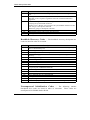
Uncompressed Initialization Codes — The uncompressed initialization
checkpoint hex codes are listed in order of execution :
Code
D0
D1
D3
Description
NMI is disabled. CPU ID saved. INIT code checksum verification will be
started.
Initializing the DMA controller, performing the keyboard controller BAT
test, starting memory refresh, and going to 4GB flat mode.
To start memory sizing.
ROBO-485/515 User’s Manual
4-12
BIOS Setup Information
Code
D4
D5
D6
D7
D8
D9
Description
Returning to real mode. Executing any OEM patches and setting the stack
next.
Passing control to the uncompressed code in shadow RAM at E000:0000h.
The INIT code is copied to segment 0 and control will betransferred to
segment 0.
Control is in segment 0. Next, checking if <Ctrl><Home> was pressed and
verifying the system BIOS checksum.
If either <Ctrl><Home> was pressed or the system BIOS checksum is bad,
next will go to checkpoint code E0h.
Otherwise, going to checkpoint code D7h.
To pass control to interface module.
Main BIOS runtime code is to be decompressed.
Passing control to the main system BIOS in shadow RAM next.
Bootblock Recovery Codes — The bootblock recovery checkpoint hex
codes are listed in order of execution :
Code
E0
E1
E2
E6
ED
EE
EF
F0
F1
F2
F3
F4
F5
FB
FC
FD
FF
Description
The onboard floppy controller if available is initialized. Next, beginning the
base 512KB memory test.
Initializing the interrupt vector table next.
Initializing the DMA and Interrupt controllers next.
Enabling the floppy drive controller and Timer IRQs. Enabling internal cache
memory.
Initializing the floppy drive.
Start looking for a diskette in drive A: and read first sector of the diskette.
A read error occurred while reading the floppy drive in drive A: .
Next, searching for the AMIBOOT.ROM file in the root directory.
The AMIBOOT.ROM file is not in the root directory.
Next, reading and analyzing the floppy diskette FAT to find the clusters
occupied by the AMIBOOT.ROM file.
Start reading AMIBOOT.ROM file, cluster by cluster.
The AMIBOOT.ROM file is not the correct size.
Next, disabling internal cache memory.
Next, detecting the type of Flash ROM.
Erasing the Flash ROM.
Programming the Flash ROM
Flash ROM programming was successful. Next, restarting the system BIOS.
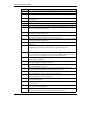
Uncompressed Initialization Codes — The following runtime
checkpoint hex codes are listed in order of execution.
uncompressed in F0000h shadow RAM.
ROBO-485/515 User’s Manual
These codes are
4-13
BIOS Setup Information
Code
03
05
06
07
08
0B
0C
0E
0F
10
11
12
13
14
19
1A
23
24
25
27
28
2A
2B
2C
2D
2E
2F
30
31
32
34
Description
The NMI is disabled. Next, checking for a soft reset or a power on condition.
The BIOS stack has been built. Next, disabling cache memory.
Uncompressing the POST code next.
Next, initializing the CPU and the CPU data area.
The CMOS checksum calculation is done next.
Next, performing any required initialization before the keyboard BAT
command is issued.
The keyboard controller input buffer is free. Next, issuing the BAT
command to the keyboard controller.
The keyboard controller BAT command result has been verified. Next,
performing any necessary INIT after the K/B controller BATcommand test.
The keyboard command byte is written next.
Next, issuing the pin 23 and 24 blocking and unblocking commands.
Next, checking if the <End> or <Ins> keys were pressed during power on.
To initialize CMOS if the initialize CMOS RAM in every boot is set or the
<End> key is pressed. Going to disable DMA and Interrupt controllers.
The video display has been disabled. Port B has been initialized. Next,
initializing the chipset.
The 8254 timer test will begin next.
The 8254 timer test is over. Starting the memory refresh test next.
The memory refresh line is toggling. Checking the 15us on/off time next.
Reading the 8042 input port and disabling the MEGAKEY Green PC feature
next. Making the BIOS code segment writable and performing any necessary
configuration before initializing the interrupt vectors.
The configuration or setup required before interrupt vector initialization has
completed. Interrupt vector init. is about to begin
Interrupt vector initialization is done. Clearing the password if the POST
DIAG switch is on.
Any initialization before setting video mode to be done.
Going for monochrome mode and color mode setting.
Bus initialization system, static, output devices will be done next, if present.
Passing control to the video ROM to perform any required configuration
before the video ROM test.
To look for optional video ROM and give control.
The video ROM has returned control to BIOS POST. Performing any
required processing after the video ROM had control.
Completed post-video ROM test processing. If the EGA/VGA controller is
not found, performing the display memory read/write test next.
EGA/VGA not found. Display memory R/W test about to begin.
Display memory R/W test passed. Look for retrace checking next.
Display memory R/W test or retrace checking failed. To do alternate display
retrace checking.
Alternate display memory R/W test passed. To look for the alternate display
retrace checking.
Video display checking is over. Setting the display mode next.
ROBO-485/515 User’s Manual
4-14
BIOS Setup Information
Code
Description
37
38
39
The display mode is set. Displaying the power on message next.
Initializing the bus input, IPL, and general devices next, if present.
Displaying bus initialization error message.
3A
The new cursor position has been read and saved. Displaying the Hit <DEL>
message next.
Preparing the descriptor tables next.
Entering protected mode for the memory test next.
Entered protected mode. Enabling interrupts for diagnostics mode next.
Interrupts enabled if the diagnostics switch is on. Initializing data to check
memory wraparound at 0:0 next.
40
42
43
44
45
46
47
48
49
4B
4C
4D
4E
4F
50
51
52
53
54
57
Data initialized. Checking for memory wraparound at 0:0 and finding the
total system memory size next.
The memory wraparound test has completed. The memory size calculation
has been done. Writing patterns to test memory next.
The memory pattern has been written to extended memory. Writing patterns
to the base 640 KB memory test.
Patterns written in base memory. Determining the amount of memory below
1MB next.
The amount of memory below 1MB has been found and verified.
Determining the amount of memory above 1MB memory next.
The amount of memory above 1MB has been found and verified. Checking
for a soft reset and clearing the memory below 1MB for the soft reset next.
If this is a power on situation, going to checkpoint 4Eh next.
The memory below 1MB has been cleared via a soft reset. Clearing the
memory above 1MB next.
The memory above 1MB has been cleared via soft reset. Saving the memory
size next. Going to checkpoint 52h next.
The memory test started, but not as the result of a soft reset. Displaying the
first 64KB memory size next.
Memory size display started. This will be updated during memory test.
Performing the sequential and random memory test next.
Memory testing/initialization below 1MB completed. Going to adjust
displayed memory size for relocation and shadowing.
The memory size display was adjusted for relocation and shadowing.
Testing the memory above 1MB next.
The memory above 1MB has been tested and initialized. Saving the memory
size information next.
The memory size information and the CPU registers are saved. Entering
real mode next.
Shutdown was successful. The CPU is in real mode. Disabling the Gate A20
line, parity, and the NMI next.
The A20 address line, parity, and the NMI are disabled. Adjusting the
memory size depending on relocation and shadowing next.
ROBO-485/515 User’s Manual
4-15
BIOS Setup Information
Code
58
59
60
62
65
66
7F
80
81
82
83
84
85
86
87
88
89
8B
8C
8D
8F
91
95
96
97
98
99
9A
Description
The memory size was adjusted for relocation and shadowing. Clearing the
Hit <DEL> message next.
The Hit <DEL> message is cleared. The <WAIT…> message is displayed.
Staring the DMA and interrupt controller test next.
The DMA page register test passed. To do DMA#1 base register test.
DMA#1 base register test passed. To do DMA#2 base register test.
DMA#2 base register test passed. To program DMA unit 1 and 2.
DMA unit 1 and 2 programming over. To initialize 8259 interrupt controller.
Extended NMI sources enabling is in progress.
The keyboard test has started. Clearing the output buffer and checking for
stuck keys. Issuing the keyboard reset command next.
A keyboard reset error or stuck key was found. Issuing the keyboard
controller interface test command next.
The keyboard controller interface test completed. Writing the command byte
and initializing the circular buffer next.
Command byte written, Global data init done. To check for lock-key.
Locked key checking is over. Checking for a memory size mismatch with
CMOS RAM data next.
The memory size check is done. Displaying a soft error and checking for a
password or bypassing Setup next.
Password checked. About to do programming before setup.
The programming before Setup has completed. Uncompressing the Setup
code and executing the AMIBIOS Setup utility next.
Returned from CMOS setup program and screen is cleared. About to do
programming after setup.
The programming after Setup has completed. Displaying the power on
screen message next.
The first screen message has been displayed. The <WAIT…> message is
displayed. Performaing the PS/2 mouse check and extended BIOS data
area allocation check next.
Programming the Setup options next.
Going for hard disk controller reset.
Hard disk controller reset done. Floppy setup to be done next.
The floppy drive controller has been configured. Configuring the hard disk
drive controller next.
Initializing the bus option ROMs from C800 next.
Initializing before passing control to the adaptor ROM at C800.
Initialization before the C800 adaptor ROM gains control has completed.
The adaptor ROM check is next.
The adaptor ROM had control and has now returned control to BIOS POST.
Performing any required processing after the option ROM returned control.
Any initialization required after the option ROM test has completed.
Configuring the timer data area and printer base address next.
Return after setting timer and printer base address. Going to set the RS-232
base address.
ROBO-485/515 User’s Manual
4-16
BIOS Setup Information
Code
9B
9C
9D
9E
A2
A3
A4
A5
A7
A8
A9
AA
AB
AC
B0
B1
00
Description
Returned after setting the RS-232 base address. Performing any required
Initialization before the Coprocessor test next.
Required initialization before the Coprocessor test is over. Initializing the
Coprocessor next.
Coprocessor initialized. Going to do any initialization after Coprocessor test.
Initialization after the Coprocessor test is complete. Checking the extended
Keyboard, keyboard ID, and Num Lock key next. Issuing the keyboard ID
command next.
Displaying any soft errors next.
Soft error display complete. Going to set keyboard typematic rate.
Keyboard typematic rate set. To program memory wait states.
Memory wait state programming is over. Clearing the screen and enabling
parity and the NMI next.
NMI and parity enabled. Performing any initialization required before
passing control to the adaptor ROM at E000 next.
Initialization before passing control to the adaptor ROM at E000h completed.
Passing control to the adaptor ROM at E000h next.
Returned from adaptor ROM at E000h control. Performing any initialization
required after the E000 option ROM had control next.
Initialization after E000 option ROM control has completed. Displaying the
system configuration next.
Building the multiprocessor table, if necessary.
Uncompressing the DMI data and initializing DMI POST next.
The system configuration is displayed.
Copying any code to specific areas.
Code copying to specific areas is done. Passing control to INT 19 h boot
loader next.
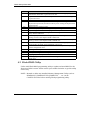
4.9 Flash BIOS Utility
Utilize AMI Flash BIOS programming utility to update on-board BIOS for the
future new BIOS version. Please contact your technical window to get this utility
if necessary.
NOTE : Remark or delete any installed Memory Management Utility (such as
HIMEM.SYS, EMM386.EXE, QEMM.EXE, …, etc.) in the
CONFIG.SYS files before running Flash programming utility.
ROBO-485/515 User’s Manual
4-17
BIOS Setup Information
ROBO-485/515 User’s Manual
4-18