1
OPERATION GUIDE
Basic Operation :
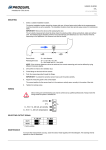
1 . Press the flashlight on/off button once for
ultra-bright setting, suitable for illuminating distant
objects . Press again for wide angle setting, suitable
for lighting nearby objects . Press a third time to turn
off flashlight ;
2 . Press the recording on/off button to start recording
and once again to stop . A flashing blue working
indicator LED light indicates recording in progress .
Recording
on/off .
Flashlight
on/off
Indicator
LED
TIP! When recording objects up close at night, it is
recommended to use the wide angle LED setting .
Video Output :
1 . Unscrew the handle of LumenCam'" and locate
the USB port.
2 . Using the included USB cable, connect
LumenCam'" to any computer with a USB port .
3 . Your computer should automatically recognize the
new hardware, which you may browse by
double-clicking on the My Computer icon on your
desktop, and then navigating into the Mobile Disk
directory.
* If your computer is unable to playback desired
video files, please first install the video player software
from the included CD .
Charge Indicator Light
Installing Lithium Battery :
1 . Unscrew the handle of LumenCam'" and locate the handle ;
2 . Insert the Li-battery into the handle with proper orientation .
Recharging Lithium Battery:
1 . Locate and remove the waterproofing plug at the base of LumenCam'" ;
2 . Connect the power adapter to LumenCam' and an (100-240V - 50/60Hz)
power source . The indicator will illuminate green when charging, and turn off
when fully charged .