1
English
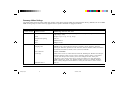
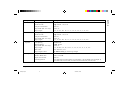
Explanations of Menu Items
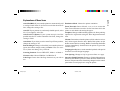
Auto CR (IBM). If you want the printer to automatically add
a carriage return when a Line Feed is received at the end of a
line, change the setting to Yes.
Emulation Mode. Choose the printer emulation.
Form Tear-Off. Choose 500 mS, 1 sec, or 2 sec to turn the
Form Tear-Off feature on and to set the time interval for the
Auto LF. If your printout is consistently double spaced, select printer to wait before advancing the paper.
No; if it overprints, select Yes.
Graphics. Change to bidirectional graphics for faster printing:
Auto Feed XT (Epson). If your system uses pin 14 of the optimise the registration using the Print Registration menu
parallel interface to control automatic line feed, change the item.
setting to Valid.
I-Prime. Determines what the printer will do when it receives
Auto Select. If you always use the same Top of Form position, the I-Prime signal from the host: Buffer Print prints out the
change the setting to Yes.
buffer contents before resetting; Buffer Clear dumps the buffer
contents immediately. Invalid causes the printer to ignore the
Bottom Margin. Change to Invalid if you want the printer to
I-Prime signal.
ignore the bottom margin setting. Caution! This can cause
loss of data and damage the printhead.
Language Set. Replaces certain standard symbols with special
characters used in foreign languages.
Centring Position. Choose DEFAULT, Mode 1 or Mode 2.
Line Spacing. Change to 8 lpi to get more lines on a page.
Character Set. Choose IBM Set I or IBM Set II.
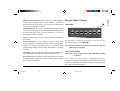
Operator Panel Function. Change to Limited Operation to
Code Page. Choose the Code Page character set you wish to
deactivate the PRINT QUALITY and CHARACTER PITCH
use.
buttons. This prevents these from being changed via the control
panel when several people are using the printer.
Help Guide
3390hlp3.pm6
19
19
22/03/96, 16:05