1
Sophos Enterprise Console
5 Protecting computers
5.1 About protecting computers
You can install Sophos protection software in the following ways:
■
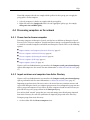
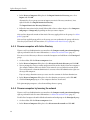
To protect computers automatically, use the protect computer wizard provided in Enterprise
Console, see Protect computers automatically (page 50).
■
Alternatively, you can protect computers automatically using Active Directory synchronization,
see About synchronization with Active Directory (page 40).
■
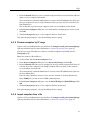
To protect computers manually, Enterprise Console helps to locate the required software, see
Locate installers for protecting computers manually (page 53). Then go to the respective computer
and install the protection software manually.
5.2 Prepare for installation of anti-virus software
As well as ensuring that computers meet the general system requirements, you must perform
further steps before you can install software on them automatically.
Note: Automatic installation is not possible on Mac, Linux and UNIX computers.
If you use Active Directory, you can prepare your computers using a Group Policy Object (GPO).
For instructions, see Sophos support knowledgebase article 116754
(http://www.sophos.com/support/knowledgebase/article/116754.html).
If you use workgroups, you must configure computers locally. For instructions, see Sophos support
knowledgebase article 116755 (http://www.sophos.com/support/knowledgebase/article/116755.html).
5.3 Prepare for installation of encryption software
As well as ensuring that computers meet the general system requirements, you must perform
further steps before you can install software on them automatically.
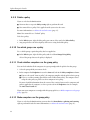
To prepare computers for installation of encryption software:
1. Make sure that drives encrypted with third-party encryption software have been decrypted and
that the third-party encryption software is uninstalled.
2. Create a full backup of the data.
3. Check if a Windows user account with credentials is set up and active for the user on the
endpoint computer.
4. Make sure that the computer has already been protected with Sophos anti-virus software version
10 before you deploy full disk encryption.
5. Uninstall third-party boot managers, such as PROnetworks Boot Pro and Boot-US.
48