1
3
Transparent Mode
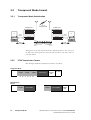
In Transparent mode, the radio acts as a modem, automatically transmitting
in FFSK format the serial data received from the PC. In this mode, the baud
rate between the PC (DTE) and the radio (DCE) can be set to either 1200,
2400, 4800, 9600, 14400 or 19200 baud using the TM8000 Programming
Application. The over-air data rate is always fixed at 1200 bps for FFSK data.
The TM8100 serial data input buffer is 128 bytes to adequately cope with
the data flow.
CTCSS and DCS subaudible signalling is available in Transparent mode but
other programmable features such as Selcall and DTMF are unavailable.
Communication in Transparent mode is free-format, with the protocol
determined entirely by the PC and the modem. It is transparent to the
CCDI, allowing the PC to send and receive data without passing through
CCDI.
If an SDM is received in Transparent mode, it is tested for SDM validity by
checking the leading ‘s’, the checksum, the SDM identity and the size. If it
is found to be a valid SDM, it is saved in the SDM buffer for later retrieval.
3.1
Entering Transparent Mode
Transparent mode can be set as the default mode at power on by selecting
“T-Mode” in the ‘Powerup State’ field in the Data form of the TM8000
Programming Application. See “Powerup State” on page 19.
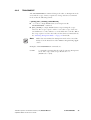
To change to Transparent mode while operating in Command mode, the
PC must send a TRANSPARENT command to the radio. E.g. t01zB1
sends a TRANSPARENT command, requesting that the radio be put into
Transparent mode. The escape character specified here is “z” (ASCII code
= $7A). Once acknowledged, any further data is linked directly to the radio
in Transparent mode.
If the radio default is set to Transparent mode at power on, the default escape
character is “+”.
TM8100 Computer Controlled Data Interface (CCDI) Protocol Manual
September 2003 © Tait Electronics Limited
Transparent Mode
21