1
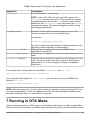
D,Xverbose,Xquery,Xdebug,Xrunjdwp,Xdevice,Xdescriptor,Xjam
This list can be overridden for a specific device, as described later.
device.list
The value for device.list is a comma-separated list of device
names. Even if an emulator supports only one device, this property
must still be produced.
security.domains (Optional) A comma-separated list of security domains supported by the
emulator. This property is required if the mekeytool command is
present.
This list can be overridden for a specific device, as described later.
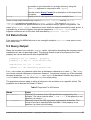
The uei.arguments list can include arguments as well as specific sub-commands. Separate
the arguments and sub-commands in the list with commas, using no spaces. If an argument
allows for a sub-command (for example, the -Xverbose argument), the sub-command must
be listed after the main argument following a colon. As a shorthand notation, sub-commands do
not need to be listed if all sub-commands are supported. However, if only a subset of subcommands is supported, every supported sub-command must be explicitly listed. For example,
if all -Xjam sub-commands are supported, but only the allocation and class -Xverbose
sub-commands are supported, uei.arguments line includes the following:
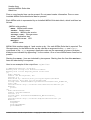
uei.arguments: Xjam,Xverbose:allocation,Xverbose:class, ...
The device-specific properties start with the device name. The device name must be one of the
values from the device.list property.
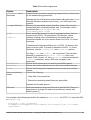
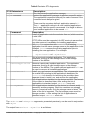
Table 6 Device-Specific Properties
Name
Value
device-name.screen.width
device-name.screen.height
device-name.screen.isColor
device-name.screen.bitDepth
The width of the device screen in pixels.
The height of the device screen in pixels.
true for color screens, false for grayscale.
The number of bits that describe a pixel's color. For
grayscale screens, this property describes how many
bits are used to determine the level of gray.
true for screens that support pointer events, false
otherwise
(Optional) Has the same meaning and syntax as
uei.arguments, but it applies to a specific device
and overrides the value of uei.arguments.
A list of API files that must be used to build a MIDlet
that runs on this device. The format is a commaseparated list of fully qualified pathnames and/or
filenames. All paths or files must start with a drive
specifier1. A path or file might contain internal
spaces, but must never contain a comma. Trailing
spaces are ignored.
device-name.screen.isTouch
device-name.uei.arguments
device-name.bootclasspath
1. A drive specifier is not required if the emulator is running on a UNIX platform. However, for
the UNIX platform, the path or file must start with the root directory.
Unified Emulator Interface Specification – Copyright © 2006 Sun Microsystems, Inc.
11