1
Managing Attribute Definitions
Editing Attributes
You can edit only the user-defined attributes using the console. Before modifying
the name, syntax, multi-valued definition of an attribute, you must ensure that no
entry in the directory currently uses this attribute, otherwise clients will be unable
to access that entry.
To modify the schema definition of an attribute:
1.
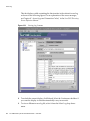
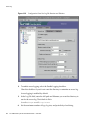
On the top-level Configuration tab of the Directory Server console, select the
Schema node in the configuration tree, then select the Attributes tab in the
right-hand panel.
2.
Select the attribute that you want to edit in the table of User Defined Attributes
and click Edit.
3.
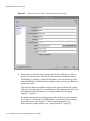
Modify the fields of the Edit Attribute dialog to redefine your attribute.
If the OID string is based on the attribute’s name, you should change the OID
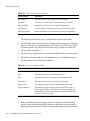
whenever you change the name. OIDs are described in Table 9-1 on page 328.
Available syntaxes are described in Table 9-2 on page 329.
4.
When you have finished editing the attribute, click OK to save your changes.
Deleting Attributes
You can delete only the user-defined attributes using the console. Before deleting
an attribute definition, you must ensure that no entry in directory currently uses
this attribute, otherwise clients will be unable to access that entry.
To delete the schema definition of an attribute:
1.
On the top-level Configuration tab of the Directory Server console, select the
Schema node in the configuration tree, then select the Attributes tab in the
right-hand panel.
2.
In the table of user-defined attributes, select the attribute and click Delete.
3.
Confirm the delete when prompted.
The server will delete the attribute definition immediately. There is no undo.
Chapter
9
Extending the Directory Schema
331