1
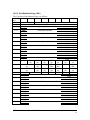
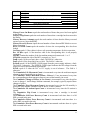
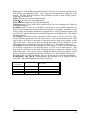
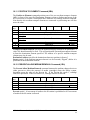
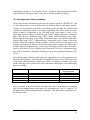
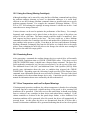
The Send Diagnostic command returns status of GOOD if no errors occur, else a CHECK
CONDITION will be set. Send a Request Sense command to obtain information about
the problem.
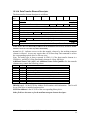
10.21 SEND VOLUME TAG Command (B6h)
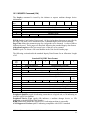
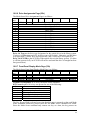
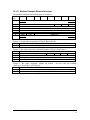
The Send Volume Tag command transfers a template to be used to search for cartridges
with specific bar codes (volume tags). Only this template matching “translate” function
of the Send Volume Tag command is supported. The Request Volume Element Address
command is used to transfer the results of the template matching operation.
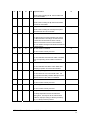
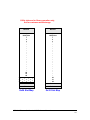
Bit
Byte
0
1
2-3
7
6
5
4
3
2
1
(MSB)
Operation Code (B6h)
Element Type Code
Element Address
(MSB)
Reserved (00h)
Send Action Code
Reserved (00h)
Parameter List Length
Reserved (0)
0
(LSB)
4
5
6-7
8-9
Reserved (0)
(LSB)
10 - 11
Reserved (00h)
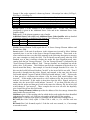
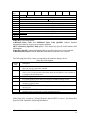
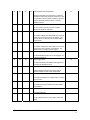
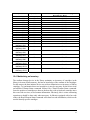
Element Type Code specifies an element type for a translate action as follows.
Code
0
1
2
3
4
Element Types Returned
All element types
Medium transport elements
Storage elements
Import/export elements
Data transfer elements
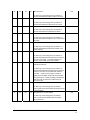
Send Action Code specifies the function to be performed by the command as shown
below.
Code
00h or 04h
01h or 05h
02h or 06h
03h, 07h-1Fh
Function
Translate - search all defined (side A and side B) bar codes of the specified
element types.
Translate - search only primary (side A) bar codes of the specified element
types.
Translate - search only alternate (side B) bar codes of the specified element
types.
Reserved
The specified elements are searched for a matching volume identification template. The
results are stored and are available for return in the next Request Volume Element
Address command (see Section 10.17).
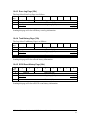
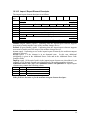
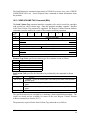
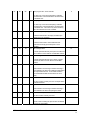
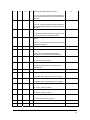
The parameters required for the Send Volume Tag command are as follows.
97706346 Plasmon Gx Libraries SCSI Reference Manual
68