1
-
PC-E500
(2)
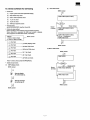
10. Check software for servicing
Mask ROM check
MENU screen
• Check item
(1)
Liquid crystal visual check (alternate display)
(2)
Mask ROM verify check
(3)
Built-in RAM read/write check
ROM CHECK (WAIT 6 SEC)
(4)
11 pin 1/0 check
(5)
15 pin 1/0 check
(6)
RAM card read/write check
• Required tools
Jig UKOGC3020CSZZ: Used for (4) and (5).
Buzzer
(3times)
• Outline of using method
Before inputting a check software, clear the RAM completely.
When check (6) is executed, the RAM card content is deleted.
Save programs and data before check, if necessary.
<MENU>
1 : DISP 2: ROM 3: RAM
4: 11 PIN 5: 15PIN 6: CARD
OJ
Key input
0
Key input
y
Buzzer (Once)
ROM CHECK (WAIT 6 SEC)
ERROR!!
ROM CHECK (WAIT 6 SEC)
EX Ver. 1 (LH5320XH)
ROM CHECK OKI
..,.,.,- MENU screen
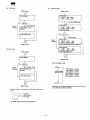
(1 ) DISP (display) check
0
MENU screen
(2) Mask ROM check
Key input
(3) Built-in RAM check
(3) Built-in ROM check
CD
Key input
0
Key input
MENU screen
(4) 11 pin check
0
(5) 15 pin check
0
RAM CHECK
Key input
(6) RAM card check
Note: To end a check, press the BRK[ON] key.
• Details of each check
(1)
DISP (display) check
Y
MENU screen
Buzzer
(3times)
Alternate display
All symbols light up.
Buzzer (once)
RAM CHECK ERROR!!
RAM CHECK OKI!
Alternate reversion
all symbols go off.
MENU screen
MENU screen
- 7-