1
PRS Adjustment
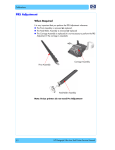
7 Click on Tools, then click on PRS Gauge and then click on Calibration.
8 A message appears on the computer screen with the default values that are
used for the calibration. Check these values against the values on the green
label on the calibration Stand.
9 If the current values displayed on the computer screen are different from the
values on the green label, then you will need to change the values by
selecting Yes on the computer screen. If the values are correct, then select
No and proceed to step 13.
If the values are
different, click Yes
hp designjet 90/90r, 120/120nr and 130/130nr printer service manual
If correct,
click No
7