1
4-5.
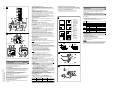
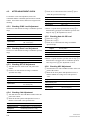
AFTER ADJUSTMENT CHECK
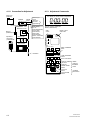
To check the values after adjustment, remove the
commander and the commander junction fixture from the
camera. Turn off the camera, then turn it on again before
checking.
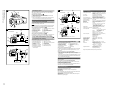
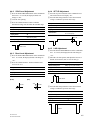
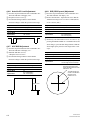
3 Check to see if the AD/-IN value (CN302 2 pin) is
within the specified value range.
Subject
All white pattern
Measurement point
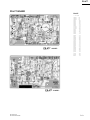
PR Board CN201 2 pin (A/D-IN)
Equipment
Oscilloscope (AC 200 mV, 10 us)
Specification
800 _ 40 mV
+ 60
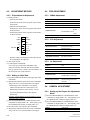
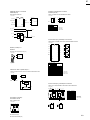
4-5-1. Checking SYNC Level Adjustment
Check to see if the measured voltage is within the specified
range.
* If there is a point where specified value for step 3 is
satisfied while varying the iris within the specified value
range for step 2, the adjustment is correct.
Subject
Free
Measurement point
SYNC level of VIDEO OUT
4-5-5. Checking Auto Iris VS Level
Equipment
Waveform Monitor
Specification
40 ±4 IRE (NTSC)
286 ±30 mV (PAL)
Lens iris
Close
1 (Same as 4-5-4 1.)
2 (Same as 4-5-4 2.)
3 Check to see if the measured voltage is within the
Specified range.
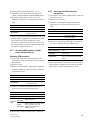
4-5-2. Checking Burst Level Adjustment
Check to see if the measured voltage is within the specified
range.
Subject
Measurement point
Equipment
Specification
Subject
Free
Equipment
Vector scope
Specification
Burst level is 75 %
All white pattern
PR Board CN201 6 pin (IRIS OUT)
Oscilloscope (AC 200 mV, 10 us)
700 ± 40 mV
* If there is a point where the specified value for step 3 is
satisfied while varying the lens iris within the specified
value range for step 2, the adjustment is correct.
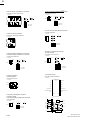
4-5-3. Checking SET UP Adjustment
1 Turn OFF the AGC switch on the side panel of the
camera.
2 Check to see if the measured voltage is within the
specified value range.
4-5-6. Checking AGC Adjustment
1 Turn OFF the AGC and CCD-IRIS switches on the side
panel of the camera.
2 Shoot the all-white pattern and adjust the lens iris so
that the VIDEO-OUT image level is the specified
value.
Subject
Free
Measurement point
SET UP level of VIDEO OUT
Equipment
Waveform Monitor
7.0 ± 2.0 IRE (NTSC)
20 ±15 mV (PAL)
Measurement point
Specification
Equipment
Waveform Monitor
Lens iris
Close
Specification
100 ±2 IRE (NTSC)
700 ±15 mV (PAL)
Subject
All white pattern
Image level of VIDEO OUT
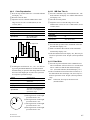
4-5-4. Checking 0 db Adjustment
1 Turn OFF the AGC and CCD-IRIS switches on the side
panel of the camera.
2 Shoot the all-white pattern and adjust the lens iris so
that the CCD LEVEL is the specified value.
Subject
All white pattern
Measurement point
PR Board CN201 1 pin (CCD LEVEL)
Equipment
Oscilloscope (AC 50 mV, 10 us)
Specification
250 ±20 mV
4-8
SSC-DC50A/54A
SSC-DC50AP/54AP/58AP