1
2013 Owner's Manual
Victory Vision Tour
Ness Signature Series
Victory Vision Tour
California Proposition 65 Warning
This product contains or emits
chemicals known to the state of
California to cause cancer and birth
defects or other reproductive harm.
The text is printed on 100% recycled
with 40% post-consumer waste (PCW).
For your nearest Polaris dealer,
call 1-800-POLARIS
or visit www.polarisindustries.com
Polaris Sales Inc.,
2100 Hwy. 55, Medina, MN 55340
Phone 1-888-704-5290
Part No. 9924035 Rev 01
Printed in USA
*9924035
*
2013 Rider’s Manual
Victory Vision® Tour
Ness Signature Series Victory Vision® Tour
1
Copyright© 2012 Polaris Sales Inc.
All information contained within this publication is based on the latest product information available at the time
of publication. Product improvements or other changes may result in differences between this manual and the
motorcycle. Depictions and/or procedures in this publication are intended for reference use only.
No liability can be accepted for omissions or inaccuracies. Polaris Industries reserves the right to make changes at
any time, without notice and without incurring obligation to make the same or similar changes to motorcycles
previously built. Any reprinting or reuse of the depictions and/or procedures contained within, whether whole or
in part, is expressly prohibited.
All reference to RIGHT, LEFT, FRONT, REAR are from the operator’s perspective seated in a normal riding
position.
Features of VICTORY Motorcycles are covered by U.S. Patent Nos: 6,976,691; 6,407,663; D489670; D482311;
D482304; D481980; D481973; D474142.
The following are registered trademarks of Polaris Industries Inc.:
POLARIS®, THE WAY OUT®, FREEDOM®, VICTORY®, VICTORY VISION® and VICTORY
MOTORCYCLES®.
DUNLOP® is a registered trademark of Dunlop Tire Corporation.
LOCTITE® is a registered trademark of Henkel Corporation.
XM Ready® is a registered trademark of XM® Satellite Radio Inc. All rights reserved.
iPod® is a registered trademark of Apple Inc.
Garmin® and zumo® are trademarks of Garmin Ltd. or its subsidiaries.
Printed in U.S.A.
P/N 9924035
2
Table of Contents
Introduction . . . . . . . . . . . . . . . . . . . . . . . . . . . . . . . . . . . . . . . . . 4
Safety . . . . . . . . . . . . . . . . . . . . . . . . . . . . . . . . . . . . . . . . . . . . . . 5
Reporting Safety Defects . . . . . . . . . . . . . . . . . . . . . . . 15
Identification / Component Location . . . . . . . . . . . . . . . . . . . . . 16
Instruments, Features & Controls. . . . . . . . . . . . . . . . . . . . . . . . 20
Pre-Ride Inspections . . . . . . . . . . . . . . . . . . . . . . . . . . . . . . . . . 38
Operation . . . . . . . . . . . . . . . . . . . . . . . . . . . . . . . . . . . . . . . . . . 47
Maintenance. . . . . . . . . . . . . . . . . . . . . . . . . . . . . . . . . . . . . . . . 56
Cleaning and Storage. . . . . . . . . . . . . . . . . . . . . . . . . . . . . . . . . 95
Warranty. . . . . . . . . . . . . . . . . . . . . . . . . . . . . . . . . . . . . . . . . . 103
Specifications . . . . . . . . . . . . . . . . . . . . . . . . . . . . . . . . . . . . . . 107
Audio . . . . . . . . . . . . . . . . . . . . . . . . . . . . . . . . . . . . . . . . . . . . 111
System Overview . . . . . . . . . . . . . . . . . . . . . . . . . . . . 111
Operation. . . . . . . . . . . . . . . . . . . . . . . . . . . . . . . . . . . 114
CB Radio - ICOM . . . . . . . . . . . . . . . . . . . . . . . . . . . . 120
AUX - iPod® . . . . . . . . . . . . . . . . . . . . . . . . . . . . . . . . . 124
XM Radio. . . . . . . . . . . . . . . . . . . . . . . . . . . . . . . . . . . 127
NAV MP3. . . . . . . . . . . . . . . . . . . . . . . . . . . . . . . . . . . 130
Index . . . . . . . . . . . . . . . . . . . . . . . . . . . . . . . . . . . . . . . . . . . . 131
3
Introduction
Thank you for purchasing a Polaris vehicle, and welcome to our world-wide family of
Polaris owners. We proudly produce an exciting line of utility and recreational products.
• Snowmobiles
• All-terrain vehicles (ATVs)
• RANGER utility vehicles
• Low emission vehicles (LEVs)
• VICTORY MOTORCYCLES
For the safe and enjoyable operation of your vehicle, be sure to follow the instructions and
recommendations in this rider’s manual. Keep this manual with the motorcycle, especially
when ownership changes. If your rider’s manual is misplaced or damaged, please purchase a
replacement from your VICTORY dealer.
All references in this manual to RIGHT, LEFT, FRONT or REAR are from the operator’s
perspective when seated in a normal riding position. If you have questions about the operation or maintenance of your motorcycle after you've read this manual, please see your VICTORY dealer. To locate the nearest authorized VICTORY dealer, call 1-800-POLARIS or
visit www.polarisindustries.com.
VICTORY motorcycles comply with all federal, state and local safety and emission regulations for the area of intended sale.
4
Safety
About the Rider's Manual
WARNING
Failure to follow recommended precautions and procedures could result in severe injury or death.
Always heed all safety precautions and follow all operation, inspection and maintenance procedures
outlined in this manual.
This rider’s manual contains information that is essential to safe riding and proper maintenance of your VICTORY motorcycle. Anyone who uses the motorcycle (operators and passengers) must read the rider’s manual before riding. Carefully read and understand the
information found in the Safety section. Understand and follow the procedures outlined in
the Maintenance section to keep your VICTORY motorcycle in top condition on the road or
in storage. Bring the manual with you when you ride. Following the precautions and procedures in the manual will add to your enjoyment and help keep you riding safely. If you lose
or damage this manual, you can purchase a new one through any authorized VICTORY
dealer. The rider’s manual should be considered part of the motorcycle and remain with it if
sold.
Safety Symbols and Signal Words
The following signal words and symbols appear throughout this manual. Your safety and the
safety of others is involved when these words and symbols are used. Become familiar with
their meanings before reading the manual.
The safety alert symbol indicates a potential for personal injury.
WARNING
WARNING indicates a hazardous situation which, if not avoided, could result in death or serious injury.
CAUTION
CAUTION indicates a hazardous situation which, if not avoided, could result in minor or moderate
injury.
NOTICE
NOTICE indicates a situation that may result in property damage.
5
Safety
Safe Riding Practices
WARNING
Improper use of this motorcycle can result in serious injury or death to you, your passenger and others.
To minimize the risk of injury, read and understand the information contained in this section before
operating the motorcycle. This section contains safety information specific to the VICTORY motorcycle,
as well as information about general motorcycle safety. Anyone who rides the motorcycle (operators
and passengers) must follow these safety precautions.
Motorcycling has inherent risks.
You can minimize those risks, but you can't eliminate them completely. Even if you're an
experienced motorcycle operator or passenger, read all of the safety information in this manual before operating the motorcycle.
• Take a rider education course from the Motorcycle Safety Foundation or another qualified
instructor. The course will help you develop or refresh your expertise in safe riding habits
through instruction and riding. For information on Motorcycle Safety Foundation rider
education courses in your area, call 1-800-446-9227 or visit their home page at www.msfusa.org.
• Read and understand all information in this rider’s manual.
• Observe all maintenance requirements specified in this manual. For assistance, see the
VICTORY Service Manual or your authorized VICTORY dealer.
Design characteristics affect how you should ride the VICTORY motorcycle:
• The motorcycle is designed for on-road use with one rider and one passenger. See the
manufacturer’s label (under the rear panel on the console). The label contains the Vehicle
Identification Number (VIN) and Gross Vehicle Weight Rating (GVWR) and Gross Axle
Weight Rating (GAWR) information. Never exceed the GVWR or the GAWR.
• Riding off-road, riding with more than one passenger, or carrying weight exceeding the
maximum weight rating can make handling difficult, which could cause loss of control.
• During the first 500 miles (800 km) of operation, follow all break-in procedures as outlined in the break-in section beginning on page 47. Failure to do so can result in serious
engine damage.
• Some VICTORY motorcycles include saddlebags, a windshield, a trunk, or a passenger
backrest as standard equipment. To maintain stability, be prepared to reduce the operating
speed of motorcycles equipped with these items.
6
Safety
Safe Riding Practices
Follow these general safe riding practices:
• Before each ride, perform the pre-ride inspections as outlined beginning on page 38. Failure to do so may result in damage to the motorcycle or an accident.
• Until you're thoroughly familiar with the motorcycle and all of its controls, practice riding
where there is little or no traffic. Practice riding at a moderate speed on various road surfaces and in different weather conditions.
• Know your skills and limits, and ride within them.
• Allow only licensed, experienced operators to ride your motorcycle, and then only after
they have become familiar with its controls and operation. Make sure all riders read and
understand this rider’s manual before riding.
• Do not ride when you're fatigued or under the influence of alcohol, prescription drugs,
over-the-counter drugs or any other drugs. Fatigue, alcohol and drugs can cause drowsiness, loss of coordination and loss of balance. They can also affect your awareness and
judgment.
• If your motorcycle operates abnormally, correct the problem immediately. See the VICTORY Service Manual or an authorized VICTORY dealer.
• Ride defensively, as if you are invisible to other motorists, even in broad daylight. A
motorist's failure to see or recognize a motorcycle is the leading cause of automobile/
motorcycle accidents. Ride where you're clearly visible to other motorists, and observe
their behavior carefully.
• Be especially cautious at intersections, as these are the most likely places for an accident.
• To prevent loss of control, keep your hands on the handlebars and your feet on the footrests.
• Do not move or operate the motorcycle with the steering locked (with accessory lock), as
the severely restricted steering could result in loss of control.
• Obey the speed limit and adjust your speed and riding technique based on road, weather
and traffic conditions. As you travel faster, the influence of all other conditions increases,
which can affect the motorcycle's stability and increase the possibility of losing control.
7
Safety
Safe Riding Practices
• Reduce speed when:
•
•
•
•
the road has potholes, or is otherwise rough or uneven.
the road contains sand, dirt, gravel or other loose substances.
the road is wet, icy or oily.
the road contains painted surfaces, manhole covers, metal grating, railway crossings or other
slippery surfaces.
• The weather is windy, rainy or otherwise causing slippery or rapidly changing conditions.
• Traffic is heavy, congested, not allowing sufficient space between vehicles or otherwise not flowing smoothly.
• You are being passed in either direction by a large vehicle that produces a wind blast in its wake.
• To maximize braking effectiveness, use the front and rear brakes together. Improper braking may cause loss of control or may not slow the vehicle in time to avoid a collision. Be
aware of the following braking facts and practices:
• The rear brake provides 40% of the motorcycle's stopping power, at most. Use the front and rear
brakes together.
• To avoid skidding, apply the brakes gradually when the road is wet or rough, or contains loose or
other slippery substances.
• If possible, avoid applying the brakes while making a turn. Motorcycle tires have less traction
during turns, so braking will increase the possibility of skidding. Bring the motorcycle to the
upright position before applying the brakes.
• When approaching a curve, choose a speed and lean angle that allows you to pass through
the curve in your own lane without applying the brakes. Excessive speed, improper lean
angle or braking in a curve can cause loss of control.
• Ground clearance is reduced when the motorcycle leans. Do not allow components to contact the road surface when leaning the motorcycle in a curve, as this could cause loss of
control.
• Retract the sidestand fully before riding. If the sidestand is not fully retracted, it could contact the road surface and cause loss of control.
• Do not tow a trailer. Towing a trailer can make the motorcycle hard to handle.
Anti-Lock Brake System Response (if equipped)
• When the anti-lock brakes engage during a braking event, the rider will feel pulsing at the
brake levers. Continue to apply steady pressure to the brakes for the best stopping performance.
8
Safety
Safe Riding Practices
Carrying a Passenger
Do not carry a passenger unless the motorcycle is equipped with passenger seat and passenger footrests..
To carry a passenger safely:
• Do not exceed the gross vehicle weight rating (GVWR) for your motorcycle.
• Direct the passenger to hold onto you or to the passenger hand grips with both hands and
to keep both feet on the passenger footrests. Do not carry a passenger who cannot place
both feet firmly on the passenger footrests. A passenger who is not holding on properly, or
who cannot reach the passenger footrests, can shift their body erratically, which can make
the motorcycle hard to handle and cause loss of control.
• To obtain the best ride and handling characteristics, adjust the rear shock absorber air pressure. See page 66.
• Before riding, be sure your passenger knows safe riding procedures. Discuss any safety
information unfamiliar to your passenger. A passenger who is unaware of safe riding procedures may distract you or make movements that make the motorcycle hard to handle.
• Adjust your riding style to compensate for the differences in handling, acceleration and
braking caused by the additional weight of the passenger. Failure to do so can cause loss of
control.
Protective Apparel
Wear protective apparel to decrease the risk of injury and increase riding comfort.
• Always wear a helmet that meets or exceeds established safety standards. Approved helmets in the USA and Canada bear a U.S. Department of Transportation (DOT) label. Laws
in some areas require that you wear an approved helmet. Head injuries are the leading
cause of fatalities in accidents involving motorcycles. Statistics prove that an approved
helmet is the most effective protection in preventing or reducing head injuries.
• Wear eye protection to protect eyes from wind or airborne particles and objects. Laws in
some areas require that you wear eye protection. VICTORY recommends that you wear
approved Personal Protective Equipment (PPE) bearing markings such as VESC 8, V-8,
Z87.1, or CE. Make sure protective eyewear is kept clean.
• All riders should wear bright or light-colored and/or reflective clothing to improve visibility to other motorists. A motorist's failure to see or recognize a motorcycle is the leading
cause of automobile/motorcycle accidents.
• Wear gloves, a jacket, heavy boots and long pants to prevent or reduce injury from abrasions, lacerations or burns should the motorcycle fall. Wear boots with low heels, as high
heels can catch on pedals or footrests. The combination of boots and pants should completely cover legs, ankles and feet, protecting skin from engine and exhaust system heat.
• Do not wear loose, flowing clothing or long boot laces, as they can catch on handlebars,
levers or footrests, or they can become entangled in the wheels, causing loss of control and
serious injury.
9
Safety
Use of Accessories
Because VICTORY cannot test and make specific recommendations concerning every accessory or combination of accessories sold, the operator is responsible for determining that the
motorcycle can be safely operated with any accessories or additional weight. Use the following guidelines when choosing and installing accessories:
• Do not install accessories that impair the stability, handling or operation of the motorcycle.
Before installing an accessory, be sure that it does not:
•
•
•
•
Reduce ground clearance when the motorcycle is either leaned or in a vertical position.
Limit suspension or steering travel or your ability to operate controls.
Displace you from your normal riding position.
Obscure lights or reflectors.
• Bulky or large accessories can cause instability (due to the lifting or buffeting effects of
wind) and loss of control.
• Do not install electrical accessories that exceed the capacity of the motorcycle’s electrical
system. Never install higher wattage light bulbs than those supplied as original equipment.
An electrical failure could result and cause hazardous loss of engine power or lights, or
damage to the electrical system. See page 90.
• Use only genuine VICTORY accessories designed for your model.
Modifications
Modifying the motorcycle by removing any equipment or by adding equipment not approved
by VICTORY may void your warranty. Such modifications could make the motorcycle
unsafe to ride and could result in severe injury to operator or passengers, as well as damage
to the motorcycle. Some modifications may not be legal in your area of operation. If in
doubt, contact your authorized VICTORY dealer.
Parking the Motorcycle
When leaving the motorcycle unattended, turn the engine off and lock the steering. See page
20. Remove the ignition key to prevent unauthorized use.
Park the motorcycle where people are not likely to touch the hot engine or exhaust system or
place combustible materials near these hot areas. Do not park near a flammable source such
as a kerosene heater or an open flame, where hot components could ignite combustible materials.
Park the motorcycle on a firm, level surface. Sloped or soft surfaces may not support the
motorcycle. If you must park on a slope or soft surface, follow the precautions outlined on
page 54.
10
Safety
Carrying Cargo
Use the following guidelines when attaching cargo or accessories to the motorcycle. Where
applicable, these guidelines also refer to the contents of any accessories.
• Keep cargo and accessory weight to a minimum, and keep items as close to the motorcycle
as possible to minimize a change in the motorcycle’s center of gravity. Changing the center of gravity can cause loss of stability and handling and could cause loss of control.
• Distribute weight evenly on both sides of the motorcycle. Maintain even weight distribution by checking accessories and cargo to make sure they’re securely attached to the
motorcycle before riding and whenever you take a break from riding. Uneven weight distribution, or accessories or cargo that shift suddenly while you’re riding can make the
motorcycle hard to handle and could cause loss of control.
• Do not attach large or heavy cargo such as sleeping bags, duffel bags or tents to the handlebars, front fork area or front fender. Cargo or accessories placed in these areas can
cause instability (due to improper weight distribution or aerodynamic changes) and could
cause loss of control. Such items can also block air flow to the engine and cause overheating that can damage the engine.
• Do not exceed the maximum cargo weight limit of any accessory (see accessory instructions and labels). Do not attach cargo to an accessory not designed for that purpose. Either
circumstance could result in an accessory failure that could cause loss of control.
• Do not attach anything to the motorcycle unless specifically designed for that purpose by
VICTORY.
Saddlebags and Trunk
Whenever operating a motorcycle with saddlebags:
• Never ride at speeds exceeding 80 MPH (120 km/h). Depending on load and weather conditions, the maximum safe operating speed may be less. Saddlebags, combined with the
lifting or buffeting effects of wind, can make the motorcycle unstable and cause loss of
control.
• Distribute weight evenly in each of the saddlebags.
• Do not exceed the individual weight limit of each saddlebag or the trunk. A weight capacity label is attached inside for reference.
• NEVER EXCEED GROSS VEHICLE WEIGHT RATING (GVWR) or the GROSS
AXLE WEIGHT RATING (GAWR), regardless of whether or not the saddlebags and/or
trunk are loaded to capacity. Exceeding the weight rating can reduce stability and handling
and cause loss of control.
11
Safety
Transporting the Motorcycle
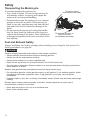
If you must transport the motorcycle:
• Use a truck or trailer. Do not tow the motorcycle
with another vehicle, as towing will impair the
motorcycle's steering and handling.
• Position and restrain the motorcycle so it remains
upright on the truck or trailer. If the motorcycle
leans to one side, gasoline may leak from the fuel
tank and result in a fire hazard or damage to the
finish.
• Do not restrain the motorcycle using the handlebars. In front, hook the tiedowns in the loop provided in the bottom of the frame. Place tiedowns as
wide apart as possible on the truck or trailer bed for
best stability.
To loop on frame
(one tiedown each side)
To shock/strut mount, or
rear tip-over bar
(one tiedown each side)
Fuel and Exhaust Safety
Always heed these fuel safety warnings when refueling or servicing the fuel system. For
fueling procedures, see page 48.
WARNING
Gasoline is highly flammable and explosive under certain conditions.
• Always exercise extreme caution whenever handling gasoline.
• Always turn off the engine before refueling.
• Always refuel outdoors or in a well-ventilated area.
• Open the fuel cap slowly. Do not overfill the tank. Do not fill the tank neck.
• Do not smoke or allow open flames or sparks in or near the area where refueling is performed or
where gasoline is stored.
Gasoline and gasoline vapors are poisonous and can cause severe injury.
• Do not swallow gasoline, inhale gasoline vapors, or spill gasoline. If you swallow gasoline, inhale
more than a few breaths of gasoline vapor, or get gasoline in your eyes, see a physician
immediately.
• If gasoline spills on your skin or clothing, immediately wash it off with soap and water and change
clothing.
Exhaust gases contain carbon monoxide, a colorless, odorless gas that can cause loss of
consciousness or death in a short time.
• Never start the engine or let it run in an enclosed area.
• Never inhale exhaust gases.
12
Safety
Safety Maintenance
WARNING
Failure to perform safety maintenance as recommended can result in difficult handling and loss of
control, which could result in serious injury or death. Always perform the safety maintenance
procedures as recommended. Perform maintenance and repairs promptly as outlined in the VICTORY
service manual, or see your authorized VICTORY dealer for service.
• Before each ride, perform the Pre-Ride Inspections. See page 47.
• Perform all periodic maintenance at the recommended intervals outlined in the Periodic
Maintenance section beginning on page 57.
• Always maintain proper tire pressure, tread condition and wheel and tire balance. Inspect
tires regularly and replace worn or damaged tires promptly. Use only approved replacement tires.
• Always ensure proper steering head bearing adjustment. Regularly inspect the rear shock
absorber and the front forks for fluid leaks or damage. Make any necessary repairs
promptly.
• Clean the motorcycle thoroughly to reveal items in need of repair.
• Make sure all legally required equipment is properly installed and in good condition,
including the license plate.
• Fasteners must meet original specifications for quality, finish and type to ensure safety.
Use only genuine VICTORY replacement parts, and ensure that all fasteners are tightened
to the proper torque.
Electromagnetic Interference
This vehicle complies with European directive 97/24/EC Chapter 8 requirements, which is
equivalent to Canadian ICES-002.
13
Safety
Gross Vehicle Weight Rating (GVWR)
WARNING! Exceeding the gross vehicle weight rating of your motorcycle can reduce stability and handling and could cause loss of control. NEVER exceed the GVWR of your motorcycle.
The maximum load capacity of your motorcycle is the maximum weight you may add to
your motorcycle without exceeding the GVWR. This capacity is determined by calculating
the difference between your motorcycle’s GVWR and wet weight.
Refer to the specification section of this manual or the Manufacturing Information/VIN label
on the motorcycle frame for model-specific information. Refer to the “Safety and Information Labels” section in this manual for location on the motorcycle.
When determining the weight you will be adding to your motorcycle, and to ensure you do
not exceed the maximum load capacity, include the following:
• operator body weight
• passenger body weight
• weight of all riders’ apparel and items in or on apparel
• weight of any accessories and their contents
• weight of any additional cargo on the motorcycle
14
Safety
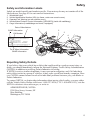
Safety and Information Labels
Labels are model-specific and market-specific. Your motorcycle may not contain all of the
labels shown. See page 83 for seat removal instructions.
1.
2.
3.
4.
5.
Windshield Label
Vehicle Identification Number (VIN) (on frame, under rear console cover)
Operator/Fuel Warning (on rear console cover)
Vehicle/Noise Emission Control Information (VECI/NECI) (inside left saddlebag)
Cargo Information (in saddlebags and trunk, if equipped)
Date of Manufacture
GVWR Information
VIN Number
1
2
3
4
Tire & Wheel Information
GAWR Information
5
Reporting Safety Defects
If you believe that your vehicle has a defect that could result in a crash or cause injury or
death, you should immediately inform the National Highway Traffic Safety Administration
(NHTSA) in addition to notifying Polaris Industries in writing.
If NHTSA receives similar complaints, it may open an investigation, and if it finds that a
safety defect exists in a group of vehicles, it may order a recall and remedy campaign. However, NHTSA cannot become involved in individual problems between you, your dealer or
Polaris Industries.
To contact NHTSA, or obtain other information about motor vehicle safety, you may either
call the Vehicle Safety Hotline toll-free at 1-888-327-4236 (TTY: 1-800-424-9153), visit the
NHTSA website at www.safercar.gov, or write to:
ADMINISTRATOR, NHTSA
1200 New Jersey Avenue, SE
West Building
Washington, DC 20590
15
Identification
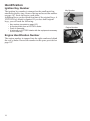
Ignition Key Number
The ignition key number is stamped on the small metal tag
attached to the key ring. Remove the tag and record the number
on page 107. Store the tag in a safe place.
Additional keys can be copied from one of the original keys. A
VICTORY key blank is required. If you lose both original
keys, you will need the following:
•
•
•
•
Key number (recorded on page 107)
A new key blank from a VICTORY dealer
Proof of ownership
A locksmith or VICTORY dealer with the equipment necessary
to cut a new key
Engine Identification Number
The engine number is stamped into the right crankcase behind
the rear cylinder. Record the number in the space provided on
page 107.
16
Key Number
Engine Number
Identification
Left Side View
1. Spark Plugs
2. Power Port
3. Front Brake Caliper
4. Gear Shift Pedal
5. Operator Footrest
6. Sidestand
7. Oil Drain Plug
8. Oil Filter
9. Passenger Footrest
10. Rear Brake Caliper
11. Diagnostic Connector (in
saddlebag)
12. Running Light (Tour)
13. Rear Speakers (Tour)
14. Passenger Hand Grip
15. Rear Shock Air Fitting (under
saddlebag door)
2
12
14
1
3
4
Right Side View
1. Drive Belt Guard
2. Drive Belt
3. Passenger Footrest
4. Drive Sprocket (under cover)
5. Speed Sensor (top of crankcase)
6. Engine Oil Fill Cap / Dipstick
7. Rear Brake Pedal
8. Operator Footrest
9. Front Brake Caliper
10. Passenger Hand Grip
11. Reflector
2
13
15
1
6
5
11
10
2
3
4
7
8
5
6
9
7
10
8
11
9
17
Identification
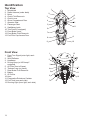
Top View
1. Windshield
2. Radio Antenna (under dash)
3. Mirror
4. Clutch Fluid Reservoir
5. Clutch Lever
6. Glove Compartment Door
7. Operator Seat
8. Passenger Seat
9. Saddlebag Latch
10. Trim Panel (if equipped)
11. Front Brake Lever
12. Front Brake Fluid Reservoir
13. Fuel Filler Cap Access Door
1
2
3
3
13
4
12
5
11
6
7
9
8
9
Front View
1. Front Turn Signal (outer light, each
side)
2. Wind Deflector
3. Headlamp
4. Driving Lamp (or HID lamp if
equipped)
5. Air Filter (front of frame)
6. Tiedown Loop (on frame)
7. Rear Brake Fluid Reservoir
8. Battery
9. Oil Cooler
10. Horn
11. Evaporative Emissions Canister
12. Fuel Tank (one each side)
13. Running Light (inner light, each side)
18
10
13
1
2
3
12
4
5
11
6
7
10
8
9
Identification
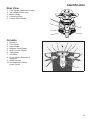
Rear View
1.
2.
3.
4.
5.
Turn Signals (uppermost in lens)
Tail Lamps (3 each side)
Brake Lamps
Exhaust Mufflers
License Plate Bracket
1
2
5
3
4
4
Console
1.
2.
3.
4.
5.
6.
7.
8.
Speakers
Fuel Gauge
Speedometer
Indicator Lamp Display
Multi-Function Display
Tachometer
Volt Meter
Cruise Control Switches (if
equipped)
9. Radio Controls
10. Left Handlebar Switch/
Audio Control
3
2
1
5
4
6
7
1
8
10
9
19
Instruments, Features and Controls
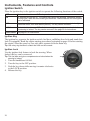
Ignition Switch
Place the ignition key in the ignition switch to operate the following functions of the switch.
OFF
All electrical circuits are off. The key can be removed.
ON
All electrical circuits are on. The ignition key cannot be removed. Headlamp, taillight,
running lights, radio and instrument lights illuminate. Hazard flashers and turn signals
can be activated.
ACC
Power is supplied to accessory circuits, radio, instruments, turn signals, brake light,
windshield motor, horn and hazard (flasher). The key can be removed.
LOCK
All electrical circuits are off. The fuel door and glove compartment are locked when
the steering is locked. The key can be removed. See page 20 for instructions.
FUEL DOOR See page 21 for instructions.
Ignition Key
The ignition key operates the ignition switch, fuel door, saddlebag door locks and trunk door
lock (if equipped). Read the engine starting procedures beginning on page 49 before starting
the engine. Store the spare key in a safe place separate from the main key.
Tip: Use a key ring that won’t scratch the finish on the console.
Ignition Lock
Use the ignition lock feature to lock the steering. When
locked, the key can be removed.
Tip: The fuel door and glove compartment are locked when the
steering is locked.
1. Turn the handlebars full left.
2. Turn the key to the OFF position.
3. Push the key down while moving it counter-clockwise
to the LOCK position.
4. Release the key.
20
Locked
Instruments, Features and Controls
Ignition Switch
Fuel
Door
Release
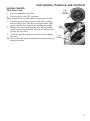
Fuel Door Lock
1. Turn the handlebars full left.
2. Turn the key to the OFF position.
Tip: Do not push the key down when unlocking the fuel door.
3. Turn the ignition key counter-clockwise to release
the fuel door latch. The door will open under light
spring tension. See page 48 for fueling procedure.
4. Remove the fuel cap and place it in the cap holder
while fueling. Reinstall the fuel cap securely before
closing the fuel door.
5. Close the fuel door and press downward to engage
the latch.
Tip: The fuel door and glove compartment are locked when the
steering is locked.
Fuel
Door
Cap
Holder
21
Instruments, Features and Controls
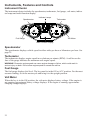
Instrument Cluster
The instrument cluster includes the speedometer, tachometer, fuel gauge, volt meter, indicator lamps and multi-function display.
Indicator Lamps
Tachometer
Speedometer
Volt Meter
Fuel Gauge
Multi-Function Display
Speedometer
The speedometer displays vehicle speed in either miles per hour or kilometers per hour. See
page 25.
Tachometer
The tachometer displays engine speed in revolutions per minute (RPM). A red line on the
face of the gauge indicates the maximum safe engine speed.
WARNING! Excessive engine speed can cause engine damage or failure, which could result in
serious injury or death. Do not allow engine speed to exceed the red line.
Fuel Gauge
The fuel gauge displays fuel level. The key must be in the ON or ACC position. For the most
accurate reading, sit on the motorcycle and bring it to the upright position.
Volt Meter
When the key is in the ON position, the volt meter displays battery voltage. If the engine is
not running, approximate battery voltage displays. If the engine is running, approximate
charging voltage displays.
22
Instruments, Features and Controls
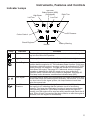
Indicator Lamps
High Beam
Left Turn
Anti-Lock
Brake System (ABS)
(if equipped)
Right Turn
Low Fuel
Oil Pressure
Cruise Control
Check Engine
Battery Warning
Neutral
Lamp
Indicates
Condition
Neutral
This lamp illuminates when the transmission is in neutral and the ignition
key is in the ON or ACC position.
High Beam
This lamp illuminates when the headlamp switch is set to high beam.
Check Engine
This lamp illuminates momentarily when the ignition switch is in the ON
position and the engine is off. This indicates proper function. If this lamp
illuminates while the engine is running, contact an authorized VICTORY
dealer promptly for diagnosis. The light will remain on if the tilt sensor
shuts down the engine. See page 28. If abnormal sensor or engine
operation is detected the light will remain on as long as the fault
condition exists. Retrieve the error codes for diagnosis. See page 25.
This lamp is also known as a malfunction indicator lamp (MIL).
Turn Signal
One arrow flashes when the corresponding turn signal is activated. Both
arrows flash when the hazard signal is activated. If a bulb fails, or if there
is a short circuit in the signal system, the lamp flashes at more than
twice the normal rate.
Low Oil
Pressure
This lamp illuminates when the ignition switch is in the ON position and
the engine is off, indicating that the indicator circuit is functioning
properly. This lamp also illuminates if engine oil pressure drops below
safe operating pressure. If this lamp illuminates while the engine is
running, turn the engine off as soon as safely possible and check the oil
level. If the oil level is correct and the lamp remains on after the engine is
restarted, turn the engine off immediately.
23
Instruments, Features and Controls
Indicator Lamps
Lamp
Indicates
Condition
Low Fuel
This lamp illuminates when approximately one gallon (3.8 liters) of fuel
remains in the fuel tank.
Low Battery
Warning
This lamp illuminates when battery voltage is low. Make sure the
charging system is operating properly. See page 93.
Cruise Control
Engaged
Before using the cruise control, read the safety and operation
procedures beginning on page 52.
Anti-Lock Brake
System Not
Activated
(if equipped)
The ABS indicator always illuminates when the key is in the ON position
and remains on until the anti-lock system activates, which occurs when
vehicle speed exceeds 6 MPH (10 km/h). When the lamp is illuminated,
the anti-lock brakes will not activate, but the conventional brake system
will continue to operate normally.
Multi-Function Display
Use the mode button to toggle through the modes of the multi-function display. See page 28.
Modes available include:
• clock
• gear position
Clock
• ambient temperature
• odometer/trip odometer
• fuel range
Gear
• average fuel consumption rate
Position
• fuel economy
Odometer
Temperature
• trip time (and other trip information)
Trip Odometer
24
Instruments, Features and Controls
Multi-Function Display
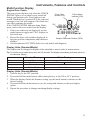
Engine Error Codes
The error screen displays only when the CHECK
Error Code
Failure Mode
ENGINE light is on or when it goes on and off
Number (0-9)
Indicator (FMI)
during one ignition cycle. Error codes are not
stored. When the key is turned OFF, the code and
message is lost, but will reappear if the fault reoccurs after restarting the engine.
“Err”
If the CHECK ENGINE indicator lamp illumiF
C
nates, retrieve the error codes from the display.
Avg Speed Range Inst Time
1. If the error codes are not displayed, use the
TRIP
1
km / h
mode button to toggle until "Err" displays in
:
: . miles
TRIP 2
/ gal
the clock area.
2. Record the three code numbers displayed in
Suspect Parameter Number (SPN)
the gear position, temperature and odometer
displays.
3. See an authorized VICTORY dealer for code details and diagnosis.
8
88:88 188
88 8 8 8 8
Display Units (Standard/Metric)
The display can be changed to display either standard or metric units of measurement.
Tip: To exit the set-up mode at any time, wait 10 seconds.The display automatically exits and returns to
the odometer display.
Standard Display
Distance
Fuel
Temperature
Time
Miles
U.S. Gallons
Fahrenheit
12-Hour Clock
Metric Display
Kilometers
I = Imperial Gallons
Liter = Liters
Celsius
24-Hour Clock
Display Units (Standard/Metric)
1. Turn the key to the OFF position.
2. Press and hold the mode button while turning the key to the ON or ACC position.
3. When the display flashes the distance setting, tap the mode button to advance to the
desired setting.
4. Press and hold the mode button to save the setting and advance to the next display
option.
5. Repeat the procedure to change remaining display settings.
25
Instruments, Features and Controls
Multi-Function Display
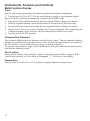
Clock
Tip: The clock must be reset any time the battery has been disconnected or discharged.
1. Turn the key to ON or ACC. Use the mode button to toggle to the odometer display.
Tip: If LOW FUEL is flashing, the display will not enter the CLOCK SET mode.
Press and hold the mode button until the hour segment flashes. Release the button.
With the segment flashing, tap the mode button to advance to the desired setting.
Press and hold the mode button until the next segment flashes. Release the button.
Repeat steps 3-4 twice to set the 10-minute and 1-minute segments. After completing the
1-minute segment, step 4 will save the new settings and exit the clock mode.
6. Turn the key to the OFF position.
2.
3.
4.
5.
Odometer/Trip Odometer
The odometer displays the total distance traveled by the vehicle. The trip odometer displays
distance traveled since the trip odometer was reset. To view the trip odometer, turn the key to
the ON position. Use the mode button to toggle to the trip odometer.
To reset the trip odometer, toggle to the trip odometer, then press and hold the mode button
until the trip odometer resets.
Gear Position
Gear position displays only when the vehicle is moving and the clutch is engaged. If the
vehicle stops moving, or if the clutch is disengaged, “--” will show in the display.
Temperature
The key must be in the ON or ACC position to display ambient air temperature.
26
Instruments, Features and Controls
Console Switches
Optional
Accessory
Switch
Hand Grip
Heater Switch
Hazard Switch
Driving Lamp
Switch
High
Off
Low
On
Off
On
Off
Hand Grip Heater Switch
Press the top (high heat) or bottom (low heat) of the rocker switch to turn the
hand grip heaters on. Move the switch to the center position to turn the heaters off.
Hazard Switch/Emergency Flashers
All turn signals flash when the emergency flashers are activated. Press the
top of the hazard switch to turn the flashers on. Press the bottom of the
switch to turn the flashers off.
Driving Lamp Switch
The driving lamp is an additional low beam lamp not controlled by the headlamp high/low switch. This lamp is a center headlamp (or HID lamp, if
equipped). The ignition key must be on to use the driving lamp. Press the top
of the rocker switch to turn the light on. Press the bottom of the switch to turn
the light off.
27
Instruments, Features and Controls
Seat Heater Switches
Seat heater switches (if equipped) are located on the seat
under the left passenger hand grip. The low heat setting is
adequate for most conditions. Use the high heat setting
with caution.
• The front switch controls the driver’s seat heater.
• The rear switch controls the passenger’s seat heater.
High
Low
Off
Tilt Sensor
A tilt sensor stops the engine if the motorcycle tips beyond 45 degrees to one side. The check
engine light will also illuminate. To restart the engine, cycle the ignition switch to the OFF
position, wait 10 seconds, then restart the engine.
Mode Button
The mode button is located on the front side of the
left handlebar switch. Use the mode button to toggle through the modes of the multi-function display. See page 24. Use the mode button to set the
display units to either standard or metric units of
measurement. See page 25.
Tip: If “Err” displays while toggling through the features,
a system error has been logged. See page 25.
Mirrors
Adjust the rear view mirrors by applying light pressure at
the outer edges of the mirror.
28
Instruments, Features and Controls
Headlamp Switch (High/Low)
The headlamp switch is located on the left handlebar. Use
the switch to toggle the headlamp to high beam or low
beam. The key must be in the ON or ACC position.
Tip: To turn the headlamp on, turn the ignition key to ON and
tap or press the start switch.
High
Beam
Low
Beam
• Press the top of the switch to activate high beam.
• Press the bottom of the switch to activate low beam.
Horn Switch
The horn switch is located on the left handlebar. Press the
horn switch to sound the horn. The key must be in the
ON or ACC position.
Horn Switch
Windshield Adjustment Switch
The motorized windshield adjustment switch (if
equipped) is located on the left handlebar. Use the
switch to change the height and angle of the windshield. The key must be in the ON or ACC position.
Raise
Windshield
Tip: Do not continuously cycle the windshield switch more
than once in a 60-second period.
• Press the top of the switch to raise the windshield.
• Press the bottom of the switch to lower the windshield.
For models not equipped with this feature, use the
manual windshield adjustment procedure. See page
35.
Lower
Windshield
29
Instruments, Features and Controls
Turn Signal Switch
The turn signal switch is located on the left handlebar. Use
the switch to activate a turn signal. The key must be in the
ON or ACC position.
• Push the switch to the left to activate the left turn signals.
• Push the switch to the right to activate the right turn
signals.
Turn signals automatically cancel after predetermined speed
and distance conditions are met. To manually cancel a signal,
move the switch to the center position and press it inward.
Turn Signal
Switch
Tip: The momentary signal feature is useful when passing or changing lanes. To use the momentary feature, push and hold the
switch through at least one complete flash cycle (at least one
second) to activate the feature. The signal will then cancel the
moment the switch is released.
Clutch Lever
The clutch lever is located on the left handlebar.
Disengage the clutch before shifting gears. For
smooth clutch operation, pull the lever quickly
and release it gradually.
• To disengage the clutch, pull the lever toward
the handlebar.
• To engage the clutch, gradually release the
lever.
Interlock
Switch
Clutch
Lever
Starter Interlock Switch
The starter interlock switch is located on the left handlebar. This switch prevents the electric
starter from operating when the transmission is in gear and the clutch is engaged (lever
released). Read the engine starting procedures beginning on page 49 before starting the
engine.
WARNING! Never start the engine with the transmission in gear and the clutch disengaged unless you
are properly seated with the front brake applied.
30
Instruments, Features and Controls
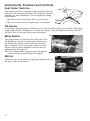
Engine Starter Switch
The starter switch is located on the right handlebar. Use the
starter switch to start the engine, turn the headlights on and
operate in reverse (if equipped). The switch will operate only
when the engine stop/run switch is in the RUN position and
the transmission is in neutral (or the clutch is disengaged).
The reverse lever (if equipped) must also be disengaged.
Tip: If the reverse system fuse has blown, the starter switch will not
function even if the reverse lever is disengaged. Replace the
fuse. See page 89.
Read the engine starting procedures before starting the
engine. See page 49.
• Press the right side of the starter switch to engage the
starter motor.
• Tap the starter switch to turn the headlight on without starting the engine.
• See page 55 for reverse operation.
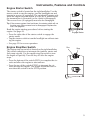
Engine Stop/Run Switch
The engine stop/run switch is located on the right handlebar.
This switch completes or interrupts the ignition, starter and
fuel pump circuits. Use the engine stop/run switch to turn
the engine off quickly. Turn the key off after the engine
stops.
• Press the bottom of the switch (RUN) to complete the circuits and allow the engine to start and run.
• Press the top of the switch (STOP) to interrupt the circuits and stop the engine. The engine should not start or
run when the switch is in the STOP position.
Engage Starter
Run
Stop
31
Instruments, Features and Controls
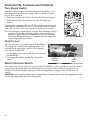
Throttle Control Grip
The throttle control grip is located on the
right handlebar. Use the throttle control grip
to control engine speed. While seated in the
proper riding position:
• Rotate the top of the grip rearward to
increase engine speed and power.
• Rotate the top of the grip forward to
decrease engine speed and power.
Decrease
Speed
Increase
Speed
Brakes
Linked Braking System
The front and rear brakes on the motorcycle are linked. The front brake lever activates only
the front brake calipers. The rear brake pedal activates the rear brake caliper fully while
simultaneously activating one of the three pistons in each front brake caliper.
For maximum brake effectiveness, apply the front brake lever and the rear brake pedal
together, as with a conventional (non-linked) brake system.
Anti-Lock Brake System (ABS)
This system is a linked brake system. The anti-lock brake system automatically reduces or
increases brake pressure as needed to provide optimum braking control, reducing the chance
of wheel lock-up during hard braking events or when braking on rough, uneven, slippery or
loose surfaces. See page 8.
• The anti-lock brake system cannot be turned off.
• The ABS indicator always illuminates when the key is in the ON or ACC position and
remains on until the anti-lock system activates, which occurs when vehicle speed exceeds
6 MPH (10 km/h).
• When the lamp is illuminated, the anti-lock brakes will not activate, but the conventional
brake system will continue to operate normally.
• When the anti-lock brakes engage during a braking event, the rider will feel pulsing at the
brake levers. Continue to apply steady pressure to the brakes for the best stopping performance.
• Service the indicator lamp if the ABS light does not come on when the key is turned to the
ON or ACC position. See your authorized VICTORY dealer for this service.
• If the lamp continues to illuminate after vehicle speed exceeds 6 MPH (10 km/h), the ABS
system is not functioning. See your VICTORY dealer promptly for service.
32
Instruments, Features and Controls
Brakes
Anti-Lock Brake System (ABS)
• Operating with non-recommended tires or improper tire pressure may reduce the effectiveness of the anti-lock brake system. Always use the recommended size and type of tires
specified for your vehicle. Always maintain the recommended tire pressure.
• The anti-lock brake system will not prevent wheel lockup, loss of traction or loss of control under all conditions. Always adhere to all safe motorcycle-riding practices as recommended.
• It is not unusual to leave tire marks on the road surface during a hard braking event.
• The anti-lock brake system does not compensate for or reduce the risks associated with:
•
•
•
•
excessive speed
reduced traction on rough, uneven or loose surfaces
poor judgment
improper operation
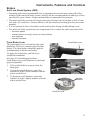
Front Brake Lever
The front brake lever is located on the right
handlebar. This lever controls only the front
brakes. The front brakes should be applied
simultaneously with the rear brakes.
To apply the front brake, pull the lever
toward the handlebar.
See page 51 for braking procedures.
Front brake lever reach (distance to the hand
grip) is adjustable.
1. Pull and hold the lever away from the
hand grip.
2. To increase reach distance, rotate the
adjuster to align a lower number with the
arrow on the lever.
3. To decrease reach distance, rotate the
adjuster to align a higher number with the
arrow on the lever.
Front Brake Lever
Pull and hold lever
Adjuster
Numbers
Arrow on Lever
33
Instruments, Features and Controls
Brakes
Rear Brake Pedal
The rear brake pedal is located on the right side
of the motorcycle. Press downward on the rear
brake pedal to apply the rear brake.
The rear brake pedal activates the rear brake caliper fully while simultaneously activating one of
the three pistons in each front brake caliper.
See page 35 for pedal adjustment options.
See page 51 for braking procedures.
Rear Brake Pedal
Gear Shift Pedal
The gear shift pedal is located on the left side of
the motorcycle.
• Press downward on the gear shift pedal to
shift to a lower gear.
• Lift up on the gear shift pedal to shift to a
higher gear.
See page 35 for pedal adjustment options. See
pages 50-51 for gear shifting procedures.
34
Gear Shift Pedal
Instruments, Features and Controls
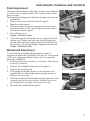
Pedal Adjustment
The brake pedal and gear shift pedal controls can be adjusted
to a front, rear or center position. The center position is the
factory setting.
Tip: An accessory linkage rod is needed to fully adjust the gear shift
pedal control.
1. Remove the screw from the footwell support.
Tool: 6 mm Allen wrench
2. Slide the control forward or rearward in its track until
the threaded hole of the control aligns with the desired
hole in the footrest support.
3. Reinstall the screw.
Torque: 96 in-lbs (11 Nm)
4. After adjusting the shift pedal, always readjust the shift
linkage rod. Loosen both jam nuts on the linkage and
turn the shaft until the footpeg is about 90 mm from the
floorboard (or to desired height). Tighten both jam nuts.
Center Adjustment
Position
Torque: 96 in-lbs (11 Nm).
Windshield Adjustment
Use the motorized windshield adjustment switch (if
equipped) to adjust the windshield. See page 29. If the motorcycle is not equipped with this feature, you can manually
adjust the windshield.
1. Park the motorcycle on a firm, level surface. Turn the key
to the OFF position.
2. Remove the windshield trim panel. See page 83.
3. Remove the retaining clip.
4. Hold slight downward pressure on the bottom of the
windshield (it is under slight upward spring pressure).
Remove the clevis pin.
5. Slide the windshield inner bracket to align with one of the
optional holes in the outer bracket. Reinstall the clevis
pin. Reinstall the retaining clip in the clevis pin.
6. Reinstall the windshield trim panel.
Retaining Clip
Clevis Pin
35
Instruments, Features and Controls
Glove Compartment
Before opening the glove compartment, turn the handlebars slightly to the right.
1. Press and release the inner edge of the compartment
door. The door will open under light spring tension.
2. To close the glove compartment door, press the
inner edge of the door downward firmly to secure
the latch.
3. To lock the glove compartment door, turn the ignition key to the LOCK position.
Tip: The fuel door and glove compartment are locked when the steering is locked.
Sidestand
The sidestand is located on the left side of the motorcycle.
WARNING! An improperly retracted sidestand could contact
the ground and cause a loss of control resulting in serious
injury or death. Always retract the sidestand fully before
operating the motorcycle.
To park the motorcycle, swing the end of the sidestand
downward and away from the motorcycle until it is
fully extended. Lean the motorcycle to the left until the
sidestand firmly supports the motorcycle.
To retract the sidestand, straddle the motorcycle and
bring it to the fully upright position. Swing the end of
the sidestand upward and toward the motorcycle until
it is fully retracted.
Saddlebag and Trunk Door Locks
Use the ignition key to lock and unlock the trunk and saddlebag doors. The doors should be locked before riding.
To lock a door, place the key in the lock and turn it counter-clockwise. To unlock a door, turn the key clockwise.
After unlocking a door, press the door lock to release the
latch and open the door.
Refer to the Gross Vehicle Weight Rating information
beginning on page 14 for loading information.
Unlock
Lock
Unlock
Lock
36
Instruments, Features and Controls
Radio/Audio Systems
Radio Panel
Refer to the Audio System section of this
manual (beginning on page 111) for radio
and accessory audio systems operation.
Tool Kit
The tool kit can be used to perform most
basic maintenance items. Tools provided in
the tool kit include:
1. 4 mm Ball Drive Allen Wrench
2. 4 mm / 6 mm Open End Wrench
3. 6 mm Ball Drive Allen Wrench
4. 8 mm / 10 mm Open End Wrench
5. Combination Phillips / Slot Screw
Driver
6. Rear Shock Absorber / Tire Pressure
Gauge
7. Fuse Puller
4
6
1
2
3
5
7
37
Pre-Ride Inspections
To keep your motorcycle in safe operating condition, always perform the recommended preride inspections before each ride. This is especially important before making a long trip and
when removing the motorcycle from storage.
WARNING! Failure to perform the recommended pre-ride inspections could result in component failure
while riding, which could result in serious injury or death. Always perform the pre-ride inspections
before each ride. When inspection reveals the need for adjustment, replacement or repair, perform the
service promptly.
You must be familiar with all instruments and controls to perform the pre-ride inspections.
Tip: During the pre-ride inspections you may use products that are potentially hazardous, such as oil or
brake fluid. When using any of these products, always follow the instructions and warnings on the
product packaging.
When inspections reveal the need for adjustment, replacement or repair:
• refer to the maintenance section of this manual
• refer to the service manual
• or see your authorized VICTORY dealer
38
Pre-Ride Inspections
Turn the ignition key to the ON position and move the stop/run switch to RUN before performing the following electrical inspections. Return the ignition key to the OFF position
after completing these inspections. If inspection of any electrical item reveals component
failure, repair or replace the component before operating the motorcycle.
Item
Inspection Procedure
Electrical
Headlamp
Tap the starter switch to verify that the headlamp illuminates. Switch to high
beam. Verify that the high beam indicator comes on and that lamp brightness
increases. See page 88 for adjustment procedures.
Taillight/Brakelight
Verify that the taillight and license plate light illuminate. If a turn signal is activated, only the two lower lamps will illuminate. Verify that the taillight lamps
increase in brightness when the front brake lever is applied and also when the
rear brake pedal is applied.
Turn Signals
Move the turn signal switch to the left. Verify that front and rear left turn signals
flash, as well as the corresponding light on the indicator panel. Push the switch
inward to cancel the signal. Verify that the signals and the indicator light stop
flashing. Repeat the procedure for the right turn signals.
Emergency
Flashers
Press the top of the hazard switch to turn the flashers on. Verify that all four turn
signals flash, as well as the lamps on the indicator panel. Turn the flashers off.
Verify that all signals and indicator lamps stop flashing.
Horn
Press the horn button. Verify that the horn sounds loudly.
Neutral Indicator
Place the transmission in neutral. Verify that the neutral indicator lamp illuminates and that the letter “N” displays in the gear position display.
Low Oil Pressure
Indicator
Verify that the low oil pressure lamp illuminates. Start the engine and verify that
the low oil pressure lamp goes off.
Engine Stop/Run
Switch
Start the engine. Move the stop/run switch to the STOP position. Verify that the
engine stops. Attempt to restart the engine to verify that the engine WILL NOT
start.
General
Engine Oil Level
Check the oil level on the dipstick.
Fuel Level
View the fuel gauge.
Tires
Inspect condition, pressure and tread depth.
Brake Operation
Inspect pedal and lever movement.
Brake Fluid Levels
Check front and rear brake fluid levels.
Brake Components
Inspect hoses, connections, brake pads.
Throttle
Inspect hand grip and throttle freeplay.
Clutch (Hydraulic)
Check fluid level and lever operation.
Clutch (Mechanical) Check lever operation and freeplay.
Front Suspension
Check for leaks, debris and damage.
Steering
Check for smooth operation.
Rear Suspension
Check shock movement and air pressure, verify ground clearance.
Drive Belt
Check for wear, damage, proper deflection.
Sidestand
Verify smooth operation, inspect pivot bolt, spring and pad.
Fasteners
Inspect for loose, damaged or missing fasteners.
Mirrors
Adjust for proper rear view.
39
Pre-Ride Inspections
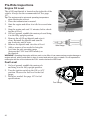
Engine Oil Level
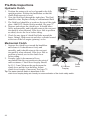
The oil fill cap/dipstick is located on the right side of the
vehicle. Always use the recommended oil. See page
107.
Tip: The engine must be at normal operating temperature
when checking the oil level.
Oil Fill Cap/Dipstick
{
1. Place the transmission in neutral.
2. Start the engine and allow it to idle for several minutes.
3. Stop the engine and wait 3-5 minutes before checking the oil level.
4. On level ground, straddle the motorcycle and bring
it to the fully upright position.
5. Remove the oil fill cap/dipstick and wipe it
clean. Reinstall the dipstick and turn the
cap clockwise until it seats.
6. Remove the dipstick and view the oil level.
7. Add or remove oil as needed to bring the
level into the safe operating range
(between the FULL and ADD marks) on
the dipstick.
Safe Range
WARNING! Operating the engine with too much or too little oil can cause serious engine damage or
engine seizure, which could result in loss of control and serious injury or death. Do not operate the
motorcycle with the oil level above the FULL mark or below the ADD mark.
Fuel Level
1. On level ground, straddle the motorcycle
and bring it to the fully upright position.
2. Turn the ignition switch to the ON or ACC
position. Observe the fuel level in the fuel
gauge.
3. Refuel as needed. See page 107 for fuel
specifications.
Fuel Gauge
40
Pre-Ride Inspections
Tires
Tire Pressure
Check tire pressure before riding, when the tires are cold. This will provide the most accurate
reading, as riding warms the tires and increases tire air pressure.
Adjust tire pressure as needed based on the total weight of your intended load. See page 77.
Tire Condition
Inspect the tire sidewalls, road contact surface and tread base. If inspection reveals cuts,
punctures, cracks or other wear or damage, replace the tire before riding.
Tire Tread Depth
Measure the tread depth near the center of the tread on both tires. See page 77. Replace any
tire with a tread depth of less than 1/16 inch (1.7 mm).
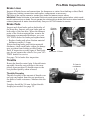
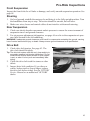
Front Brake Lever
1. Pull the front brake lever toward the handlebar and hold it. The lever should
move freely and smoothly. It should not
move more than 3/4 inch (19 mm) before
resistance is firm. It should continue to
feel firm, without loss of pressure, until
the lever is released.
2. Release the lever. It should return to its
rest position quickly when released.
3. If the front brake lever fails to perform
as stated, service the brake lever before
riding.
4. See page 33 for front brake lever reach
adjustments.
Minimum Level
Resistance at 3/4 inch (19 mm)
Front Brake Fluid Level
1. Straddle the motorcycle and bring it to the fully upright position. Position the handlebars
so that the fluid reservoir is level.
2. View the fluid level through the sight glass. The fluid should be clear. Replace cloudy or
contaminated fluid.
3. The fluid level should be at or above the top of the sight glass. Add brake fluid if necessary. See page 75.
41
Pre-Ride Inspections
Rear Brake Pedal
1. Press downward on the rear brake pedal. It
should move freely and smoothly. It
should not move more than 3/8 inch (8
mm) before resistance is firm. It should
continue to feel firm, without loss of pressure, until the pedal is released.
2. Release the pedal. It should return to its
rest position quickly when released.
3. If the rear brake pedal fails to perform as
stated or travels too far before beginning
to engage the brake, service the brakes
before riding.
4. See page 35 for rear brake pedal adjustments.
Resistance at 3/8 inch (8 mm)
Rear Brake Fluid Level
The rear brake fluid reservoir is located near the rear
brake pedal, just inside the right lower leg fairing.
View the reservoir from the front right side of the
vehicle.
1. Position the motorcycle on level ground in the
fully upright position.
2. View the brake fluid through the reservoir.
3. The fluid should be clear. Replace cloudy or contaminated fluid.
4. The fluid level should be between the minimum
and maximum marks on the reservoir. Add brake
fluid as needed. See page 75.
Maximum
Mark
Minimum
Mark
42
Pre-Ride Inspections
Brake Lines
Inspect all brake hoses and connections for dampness or stains from leaking or dried fluid.
Tighten any leaking connections and replace components as necessary.
Tip: Refer to the service manual or contact your dealer for fastener torque values.
WARNING! Brake fluid leaks or low brake fluid levels could cause brake system failure, which could
result in serious injury or death. Do not operate the vehicle with low brake fluid levels or when leaks are
evident (dampness or stains from dried fluid). See your VICTORY dealer for service.
Brake Pads
Inspect each front brake pad on both sides of
the front disc. Inspect each rear brake pad on
both sides of the rear disc. When the thinnest
point of the friction material has worn to the
minimum recommended thickness, see your
VICTORY dealer for brake pad replacement.
• Replace brake pads when friction material
thickness reaches 1.0 mm.
When checking brake pad friction material
thickness, check each brake caliper for dampness or stains from leaking or dried brake
fluid. If inspection reveals signs of fluid leakage, do not operate the vehicle. See your VICTORY dealer for service.
See page 76 for brake disc inspection.
Friction
Material
Front
Rear
Minimum: 1.0 mm
Throttle
Rotate the throttle control grip. It should rotate
smoothly from the rest position to the completely open position. It should return to the
rest position quickly when released.
2-4 mm to
resistance
Throttle Freeplay
Throttle freeplay is the amount of throttle control grip movement from the rest position to
the point of cable resistance. Measure this distance.
Freeplay should be 2-4 mm. Adjust throttle
freeplay as needed. See page 70.
43
Pre-Ride Inspections
Hydraulic Clutch
Minimum
Level
1. Position the motorcycle on level ground in the fully
upright position. Position the handlebars so that the
clutch fluid reservoir is level.
2. View the fluid level through the sight glass. The fluid
should be clear. Replace cloudy or contaminated fluid.
3. The fluid level should be at or above the top of the sight
glass. Add DOT 4 brake fluid as needed. See page 71.
4. Squeeze and release the clutch lever. It should move
freely and smoothly, and it should return to the rest position quickly when released. If the lever fails to perform
as stated, service the lever before riding.
5. Check for any signs of clutch fluid leaks around the
hoses, fittings, fluid reservoir and slave cylinder located
at the rear of the left engine (primary) cover.
Slave Cylinder
Mechanical Clutch
1. Squeeze the clutch lever toward the handlebar
and release it. It should move freely and
smoothly, and it should return to the rest position quickly when released. If the lever fails to
perform as stated, service the clutch lever
before riding.
2. Freeplay (gap) is the amount of lever
movement from the rest position to the point of
cable resistance. Clutch lever freeplay should
be 0.5-1.5 mm. Measure the gap between the
clutch lever and the lever housing. Adjust
clutch lever freeplay if necessary. See page 72.
Lever
Housing
0.5-1.5 mm
Freeplay
Tip: The starter interlock switch is dependent on the
clutch lever freeplay being set correctly to ensure activation of the clutch safety switch.
44
Clutch
Lever
Pre-Ride Inspections
Front Suspension
Inspect the front forks for oil leaks or damage, and verify smooth suspension operation. See
page 68.
Steering
1. On level ground, straddle the motorcycle and bring it to the fully upright position. Turn
the handlebars from stop to stop. The action should be smooth, but not loose.
2. Make sure wires, hoses and control cables do not interfere with smooth steering.
Rear Suspension
1. Check rear shock absorber movement and air pressure to ensure the correct amount of
suspension travel and ground clearance.
2. For air pressure adjustment information, see page 66 or refer to the suspension air pressure label located in the left saddlebag.
WARNING! Inadequate ground clearance could result in components contacting the ground, causing
loss of control and serious injury or death. Always ensure ground clearance is at specification.
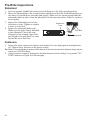
Drive Belt
1. Check drive belt tension. See page 63. The
drive belt should fit tightly.
Tip: The drive belt system must be cool, clean and dry to
accurately measure belt tension (deflection). Do not
measure belt tension when the belt or drive system
is wet, or when it is hot (such as immediately after
riding).
2. Check the drive belt teeth for stones or other
debris.
3. Inspect drive belt condition. If you discover
cracks, broken teeth or frayed edges, replace
the drive belt before riding. See the VICTORY
Service Manual or an authorized VICTORY
dealer.
Drive Belt
45
Pre-Ride Inspections
Sidestand
1. On level ground, straddle the motorcycle and bring it to the fully upright position.
2. Move the sidestand up to the stored position and down to the fully extended position several times. It should move smoothly and quietly. Make sure the return spring holds the
sidestand tightly in place when the sidestand is in the stored position. Adjust or replace a
loose spring.
3. Inspect the sidestand pivot bolt for
Wear Limit
looseness or wear. Tighten or replace
Line
a loose or worn bolt.
4. Inspect the sidestand rubber pad.
Pivot Bolt
Make sure the pad is firmly attached
to the sidestand. Check the wear
indicator on the leading edge of the
Front of Motorcycle
pad. Replace the pad when it’s worn
beyond the wear limit line.
Fasteners
1. Inspect the entire motorcycle chassis and engine for loose, damaged or missing fasteners. Tighten loose fasteners to the proper torque.
Tip: Refer to the specifications section of this manual or the service manual for fastener torque values,
or see your VICTORY dealer.
2. Always replace stripped, damaged or broken fasteners before riding. Use genuine VICTORY fasteners of equal size and strength.
46
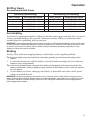
Operation
The operation section of this manual describes how to ensure maximum performance and
longevity through the proper care and operation of your motorcycle.
Tip: Even if you're an experienced motorcycle operator or passenger, read all of the safety information
in this manual before operating the motorcycle. See page 5.
Important areas covered by the operation section include:
• Engine Break-In
• Fueling
• Starting the Engine
• Shifting Gears
• Accelerating
• Using Cruise Control
• Braking
• Stopping the Engine
• Parking
Engine Break-In
The engine break-in period for your motorcycle is the first 500 miles (800 km) of operation.
During this break-in period, critical engine parts require special wear-in procedures so they
seat and mate properly. Read, understand and follow all break-in procedures to ensure the
long-term performance and durability of your engine.
NOTICE: Failure to properly follow the engine break-in procedures outlined in this manual can result
in serious damage to the engine. Follow all break-in procedures carefully. Avoid full throttle
operation and other conditions that may place an excessive load on the engine during the
break-in period.
Odometer
Miles
Km
0-90
0-145
91-300
301-500
At
500
Break-in Procedure
Do not operate for extended periods above 1/3 throttle or at any one throttle
position. Vary engine speed frequently.
146-483 Do not operate for extended periods above 1/2 throttle or at any one throttle
position. Vary engine speed frequently.
484-800 Do not operate for extended periods above 3/4 throttle.
At
Perform the break-in maintenance outlined in the maintenance section of this
800
manual. Break-in maintenance should be performed by an authorized VICTORY dealer. Break-in maintenance must include inspection, adjustments, fastener tightening and an engine oil and filter change. Performing break-in
maintenance at the required odometer reading helps ensure peak engine performance, minimal exhaust emissions and maximum service life of the engine.
47
Operation
Fueling
Always refuel on level ground with the sidestand down. Review the fuel warnings. See page
12. Use only the recommended fuel. See page 107. Hold the nozzle while filling. Do not rest
the weight of the nozzle and hose on the filler neck. Do not leave the nozzle unattended.
WARNING! Overflows or spilled gasoline could contact a hot engine or exhaust system and cause a
fire, which could result in serious injury or death. Do not allow gasoline to contact hot components.
1. Insert the fuel nozzle 2-3 inches (5-7 cm) into the fuel tank filler neck.
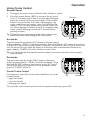
2. Fill the last 1/4 tank slowly to allow the left fuel tank to fill completely. Fill the fuel tank
to a level just below the bottom of the fuel filler insert.
WARNING! Fuel expands in the fuel tank. Do not overfill. To prevent leaks, make sure the fuel filler cap
is properly seated.
NOTICE: Fuel can damage painted surfaces and plastic parts. If gasoline spills on the any part of the
motorcycle, immediately rinse it off with water or wipe it dry with a clean cloth.
Priming the Fuel System
If the motorcycle runs out of fuel, prime the fuel system before attempting to restart the
engine.
1. Fill the fuel tank.
2. Turn the ignition key to the ON position.
3. Move the engine stop/run switch from the STOP position to the RUN position.
4. Allow the fuel pump to run until it stops (about 3 seconds).
5. Move the engine stop/run switch to the STOP position and wait 10 seconds.
6. Repeat steps 3-5 four to five times.
7. Turn the key to the OFF position.
8. Start the engine. See page 49.
48
Operation
Starting the Engine
The starter interlock system allows the engine to be started only when the transmission is in
neutral, or when the transmission is in gear with the clutch disengaged (clutch lever pulled
in).
Tip: If the motorcycle runs out of fuel, prime the system before attempting to restart the engine. See
page 48.
1.
2.
3.
4.
5.
Perform the Pre-Ride Inspections. See page 38. Properly secure any cargo.
Straddle the motorcycle and bring it to the fully upright position.
Retract the sidestand.
Insert the key into the ignition switch. Turn the key to the ON position.
Move the engine stop/run switch to the RUN position. You should hear the fuel pump
run momentarily as it pressurizes the fuel system.
6. If the neutral indicator is not illuminated, shift the transmission to neutral.
7. Apply the front brakes.
8. Leaving the throttle closed, press and hold the starter switch to start the engine. Release
the switch promptly when the engine starts. If the engine does not start within 10 seconds, release the starter switch. Wait five seconds, then try again.
Tip: Hold the starter switch for as short a time as possible to minimize battery drain. Do not hold the
starter switch for more than 10 seconds at one time.
9. If either the check engine indicator or the low oil pressure indicator does not go out after
the engine starts, stop the engine immediately. Refer to either the check engine indicator
information on page 23 or the low oil pressure indicator information on page 23.
10. Leave the throttle closed and allow the engine to idle. Idle speed will gradually slow to
normal as the engine warms to operating temperature.
Tip: Do not rev the engine or put the transmission in gear immediately after starting the engine. Allow
the engine to idle for about 30 seconds after a warm start or at least one minute after a cold start
(longer in cold weather). This will allow oil to reach all areas before the engine is put under load.
49
Operation
Shifting Gears
WARNING! Forced shifting (with clutch engaged) could cause damage to the engine, transmission
and drive train. Such damage could cause loss of control, which could result in serious injury or death.
Always pull the clutch lever fully toward the handlebars to disengage the clutch before shifting gears.
This motorcycle is equipped with a six-speed transmission. The sixth gear is overdrive. Neutral is located
between first and second gear.
Tip: The transmission is in neutral if you can move the motorcycle forward or rearward freely without disengaging the
clutch. If the ignition switch is in the ON position, the neutral
indicator illuminates when the transmission is in neutral.
1. Start the engine. See page 49.
2. With the engine at idle speed, apply the front brakes.
3. Disengage the clutch (pull the clutch lever fully
toward the handlebar).
4. Push the shift pedal downward until you feel it stop in
first gear.
Overdrive
(6th Gear)
4
5
O/D
3
Neutral
2
N
1
Tip: Shift to a higher gear by lifting the front of the gear shift pedal with your toe. Shift to a lower gear by
pressing the pedal downward.
5. Release the brake lever.
6. Simultaneously release the clutch lever while opening the throttle (rolling the throttle
control grip rearward) in one smooth motion. As the clutch begins to engage, the motorcycle will move forward.
7. To shift to a higher gear, accelerate smoothly to the recommended shift point. See page
51. With a quick motion, simultaneously close the throttle completely and disengage the
clutch. Raise the shift pedal until you feel it stop at the next gear. Simultaneously release
the clutch lever and open the throttle in one smooth motion.
Tip: Within the recommended speed ranges (see page 51), you can downshift to slow the motorcycle
or to increase power. You may want to downshift when climbing a hill or passing. Downshifting also
helps to decrease speed when combined with closing the throttle.
8. To shift to a lower gear (downshift), simultaneously pull the clutch lever toward the handlebar and close the throttle. Move the shift pedal downward until you feel it stop at the
next gear. Simultaneously release the clutch lever while opening the throttle.
WARNING! Downshifting improperly could cause transmission damage, loss of traction and loss of
control, which could result in serious injury or death.
• Reduce speed before downshifting. Always downshift within the recommended shift points.
• Use extreme caution when downshifting on wet, slippery or other low traction surfaces. Release the
clutch lever very gradually in these conditions.
• Avoid downshifting in a curve. Downshift before entering the curve.
50
Operation
Shifting Gears
Recommended Shift Points
Upshifting (Accelerating)
Gear Change
1 to 2
2 to 3
3 to 4
4 to 5
5 to O/D
Recommended Speed
18 MPH (29 km/h)
30 MPH (48 km/h)
40 MPH (64 km/h)
50 MPH (80 km/h)
60 MPH (96 km/h)
Downshifting (Decelerating)
Gear Change
O/D to 5
5 to 4
4 to 3
3 to 2
2 to 1
Recommended Speed
50 MPH (80 km/h)
35 MPH (56 km/h)
25 MPH (40 km/h)
15 MPH (24 km/h)
10 MPH (16 km/h)
Accelerating
Accelerate by opening the throttle (rolling the throttle control grip rearward). For even acceleration, open the throttle with a smooth, continuous motion. When you reach the recommended speed for upshifting, shift up one gear.
WARNING! Accelerating abruptly could cause your body to shift rearward suddenly, which could result
in loss of control. Accelerating abruptly could also cause loss of control on low traction surfaces. Loss
of control could result in serious injury or death. Always accelerate gradually, especially on wet,
slippery or other low traction surfaces.
Braking
Always allow sufficient stopping distance so that brakes can be applied gradually.
Tip: Applying slightly more front brake than rear brake generally provides the best braking performance.
1. To slow the motorcycle with the brakes, close the throttle and apply the front and rear
brakes evenly and gradually.
Tip: If the anti-lock brake system activates while braking (if equipped) you’ll feel pulsing at the foot
brake or hand brake. Continue applying equal pressure to the brakes to slow or stop the motorcycle. See page 8.
2. As the motorcycle slows, disengage the clutch, or downshift each time vehicle speed
reaches a downshift point.
WARNING! Braking improperly could result in loss of control, which could result in serious injury or
death. Avoid braking abruptly. Always apply the brakes gradually, especially on wet, slippery or other
low traction surfaces. Avoid braking in a curve or turn. Bring the motorcycle to the upright position
before applying the brakes.
51
Operation
Using Cruise Control
If equipped, the cruise control is located on the right handlebar. Make sure you read this section and understand how to safely operate this feature before using the cruise control.
Cruise Type R: Verify which type of cruise control is installed on your
vehicle by checking for a label in the left saddlebag. If a “Cruise Type
R” label is affixed, additional operation information for your controls
is noted throughout the following pages as “Type R”.
WARNING! Improper operation of cruise control could cause loss of control
and result in serious injury or death. Follow all cruise operation procedures
carefully. Never use cruise control when roads are wet or slippery. Do not use
cruise control when riding in heavy or congested traffic.
Cruise Control Tips
•
•
•
•
Cruise control can be set in any gear.
Vehicle speed must be above 25 MPH (40 km/h).
Cruise Control
Set speed will vary slightly in hilly terrain.
Switches
The cruise control will not resume a pre-set speed if the resulting
acceleration or deceleration rate is too high or too low. For example,
resuming a set speed from 40 MPH (64 km/h) while in 6th gear may cause cruise to disengage.
• Cruise control will not engage if brake lights are not operating properly.
Set Speed
1. Press the cruise control ON switch. A red dot (power indicator) at the center of the switch will illuminate to indicate
when cruise control can be engaged. (Type R: The cruise
control indicator lamp will illuminate whenever the ON or
OFF switch is pressed.)
2. Accelerate to the desired speed and press the SET switch.
The cruise control indicator lamp will illuminate. (Type R:
You must wait at least 3 seconds after turning cruise control on before pressing SET. This is a safety feature that
prevents cruise control from engaging if a button is stuck.
To continue using cruise control, turn the power off and
on. Wait 3 seconds before pressing SET.)
52
ON
SET
Power Indicator
Operation
Using Cruise Control
Resume Speed
1. Disengage the cruise control with the brake, throttle or clutch.
2. Press the resume button (RES) to return to the set speed.
(Type R: You must wait at least 3 seconds after disengaging cruise control before pressing resume. If the resume
button is pressed within 3 seconds of disengaging, the
cruise control may not engage, even if the indicator illuminates. This is a safety feature that prevents cruise control from engaging if a button is stuck. To continue using
cruise control, disengage it and wait 3 seconds before
pressing resume.)
Resume
Tip: Turning the cruise control master switch off will erase the set
speed from memory and disengage the cruise control.
Accelerate
Accelerate
Tap and release the accelerate (ACC) button to increase speed
in approximately 1 MPH (1-2 km/h) increments. Press and hold the ACC button to accelerate
to a new SET speed (resets when button is released). On vehicles without Type R cruise control, the speed will reset when the button is released or after a maximum acceleration of
approximately 10 MPH (16 km/h), whichever comes first.
Tip: If you use the throttle to accelerate and then release it, the cruise control will resume the previously set speed.
Decelerate
Tap and release the decelerate (DEC) button to decrease
speed in approximately 1 MPH (1-2 km/h) increments. Press
and hold the DEC button to decelerate to a new SET speed
(resets when button is released), or to the minimum cruise
speed of 25 MPH (40 km/h).
Cancel Cruise Control
To temporarily cancel the cruise control and allow use of the
Off
resume feature:
• apply the brakes
• close the throttle
• disengage the clutch
To cancel the cruise control and erase the set speed from memory, press OFF.
Decelerate
53
Operation
Stopping the Engine
Before stopping the engine, bring the motorcycle to a complete stop. Shift to neutral or disengage the clutch.
WARNING! Stopping the engine with the transmission in gear while the motorcycle is moving could
cause loss of rear wheel traction or engine and transmission damage, which could cause loss of control
and serious injury or death. Always stop the engine after the motorcycle is fully stopped and the
transmission is in neutral. If the engine stops unexpectedly while the motorcycle is moving, guide the
motorcycle to a safe location off the road and away from traffic.
1. When fully stopped, shift into neutral.
2. Move the engine stop/run switch to the STOP position.
3. Move the ignition switch to the OFF position. Remove the ignition key.
Tip: A momentary clicking sound from the IAC valve is normal when the key is first turned to the OFF
position.
Parking
Choose a firm level surface to park the motorcycle.
1. When fully stopped, shift into neutral.
2. Stop the engine.
3. Fully extend the sidestand.
4. Turn the handlebars to the left and lean the motorcycle to the left until the sidestand
firmly supports the motorcycle.
5. Remove the ignition key.
Parking on a Slope
If parking on a slope is unavoidable, position the front of the motorcycle toward the top of
the slope. Place the transmission in gear and position the motorcycle so that it is stable when
it rests on the sidestand.
Parking on a Soft Surface
If parking on a soft surface is unavoidable, place a sidestand footrest under the foot of the
sidestand to provide a firm surface. The sidestand footrest must be strong enough and large
enough to support the motorcycle's weight without sinking into the parking surface.
Asphalt becomes soft in hot weather. A sidestand can sink into soft asphalt and the motorcycle may fall. When parking on asphalt in hot weather, use a sidestand footrest.
CAUTION! Hot engine and exhaust components can cause burns to skin and can ignite a fire if
exposed to flammable materials. Always park the motorcycle clear of flammable materials and where
people are not likely to contact hot components.
54
Operation
Reverse Operation (if equipped)
NOTICE: Do not attempt to engage or disengage the reverse system when the motorcycle is moving.
Before Operating in Reverse:
• always sit on the motorcycle with legs astride and both feet on the ground.
• always check for obstacles or people behind the motorcycle.
• always retract the sidestand fully.
• always make sure the motorcycle is completely stopped.
NEVER Operate in Reverse:
• when not properly seated.
• when in an area where obstacles or bystanders are present.
• with a passenger on board. A passenger can obstruct your view and maneuverability.
• when on loose or slippery surfaces. Loss of foot traction could cause a tip-over.
• while the motorcycle is moving forward.
• when on a grade or uneven surfaces.
Reverse Operation Procedure
1. Always check for obstacles or people behind the motorcycle. Be aware that the front
wheel may travel outward and require a larger operating area.
2. Make sure the motorcycle is stationary.
3. Dismount any passenger.
4. Sit on the operator’s seat with legs astride and both feet on the ground.
5. Retract the sidestand (if down).
6. Place the transmission in neutral.
7. With the engine idling, lift the reverse lever and verify that the reverse indicator (R) displays in the multi-function display.
NOTICE: NEVER shift the transmission into gear with the reverse engaged. Doing so WILL result in
damage to the reverse system.
8. Recheck the area behind and around the motorcycle to ensure a clear operating area.
9. While balancing the motorcycle with your legs and feet, press and hold the starter switch
to begin moving in reverse. Release the switch to stop moving.
NOTICE: NEVER shift the transmission into gear with the reverse engaged. Doing so WILL result in
damage to the reverse system.
10. If parking the motorcycle, wait until it’s completely stopped, then move the reverse lever
down to the disengaged position. Verify that the neutral indicator (N) displays before
stopping the engine.
55
Maintenance
Safety During Service Procedures
WARNING
Failure to follow recommended precautions and procedures could result in severe injury or death.
Always heed all safety precautions and follow all operation, inspection and maintenance procedures
outlined in this manual.
• Improperly installed or adjusted components can make the motorcycle unstable or hard to handle.
Improperly installed electrical components can cause engine or electrical system failure. In either
event, damage or serious injury could result. If you do not have the time, tools and expertise
necessary to complete a procedure properly, please see your dealer for service.
• Review the safety-related maintenance information on page 13.
• Before beginning any maintenance procedure, read the instructions for the entire procedure.
• Always position the motorcycle on a firm level surface before performing service. Make sure the
motorcycle will not tip or fall while elevated or while on the sidestand.
• Hot engine and exhaust components can cause burns to skin and can ignite a fire if exposed to
flammable materials. Always park the motorcycle clear of flammable materials and where people are
not likely to contact hot components.
• Wear eye and face protection when using pressurized air.
• Never start the engine or let it run in an enclosed area. Engine exhaust fumes are poisonous and
can cause loss of consciousness or death in a short time.
• During some procedures you may use potentially hazardous products such as oil or brake fluid.
Always follow the instructions and warnings on the product packaging.
56
Maintenance
Proper maintenance assures the highest level of safety, durability and dependability for your
motorcycle.
• Have your VICTORY dealer perform the break-in maintenance procedures when the
motorcycle’s odometer registers 500 miles (800 km).
• Perform the recommended periodic maintenance at the intervals specified in the periodic
maintenance table beginning on page 58.
Road Tests
Before returning the motorcycle to regular use after performing service, road test it in a safe
environment. Pay special attention to the proper fit and operation of all serviced components.
Make any corrections or additional adjustments necessary to ensure safe vehicle performance.
Break-In Maintenance
Have your VICTORY dealer perform the break-in maintenance procedures when the motorcycle’s odometer registers 500 miles (800 km). Performing the break-in maintenance will
help ensure optimum engine performance for the entire service life of the engine. Your dealer
will change engine oil, inspect all fluids and serviceable components, ensure that all fasteners are tightened and make other adjustments as needed.
Major Maintenance
For major repair information, refer to the VICTORY Service Manual. Major repairs typically
require technical skills and specially designed tools. Emission system service requires special tools and training and should be performed by your dealer.
Periodic Maintenance
Inspect, clean, lubricate, adjust and replace parts as necessary. When inspection reveals the
need for replacement parts, use genuine VICTORY parts available from your VICTORY
dealer. Record service and maintenance information in the Maintenance Log beginning on
page 59.
Perform maintenance at the intervals specified in the periodic maintenance table beginning
on page 58. Perform the procedures more frequently if normal use of the motorcycle
includes:
• high speed operation for extended periods
• low speed operation for extended periods
• operation in dusty or otherwise adverse conditions
57
Maintenance
Periodic Maintenance Table
5000 (8000)
10000 (16000)
15000 (24000)
20000 (32000)
25000 (40000)
30000 (48000)
35000 (56000)
40000 (64000)
45000 (72000)
50000 (80000)
Odometer Reading in Miles (Kilometers)
500 (800)
See table key below
Air Filter
61
I
I
R
I
R
I
R
I
R
I
R
Battery
79
I
I
I
I
I
I
I
I
I
I
I
Brake Fluid
75
I
I
I
I
I
I
R
I
I
I
I
Brake Pads
43
I
I
I
I
I
I
I
I
I
I
I
Clutch Cable
(Mechanical)
73
I
I
L
I
L
I
L
I
L
I
L
Component
Page
Clutch Fluid
71
I
I
I
I
I
I
R
I
I
I
I
Clutch Lever
(Hydraulic)
71
L
I
I
I
I
I
I
I
I
I
I
Clutch Lever
(Mechanical)
72, 73
I
I
L
I
L
I
L
I
L
I
L
Control Cables
71, 73
I
I
L
I
L
I
L
I
L
I
L
Crankcase Vent
69
I
I
I
I
I
I
I
I
I
I
I
Drive Belt
62
I
I
I
I
I
I
R
I
I
I
I
Drive Belt Adjustment
65
P
Adjust with each tire change thereafter
Engine Oil & Filter*
60
R
R
R
R
R
R
R
R
R
R
R
Evaporative Emission
Control System
(if equipped)
69
I
I
I
I
I
I
I
I
I
I
I
Exhaust System
78
I
I
I
I
I
I
I
I
I
I
I
Fasteners
82
I
I
I
I
I
I
I
I
I
I
I
Front Brake Lever
74
L
L
L
L
L
L
L
L
L
L
L
Front Fork Oil**
68
I
I
I
R
I
I
R
I
I
R
I
Front Fork / Axle
68
I
I
I
I
I
I
I
I
I
I
I
Fuel System
69
I
I
I
I
I
I
I
I
I
I
I
Headlamp
88
I
Ignition Switch & Locks
82
L
L
L
Radio/Radio Software
111
ABS Components
76
Rear Wheel Align
I
I
L
L
I
L
L
I
L
I
L
L
I
I
I
I
I
I
I
I
I
I
I
65
I
I
I
I
I
I
I
I
I
I
I
Rear Shock
66
I
I
I
I
I
I
I
I
I
I
I
Rear Brake Pedal
74
I
I
L
I
L
I
L
I
L
I
L
Road Test
91
P
P
P
P
P
P
P
P
P
P
P
Sidestand
82
I
I
L
I
L
I
L
I
L
I
L
Sidestand Pad
46
I
I
I
I
I
I
I
I
I
I
I
Spark Plugs
78
I
I
I
I
I
I
R
I
I
I
I
Steering Head Bearings
69
I
I
I
L
I
I
L
I
I
L
I
Swingarm
68
I
I
I
I
I
I
I
I
I
I
I
Throttle Cable
70
I
I
L
I
L
I
L
I
L
I
L
Tires
77
I
I
I
I
I
I
I
I
I
I
I
Update annually. Please see your dealer.
Maintenance Key: I = Inspect, clean, adjust, correct or replace if necessary; P = Perform; R = Replace / Rebuild
L = Lubricate w/ proper lubricant; * = Replace at specified interval or annually; ** = Replace as specified or every 2 years
58
Maintenance
Maintenance Log
Maintenance Performed
Miles / Km
Notes
Performed
by
59
Maintenance
Engine Oil / Filter Change
Change the engine oil at the intervals specified in the
periodic maintenance table beginning on page 58.
1. Start the engine and allow it to idle for several minutes. Stop the engine.
Tip: The engine must be at normal operating temperature
before changing the oil.
CAUTION! Hot engine and exhaust components can cause
Drain Plug
burns to skin and can ignite a fire if exposed to flammable
materials. Always park the motorcycle clear of flammable
materials and where people are not likely to contact hot components.
Oil Filter
2. Position the motorcycle securely on the sidestand.
3. Place a drain pan under the drain plug and oil filter. Remove the drain plug and seal.
Allow the oil to drain completely.
Tool: 6 mm Allen wrench
4. Slowly loosen the oil filter. Allow the oil to drain completely.
Tool: 2 1/2 inch (63.5 mm) oil filter wrench
5. Clean the drain plug sealing surface on the crankcase. Reinstall the drain plug with a
new seal. DO NOT overtighten.
Torque: 15 ft-lbs (20 Nm)
6. Clean the oil filter mounting threads and gasket sealing surface on the crankcase. Make
sure the new oil filter gasket is properly seated in the new oil filter. Apply a thin film of
clean engine oil to the gasket. Screw the new filter on until the gasket contacts the sealing surface. Tighten the filter by hand an additional 3/4 turn.
7. Remove the oil fill cap/dipstick. Add approximately 4.5 quarts (4.25 liters) of the recommended oil. Reinstall the oil fill cap.
NOTICE: Do not add chemical additives to the engine oil. Some automotive engine oils contain
additives that could damage or reduce the service life of the wet clutch in your motorcycle.
(continued on next page)
60
Maintenance
Engine Oil / Filter Change
8. Start the engine and allow it to idle for several minutes. Stop the engine.
NOTICE: After an oil change, the low oil pressure indicator
remains illuminated longer than usual before going
out. Revving the engine while the low oil pressure
indicator is illuminated can damage the engine.
9. Stop the engine. Check for leaks around the drain plug
and oil filter.
10. Check the oil level and adjust if needed.
11. Recycle the used oil and filter properly.
Engine Oil Capacity at Oil Change
(including filter)
4.5 qt. (4.25 liter)
(approximately)
Engine Oil Capacity at Oil Change
(not including filter)
4.0 qt. (3.8 liter)
(approximately)
Oil Check/Fill
1 qt. (.9 l)
(approximately)
Air Filter
Inspect the air filter often if riding in unusually wet or
dusty conditions. Do not apply air filter oil to this air
filter.
Tabs
1. Remove the two air filter retaining screws.
2. Pull the lower edge of the filter toward the front
of the motorcycle, then lower it to release the two
tabs at the top edge. Remove the filter.
3. Clean the filter sealing surface on the frame.
Screws
4. Install the new air filter, engaging the tabs at the
top of the filter with the filter case.
5. Reinstall the retaining screws.
Torque: 87 in-lbs (10 Nm)
61
Maintenance
Drive Belt Condition
Replace the drive belt if it is cracked or has broken teeth or frayed edges. No matter its condition, the drive belt should be replaced at
periodic intervals. See the VICTORY Service
Manual or an authorized VICTORY dealer.
DO NOT attempt to check belt tension if the
belt has been exposed to rain or washing within
a 24 hour period or if the belt is hot from riding.
Allow the belt to cool down to ambient temperature before measuring belt tension. Replace
the drive belt and both sprockets as a set if the
drive belt has over 5,000 miles (8,000 km) of
service at the time of damage or failure.
Drive Belt Wear Analysis
62
Internal tooth cracks
(hairline):
OK to run, but
monitor condition
External tooth cracks:
Replace belt
Missing teeth:
Replace belt
Chipping (not serious):
OK to run, but monitor
condition
Fuzzy edge cord:
OK to run,
but monitor condition
Hook wear:
Replace belt
Stone damage:
Replace belt if damage is
on edge
Bevel wear
(outboard edge only):
OK to run,
but monitor condition
Maintenance
Drive Belt Tension Data
Specifications are listed below for deflection and sonic tension. Sonic tension measurement
requires Gates Sonic Tension Meter 507C or an equivalent.
Drive Belt Deflection (Using PV-43532 Tension Gauge)
Deflection
32 mm ± 0.5 mm
Drive Belt Sonic Tension (Using Sonic Tension Meter)
Sonic Tension
Required Data
Span
Belt Width
Belt Mass Constant
All VISION
708.6
28 mm
8.4
20 Hz ± 1
Drive Belt Tension Inspection
On new drive systems or belt, adjust belt tension after the
first 500 miles (800 km). Adjust tension at each tire
change thereafter.
Tip: Do not inspect or adjust drive belt tension when the belt is
wet. Improper adjustment will result.
Checking drive belt tension involves using the belt tension
gauge (P/N PV-43532). You can also use a Sonic Tension
Meter if available. Before beginning this procedure:
• Make sure the drive system is clean, dry, and at room
temperature (belt and sprockets).
• Be sure suspension is properly adjusted.
• Belt tension must be adjusted at the tightest spot.
Base
Belt Tension Gauge
Small O-Ring
Plunger
63
Maintenance
Drive Belt Tension Inspection
1. Elevate and support the motorcycle with the rear tire
slightly off the floor.
CAUTION! Make sure the motorcycle is stable when elevated.
Injury may occur if the motorcycle tips or falls.
2. Place the transmission in neutral.
3. Rotate the rear wheel in a forward direction until the
valve stem is at the bottom. This is your reference point
for determining the tight spot to make your adjustment
(if necessary).
4. Position the small O-ring on the tension gauge directly
over the 10 lbs. mark on the plunger.
5. Place a tape measure or steel rule next to the drive belt,
mid-way between the sprockets. Support the rule or
tape so it does not move.
6. Note the graduation mark on the rule that aligns with
the lower edge of the belt. This position represents zero
force.
7. Place the support base of the tension gauge squarely
against the lower surface of the belt as close as possible
to the rule or tape.
8. Keeping the tension gauge perpendicular to the belt
surface and parallel with its length, push the plunger
upward until the small O-ring touches the tension
gauge body.
9. Be sure the tension gauge is seated squarely against the
belt, and note the graduation mark on the rule that now
aligns with the lower edge of the belt. This position
represents 10 lbs. force.
10. To calculate belt tension (deflection) subtract the
smaller measurement from the larger measurement and
record it.
Determine The Tightest Spot
11. Repeat the above deflection measurements
with the tire’s valve stem at the rear most
position, top, and front most positions (90
degrees rotation each time), recording each
measurement.
12. If the tightest measurement is not within the
recommended range (see page 63), belt tension must be adjusted.
Drive Belt
Belt Tension Gauge
Rule
90°
Drive Belt
Push Inner Plunger
90q
90q
Rear Wheel
90q
Valve Stem
64
Maintenance
Drive Belt Tension Adjustment
1. Move the wheel to the tight spot location determined previously.
2. Loosen the rear axle nut on the left side.
3. Turn each axle adjuster nut clockwise an equal
amount to tighten the belt (reduce deflection) or an
equal amount counter-clockwise to loosen the belt
(increase deflection).
Tool: 13 mm deep socket
4. Tighten the rear axle nut.
Torque: 65 ft-lbs (88 Nm)
Adjuster Nut
5. Pump the rear brake pedal to re-set the pads
against the brake disc.
6. Verify proper belt tension and wheel alignment.
Axle Nut
(hidden by swing arm)
Drive Belt / Rear Wheel Alignment
1. Look at the alignment reference marks
on each side of the swingarm and the
marks on the axle plates to verify proper
wheel alignment. Axle plate mark to reference mark alignment must be the same
on both sides.
2. If the marks are not aligned, perform all
steps of the Belt Tension Adjustment procedure. See page 65.
3. Before and after tightening the axle nut,
verify proper belt tension and wheel
alignment.
Swing Arm
Marks
Axle Plate
Marks
Drive Belt Cleaning
Cleaning the drive belt will maximize belt and sprocket life and minimize drive line noise.
Clean the belt at every tire change. Clean the belt more often if riding in dirty, dusty or high
debris environments.
1. Mix a few drops of mild dish soap with a cup of warm water.
2. Use a soft nylon brush to clean the belt and sprocket teeth with the soapy water. Clean
well in corner areas where road debris and belt dust can collect.
3. Rinse the belt with clear water, then dry thoroughly.
Tip: Do not inspect or adjust drive belt tension when the belt is wet. Improper adjustment will result.
65
Maintenance
Rear Suspension Adjustment
For riding comfort and to ensure proper ground clearance,
adjust rear shock air pressure as specified on the label
located in left saddlebag area (see below).
Follow these guidelines when adjusting:
• Park the motorcycle with the sidestand down on a firm,
level surface. Remove all riders and cargo.
• DO NOT exceed 72 PSI (496 kPa) in the shock.
Shock Label
• Use the VICTORY Air Pump & Gauge (PV-48909).
Follow the instructions on the following pages.
If the VICTORY air pump and gauge are not available, use
the gauge provided in the tool kit, and a pressurized air source with a maximum line pressure
of 72 PSI (496 kPa). After using this gauge, remove it quickly to minimize leakage. Expect
to lose about 4 PSI (27.6 kPa) with each pressure check when using this gauge. Use only a
dry air source, such as a system with a water separator or air line dryer, to prevent moisture
from entering the shock.
CAUTION! Air pressure increases VERY quickly when using pressurized air. Wear eye and face
protection.
Air Suspension
Adjustment
(Shock Label 7176130)
NESS MODELS
Set desired pressure with bike
unloaded on side stand
Air Suspension
Adjustment
(Shock Label 7174258)
TOUR MODELS
Set desired pressure with bike
unloaded on side stand
LOW
SUSPENSION
Total Cargo &
Occupant
Weight (lbs)
Air Pressure
(psi)
100
125
150
175
200
225
250
275
300
325
350
375
400
425
22
25
28
31
33
36
39
42
46
50
55
60
66
72
MAX PRESSURE 72 PSI
66
No
Trunk
Total Cargo &
Occupant
Weight (lbs)
Trunk
Air Pressure
(psi)
100
0
0
125
0
6
150
0
10
175
4
13
200
10
19
225
14
23
250
19
28
275
24
33
300
30
39
325
35
44
350
40
49
375
46
55
400
51
60
425
57
66
450
62
71
MAX PRESSURE 72 PSI
Maintenance
Rear Suspension Adjustment
1. Park the motorcycle with the sidestand down
on a firm, level surface. Remove all riders
and cargo.
2. Open the left saddlebag door. Remove the
cap from the air fitting.
3. Refer to the shock label to determine the recommended air pressure.
4. Install the hose fitting of the recommended
gauge securely onto the air fitting. Read the
air pressure on the gauge.
Tip: A small oil leak from the air fitting is acceptable
when pressure is adjusted. See your dealer if
more than 5 cc of oil leaks from the fitting.
Bleed
Button
Air
Fitting
Handle
5. To reduce air pressure, push the bleed button on the gauge. Bleed pressure in small
amounts until the desired pressure is attained.
6. To increase pressure, pump the handle until pressure increases to the desired amount.
CAUTION! DO NOT exceed 72 PSI (496 kPa) in the shock.
7. Remove the hose from the air fitting and reinstall the cap.
67
Maintenance
Swing Arm / Rear Axle Inspection
1. Sit in the operator's seat and slowly bounce the rear suspension a few times. Make sure
the suspension moves freely without binding. Listen for abnormal noises.
2. Elevate and support the motorcycle with the rear tire slightly off the floor.
CAUTION! Make sure the motorcycle is stable when elevated. Injury may occur if the motorcycle tips
or falls.
3. Grasp the rear-most surface of the rear tire and attempt to move the wheel side-to-side. If
there is movement at the front of the swingarm, check the swingarm pivot nut torque and
swingarm pivot bearings.
4. Contact your VICTORY dealer for service if you detect noise or movement at the swingarm pivot.
5. Grasp the top or bottom surface of the tire and try
to move it side to side. If there is movement at the
rear axle, inspect wheel bearings and rear axle nut
torque.
6. Contact your VICTORY dealer for service if you
detect noise or movement at the wheel bearings.
7. With the transmission in neutral, slowly rotate the
rear wheel. If the wheel does not rotate smoothly,
inspect the wheel bearings, rear axle, belt adjustment and wheel alignment. See the VICTORY SerCheck for movement in
vice Manual or your authorized VICTORY dealer.
Front Fork / Suspension Inspection
wheel bearing area
1. Place the motorcycle on the sidestand and inspect the
front forks. Make sure there is no fork oil present on the
outer fork tubes, around the fork seals or around the
inner tubes.
Fork
2. Clean the fork tubes to remove bugs, tar or buildup
Inner
which may cause seal wear or leakage.
Tube
3. Inspect the outer surfaces of the inner fork tubes for
scratches or damage from foreign objects.
4. Straddle the motorcycle and bring it to the fully upright
position. Apply the front brake and push downward
(hard) on the handlebars several times. The front
suspension should operate smoothly and quietly.
5. Fork oil condition and level affects front suspension performance and internal component wear. Replace fork oil at the recommended intervals. Special tools are required to
perform this procedure. See the VICTORY Service Manual or your authorized VICTORY
dealer.
68
Maintenance
Steering Head Inspection
1. Elevate and support the motorcycle with the
front tire slightly off the floor.
View
CAUTION! Make sure the motorcycle is stable when
elevated. Injury may occur if the motorcycle tips or
falls.
2. Turn the handlebars from stop to stop. The
action should be smooth but not loose.
Make sure wires, hoses and control cables
do not interfere with smooth steering.
3. Alternately push and pull on the lower fork
legs and feel for movement in the steering
head area. See your VICTORY dealer if any
movement is detected.
Fuel System Components
1. Inspect fuel hoses for cracks or damage.
2. Inspect hose connections at the fuel tank and at
the fuel rail for dampness or stains from leaks.
Evaporative Emission Control System
1. Inspect all evaporative emission control system
hoses and connections. Make sure all connections
are tight.
2. Inspect connections at the evaporative emissions
canister to be sure they are secure. The canister is
located on the left side of the motorcycle near the
oil cooler.
Evaporative Emissions
Canister (California Models)
Fast Idle
A fast idle speed during warm up of between 1200 and 2000 RPM is automatically set by the
EFI system Idle Air Control (IAC). Periodic adjustment is not required.
Crankcase Breather Hose
Breather Hose
Inspect the crankcase breather hose for cracks or damage.
Be sure the clamps are in place and secure.
69
Maintenance
Throttle Control Inspection
1. With the engine OFF, rotate the throttle control
grip fully open and then release it. It should
rotate smoothly from the rest position to the
completely open position. It should return to the
rest position quickly when released.
2. Repeat the twist and release process with the
handlebars turned fully right and fully left.
3. Remove the right side access cover.
4. Inspect throttle cables for frayed ends.
5. Service the throttle system if throttle operation
is not smooth, if throttle grip does not return
properly, or if cable ends are frayed. See the
VICTORY Service Manual or your authorized
VICTORY dealer.
Cable Area
Throttle Cable Freeplay
Throttle freeplay is the amount of throttle control grip
movement from the rest position to the point of cable
resistance. Measure this distance. Freeplay should be
2-4 mm. Adjust throttle freeplay as needed.
1. Position the front wheel straight ahead. Stop the
engine.
2-4 mm
2. Hold the adjuster nuts securely and loosen the lock
nuts on both cables. Turn the lock nuts away from
the adjuster nuts as far as possible.
3. Turn both adjuster nuts toward the lock nuts as far
as possible for maximum freeplay in both cables.
4. Turn the adjuster on the throttle opening cable
(front cable) away from the lock nut until throttle
freeplay is 2-4 mm.
5. To adjust the closing cable (rear cable), hold the
Adjuster Nut
Lock Nut
throttle grip lightly in the closed position. Turn the
adjuster slowly outward until slight resistance is
felt.
6. Turn the lock nuts on both cables until they are seated against the adjuster nuts. Hold
each adjuster nut and tighten each lock nut securely.
7. Repeat the throttle control inspection. See page 70.
70
Maintenance
Throttle Cable Lubrication
Lubricate control cable ends at the intervals recommended in the periodic maintenance table
beginning on page 58.
NOTICE: External casings are factory-lubricated. Additional lubrication could be detrimental to cable
performance.
Verify proper routing and smooth movement. Inspect for damage to the external casing, and
inspect exposed cable wire for fraying, kinks or corrosion. Replace any damaged, sticky or
sluggish cable.
1. Disconnect the cable at the throttle body.
2. Apply a light film of VICTORY All Purpose Grease or equivalent to the barrel end.
3. Reconnect the cable and adjust freeplay as needed.
Cruise Control Cable Inspection
(if equipped)
1. Remove the right side access cover.
2. Inspect the throttle body end of the cruise control cable for fraying and be sure the end is
secured in the bracket.
Cruise Control Cable
Hydraulic Clutch Lever Lubrication
Lubricate the pivot bushing at the intervals recommended in the periodic maintenance table beginning
on page 58. Also lubricate any time binding is evident. Use VICTORY All Purpose Grease or equivalent.
Hydraulic Clutch Fluid
Clutch Lever Bushing
Check the hydraulic clutch fluid level. See page 44.
The fluid level should be at or above the top of the
sight glass. Add fluid as needed. Replace cloudy or
contaminated fluid.
Use DOT 4 brake fluid in the hydraulic clutch reservoir. Use fluid only from a sealed, clean
container. Review the brake fluid precautions on page 74.
Do not operate the clutch while the reservoir cover is removed. Fluid could overflow from
the reservoir and cause air to enter the fluid system.
WARNING! Using the wrong fluid or allowing air or contaminants into the fluid system can damage the
system seals or result in a malfunction that could lead to serious injury or death.
71
Maintenance
Hydraulic Clutch Fluid
1. Straddle the motorcycle and bring it to the fully
upright position. Position the handlebars so that the
fluid reservoir is level.
2. Wipe the fluid container and the area around the reservoir cover with a clean cloth.
3. If the fluid level is low, check hoses, lines and the
slave cylinder for leaks.
4. To add fluid, remove the three reservoir cover
screws. Remove the cover and diaphragm. Carefully
add fluid to the top of the sight glass.
5. Reinstall the diaphragm, cover and screws.
Minimum
Level
Torque: 25 in-lbs (3 Nm)
6. Wipe away any fluid spills. Check for signs of fluid leaks around hoses, fittings, reservoir, and slave cylinder. Check for deterioration of hoses.
Mechanical Clutch Lever Freeplay
1. Remove the right side access cover.
2. Hold the clutch cable and loosen the adjuster lock nut.
3. While holding the cable, turn the cable adjuster inward or
outward until clutch lever freeplay is 0.5-1.5 mm.
4. While holding the cable, tighten the adjuster lock nut
securely.
5. Reinstall the right side cover.
6. Verify that the safety switch activates properly. The
engine should not start in gear with the clutch lever
released.
0.5-1.5 mm
Freeplay
Tip: The starter interlock switch is dependent on the clutch lever freeplay being set correctly to ensure
activation of the clutch safety switch.
72
Maintenance
Mechanical Clutch Lever Lubrication
1. Remove the right side access cover. Loosen the clutch
cable adjuster lock nut.
2. Turn the cable adjuster completely inward to provide
maximum lever freeplay.
3. Remove the clutch lever pivot nut and screw. Disconnect
the clutch cable from the clutch lever.
4. Remove any old grease and dirt from the lever and
housing. Lubricate the clutch lever and pivot screw with
VICTORY Moly Assembly Grease or VICTORY All
Purpose Grease.
5. Reconnect the clutch cable. Reinstall the lever, pivot
screw and nut. Hold the screw down and tighten the nut.
Pivot Screw
AP
Pivot
Nut
Torque: 40 in-lbs (5 Nm)
6. Adjust clutch lever freeplay. See page 72.
Mechanical Clutch Cable Lubrication
Lubricate control cable ends at the intervals recommended in the periodic maintenance table
beginning on page 58.
NOTICE: External casings are factory-lubricated. Additional lubrication could be detrimental to cable
performance.
Verify proper routing and smooth movement. Inspect for damage to the external casing, and
inspect exposed cable wire for fraying, kinks or corrosion. Replace any damaged, sticky or
sluggish cable.
1. Disconnect the cable at the clutch lever and at the primary cover.
2. Lubricate the barrel ends with VICTORY All Purpose Grease or equivalent.
3. Reconnect the cable and adjust freeplay as needed.
73
Maintenance
Front Brake Lever
1. See page 33 for front brake lever reach adjustments.
2. Lubricate the pivot bushing at the intervals recommended in the periodic maintenance table beginning on
page 58. Also lubricate any time binding is evident. Use
VICTORY All Purpose Grease or equivalent.
3. Inspect brake pads as outlined on page 43.
Brake Lever Bushing
Rear Brake Pedal
1. See page 35 for rear brake pedal adjustments.
2. Lubricate the pivot bushing at the intervals recommended in the periodic maintenance
table beginning on page 58. Also lubricate any time binding is evident. Use VICTORY
All Purpose Grease or equivalent.
3. Inspect brake pads as outlined on page 43.
Brake Fluid Precautions
WARNING
Using the wrong fluid or allowing air or contaminants into the fluid system can damage the system
seals or result in a malfunction that could lead to serious injury or death. Use only DOT 4 brake fluid
from a sealed container.
Do not operate the front brake with the reservoir cover removed. Fluid could overflow from the reservoir
and allow air to enter the system. Air in the brake system could cause the brakes to malfunction.
An over-full reservoir may cause brake drag or brake lock-up, which could result in serious injury or
death. Maintain brake fluid at the recommended level. Do not overfill.
NOTICE: Brake fluid will damage painted surfaces and plastic parts. Always clean spilled brake fluid
immediately with water and a mild detergent.
74
Maintenance
Rear Brake Fluid
1. Position the motorcycle on level ground in the fully
upright position.
2. The rear brake fluid reservoir is located near the rear
brake pedal, just inside the right lower leg fairing. Wipe
the fluid container and the area around the reservoir
cover with a clean cloth.
3. If the fluid level is low, inspect brake pads as outlined on
page 43. If pads are not worn beyond the service limit,
inspect the brake system for leaks.
4. To add fluid, remove the reservoir cover. Carefully add
fluid to the recommended level. Do not overfill.
5. Reinstall the cover and diaphragm.
6. Wipe away any fluid spills. Check for signs of brake
fluid leaks around hoses, fittings, reservoir, and brake
calipers.
Maximum
Mark
Minimum
Mark
Front Brake Fluid
Change the brake fluid at the intervals recommended in
the periodic maintenance table beginning on page 58.
Maximum Level
Do not attempt to change the anti-lock brake system
fluid. See your VICTORY dealer.
Minimum Level
1. Straddle the motorcycle and bring it to the fully
upright position. Position the handlebars so that the
fluid reservoir is level. Wipe the fluid container and
the area around the reservoir cover with a clean
cloth.
2. If the fluid level is low, inspect brake pads as outlined on page 43. If pads are not worn beyond the
service limit, inspect the brake system for leaks.
3. To add fluid, remove the three reservoir cover
screws. Remove the cover and diaphragm. Carefully
add fluid to the top of the sight glass. Do not overfill. Reinstall the diaphragm, cover and
screws.
Torque: 25 in-lbs (3 Nm)
4. Wipe away any fluid spills. Check for signs of brake fluid leaks around hoses, fittings,
reservoir, and brake calipers. Check for deterioration of hoses.
75
Maintenance
Brake Disc Inspection / Cleaning
1. Inspect brake pads as outlined on page 43.
2. Inspect brake discs for nicks, scratches, cracks or
other damage. Inspect the thickness of each brake
disc at four or more locations around the disc. If
any disc is worn to the minimum thickness at the
thinnest point, or if a disc is damaged, see your
VICTORY dealer for replacement.
3. Clean discs if minor squeaks develop due to dirt or
dust. Apply VICTORY Brake Cleaner (P/N
2872191) to a clean shop towel and wipe disc. DO
NOT allow brake cleaner to contact painted or
plastic parts. Read all precautions on the label.
Minimum Thickness
Front: 4.5 mm
Rear: 6.5 mm
Brake Hoses / Connections
Inspect all brake hoses and connections for dampness or stains from leaking or dried fluid.
Tighten any leaking connections and replace components as necessary. See the VICTORY
Service Manual or your authorized VICTORY dealer.
Wheel Inspection
Inspect both wheels for cracks or damage and replace damaged wheels promptly. Do not
operate the motorcycle if wheels are damaged or cracked. See the VICTORY Service Manual
or your authorized VICTORY dealer.
Anti-Lock Brake System (ABS) Tone Ring/Sensor Inspection
1. Visually inspect for damaged teeth on
the front and rear ABS tone rings.
Inspect for nicks and dents on the face
of the teeth. The teeth edges should be
consistent in appearance. If a tone ring
is damaged, see your VICTORY dealer
for replacement as soon as possible.
2. Inspect for debris adhering to the end of
the wheel speed sensors. If contamination is observed, or if you are unable to
visually inspect, slide a thin towel
across the face of the sensor between
the sensor and the tone ring to remove
any potential debris.
Tone Ring
Teeth
76
Wheel Speed
Sensor
Maintenance
Tires
WARNING
Operating the motorcycle with improper tires or with improper or uneven tire pressure could cause loss
of control or accident. Always use the correct size and type of tires specified for your vehicle. Always
maintain proper tire pressure as recommended in the owner's manual and on safety labels.
Tire Condition
Inspect the tire sidewalls, road contact surface, and tread
base for cuts, punctures, and cracking. Replace damaged
tires immediately. See the VICTORY Service Manual or
an authorized VICTORY dealer.
Tire Tread Depth
Use a depth gauge or an accurate ruler to measure the
depth of the center tire tread on both front and rear tires.
Replace the tire if the tread depth is less than 1/16 inch
(1.6 mm).
Tire Pressure
Riding warms the tires and increases tire air pressure. For an accurate reading, check tire
pressure before riding. Adjust tire pressure as recommended for the total weight of your
intended load (see table).
WARNING! Do not exceed the maximum recommended inflation pressure to seat the bead. Tire or rim
failure may result.
Recommended Pressure
Location
Front
Rear
Size
Brand
Type
Load Weight
up to 200 lbs (91 kg)
130/70R18 63H
Dunlop
180/60R16 M/C 80H Dunlop
Elite 3
Elite 3
36 psi (248 kPa)
38 psi (262 kPa)
Load weight up to
vehicle’s maximum
load capacity
38 psi (262 kPa)
40 psi (276 kPa)
77
Maintenance
Spark Plugs
Replace spark plugs at the intervals recommended in the
periodic maintenance table beginning on page 58. Always
replace spark plugs in pairs.
031-.035 inch
(0.8-0.9 mm)
Spark Plug Specifications
Spark Plug Type
Spark Plug Gap
Spark Plug Torque
NGK DCPR6E
.031-.035 inch (0.8-0.9 mm)
10.8-14.5 ft-lbs (14.6-19.7 Nm)
1. Make sure the engine is at room temperature.
2. Pull upward on the spark plug boot (not the wire) to remove the boot.
CAUTION! Wear eye and face protection when using pressurized air.
3. To prevent debris from entering the spark plug hole, use compressed air to clean the area
around the plugs before removing them. Remove the spark plugs.
Tool: 12 mm plug socket
Tip: Both spark plugs should have the same light or medium tan color deposits. The electrodes should
be square with sharp edges.
4. Reinstall the spark plugs or install new plugs. Apply anti-seize compound sparingly to
the threads.
Engine Compression Test
An engine compression test can be performed to monitor general engine condition. See the
VICTORY Service Manual or your authorized VICTORY dealer.
Exhaust System Inspection
Check the exhaust system for stains from leaking exhaust gasses. Replace damaged or leaking exhaust gaskets. See the VICTORY Service Manual or your authorized VICTORY dealer.
Check all exhaust system fasteners. Tighten loose clamps and fasteners. Do not overtighten.
3
Fastener Torques
1. 12 ft-lbs (16 Nm)
2. 35 ft-lbs (47.5 Nm)
3. 8 ft-lbs (11 Nm)
4. 35 in-lbs (4 Nm)
5. 31 ft-lbs (42 Nm)
1
1
5
4
5
5
3
78
4
2
2
Maintenance
Battery
The motorcycle battery is a sealed, maintenance-free battery. Do not remove the battery cap
strip for any reason. Keep the battery connections clean and tight at all times.
WARNING
Battery electrolyte is poisonous. It contains sulfuric acid. Serious burns can result from contact with
skin, eyes or clothing.
Antidote:
External: Flush with water.
Internal: Drink large quantities of water or milk. Follow with milk of magnesia, beaten egg, or vegetable
oil. Call physician immediately.
Eyes: Flush with water for 15 minutes and get prompt medical attention.
Batteries may produce explosive gases.
• Keep sparks, flame, cigarettes, etc. away.
• Ventilate when charging or using in an enclosed space.
• Always shield eyes when working near batteries
• KEEP OUT OF REACH OF CHILDREN.
79
Maintenance
Battery Removal
1. Turn the handlebars full right.
2. Remove the five belly pan screws.
Tool: 6 mm Allen wrench
3. Remove the screw that joins the two side
grills.
Tip: The grill screw is placed in the FRONT hole.
The center belly pan screw uses the rear hole.
WARNING! Improperly connecting or
disconnecting battery cables can result in an
explosion and cause serious injury or death. When
removing the battery, always disconnect the
negative (black) cable first. When reinstalling the
battery, always connect the negative (black) cable
last.
85 in-lbs
(10 Nm)
85 in-lbs
(10 Nm)
36 in-lbs
(4 Nm)
4. Remove the negative (-) battery cable from
the battery terminal.
Tool: 10 mm wrench
5. Remove the red protective boot from the
positive (+) cable end to expose the terminal. Remove the positive cable from the
battery terminal.
6. Remove the front battery box bolt.
Tool: 10 mm socket
7. Tip the front box forward and lift the battery up (to clear the case) and then out the
bottom side.
80
Step 4
Step 6
Step 5
Maintenance
Battery Installation
WARNING! Improperly connecting or disconnecting battery
cables can result in an explosion and cause serious injury or
death. When removing the battery, always disconnect the
negative (black) cable first. When reinstalling the battery,
always connect the negative (black) cable last.
85 in-lbs (10 Nm)
36 in-lbs (4 Nm)
1. Ensure the front battery box tabs are engaged with
the inner box slots. Replace any damaged or missing foam pads. Slide the battery into the battery box
with terminals forward.
2. Tip the front battery box toward the inner box and
install the top bolt. Torque to specification.
3. Install the positive (+) battery cable first. Torque
Tab Slots
the bolt to specification. Install the red protective
boot over the terminal.
4. Install the negative (-) cable last. Torque the bolt to specification.
5. Reinstall all remaining components.
+
-
Tabs
Forward
Battery Charging
Tip: If your VICTORY motorcycle will not be used for a period of 6 weeks or longer, a maintenance
charger should be connected to the battery. A fused maintenance charger connection is provided.
The connector is designed for use with the VICTORY accessory maintenance charger available at
your authorized VICTORY dealer.
1. Following the charger manufacturer’s instructions, use a battery charger designed for use
with 12-volt batteries. The charger should have a maximum charging rate of 1.8 amps.
Charge the battery for approximately 10 hours at a rate of 1.8 amps. If you use a taper or
trickle charger, it will take longer to charge the battery.
2. After charging the battery, allow the battery to sit 1-2 hours before checking the state of
charge with a DC volt meter. The charge should be a minimum of 12.5 DC volts. Repeat
the charging cycle if the charge is less than 12.5 DC volts. Replace the battery if it fails
to reach 12.5 volts after the second charge.
81
Maintenance
Ignition Switch / Lock Lubrication
Periodically lubricate the ignition switch and door locks. We recommend the use of VICTORY Multi-Purpose Lubricant.
1. Spray lubricant directly into the ignition switch and into each lock cylinder for 1-2 seconds.
2. Insert each key into its lock and turn it to all positions to distribute the lubricant.
3. Wipe away any excess lubricant.
Sidestand Lubrication
Periodically lubricate the sidestand pivot and the ends
of the spring. See page 46 for sidestand inspections.
Fastener Inspection
1. Inspect the entire motorcycle chassis and engine
for loose, damaged or missing fasteners. Tighten
loose fasteners to the proper torque.
Tip: Refer to the specifications section of this manual or the
service manual for fastener torque values, or see your
VICTORY dealer.
Lubricate
2. Always replace stripped, damaged or broken fasteners before riding. Use genuine VICTORY fasteners of equal size and strength.
82
Maintenance
Seat Removal / Installation
1. Open the glove compartment door and the fuel
door.
2. Lift the console trim panel straight upward at each
corner to remove it. Do not tip the panel rearward.
3. Remove the two seat bolts.
Tool: 4 mm Allen wrench
4. Unplug the seat heater power connector (if
equipped). Lift the front of the seat upward and
pull forward to disengage the tab at the rear of the
seat.
5. To install, reverse the above process, being sure to
engage the tab at the back of the seat.
6. Tighten the seat bolts.
Torque: 36 in-lbs (4 Nm)
Seat Bolts
36 in-lbs (4 Nm)
Windshield Trim Panel Removal
Remove the windshield trim panel to access fuse
boxes, the manual windshield adjustment mechanism,
the headlamp adjustment knob and the front turn signal
bulbs.
1. Lift each panel end upward to release the ends.
2. Carefully slide the panel slightly toward the windshield to disengage the lower tabs. Remove the
panel.
3. Unplug the antenna.
4. Reverse all steps to reinstall the trim panel.
83
Maintenance
Street Trim Panel Removal
1. Remove the seat, license plate and bracket. See
page 83.
2. Open the saddlebags.
3. Working from top to bottom, lift each edge of
the tail molding to release the tabs. Lift the tail
molding just enough to provide clearance to
remove the trim panel.
4. Lift the trim panel straight upward to release
all four tabs at the corners.
5. Install the trunk. See page 85.
6. Align the tail molding. Working from bottom
to top, press at each tab to secure the molding.
7. Reinstall the license plate and seat. Tighten the
fasteners.
Top
Tabs
Trim
Panel
Center
Tabs
Bottom
Tabs
Torque: 36 in-lbs (4 Nm)
Street Trim Panel Installation
1. Remove the seat, license plate and bracket.
2. Open the saddlebags.
3. Working from top to bottom, lift each edge of the tail molding to release the tabs. Lift the
tail molding just enough to provide clearance to install the trim panel.
4. Remove the trunk.
5. Align the trim panel and press downward evenly to seat all four tabs in the tab slots.
6. Align the tail molding. Working from bottom to top, press at each tab to secure the molding.
7. Reinstall the license plate and seat. Tighten the fasteners.
Torque: 36 in-lbs (4 Nm)
84
Maintenance
Trunk Removal
1.
2.
3.
4.
Remove the seat. See page 83.
Disconnect the trunk wire harness.
Remove the license plate.
Remove the two 4 mm Allen screws from bottom of the license plate bracket. Remove the
bracket.
5. Open the trunk and remove all contents.
6. Remove the compartment cover by squeezing
between the two notches.
7. Remove three of the four trunk mount bolts. Support the trunk before removing the last bolt.
Tool: 13 mm socket, extension, drive handle
8. Install the street trim panel. See page 84.
Wire
Harness
Remove Screws
Trunk Installation
1. Remove the street trim panel. See page 84.
2. Reverse the trunk removal instructions to reinstall the trunk.
3. Tighten the trunk mounting bolts.
Torque: 26 ft-lbs (35 Nm)
4. Tighten the license plate bracket screws.
Torque: 36 in-lbs (4 Nm)
85
Maintenance
Headlamp Bulb Replacement
1. Remove the air filter. See page 61.
2. Pull the sealing boot away from the back of the bulbs and housing.
3. Press the looped end of the wire bulb retainer clip and swing the end toward the center of
the bulb to release it from the latch tab.
4. With the wire connector attached, pull the bulb out.
Tip: When servicing a halogen lamp, avoid touching the lamp with bare fingers. Oil from your skin
leaves a residue, causing a hot spot that will shorten the life of the lamp. If fingers do touch a lamp,
clean it with denatured alcohol.
5. Disconnect the wire harness. Install the new bulb and secure the retainer.
6. Reinstall the sealing boot. Make sure it seals tightly around the bulb base and lens to prevent condensation.
7. Reinstall the air filter.
Front Turn Signal Bulb Replacement
1. Remove the windshield trim panel. See page 83.
2. Disconnect the wire harness from the socket
before removing the socket from the lens. Lift the
lock tab on the connector and push the connector
off the socket.
3. Rotate the bulb socket counter-clockwise 1/4 turn
and remove the socket with bulb. Remove the bulb
and install a new bulb. Reinstall the socket and
rotate it 1/4 turn clockwise.
4. Reconnect the wire harness. Be sure it snaps
securely into place over the connector lock tab.
IMPORTANT
Disconnect the wire harness from
the socket before removing the
socket from the lens.
Running Light Bulb Replacement
Replace the running light bulb (innermost bulb) using the same procedure as the turn signal
bulb, but leave the wire harness attached to the bulb socket when removing the socket from
the lens.
86
Maintenance
Taillight / Brake Light / Turn Signal Bulb Replacement
1. Open the saddlebags.
Tip: Removal of the trunk or street panel is not necessary.
2. Remove the license plate and bracket. See page 83.
3. Working from top to bottom, lift each edge of the
tail molding to release the tabs.
4. Remove the six button-head screws from the lower
rear bumper. Remove the five button-head screws
that secure the taillight lenses.
Screws
Screws
Screws
Tool: 4 mm Allen wrench
5. Pull both taillights straight rearward to release all
spring tabs from the rear fender and expose the bulb
socket. Make a note of bulb socket orientation for
reassembly.
6. Rotate the socket 1/4 turn counter-clockwise to
remove it. Pull the bulb straight out of the socket
and install a new bulb.
7. Reverse all steps to reassemble components.
Tighten the button-head screws.
Socket
Torque: 36 in-lbs (4 Nm)
87
Maintenance
Headlamp Aim Adjustment
The high beam should shine straight forward. The low beam will spread more toward the
right (U.S./Canada).
1. Verify that tire pressure is at specification. See
25 ft. (7.6 m)
page 77. Verify that rear suspension ride height
(preload) is at specification. See page 66.
Center Mark
2. Position the motorcycle on a level surface with
X
the headlight approximately 25 ft. (7.6 m) from
a wall. Measure the distance from the floor to
the center of the headlight and make a mark on
the wall at the same height.
3. Sit in the operator's seat. Bring the motorcycle
to the fully upright position.
4. Move the ignition switch to the ON position and
switch the headlamp to high beam. Observe the
headlight aim on the wall. The top of the beam
should be slightly below the mark on the wall.
5. Remove the windshield trim panel. See page 83.
Reach through the opening in the headlamp housing
mount.
6. To lower the headlamp beam, turn the knob clockwise (as viewed from the operator’s seat).
Knob Access
7. To raise the headlamp beam, turn the knob counterclockwise.
Lower
Raise
88
Maintenance
Fuse Boxes
Remove the windshield trim panel to access the fuses, auto-reset circuit breakers and relays.
See page 83. Use the fuse puller provided in the tool kit to remove a fuse.
Left Fuse Box
Right Fuse Box
Fuse Replacement
1. Remove the windshield trim panel. See page 83.
2. Push the center of the dart upward to remove a fuse box cover panel.
3. Pull the tab to release a fuse box cover.
Tip: The reverse system fuse is located on the left rear side of the motorcycle, under the seat.
NOTICE: Always use the recommended fuse to prevent electrical system damage. Refer to the label
on the fuse box cover.
Right Fuse Box
Reverse System
25 amp mini fuse
(if equipped)
Dart
Left Fuse Box
ABS Fuses (if equipped)
Tab
89
Maintenance
Electrical Precautions
Be aware of the following “DO’s” and “DO NOT’s” regarding the electrical system to avoid
disruption of electrical signals and possible system malfunction.
DO:
• DO use ONLY genuine VICTORY parts and accessories designed for your model and follow the instructions provided.
• DO use the accessory power jack provided in the glove compartment (or trunk). The glove
compartment power jack is powered whenever the ignition key is in the ON or ACC position. The trunk power jack is powered at all times.
• If it is necessary to provide power to an item that does not use one of the previously mentioned power jacks, connect to the load side of the main circuit breaker (under the cover
behind the oil cooler), and connect the ground wire to the engine ground at the front left
side of the crankcase (near the circuit breaker).
DO NOT:
• DO NOT splice or cut any wires.
• DO NOT tap in to any power or ground on the motorcycle unless specifically directed to
do so by the VICTORY instructions that come with the kit.
• DO NOT back-probe electrical connectors on the vehicle unless directed to do so by the
Service Manual.
• DO NOT power any accessories from the diagnostic connector (inside the left saddlebag
near the rear suspension air pressure label).
90
Maintenance
Elevating the Motorcycle
WARNING! Serious injury or death can occur if the motorcycle tips or falls. Make sure the motorcycle
will not tip or fall while elevated or while on the sidestand.
Some procedures require raising the motorcycle to remove weight from the component being
inspected. Elevate the motorcycle by placing a stable, flat platform jack or lift mechanism on
a firm, flat surface and lifting under the engine crankcase. The platform should be a minimum of 12 inches (30 cm) square. DO NOT attempt to lift the motorcycle without proper
equipment. Always secure the motorcycle properly before lifting so it cannot tip or fall when
elevated.
Road Test
Before returning the motorcycle to regular use, perform a road test in a safe area. Pay special
attention to the proper fit and operation of all serviced components.
Make any corrections or additional adjustments promptly to ensure safe, reliable and enjoyable vehicle performance.
Fastener Torque
Refer to the service manual or an authorized VICTORY dealer for procedures and fastener
torques not listed in this manual.
Windshield Screws
36 in-lbs (4 Nm)
Front Brake Caliper
Mounting Screws
31 ft-lbs (42 Nm)
Handlebar
End Cap Screws
84 in-lbs (10 Nm)
Rear Axle Nut
(Apply grease to threads)
65 ft-lbs (88 Nm)
Switch Screws
25 in-lbs (3 Nm)
Front Axle
Pinch Bolts
17 ft-lbs (23 Nm)
Front Fender
8 ft-lbs (11 Nm)
Front Axle
52 ft-lbs
(71 Nm)
91
Maintenance
Troubleshooting
For your personal safety, do not attempt inspection or repairs not fully described in this
rider’s manual. Contact an authorized VICTORY dealer for service if you cannot determine
the cause of a problem or if the inspection / repair exceeds your mechanical ability or tool
resources. Do not perform any inspection or repair with the engine running.
Engine Cranks But Will Not Start
Possible Cause
Low Fuel
Fuel pump inoperative
Battery Discharged
Spark Plug(s) Fouled
Spark Plug Wire(s) Disconnected or Loose
Possible Remedy/Action
Verify fuel level
Turn engine STOP switch to RUN. Turn key ON.
The fuel pump should run momentarily and then
stop. If you do not hear the fuel pump run, check
the fuel pump / ignition circuit breaker. See page
89. A momentary clicking sound from the IAC
valve is normal when the key is first turned to the
OFF position.
Fully charge the battery. See page 81.
Inspect spark plugs. See page 78.
Be sure spark plug wires are securely fastened.
Starter Motor Does Not Turn or Turns Slowly
Possible Cause
Engine Stop / Run Switch in Stop Position
Battery Discharged
Battery Cables Loose or Corroded
Transmission In Gear
Possible Remedy/Action
Place switch in RUN position.
Fully charge the battery. See page 81.
Inspect battery cables.
Shift transmission into neutral or pull the clutch
lever in to disengage the clutch. See starting procedures on page 49.
Engine Starts But Misses or Runs Poorly
Tip: Turn engine OFF before inspecting any of these items.
Possible Cause
Battery Discharged
Battery Cables Loose or Corroded
Spark Plug(s) Fouled
Spark Plug Wire(s) Loose or Wet
Contaminated Fuel
Engine Oil Level Incorrect Or Wrong Type
Loose, Broken, Shorted Ignition Coil Wires
Air Intake Restricted
92
Possible Remedy/Action
Fully charge the battery. See page 81.
Inspect battery cables and connections.
Inspect spark plugs. See page 78.
Inspect spark plug wires, ensure dry/secure.
Inspect fuel for water / contamination. See dealer.
Inspect level and quality of oil. See page 40.
Inspect coil primary wires. See dealer.
Inspect air filter. See page 61.
Maintenance
Troubleshooting
Shifting Difficulties or Hard to Find Neutral
Possible Cause
Shift Linkage Bushings Dry Or Worn
Engine Oil Level Incorrect Or Wrong Type
Hydraulic Clutch Fluid Contaminated
Air In Hydraulic Clutch System
Clutch Slave Cylinder Bracket Loose
Hydraulic Clutch Fluid Leak
Clutch Damage
Possible Remedy/Action
Lubricate shift linkage.
Inspect level and quality of oil. See page 40.
Flush hydraulic clutch fluid (see dealer).
Bleed system (see dealer).
Inspect / tighten loose parts.
Inspect system for leaks (see dealer).
Replace clutch.
Battery Charging Rate Low or Battery Discharges
Possible Cause
Loose/Corroded Charging Circuit
Connection
Accessory Load Exceeds Charge Rate
Improperly Wired Accessory (Current Draw)
Battery discharges when motorcycle not in
use.
Possible Remedy/Action
Check/clean battery cable connections. Check/clean
charging circuit connections. See dealer.
Use ACC position and limit accessory operation when
engine is off.
See dealer to check charging system output and current draw.
See dealer to check key OFF current draw.
Brake Noise / Poor Brake Performance
Tip: Contact a VICTORY dealer if brake performance does not return after these inspections.
Possible Cause
Dust / Dirt On Brake Disc(s)
Worn Pads Or Disc / Brake Disc Damage
Brake Fluid Level Low Or Fluid Contaminated
Possible Remedy/Action
Clean disc. See page 76.
Inspect pads. See pages 43 and 76.
Inspect fluid level / fluid. See pages 41 and 42.
Anti-Lock Brake Light Remains Illuminated or Illuminates Intermittently
Possible Cause
Blown fuse
Loose or damaged pulse ring
Debris lodged in components
Damage caused by debris
Damaged components
Possible Remedy/Action
Check the fuses. See page 89.
Inspect pulse ring for looseness or chipped teeth.
Inspect wheel speed sensor and pulse ring for debris.
Inspect wheel speed sensor for cracked housing.
See service manual or authorized dealer.
93
Maintenance
Service Manual Availability
Some procedures are beyond the scope of this manual. See your dealer to purchase a VICTORY Service Manual for your motorcycle.
Some procedures provided in the Service Manual require specialized knowledge, equipment,
and training. Be sure you have the required technical skills and tools that are needed before
you attempt ANY service on your motorcycle. Please contact your VICTORY dealer before
attempting any service work that is beyond your level of technical knowledge or experience,
or if the work requires specialized equipment.
94
Cleaning and Storage
VICTORY Cleaning Products
This section provides tips on the very best way to clean, polish and preserve every surface of
your beautiful new VICTORY Motorcycle. We recommend the use of our new Pure VICTORY cleaning and polishing products and accessories, which have been specially designed
to offer the best care possible for your VICTORY motorcycle.
In addition to the products recommended in this section for cleaning and polishing, Pure
VICTORY Polishes also has specialty products for:
• removing scratches, scuffs and swirls
• enhancing black and silver engines
• cleaning engines, tires and wheels
• removing brake dust
After cleaning the motorcycle, inspect for damage to the painted surfaces. Repair chips or
scratches promptly by applying VICTORY touch-up paint to prevent corrosion. For more
information, or for answers to your cleaning and detailing questions, see your VICTORY
dealer or write to the Pure VICTORY Polishes Staff at: [email protected].
Washing the Motorcycle
NOTICE: Do not use pressurized water to wash the motorcycle. Water may seep in and deteriorate
wheel bearings, brake caliper assemblies, brake master cylinders, electrical connectors,
steering head bearings, and transmission seals. Do not direct any water stream at air
intakes, exhaust outlets or electrical connectors.
Electrical components may be damaged by water. Do not allow water to contact electrical
components or connectors.
Do not use glass cleaners, water or soil repellents, and petroleum or alcohol based cleaners
on the windshield, as these products can damage the windshield.
1. Before washing, make sure exhaust pipes are cool. Cover each pipe opening with a plastic bag secured with a strong rubber band. Check that the spark plugs, spark plug wire
caps, oil fill cap and fuel caps are properly seated.
2. Rinse off as much dirt and mud as possible with water running at low pressure. Use as
little water as possible when washing near the air cleaner or the exhaust pipe openings.
Dry these components thoroughly before using the motorcycle.
3. Clean the front fork tubes thoroughly to reduce fork seal wear and leakage.
4. After washing, remove the rubber bands and plastic bags from the exhaust pipes. Start
the engine and let it idle for a few minutes. Make sure the brakes are functioning properly before riding.
95
Cleaning and Storage
Washing the Motorcycle
There are two totally different styles of motorcycle washing and there is a Pure VICTORY
Polish product for each style.
Standard “Bucket Wash”
This is the conventional way to wash your motorcycle. We recommend the use of Pure VICTORY Bike Wash Concentrate, a concentrated gentle product formulated to clean without
diminishing the life of any durable polish. This product does not contain alkalis, acids or
abrasives and is formulated to perform as a wetting agent to soften bugs, road grime and soil,
and to prevent abrasion from your wash mitt or cloth. This product also decreases drying
time without spotting or streaking.
1. Add 1 ounce (about 2 capfuls) to 1 gallon of water.
2. Apply to a cool motorcycle with a wool or microfiber wash mitt.
Tip: For best results, work one side of the motorcycle at a time, working from top to bottom.
3. Rinse thoroughly with an open hose, no pressure needed. Create a sheeting action to
eliminate spotting.
4. Use a Pure VICTORY Microfiber Chamois or Plush Microfiber Towel to dry virtually
spot-free.
Spray-Rinse-and-Ride Wash
This is the new way to clean your VICTORY quickly and easily, then resume riding. Pure
VICTORY Spray Rinse and Ride bike wash is safe and will not harm any surface that water
won’t harm.
If you clean your bike frequently, you may mix this product 50/50 with water. Spray the
product on surfaces cool to the touch. DO NOT spray on a hot motorcycle. When applied,
this product softens dirt, soil, bugs and road grime.
1. Spray windshields, body panels, saddle bags, trunks, engines, tires, wheels, pipes and
chrome. Consistent and complete coverage of the motorcycle is important for best
results.
Tip: Use a cloth or wash mitt on stubborn areas.
2. DO NOT allow the product to dry on your motorcycle. Blast rinse with a garden hose
equipped with a pressure nozzle. Be sure to rinse thoroughly, then use a gentle rinse to
create sheeting action of the water to lessen the possibility of spotting. Use a Pure VICTORY Microfiber Chamois or Plush Microfiber Towel to dry virtually spot-free.
96
Cleaning and Storage
Washing the Motorcycle
Quick Clean-Ups
For quick clean-ups between washings, or when water is not available, use Pure VICTORY
Spray & Wipe Instant Detailer, a complete spray-and-wipe product designed to clean and
polish all surfaces. It works quickly and easily and is silicone-free so it leaves no oily nor
white residue. It provides protection from UV rays, acid rain, and dirt. It will remove bugs,
road tar, and road grime from your windshield, paint and chrome. This product is safe for all
surfaces, including pin striping, custom paint or murals. It’s safe for Plexiglas, Lexan,
Acrylic or factory-coated windscreens. It’s non-streaking, and it provides polish protection
and a water-repellent shine.
1. Spray on all surfaces, including the windshield, paint, chrome, wheels and leather to
clean, polish and protect.
2. Wipe dry with Pure VICTORY Plush Microfiber Towel. DO NOT use a T-shirt.
3. Spray on and wipe off to easily remove bugs, dust and water spots. For heavily soiled
surfaces, use product more liberally.
Tip: Use this product on the windshield to repel water and enhance rain visibility.
Polishing the Motorcycle
Polished Aluminum Care
When a VICTORY is new, the polished aluminum wheels, hand levers and shifter shine like
chrome. Ultraviolet (UV) rays and oxidation will cause polished aluminum to grow dull,
however, if it’s not properly polished and protected.
Pure VICTORY Awesome Metal Polish will clean, polish and protect these aluminum surfaces. This metal polish will restore that factory chrome-like shine and leave a protective
coating that resists future oxidation for several months. Pure VICTORY Awesome Metal
Polish provides instant results you must see to believe!
1. Shake the polish container well before using.
2. Apply the product with a terry cotton or microfiber cloth or pad.
3. Rub gently until the black begins to come to the surface or until shine begins to show
through the haze.
4. Allow the product to haze.
5. Remove the haze with a terry cotton or microfiber cloth and buff to a long-lasting
chrome-like shine.
97
Cleaning and Storage
Polishing the Motorcycle
There are now two totally different styles of polishing or protecting your paint and chrome.
Standard Method of Polishing Paint and Chrome
Pure VICTORY Windshield, Paint and Chrome Polish is a unique formula designed to produce a glass-like shine on painted or clear-coated finishes and chrome surfaces.
• Use it on chrome-plated accessories to prevent surface rust and create a glass-like shine.
• This product creates a high reflective index point, giving a deep, shiny finish without silicone.
• Use it to polish and fill light scratches on Plexiglas, Lexan, Acrylic and factory-coated
windshields.
• It repels water from windshields and keeps bugs from sticking.
• Windshield, Paint and Chrome Polish provides long-lasting protection from oxidation,
corrosion, UV rays and heat.
Standard Method of Polishing Paint and Chrome
1. Shake the container well before using.
2. Apply with Pure VICTORY 100% Microfiber Wax Applicator in a circular motion or
straight line to a clean surface. It can be applied in direct sunlight.
3. Rub the product until it is almost clear, then allow to dry to a haze before removal. The
entire motorcycle can be treated before removing polish.
4. Use a Pure VICTORY Polishes Plush Microfiber Towel to wipe it off easily and dustfree.
5. For best results on a windshield, apply to a clean windshield. Once applied, rain water
beads and blows off, enhancing rain visibility. The glass-like finish keeps bugs from
sticking and permits their easy removal.
98
Cleaning and Storage
Polishing the Motorcycle
Premium Polishing for Long-Lasting Protection
This newer style of polishing paint and chrome utilizes the latest in high-quality polymer
technology that provides the longest-lasting protection available in the polish industry today.
Pure VICTORY Liquid Spray Wax for Windshields, Paint & Chrome is formulated for polishing after washing and can be sprayed on wet or dry surfaces. Liquid Spray Wax quickly
produces a durable, high-gloss shine with minimal effort. It contains NO ABRASIVES and
is clear coat-safe. It contains NO PETROLIUM DISTILLATES or SILICONES.
1. Shake container well before use.
2. Begin by washing and rinsing the motorcycle.
3. Spray Liquid Spray Wax on a wet or dry bike, one section at a time. (For best results, the
bike’s surface should be cool.)
4. Wipe dry one section at a time with Pure VICTORY Microfiber Chamois or microfiber
towel.
5. When finished drying, buff the entire motorcycle with a clean, dry Pure VICTORY
Microfiber Polishing Towel for a clean and luxurious shine.
Tip: Liquid Spray Wax can also be applied to clean and dry clear coats, windshields and chrome. Apply
to one section at a time and wipe dry. When finished, use a second towel to buff to a luxurious,
long-lasting shine.
Leather, Rubber and Vinyl Care
WARNING
Never use a non-recommended protectant on seats, footrests, hand grips or tires. Slippery seats,
footrests or hand grips can cause loss of control. Slippery tires can cause loss of traction and loss of
control. Both situations could result in serious injury or death.
For the finest leather care, use Pure VICTORY Leather, Vinyl & Rubber Conditioner, a
unique, pleasantly scented formula of premium-quality polymers designed to restore luster
and softness to vinyl, leather and rubber without making them slippery.
This product is a true conditioner, not a coating. It does not close the pores of the surfaces but
penetrates, nourishes and softens the material. It protects against ultra violet (UV) rays and
cracking, repels water and prolongs the life and like-new appearance of the materials.
Applied to rubber, this product creates a water-repellent, like-new appearance. This product
can also be used to restore or maintain the factory finish on a VICTORY VISION instrument
panel/dash and rear storage compartment black vinyl surfaces. Regular use increases soil
resistance.
1. Apply the product on a clean dry surface using a soft cloth.
2. Rub the product into the material. Repeat the treatment if the surface is extremely dry.
3. Wipe dry with a second cloth to remove excess product. Buff lightly with the second
towel for additional luster.
99
Cleaning and Storage
If you will not operate the motorcycle for several months, such as during the winter, store the
motorcycle to prevent damage to the fuel system and the battery and to protect components
from corrosion or deterioration. During storage you might use products that are potentially
hazardous; such as fuel stabilizer. When using any of these products, follow the instructions
and warnings on the product packaging.
This section includes instructions for preparing the motorcycle for storage, maintaining it
during storage and removing it from storage.
Storage Area Preparation
Choose a dry, well-ventilated storage location, inside a garage or other structure if possible.
The location should have a firm, flat surface and allow enough space for the motorcycle.
To best preserve tire condition:
• The storage area should have a relatively constant and moderate temperature.
• The storage surface should be free of oil and gasoline.
• The motorcycle should not be near a radiator or other heat source, or any type of electric
motor.
Clean and Protect the Motorcycle
To prepare the motorcycle for storage, begin by cleaning it as outlined beginning on page 95.
Wax painted surfaces and polish chromed and other metal surfaces. Apply protectant to
exposed rubber, vinyl, and plastic parts.
Do not apply rubber protectant to the tire tread surfaces.
Fuel Stabilizer
Using a mixture of fuel and the recommended amount of VICTORY Premium Carbon Clean
Plus or other gasoline stabilizer, fill the fuel tank only to the top of the filler insert.
Ride the motorcycle or start and run the engine for 15 minutes in a well ventilated area to
pass the stabilized fuel through entire fuel-injection system.
Tire Inflation
Inflate the tires to normal pressure. See page 77.
100
Cleaning and Storage
Engine Protection
Change the engine oil. See page 60. Carbon deposits and combustion acids, normally suspended in the engine oil when in service, settle on internal engine components during storage. Settled deposits can cause engine damage or internal corrosion.
Battery Care
1. Remove the battery. See page 80.
2. Clean the battery terminals first with a wire brush to remove any loose deposits.
3. Wash the posts and the ends of the battery cables with a solution of 1 part baking soda to
16 parts water. Rinse with clean water and wipe dry.
4. Apply a thin film of dielectric grease (available from your VICTORY dealer) to the posts
and cable connectors.
5. Clean the outside of the battery with a solution of mild detergent and warm water.
6. Store the battery in a dry area with a temperature of 32° to 90° F (0° to 32° C).
7. While in storage, fully charge the battery once a month. See page 81.
Park and Cover the Motorcycle
Park the motorcycle in its storage location. Cover it with a genuine VICTORY motorcycle
cover, or a cover made from a durable, breathable material designed for storage. Covering
the motorcycle helps protect it from dust and other airborne materials. The cover must be of
a breathable material to prevent moisture from building up on the motorcycle which can
cause oxidation of metal surfaces.
Rodents
Mice and other rodents are often the worst enemy of a stored motorcycle. If the motorcycle
will be stored in an area where mice are a concern (particularly in rural areas, barns, sheds,
etc.) be sure to take extra measures to deter their infestation. This may include placing a
screen mesh over any intake or exhaust openings (just be sure to remember to remove them
when you take the motorcycle from storage).
Maintenance During Storage
During extended storage periods, maintain tire pressure and battery voltage at the recommended levels.
101
Cleaning and Storage
Removal From Storage
1.
2.
3.
4.
Remove the cover and unlock the front forks (if locked).
Verify that tire pressure is at specification.
Install the battery and perform an electrical inspection.
Check the oil level. If the motorcycle was stored in an area subject to wide swings in
temperature and humidity (such as outdoors), change the engine oil before starting the
engine.
NOTICE: During storage, temperature and humidity changes can cause condensation to form in the
crankcase and mix with engine oil. Running the engine with oil that contains condensation
can cause engine damage.
5. Inspect the storage area for signs of fluid leaks. Identify and perform service to any
leaking components.
6. Install new spark plugs if necessary.
7. Wash and polish the motorcycle. Wax, polish, or apply protectant to appropriate
components.
8. Perform the pre-ride inspections. See page 38.
9. Perform a road test. See page 91.
102
Warranty
Motorcycle Noise Regulation
Tampering with noise control systems is prohibited. Federal law prohibits the following acts or causing thereof:
• The removal or rendering inoperative by any person other than for the purposes of maintenance, repair, or replacement, of
any device or element of design incorporated into any new vehicle for the purpose of noise control prior to its sale or delivery to the ultimate purchaser or while it is in use, or
• The use of the vehicle after such device or element of design has been removed or rendered inoperative by any person.
Among those acts presumed to constitute tampering are:
• Removal or puncturing of the muffler, baffles, header pipes, or any other component which conducts exhaust gasses.
• Removal or puncturing of any part of the intake system.
• Lack of proper maintenance.
• Replacing any moving part of the vehicle, or parts of the exhaust system or intake system, with parts other than those specified by the manufacturer.
This product should be checked for repair or replacement if the motorcycle noise has increased significantly through use.Otherwise, the owner may become subject to penalties under state and local ordinances.
Noise Emission Warranty
VICTORY Motorcycle Division warrants that this exhaust system, at the time of sale, meets all applicable U.S. EPA Federal
noise standards. This warranty extends to the first person who buys this exhaust system for purposes other than resale, and to all
subsequent buyers.
Warranty claims should be directed to:
• An authorized VICTORY dealer, or
• VICTORY Motorcycle Division, Polaris Sales Inc., P.O. Box 47700, Hamel, MN 55340-9960
Emissions Control System Warranty
VICTORY MOTORCYCLES, Polaris Sales Inc. - Emission Control System Warranty Statement
Your Warranty Rights and Obligations
The California Air Resources Board and VICTORY Motorcycle Division, Polaris Sales Inc. (hereinafter VICTORY) are
pleased to explain the emission control system warranty on your 2007 or later VICTORY motorcycle. In California, new motor
vehicles must be designed, built and equipped to meet the state’s stringent anti-smog standards. VICTORY must warrant the
emission control system on your motorcycle for the periods of time listed below provided there has been no abuse, neglect or
improper maintenance of your motorcycle. Your emission control system may include parts such as the fuel-injection system,
the ignition system, catalytic converter and engine computer. Also included may be hoses, belts, connectors and other emissionrelated assemblies. Where a warrantable condition exists, VICTORY will repair your motorcycle at no cost to you, including
diagnosis, parts and labor.
Manufacturer’s Warranty Coverage
Class III motorcycles (280 cc and larger): for a period of use of five (5) years or 30,000 kilometers (18,641 miles), whichever
first occurs.
If an emission-related part on your motorcycle is defective, the part will be repaired or replaced by VICTORY. This is your
emission control system DEFECTS WARRANTY.
Owner’s Warranty Responsibilities
As the motorcycle owner, you are responsible for the performance of the required maintenance listed in your Rider’s manual.
VICTORY recommends that you retain all receipts covering maintenance on your motorcycle, but VICTORY cannot deny warranty solely for the lack of receipts or for your failure to ensure the performance of all scheduled maintenance. You are responsible for presenting your motorcycle to a VICTORY dealer as soon as a problem exists. The warranty repairs should be
completed in a reasonable amount of time, not to exceed 30 days. As the motorcycle owner, you should be aware that VICTORY may deny your warranty coverage if your motorcycle or part has failed due to abuse, neglect, improper maintenance or
unapproved modifications.
If you have any questions regarding your warranty rights and responsibilities, you should contact VICTORY Motorcycle Division, Polaris Sales Inc., P.O. Box 47700, Hamel, Minnesota 55340-9960, or the California Air Resources Board, P.O. Box 8001,
9528 Telstar Avenue, El Monte, CA 91734-8001.
103
Warranty
Emissions Control System Warranty
VICTORY Motorcycle Division, Polaris Sales Inc. - Limited Warranty on Emission Control System
VICTORY Motorcycle Division, Polaris Sales Inc., (hereinafter VICTORY) warrants that each new 2009 and later VICTORY
Motorcycle that includes as standard equipment a headlight, taillight and stoplight, and is street legal:
A. is designed, built and equipped so as to conform at the time of initial retail purchases with all applicable regulations of
the United States Environmental Protection Agency, and the California Air Resources Board; and
B. is free from defects in material and workmanship which cause such motorcycle to fail to conform with applicable regulations of the United States Environmental Protection Agency or the California Air Resources Board for a period of use,
depending on the engine displacement, of 12,000 kilometers (7,456miles), if the motorcycle’s engine displacement is less
than 170 cubic centimeters; of 18,000 kilometers (11,185miles), if the motorcycle’s engine displacement is equal or
greater than 170 cubic centimeters but less than 280 cubic centimeters; or of 30,000 kilometers (18,641miles), if the
motorcycle’s engine displacement is 280 cubic centimeters or greater; or 5 (five) years from the date of initial retail delivery, whichever occurs first.
l. Coverage
Warranty defects shall be remedied during customary business hours at any authorized VICTORY motorcycle dealer located
within the United States of America in compliance with the Clean Air Act and applicable regulations of the United States Environmental Protection Agency and the California Air Resources Board. Any part or parts replaced under this warranty shall
become the property of VICTORY.
In the State of California only, emission related warranted parts are specifically defined by the state’s Emission Warranty Parts
List. These warranted parts are: carburetor and internal parts; intake manifold; fuel tank; fuel injection system; spark advance
mechanism; crankcase breather; air cutoff valves; fuel tank cap for evaporative emission controlled vehicles; oil filler cap; pressure control valve; fuel/vapor separator; canister; igniters; breaker governors; ignition coils; ignition wires; ignition points; condensers, and spark plugs if failure occurs prior to the first scheduled replacement; and hoses, clamps, fittings and tubing used
directly in these parts. Since emission related parts may vary from model to model, certain models may not contain all of these
parts and certain models may contain functionally equivalent parts.
In the State of California only, Emission Control System emergency repairs, as provided for in the California Administrative
Code, may be performed by other than an authorized VICTORY dealer. An emergency situation occurs when an authorized
VICTORY dealers is not reasonably available, a part is not available within 30 days, or a repair is not complete within 30 days.
Any replacement part can be used in an emergency repair. VICTORY will reimburse the owner for expenses, including diagnosis, not to exceed VICTORY’s suggested retail price for all warranted parts replaced and labor charges based on VICTORY’s
recommended time allowance for the warranty repair and the geographically appropriate hourly labor rate. The owner may be
required to keep receipts and failed parts in order to receive compensation.
ll. Limitations
The Emission Control System Warranty shall not cover any of the following:
A. Repair or replacement required as a result of:
• Accident
• Misuse
• Repairs improperly performed or replacements improperly installed
• Use of replacement parts or accessories not conforming to VICTORY specifications which adversely affect performance
and/or
• Use in competitive racing or related events.
B. Inspections, replacement of parts, and other services and adjustments necessary for required maintenance
C. Any motorcycle on which the odometer mileage has been changed so that actual mileage cannot be readily determined.
104
Warranty
Emissions Control System Warranty
lll. Limited Liability
A. The liability of VICTORY under this Emission Control System Warranty is limited solely to the remedying of defects in
material or workmanship by an authorized VICTORY motorcycle dealer at its place of business during customary business
hours. This warranty does not cover inconvenience or loss of use of the motorcycle or transportation of the motorcycle to or
from the VICTORY dealer. VICTORY SHALL NOT BE LIABLE FOR ANY OTHER EXPENSES, LOSS OR DAMAGE,
WHETHER DIRECT, INCIDENTAL, CONSEQUENTIAL OR EXEMPLARY ARISING IN CONNECTION WITH THE
SALE OR USE OF OR INABILITY TO USE THE VICTORY MOTORCYCLE FOR ANY PURPOSE. SOME STATES DO
NOT ALLOW THE EXCLUSION OR LIMITATION OF ANY INCIDENTAL OR CONSEQUENTIAL DAMAGES, SO THE
ABOVE LIMITATIONS MAY NOT APPLY TO YOU.
B. NO EXPRESS EMISSION CONTROL SYSTEM WARRANTY IS GIVEN BY VICTORY EXCEPT AS SPECIFICALLY
SET FORTH HEREIN. ANY EMISSION CONTROL SYSTEM WARRANTY IMPLIED BY LAW, INCLUDING ANY
WARRANTY OF MERCHANTABILITY OR FITNESS FOR A PARTICULAR PURPOSE, IS LIMITED TO THE EXPRESS
EMISSION CONTROL SYSTEM WARRANTY TERMS STATED IN THIS WARRANTY. THE FOREGOING STATEMENTS OF WARRANTY ARE EXCLUSIVE AND IN LIEU OF ALL OTHER REMEDIES. SOME STATES DO NOT
ALLOW LIMITATIONS ON HOW LONG AN IMPLIED WARRANTY LASTS SO THE ABOVE LIMITATIONS MAY
NOT APPLY TO YOU.
C. No dealer is authorized to modify this VICTORY Limited Emission Control System Warranty.
lV. Legal Rights
THIS WARRANTY GIVES YOU SPECIFIC LEGAL RIGHTS, AND YOU MAY ALSO HAVE OTHER RIGHTS WHICH
VARY FROM STATE TO STATE.
V. This warranty is in addition to the VICTORY Limited Motorcycle Warranty
Vl. Additional Information
Any replacement part that is equivalent in performance and durability may be used in the performance of any maintenance or
repairs. However, VICTORY is not liable for these parts. The owner is responsible for the performance of all required maintenance. Such maintenance may be performed at a service establishment or by any individual. The warranty period begins on the
date the motorcycle is delivered to an ultimate purchaser.
VICTORY Motorcycle Division, Polaris Sales, Inc.
P.O. Box 47700
Hamel, MN 55340-9960
ATTN: Warranty Department
105
Warranty
VICTORY Motorcycle Warranty Policy
Limited Warranty
VICTORY Motorcycle Division, Polaris Sales Inc., P.O. Box 47700, Hamel, Minnesota 55340-9960, gives a ONE YEAR LIMITED WARRANTY on all components of the VICTORY Motorcycle against defects in material or workmanship. This warranty covers the parts and labor charges for repair or replacement of defective parts which are covered by this warranty. This
warranty begins on the date of purchase. This warranty is transferable to another consumer during the warranty period through
a VICTORY Motorcycle dealer.
Registration
At the time of sale, the Warranty Registration Form must be completed by your dealer and submitted to VICTORY Motorcycle
Division, Polaris Sales Inc. within ten days. Upon receipt of this registration, VICTORY Motorcycle Division, Polaris Sales
Inc. will record the registration for warranty. No verification of registration will be sent to the purchaser as the copy of the Warranty Registration Form will be the warranty entitlement. If you have not signed the original registration and received the “customer copy”, please contact your dealer immediately. NO WARRANTY COVERAGE WILL BE ALLOWED UNLESS YOUR
VICTORY MOTORCYCLE IS REGISTERED WITH VICTORY MOTORCYCLES DIVISION OF POLARIS SALES INC.
Initial dealer preparation and set-up of your VICTORY Motorcycle is very important in ensuring trouble-free operation. Purchasing a motorcycle in the crate or without proper dealer set-up will void your warranty coverage.
Warranty Coverage and Exclusions:
Limitations of Warranties and Remedies
The warranty excludes any failures that are not caused by a defect in material or workmanship. This warranty does not cover
accidental damage, normal wear and tear, abuse or improper handling. This warranty also does not cover any VICTORY Motorcycle that has been altered structurally, modified, neglected, improperly maintained, used for racing, or used for purposes other
than for which it was manufactured, or for any damages which occur during trailer transit or as a result of unauthorized service
or the use of unauthorized parts. In addition, this warranty does not cover physical damage to paint or finish, stress cracks, tearing or puncturing of upholstery material, corrosion, or defects in parts, components or VICTORY Motorcycle due to fire, explosions or any other cause beyond VICTORY Motorcycle Division, Polaris Sales Inc. control.
This warranty does not cover the use of unauthorized lubricants, chemicals, or fuels that are not compatible with the VICTORY
Motorcycle.
The exclusive remedy for breach of this warranty shall be, at VICTORY Motorcycle Division, Polaris Sales Inc. exclusive
option, repair or replacement of any defective materials, or components or products. THE REMEDIES SET FORTH IN THIS
WARRANTY ARE THE ONLY REMEDIES AVAILABLE TO ANY PERSON FOR BREACH OF THIS WARRANTY. VICTORY MOTORCYCLES DIVISION OF POLARIS SALES INC. SHALL HAVE NO LIABILITY TO ANY PERSON FOR
INCIDENTAL, CONSEQUENTIAL OR SPECIAL DAMAGES OF ANY DESCRIPTION, WHETHER ARISING OUT OF
EXPRESS OR IMPLIED WARRANTY OR ANY OTHER CONTRACT, NEGLIGENCE, OR OTHER TORT OR OTHERWISE. THIS EXCLUSION OF CONSEQUENTIAL, INCIDENTAL, AND SPECIAL DAMAGES IS INDEPENDENT
FROM AND SHALL SURVIVE ANY FINDING THAT THE EXCLUSIVE REMEDY FAILED OF ITS ESSENTIAL PURPOSE. Some states do not permit the exclusion or limitation of incidental or consequential damages or implied warranties, so
the above limitations or exclusions may not apply to you if inconsistent with controlling state law.
Limitations of Warranties and Remedies
ALL IMPLIED WARRANTIES (INCLUDING BUT NOT LIMITED TO THE IMPLIED WARRANTIES OF MERCHANTABILITY AND FITNESS FOR A PARTICULAR PURPOSE) ARE LIMITED IN DURATION TO THE ABOVE ONE YEAR
WARRANTY PERIOD. VICTORY MOTORCYCLES DIVISION OF POLARIS SALES INC. FURTHER DISCLAIMS ALL
EXPRESS WARRANTIES NOT STATED IN THIS WARRANTY OTHER THAN EMISSIONS AND EXCISE WARRANTIES. Some states do not allow limitations on how long an implied warranty lasts, so the above limitation may not apply to you
if inconsistent with controlling state law.
How To Obtain Warranty Service
If your VICTORY Motorcycle requires warranty service, you must take it to a VICTORY Motorcycle Servicing Dealer. When
requesting warranty service you must present your copy of the Warranty Registration form to the dealer. (THE COST OF
TRANSPORTATION TO AND FROM THE DEALER IS YOUR RESPONSIBILITY). VICTORY MOTORCYCLES division
of Polaris Sales Inc. suggests that you use your original selling dealer; however, you may use any VICTORY Motorcycle Servicing Dealer to perform warranty service.
Please work with your dealer to resolve any warranty issues. Should your dealer require any additional assistance they will contact the appropriate person at VICTORY MOTORCYCLES division of Polaris Sales Inc.
This warranty also gives you specific legal rights, and you may also have other rights which vary from state to state.
If any of the above terms are void because of state or federal law, all other warranty terms will remain in effect.
106
Specifications
Fuel Recommendation
For best performance, use only unleaded gasoline with a 91 pump octane minimum (R+M/2
Method).
DO NOT USE E-85 GASOLINE OR GASOLINE CONTAINING METHANOL. Using E85
or gasoline / methanol blends can result in poor starting and driveability, and may damage
critical fuel system components.
Gasoline containing up to 10% Ethanol can be used.
Gasoline containing up to 15% Methyl Tertiary Butyl Ether (MTBE) can be used.
Engine Oil Recommendation
Polaris Recommends the use of VICTORY brand Semi-Synthetic 20W-40 Motor Oil or
equivalent motorcycle oil that is approved for use in wet clutch transmissions (such as those
with a JASO MA rating).
Identification Number Record
Record important identification numbers below.
Vehicle Identification Number (VIN)
(see page 15)
Engine Identification Number
(see page 16)
Ignition Key Number
(see page 16)
107
Specifications
Vision Tour
Ness Vision
Dimensions (Dimensions and specifications may vary with features, options and accessories)
Overall Length
104.9 in. (266.5 cm)
104.9 in. (266.5 cm)
Overall Width
45.2 in. (114.7 cm)
45.2 in. (114.7 cm)
Overall Height
58.5 in. (148.5 cm)
58.5 in. (148.5 cm)
Seat Height
26.5 in. (67.3 cm)
24.5 in. (62.2 cm)
Wheel Base
65.7 in. (166.9 cm)
65.7 in. (166.9 cm)
Ground Clearance
5.8 in. (14.7 cm)
4.8 in. (12.2 cm)
Rake & Trail
29°/5.4 in. (137 mm)
29°/5.4 in. (137 mm)
Dry Weight
869 lbs. (395 kg)
869 lbs. (395 kg)
Wet Weight
909 lbs. (413 kg)
909 lbs. (413 kg)
Maximum Load Capacity (riders, cargo,
accessories, options)
505 lbs. (229 kg)
505 lbs. (229 kg)
Gross Vehicle Weight Rating-GVWR
(see page 14)
1414 lbs. (643 kg)
1414 lbs. (643 kg)
Weight
Gross Axle Weight Rating (GAWR)
108
Front Axle: 513 lbs. (233 kg)
Front Axle: 513 lbs. (233 kg)
Rear Axle: 901 lbs. (409 kg)
Rear Axle: 901 lbs. (409 kg)
Specifications
All Vision Models
Capacities
Engine Oil
Fuel
5 qt (4.75 l) [Approximately 4.5 qt (4.25 l) at oil change]
6.0 Gallons (22.7 l)
Fuel Reserve
1.0 Gallon (3.8 l)
Engine
Engine Type
VICTORY Freedom® 106 / 6 V-Twin
Configuration
50° V-Twin 4 Stroke SOHC
Displacement
106 Cubic Inch (1731 cc)
Cooling System
Compression Ratio
Valve Train
Bore & Stroke
Throttle Body Bore
Electronic Fuel Injection System
Lubrication System
Spark Plug / Gap
Exhaust
Air & Oil
9.4:1
4 Valves per cylinder. Hydraulic Lifters & Self-Adjusting Cam Chains
101 x 108 mm
45 mm
Closed Loop
Wet Sump
NGK DCPR6E / .031-.035 inch (0.8-0.9 mm)
Split dual exhaust with crossover
Chassis
Front Suspension Type / Travel
Front Fork Tube Diameter
Rear Suspension Type / Travel
Swingarm
Front Brakes
Rear Brakes
Total Storage Volume
Telescopic Fork / 5.1 in. (13 cm)
46 mm
Single Monotube Air Adjustable Shock: 4.7 in. (12 cm)
Cast Aluminum with Rising Rate Linkage
Dual Disc / Floating Rotor / 3 Piston Calipers
Disc / Floating Rotor / 2 Piston Caliper
3370 Cubic In. (55,224 Cubic Centimeters)
Drive System
Final Drive Type
Transmission Type
Primary Drive Type (Reduction Ratio)
Gear Shift Pattern
Carbon Fiber Reinforced Belt
6 Speed Constant Mesh with True Overdrive
Gear Drive with Torque Compensator (1.48:1)
1 Down 5 Up
Internal Gear Ratios
1st
3.13:1
2nd
2.02:1
3rd
1.50:1
4th
1.20:1
5th
6th (Overdrive)
Final Drive Ratio
Clutch Type
1:1
.87:1
2.12:1
Wet, Multi Plate, Diaphragm Spring
109
Specifications
All Vision Models
Wheels And Tires
Front Wheel Type / Size
Front Tire Type / Size
Rear Wheel Type / Size
Rear Tire Type / Size
Cast or Billet 18 x 3.0 inch
DUNLOP Elite 3 - 130/70R18 63H Radial
Cast or Billet 16 x 5.0 inch
DUNLOP Elite 3 - 180/60R16 M/C 80H Radial
Electrical
Alternator
Battery
48 Amp Maximum Output
12 Volt / 18 Amp Hour / 310 CCA / Yuasa YTX20HL
Lights
Headlamp (High / Low)
H4 55/60W
Driving Lamp (Standard)
HS1 35W
Driving Lamp (HID)
D1R 35W
Turn / Tail / Brake Lamp
3157 27/ 7W
License Plate Lamp
W5W 5W
Trunk Lamps (Running Lights)
W5W 5W
Courtesy Lamp (trunk, if equipped)
6411 10W
Fuses / Circuit Breakers
Left Fuse Box
Ignition
10A Breaker
Headlight
20A Breaker
Gauges
5A
Radio
25A
Secondary Lights
20A
Horn
20A
Turn Signal / Brake
20A
Right Fuse Box
Engine
Windshield (Electric)
110
15A Breaker
20A
Fuel Pump / Ignition Coil
15A
Anti-Lock Brake System
30A (2)
Audio System Overview
Audio System Introduction
Not all motorcycles are equipped with all components discussed in the audio section of this
manual. Components not installed at the factory can be purchased from and installed by your
local VICTORY dealer.
Software Updates
Radio system software should be updated annually to ensure the best performance. Please
see your authorized VICTORY dealer for this service.
Radio Frequencies
North America
European
AM
FM
WX
FM
MW
LW
520 to 1720 kHz
87.9 to 107.9 MHz
162.40 to 162.55 MHz
Main User Interface
87.5 to 108.00 MHz
522 to 1602 kHz
144 to 288 kHz
3. Volume/Menu Option:
Adjust volume or cycle
through menu options in
the mode menus.
1
2
5
3
6
4
1. LCD screen: The LCD screen displays
information for the active sources.
FM
ICOM
CB19
P1 ST
97.1
2. Memory Presets: Presets allow the
operator to store and recall up to 12
radio stations or access up to 11 iPod
user-defined playlists.
4. Power ON/OFF: Press
the power button to turn
the system on or off.
Tip: The ignition key must be in
the ACC or ON position to
use the audio system.
5. Source (SRC): Press SRC
to cycle through available
sources or to exit mode
menus.
6. Mode: Press and release
the MODE button to enter
the audio system mode
menus. Continue to press
and release the MODE button until the
desired mode menu displays.
Tip: Sources and menu options will be displayed
only for installed components.
111
Audio System Overview
Main User Interface
Audio Controls
U.S.A. Sources
Operation of the left handlebar audio controls is outlined in greater detail on the following pages.
• FM
• AM
• WX
• AUX (NAV MP3, AUX or iPod)
1
• XM Radio
2
3
European Sources
• FM
• MW
• LW
• AUX (NAV MP3, AUX or iPod)
4
Mode Menu Options
• Bass
• CB Local/Distant
• Treble
• Tuning Mode
• Fader
• Radio Data System
• External Speakers
• AUX Mode
• Automatic Volume Control
• XM Display
• CB Headset ENT Mode
• XM Category
• ICOM Volume
• XM Tune Mode
• CB Volume
Tip: Some mode menu options have sub-menus.
112
1. Volume: Press to increase (+) or
decrease (-) audio volume. Press and
hold to rapidly increase or decrease volume.
2. Tuner: Press (+) or (-) to change radio
stations or iPod tracks. Press and hold to
automatically seek or scan.
3. Source/Exit (S/E): Press S/E to cycle
through available sources or to exit the
current mode.
4. Mute: Press MUTE to silence audio
and pause the iPod.
Audio System Overview
Citizens Band (CB) Radio
Controls
If equipped, the operator’s CB radio controls are located on the left handlebar above
the audio controls. Operation of these controls is outlined in greater detail on the following pages.
1
2
Audio System Power
The ignition key must be in the ACC or ON
position to use the audio system.
With the key in the ACC or ON position and
audio system OFF, the screen will display
“VICTORY”.
VICTORY
3
Tip: To prevent battery drain, do not leave the
key in the ACC position for long periods.
VICTORY recommends using the audio system only when the engine is running.
4
1. Push-to-Talk (PTT): Press and hold
the top or bottom of the button to transmit. See page 121.
2. Squelch: Press SQ (+) or SQ (-) to
adjust CB radio channel reception sensitivity. See page 121.
3. COM: Press COM to turn the CB radio
on or off. Press and hold COM to select
a COM channel.
4. ICOM: Press ICOM to turn the driver/
passenger intercom on or off. Press and
hold ICOM to access Voice-Activated
Switch (VOX) settings. See page 122.
Passenger CB Controls
1. Push-to-Talk
(PTT): Press and
hold the button to
transmit.
2. Rear Volume: Press
(+) or (-) on the passenger control to
raise or lower volume.
Press the power button
to turn the audio system on. The screen will
display the active
sources.
2
1
4
3
FM
ICOM
CB19
5
P1 ST
97.1
1. Current audio source:
• (U.S.) FM / AM / WX / iPod - AUX / XM
• (Euro) FM / MW / LW / iPod - AUX
2.
3.
4.
5.
Station preset number (P1-P12)
CB radio active channel (if equipped)
Intercom system active (if equipped)
Stereo indicator
Tip: The audio system will always display the last
active source when turned on.
113
Audio System Operation
Audio Volume Control
Selecting Audio Sources
The driver can adjust volume for the front
and rear speakers, turn the speakers off or
on and mute the system audio.
Press and release S/E or SRC until the
desired source is active.
Audio Mute
Press and release
MUTE to drop audio
system volume. To
resume volume to
the prior level, press
and release MUTE
again.
Audio Volume
Press and release (+) or (-) on the console to
raise or lower volume. You can also press
VOL (+) or VOL (-) on left control.
FM source active:
U.S. / European models
FM
ST
97.1
AM source active:
U.S. models only
AM
1130
Passenger Volume Control
The passenger can control the rear headset
volume. Press (+) or (-) on the passenger
control to adjust the volume.
114
WX (Weather) source active:
U.S. models only
WX
3
Audio System Operation
Selecting Audio Sources
Audio Tuning
NAV MP3 source active:
Use the tuner on the
left control to select
radio stations.
Press and release
TUNE (+) or TUNE
(-) to locate stations
in single-step increments.
Press and hold TUNE (+) or TUNE (-) to
seek or scan for stations depending on mode
setting.
Press and release TUNE or S/E to exit the
seek or scan function.
U.S. / European models
AUX
ICOM
CB19
NAV MP3
iPod source active:
U.S. / European models (skipped if not equipped)
Artist
Title
Playlist
iPod
AUX source active:
Memory Presets
U.S. / European models
AUX
ICOM
CB19
AUX
XM Radio source active:
U.S. models only (skipped if not equipped)
XM
CH25
TheBlend
P6
Sting
Fields of Gold
The audio system features 12 user-defined
presets for storing favorite stations.
To set a preset, select the desired source
(FM, AM, WX, XM, MW or LW).
Use TUNE or seek/scan to locate a radio
station.
Press and hold one of the console preset buttons (1-12) until the audio sound is muted
for 1/2 second.
MW (Medium Wave) Source:
European models only
MW
531
LW (Long Wave) source:
The preset location displays on the screen.
FM
European models only
LW
144
P1
ST
97.1
115
Audio System Operation
Audio Mode Menus
Entering Mode Menus
Press and release the MODE
button on the console panel to
enter the audio system mode
menus. Continue to press and
release the MODE button
until the desired menu displays.
Exiting Mode Menus
Press S/E on the left
control to exit the
screen and return to
the main display.
Pressing SRC on the
control panel will
also exit the screen.
Tip: After 5 seconds of inactivity, the system will
exit the menu and return to the default display.
To change mode settings, enter the mode
menu. Press (+) or (-) on the console panel
to change settings. Press S/E to save and
exit.
Bass Setting
Press (+) or (-) on
the console panel
to adjust the level.
Treble Setting
Press (+) or (-) on
the console panel
to adjust the level.
116
+
-
BASS 0
+
-
BASS +3
+
-
BASS -3
+
-
TREBLE 0
+
-
TREBLE +3
+
-
TREBLE -3
Fader Setting
Press (+) or (-) on
the console panel
to change settings.
External
Speakers
Press (+) or (-) on
the console panel
to turn the
speakers on or off.
Automatic
Volume
Control (AVC)
When set, this
feature will lower
or raise the
speaker/headset
volume automatically, based on
vehicle speed.
+ R
-
FADER
F
+
-
EXTERNAL SPKRS
+
-
EXTERNAL SPKRS
ON
OFF
+ AUTO VOL CONTROL
OFF
+ AUTO VOL CONTROL
LOW
+ AUTO VOL CONTROL
MEDIUM
+ AUTO VOL CONTROL
HIGH
-
Off: Volume will not adjust
Low: Least aggressive setting
Medium: Moderate setting
High: Most aggressive setting
Audio System Operation
Audio Mode Menus
CB Headset Volume Controls (if equipped)
The headsets have three separate volume settings: Intercom (ICOM) volume, CB receive
volume and entertainment (ENT) volume. Always position headsets with the speakers
directly over your ears to ensure the best sound quality and volume.
Tip: The driver can turn off the external speakers and listen to audio only through the headsets. See
page 116.
Item
ENT Volume
ICOM Volume
CB Receive Volume
Driver Controls
Press VOL (+) or VOL (-) on the left control or press the
console panel (+/-) (while listening to ENT).
Press VOL (+) or VOL (-) on the left control (when VOX
is in use) or press the console panel (+/-) when the
ICOM volume screen is active from the mode menu.
Press VOL (+) or VOL (-) on the left control (when
receiving a CB transmission) or press the console panel
(+/-) when the CB volume screen is active from the
mode menu.
Passenger Controls
Press (+) or (-) on the
passenger control.
CB Headset ENT Mode (if equipped)
To change mode settings, enter the mode menu. Press (+) or (-) on the console panel to
change settings. Press S/E to save and exit.
OFF: Only
MIX: The audio source volume drops lower
+ HEADSET ENT MODE
communications
than the ICOM volume whenever the voiceOFF
are audible in the
operated switch (VOX) is opened. The
headsets. Riders
audio source volume gradually returns to its
+ HEADSET ENT MODE
can listen to
original level after the VOX is closed.
MIX
navigation
MUTE: The audio source volume is muted
commands and
+ HEADSET ENT MODE
when the VOX is opened. The audio source
MUTE
entertainment
volume gradually returns to its original level
with the external
after the VOX is closed.
speakers while
reserving the
headset for communication.
117
Audio System Operation
Audio Mode Menus
To change mode settings, enter the mode menu. Press (+) or (-) on the console panel to
change settings. Press S/E to save and exit.
Tip: Sources and menu options will be displayed only for installed components.
ICOM Volume
Press (+) or (-) on
the console panel
to change settings.
+
-
CB Volume
Press (+) or (-) on +
the console panel
to change settings.
CB LO/DX Mode
Press (+) or (-) on
the console panel
to change settings.
See page 122 for
more detailed
information.
ICOM VOL 15
CB VOL 15
+
-
CB LO / DX MODE
+
-
CB LO / DX MODE
DISTANT
LOCAL
Tuning (Seek/Scan Modes)
Press (+) or (-) on +
TUNING MODE
the console panel
SEEK
to set the tuner
SEEK or SCAN
mode.
Radio Data System (RDS)
Press (+) or (-) on
RDS
+
the console panel
OFF
to turn the radio
data system on,
RDS
+
off or to FULL.
ON
ON: Station name
and song
information displays.
FULL: Additional song information
displays (if available in the radio signal).
118
AUX Mode
Press (+) or (-) on
AUX MODE
+
the console panel
AUX
to set the mode to
AUX (for iPod or +
AUX MODE
any other MP3
NAV MP3
player use) or to
NAV MP3 for
navigation unit MP3 player use.
Tip: NAV MP3 mode will override any device
connected with an input cable in the left console storage bin.
Tip: If using NAV MP3 mode, always pause the
GARMIN unit before changing sources. Otherwise, music from the NAV unit will interrupt
the new source, interpreting it as navigation
commands, not music.
XM Display
Press (+) or (-) on
the console panel
to set the screen
to display
channel name or
category when
the XM radio is
active.
+
XM DISPLAY
- CHANNEL NAME
+
-
XM DISPLAY
CATEGORY
Audio System Operation
Audio Mode Menus
Weather Band (WX)
To change mode settings, enter the mode
menu. Press (+) or (-) on the console panel
to change settings. Press S/E to save and
exit.
Weather band channels are broadcast by the
National Oceanic and Atmospheric Administration (NOAA). NOAA operates more
than 940 transmitters covering the United
States, Puerto Rico, the U.S. Virgin Islands,
the U.S. Pacific Territories and adjacent
coastal waterways.
Press and release S/E or SRC until the
desired source is active. When the WX
source is selected, a total of 7 weather band
channels are available.
Typically, only one weather band channel
will be available for a given location. When
traveling, if a channel becomes unavailable,
search for another active channel.
Press P1-P7 on the console to access a channel, or use TUNE (+) or TUNE (-).
XM Category
Press (+) or (-) on +
XM CATEGORY
the console panel
All Channels
to set the music
selection category +
XM CATEGORY
when tuning XM. MorMusic
These categories
XM CATEGORY
+
are downloaded
Traffic
from XM
whenever the XM
antenna is
receiving a signal and may change from
time to time.
Tip: Selecting a category will then limit the channels available to those within that category
until ALL CHANNELS or another category is
selected.
XM Tune Mode
Press (+) or (-) on +
XM TUNE MODE
the console panel
SCAN
to change the
mode. In SCAN
+
XM TUNE MODE
mode, TUNE (+)
SEEK
or TUNE (-) will
tune to the next
higher or lower XM channel, remain there
for up to 5 seconds, then automatically tune
to the next higher or lower channel until
TUNE (+) or TUNE (-) is pressed again.
WX Channels
WX Ch.
1
2
3
4
5
6
7
Freq.
162.400
162.425
162.450
162.475
162.500
162.525
162.550
119
CB Radio / ICOM System
CB/ICOM Introduction
CB Channels
In the U.S.A., refer to the Federal Communications Commission (FCC) Plain Rules
pamphlet accompanying this rider’s manual
for a comprehensive guide of citizens band
(CB) radio rules and regulations.
When the CB radio system is active, “CB”
and the active channel will display.
Headset Use
The use of helmet-mounted headsets may be
restricted or prohibited in some areas.
Always obey all applicable regulations and
laws.
The headsets have three separate volume
settings: Intercom (ICOM) volume, CB
receive volume and entertainment (ENT)
volume. See page 117.
Getting Started
Tip: To minimize distractions while riding, always
make adjustments to the CB/ICOM system
prior to operating your motorcycle.
Tip: To prevent battery drain, do not leave the
key in the ACC position for long periods.
VICTORY recommends using the audio
system only when the engine is running.
The ignition key must be in the ACC or ON
position to use the audio system.
1. Press the power
button to turn the
audio system on.
2. Press COM on the
left control to activate the CB/COM
system.
120
FM
ICOM
CB19
P1
ST
100.5
Press and hold
COM on the upper
left control to
access the
CHANNEL
ADJUST screen.
Push COM or ICOM on the left control or
(+) or (-) on the console panel to change
channels.
COM
+/ICOM
CHANNEL ADJUST
CB 19
Tip: Changing to a new channel may require
changing the squelch setting.
Press S/E on the left
control to exit the
screen and return to
the main display.
CB Radio / ICOM System
Push-to-Talk (PTT)
Squelch
Press and hold the
top or bottom of the
PTT button to transmit over CB radio.
The passenger must
push and hold the
rear PTT button.
Squelch blocks undesired signals and noise
by allowing the reception of signals only
over a specified level.
Press and release
+
SQUELCH 8
the SQ (+) or SQ
SQ
(-) buttons to
adjust the
squelch to any
level between OPEN and CLOSED.
When squelch is set to OPEN, no filtering
occurs. Setting squelch to CLOSED blocks
all signals, including strong signals.
To set the squelch level, first lower the
squelch level until noise or static is audible.
Gradually increase the squelch level until
the noise or static is gone.
Press S/E on the left
control to exit the
screen and return to
the main display.
“TX” will display on the console screen
when one of the PTT buttons is pressed.
“RX” will display when the CB is receiving
a transmission.
FM
ICOM
TX19
100.5
Transmitting
FM
ICOM
RX19
100.5
Receiving
Driver CB
Radio Volume
To change
+
CB VOL 15
settings, enter the mode menu. Press
(+) or (-) on the
console panel to adjust settings. Press S/E to
save and exit.
Tip: The CB volume can also be set using the
hand control when the CB is receiving.
Passenger CB Radio Volume
The passenger can control rear headset volume when Entertainment, CB radio or
ICOM is active.
Tip: Each volume setting is independently adjustable.
Press (+) or (-) on the passenger control to raise or lower
volume.
121
CB Radio / ICOM System
Local/Distant CB Radio Mode
To change mode
CB LO / DX MODE
settings, enter the +
DISTANT
mode menu. Press
(+) or (-) on the
+ CB LO / DX MODE
console panel to
LOCAL
set the CB to local (LO) or distant
(DX) mode. Press S/E to save and exit.
Distant: Use this setting for weaker signals.
Receiver sensitivity will be increased. Static
and noise levels are increased.
Local: Use this setting for stronger signals
or in high density areas. Receiver sensitivity
will be decreased. Static and noise levels are
decreased.
CB Radio Frequencies
The FCC has designated 40 citizen band (CB) channels for consumer use. Channel 9 is designated as an EMERGENCY channel for emergency use only.
CB Channels / Frequencies
Ch.
Freq.
Ch.
Freq.
Ch.
Freq.
Ch.
Freq.
Ch.
Freq.
Ch.
Freq.
1
26.965
8
27.055
15
27.135
22
27.225
29
27.295
36
27.365
2
26.975
9
27.065
16
27.155
23
27.255
30
27.305
37
27.375
3
26.985
10
27.075
17
27.165
24
27.235
31
27.315
38
27.385
4
27.005
11
27.085
18
27.175
25
27.245
32
27.325
39
27.395
5
27.015
12
27.105
19
27.185
26
27.265
33
27.335
40
27.405
6
27.025
13
27.115
20
27.205
27
27.275
34
27.345
7
27.035
14
27.125
21
27.125
28
27.285
35
27.355
ICOM System
Press and release
ICOM on the left
control to activate
the intercom system.
When the intercom
system is active, ICOM will display on the
console screen.
FM
ICOM
CB19
122
92.5
VOX Break Setting
The intercom is opened and closed using a
voice-operated switch (VOX). The volume
sensitivity level required to open the intercom can be adjusted using the VOX sensitivity setting.
Press and hold
ICOM on the
upper left control
to access the VOX
sensitivity set
screen.
CB Radio / ICOM System
ICOM System
VOX Break Setting
Push COM or ICOM or (+) or (-) on the
console panel to adjust the sensitivity setting.
Tip: Lower settings require less volume to open
the intercom. If wind or ambient vehicle
noise trigger the VOX to open, set the VOX
sensitivity to a higher level.
COM
+/ICOM
VOX 15
Press S/E on the left
control to exit the
screen and return to
the main display.
“VOX” will display
on the console
screen whenever the driver or passenger are
communicating over the intercom system.
FM
VOX
CB19
Driver ICOM Volume
To change
+
ICOM VOL 15
settings, enter the
mode menu. Press
(+) or (-) on the
console panel to adjust settings. Press S/E to
save and exit.
Tip: Intercom volume can also be adjusted with
the hand control when the VOX circuit is
open.
Passenger ICOM Volume
The passenger can control rear
speaker volume only when the
CB radio, ICOM or rear headset speakers are active.
Press (+) or (-) on the passenger control to raise or lower
volume.
100.5
Headset Receptacles
The driver’s headset receptacle is located on the console. The passenger’s receptacle (if
equipped) is located near the passenger’s audio controls.
Driver
Headset
Receptacle
12-Volt
Receptacle
Passenger
Headset
Receptacle
123
AUX / iPod
Input Cable Setup
The AUX and iPod input cables are connected to the audio system through a small
hole in the left console storage bin. Only
one input cable can be connected at any
given time.
To use the iPod, connect the iPod input
cable.
AUX Input
Cable
To change an input cable:
1. Open the left console storage bin.
2. Locate the input cable and sealing
grommet at the bottom of the bin.
3. Carefully pull the cable inside the bin.
4. Disconnect the cable from the harness
by carefully pushing up on the green
tab. DO NOT ALLOW THE HARNESS TO DROP BACK THROUGH
THE HOLE.
5. Install the desired input cable.
6. Carefully push the sealing grommet
back into the hole.
iPod Input
Cable
AUX Input
Cable
124
AUX / iPod
Getting Started
The ignition key must be in the ACC or ON
position to use the audio system.
Tip: To prevent battery drain, do not leave the
key in the ACC position for long periods.
VICTORY recommends using the audio system only when the engine is running.
Press the power button to turn the audio system on. Press and release the S/E button on
the left control, or SRC on the console
panel, until AUX or iPod is active.
When AUX is active, the console screen
will display “AUX” as the active source.
AUX
ICOM
CB19
NAV MP3
When iPod is active, the console screen will
display “iPod” as the active source and iPod
information in the display screen.
iPod
ICOM
CB19
Song Title
Artist
Playlist
To change the mode, press the MODE button
on the console repeatedly to toggle to the
AUX mode.
Press (+) or (-) on
AUX MODE
+
the console panel
AUX
to set the mode to
AUX (for iPod or +
AUX MODE
any other MP3
NAV MP3
player use) or to
NAV MP3 for
navigation unit MP3 player use.
Tip: NAV MP3 mode will override any device
connected with an input cable in the left console storage bin.
125
AUX / iPod
iPod Playlists
iPod Tuning
Access the iPod’s main music library and
user-defined playlists with the console preset buttons.
Press TUNE (+) or TUNE (-) once to move
one track forward or backward. Press the
button twice (double click) to bring up the
track selection screen, then use the TUNE
button to move forward and backward
through the playlist.
When the desired track is highlighted, press
any preset button on the console to select
the track.
Tip: Generic MP3 players can play music, but
cannot be controlled through the audio
system (for example, selecting tracks or
playlists).
Press and release preset button 1 to access
the iPod’s main music library.
iPod
ICOM
CB19
Artist
Song Title
My iPod
Press and release preset buttons 2-12 to
access the iPod’s user-defined playlists.
iPod
ICOM
CB19
Artist
Song Title
My Playlist 3
Tip: To exit the screen without changing tracks,
press S/E.
+
TUNE
-
Track 1
Track 2
Track 3
Tip: Press and hold TUNE (+) or TUNE (-) to
fast-forward or fast-reverse the track.
To browse tracks by artist, playlist or album,
press and hold any preset button to bring up
the selection screen. Press TUNE (+) or
TUNE (-) to make a selection.
+
TUNE
-
Artist
Playlist
Album
Press and release any preset button to bring
up the items in the selected list. Press TUNE
(+) or TUNE (-) to make a selection. Press
and release any preset button to start playing
the track.
+
TUNE
-
126
90s Music
My iPod
On-The-Go
XM Radio
About XM Radio
XM is North America’s number one satellite radio company, offering an extraordinary variety of commercial-free music, plus the best in premier sports, news, talk radio, comedy, children’s and entertainment programming, broadcast in superior digital audio quality coast to
coast.
For more information, or to subscribe, U.S. customers visit xmradio.com or call XM Listener
Care at 1-800-XMRADIO (1-800-967-2346); Canadian customers visit xmradio.ca or call
XM Listener Care at 1-877-GETXMSR (1-877-438-9677).
XM Ready® Legal
XM monthly service subscription sold separately. XM Mini-Tuner and Home Dock required
(each sold separately) to receive XM service. It is prohibited to copy, decompile, disassemble, reverse engineer, hack, manipulate or otherwise make available any technology or software incorporated in receivers compatible with the XM satellite Radio System. Installation
costs and other fees and taxes, including a one-time activation fee may apply. All fees and
programming subject to change. Channels with frequent explicit language are indicated with
an XL. Channel blocking is available for XM radio receivers by calling 1-800-XMRADIO
(U.S.residents) and 1-877-GETXMSR (Canadian residents). Only available in the 48 contiguous United States and Canada. ©2007 XM Satellite Radio Inc. All rights reserved.
XM Ready Subscription
Once you have installed the XM MiniTuner Home Dock, inserted the XM MiniTuner, connected the XM Mini-Tuner Home
Dock to your XM Ready audio system, and
installed the antenna, you are ready to subscribe and begin receiving XM programming.
There are three places to find your eight
character XM Radio ID: On the XM MiniTuner, on the XM Mini-Tuner package, and
on XM Channel 0.
Record the Radio ID below for reference.
Tip: The XM Radio ID does not use the letters “I”,
“O”, “S” or “F”.
Activate your XM Satellite Radio service in
the U.S. online at http://activate.xmradio.com or call 1-800-XMRADIO (1-800967-2346). Activate your XM Satellite
Radio service in Canada online at https://
activate.xmradio.ca or call 1-877-GETXMSR (1-877-438-9677). You will need a
major credit card. XM will send a signal
from the satellites to activate the full channel lineup. Activation normally takes 10-15
minutes, but during peak busy periods you
may need to keep your XM Ready audio
system on for up to an hour. When you can
access the full lineup on your XM Ready
audio system you are done.
127
XM Radio
Getting Started
The ignition key must be in the ACC or ON
position to use the audio system.
Tip: To prevent battery drain, do not leave the
key in the ACC position for long periods.
VICTORY recommends using the audio system only when the engine is running.
Press the power button to turn the audio system on.
Press and release the S/E button on the left
control, or SRC on the console panel, until
the XM radio is the active source.
If the XM radio system is not receiving a
signal due to being indoors (or any overhead
obstruction), “No Signl” appears on the display.
XM
ICOM
CB19
CH55
No Signl
Tip: If the antenna is disconnected, “Antenna”
will display.
XM
ICOM
CB19
XM Radio Menu Options
When the XM radio is active, the console
screen will display radio channel, preset
number (if applicable), channel name or category, artist, and song title.
XM
ICOM
CB19
XM Radio Reception
CH55 P2 CAT
Artist
Song Title
ROCK
The XM radio system has unique menus
that apply only to this system when the XM
radio is the active source. Some settings
such as bass, treble, fader, etc. apply to both
the audio system and the XM radio system.
Menus specific to the XM radio system are:
XM Display (Category or Channel Name)
XM Category (Rock, Country, Traffic,
Sports, All Channels, Talk News, etc.)
XM Tune Mode (Seek/Scan)
Tip: XM Tune Mode is unique to the XM radio
system.
128
XM Radio
XM Radio Settings
XM Radio Categories
To access the menus, turn the audio system
power on and change the active source to
XM Radio.
Press the MODE
+
XM DISPLAY
button on the
CHANNEL NAME
console
repeatedly to
+
XM DISPLAY
toggle to the XM
CATEGORY
DISPLAY menu.
Press (+) or (-) on the console panel to
select CATEGORY or CHANNEL NAME.
In the CATEGORY mode, the category of a
selected station will display in the upper
right corner of the screen.
With XM as the active source, use the
MODE button on the console to scroll to the
XM Category menu.
Press TUNE (+)
XM CATEGORY
+
or TUNE (-) on
- ALL CHANNELS
the left control
to change the
category.
Press S/E to save and exit.
XM
ICOM
CB19
CH55 P2 CAT
Artist
Song Title
ROCK
In the CHANNEL NAME mode, the name
of the selected channel will display.
XM
ICOM
CB19
CH55
CH Name
Artist
Song Title
XM Radio Channels
Press TUNE (+) or TUNE (-) on the left
control to change the channel.
The ALL CHANNELS category must be
selected to scroll through every available
channel in numerical order.
If a specific category (other than ALL
CHANNELS) is selected, only channels
within that category will be selected with
the TUNE button.
Tip: If a preset button is used to tune a station
that is not within the currently active category and the TUNE button is used to change
the channel, it will tune stations within the
previously selected category, not within the
category of the preset station.
129
NAV MP3
Navigation MP3 Introduction
Please read this manual and the GARMIN ZUMO 660 NAV MP3 information provided with
your player to become familiar with all unit features and operation.
The audio integration kit must be installed to enable outputs from the NAV MP3 (such as
navigation instructions or user-loaded MP3 media files) to play through the headsets or
speakers. The unit is fully functional without the kit installed, but there will be no interface
with the vehicle’s audio system.
Navigation MP3 Operation Tips
• Signals coming from the NAV MP3 unit will override any source of the motorcycle’s audio system to
ensure navigation instructions are communicated when needed. The signals will also override the
MP3 player.
• You must set volume levels within the NAV MP3 unit. Volume settings in the motorcycle’s audio
system control NAV MP3 volume, but navigation instructions may be difficult to hear if volume levels
in the unit are set too low. See the GARMIN information for setting procedures. The recommended
initial settings are 100/80/80: MASTER 100%, NAVIGATION 80%, MEDIA 80%.
• Pause or stop the MP3 player to switch to radio.
• To switch from radio to MP3 player, change the active source to AUX. For best sound quality,
change the AUX mode setting on the radio from AUX to NAV MP3 when listening to the MP3 player.
Audio works in the AUX setting, but the levels are not optimized.
• If playing MP3 files from the GARMIN ZUMO 660 unit, you may need to turn down the "media
volume" on the GARMIN unit to avoid distortion.
Changing to NAV MP3 Mode
The ignition key must be in the ACC or ON
position to use the audio system.
Press the power button to turn the audio system on.
Press and release the S/E button on the left
control, or SRC on the console panel, until
AUX is the active source.
AUX
ICOM
CB19
130
AUX
To change the mode, press the MODE button
on the console repeatedly to toggle to the
AUX mode.
Press (+) or (-) on
AUX MODE
+
the console panel
AUX
to set the mode to AUX (for iPod or +
AUX MODE
any other MP3
NAV MP3
player use) or to
NAV MP3 for
navigation unit MP3 player use.
Index
A
About the Rider’s Manual. . . . . . . . . . . . . . . . . . . . 5
ABS. . . . . . . . . . . . . . . . . . . . . . . . . . . . . . . . . 32-33
ABS Tone Ring/Sensor Inspection . . . . . . . . . . . . 76
ABS, How to Respond . . . . . . . . . . . . . . . . . . . . . . 8
Accelerating . . . . . . . . . . . . . . . . . . . . . . . . . . . . . 51
Accessories, How to Choose . . . . . . . . . . . . . . . . 10
Air Filter . . . . . . . . . . . . . . . . . . . . . . . . . . . . . . . . 61
Anti-Lock Brake System . . . . . . . . . . . . . . . . 32-33
Anti-Lock Brake System Response . . . . . . . . . . . . 8
Apparel for Riding . . . . . . . . . . . . . . . . . . . . . . . . . 9
Audio Controls . . . . . . . . . . . . . . . . . . . . . . . . . . 112
Audio Input Cable Setup. . . . . . . . . . . . . . . . . . . 124
Audio Memory Presets . . . . . . . . . . . . . . . . . . . . 115
Audio Mode Menus . . . . . . . . . . . . . . . . . . 116-119
Audio Source Selection . . . . . . . . . . . . . . . 114-115
Audio System . . . . . . . . . . . . . . . . . . . . . . . . . . . 111
Audio System Power . . . . . . . . . . . . . . . . . . . . . 113
Audio Tuning . . . . . . . . . . . . . . . . . . . . . . . . . . . 115
Audio Volume. . . . . . . . . . . . . . . . . . . . . . . . . . . 114
Audio Volume, Passenger. . . . . . . . . . . . . . . . . . 114
B
Battery
Charging . . . . . . . . . . . . . . . . . . . . . . 81
Installation . . . . . . . . . . . . . . . . . . . . 81
Removal . . . . . . . . . . . . . . . . . . . . . . 80
Safety Warnings . . . . . . . . . . . . . . . . 79
Brake Fluid Level, Front Brake . . . . . . . . . . . . . . 41
Brake Fluid Level, Rear Brake . . . . . . . . . . . . . . . 42
Brake Fluid, Front Brake . . . . . . . . . . . . . . . . . . . 75
Brake Fluid, Rear Brake . . . . . . . . . . . . . . . . . . . . 75
Brake Lever Inspection . . . . . . . . . . . . . . . . . . . . . 41
Brake Lever, Front Brakes . . . . . . . . . . . . . . . 33, 74
Brake Light Bulb Replacement. . . . . . . . . . . . . . . 87
Brake Line Inspection . . . . . . . . . . . . . . . . . . . . . . 43
Brake Pad Inspection . . . . . . . . . . . . . . . . . . . . . . 43
Brake Pedal Adjustment . . . . . . . . . . . . . . . . . . . . 35
Brake Pedal Inspection . . . . . . . . . . . . . . . . . . . . . 42
Brake Pedal, Rear Brakes . . . . . . . . . . . . . . . . 34, 74
Brakes
ABS Tone Ring/Sensor Inspection . . 76
Anti-Lock Brake System (ABS) . 32-33
Brake Fluid Precautions . . . . . . . . . . 74
Brake Lever Inspection . . . . . . . . . . . 41
Brake Line Inspection . . . . . . . . . . . . 43
Brake Pad Inspection . . . . . . . . . . . . 43
Brake Pedal Inspection . . . . . . . . . . . 42
Disc Inspection/Cleaning . . . . . . . . . 76
Front Brake Fluid . . . . . . . . . . . . 41, 75
Front Brake Lever . . . . . . . . . . . . 33, 74
Hoses/Connections . . . . . . . . . . . . . . 76
Linked Braking System . . . . . . . . . . 32
Rear Brake Fluid . . . . . . . . . . . . . 42, 75
Rear Brake Pedal . . . . . . . . . . . . 34, 74
B
Braking . . . . . . . . . . . . . . . . . . . . . . . . . . . . . . . . .
Break-In Maintenance . . . . . . . . . . . . . . . . . . . . .
Break-In, Engine. . . . . . . . . . . . . . . . . . . . . . . . . .
Breather Hose Inspection . . . . . . . . . . . . . . . . . . .
51
57
47
69
C
Cargo Distribution . . . . . . . . . . . . . . . . . . . . . . . . 11
Cargo Safety . . . . . . . . . . . . . . . . . . . . . . . . . . . . . 11
CB Channels . . . . . . . . . . . . . . . . . . . . . . . . . . . . 120
CB Headset ENT Mode . . . . . . . . . . . . . . . . . . . 117
CB Headset Volume Controls . . . . . . . . . . . . . . 117
CB Radio . . . . . . . . . . . . . . . . . . . . . . . . . . . . . . 120
CB Radio Frequencies . . . . . . . . . . . . . . . . . . . . 122
CB Radio Mode, Local/Distant . . . . . . . . . . . . . 122
CB Radio Volume, Driver . . . . . . . . . . . . . . . . . 121
CB Radio Volume, Passenger. . . . . . . . . . . . . . . 121
Check Engine Indicator . . . . . . . . . . . . . . . . . . . . 25
Citizens Band (CB) Radio . . . . . . . . . . . . . . . . . 113
Cleaning Products . . . . . . . . . . . . . . . . . . . . . . . . . 95
Clock, Resetting . . . . . . . . . . . . . . . . . . . . . . . . . . 26
Clutch Cable Lubrication, Mechanical . . . . . . . . . 73
Clutch Fluid, Hydraulic . . . . . . . . . . . . . . . . . 71-72
Clutch Inspection, Hydraulic . . . . . . . . . . . . . . . . 44
Clutch Inspection, Mechanical . . . . . . . . . . . . . . . 44
Clutch Lever . . . . . . . . . . . . . . . . . . . . . . . . . . . . . 30
Clutch Lever Freeplay, Mechanical . . . . . . . . . . . 72
Clutch Lever Lubrication, Hydraulic . . . . . . . . . . 71
Clutch Lever Lubrication, Mechanical . . . . . . . . . 73
Compliance, Vehicle. . . . . . . . . . . . . . . . . . . . . . . 13
Component Locations
Console . . . . . . . . . . . . . . . . . . . . . . . 19
Front View . . . . . . . . . . . . . . . . . . . . 18
Left Side . . . . . . . . . . . . . . . . . . . . . . 17
Rear View . . . . . . . . . . . . . . . . . . . . . 19
Right Side . . . . . . . . . . . . . . . . . . . . . 17
Top View . . . . . . . . . . . . . . . . . . . . . 18
Console Components . . . . . . . . . . . . . . . . . . . . . . 19
Cruise Control Cable Inspection. . . . . . . . . . . . . . 71
Cruise Control Operation . . . . . . . . . . . . . . . . 52-53
D
Display Units, Standard/Metric . . . . . . . . . . . . . . 25
Drive Belt
Cleaning . . . . . . . . . . . . . . . . . . . . . . 65
Condition . . . . . . . . . . . . . . . . . . . . . 62
Inspection . . . . . . . . . . . . . . . . . . . . . 45
Rear Wheel Alignment . . . . . . . . . . . 65
Tension Adjustment . . . . . . . . . . . . . 65
Tension Data . . . . . . . . . . . . . . . . . . . 63
Tension Inspection . . . . . . . . . . . 63-64
Wear Analysis. . . . . . . . . . . . . . . . . . 62
Drive Belt/Rear Wheel Alignment . . . . . . . . . . . . 65
Driving Lamp Switch . . . . . . . . . . . . . . . . . . . . . . 27
131
Index
E
Electrical Precautions . . . . . . . . . . . . . . . . . . . . .
Elevating the Motorcycle. . . . . . . . . . . . . . . . . . .
Emergency Flashers. . . . . . . . . . . . . . . . . . . . . . .
Emission Control System Inspection. . . . . . . . . .
Engine Break-In. . . . . . . . . . . . . . . . . . . . . . . . . .
Engine Compression Test . . . . . . . . . . . . . . . . . .
Engine Identification Number . . . . . . . . . . . . . . .
Engine Starter Switch . . . . . . . . . . . . . . . . . . . . .
Engine Stop/Run Switch . . . . . . . . . . . . . . . . . . .
Engine, Starting . . . . . . . . . . . . . . . . . . . . . . . . . .
Engine, Stopping . . . . . . . . . . . . . . . . . . . . . . . . .
Equipment Modifications . . . . . . . . . . . . . . . . . .
Error Codes, Engine. . . . . . . . . . . . . . . . . . . . . . .
Exhaust Safety . . . . . . . . . . . . . . . . . . . . . . . . . . .
Exhaust System Inspection . . . . . . . . . . . . . . . . .
H
90
91
27
69
47
78
16
31
31
49
54
10
25
12
78
F
Fastener Inspection . . . . . . . . . . . . . . . . . . . . 46, 82
Fastener Torques . . . . . . . . . . . . . . . . . . . . . . . . . 91
Fluid Change, Engine Oil . . . . . . . . . . . . . . . . 60-61
Fluid Level
Engine Oil . . . . . . . . . . . . . . . . . . . . . 40
Front Brake . . . . . . . . . . . . . . . . . . . . 41
Front Brake Fluid. . . . . . . . . . . . . . . . 75
Hydraulic Clutch Fluid . . . . . . . . 71-72
Rear Brake . . . . . . . . . . . . . . . . . . . . . 42
Rear Brake Fluid . . . . . . . . . . . . . . . . 75
Fork Inspection . . . . . . . . . . . . . . . . . . . . . . . . . . 68
Fuel Door Lock . . . . . . . . . . . . . . . . . . . . . . . . . . 21
Fuel Gauge. . . . . . . . . . . . . . . . . . . . . . . . . . . . . . 22
Fuel Handling Safety . . . . . . . . . . . . . . . . . . . . . . 12
Fuel Level . . . . . . . . . . . . . . . . . . . . . . . . . . . . . . 40
Fuel Recommendation . . . . . . . . . . . . . . . . . . . . 107
Fuel System Inspection . . . . . . . . . . . . . . . . . . . . 69
Fuel System, Priming. . . . . . . . . . . . . . . . . . . . . . 48
Fueling . . . . . . . . . . . . . . . . . . . . . . . . . . . . . . . . . 48
Fuse Boxes. . . . . . . . . . . . . . . . . . . . . . . . . . . . . . 89
Fuse Replacement . . . . . . . . . . . . . . . . . . . . . . . . 89
G
Gasoline Handling Safety . . . . . . . . . . . . . . . . . . 12
Gear Shift Pedal. . . . . . . . . . . . . . . . . . . . . . . . . . 34
Gear Shift Pedal Adjustment . . . . . . . . . . . . . . . . 35
Gear Shifting . . . . . . . . . . . . . . . . . . . . . . . . . . 50-51
Glove Compartment. . . . . . . . . . . . . . . . . . . . . . . 36
Gross Vehicle Weight Rating . . . . . . . . . . . . . . . 14
GVWR . . . . . . . . . . . . . . . . . . . . . . . . . . . . . . . . . 14
132
Hand Grip Heater Switch . . . . . . . . . . . . . . . . . . . 27
Hazard Switch . . . . . . . . . . . . . . . . . . . . . . . . . . . . 27
Headlamp Aim Adjustment . . . . . . . . . . . . . . . . . . 88
Headlamp Bulb Replacement . . . . . . . . . . . . . . . . 86
Headlamp Switch. . . . . . . . . . . . . . . . . . . . . . . . . . 29
Headset Receptacles . . . . . . . . . . . . . . . . . . . . . . 123
Headset Use . . . . . . . . . . . . . . . . . . . . . . . . . . . . . 120
Horn Switch. . . . . . . . . . . . . . . . . . . . . . . . . . . . . . 29
I
Identification Number Record . . . . . . . . . . . . . . . 107
Idle Inspection . . . . . . . . . . . . . . . . . . . . . . . . . . . . 69
Ignition Key. . . . . . . . . . . . . . . . . . . . . . . . . . . . . . 20
Ignition Key Number. . . . . . . . . . . . . . . . . . . . . . . 16
Ignition Lock . . . . . . . . . . . . . . . . . . . . . . . . . . . . . 20
Ignition Switch . . . . . . . . . . . . . . . . . . . . . . . . 20-21
Ignition Switch Lubrication. . . . . . . . . . . . . . . . . . 82
Indicator Lamps. . . . . . . . . . . . . . . . . . . . . . . . 23-24
Information Labels . . . . . . . . . . . . . . . . . . . . . . . . 15
Instrument Cluster . . . . . . . . . . . . . . . . . . . . . . . . . 22
Intercom System . . . . . . . . . . . . . . . . . . . . . 120-123
iPod Playlists . . . . . . . . . . . . . . . . . . . . . . . . . . . . 126
iPod Tuning . . . . . . . . . . . . . . . . . . . . . . . . . . . . . 126
K
Key Number . . . . . . . . . . . . . . . . . . . . . . . . . . . . . 16
Key, Ignition . . . . . . . . . . . . . . . . . . . . . . . . . . . . . 20
L
Labels, Information . . . . . . . . . . . . . . . . . . . . . . . . 15
Labels, Safety . . . . . . . . . . . . . . . . . . . . . . . . . . . . 15
Leather, Rubber and Vinyl Care . . . . . . . . . . . . . . 99
Lights
Brake Light Bulb Replacement . . . . . 87
Headlamp Aim Adjustment . . . . . . . . 88
Headlamp Bulb Replacement . . . . . . 86
Running Light Bulb Replacement . . . 86
Taillight Bulb Replacement. . . . . . . . 87
Turn Signal Bulb Replacement . . 86-87
Linked Braking System . . . . . . . . . . . . . . . . . . . . . 32
Lock Lubrication . . . . . . . . . . . . . . . . . . . . . . . . . . 82
Locking Saddelbags. . . . . . . . . . . . . . . . . . . . . . . . 36
Locking the Fuel Door. . . . . . . . . . . . . . . . . . . . . . 21
Locking the Steering . . . . . . . . . . . . . . . . . . . . . . . 20
Locking the Trunk . . . . . . . . . . . . . . . . . . . . . . . . . 36
Index
M
R
Maintenance
Break-In Maintenance. . . . . . . . . . . . 57
Major Maintenance . . . . . . . . . . . . . . 57
Periodic Maintenance . . . . . . . . . 57-58
Maintenance for Safety . . . . . . . . . . . . . . . . . . . . . 13
Maintenance Log . . . . . . . . . . . . . . . . . . . . . . . . . 59
Maintenance Safety. . . . . . . . . . . . . . . . . . . . . . . . 56
Maintenance, Required . . . . . . . . . . . . . . . . . . . . . 13
Major Maintenance . . . . . . . . . . . . . . . . . . . . . . . . 57
Metric Display . . . . . . . . . . . . . . . . . . . . . . . . . . . 25
MFD . . . . . . . . . . . . . . . . . . . . . . . . . . . . . . . . 24-26
Mirror Adjustment . . . . . . . . . . . . . . . . . . . . . . . . 28
Mode Button . . . . . . . . . . . . . . . . . . . . . . . . . . . . . 28
Modifications, Vehicle . . . . . . . . . . . . . . . . . . . . . 10
Motorcycle Safety Foundation . . . . . . . . . . . . . . . . 6
MP3 Player . . . . . . . . . . . . . . . . . . . . . . . . . . . . . 130
Multi-Function Display. . . . . . . . . . . . . . . . . . 24-26
Radio Frequencies . . . . . . . . . . . . . . . . . . . . . . . 111
Radio Frequencies, CB . . . . . . . . . . . . . . . . . . . . 122
Rear Axle Inspection . . . . . . . . . . . . . . . . . . . . . . 68
Refueling Safety . . . . . . . . . . . . . . . . . . . . . . . . . . 12
Reverse Operation . . . . . . . . . . . . . . . . . . . . . . . . 55
Riding Safety . . . . . . . . . . . . . . . . . . . . . . . . . . . 6-9
Road Testing . . . . . . . . . . . . . . . . . . . . . . . . . . 57, 91
Running Light Bulb Replacement . . . . . . . . . . . . 86
N
NAV/MP3 Mode, Changing . . . . . . . . . . . . . . . . 130
Navigation MP3 . . . . . . . . . . . . . . . . . . . . . . . . . 130
O
Odometer . . . . . . . . . . . . . . . . . . . . . . . . . . . . . . . 26
Oil Change, Engine Oil/Filter . . . . . . . . . . . . . 60-61
Oil Level, Engine Oil . . . . . . . . . . . . . . . . . . . . . . 40
Oil Recommendation . . . . . . . . . . . . . . . . . . . . . 107
P
Panel Installation, Street Trim . . . . . . . . . . . . . . . 84
Panel Removal, Street Trim . . . . . . . . . . . . . . . . . 84
Panel Removal, Windshield Trim. . . . . . . . . . . . . 83
Parking . . . . . . . . . . . . . . . . . . . . . . . . . . . . . . . . . 54
Parking on a Slope . . . . . . . . . . . . . . . . . . . . . . . . 54
Parking on a Soft Surface . . . . . . . . . . . . . . . . . . . 54
Parking the Motorcycle. . . . . . . . . . . . . . . . . . . . . 10
Passenger Safety . . . . . . . . . . . . . . . . . . . . . . . . . . . 9
Pedal Adjustment . . . . . . . . . . . . . . . . . . . . . . . . . 35
Periodic Maintenance . . . . . . . . . . . . . . . . . . . 57-58
Polished Aluminum Care . . . . . . . . . . . . . . . . . . . 97
Polishing Paint and Chrome . . . . . . . . . . . . . . . . . 98
Polishing the Motorcycle . . . . . . . . . . . . . . . . 97-99
Polishing, Premium. . . . . . . . . . . . . . . . . . . . . . . . 99
Protectants, Leather, Rubber, Vinyl . . . . . . . . . . . 99
Push-to-Talk (PTT). . . . . . . . . . . . . . . . . . . . . . . 121
S
Saddlebag Lock . . . . . . . . . . . . . . . . . . . . . . . . . . 36
Saddlebags, Using Safely . . . . . . . . . . . . . . . . . . . 11
Safety Defects, Reporting to NHTSA . . . . . . . . . 15
Safety Gear . . . . . . . . . . . . . . . . . . . . . . . . . . . . . . . 9
Safety Labels . . . . . . . . . . . . . . . . . . . . . . . . . . . . 15
Safety Symbols . . . . . . . . . . . . . . . . . . . . . . . . . . . . 5
Safety While Servicing . . . . . . . . . . . . . . . . . . . . . 56
Seat Heater Switches . . . . . . . . . . . . . . . . . . . . . . 28
Seat Removal/Installation . . . . . . . . . . . . . . . . . . . 83
Service Manual . . . . . . . . . . . . . . . . . . . . . . . . . . . 94
Service Procedure Safety . . . . . . . . . . . . . . . . . . . 56
Shift Points . . . . . . . . . . . . . . . . . . . . . . . . . . . . . . 51
Shifting Gears . . . . . . . . . . . . . . . . . . . . . . . . . 50-51
Sidestand. . . . . . . . . . . . . . . . . . . . . . . . . . . . . . . . 36
Sidestand Inspection . . . . . . . . . . . . . . . . . . . . . . . 46
Sidestand Lubrication . . . . . . . . . . . . . . . . . . . . . . 82
Signal Words . . . . . . . . . . . . . . . . . . . . . . . . . . . . . 5
Spark Plugs . . . . . . . . . . . . . . . . . . . . . . . . . . . . . . 78
Speedometer . . . . . . . . . . . . . . . . . . . . . . . . . . . . . 22
Squelch . . . . . . . . . . . . . . . . . . . . . . . . . . . . . . . . 121
Starter Interlock Switch . . . . . . . . . . . . . . . . . . . . 30
Steering Head Inspection . . . . . . . . . . . . . . . . . . . 69
Steering Inspection . . . . . . . . . . . . . . . . . . . . . . . . 45
Steering Lock . . . . . . . . . . . . . . . . . . . . . . . . . . . . 20
Storage
Battery Care . . . . . . . . . . . . . . . . . . 101
Clean/Protect the Motorcycle . . . . . 100
Engine Protection . . . . . . . . . . . . . . 101
Fuel Stabilizer . . . . . . . . . . . . . . . . . 100
Maintenance During . . . . . . . . . . . . 101
Motorcycle Cover . . . . . . . . . . . . . . 101
Removal From . . . . . . . . . . . . . . . . 102
Rodents . . . . . . . . . . . . . . . . . . . . . . 101
Storage Area . . . . . . . . . . . . . . . . . . 100
Tire Inflation . . . . . . . . . . . . . . . . . . 100
Street Trim Panel Installation . . . . . . . . . . . . . . . . 84
133
Index
S
T
Street Trim Panel Removal . . . . . . . . . . . . . . . . . 84
Suspension Adjustment, Rear . . . . . . . . . . . . . 66-67
Suspension Inspection, Front. . . . . . . . . . . . . 45, 68
Suspension Inspection, Rear . . . . . . . . . . . . . . . . 45
Swing Arm Inspection . . . . . . . . . . . . . . . . . . . . . 68
Switches
Console Switches. . . . . . . . . . . . . . . . 27
Driving Lamp Switch . . . . . . . . . . . . 27
Emergency Flashers. . . . . . . . . . . . . . 27
Engine Starter Switch . . . . . . . . . . . . 31
Engine Stop/Run Switch . . . . . . . . . . 31
Hand Grip Heater Switch. . . . . . . . . . 27
Hazard Switch . . . . . . . . . . . . . . . . . . 27
Headlamp Switch. . . . . . . . . . . . . . . . 29
Horn Switch . . . . . . . . . . . . . . . . . . . . 29
Ignition Switch . . . . . . . . . . . . . . 20-21
Ignition Switch Lubrication. . . . . . . . 82
Mode Button . . . . . . . . . . . . . . . . . . . 28
Seat Heater Switches . . . . . . . . . . . . . 28
Starter Interlock Switch . . . . . . . . . . . 30
Turn Signal Switch . . . . . . . . . . . . . . 30
Windshield Adjustment Switch . . . . . 29
Transporting the Motorcycle . . . . . . . . . . . . . . . . . 12
Trim Panel Installation, Street . . . . . . . . . . . . . . . . 84
Trim Panel Removal, Street . . . . . . . . . . . . . . . . . 84
Trim Panel Removal, Windshield . . . . . . . . . . . . . 83
Trip Odometer . . . . . . . . . . . . . . . . . . . . . . . . . . . . 26
Troubleshooting. . . . . . . . . . . . . . . . . . . . . . . . 92-93
Trunk Door Lock . . . . . . . . . . . . . . . . . . . . . . . . . . 36
Trunk Installation . . . . . . . . . . . . . . . . . . . . . . . . . 85
Trunk Removal . . . . . . . . . . . . . . . . . . . . . . . . . . . 85
Trunk, Using Safely. . . . . . . . . . . . . . . . . . . . . . . . 11
Turn Signal Bulb Replacement . . . . . . . . . . . . 86-87
Turn Signal Switch . . . . . . . . . . . . . . . . . . . . . . . . 30
T
Tachometer . . . . . . . . . . . . . . . . . . . . . . . . . . . . . 22
Taillight Bulb Replacement. . . . . . . . . . . . . . . . . 87
Testing After Servicing . . . . . . . . . . . . . . . . . 57, 91
Throttle Cable Freeplay . . . . . . . . . . . . . . . . . . . . 70
Throttle Cable Lubrication . . . . . . . . . . . . . . . . . 71
Throttle Control Grip. . . . . . . . . . . . . . . . . . . . . . 32
Throttle Control Inspection . . . . . . . . . . . . . . . . . 70
Throttle Freeplay . . . . . . . . . . . . . . . . . . . . . . . . . 43
Throttle Inpspection. . . . . . . . . . . . . . . . . . . . . . . 43
Tilt Sensor . . . . . . . . . . . . . . . . . . . . . . . . . . . . . . 28
Tires
Condition . . . . . . . . . . . . . . . . . . . . . . 77
Pressure . . . . . . . . . . . . . . . . . . . . . . . 77
Recommended Pressure. . . . . . . . . . . 77
Recommended Type . . . . . . . . . . . . . 77
Tire Condition . . . . . . . . . . . . . . . . . . 41
Tire Pressure . . . . . . . . . . . . . . . . . . . 41
Tread Depth . . . . . . . . . . . . . . . . . . . . 77
Wheel Inspection . . . . . . . . . . . . . . . . 76
Tone Ring/Sensor Inspection, ABS. . . . . . . . . . . 76
Tool Kit . . . . . . . . . . . . . . . . . . . . . . . . . . . . . . . . 37
134
V
VICTORY Cleaning Products . . . . . . . . . . . . . . . . 95
Volt Meter . . . . . . . . . . . . . . . . . . . . . . . . . . . . . . . 22
W
Washing the Motorcycle . . . . . . . . . . . . . . . . . 95-97
Weather Band (WX) . . . . . . . . . . . . . . . . . . . . . . 119
Weight Capacity . . . . . . . . . . . . . . . . . . . . . . . . . . 14
Wheel Inspection . . . . . . . . . . . . . . . . . . . . . . . . . . 76
Windshield Adjustment . . . . . . . . . . . . . . . . . . . . . 35
Windshield Adjustment Switch . . . . . . . . . . . . . . . 29
Windshield Trim Panel Removal . . . . . . . . . . . . . 83
X
XM Radio Categories . . . . . . . . . . . . . . . . . . . . . 129
XM Radio Channels . . . . . . . . . . . . . . . . . . . . . . 129
XM Radio Introduction . . . . . . . . . . . . . . . . . . . . 127
XM Radio Menu Options . . . . . . . . . . . . . . . . . . 128
XM Radio Reception . . . . . . . . . . . . . . . . . . . . . . 128
XM Ready Legal . . . . . . . . . . . . . . . . . . . . . . . . . 127
XM Ready Subscription . . . . . . . . . . . . . . . . . . . 127