1
Z-1D05
2. REMOVING MAIN PARTS COMPONENTS
-
r--
f'"o=
/If
(
lIt
I
11 I
......
CJ
r:=:J
c=J
~
11
i ••
Rear side of the-+--tI-<..
printed wire board.
,.ry~r
/
I
I
Figure 3.
Figure 2.
•
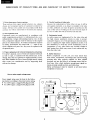
Remov,1 of the rear cover
Disconnect the AC cable.
2) Untighten two screws that secure the upper part
® and two other screws that secure the lower
part @ of the rear cover.
3) Remove the screw © then pull off rear cover.
4) Untighten the screw @.
1)
3. ADJUSTMENTS
• It needs a personal computer (Le. MZ-700) to carry out
adjustments.
• Even though everthing had been adjusted to their optimum points before the unit left the factory, it has to be
adjusted in the following manner whenever parts replacement is done or when an adjustment error should occur.
• Adjusting horizontal synchronization
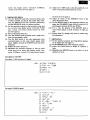
(l) Set the personal computer so that the same letter
should be displayed on an entire screen area (on an
entire data display period: horizontal 36.088tLsec,
vertical 12.811msec), using such as alphabet letter
of "H" (see Test signal I).
(2) Adjust the H-HOLD knob so that the picture should
situate in a middle of the screen.
(3) Try to turn on and off power for a few times to see
that the picture is stayable.
• +B power supply circuit (It needs the voltmeter with
internal resistance of 20kohrns/V.)
(1) Ensure that the ac supply is above the rating below,
depending on power source rating.
228V for 240V set
209V for 220V set.
(2) Adjust the +B potentiometer so that there should
appear the de voltage of HOV between TP-91 and
ground.
NOTE-I) Supply of required HOV may not be obtained
when the source voltage is under the given rating,
but there would be no specific problem_
NOTE-2) Turning the +B potentiometer clockwise increases the +B Voltage. Watch the voltmete while adjusting so as to avoid too much voltage increase.
• Adjusting horizontal amplitude
(1) Set the personal computer so that the letter "H"
should be displayed on an entire screen area (on an
entire data display period: horizontal 36.088tLsec,
vertical 12.811msec) (see Test signal 1).
(2) Adjust the horizontal amplitude coil so that the amplitude on the center should become 245mm.
NOTE) Turning the horizontal amplitude coil clockwise
will make amplitude increased.
• Adjusting vertical amplitude
(1) Set the personal computer so that the letter "H"
should be displayed on an entire screen area (on an
4