1
Communication Connections: RS-232C or RS-485
Description
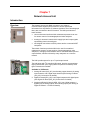
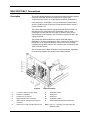
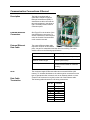
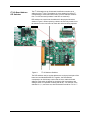
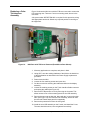
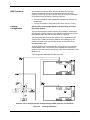
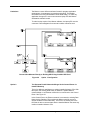
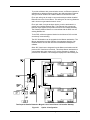
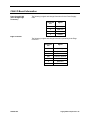
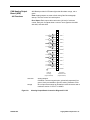
This section provides information for making connections to the NAU
installed SYSCON RS-232C and RS-485 serial port connectors. See
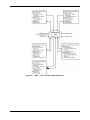
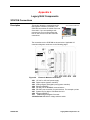
Figure 4 and Figure 5 for connector locations.
Wall Mounted Unit
Cable Compression
Fittings
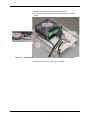
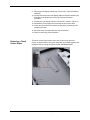
Cables must be run through compression fittings installed in the bottom
or side of the Conduit Connection Box. When the compression fitting is
tightened, it will secure the cable and prevent it from being pulled out
from its SYSCON connector. The compression fitting openings that are
drilled into the box must be suitable for the size cables being run.
The maximum line length is 3937 feet (1200 meters) for RS-485 and 49
feet (15 meters) for RS-232.
Serial Port Cable
Installation
Procedures
The following procedures should be followed when installing serial port
data cable:
1. Before installing RS-232 and/or RS-485 connector(s), turn NAU AC
power OFF.
2. Feed serial cable through the compression fitting, leaving sufficient
cable length within the Conduit Connection Box, leave enough cable
to allow connecting of RS-232C and/or RS-485 connector and to
remove cable tension; tighten fitting.
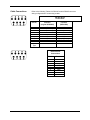
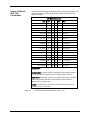
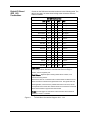
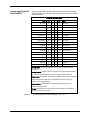
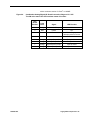
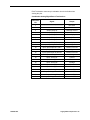
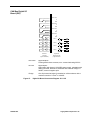
3. Plug RS-232-C and/or RS-485 connector in appropriate SYSCON
serial port connectors (for SYSCON2, refer to the database to
determine which connectors are configured as RS-232 and which
are RS-485).
4. Turn NAU AC power ON.
2000581-001
Installation - 23