1
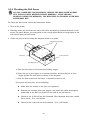
5.3.2 Checking the Ball Screw , DO NOT, UNDER ANY CIRCUMSTANCES, REMOVE THE BALL SCREW OR BALL NUT. DOING SO WILL RELEASE THE BALL BEARINGS. SINCE THE BALL BEARINGS CANNOT BE REPLACED, YOU WILL HAVE TO PURCHASE A NEW BALL SCREW/BALL NUT. To check the ball screw, follow the instructions below. 1. Turn off the power. 2. Manually move the axis from one end to the other and back by rotating the knob on the motor. For Servo Motors, you must push on the crriage plate.Check for rough spots as the axis travels along the ball screw. 3. Check for play in the nut using the diagram below as a guide: push slide back and forth slide plate lock nut (see note) place finger here a) Turn on the power so the motor has holding torque. b) Place the tip of your finger on a stationary surface and lean the ball of your finger against the slide plate as shown in the diagram. c) Push the slide plate back and forth. It should not move at all. If the plate has free play, do the following: Make sure the screws to the plate are tightened. Remove the carriage plate (see page 8) and check the radial bearings on either side of the ball nut (located at the end of the ball screw). Check to see if the ball nut has loosened. The vibrations may have caused this to occur. If so, call Techno. Check to see if the lock nut has loosened. If so, call Techno. 20