1
BeoLab 3500 MKII
Type1601, 1602, 1603, 1604, 1605, 1607, 1608 from serial no. 19343452
Service Manual
English
German and French, versions are available in the Retail System
CONTENTS
Survey of modules ......................................................................................... 1.1
Adjustments .................................................................................................. 2.1
Repair tips ..................................................................................................... 3.1
Disassembly ................................................................................................... 4.1
Insulation test ................................................................................................ 5.1
Specification guidelines for service use ........................................................... 6.1
Wiring diagram . ............................................................................................ 7.1
Block diagrams ..................................................................................... 7.3 – 7.5
Available parts ............................................................................................... 8.1
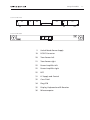
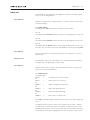
Survey of modules
Seen from the front
22
2
20
21
34
25
31
19
Seen from the back
32
2
35
36
Switch Mode Power Supply
19
DC/DC Converter
20
Transformer left
21
Transformer right
22
Power Amplifier left
22
Power Amplifier right
25
NTC
31
LF Supply and Control
32
Cross Field
34
Plug PCB
35
Display, Keyboard and IR Receiver
36
Microcomputer
22
25
1.
1.
Adjustments
2.
ADJUSTMENTS
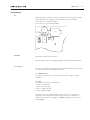
5V
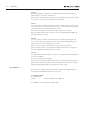
When replacing IC1, LM3578, on PCB2, Switch-Mode Power Supply, the supply
voltage may have to be adjusted to 5V ±0.25V by means of R2 and R10:
- If 5V is above level, install R2 (R1//R2).
- If 5V is below level, install R10 (R3//R10).
C3
R5
R2
R1
IC1
R4
C1
C2
R3
R11
C7
R10
L1
L2
2
SPEAKER
Adjustment of bass/treble sound level.
To be carried out only when replacing a speaker unit or PCB36, Microcomputer.
TEST MODE 01
This test mode permits manual adjustment of speaker bass and treble levels and
can only be executed from stand-by with a Beo4.
- Press MENU 0 1 GO.
The display reads SPK.CAL. to indicate that the product is ready for speaker
calibration.
- Press GO.
The display shows the present adjustment:
‘X X X X’ = left bass (LB).
‘X X X X’ = left treble (LT).
‘X X X X’ = right treble (RT).
‘X X X X’ = right bass (RB).
The value that can be changed is flashing. Press >> or << to change unit of
adjustment, and change the value by pressing the digit keys. When all four
speakers have the desired encoding, press STORE, and abandon test mode by
pressing STOP.
2.
Adjustments
Replacement of PCB36, Microcomputer
The bass and treble levels of the speakers are stored electronically in the
Microcomputer (PCB36). When replacing PCB36, the original bass and treble level
values must be restored:
- Install the new Microcomputer (see section 4, Disassembly, if necessary).
- In TEST MODE 01, enter the values printed on the label in the socket well:
LT (left treble) : X LB (left bass) : X
RT (right treble) : X RB (right bass) : X
- Press STORE STORE when all four speakers have been encoded as desired.
Replacement of a speaker unit
A rated value in dB is printed on the back of the new speaker unit. This value is
used for adjusting the sound level, which is done in TEST MODE 01:
- Note the value on the back of the new speaker unit
- Replace the old speaker unit.
- Execute the point TEST MODE 01.
- The rated value printed on the back of the speaker may be either positive or
negative:
Positive:
If the rated value printed on the back of the speaker is positive, the unit in
question must be damped by X number of steps. Press >> to select speaker, if
necessary (the active speaker is flashing), and enter a new digit (see table).
Negative:
If the rated value printed on the back of the speaker is negative, the other three
units must be damped by X number of steps. Press >> to select the three speakers
in question, and enter new digits (see table).
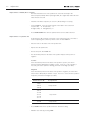
Rated value in dB
X steps down
0.00
+/-0.25
+/-0.50
0 steps down
+/-0.75
+/-1.00
+/-1.251 step down
+/-1.50
+/-1.75
+/-2.00
2 steps down
- Press STORE when all four speakers have the desired encoding.
- Abandon test mode by pressing STOP.
Repair tips
3.
REPAIR TIPS
BeoLab 3500 can be brought into TEST MODE from stand-by with a Beo4, giving
access to the following functions:
TEST MODE 00
Display of: Software version number and time of operation in Audio mode, Video
mode and stand-by.
- Press MENU 0 0 GO.
The display reads: SW X.Y, which is the software version number.
- Press m
The display reads: A: XXXXX, which is the Audio mode operating time in hours x 10.
- Press m
The display reads: B: XXXXX, which is the Video mode operating time in hours x 10.
- Press m
The display reads: C: XXXXX, which is the stand-by operating time in hours x 10.
Press m or p to scroll in the scroll menu, and abandon test mode by pressing STOP.
TEST MODE 01
Electronic adjustment of the bass and treble levels of the speakers. See section 2,
Adjustments.
SERVICE SET-UP
BeoLab 3500 is connected to a Beomaster as an ordinary Master link installation.
As regards option programming, see User’s Guide.
TEST MODE 02
Display of Master Link error types. Gives an identification of the error types that
may occur in the Beolink installation.
-
Press MENU 0 2 GO
The display reads:
ML OK
=
Or
NO ML
=
Or
ERROR 1
=
Or
ERROR 2
=
Or
ERROR 3
=
Or
ERROR 4
=
The Master Link connection is OK.
Master Link is not connected.
Address configuration impossible.
Master Link data pulled low.
Master Link data pulled high.
Data collision on Master Link.
- Press STOP to abandon display of Master Link error types and to delete registered
errors.
The Master Link error system is a part of the software in the product. It registers
communication errors between the microcomputer, the data transceiver circuits
(PCB35) and the products connected to BeoLink. The error types will be described
below, and tips will be given regarding how the cause of the error can be found:
3.
Repair tips
ERROR 1:
Error during address configuration. No address has been allocated because too
many units are connected to the BeoLink.
- Remove all products from BeoLink, and connect them again one at a time until the
error code occurs. Disconnect that product from BeoLink.
ERROR 2:
It is not possible to transmit on BeoLink, because it has been pulled low. The error
may occur if there is no Master Link driver circuit, or as a result of a physical shortcircuit on BeoLink or in the data transceiver circuits.
- Disconnect one product from BeoLink at a time, and see if it starts up.
- Reset the faulty product, and check the connection (cable/plug) and signal path
(the data transceiver circuits).
ERROR 3:
It is not possible to transmit on BeoLink, because it has been pulled high. This
error is caused either by the pull-up resistance in the system having become too
small or by an error in the data transceiver circuit.
- Disconnect one product from BeoLink at a time, and see if it starts up.
- Reset the faulty product, check whether the Master Link cable is too long, and
check the signal path (the data transceiver circuit).
ERROR 4:
The data traffic on BeoLink has been excessive, or a product has jammed and will
not receive telegrams.
- Press the operating sequence again.
- Disconnect one product from BeoLink at a time to determine which product has
jammed. Reset the faulty product, and check the Master Link connection (cable/
plug) and signal path (amplifiers in the data transceiver circuit).
TEST MODE 0 3
Direct selection of Master Link input. Permits the Master Link signal path to be
tested without having a BeoLink master connected.
- Press MENU 0 3 GO
The display reads:
ML SEL.
=
Opens the Master Link signal path.
- Press STOP to close the Master Link signal path.
Disassembly
4.
DISASSEMBLY
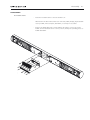
Front fabric frame
- Push the front fabric frame to the side and lift it off.
When both front fabric frames have been removed, PCB35, Display, Keyboard & IR
receiver, PCB36, Microcomputer, and PCB32, Cross field, are accessible:
- Remove the display glass (two screws) and the two plastic covers (four screws).
PCB35 can now be tilted out into service position, thereby also providing access to
PCB36 and PCB32.
32
36
35
4.
Disassembly
Service position
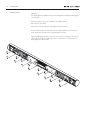
Important!
The display glass and cabinet must be protected against scratches by placing them
on a soft base.
- Remove the sixteen screws, A, behind the front fabric frames.
- Place the front face down.
- Remove the socket well by first removing the two Allen screws.
- Lift the cabinet up and off carefully. Place the cabinet parallel to the electronics
block, and remove the two woofer plugs (22P4) if necessary.
- When assembling the product, lower the electronics block carefully down into the
cabinet. Place the woofer leads at the centre of the cabinet so that they will not
rattle against the cabinet sides.
A
A
A
A
A
A
A
A
A
A
A
A
A
A
A
A
Insulation test
5.
INSULATION TEST
Each set must be insulation tested after dismantling. The test is to be performed
when the set has been re-assembled and is ready for delivery to the customer.
Make the insulation test as follows: Short-circuit the two plug pins of the mains
plug and connect one of the terminals of the insulation tester. Connect the other
terminal of the insulation tester to the chassis of the 8-pin DIN socket.
N.B.!
To avoid ruining the set, it is esential that both insulator test terminals are in really
good mechanical contact.
Now turn slowly the voltage control of the insulation tester until a voltage of 1.3kV
is obtained. Hold it there for 1 second, then turn slowly the voltage down again.
At no point during the testing procedure any flash-overs are permissible.
5.
Specification guidelines for service use
6.
SPECIFICATION GUIDELINES FOR SERVICE USE
BeoLab 3500 MKII
Type 1601 (EU), 1602 (GB), 1603 (USA-CDN), 1604 (JAP), 1605 (AUS)
1607 (KOR), 1608 (CHK)
Concept
X-tra room product
Active stereo loudspeaker with control circuitry, stand-by relay
and IR receiver
Operation
Local operation
Remote operation
Status feedback
Independent sound control
Compatability
Two sensi-touch fields with restriced operation (Mute/on/off/listen-in,
timer on/off)
Beolink 1000 or Beo4, one-way (optional extra)
Red 8 char. LED dot matrix display, (program source, program or
track number, record, clock)
Red LED 1.8mm (Timer indication)
Volume, balance, bass, treble, loudness
Master Link
Wireless 1 via 8-pin DIN plug
Cabinet
Rear finish
Front cloth Center front
Wall bracket
Polished aluminium, high gloss
Black
Black aluminium/plastic
Grey plastic
Placement
Wall
Stand
Wall bracket included
Polished aluminium (optional extra)
Acoustics
Cabinet net volume per channel
0.8 litres
Woofer in each channel
9 cm - 3½”
Tweeter in each channel1.8 cm - 3/4”
Crossover frequency
3000 Hz
Bass reflex principle
Port
Electronics
Overload protection
Volumecontrol
Bass/treble equalization
Yes
+12 dB in relation to central room
±12 dB, 100Hz/20kHz
System data
Principle
Frequency response
Sound Pressure Level
Harmonic distortion 250 -1,000Hz
Harmonic distortion 1,000 - 5,000Hz
Minimum distance to TV
Active, Bass reflex, 2-way, bi-amp,stereo
70 - 22.000 Hz +4 -8 dB, half field
95 dB weighted noise (IEC 268-5),stereo, half room, 3m
<10% 94 dB SPL, 1m
<3% 94 dB SPL, 1m
25cm
6.
Specification guidelines for service use
Power amplifiers
Rated power woofer
Rated power tweeter
Amplifier signal-to-noise ratio
Signal-to-noise ratio
Frequency range
Harmonic distortion
Total harmonic distortion
Cross talk
Active crossover network
Low frequency equalization
High pass filter
35W, 8W
35W, 8W
> 80 dBA, 1W/8W
> 74 dBA, full volume
20 - 20,000 Hz +0 -1 dB
< 0.1%
< 0.3% IHF
50 dB
24 dB/octave Linkwitz/Riley
+12 dB/60 - 250 Hz, ABL
30 dB/octave, 60 Hz
Connections
Mains
Cable included, 3 meters
230V AC, 1601 EU, 1607 KOR, 1608 CHK
240V AC, 1602 GB and 1605 AUS
120V AC, 1603 USA - CDN
100V AC, 1604 JAP
BeoLink Wireless 1 (W1)
8-pin DIN 45326 socket
Dimensions
Total dimensions W x H x D (on wall)111 x 9.5 x 11 cm
Power consumption, operation
95 watts (230V)
Power consumption, stand-by1.1 watt, ‘Dot’ in display
3 watt, ‘Watch’ in display
Weight10 kg, without stand
Optional accessories
Beo4
Wall bracket
Wall bracket
Wall plate
Table stand
Cable cover
Subject to change without notice
Type 1627
Type 1607 - 3031302
3031235
3031333
Type 1606 - 1160611
2560276 (10 pieces x 2.5m)
Wiring diagram
7.
7.
Wiring diagram
7.
AC1-2
AC1 2
AC1 2
AC1 2
AC1 G
AC1 G
AC1 G
AC1 G
AC1 1
AC1-1
AC1 1
AC1 1
12
11
10
9
8
7
6
5
4
3
2
1
P21
1
2
3
4
20
REL1
REL2
GND
10V
PMUTE
PON
PFAIL
PL data
1
2
GNDD
PL in L
3
GND REF
4
5
PL in R
6
MLR+
7
MLRMLL+
8
MLL9
10 V ML -8V5 u?-15V
11 V ML 8V5 u?15V
12
SP ON
MLD+
13
MLD14
22
POWER AMPLIFIER
LEFT
+
N.C.
P4
1
2
3
+
N.C.
P3
1
2
+
-
P8
PLIM
PMUTE
ML?
MCL
SDA
SCL
GND
BAS L
GND
TREB L
PLIM
PMUTE
PFAIL
25
NTC
P10
P18
21
P9
19
TRANSFORMER RIGHT
35
DC/DC
CONVERTER
DISPLAY AND IR RECEIVER
P13
1
2
3
4
5
6
18V
GND
+9V
-18V
GND
-9V
P14
6
5
4
3
2
1
CP1
P8
1
2
ML?
PLIM
MCL
GND
1
2
3
4
5
6
7
8
9
10
11
12
P17
31
LF SUPPLY AND CONTROL
P16
1
2
3
4
5
6
7
8
+9V
-9V
GND
BASS R
TREB R
PLIM
PMUTE
PFAIL
P2
1
2
3
4
5
6
7
8
22
POWER AMPLIFIER
RIGHT
AC
AC
AC
13V
13V
13V
P15
12
11
10
9
8
7
6
5
4
3
2
1
4
3
2
1
AC3 2
AC3 G
AC3 G
AC3 1
AC
P12
13V
12
11
10
9
8
7
6
5
4
3
2
1
P1
P11
AC2-2
AC2-2
AC2-2
AC2 2
AC2 G
AC2 G
AC2 G
AC2 G
AC2-1
AC2-1
AC2-1
AC2 1
N.C.
N.C.
+9V
-9V
MLLMLL+
MLRMLR+
PL in R
GND REF
PL in L
GND
PMUTE
P2
P4
1
2
3
PFAIL
PON
TREB L
GND
BAS L
GND
SCL
SDA
12
11
10
9
8
7
6
5
4
3
2
P6 1
+
-
NTC
MCLR+
MCLRMCLL+
MCLLMLR+
MLRMLL+
MLL-9V
+9V
N.C.
N.C.
P1
1
2
3
4
5
6
7
8
9
10
P24
P3
1
2
25
AC2-2
AC2-2
AC2-2
AC2-2
AC2 G
AC2 G
AC2 G
AC2 G
AC2-1
AC2-1
AC2-1
AC2-1
NC
STROBE
PMUTE
+5V ST.BY
GND
-5V ST.BY
GND
BAS L
GND
TREB L
GND
+9V
-9V
230VAC
230VAC
TIMER
MUTE
IRRX
P5
1
2
3
4
5
6
7
8
9
10
11
12
13
14
MLTX
MLRX
STKEY
OE
NC
GND
GND
+5V
CROSS FIELD PCB
STROBE
MLDMLD+
DATA
CLOCK
32
PON
TIMER
MUTE
IRRX
PLIM
P4
1
2
3
4
5
6
7
8
9
10
11
12
13
14
15
16
17
18
19
20
MLRX
MLTX
SDA
STKEY
PLIM
PFAIL
P2
1
2
3
4
5
6
7
8
1
2
P7
PMUTE
L_LEV
+5V ST.BY
+5VA ST.BY
GND
GND
CLOCK
DATA
OE
-5V ST.BY
MCLTX
22
21
20
19
18
17
16
15
14
13
12
11
10
9
8
7
6
5
4
3
2
1
SWITCH MODE
POWER SUPPLY
+9V
-9V
GND
BAS L
TREB L
230VAC
230VAC
20
19
18
17
16
15
14
13
12
11
10
9
8
7
6
5
4
3
2
1
PFAIL
MLCON
MCLRX
P25
1
2
3
4
5
6
7
8
P20
P3
L LEV
P23
1
2
3
4
TRANSFORMER LEFT
14
13
12
11
10
9
8
7
6
5
4
3
2
1
NC
STROBE
230VAC
230VAC
PFAIL
TIMER
MUTE
IRRX
PLUG PCB
10
9
8
7
6
5
4
3
2
1
NC
GND
GND
+5V
2
P19
PLIM
OE
P1
P22
MAINS
-9V
+9V
GND
TREB L
GND
BAS L
GND
-5V ST.BY
GND
+5V ST.BY
DATA
CLOCK
34
14
13
12
11
10
9
8
7
6
5
4
3
2
1
MLRX
MLTX
SDA
STKEY
PLIM
36
MICRO
COMPUTER
4
3
2
1
MCLTX
P8
1
2
3
4
5
6
7
8
9
10
11
12
13
14
15
16
17
18
19
20
21
22
AC3 1
AC3 G
AC3 G
AC3 2
PFAIL
MLCON
MCLRX
AC1 2
AC1 2
AC1 2
AC1 2
AC1 G
AC1 G
AC1 G
AC1 G
AC1 1
AC1 1
AC1 1
AC1 1
L LEV
12
11
10
9
8
7
6
5
4
3
2
1
Wiring diagram
7.
7.
7.
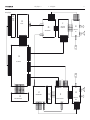
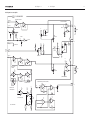
Block diagram
2
TRANSFORMER LEFT
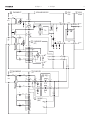
Block diagram
7.
32
35
CROSS
FIELD
DISPLAY,
KEYB.&IR
T1
10V
+
C5
P19-1
P21-4
10V
P23-4
P21-3
P23-3
5V ST.BY
5V
P24-1
PON
REL1
1V 1
TF5
T2
REL2
P21-2
F2
IC1
LM3578
P23-1
R3
P21-1
R10
RL1
5V ST.BY
P4-1
P1-6
-
C5
R5
D2
MAINS IN
R4
P19-2
R2
TF1
7.
SWITCH MODE POWER SUPPLY
R1
20
7.
7/6
P8-17
5
P23-2
P2-3
P9-18
P2-4
P9-17
36
5V ST.BY
5VA ST.BY
µC
5V
C6
P20-1
TR2
MAINS
OUT
22
D3
+
P20-2
P22-1
26V
POWER AMPLIFIER
(LEFT)
C8
26V
AC
D200
35V
+
-9V
F3
26V
26V
AC
P22-12
C1
AC
9V
P2-2
P25-2
P2-1
P25-1
-9V
P24-10
9V
P24-9
P1-12
21 TRANSFORMER RIGHT
13V
19
AC
P10-1
MAINS IN
P12-4
P15-1
P12-3
P15-2
P12-2
P15-3
P10-2
DC/DC
IC1
LM317
D1
-
+
18V
P14-6
P13-1
9V
P13-3
9V
P14-4
P18-10
-18V
P14-3
P13-4
-9V
P13-6
-9V
P14-1
P18-9
C29
13V
AC
P12-1
P15-4
26V
AC
P11-1
SEE PCB 22 POWER
AMPLIFIER LEFT
F5
26V
AC
P11-12
IC2
LM337
P1-1
P1-12
22
POWER AMP.
(RIGHT)
-9V
9V
P2-2
P2-1
-9V
P16-2
9V
P16-1
C30
F4
P4-9
9V
P6-10
-9V
P6-9
31 LF POWER SUPPLY
F3
P4-10
-35V
C2
F2
P2-10
C9
D4
-
T1
-5V ST.BY
P4-3
TR3
F4
TF1
-5V ST.BY
P24-3
P1-1
AC
D3
P9-11
-5V ST.BY
7.
Block diagram
34
7.
7.
Block diagram
32 CROSS FIELD
PLUG PCB
MLDP3-14
MLD+
P3-13
MLDP7-1
MLD+
P7-2
MASTER LINK
SCL
16
1
V ML
P7-14
1
3
4
5
PL D
P3-1
PL DATA
2 6
7
8V5 =>15V
SDA, SCL
3/4IC1
P5-3
SDA
P5-2
PL
31LF
PL DATA
TR3,4,5
P17-2
SDA
P17-3
SCL
5V
SOUND CONTROL
35 DISPLAY, KEYBOARD & IR
R21
10K
IC1
1A
P2-8
P4-13
P1-15
P1-19
SDA
P1-6
P1-20
P1-18
PL RX
PFAIL
P8-3
R78,TR8-10 AND
IC2, TR7
P5
10
PL TX
P8-5
PLIM
P2-6
PMUTE
P2-7
2
P24-11
P25-6
P24-13
P25-8
PL ON
POWER AMP. LEFT
P4-11
5V
P8-17
P2-8
P16-6
P17-10
P16-8
1A
P1-13
PFAIL
1A
PLIM
R78,TR8-10 AND
IC2, TR7
5V
P5-8
P8-10
P2-6
P17-8
P1
16
MLTX
P8-7
P2-16
P2-17
P2-2
P1-22
P2-19
P1-17
36
L-LEV
P8-1
CLOCK
P8-12
P1-11
MLRX
1
P8-6
OE
2
P1-3
P1-10
DATA
P8-11
IRRX
P8-20
P1-12
P1-1
P8-9
STKEY
P8-19
MUTE
P8-18
TIMER
STROBE
P8-22
GND
P8-15
GND
P8-16
C4
5V
MICROCOMPUTER
P8-13
P2-14
ML DATA
TRANSCEIVER
TR9-14,IC8
R6
10K
R7
10K
PLIM
MLTX
P9-3
P8-8
31
POWER AMP. RIGHT
P2-18
TR6
1A
P8-4
P3-11
P121
22
P7-4
8V5 =>15V
P8-2
PMUTE
P2-7
V ML
PFAIL
22
V ML
P2-7
22n
MLDP9-5
MLD+
P9-4
CLOCK
P9-14
14
1/4IC1
1A
3
P2-9
P2-8
P2-15
OE
P9-12
DATA
P9-13
DISPLAY
IC1,2,7
2/4IC6,DP1
STR.
P9-6
32
DATA
P1-14
P2-20
P1-4
P2-13
P1-5
P2-12
GND
P4-2
P1-8
P1
7
STROBE
CLOCK
OE
PON
LCD
CONTRAST
POWER
ON/MUTE
IC4
TR7,8,15
P2-11
P9-10
P4-14
PMUTE
L-LEV
2
P24-14
SMPS
SOFT TOUCH KEYB.
TR3,TR4,2/4IC6
2
IRRX
P9-7
P25-7
P24-12
MLRX
P9-2
PMUTE
P16-7
P4
12
31
32
L-LEV
P2-1
P9-20
D5
P17-9
P5-9
P9-19
P-MUTE
IR RECEIVER
IC3,TR1,2,5,6
P9-1
STKEY
P9-8
MUTE
TIMER
P9-9
TR1
RELAY
P24-2
Block diagram
7.
7.
Block diagram
7.
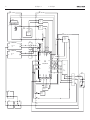
Block diagram for Power amplifier
22
POWER AMPLIFIER
TREBLE FILTER, 4. ORDER HP
3
+
1
2
1/2
IC100
4558
TREBLE IN
P2-5
P1-1,2,3,4
5
6
POWER AMPLIFIER TREBLE
+
7
-
1/2
IC100
4558
1
9V
D200
+
C1
D12
R32
TR3
TO IC1 PIN 6
C14
P1-5,6,7,8
9V
9V
9V
35V
25
NTC
TR1
R5
R4
P2-7
R71
1/2
IC1
STK4171V
18
+
13
P2-8
TO PCB3 ?P
P8-1
TR10
R78
R2
TR2
PMUTE
TR8
PFAIL
TR9
POWER SUPPLY
P8-2
1
-
1/2
IC101
4558
3
2
6
+
-
5
1
1/2
IC103
4558
6
7
1/2
IC103
4558
-
17
TR4
1/2
IC101
4558
-
+
BASS EXTENSION 4. ORDER LP
BASS EXTENSION
2. ORDER HP
5
-9V
+
5
7
3
2
+
-
1
6
+
-
1/2
IC102
4558
2. ORDER HP
7
1/2
IC102
4558
R113
POWER LIMITER BASS (LONG AND SHORT TERM)
12
6
+
7
3
-
2
+
D9
13
+
-
14
3
1/4
IC2
2
R58
1
+
1
-
1/4
IC2
R129
5
D8
9V
1/2
IC104
4558
1/2
IC104
4558
BASS
POWER AMPLIFIER BASS
LDR
BAND PASS FILTER
WITH ADJUSTMENT
P4
1
R52
MUTE
TRANSISTOR
DIFFERENTIAL FILTER
R109
-
R70
2
SIGNAL MUTE
+
R49
3
R114
BASS IN
P2-4
R66
R109
LED
AMPLITUDE DETECTOR
10
9
R128
R130
BASS FILTER WITH ABL
R127
FROM
PCB 5
P9-20
TREBLE
MUTE
TRANSISTOR
TREBLE PROTECT
P1-9,10,11,12
P2
1
R26
TR5
PA MUTE
D4
10
-
TR6
35V
C2
+
R69
-
2
R27
-35V
1/2
IC1
STK4171V
C26
1/4
IC2
+
5
8
6
+
1/4
IC2
7
-
R67
PLIM
P2-6
TR7
TO PCB3 ?P
8.1
Available parts
Available parts
8.1
8.1
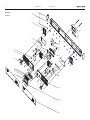
Available parts
9008
9009
BeoLab 3500
1
9011
3
4
9010
2
1
3
2
5
9022
5
5
6
5
7
9012
6
22
25
10
14
6
10
11
11
22
10
6
18
21
6
32
6
13
9017
36
5
5
20
9007
19
20
19
5
35
19
20
19
31
22
14
10
6
25
6
5
13
5
6
6
14
15
10
9018
5
13
14
6
19
13
21
20
5
5
13
6
5
17
13
18
21
16
5
6
6
21
6
5
5
13
22
10
5
6
6
10
6
5
9004
9005
9006
6
6
20
10
5
21
10
16
17
21
4
7
10
6
2
9003
9015
9016
7
15
14
5
9
9014
14
9001
9002
98
34
6
9013
9023
7
8
9019
21
9020
9021
5
5
5
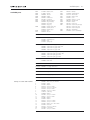
Available parts
Available parts
9001
9002
9003
9004
9005
9006
9007
9008
9009
9010
9011
2576302
3114422
8480340
3907064
3950053
3451207
3169016
3459454
3459108
3459106
3430055
3430056
3430614
2816214
8480259
Distance bolt
Chassis
Tweeter
Rubber
Rubber belt
Front piece
Operating panel
Cap, dark grey
Cap, black
Cap, grey
Cabinet, dark grey
Cabinet, black
Cabinet, grey
Clips
Woofer
9012
9013
9014
9015
9016
9017
9018
9019
9020
9021
9022
9023
3332055
3170300
3152214
6276907
3164935
3114406
8006108
3114422
3451207
3451470
3451472
3451244
3031382
3164920
02Module 8006073 Switch Mode Power Supply
19Module
8006107
2622423
2364066
2816195
DC/DC Converter
Insulating piece
Rivet
Spring clips
20Module
8006091
8006092
8006093
8006094
Transformer left, type 1601, 1607, 1608
Transformer left, type 1602, 1605
Transformer left, type 1603
Transformer left, type 1604
21Module
8006061
8006062
8006063
8006064
Transformer right, type 1601, 1607, 1608
Transformer right, type 1602, 1605
Transformer right, type 1603
Transformer right, type 1604
22Module 8006087 Power Amplifier
6200044 Band cable
25Module 8006109 NTC PCB
31Module 8002938 LF Supply and Control
32Module 8002935 Cross Field
34Module 8002932 Plug PCB
35Module 8002937 Display, Keyboard and IR Receiver
36Module 8002944 Microcomputer
Survey of screws and washers
1
2
3
4
5
6
7
8
9
10
11
13
14
15
16
17
18
19
20
21
2046032
2816267
2622487
2013176
2015154
2013188
2036082
7530119
2640054
2011056
2038111
2622041
2624013
2013177
2038103
2622247
3358305
2015167
2625039
2011055
Allen screw, 6 x 32.7mm
Spring
Washer
Screw, 3 x 6mm
Screw, 3.5 x 25mm
Screw, 3 x 8mm
Screw, 2.5 x 8mm
Solder tag
Washer
Screw, 3 x 16mm
Screw, 3 x 8mm
Washer
Washer
Screw, 3 x 13mm
Screw, 3 x 12mm
Washer, 3.2 x 10.2 x1mm
Heat sink
Screw, 3.5 x 14mm
Lock washer
Screw, 3 x 10mm
8.
Damper
Insulating piece
Wire holder
Mains socket
Cover
Chassis f. sockets
Rectifier PCB
Chassis
Front piece
Cloth front, dark grey
Cloth front, silver
Cloth front, black
Wall fittings
Cover f. wall fittings
8.
Available parts
Accessories
3031302
3031235
3390481
3031333
3390468
1160611
3390480
2560276
Wall bracket, type 1607
Wall bracket
Bag with parts f/Wall bracket
Wall plate
Bag with parts f/Wall plate
Table stand
Bag with parts f/table stand
Cable cover, 10 pieces
Parts not shown
3947547
3947350
3947548
3984215
3040016
6100273
6100329
6100307
6100247
6100086
6100386
6100047
Foam, 3x19mm x 10m
Foam, 3x7mm x 10m
Foam, 6x7mm x 10m
Heat sink compound
Allen key, 4mm
Mainscable EU, type 1601
Mainscable GB, type 1602
Mainscable US, type 1603
Mainscable JAP, type 1604
Mainscable AUS, type 1605
Mainscable KOR, type 1607
Mainscable CHK, type 1608
Packing
3392368 Outer carton
3397921 Foam packing
3946038 Foam foil
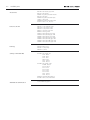
Survey of wire bundles
6276906
6276908
6200239
6276907
Available documentation
Wire bundle, left:
2P23 - 20P21
2P24 - 32P4
2P25 - 22P2
20P22 - 22P1
22P3 - Tweeter
22P4 - Woofer
Wire bundle, right:
31GND - Chassis
31P14 - 19P13
31P15 - 21P5
31P16 - 22P2
31P17 - 32P5
31P18 - 32P6
22P3 - Tweeter
22P4 - Woofer
Varnished tubing PCB set
Mains socket wire bundle
See Retail Ordering System
Bang & Olufsen
DK-7600 Struer
Denmark
Phone +45 96 84 11 22*
Fax +45 97 85 39 11
06-06 A