1
INSTALLATION PROCEDURE
INSTALLATION USING ProGrammer
Step 1 - Initial Set-Up Conditions:
1.
Start ProGrammer.
2.
From the Contents of the On-Line Help select Programming The
Radio. Follow the System Hook-Up procedures described for the
appropriate radio.
3.
Turn the radio on. The radio should be in the programming mode.
Step 2 - Save Current Personality And Flash Code
If the current personality and/or radio (flash) code are not backed up to
disk, now is a good time to read the personality and/or radio (flash)
code and save to disk.
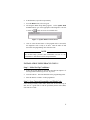
In ProGrammer, from the Radio menu, select Read.
WARNING
The PC Programmer is used to WRITE the radio (flash) code to the
radio. ProGrammmer (all versions) and EDACS-3/CONV-1 version
10 or later can also be used to READ the flash (code) out of the
radio. Do not download the Diagnostic radio code to the radio,
unless there is a backup copy (on floppy diskette or hard drive) of the
current radio code loaded in the radio.
Step 3 - Create Test Personality
Create a test personality. The diagnostic radio code is designed to
support personalities up to 2K bytes in size for all versions of radio
hardware.
NOTE
Standard radio code supports radio personality files up to 14K bytes
in size, depending on radio hardware and software version.
Diagnostic test personalities should be created small. Any existing
personality may be used as a test personality as long as the size of the
file is approximately 2K bytes or less. Problems may occur if a
personality is used that is larger than the recommended size.
5