1
Operator panel
System control
The easy-to-see operator panel provides the user with a
complete range of easy-to-use information.
Touchscreen operator panel
A full color high-resolution 15 inch (diagonal) touchscreen
operator interface panel (HMI) allows the operator to monitor
and control the on-site power system.
All data is configurable for display in either U.S. standard or
metric indications. Screens are configured in a typical
Windows® format. Each screen includes navigation buttons
to allow quick access to other screens that are logically
connected with the screen being displayed. Access to
screens that impact on system settings or sequence of
operation are controlled by a multi-level password system.
The HMI typically includes the following screens and/or
functions:
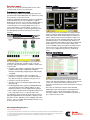
One line diagram
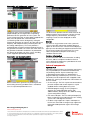
The system control screen provides the operator with the
ability to enable or disable load demand operation, view
timer values and the load demand sequence; initiate test
(with or without load); control the shutdown sequence for
the generator sets in the load demand mode; set the load
demand time delays; set the load demand operation set
points; and display and modify the automatic load add and
shed sequence. The screen also allows setting of the
source availability settings and sequence timing for power
transfer. This screen is password-protected to prevent
access to the configuration functions by unauthorized
users.
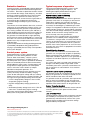
System alarm history
The one-line diagram screen displays system status by a
combination of animation, changing screen color, text
messages, and pop-up indicators. Conditions visible on the
screen include:
• Generator set(s) and bus configuration with generator set,
parallel breaker and bus energized/de-energized
indication (red indicating energized, green indicating deenergized).
• Generator set designation, with control data, and
performance summary screens accessible through hot
keys (links) located on or adjacent to the genset icon.
• Generator set mode (run/off/auto).
• Generator set status (normal/warning/shutdown/load
demand stop).
• Paralleling breaker status (open/closed/tripped/racked
out). Optional status and condition displays of other
breakers and devices can be supplied where required.
• Bus condition (energized or de-energized) Clicking on the
bus icon provides access to a bus AC data screen.
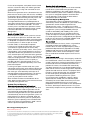
For applications which include automatic transfer switches
(ATS), the Digital MasterControl provides a depiction of the
ATS in the one line, indicating source availability and switch
position. It also is available with detailed information access
to each ATS in the system.
The master control touchscreen records the date, time and
nature of all alarm and shutdown conditions reported on the
system. This log includes all alarms reported on the
generator set and all master control and network connected
functions.
Generator set and transfer switches retain a detailed
independent log of their perspective operating histories,
allowing the user to not only understand system level
operation conditions, but also view details of operation of
any component in the system.
Our energy working for you.™
www.cumminspower.com
©2009 Cummins Power Generation Inc. All rights reserved. Cummins Power Generation and Cummins are registered trademarks of Cummins
Inc. PowerCommand, InPower and “Our energy working for you.” are trademarks of Cummins Power Generation. Other company, product,
or service names may be trademarks or service marks of others. Specifications are subject to change without notice.
S-1611 (9/09) Page 2 of 7