1
BSS 2 Maintenance
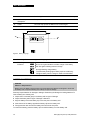
THE BSS 2 SERVICE INDICATOR
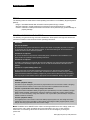
WARNING!
Shock hazard.
Do not disassemble the battery support system. It contains no operator-serviceable components and
dangerous high voltages may be present. Contact a qualified service technician for repair.
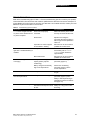
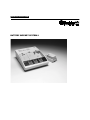
When the BSS 2 ac power cord is inserted into an ac power receptacle, the BSS 2 performs a series of
self-diagnostic tests. Power-up testing is indicated by all the BSS 2 indicator lights briefly illuminating. If
self-testing is successful all the indicators (except POWER) extinguish. If the BSS 2 fails any power-up
self-test, SERVICE lights. Remove the BSS 2 from use and contact a qualified service technician for
repair.
Periodically inspect the BSS 2 for damage or cracks. Check that it is completely closed. Inspect the
power cord for damage, cracks, or bent pins.
The BSS 2 does not contain any operator-serviceable components. If the BSS 2 requires service,
contact a qualified service technician. When calling Medtronic Physio-Control to request service, have
the following information available: model number, serial number, and a description of the problem. If
the device must be sent to a service center or factory, repack it in the original shipping container to
prevent shipping damage.
Test modes, service protocols, fault codes, and other maintenance procedures are described in the
Battery Support System 2 Service Manual. In the USA, call 1.800.442.1142 for technical consultation,
manuals, or parts. Outside the USA, contact your local Medtronic Physio-Control service office.
CLEANING
Clean the BSS 2 case, battery contacts, batteries, and ac power cord with a damp sponge or towel. The
following agents may be used:
•
•
•
•
Mild soap and water
Quaternary ammonium compounds
Isopropyl alcohol
Peracetic (peroxide) acid solutions
CAUTION!
Possible equipment damage.
Do not clean any part of the battery support system or ac power cord with bleach, bleach dilution,
ketones, solvents, flammable agents, phenolic compounds, or abrasive agents. Do not steam,
autoclave, or gas-sterilize the battery support system.
FUSE REPLACEMENT
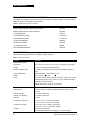
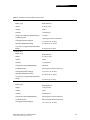
The BSS 2 has two fuses that help provide protection against over current. To replace the fuses, open
the fuse carrier door (located in the power input module) with a flat-bladed screw driver. Verify that the
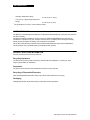
replacement fuses are the same type and rating as listed in the specifications in Table 4-3.
When replacing fuses in the BSS 2, use only 5 x 20mm T 250V fuses approved to IEC 127-2, sheet 1 or
2, such as:
• Schurter FST
• Bussman GDC
• Littelfuse 218
Note: Use of other fuses may cause premature failure of mains fuse.
4-2
Battery Support System 2 Operating Instructions