1
5
Using the Standard 6” Touch Screen
5-1
Introduction
This chapter gives the procedures for configuring your VTC
4/32 controller. This chapter applies only to the standard 6”
touch screen controller. If you have purchased the optional
10” touch screen controller, skip to Chapter 6: “Using the
Optional 10” Interface”.
Configuration of your VTC4/32 controller includes setting the
number of stations and pumps, setting variables such as
convey time and blow-back interval, and setting up
passwords. AEC recommends that you carry out these
procedures in the order given here.
5-2
Setup
Important! Before carrying out these procedures, install all equipment as
L
5-2-1
described in Chapter 4: “Installation”, and in the manual VacTrac™
Series Conveying Systems: Mechanical Components.
Setting Up the System
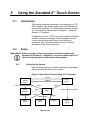
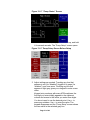
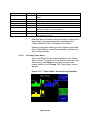
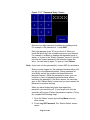
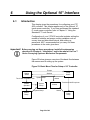
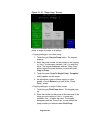
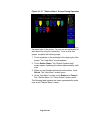
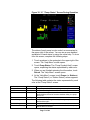
Figure 3 below gives an overview of the basic flow between
the menus used in setting up the system.
Figure 3: Basic Menu Flow for Setup of 6” Controller
Pumps
Station
Status
Touch and Hold Station Icon
Station
Operator
Station Setup
Station
Setup
Pump
Status
Stations
Menu
Menu
Menu
Touch and Hold Pump Icon
Menu
Menu
System Setup
System
Setup
Page 21 of 98
Alarms
Alarms
Pump
Setup