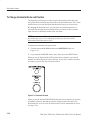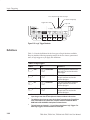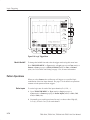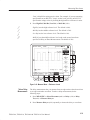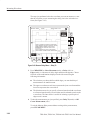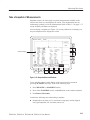
1
User Manual TDS 420A, TDS 430A, TDS 460A & TDS 510A Digitizing Oscilloscopes 070-9701-03 www.tektronix.com Copyright © Tektronix, Inc. All rights reserved. Tektronix products are covered by U.S. and foreign patents, issued and pending. Information in this publication supercedes that in all previously published material. Specifications and price change privileges reserved. Tektronix, Inc., P.O. Box 500, Beaverton, OR 97077 TEKTRONIX and TEK are registered trademarks of Tektronix, Inc. WARRANTY Tektronix warrants that the products that it manufactures and sells will be free from defects in materials and workmanship for a period of three (3) years from the date of shipment. If a product proves defective during this warranty period, Tektronix, at its option, either will repair the defective product without charge for parts and labor, or will provide a replacement in exchange for the defective product. In order to obtain service under this warranty, Customer must notify Tektronix of the defect before the expiration of the warranty period and make suitable arrangements for the performance of service. Customer shall be responsible for packaging and shipping the defective product to the service center designated by Tektronix, with shipping charges prepaid. Tektronix shall pay for the return of the product to Customer if the shipment is to a location within the country in which the Tektronix service center is located. Customer shall be responsible for paying all shipping charges, duties, taxes, and any other charges for products returned to any other locations. This warranty shall not apply to any defect, failure or damage caused by improper use or improper or inadequate maintenance and care. Tektronix shall not be obligated to furnish service under this warranty a) to repair damage resulting from attempts by personnel other than Tektronix representatives to install, repair or service the product; b) to repair damage resulting from improper use or connection to incompatible equipment; c) to repair any damage or malfunction caused by the use of non-Tektronix supplies; or d) to service a product that has been modified or integrated with other products when the effect of such modification or integration increases the time or difficulty of servicing the product. THIS WARRANTY IS GIVEN BY TEKTRONIX IN LIEU OF ANY OTHER WARRANTIES, EXPRESS OR IMPLIED. TEKTRONIX AND ITS VENDORS DISCLAIM ANY IMPLIED WARRANTIES OF MERCHANTABILITY OR FITNESS FOR A PARTICULAR PURPOSE. TEKTRONIX’ RESPONSIBILITY TO REPAIR OR REPLACE DEFECTIVE PRODUCTS IS THE SOLE AND EXCLUSIVE REMEDY PROVIDED TO THE CUSTOMER FOR BREACH OF THIS WARRANTY. TEKTRONIX AND ITS VENDORS WILL NOT BE LIABLE FOR ANY INDIRECT, SPECIAL, INCIDENTAL, OR CONSEQUENTIAL DAMAGES IRRESPECTIVE OF WHETHER TEKTRONIX OR THE VENDOR HAS ADVANCE NOTICE OF THE POSSIBILITY OF SUCH DAMAGES. Table of Contents General Safety Summary . . . . . . . . . . . . . . . . . . . . . . . . . . . . . . . . . . . . Preface . . . . . . . . . . . . . . . . . . . . . . . . . . . . . . . . . . . . . . . . . . . . . . . . . . . vii ix Product Description . . . . . . . . . . . . . . . . . . . . . . . . . . . . . . . . . . . . . . . . . Start Up . . . . . . . . . . . . . . . . . . . . . . . . . . . . . . . . . . . . . . . . . . . . . . . . . . 1–1 1–3 Overview . . . . . . . . . . . . . . . . . . . . . . . . . . . . . . . . . . . . . . . . . . . . . . . . . . At a Glance . . . . . . . . . . . . . . . . . . . . . . . . . . . . . . . . . . . . . . . . . . . . . . . . Tutorial . . . . . . . . . . . . . . . . . . . . . . . . . . . . . . . . . . . . . . . . . . . . . . . . . . . 2–1 2–3 2–11 Overview . . . . . . . . . . . . . . . . . . . . . . . . . . . . . . . . . . . . . . . . . . . . . . . . . . Accessing Help . . . . . . . . . . . . . . . . . . . . . . . . . . . . . . . . . . . . . . . . . . . . . Acquisition Modes . . . . . . . . . . . . . . . . . . . . . . . . . . . . . . . . . . . . . . . . . . Delayed Triggering . . . . . . . . . . . . . . . . . . . . . . . . . . . . . . . . . . . . . . . . . Determining Status . . . . . . . . . . . . . . . . . . . . . . . . . . . . . . . . . . . . . . . . . Display Modes . . . . . . . . . . . . . . . . . . . . . . . . . . . . . . . . . . . . . . . . . . . . . Edge Triggering . . . . . . . . . . . . . . . . . . . . . . . . . . . . . . . . . . . . . . . . . . . . Fast Fourier Transforms (Optional) . . . . . . . . . . . . . . . . . . . . . . . . . . . File System . . . . . . . . . . . . . . . . . . . . . . . . . . . . . . . . . . . . . . . . . . . . . . . . Hardcopy . . . . . . . . . . . . . . . . . . . . . . . . . . . . . . . . . . . . . . . . . . . . . . . . . Horizontal Control . . . . . . . . . . . . . . . . . . . . . . . . . . . . . . . . . . . . . . . . . Limit Testing . . . . . . . . . . . . . . . . . . . . . . . . . . . . . . . . . . . . . . . . . . . . . . Logic Triggering (TDS 510A Only) . . . . . . . . . . . . . . . . . . . . . . . . . . . . Measuring Waveforms . . . . . . . . . . . . . . . . . . . . . . . . . . . . . . . . . . . . . . Probe Cal (TDS 510A Only) . . . . . . . . . . . . . . . . . . . . . . . . . . . . . . . . . . Probe Compensation . . . . . . . . . . . . . . . . . . . . . . . . . . . . . . . . . . . . . . . . Pulse Triggering (TDS 510A Only) . . . . . . . . . . . . . . . . . . . . . . . . . . . . Remote Communication . . . . . . . . . . . . . . . . . . . . . . . . . . . . . . . . . . . . . Roll Mode (TDS 400A Only) . . . . . . . . . . . . . . . . . . . . . . . . . . . . . . . . . Saving and Recalling Setups . . . . . . . . . . . . . . . . . . . . . . . . . . . . . . . . . . Saving and Recalling Waveforms . . . . . . . . . . . . . . . . . . . . . . . . . . . . . Selecting Channels . . . . . . . . . . . . . . . . . . . . . . . . . . . . . . . . . . . . . . . . . . Setting Up Automatically: Autoset and Reset . . . . . . . . . . . . . . . . . . . 3–1 3–3 3–5 3–11 3–15 3–17 3–21 3–27 3–43 3–47 3–55 3–63 3–67 3–73 3–83 3–89 3–91 3–97 3–99 3–103 3–105 3–111 3–113 Getting Started Operating Basics Reference TDS 420A, TDS 430A, TDS 460A & TDS 510A User Manual i Table of Contents Signal Path Compensation . . . . . . . . . . . . . . . . . . . . . . . . . . . . . . . . . . . Taking Cursor Measurements . . . . . . . . . . . . . . . . . . . . . . . . . . . . . . . . Vertical Control . . . . . . . . . . . . . . . . . . . . . . . . . . . . . . . . . . . . . . . . . . . . Video Triggering (TDS 400A) . . . . . . . . . . . . . . . . . . . . . . . . . . . . . . . . . Waveform Differentiation (Optional) . . . . . . . . . . . . . . . . . . . . . . . . . . Waveform Integration (Optional) . . . . . . . . . . . . . . . . . . . . . . . . . . . . . Waveform Math . . . . . . . . . . . . . . . . . . . . . . . . . . . . . . . . . . . . . . . . . . . . Zoom . . . . . . . . . . . . . . . . . . . . . . . . . . . . . . . . . . . . . . . . . . . . . . . . . . . . . 3–115 3–117 3–123 3–127 3–131 3–135 3–139 3–143 Appendix A: Options and Accessories . . . . . . . . . . . . . . . . . . . . . . . . . . Appendix B: Packaging for Shipment . . . . . . . . . . . . . . . . . . . . . . . . . . Appendix C: Remote Display . . . . . . . . . . . . . . . . . . . . . . . . . . . . . . . . . Appendix D: Programmer Disk . . . . . . . . . . . . . . . . . . . . . . . . . . . . . . . A–1 B–1 C–1 D–1 Appendices Glossary Index ii TDS 420A, TDS 430A, TDS 460A & TDS 510A User Manual Table of Contents List of Figures Figure 1–1: Rear Panel Controls Used in Start Up . . . . . . . . . . . . . . . Figure 1–2: ON/STBY Button . . . . . . . . . . . . . . . . . . . . . . . . . . . . . . . . 1–4 1–5 Figure 2–1: Connecting a Probe for the Examples . . . . . . . . . . . . . . . . Figure 2–2: SETUP Button Location . . . . . . . . . . . . . . . . . . . . . . . . . . . Figure 2–3: The Displayed Setup Menu . . . . . . . . . . . . . . . . . . . . . . . . Figure 2–4: SET LEVEL TO 50% Button . . . . . . . . . . . . . . . . . . . . . . Figure 2–5: The Display After Factory Initialization . . . . . . . . . . . . . Figure 2–6: The VERTICAL and HORIZONTAL Controls . . . . . . . Figure 2–7: TRIGGER Controls . . . . . . . . . . . . . . . . . . . . . . . . . . . . . . Figure 2–8: AUTOSET Button Location . . . . . . . . . . . . . . . . . . . . . . . . Figure 2–9: The Display After Pressing Autoset . . . . . . . . . . . . . . . . . Figure 2–10: Display Signals Requiring Probe Compensation . . . . . . Figure 2–11: The Channel Buttons and Lights . . . . . . . . . . . . . . . . . . . Figure 2–12: The Vertical Main Menu and Coupling Side Menu . . . . Figure 2–13: The Menus After Changing Channels . . . . . . . . . . . . . . Figure 2–14: Measure Main Menu and Select Measurement Side Menu . . . . . . . . . . . . . . . . . . . . . . . . . . . . . . . . . . . . . . . . . . . . . . . . . . Figure 2–15: Four Simultaneous Measurement Readouts . . . . . . . . . Figure 2–16: General Purpose Knob Indicators . . . . . . . . . . . . . . . . . Figure 2–17: Snapshot of Channel 1 . . . . . . . . . . . . . . . . . . . . . . . . . . . Figure 2–18: Save/Recall Setup Menu . . . . . . . . . . . . . . . . . . . . . . . . . . 2–11 2–12 2–12 2–13 2–14 2–15 2–16 2–16 2–17 2–17 2–18 2–20 2–21 Figure 3–1: Initial Help Screen . . . . . . . . . . . . . . . . . . . . . . . . . . . . . . . Figure 3–2: Acquisition Menu and Readout . . . . . . . . . . . . . . . . . . . . . Figure 3–3: Acquire Menu — Stop After . . . . . . . . . . . . . . . . . . . . . . . Figure 3–4: Delayed Runs After Main . . . . . . . . . . . . . . . . . . . . . . . . . . Figure 3–5: Delayed Triggerable . . . . . . . . . . . . . . . . . . . . . . . . . . . . . . Figure 3–6: Delayed Trigger Menu (TDS 400A shown) . . . . . . . . . . . . Figure 3–7: Status Menu — System (TDS 400A shown) . . . . . . . . . . . Figure 3–8: Banner Display . . . . . . . . . . . . . . . . . . . . . . . . . . . . . . . . . . Figure 3–9: Display Menu — Style . . . . . . . . . . . . . . . . . . . . . . . . . . . . Figure 3–10: Trigger Point and Level Indicators . . . . . . . . . . . . . . . . . Figure 3–11: Edge Trigger Readouts . . . . . . . . . . . . . . . . . . . . . . . . . . . Figure 3–12: Record View, Trigger Position, and Trigger Level Bar Readouts . . . . . . . . . . . . . . . . . . . . . . . . . . . . . . . . . . . . . . . . . . . 3–3 3–8 3–9 3–11 3–11 3–14 3–15 3–16 3–17 3–19 3–21 TDS 420A, TDS 430A, TDS 460A & TDS 510A User Manual 2–22 2–23 2–24 2–25 2–27 3–22 iii Table of Contents Figure 3–13: Main Trigger Menu — Edge Type . . . . . . . . . . . . . . . . . Figure 3–14: TRIGGER Controls and Status Lights . . . . . . . . . . . . . . Figure 3–15: System Response to an Impulse . . . . . . . . . . . . . . . . . . . . Figure 3–16: Define FFT Waveform Menu . . . . . . . . . . . . . . . . . . . . . . Figure 3–17: FFT Math Waveform in Math1 . . . . . . . . . . . . . . . . . . . . Figure 3–18: Cursor Measurement of an FFT Waveform . . . . . . . . . . Figure 3–19: Waveform Record vs. FFT Time Domain Record . . . . . Figure 3–20: FFT Time Domain Record vs. FFT Frequency Domain Record . . . . . . . . . . . . . . . . . . . . . . . . . . . . . . . . . . . . . . . . . Figure 3–21: How Aliased Frequencies Appear in an FFT . . . . . . . . . Figure 3–22: Windowing the FFT Time Domain Record . . . . . . . . . . Figure 3–23: FFT Windows and Bandpass Characteristics . . . . . . . . Figure 3–24: File Utilities . . . . . . . . . . . . . . . . . . . . . . . . . . . . . . . . . . . . Figure 3–25: File System — Labelling Menu . . . . . . . . . . . . . . . . . . . . Figure 3–26: Utility Menu — System I/O . . . . . . . . . . . . . . . . . . . . . . . Figure 3–27: Date and Time Display . . . . . . . . . . . . . . . . . . . . . . . . . . . Figure 3–28: Connecting the Digitizing Oscilloscope Directly to the Hardcopy Device . . . . . . . . . . . . . . . . . . . . . . . . . . . . . . . . . . . . . Figure 3–29: Connecting the Digitizing Oscilloscope and Hardcopy Device Via a PC . . . . . . . . . . . . . . . . . . . . . . . . . . . . . . . . . . . . . . . . . Figure 3–30: Record View and Time Base Readouts . . . . . . . . . . . . . . Figure 3–31: Horizontal Controls . . . . . . . . . . . . . . . . . . . . . . . . . . . . . Figure 3–32: Aliasing . . . . . . . . . . . . . . . . . . . . . . . . . . . . . . . . . . . . . . . . Figure 3–33: Comparing a Waveform to a Limit Template . . . . . . . . Figure 3–34: Acquire Menu — Create Limit Test Template . . . . . . . . Figure 3–35: Logic Trigger Readouts . . . . . . . . . . . . . . . . . . . . . . . . . . Figure 3–36: Logic Trigger Menu . . . . . . . . . . . . . . . . . . . . . . . . . . . . . Figure 3–37: Logic Trigger Menu — Time Qualified TRUE . . . . . . . Figure 3–38: Measurement Readouts . . . . . . . . . . . . . . . . . . . . . . . . . . Figure 3–39: Measure Menu . . . . . . . . . . . . . . . . . . . . . . . . . . . . . . . . . . Figure 3–40: Measure Menu — Gating . . . . . . . . . . . . . . . . . . . . . . . . . Figure 3–41: Measure Menu — Reference Levels . . . . . . . . . . . . . . . . Figure 3–42: Measure Delay Menu — Delay To . . . . . . . . . . . . . . . . . . Figure 3–43: Snapshot Menu and Readout . . . . . . . . . . . . . . . . . . . . . . Figure 3–44: Probe Cal Menu and Gain Compensation Display . . . . Figure 3–45: Re-use Probe Calibration Data Menu . . . . . . . . . . . . . . . Figure 3–46: How Probe Compensation Affects Signals . . . . . . . . . . . Figure 3–47: Probe Adjustment . . . . . . . . . . . . . . . . . . . . . . . . . . . . . . . Figure 3–48: Pulse Trigger Readouts . . . . . . . . . . . . . . . . . . . . . . . . . . iv 3–23 3–26 3–28 3–29 3–31 3–32 3–34 3–34 3–37 3–40 3–41 3–43 3–44 3–48 3–49 3–50 3–52 3–55 3–56 3–58 3–63 3–64 3–68 3–70 3–72 3–75 3–76 3–78 3–79 3–80 3–81 3–85 3–87 3–89 3–90 3–91 TDS 420A, TDS 430A, TDS 460A & TDS 510A User Manual Table of Contents Figure 3–49: Main Trigger Menu — Glitch Class . . . . . . . . . . . . . . . . Figure 3–50: Main Trigger Menu—Runt Class . . . . . . . . . . . . . . . . . . Figure 3–51: Connecting the Digitizing Oscilloscope to a Controller Figure 3–52: Utility Menu . . . . . . . . . . . . . . . . . . . . . . . . . . . . . . . . . . . . Figure 3–53: Roll Mode (500 Point Record Length) . . . . . . . . . . . . . . Figure 3–54: Trigger Mode Menu . . . . . . . . . . . . . . . . . . . . . . . . . . . . . Figure 3–55: Save/Recall Setup Menu . . . . . . . . . . . . . . . . . . . . . . . . . . Figure 3–56: Save Waveform Menu (TDS 400A shown) . . . . . . . . . . . Figure 3–57: More Menu . . . . . . . . . . . . . . . . . . . . . . . . . . . . . . . . . . . . Figure 3–58: Save Format Menu . . . . . . . . . . . . . . . . . . . . . . . . . . . . . . Figure 3–59: The Channel Readout . . . . . . . . . . . . . . . . . . . . . . . . . . . . Figure 3–60: Waveform Selection Priority . . . . . . . . . . . . . . . . . . . . . . Figure 3–61: Performing a Signal Path Compensation . . . . . . . . . . . . Figure 3–62: Cursor Types . . . . . . . . . . . . . . . . . . . . . . . . . . . . . . . . . . . Figure 3–63: Cursor Modes . . . . . . . . . . . . . . . . . . . . . . . . . . . . . . . . . . Figure 3–64: H Bars Cursor Menu and Readouts . . . . . . . . . . . . . . . . Figure 3–65: Paired Cursor Menu and Readouts . . . . . . . . . . . . . . . . Figure 3–66: Video Line and IRE Units (TDS 400A shown) . . . . . . . . Figure 3–67: Vertical Readouts and Channel Menu . . . . . . . . . . . . . . Figure 3–68: Main Trigger Menu — Video Type . . . . . . . . . . . . . . . . . Figure 3–69: Video Trigger Menu — Class . . . . . . . . . . . . . . . . . . . . . . Figure 3–70: Video Trigger Menu — TV Delay Mode . . . . . . . . . . . . . Figure 3–71: Video Trigger — Scan Parameter . . . . . . . . . . . . . . . . . . Figure 3–72: Video Trigger — Scan Rate & Interlace . . . . . . . . . . . . . Figure 3–73: Derivative Math Waveform . . . . . . . . . . . . . . . . . . . . . . . Figure 3–74: Peak-Peak Amplitude Measurement of a Derivative Waveform . . . . . . . . . . . . . . . . . . . . . . . . . . . . . . . . . . . . . . . . . . . . . . Figure 3–75: Integral Math Waveform . . . . . . . . . . . . . . . . . . . . . . . . . Figure 3–76: H Bars Cursors Measure an Integral Math Waveform Figure 3–77: More Menu . . . . . . . . . . . . . . . . . . . . . . . . . . . . . . . . . . . . Figure 3–78: Dual Waveform Math Menus . . . . . . . . . . . . . . . . . . . . . Figure 3–79: Zoom Mode with Horizontal Lock Set to None . . . . . . . Figure 3–80: Zoom Preview Mode . . . . . . . . . . . . . . . . . . . . . . . . . . . . . 3–92 3–95 3–97 3–98 3–100 3–102 3–104 3–106 3–107 3–108 3–111 3–112 3–116 3–117 3–118 3–119 3–119 3–121 3–124 3–127 3–128 3–129 3–130 3–130 3–132 Figure D–1: Equipment Needed to Run the Example Programs . . . . D–1 TDS 420A, TDS 430A, TDS 460A & TDS 510A User Manual 3–133 3–136 3–137 3–139 3–141 3–145 3–146 v Table of Contents List of Tables vi Table 1–1: Fuse and Fuse Cap Part Numbers . . . . . . . . . . . . . . . . . . . 1–4 Table 3–1: TDS 460A, TDS 430A, and TDS 420A Resolution Bits . . Table 3–2: TDS 510A Resolution Bits . . . . . . . . . . . . . . . . . . . . . . . . . . Table 3–3: XY Format Pairs . . . . . . . . . . . . . . . . . . . . . . . . . . . . . . . . . Table 3–4: Logic Triggers . . . . . . . . . . . . . . . . . . . . . . . . . . . . . . . . . . . . Table 3–5: Measurement Definitions . . . . . . . . . . . . . . . . . . . . . . . . . . Table 3–6: Probe Cal Status . . . . . . . . . . . . . . . . . . . . . . . . . . . . . . . . . Table 3–7: Pulse Trigger Definitions . . . . . . . . . . . . . . . . . . . . . . . . . . . 3–6 3–6 3–20 3–68 3–73 3–86 3–91 Table A–1: International Power Cords . . . . . . . . . . . . . . . . . . . . . . . . Table A–2: Standard Accessories . . . . . . . . . . . . . . . . . . . . . . . . . . . . . Table A–3: Optional Accessories . . . . . . . . . . . . . . . . . . . . . . . . . . . . . . Table A–4: Compatible Probes . . . . . . . . . . . . . . . . . . . . . . . . . . . . . . . Table A–5: Accessory Software . . . . . . . . . . . . . . . . . . . . . . . . . . . . . . . A–2 A–3 A–3 A–4 A–5 TDS 420A, TDS 430A, TDS 460A & TDS 510A User Manual General Safety Summary Review the following safety precautions to avoid injury and prevent damage to this product or any products connected to it. Only qualified personnel should perform service procedures. Injury Precautions Use Proper Power Cord. To avoid fire hazard, use only the power cord specified for this product. Avoid Electric Overload. To avoid electric shock or fire hazard, do not apply a voltage to a terminal that is outside the range specified for that terminal. Avoid Overvoltage. To avoid electric shock or fire hazard, do not apply potential to any terminal, including the common terminal, that varies from ground by more than the maximum rating for that terminal. Avoid Electric Shock. To avoid injury or loss of life, do not connect or disconnect probes or test leads while they are connected to a voltage source. Ground the Product. This product is grounded through the grounding conductor of the power cord. To avoid electric shock, the grounding conductor must be connected to earth ground. Before making connections to the input or output terminals of the product, ensure that the product is properly grounded. Do Not Operate Without Covers. To avoid electric shock or fire hazard, do not operate this product with covers or panels removed. Use Proper Fuse. To avoid fire hazard, use only the fuse type and rating specified for this product. Do Not Operate in Wet/Damp Conditions. To avoid electric shock, do not operate this product in wet or damp conditions. Do Not Operate in an Explosive Atmosphere. To avoid injury or fire hazard, do not operate this product in an explosive atmosphere. Product Damage Precautions Use Proper Power Source. Do not operate this product from a power source that applies more than the voltage specified. Provide Proper Ventilation. To prevent product overheating, provide proper ventilation. Do Not Operate With Suspected Failures. If you suspect there is damage to this product, have it inspected by qualified service personnel. TDS 420A, TDS 430A, TDS 460A & TDS 510A User Manual vii General Safety Summary Symbols and Terms Terms in this Manual. These terms may appear in this manual: WARNING. Warning statements identify conditions or practices that could result in injury or loss of life. CAUTION. Caution statements identify conditions or practices that could result in damage to this product or other property. Terms on the Product. These terms may appear on the product: DANGER indicates an injury hazard immediately accessible as you read the marking. WARNING indicates an injury hazard not immediately accessible as you read the marking. CAUTION indicates a hazard to property including the product. Symbols on the Product. The following symbols may appear on the product: DANGER High Voltage Certifications and Compliances viii Protective Ground (Earth) Terminal ATTENTION Refer to Manual Refer to the specifications chapter of the performance verification and specifications manual for a listing of certifications and compliances that apply to this product. TDS 420A, TDS 430A, TDS 460A & TDS 510A User Manual Preface This is the User Manual for the TDS 420A, TDS 430A, TDS 460A, and TDS 510A Digitizing Oscilloscopes. The Getting Started chapter briefly describes the digitizing oscilloscope, prepares you to install it, and tells you how to put it into service. The Operating Basics chapter covers basic principles of the operation of the oscilloscope. These articles help you understand why your oscilloscope works the way it does. The Reference chapter teaches you how to perform specific tasks. See page 3–1 for a complete list of tasks covered in that chapter. The Appendices provide an option and accessories listing and other useful information. Related Manuals The following documents are related to the use or service of the digitizing oscilloscope: H The TDS Family Programmer Manual describes using a computer to control the digitizing oscilloscope through the GPIB interface. H The TDS 420A, TDS 430A, TDS 460A & TDS 510A Reference gives you a quick overview of how to operate your digitizing oscilloscope. H The TDS 420A, TDS 430A & TDS 460A Performance Verification and TDS 510A Performance Verification manuals tell how to verify the performance of the digitizing oscilloscope. H The TDS Family Option 13 Instruction Manual describes using the optional Centronicsr and RS-232 interfaces for obtaining hardcopy (only for TDS oscilloscopes equipped with that option). H The TDS 420A, TDS 430A & TDS 460A Service Manual and the TDS 510A Service Manual provide information for maintaining and servicing your digitizing oscilloscope to the module level. TDS 420A, TDS 430A, TDS 460A & TDS 510A User Manual ix Preface Conventions In the Getting Started and Reference chapters, you will find various procedures which contain steps of instructions for you to perform. To keep those instructions clear and consistent, this manual uses the following conventions: H Names of front panel controls and menu labels appear in boldface print. H Names also appear in the same case (initial capitals, all uppercase, etc.) in the manual as is used on the oscilloscope front panel and menus. Front panel names are all upper case letters, for example, VERTICAL MENU, CH 1, and SETUP. H Instruction steps are numbered. The number is omitted if there is only one step. H When steps require that you make a sequence of selections using front panel controls and menu buttons, an arrow ( ➞ ) marks each transition between a front panel button and a menu, or between menus. Also, whether a name is a main menu or side menu item is clearly indicated: Press VERTICAL MENU ➞ Coupling (main) ➞ DC (side) ➞ Bandwidth (main) ➞ 100 MHz (side). Using the convention just described results in instructions that are graphically intuitive and simplifies procedures. For example, the instruction just given replaces these five steps: 1. Press the front panel button VERTICAL MENU. 2. Press the main menu button Coupling. 3. Press the side-menu button DC. 4. Press the main menu button Bandwidth, 5. Press the side menu button 100 MHz. H x Sometimes you may have to make a selection from a pop-up menu: Press TRIGGER MENU ➞ Type (main) ➞ Edge (pop-up). In this example, you repeatedly press the main menu button Type until Edge is highlighted in the pop-up menu. TDS 420A, TDS 430A, TDS 460A & TDS 510A User Manual Product Description Your Tektronix digitizing oscilloscope is a superb tool for acquiring, displaying, and measuring waveforms. Its performance addresses the needs of both lab and portable applications with the following features: H 200 MHz maximum analog bandwidth on the TDS 420A 400 MHz maximum analog bandwidth on the TDS 430A, TDS 460A 500 MHz maximum analog bandwidth on the TDS 510A H 500 Megasamples/second maximum digitizing rate on the TDS 510A 100 Megasamples/second maximum digitizing rate on the TDS 420A, TDS 430A, and TDS 460A H Roll mode and triggered roll mode for display of slower waveforms on the TDS 420A, TDS 430A, and TDS 460A H Waveform Math — Invert a single waveform and add, subtract, and multiply two waveforms. On instruments equipped with option 2F, integrate or differentiate a single waveform or perform an FFT (fast fourier transform) on a waveform to display its magnitude or phase versus its frequency. H Up to 30,000-point record length per channel (120,000-point optional) on the TDS 420A, TDS 430A, and TDS 460A. Up to 50,000-point record length per channel on the TDS 510A H Full GPIB software programmability. GPIB hardcopy output. On instruments equipped with option 13, hardcopy output using the RS-232 or Centronics ports. H Complete measurement and documentation ability H Intuitive graphical icon operation blended with the familiarity of traditional horizontal and vertical knobs TDS 420A, TDS 430A, TDS 460A & TDS 510A User Manual 1–1 Product Description H Four channels and four eight-bit digitizers on the TDS 420A, TDS 460A, and TDS 510A. Two channels and two eight-bit digitizers on the TDS 430A H On-line help at the touch of a button Appendix A lists the options and accessories. The product specification is in the performance verification manual that is shipped as a standard accessory with the digitizing oscilloscope. 1–2 TDS 420A, TDS 430A, TDS 460A & TDS 510A User Manual Start Up Before you use the digitizing oscilloscope, ensure that it is properly installed and powered on. Operation To properly install and power on the digitizing oscilloscope, do the following steps: Installation 1. Be sure you have the appropriate operating environment. Specifications for temperature, relative humidity, altitude, vibrations, and emissions are included in performance verification and specification manuals (Tektronix part numbers 070-9705-xx and 070-9706-xx). 2. Leave space for cooling. Do this by verifying that the air intake and exhaust holes on the sides of the cabinet (where the fan operates) are free of any airflow obstructions. Leave at least 2 inches (5.1 cm) free on each side. WARNING. To avoid electrical shock, be sure that the power cord is disconnected before checking the fuse. 3. Check the fuse to be sure it is the proper type and rating (see Figure 1-1 for the fuse location). You can use either of two fuses (see Table 1–1 for the fuse data). 4. Check that you have the proper electrical connections: H For TDS 400A serial number below B080000: 90 to 132 V for 48 Hz through 62 Hz, 100 to 132 V or 180 to 250 V for 48 through 440 Hz, and may require up to 240 W. H For TDS 400A serial number B080000 - Up: 100 to 240 V ±10%, 50/60 Hz nominal, or 115 V ±10% for 400 Hz, and may require up to 240 W. H For TDS 510A all serial numbers: 90 to 250 V for 45 Hz to 440 Hz, and may require up to 300 W. 5. Connect the proper power cord from the rear-panel power connector (see Figure 1-1 for the connector location) to the power system. TDS 420A, TDS 430A, TDS 460A & TDS 510A User Manual 1–3 Start Up TDS 400A ( B080000 - Up) TDS 400A (Below B080000) Power Connector Fuse Fuse TDS 510A Power Connector Power Connector Principal Power Switch Principal Power Switch Fuse Figure 1-1: Rear Panel Controls Used in Start Up Table 1–1: Fuse and Fuse Cap Part Numbers Oscilloscope Fuse Fuse Part Number Fuse Cap Part Number TDS 420A, TDS 430A, and TDS 460A Below B080000: 5 A FAST, 250 V, 3AG B080000 - Up: 8 A, 250V, 3AG 159-0014-00 200-2264-00 159-0046-00 200-2264-00 159-0255-00 200-2265-00 159-0381-00 200-2265-00 .25 inch y 1.25 inch (UL 198.6, 3AG): 6 A FAST, 250 V 159-0013-00 200-2264-00 5 mm y 20 mm (IEC 127): 5 A (T), 250 V 159-0210-00 200-2265-00 Below B080000: 4 A (T), 250 V. B080000 - Up: 6.3 A FAST, 250 V TDS 510A 1–4 TDS 420A, TDS 430A, TDS 460A & TDS 510A User Manual Start Up Front Cover Removal Remove the front cover by grasping its left and right edges and snapping it off of the front subpanel. (When reinstalling, align and snap back on.) Power On 1. Check that the rear-panel principal power switch is on (see Figure 1-1 for the location of the switch ). The principal power switch controls all AC power to the instrument. NOTE. TDS400A instruments with serial number B080000 or above do not have a principal power switch. 2. If the oscilloscope is not powered on (the screen is blank), push the front-panel ON/STBY button to toggle it on (Figure 1-2). Once the digitizing oscilloscope is installed, you can leave the principal power switch on (TDS400A instruments below B080000 and all TDS510A instruments) and use the ON/STBY button . ON/STBY Button Figure 1-2: ON/STBY Button Self Test The digitizing oscilloscope automatically performs power-on tests each time it is turned on. It comes up with a display screen that states whether or not it passed self test. If the self test does not detect any problems, the status display screen disappears a few seconds after the self test is complete. Check the self test results. If the self test fails, call your local Tektronix Service Center. Depending on the type of failure, you may still be able to use the oscilloscope before it is serviced. Power Off Press the ON/STBY switch to turn off the oscilloscope. TDS 420A, TDS 430A, TDS 460A & TDS 510A User Manual 1–5 Start Up Before You Begin Signal Path Compensation (SPC) lets you compensate your oscilloscope for the current ambient temperature. SPC helps ensure maximum possible accuracy for your most critical measurements. See Signal Path Compensation in Section 3 for information on this feature. 1–6 TDS 420A, TDS 430A, TDS 460A & TDS 510A User Manual Overview This chapter describes the basic concepts of operating the digitizing oscilloscope. Understanding the basic concepts of your digitizing oscilloscope helps you use it much more effectively. At a Glance quickly shows you how the oscilloscope is organized and gives some very general operating instructions. It also contains an overview of the following maps: H Front Panel Map H Rear Panel Map H Display Map H Basic Menu Operation The Tutorial contains tutorial examples and explains basic system concepts: H Setting Up for the Examples explains how to set up the digitizing oscilloscope to use the examples. H Example 1: Displaying a Waveform teaches you how to reset the digitizing oscilloscope, display and adjust waveforms, and use the autoset function. H Example 2: Displaying Multiple Waveforms explains how to add, control, and delete multiple waveforms. H Example 3: Taking Automated Measurements introduces you to the automated measurement system. H Example 4: Saving Setups discusses saving and recalling the digitizing oscilloscope setups. H Triggering explains how to set the triggers to convert unstable displays or blank screens into meaningful waveforms. H Scaling and Positioning Waveforms explains how to change the position and displayed size of waveforms. H Measurements explains using automated, cursor, and graticule measurements to display numeric information on the displayed waveforms. To explore these topics in more depth and to read about topics not covered in this chapter, see Reference. Page 3–1 lists the topics covered. TDS 420A, TDS 430A, TDS 460A & TDS 510A User Manual 2–1 Overview 2–2 TDS 420A, TDS 430A, TDS 460A & TDS 510A User Manual At a Glance The At a Glance section contains illustrations of the display and the front and rear panels. These illustrations help you understand and operate the digitizing oscilloscope. This section also contains a visual guide to using the menu system. Front Panel Map — Left Side File System, page 3–43 Side Menu Buttons, page 2–8 ON/STBY Switch, page 1-4 Main Menu Buttons, page 2–8 TDS 420A, TDS 430A, TDS 460A & TDS 510A User Manual CLEAR MENU Removes Menus from the Display 2–3 At a Glance Front Panel Map — Right Side (TDS 400A) Saving and Recalling Setups, page 3–103 Reset the Oscilloscope, page 2–12 Help, page 3–3 Status, page 3–15 Autoset, page 3–113 Saving and Recalling Waveforms, page 3–105 Measurement System, File System, page 3–73 page 3–43 Hardcopy, page 3–47 Acquisition Modes, page 3–5 Cursor Measurements, page 3–117 Selecting Channels, page 3–111 Shift, when lit, selects alternate menus (printed in blue) and coarse knob speed. Display Modes, page 3–17 Remote Communication, page 3–97 WaveformMath, page 3–139 RemovingWaveforms, page 3–111 Ground Probe Compensation, page 3–89 2–4 Vertical Control, page 3–123 Zoom, page 3–143 Horizontal Control, page 3–55 Triggering, page 3–25 Delay Triggering, page 3–11 Edge Triggering, page 3–21 Video Triggering, page 3–127 TDS 420A, TDS 430A, TDS 460A & TDS 510A User Manual At a Glance Front Panel Map — Right Side (TDS 510A) Measurement System, page 3–73 Saving and Recalling Waveforms, page 3–105 File System, page 3–43 Cursor Measurements, page 3–117 Display Modes, page 3–17 Remote Communication, page 3–97 Hardcopy, page 3–47 File System, page 3–43 Acquisition Modes, page 3–5 Cursor Measurements, page 3–117 Autoset, page 3–113 Help, page 3–3 Status, page 3–15 Saving and Recalling Setups, page 3–103 Reset the Oscilloscope, page 2–12 Selecting Channels, page 3–111 Waveform Math, page 3–139 Vertical Control, page 3–123 Zoom, page 3–143 Removing Waveforms, page 3–111 Ground Horizontal Control, page 3–55 TDS 420A, TDS 430A, TDS 460A & TDS 510A User Manual Triggering, page 3–25 Delay Triggering, page 3–11 Edge Triggering, page 3–21 Logic Triggering, page 3–67 Pulse Triggering, page 3–91 Probe Compensation, page 3–89 2–5 At a Glance Rear Panel Map GPIB Connector Centronics Connector (Optional) RS-232 Connector (Optional) TDS 400A VIDEO VGA (Below B080000) Compatible Connector, page C–1 Principal Power Switch, page 1–3 Centronics Connector (Optional) Fuse, page 1–3 Power Connector, page 1–3 AUX TRIGGER/EXT CLOCK (Provides Auxiliary Trigger and External Clock Input) RS-232 Connector (Optional) Principal Power Switch, page 1–5 Serial Number Fuse, page 1–3 Power Connector, page 1–3 TDS 400A (B080000 - Up) GPIB Connector VGA Output (Monochrome) Rear Panel Connectors SIGNAL OUTPUT – (Provides CH3 analog signal output) AUX TRIGGER INPUT – (Provides auxiliary trigger signal input) MAIN TRIGGER OUTPUT – (Provides main trigger (TTL) output) Fuse, page 1–3 Serial Number Power Connector, page 1–3 Security Bracket DELAYED TRIGGER OUTPUT – (Provides delayed trigger (TTL) output) TDS 510A 2–6 TDS 420A, TDS 430A, TDS 460A & TDS 510A User Manual At a Glance Display Map Acquisition Status, page 3–7 Trigger Position (T), page 3–25 Indicates position of vertical bar cursors in the waveform record When present, the general purpose The value entered with the knob makes coarse adjustments; general purpose knob. when absent, fine adjustments. Waveform Record Icon When the general purpose knob is activated, the knob icon appears here. Shows what part of the waveform record is displayed, page 3–55. Cursor Measurements, page 3–117 Trigger level on waveform (may be an arrow at right side of screen instead of a bar) The side menu with choices of specific actions Channel Level and Waveform Source Trigger Parameters, page 3–21 Vertical Scale of Each Channel, page 3–123 The main menu with choices of major actions TDS 420A, TDS 430A, TDS 460A & TDS 510A User Manual Horizontal Scale and Time Base Type, page 3–55 2–7 At a Glance To Operate a Menu (TDS 400A) 1 Press front-panel menu button. 2 Press one of these buttons to select from main menu. 3 Press one of these buttons to select from side menu (if displayed). 4 If side menu item has an adjustable value (shown in reverse video), adjust it with the general purpose knob. 2–8 TDS 420A, TDS 430A, TDS 460A & TDS 510A User Manual At a Glance To Operate a Menu (TDS 510A) 1 Press front-panel menu button. (Press SHIFT first if button label is blue.) 2 Press one of these buttons to select from main menu. 3 Press one of these buttons to select from side menu (if displayed). 4 If side menu item has an adjustable value (shown in reverse video), adjust it with the general purpose knob or keypad. TDS 420A, TDS 430A, TDS 460A & TDS 510A User Manual 2–9 At a Glance To Operate a Pop-Up Menu Press to display pop-ups. Press to remove menus from screen. Press again to make selection. Alternatively, press SHIFT first to make selection in the opposite direction. A pop-up selection changes the other main menu titles. 2–10 TDS 420A, TDS 430A, TDS 460A & TDS 510A User Manual Tutorial This section quickly acquaints you with some of the fundamental operations required to use your digitizing oscilloscope to take measurements. Start this tutorial by doing Setting Up for the Examples. Setting Up for the Examples Perform the following tasks to connect input signals to the digitizing oscilloscope, to reset it, and to become acquainted with its display screen. Once completed, these tasks ready the digitizing oscilloscope for use in the examples that follow. Connect the Input Signal Remove all probes and signal inputs from the input BNC connectors along the lower right of the front panel. Then, using one of the probes supplied with the digitizing oscilloscope, connect from the CH 1 connector of the digitizing oscilloscope to the Probe Compensation connector (Figure 2-1). TDS 400A TDS 510A Figure 2-1: Connecting a Probe for the Examples TDS 420A, TDS 430A, TDS 460A & TDS 510A User Manual 2–11 Tutorial Reset the Oscilloscope Do the following steps to reset the digitizing oscilloscope to a known factory default state. (Reset the oscilloscope anytime you begin a new task and need to “start fresh” with known default settings.) 1. Press the save/recall SETUP button to display the Setup menu (see Figure 2-2). SETUP Button Figure 2-2: SETUP Button Location The digitizing oscilloscope displays main menus along the bottom of the screen. Figure 2-3 shows the Setup main menu. OK Confirm Factory Init Menu Item and Button Recall Factory Setup Menu Item and Button Figure 2-3: The Displayed Setup Menu 2. Press the button directly below the Recall Factory Setup menu item. The display shows side menus along the right side of the screen. The buttons to select these side menu items are to the right of the side menu. Because an accidental instrument reset could destroy a setup that took a long time to create, the digitizing oscilloscope asks you to verify the Recall Factory Setup selection (see Figure 2-3). 3. Press the button to the right of the OK Confirm Factory Init side menu item. 2–12 TDS 420A, TDS 430A, TDS 460A & TDS 510A User Manual Tutorial NOTE. This manual uses the following notation to represent the sequence of selections you made in steps 1, 2 and 3: Press save/recall SETUP ➞ Recall Factory Setup (main) ➞ OK Confirm Factory Init (side). Note that a clock icon appears on screen. The oscilloscope displays this icon when performing operations that take longer than several seconds. 4. Press SET LEVEL TO 50% (see Figure 2-4) to be sure the oscilloscope triggers on the input signal. SET LEVEL TO 50% Button Figure 2-4: SET LEVEL TO 50% Button Examine the Display Elements Read the following information to become familiar with the oscilloscope display. Figure 2-5 shows the display that results from the oscilloscope reset. There are several important points to observe: H The trigger level bar shows that the waveform is triggered at a level near 50% of its amplitude (from step 4). H The trigger position indicator shows that the trigger position of the waveform is located at the horizontal center of the graticule. H The channel reference indicator shows the vertical position of channel 1 with no input signal. This indicator points to the ground level for the channel when its vertical offset is set to 0 V in the vertical menu; when vertical offset is not set to 0 V, the indicator points to the vertical offset level. H The trigger readout shows that the digitizing oscilloscope is triggering on channel 1 (Ch1) on a rising edge and that the trigger level is about 200-300 mV. H The time base readout shows that the main time base is set to a horizontal scale of 500 ms/div. TDS 420A, TDS 430A, TDS 460A & TDS 510A User Manual 2–13 Tutorial H The channel readout indicates that channel 1 (Ch1) is displayed with DC coupling. (In AC coupling, ~ appears after the volts/div readout.) The digitizing oscilloscope always displays channel 1 at reset. Right now, the channel, time base, and trigger readouts appear in the graticule area because a menu is displayed. You can press the CLEAR MENU button at any time to remove any menus and to move the readouts below the graticule. Trigger Position Indicator Channel Ground Reference Indicator Channel Readout Time Base Readout Trigger Readout Figure 2-5: The Display After Factory Initialization 2–14 TDS 420A, TDS 430A, TDS 460A & TDS 510A User Manual Tutorial Example 1: Displaying a Waveform The digitizing oscilloscope provides front panel knobs for you to adjust a waveform, or it can automatically set up its controls to display a waveform. Do the following tasks to learn how to adjust a waveform and how to autoset the digitizing oscilloscope. Adjusting the Waveform Display The display shows the probe compensation signal. It is a 1 kHz square wave of approximately 0.5 V amplitude. Do the following steps to adjust the size and placement of the waveform using the front-panel knobs. Figure 2-6 shows the main VERTICAL and HORIZONTAL sections of the front panel. Each has SCALE and POSITION knobs. 1. Turn the vertical SCALE knob clockwise. Observe the change in the displayed waveform and the channel readout at the bottom of the display. Figure 2-6: The VERTICAL and HORIZONTAL Controls 2. Turn the vertical POSITION knob first one direction, then the other. Observe the change in the displayed waveform. Then return the waveform to the center of the graticule. TDS 420A, TDS 430A, TDS 460A & TDS 510A User Manual 2–15 Tutorial 3. Turn the horizontal SCALE knob one click clockwise. Observe the time base readout at the bottom of the display. The time base should be set to 200 ms/div now, and you should see two complete waveform cycles on the display. Autoset the Oscilloscope When you first connect a signal to a channel and display it, the signal displayed may not be scaled and triggered correctly. Use the autoset function and you should quickly get a meaningful display. You should have a stable display of the probe compensation waveform from the last step. Do the following steps to first create an unstable display and then to automatically obtain a stable display: 1. To create an unstable display, slowly turn the trigger MAIN LEVEL knob (see Figure 2-7) first one direction, then the other. Observe what happens when you move the trigger level above the highest part of the displayed waveform. Leave the trigger level in that untriggered state. 2. Press AUTOSET (see Figure 2-8) and observe the stable waveform display. MAIN LEVEL Knob Figure 2-7: TRIGGER Controls AUTOSETButton Figure 2-8: AUTOSET Button Location Figure 2-9 shows the display after pressing AUTOSET. If necessary, you can adjust the waveform using the knobs discussed earlier in this example. 2–16 TDS 420A, TDS 430A, TDS 460A & TDS 510A User Manual Tutorial Figure 2-9: The Display After Pressing Autoset NOTE. If the corners on your displayed signal look rounded or pointed (see Figure 2-10), then you may need to compensate your probe. See pages 3–83 and 3–89 for probe calibration and compensation procedures. Figure 2-10: Display Signals Requiring Probe Compensation TDS 420A, TDS 430A, TDS 460A & TDS 510A User Manual 2–17 Tutorial Example 2: Displaying Multiple Waveforms In this example you learn how to display and control more than one waveform at a time. Adding a Waveform The VERTICAL section of the front panel contains the channel selection buttons. On the TDS 420A, TDS 460A, and TDS 510A Digitizing Oscilloscopes, they are CH 1, CH 2, CH 3, CH 4, and MORE (Figure 2-11). On the TDS 430A, they are CH 1, CH 2, and MORE. Figure 2-11: The Channel Buttons and Lights Each of the channel (CH) buttons has a light above or beside its label. Do the following steps to add a waveform to the display: 1. If you are not continuing from the previous example, follow the instructions on page 2–11 under the heading Setting Up for the Examples. 2. Press SETUP ➞ Recall Factory Setup (main) ➞ OK Confirm Factory Init (side). 3. Press AUTOSET. 4. Press CH 2. The display shows a second waveform, which represents the signal on channel 2. 2–18 TDS 420A, TDS 430A, TDS 460A & TDS 510A User Manual Tutorial There are several other things to observe: H The channel readout on the display now shows the settings for both Ch1 and Ch2. H There are two channel indicators at the left edge of the graticule. Right now, they overlap. H The light by the CH 2 button is now on, and the vertical controls are now set to adjust channel 2. H The trigger source is not changed by adding a channel. (You can change the trigger source by using the TRIGGER MENU.) 5. Turn the vertical POSITION knob clockwise to move the channel 2 waveform up on the graticule. Notice that the channel reference indicator for channel 2 moves with the waveform. 6. Press VERTICAL MENU ➞ Coupling (main). The vertical menu gives you control over many vertical channel parameters (Figure 2-12). Although there can be more than one channel displayed, the vertical menu and buttons only adjust the selected channel. Each menu item in the Vertical menu displays a side menu. Right now, the Coupling item in the main menu is highlighted, which means that the side menu shows the coupling choices. 7. Press W (side) to toggle the selection to 50 W; this changes the input coupling of channel 2 from 1 MW to 50 W. The channel readout for channel 2 (near the bottom of the graticule) now shows an W indicator. TDS 420A, TDS 430A, TDS 460A & TDS 510A User Manual 2–19 Tutorial Ch2 Reference Indicator Side Menu Title Figure 2-12: The Vertical Main Menu and Coupling Side Menu Assign Controls to Another Channel Pressing a channel (CH) button sets the vertical controls to that channel. It also adds the channel to the display if that waveform is not already displayed. To explore assigning controls to different channels, do the following steps: 1. Press CH 1. Observe that the side menu title shows Ch1 (see Figure 2-13) and that the indicator next to CH 1 is on. Note the highlighted menu item in the side menu also changes from the 50 W channel 2 setting to the 1 MW impedance setting of channel 1. 2. Press CH 2 ➞ W (side) to toggle the selection to 1 MW. This returns the coupling impedance of channel 2 to its initial state. 2–20 TDS 420A, TDS 430A, TDS 460A & TDS 510A User Manual Tutorial Side Menu Title Figure 2-13: The Menus After Changing Channels Remove a Waveform Pressing the WAVEFORM OFF button removes the waveform for the currently selected channel. If the waveform you want to remove is not already selected, select that channel using the channel (CH) button. To remove a waveform from the display, do the following steps: 1. Press WAVEFORM OFF (under the vertical SCALE knob). Since the CH 2 light was on when you pressed the WAVEFORM OFF button, the channel 2 waveform was removed. The channel (CH) lights now indicate channel 1. Channel 1 has become the selected channel. When you remove the last waveform, all the CH lights are turned off. 2. Press WAVEFORM OFF again to remove the channel 1 waveform. TDS 420A, TDS 430A, TDS 460A & TDS 510A User Manual 2–21 Tutorial Example 3: Taking Automated Measurements The digitizing oscilloscope can measure many waveform parameters automatically and read out the results on screen. Do the following tasks to discover how to set up the oscilloscope to measure waveforms automatically. Display Measurements Automatically To take automated measurements, do the following steps: 1. If you are not continuing from the previous example, follow the instructions on page 2–11 under the heading “Setting Up for the Examples.” 2. Press SETUP ➞ Recall Factory Setup (main) ➞ OK Confirm Factory Init (side). 3. Press AUTOSET. 4. Press MEASURE to display the Measure main menu (see Figure 2-14). Figure 2-14: Measure Main Menu and Select Measurement Side Menu 5. If it is not already selected, press Select Measrmnt (main). The readout for that menu item indicates which channel the measurement will be taken from. All automated measurements are made on the selected channel. 2–22 TDS 420A, TDS 430A, TDS 460A & TDS 510A User Manual Tutorial The Select Measurement side menu lists the measurements that can be taken. Up to four can be taken and displayed at any one time. Pressing the button next to the –more– menu item displays the other measurement selections. 6. Press Frequency (side). If the Frequency menu item is not visible, press –more– (side) repeatedly until the Frequency item appears, then press Frequency (side). Observe that the frequency measurement appears within the right side of the graticule area. The measurement readout includes the notation Ch1, meaning that the measurement is taken on the channel 1 waveform. (To take a measurement on another channel, select that channel, and then select the measurement.) 7. Press Positive Width (side) ➞ –more– (side) ➞ Rise Time (side) ➞ Positive Duty Cycle (side). All four measurements are displayed. 8. To move the measurement readouts outside the graticule area, press CLEAR MENU (see Figure 2-15). Figure 2-15: Four Simultaneous Measurement Readouts TDS 420A, TDS 430A, TDS 460A & TDS 510A User Manual 2–23 Tutorial Remove Measurement Readouts Examine the Measurement Reference Levels To remove measurements you no longer want displayed: Press MEASURE ➞ Remove Measrmnt (main) ➞ Measurement 1, Measurement 2, and Measurement 4 (side) to remove those measurements. Leave the rise time measurement displayed. To examine the current values: Press Reference Levels (main) ➞ High Ref (side). General Purpose Knob Setting and Readout General Purpose Knob Icon Highlighted Menu Item with Boxed Readout Value Figure 2-16: General Purpose Knob Indicators Change the Measurement Reference Levels By default, the measurement system uses the 10% and 90% levels of the waveform for taking the rise time measurement. You can change these values to other percentages or change them to absolute voltage levels. To examine the current values, press Reference Levels (main) ➞ High Ref (side). The general purpose knob is now set to adjust the high reference level (Figure 2-16). 2–24 TDS 420A, TDS 430A, TDS 460A & TDS 510A User Manual Tutorial There are several important things to observe on the screen: H The knob icon appears at the top of the screen. The knob icon indicates that the general purpose knob is set to adjust a parameter. H The upper right corner of the screen shows the readout High Ref: 90%. H The High Ref side menu item is highlighted, and a box appears around the 90% readout in the High Ref menu item. The box indicates that the general purpose knob is currently set to adjust that parameter. To adjust the high level to 80%, turn the general purpose knob. Display a Snapshot of Automated Measurements You can pop up a display of almost all of the automated measurements. To display a snapshot of automated measurements of the selected channel, do the following steps: 1. Press Snapshot (main) to pop up a snapshot of all available single waveform measurements. (See Figure 2-17). Figure 2-17: Snapshot of Channel 1 TDS 420A, TDS 430A, TDS 460A & TDS 510A User Manual 2–25 Tutorial Example 4: Saving Setups The digitizing oscilloscope can save its control settings and recall them later to quickly re-establish the previously saved state. Do the following tasks to learn how to save, and then recall, a setup. Save a Setup First, you need to create an instrument setup you want to save. Perform the following steps to create and save a setup that is complex enough that you might prefer not to go through all these steps each time you want that display: 1. If you are not continuing from the previous example, follow the instructions on page 2–11 under the heading Setting Up for the Examples. 2. Press SETUP ➞ Recall Factory Setup (main) ➞ OK Confirm Factory Init (side). 3. Press ➞ AUTOSET. 4. Press MEASURE ➞ Select Measrmnt (main) ➞ Frequency (side). (Press the –more– side menu item if the Frequency selection does not appear in the side menu.) 5. Press CH 2 ➞ CLEAR MENU. To save the setup, do the following steps: 6. Press SETUP ➞ Save Current Setup (main) to display the Setup main menu (see Figure 2-18). 2–26 TDS 420A, TDS 430A, TDS 460A & TDS 510A User Manual Tutorial Figure 2-18: Save/Recall Setup Menu 7. Press one of the To Setup side menu buttons to store the current instrument settings into that setup location. Remember which setup location you selected for use later. Once you have saved a particular setup, you can change the settings as you wish, knowing that you can come back to that setup at any time. 8. Press MEASURE ➞ Positive Width (side) to add that measurement to the display. Recall a Setup To recall the setup, press SETUP ➞ Recall Saved Setup (main) ➞ Recall Setup (side) for the setup location you used in the last exercise. TDS 420A, TDS 430A, TDS 460A & TDS 510A User Manual 2–27 Tutorial 2–28 TDS 420A, TDS 430A, TDS 460A & TDS 510A User Manual Overview This chapter describes the details of operating the digitizing oscilloscope. It contains an alphabetical list of tasks you can perform with the digitizing oscilloscope. Use this chapter to answer specific questions about instrument operation. The following tasks are included: H Accessing Help H Remote Communication H Acquisition Modes H Roll Mode H Delayed Triggering H Saving and Recalling Setups H Determining Status H Saving and Recalling Waveforms H Display Modes H Selecting Channels H Edge Triggering H Setting up Automatically H Fast Fourier Transforms H Signal Path Compensation H File System H Taking Cursor Measurements H Hardcopy H Vertical Control H Horizontal Control H Video Triggering H Limit Testing H Waveform Differentiation H Measuring Waveforms H Waveform Integration H Probe Cal H Waveform Math H Probe Compensation H Zoom H Pulse Triggering Many of these tasks list steps you perform to accomplish the task. You should read Conventions on page x of Preface before reading about these tasks. TDS 420A, TDS 430A, TDS 460A & TDS 510A User Manual 3–1 Overview 3–2 TDS 420A, TDS 430A, TDS 460A & TDS 510A User Manual Accessing Help The on-line help system provides brief information about each of the digitizing oscilloscope controls. To use the on-line help system: Press HELP to display information on any front panel button, knob, or menu item (see Figure 3-1). Press HELP again to return to the regular operating mode. Whenever the oscilloscope is in help mode, pressing any button (except HELP or SHIFT), turning any knob, or pressing any menu item displays help text on the screen that discusses that control. On-line help is available for each menu selection displayed at the time the HELP button is first pressed. If you are in help mode and want to see help on selections from non-displayed menus, you first exit help mode, display the menu you want information on, and press HELP again to re-enter help mode. Figure 3-1: Initial Help Screen TDS 420A, TDS 430A, TDS 460A & TDS 510A User Manual 3–3 Accessing Help 3–4 TDS 420A, TDS 430A, TDS 460A & TDS 510A User Manual Acquisition Modes The acquisition system has several options for converting analog data into digital form. The Acquisition menu lets you determine the acquisition mode, whether or not to permit equivalent time sampling, and how to start and stop acquisitions. Description of Modes The digitizing oscilloscope supports five acquisition modes: H Sample H Peak Detect H Hi Res H Envelope H Average The Sample, Peak Detect, and Hi Res modes operate in real-time on a single trigger event, provided the digitizing oscilloscope can acquire enough samples for each trigger event. Envelope and Average modes operate on multiple acquisitions. The digitizing oscilloscope averages or envelopes several waveforms on a point-by-point basis. Sample Mode Peak Detect Mode In Sample mode, the oscilloscope creates a record point by saving the first sample (of perhaps many) during each acquisition interval. (An acquisition interval is the time covered by the waveform record divided by the record length.) This is the default mode. Peak Detect mode alternates between saving the highest sample in one acquisition interval and lowest sample in the next acquisition interval. This mode only works with real-time, non-interpolated sampling. If you set the time base so fast that it requires real-time interpolation or equivalent-time sampling, the mode automatically changes from Peak Detect to Sample, although the menu selection does not change. Hi Res Mode In Hi Res mode, the digitizing oscilloscope averages all samples taken during an acquisition interval to create a record point. That average results in a higher-resolution, lower-bandwidth waveform. TDS 420A, TDS 430A, TDS 460A & TDS 510A User Manual 3–5 Acquisition Modes NOTE. In Hi Res mode the frequency of the external clock signal (TDS 460A, TDS 430A, and TDS 420A only) must be less than or equal to the frequency set in the external clock menu. If the frequency of the external clock signal is greater than the frequency in the menu, the displayed waveform will have the wrong amplitude. This mode only works with real-time, non-interpolated sampling. If you set the time base so fast that it requires real-time interpolation or equivalent-time sampling, the mode automatically becomes Sample, although the menu selection does not change. A key advantage of Hi Res is its potential for increasing resolution regardless of the input signal. Tables 3–1 and 3–2 illustrate how you can obtain up to 15 significant bits with Hi Res mode. Note that resolutions above 15 bits are not allowed. The bits of resolution shown in the tables are theoretically achievable. Actual resolution may vary as a function of the correlated noise sources in the test environment. Table 3–1: TDS 460A, TDS 430A, and TDS 420A Resolution Bits Time Base Speed Bits of Resolution 1 ms and faster 8 bits 2 ms to 5 ms 9 bits 10 ms to 20 ms 10 bits 50 ms to 100 ms 11 bits 200 ms to 500 ms 12 bits Table 3–2: TDS 510A Resolution Bits 3–6 Time Base Speed Bits of Resolution 400 ns and faster 8 bits 1 ms to 2 ms 9 bits 5 ms to 10 ms 10 bits 20 ms to 50 ms 11 bits 50 ms to 100 ms 11 bits 100 ms to 200 ms 12 bits 500 ms 13 bits 1 ms to 2 ms 14 bits 5 ms and slower 15 bits TDS 420A, TDS 430A, TDS 460A & TDS 510A User Manual Acquisition Modes Envelope Mode Envelope mode lets you acquire and display a waveform record that shows the extremes in variation over several acquisitions. You specify the number of acquisitions over which to accumulate the data. The oscilloscope saves the highest and lowest values in two adjacent intervals similar to the Peak Detect mode. But Envelope mode, unlike Peak Detect, gathers peaks over many trigger events. The final display shows the most extreme values for all the acquisitions for each point in the waveform record. NOTE. Envelope and Average acquisition modes disable Roll mode. See Roll Mode beginning on page 3–99. Average Mode Average mode lets you acquire and display a waveform record that is the averaged result of several acquisitions. This mode reduces random noise. The oscilloscope acquires data after each trigger event using Sample mode. Checking the Acquisition Readout To determine the acquisition sampling rate, the acquisition state (running or stopped), and the acquisition mode, check the acquisition readout at the top of the display (see Figure 3-2). The “running” state shows the sample rate (or External Clock when external clock is enabled) and acquisition mode. The “stopped” state shows the number of acquisitions acquired since the last stop or major change. TDS 420A, TDS 430A, TDS 460A & TDS 510A User Manual 3–7 Acquisition Modes Acquisition Readout Figure 3-2: Acquisition Menu and Readout Selecting an Acquisition Mode The oscilloscope provides several acquisition modes. To bring up the acquisition menu (Figure 3-2) and choose how the digitizing oscilloscope creates points in the waveform record: Press SHIFT ACQUIRE MENU ➞ Mode (main) ➞ Sample, Peak Detect, Hi Res, Envelope, or Average (side). NOTE. With some longer record lengths, the digitizing oscilloscope will not allow selecting Hi Res mode or will reduce the record length setting. When you select Envelope or Average, you can enter the number of waveform records to be enveloped or averaged using the general purpose knob. Selecting Repetitive Sampling To limit the digitizing oscilloscope to real-time sampling or let it choose between real-time or equivalent-time sampling: Press SHIFT ACQUIRE MENU ➞ Repetitive Signal (main) ➞ ON or OFF (side). 3–8 TDS 420A, TDS 430A, TDS 460A & TDS 510A User Manual Acquisition Modes ON (Enable ET) uses both the real time and the equivalent time features of the digitizing oscilloscope. OFF (Real Time Only) limits the digitizing oscilloscope to real time sampling. If the digitizing oscilloscope cannot accurately get enough samples for a complete waveform, the oscilloscope uses the interpolation method selected in the display menu to fill in the missing record points. To Stop After To choose the event that signals the oscilloscope to stop acquiring waveforms, do the following step: Press SHIFT ACQUIRE MENU ➞ Stop After (main) ➞ RUN/STOP button only, Single Acquisition Sequence, or Limit Test Condition Met (side) (see Figure 3-3). Figure 3-3: Acquire Menu — Stop After RUN/STOP button only (side) lets you start or stop acquisitions by toggling the RUN/STOP button. Pressing the RUN/STOP button once stops the acquisitions. The upper left hand corner in the display indicates Stopped and shows the number of acquisitions. If you press the button again, the digitizing oscilloscope resumes taking acquisitions. TDS 420A, TDS 430A, TDS 460A & TDS 510A User Manual 3–9 Acquisition Modes Single Acquisition Sequence (side) lets you run a single sequence of acquisitions by pressing the RUN/STOP button. In Envelope or Average mode, the digitizing oscilloscope makes the specified number of acquisitions to complete the averaging or enveloping task. If the oscilloscope is in equivalent-time mode and you press Single Acquisition Sequence (side), it continues to recognize trigger events and acquire samples until the waveform record is filled. NOTE. To quickly select Single Acquisition Sequence without displaying the Acquire and Stop After menus, press SHIFT FORCE TRIG. (You still must display the Acquire menu and then the Stop After menu to leave Single Acquisition Sequence operation.) Limit Test Condition Met (side) lets you acquire waveforms until waveform data exceeds the limits specified in the limit test. Then acquisition stops. At that point, you can also specify other actions for the oscilloscope to take using the selections available in the Limit Test Setup main menu. NOTE. In order for the digitizing oscilloscope to stop acquisition when limit test conditions are met, limit testing must be turned ON, using the Limit Test Setup main menu. Setting up limit testing requires several more steps. See Limit Testing, on page 3–63. 3–10 TDS 420A, TDS 430A, TDS 460A & TDS 510A User Manual Delayed Triggering The digitizing oscilloscope provides a main time base and a delayed time base. The delayed time base, like the main time base, requires a trigger signal and an input source dedicated to that signal. You can only use delay with the edge trigger and certain classes of main pulse triggers. This section describes how to delay the acquisition of waveforms. There are two different ways to delay the acquisition of waveforms: delayed runs after main and delayed triggerable. Only delayed triggerable uses the delayed trigger system. Delayed runs after main looks for a main trigger, then waits a user-defined time, and then starts acquiring (see Figure 3-4). Wait for Main Trigger Wait User-specified Time Acquire Data Figure 3-4: Delayed Runs After Main Delayed triggerable looks for a main trigger and then, depending on the type of delayed trigger selected, makes one of the types of delayed triggerable mode acquisitions listed below (see Figure 3-5). Wait for Main Trigger Wait User-specified Time, Number of Delayed Trigger Events or Number of External Clocks Wait for Delay Trigger Event Acquire Data Figure 3-5: Delayed Triggerable After Time waits the user-specified time, then waits for the next delayed trigger event, and then acquires. After Events waits for the specified number of delayed trigger events and then acquires. After Events/Time (TDS 510A only) waits for the specified number of delayed trigger events, then waits the user-specified time, and then acquires. External clks (TDS 400A) waits for the specified number of external clocks and then acquires. TDS 420A, TDS 430A, TDS 460A & TDS 510A User Manual 3–11 Delayed Triggering NOTE. When using the delayed triggerable mode, the digitizing oscilloscope provides a conventional edge trigger for the delayed time base. The delayed time base will not trigger if the main trigger type (as defined in the Main Trigger menu) is logic, or if the main trigger type is pulse with the runt trigger class selected. To Run After Delay You use the Horizontal menu to select and define either delayed runs after main or delayed triggerable. Delayed triggerable, however, requires further selections in the Delayed Trigger menu. Do the following steps to set the delayed time base to run immediately after delay: 1. Press HORIZONTAL MENU ➞ Time Base (main) ➞ Delayed Only (side) ➞ Delayed Runs After Main (side). 2. Use the general purpose knob to set the delay time. If you press Intensified (side), you display an intensified zone on the main timebase record that shows where the delayed timebase record occurs relative to the main trigger. For Delayed Runs After Main mode, the start of the intensified zone corresponds to the start of the delayed timebase record. The end of the zone corresponds to the end of the delayed record. To learn how to set the intensity level, see Display Modes on page 3–17. To Trigger After Delay The Main Trigger menu settings must be compatible with Delayed Triggerable. To select Delayed Triggerable mode, do the following steps: 1. Press TRIGGER MENU. 2. Press Type (main) and either Edge or Pulse as fits your application. 3. Press HORIZONTAL MENU ➞ Time Base (main) ➞ Delayed Only (side) ➞ Delayed Triggerable (side). NOTE. The Delayed Triggerable menu item is not selectable unless incompatible Main Trigger menu settings are eliminated. If such is the case, the Delayed Triggerable menu item is dimmer than other items in the menu. 3–12 TDS 420A, TDS 430A, TDS 460A & TDS 510A User Manual Delayed Triggering By pressing Intensified (side), you can display an intensified zone that shows where the delayed timebase record may occur (a valid delay trigger event must be received) relative to the main trigger on the main timebase. For Delayed Triggerable After mode, the start of the intensified zone corresponds to the possible start point of the delayed timebase record. The end of the zone continues to the end of main timebase, since a delayed time base record may be triggered at any point after the delay time elapses. To learn how to define the intensity level of the normal and intensified waveform, see Display Modes on page 3–17. Now you need to bring up the Delayed Trigger menu so you can define the delayed trigger event. 4. On a TDS 400A, press SHIFT DELAYED TRIG ➞ Delay by (main) ➞ Triggerable After Time, Events, or Ext clks (side) (Figure 3-6). 5. On the TDS 510A, press SHIFT DELAYED TRIG ➞ Delay by (main) ➞ Triggerable After Time, Events, or Events/Time (side). 6. Enter the delay time or events using the general purpose knob or the keypad. Hint: You can go directly to the Delayed Trigger menu (see steps 4 and 5). By selecting either Triggerable After Time, Events, or Events/Time, the oscilloscope automatically switches to Delayed Triggerable in the Horizontal menu. If you wish to leave Delayed Triggerable, you still need to display the Horizontal menu. The Source menu lets you select which input is the delayed trigger source. 7. Press Source (main) ➞ Ch1, Ch2, Ch3, Ch4, DC Aux, or Auxiliary (side). TDS 420A, TDS 430A, TDS 460A & TDS 510A User Manual 3–13 Delayed Triggering Figure 3-6: Delayed Trigger Menu (TDS 400A shown) 8. To define how the input signal is coupled to the delayed trigger, press Coupling (main) ➞ DC, AC, HF Rej, LF Rej, or Noise Rej (side). For descriptions of these coupling types, see To Specify Coupling on page 3–23. 9. To select the slope that the delayed trigger occurs on, press Slope (main). Choose between the rising edge and falling edge slopes. When using Delayed Triggerable mode to acquire waveforms, two trigger bars are displayed. One trigger bar indicates the level set by the main trigger system; the other indicates the level set by the delayed trigger system. 10. Press Level (main) ➞ Level, Set to TTL, Set to ECL, or Set to 50% (side). For a description of these level settings, see To Set Level on page 3–24. 3–14 TDS 420A, TDS 430A, TDS 460A & TDS 510A User Manual Determining Status The Status menu lets you see information about the oscilloscope state. To Display the Status To display the Status menu (see Figure 3-7): Press SHIFT STATUS ➞ Status (main) ➞ System, Trigger, Waveforms, or I/O (side). System displays information about the firmware, Horizontal, Zoom, Acquisition, Limit Test, Measure, and Hardcopy (TDS 510A) systems. Display displays information about the display system. Trigger displays information about the triggers. Waveforms displays information about the various waveforms, including live, math, and reference. I/O displays information about the I/O port(s). Firmware Date Figure 3-7: Status Menu — System (TDS 400A shown) TDS 420A, TDS 430A, TDS 460A & TDS 510A User Manual 3–15 Determining Status To Display the Banner To display the banner (firmware version, options, and copyright): Press SHIFT STATUS ➞ Banner (main). (See Figure 3-8.) Figure 3-8: Banner Display 3–16 TDS 420A, TDS 430A, TDS 460A & TDS 510A User Manual Display Modes This section describes how to adjust the oscilloscope display style, intensity level, graticule, and format. Change Display Settings To bring up the Display menu, press DISPLAY. Select the Display Style Press DISPLAY ➞ Style (main) ➞ Vectors, Intensified Samples, Dots, Infinite Persistence, or Variable Persistence (side) (Figure 3-9). Figure 3-9: Display Menu — Style Vectors style displays draw vectors (lines) between the record points. Dots style displays waveform record points as dots. Intensified Samples style also displays waveform record points as dots. However, the points actually sampled are displayed intensified relative to the interpolated points. TDS 420A, TDS 430A, TDS 460A & TDS 510A User Manual 3–17 Display Modes In addition to choosing Intensified Samples in the side menu, the oscilloscope must be interpolating (equivalent time must be off) or Zoom must be on with its horizontal expansion greater that 1X. See Zoom beginning on page 3–143. Variable Persistence accumulates the record points on screen over many acquisi- tions and displays them only for a specific time interval. In that mode, the display behaves like that of an analog oscilloscope. Infinite Persistence accumulates the record points until you change some control (such as scale factor) causing the display to be erased. Adjust Intensity Intensity lets you set overall, text/graticule, and waveform intensity (brightness) levels. To set the intensity: Press DISPLAY ➞ Intensity (main) ➞ Overall, Text/Grat, Waveform, or Contrast (side). Enter the intensity percentage values with the general purpose knob or keypad. NOTE. The Intensified setting for Timebase in the horizontal menu causes a zone on the waveform to be intensified relative to the rest of the waveform. If the contrast is set to 100%, you can not distinguish the intensified portion from the rest of the waveform because both are the same brightness. Set Display Readout Options To control whether the trigger indicator, trigger level bar, and current date and time appear on the display and what style trigger level bar, long or short, is displayed: 1. Press DISPLAY ➞ Readout (main). 2. To select whether or not to display a ‘T’ indicating the trigger point, Toggle Display ‘T’ @ Trigger Point (side). You can select ON or OFF. (The trigger point indicates the position of the trigger in the waveform record.) 3. To select either the short or the long trigger bar or to turn the trigger bar off, toggle Trigger Bar Style (side). (See Figure 3-10. Note that both styles are shown for illustrating purposes, but you can only display one style at a time.) The trigger bar is only displayed if the trigger source is an active, displayed waveform. Also, two trigger bars are displayed when delay triggerable acquisitions are displayed . The trigger bar is a visual indicator of the trigger level. 4. Press Display Date/Time (side) to turn it on or off. Push Clear Menu to see the current date and time. See To Date/Time Stamp Your Hardcopy on page 3–49 for more information. 3–18 TDS 420A, TDS 430A, TDS 460A & TDS 510A User Manual Display Modes Trigger Point Indicator Trigger Bar—Long Style -orTrigger Bar—Short Style Figure 3-10: Trigger Point and Level Indicators Select Interpolation Filter To select the display filter type (sin(x)/x interpolation and linear interpolation): Press DISPLAY ➞ Filter (main) ➞ Sin(x)/x Interpolation or Linear Interpolation (side). Select the Graticule Type To select the graticule type: Press DISPLAY ➞ Graticule (main) ➞ Full, Grid, Cross Hair, Frame, NTSC or PAL (side). Full provides a grid, cross hairs, and a frame. Grid displays a frame and a grid. Cross Hair provides cross hairs and a frame. Frame displays just a frame. NTSC provides a grid useful for measuring NTSC-class waveforms. PAL provides a grid useful for measuring PAL-class waveforms. TDS 420A, TDS 430A, TDS 460A & TDS 510A User Manual 3–19 Display Modes NOTE. Selecting either NTSC or PAL graticule automatically changes the vertical scale, position settings, coupling, and sets to zero any vertical offset of any channel displayed. These settings are not restored after switching to other graticule types. Select the Display Format There are two display formats: YT and XY. YT is the conventional oscilloscope display format. It shows a signal voltage (the vertical axis) as it varies over time (the horizontal axis). XY format compares the voltage levels of two waveform records point by point. That is, the digitizing oscilloscope displays a graph of the voltage of one waveform record against the voltage of another waveform record. This mode is particularly useful for studying phase relationships. To set the display axis format: Press DISPLAY ➞ Format (main) ➞ XY or YT (side). When you choose the XY mode, the input you have selected is assigned to the X-axis and the digitizing oscilloscope automatically chooses the Y-axis input (see Table 3–3). Table 3–3: XY Format Pairs X-Axis Channel (User Selectable) Y-Axis Channel (Fixed) Ch 1 Ch 2 Ch 3 (TDS 420A, TDS 460A, and TDS 510A only) Ch 4 (TDS 420A, TDS 460A, and TDS 510A only) If you press the WAVEFORM OFF button for an XY channel, the digitizing oscilloscope deletes the XY graph of of the channels. Since selecting YT or XY affects only the display, the horizontal and vertical scale and position knobs and menus control the same parameters regardless of the mode selected. Specifically, in XY mode, the horizontal scale continues to control the time base and the horizontal position continues to control which portion of the waveforms are displayed. XY format is a dot-only display, although it can have persistence. The Vector style selection has no effect when you select XY format. You cannot display Math waveforms in XY format. They disappear from the display when you select XY. 3–20 TDS 420A, TDS 430A, TDS 460A & TDS 510A User Manual Edge Triggering An edge trigger event occurs when the trigger source passes through a specified voltage level (the trigger level) in a specified direction (the trigger slope). You will likely use edge triggering for most of your measurements. This section describes how to use edge triggering. It also explains how to select the trigger mode, auto or normal, for all trigger types. To Check Edge Trigger Status To quickly check if edge triggers are selected, check the Trigger readout. When edge triggers are selected, the trigger readout displays the trigger source, as well as the trigger slope and level (see Figure 3-11). Main Time Base Time/Div Main Trigger Source = Ch 1 Main Time Base Main Trigger Slope = Rising Edge Main Trigger Level Figure 3-11: Edge Trigger Readouts To determine the trigger status, check the TRIG’D, READY, and ARM status lights in the Trigger control area (see Figure 3–26): H When TRIG’D is lighted, the digitizing oscilloscope has recognized a valid trigger and is filling the posttrigger portion of the waveform. H When READY is lighted, the digitizing oscilloscope can accept a valid trigger event and it is waiting for that event to occur. H When ARM is lighted, the trigger circuitry is filling the pretrigger portion of the waveform record. TDS 420A, TDS 430A, TDS 460A & TDS 510A User Manual 3–21 Edge Triggering H When both TRIG’D and READY are lighted, the digitizing oscilloscope has recognized a valid main trigger and is waiting for a delayed trigger. When it recognizes a delayed trigger it will fill in the posttrigger portion of the delayed waveform. H When ARM, TRIG’D, and READY are all off, the digitizer is stopped. To determine where the trigger point is located in the waveform record and with respect to the display, check the record view at the top of the display (see Figure 3-12). To see the trigger point and level on the waveform display, check the graphic indicators of trigger position and level, which you can optionally display. Figure 3-12 shows the trigger position indicator and the short-style trigger level bar. See Set Display Readout Options on page 3–18 for more information. Trigger Position Relative to the Display and Waveform Record. Trigger Point Indicator Indicating the Trigger Position on the Waveform Record. Trigger Bar Indicating the Trigger Level on the Waveform Record. Figure 3-12: Record View, Trigger Position, and Trigger Level Bar Readouts To Select Edge Triggering Use the Edge Trigger menu to select edge triggering and to perform the procedures for selecting the source, coupling, slope, trigger level, mode, and holdoff that follow. To bring up the Edge Trigger menu, press TRIGGER MENU ➞ Type (main) ➞ Edge (pop-up) (see Figure 3-13). 3–22 TDS 420A, TDS 430A, TDS 460A & TDS 510A User Manual Edge Triggering To Select a Source To select which source you want for the trigger: Press TRIGGER MENU ➞ Type (main) ➞ Edge (pop-up) ➞ Source (main) ➞ Ch1, Ch2, Ch3, Ch4, AC Line, or Auxiliary (side). Figure 3-13: Main Trigger Menu — Edge Type To Specify Coupling To select the coupling you want, press TRIGGER MENU ➞ Type (main) ➞ Edge (pop-up) ➞ Coupling (main) ➞ DC, AC, HF Rej, LF Rej, or Noise Rej (side). NOTE. If you select the Auxiliary trigger source, select DC or HF Rej coupling. DC passes all of the input signal. In other words, it passes both AC and DC components to the trigger circuit. AC passes only the alternating components of an input signal (above 30 Hz). It removes the DC component from the trigger signal. HF Rej removes the high frequency portion of the triggering signal. That allows only the low frequency components to pass on to the triggering system. High frequency rejection attenuates signals above 30 kHz. LF Rej does the opposite of high frequency rejection. Low frequency rejection attenuates signals below 80 kHz. TDS 420A, TDS 430A, TDS 460A & TDS 510A User Manual 3–23 Edge Triggering Noise Rej provides lower sensitivity. It requires additional signal amplitude for stable triggering, reducing the chance of falsely triggering on noise. To Set Slope To select the slope that the edge trigger occurs on: 1. Press the TRIGGER MENU ➞ Type (main) ➞ Edge (pop-up) ➞ Slope (main). 2. Select the rising or falling edge from the side menu. To Set Level Press the TRIGGER MENU ➞ Type (main) ➞ Edge (pop-up) ➞ Level (main) ➞ Level, Set to TTL, Set to ECL, or Set to 50% (side). Level lets you enter the trigger level using the general purpose knob or the keypad. (You may also change the level using the MAIN LEVEL knob.) Set to TTL fixes the trigger level at +1.4 V. Set to ECL fixes the trigger level at –1.3 V. NOTE. When you set the volts/div smaller than 200 mV, the oscilloscope reduces the Set to TTL or Set to ECL trigger levels below standard TTL and ECL levels. This happens because the trigger level range is fixed at ±12 divisions from the center. At 100 mV (the next smaller setting after 200 mV) the trigger range is ±1.2 V, which is smaller than the typical TTL (+1.4 V) or ECL (–1.3 V) level. Set to 50% fixes the trigger level to approximately 50% of the peak-to-peak value of the trigger source signal. To Set Mode & Holdoff To select the trigger mode and change the holdoff time: 1. Press the TRIGGER MENU ➞ Mode & Holdoff (main) ➞ Auto or Normal (side). The trigger modes operate as follows: H In Auto mode the oscilloscope acquires a waveform after a specific time has elapsed even if a trigger does not occur. The amount of time the oscilloscope waits depends on the time base setting. H In Normal mode the oscilloscope acquires a waveform only if there is a valid trigger. 2. To change the holdoff time, press Holdoff (side). Enter the value in % using the general purpose knob or keypad. If you want to enter a large number using the general purpose knob, press the SHIFT button before turning the knob. When the light next to the SHIFT button 3–24 TDS 420A, TDS 430A, TDS 460A & TDS 510A User Manual Edge Triggering is on and the display says Coarse Knobs in the upper right corner, the general purpose knob speeds up significantly. Holdoff is automatically reset to 0% when you change the main time base time/division setting. However, it is not reset if you change the delayed time base time/division (that is, Intensified or Delayed Only). To Force a Trigger To force the oscilloscope to immediately start acquiring a waveform record even without a trigger event, press the FORCE TRIG front panel button. To Single Trigger To trigger on the next valid trigger event and then stop, press SHIFT FORCE TRIG. Now press the RUN/STOP button each time you want to initiate a single sequence of acquisitions. Triggering From the Front Panel The trigger buttons and knob let you quickly adjust the trigger level or force a trigger (see Figure 3-14). You use the following trigger controls for all trigger types, except were noted. To Set the MAIN LEVEL. To manually change the trigger level, turn the MAIN LEVEL knob. It adjusts the trigger level (or threshold level) no matter what menu, if any, is displayed. To Set to 50%. To quickly obtain an edge trigger, press SET LEVEL TO 50%. The oscilloscope sets the trigger level to the halfway point between the peaks of the trigger signal. Set Level to 50% has no effect when the trigger type is video. Note that the MAIN LEVEL knob and menu items apply only to the main trigger level. To modify the delayed trigger level, use the Level item in the Delayed Trigger menu. To Force a Trigger. To force the oscilloscope to immediately start acquiring a waveform record even without a trigger event, press the FORCE TRIG front panel button. TDS 420A, TDS 430A, TDS 460A & TDS 510A User Manual 3–25 Edge Triggering Trigger Status Lights Figure 3-14: TRIGGER Controls and Status Lights To Single Trigger. To trigger on the next valid trigger event and then stop, press SHIFT FORCE TRIG. Now press the RUN/STOP button each time you want to initiate a single sequence of acquisitions. 3–26 TDS 420A, TDS 430A, TDS 460A & TDS 510A User Manual Fast Fourier Transforms (Optional) Advanced DSP Math, provides the Fast Fourier Transform (FFT). (For more information see Waveform Differentiation, on page 3–131, Waveform Integration, on page 3–135, and Waveform Math, on page 3–139.) The FFT allows you to transform a waveform from a display of its amplitude against time to one that plots the amplitudes of the various discrete frequencies the waveform contains. You can also display the phase shifts of those frequencies. Use FFT math waveforms in the following applications: H Testing impulse response of filters and systems H Measuring harmonic content and distortion in systems H Characterizing the frequency content of DC power supplies H Analyzing vibration H Analyzing harmonics in 50 and 60 cycle lines H Identifying noise sources in digital logic circuits Description The FFT computes and displays the frequency content of a waveform you acquire as an FFT math waveform. The resulting waveform is a display of the magnitude or phase angle of the various frequencies the waveform contains with respect to those frequencies. For example, Figure 3-15 shows the non-transformed impulse response of a system in channel 2 at the top of the screen. The FFT-transformed magnitude and phase appear in the two math waveforms below the impulse. The horizontal scale for FFT math waveforms is always expressed in frequency per division with the beginning (left-most point) of the waveform representing zero frequency (DC). TDS 420A, TDS 430A, TDS 460A & TDS 510A User Manual 3–27 Fast Fourier Transforms Normal Waveform of an Impulse Response FFT Waveform of the Magnitude Response FFT Waveform of the Phase Response Figure 3-15: System Response to an Impulse Operation To obtain an FFT of your waveform: 1. Connect the waveform to the desired channel input and select that channel. 2. Adjust the vertical and horizontal scales and trigger the display (or press AUTOSET). The topic Offset, Position, and Scale, on page 3–34, provides information about optimizing your setup for FFT displays. 3. Press MORE to access the menu for turning on math waveforms. 4. Select a math waveform. Your choices are Math1, Math2, and Math3 (main). 5. If the selected math waveform is not FFT, press Change Math Definition (side) ➞ FFT (main). See Figure 3-16. 3–28 TDS 420A, TDS 430A, TDS 460A & TDS 510A User Manual Fast Fourier Transforms Figure 3-16: Define FFT Waveform Menu 6. Press Set FFT Source to (side) repeatedly until the channel source selected in step 1 appears in the menu label. 7. Press Set FFT Vert Scale to (side) repeatedly to choose from the following vertical scale types: H dBV RMS — Magnitude is displayed using log scale, expressed in dB relative to 1 VRMS where 0 dB =1 VRMS. H Linear RMS — Magnitude is displayed using voltage as the scale. H Phase (deg) — Phase is displayed using degrees as the scale, where degrees wrap from –180_ to +180_. H Phase (rad) — Phase is displayed using radians as the scale, where radians wrap from –p to +p. The topic Considerations for Phase Displays, on page 3–37, provides in depth information on setup for phase displays. 8. Press Set FFT Window to (side) repeatedly to choose from the following window types: H Rectangular — Best type for resolving frequencies that are very close to the same value but worst for accurately measuring the amplitude of those TDS 420A, TDS 430A, TDS 460A & TDS 510A User Manual 3–29 Fast Fourier Transforms frequencies. Best type for measuring the frequency spectrum of non-repetitive signals and measuring frequency components near DC. H Hamming — Very good for resolving frequencies that are very close to the same value with somewhat improved amplitude accuracy over the rectangular window. H Hanning — Very good for measuring amplitude accuracy but degraded for resolving frequencies. H Blackman-Harris — Best window for measuring the amplitude of frequencies but worst at resolving frequencies. See Selecting a Window, on page 3–39, provides in depth information on choosing the right window for your application. 9. If you did not select Phase (deg) or Phase (rad) in step 7, skip to step 12. Phase suppression is only used to reduce noise in phase FFTs. 10. If you need to reduce the effect of noise in your phase FFT, press Suppress phase at amplitudes < (side). 11. Use the general purpose knob or the keypad to adjust the phase suppression level. FFT magnitudes below this level will have their phase set to zero. See Adjust Phase Suppression, on page 3–38, provides additional information on phase suppression. 12. Press OK Create Math Wfm (side) to display the FFT of the waveform you input in step 1 (see Figure 3-17). 3–30 TDS 420A, TDS 430A, TDS 460A & TDS 510A User Manual Fast Fourier Transforms Figure 3-17: FFT Math Waveform in Math1 Cursor Measurements of an FFT Once you have displayed an FFT math waveform, use cursors to measure its frequency amplitude or phase angle. 1. Be sure MORE is selected in the channel selection buttons and that the FFT math waveform is selected in the More main menu. 2. Press CURSOR ➞ Mode (main) ➞ Independent (side) ➞ Function (main) ➞ H Bars (side). 3. Use the general purpose knob to align the selected cursor (solid line) to the top (or to any amplitude on the waveform you choose). 4. Press SELECT to select the other cursor. Use the general purpose knob to align the selected cursor to the bottom (or to any amplitude on the waveform you choose). 5. Read the amplitude between the two cursors from the D: readout. Read the amplitude of the selected cursor relative to either 1 VRMS (0 dB), ground (0 volts), or the zero phase level (0 degrees or 0 radians) from the @: readout. (The waveform reference indicator at the left side of the graticule indicates the level where phase is zero for phase FFTs.) TDS 420A, TDS 430A, TDS 460A & TDS 510A User Manual 3–31 Fast Fourier Transforms Figure 3-18 shows the cursor measurement of a frequency magnitude on an FFT. The @: readout reads 0 dB because it is aligned with the 1 VRMS level. The D: readout reads 24.4 dB indicating the magnitude of the frequency it is measuring is –24.4 dB relative to 1 VRMS. The source waveform is turned off in the display. The cursor units will be in dB or volts for FFTs measuring magnitude and in degrees or radians for those FFTs measuring phase. The cursor unit depends on the selection made for Set FFT Vert Scale to (side). See step 7 on page 3–29 for more information. 6. Press V Bars (side). Use the general purpose knob to align one of the two vertical cursors to a point of interest along the horizontal axis of the waveform. 7. Press SELECT to select the alternate cursor. 8. Align the selected cursor to another point of interest on the math waveform. 9. Read the frequency difference between the cursors from the D: readout. Read the frequency of the selected cursor relative to the zero frequency point from the @: readout. The cursor units will always be in Hz, regardless of the setting in the Time Units side menu. The first point of the FFT record is the zero frequency point for the @: readout. Figure 3-18: Cursor Measurement of an FFT Waveform 3–32 TDS 420A, TDS 430A, TDS 460A & TDS 510A User Manual Fast Fourier Transforms 10. Press Function (main) ➞ Paired (side). 11. Place the vertical bar of each paired cursor to the points along the horizontal axis you are interested in. 12. Read the amplitude between the X of the two paired cursors from the top-most D: readout. Read the amplitude of the short horizontal bar of the selected (solid) cursor relative to either 1 VRMS (0 dB), ground (0 volts), or zero phase level (0 degrees or 0 radians) from the @: readout. Read the frequency between the long horizontal bars of both paired cursors from the bottom D: readout. Automated Measurements of an FFT You can also use automated measurements to measure FFT math waveforms. Use the same procedure as is found under Waveform Differentiation on page 3–132. Considerations for Using FFTs There are several characteristics of FFTs that affect how they are displayed and should be interpreted. Read the following topics to learn how to optimize the oscilloscope setup for good display of your FFT waveforms. The FFT Frequency Domain Record The following topics discuss the relation of the source waveform to the record length, frequency resolution, and frequency range of the FFT frequency domain record. (The FFT frequency domain waveform is the FFT math waveform that you display.) FFTs May Not Use All of the Waveform Record. The FFT math waveform is a display of the magnitude or phase data from the FFT frequency domain record. This frequency domain record is derived from the FFT time domain record, which is derived from the waveform record. All three records are described below. Waveform Record — the complete waveform record acquired from an input channel. The waveform record is not a DSP Math waveform. FFT Time Domain Record — that part of the waveform record that is input to the FFT. This time domain record waveform becomes the FFT math waveform. Its record length depends on the length of the waveform record defined above. FFT Frequency Domain Record — the FFT math waveform after digital signal processing converts the FFT time domain record into a frequency domain record. TDS 420A, TDS 430A, TDS 460A & TDS 510A User Manual 3–33 Fast Fourier Transforms Figure 3-19 compares the waveform record to the FFT time domain record. FFT Time Domain Record = Waveform Record Waveform Record ≤ 10 K Zero Phase Reference FFT Time Domain Record = 10k Waveform Record > 10 K Zero Phase Reference Figure 3-19: Waveform Record vs. FFT Time Domain Record FFTs Transform Time Records to Frequency Records. The FFT time domain record is input for the FFT. The resulting record is one half the length of the FFT input (see Figure 3-20) because the FFT computes both positive and negative frequencies. Since the negative values mirror the positive values, only the positive values are displayed. FFT Time Domain Record FFT FFT Frequency Domain Record Figure 3-20: FFT Time Domain Record vs. FFT Frequency Domain Record Offset, Position, and Scale 3–34 The following topics contain information to help you display your FFT properly. TDS 420A, TDS 430A, TDS 460A & TDS 510A User Manual Fast Fourier Transforms Adjust for a Non-Clipped Display. To properly display your FFT waveform, scale the source waveform so it is not clipped: H Scale and position the source waveform so it is contained on screen. (Off screen waveforms may be clipped, resulting in errors in the FFT waveform. If you use off screen waveforms, turn on Pk-Pk in the measurement menu and monitor the source waveform for clipping.) H Use vertical position and vertical offset to position your source waveform. As long as the source waveform is not clipped, its vertical position and vertical offset will not affect your FFT waveform except at DC. (DC correction is discussed below.) Adjust Offset and Position to Zero for DC Correction. Normally, the output of a standard FFT computation yields a DC value that is twice as large as it should be with respect to the other frequencies. Also, the selection of window type introduces errors in the DC value of an FFT. The displayed output of the FFT on TDS oscilloscopes is corrected for these errors to show the true value for the DC component of the input signal. The Position and Offset must be set to zero for the source waveform in the Vertical menu. When measuring the amplitude at DC, remember that 1 VDC equals 1 VRMS and the display is in dB. Record Length Most often, you will want to use a short record length because more of the FFT waveform can be seen on screen and long record lengths can slow oscilloscope response. However, long record lengths lower the noise relative to the signal and increase the frequency resolution for the FFT. More important, they might be needed to capture the waveform feature you want to include in the FFT. To speed up oscilloscope response when using long record lengths, you can save your source waveform in a reference memory and perform an FFT on the saved waveform. That way the DSP will compute the FFT based on saved, static data and will only update if you save a new waveform. Acquisition Mode Selecting the right acquisition mode can produce less noisy FFTs. Set up in Sample or Normal Mode. Use sample mode until you have set up and turned on your FFT. Sample mode can acquire repetitive and nonrepetitive waveforms and does not affect the frequency response of the source waveform. Hi Res and Average Reduce Noise. After the FFT is set up and displayed, it might be useful to turn on Hi Res mode, to reduce the effect of noise in the signal. However, Hi Res does affect the frequency response of the source waveform. TDS 420A, TDS 430A, TDS 460A & TDS 510A User Manual 3–35 Fast Fourier Transforms If the pulse is repetitive, Average mode may be used to reduce noise in the signal at a cost of slower display response. However, averaging does affect the frequency response of the source waveform. Do not use Peak Detect and Envelope mode. They can add significant distortion to the FFT results. Zoom and Interpolation Once you have your waveform displayed optimally, you may magnify (or reduce) it vertically and horizontally to inspect any feature you desire. Just be sure the FFT waveform is the selected waveform. Depending upon the record length, FFT math waveforms may be zoomed or not. Sin(x)/x interpolation may distort the magnitude and phase displays of the FFT depending on which window was used. You can easily check the effects of the interpolation by switching between sin(x)/x and linear interpolation and observing the difference in measurement results on the display. If significant differences occur, use linear interpolation. Undersampling (Aliasing) Aliasing occurs when the oscilloscope acquires a source waveform with frequency components outside of the frequency range for the current sample rate. In the FFT waveform, the actual higher frequency components are undersampled, and therefore, they appear as lower frequency aliases that “fold back” around the Nyquist point (see Figure 3-21). The greatest frequency that can be input into any sampler without aliasing is ½ the sample frequency. Since source waveforms often have a fundamental frequency that does not alias but have harmonic frequencies that do, use the following methods to recognize and deal with aliases: H A source waveform with fast edge transition times creates many high frequency harmonics. H Sample the source signal at rates that are at least 2X that of the highest frequency component having significant amplitude. H Filter the input to bandwidth limit it to frequencies below that of the Nyquist frequency. H Recognize and ignore the aliased frequencies. If you think you have aliased frequencies in your FFT, select the source channel and adjust the horizontal scale to increase the sample rate. Since you increase the Nyquist frequency as you increase the sample rate, the alias signals should appear at their proper frequency. 3–36 TDS 420A, TDS 430A, TDS 460A & TDS 510A User Manual Fast Fourier Transforms Nyquist Frequency Point Amplitude ÉÉÉÉÉÉÉÉ ÉÉÉÉÉÉÉÉ ÉÉÉÉÉÉÉÉ ÉÉÉÉÉÉÉÉ ÉÉÉÉÉÉÉÉ ÉÉÉÉÉÉÉÉ ÉÉÉÉÉÉÉÉ Frequency Aliased Frequencies Actual Frequencies Figure 3-21: How Aliased Frequencies Appear in an FFT Considerations for Phase Displays When you set up an FFT math waveform to display the phase angle of the frequencies contained in a waveform, take into account the reference point the phase is measured against. You may also need to use phase suppression to reduce noise in your FFTs. Establish a Zero Phase Reference Point. The phase of each frequency is measured with respect to the zero phase reference point. The zero reference point is the point at the center of the FFT math waveform but corresponds to various points on the source (time domain) record. (See Figure 3-19 on page 3–34.) To measure the phase relative to most source waveforms, you need only to center the positive peak around the zero phase point. (For instance, center the positive half cycle for a sine or square wave around the zero phase point.) Use the following method: H First be sure the FFT math waveform is selected in the More menu, then set horizontal position to 50% in the Horizontal menu. This positions the zero phase reference point to the horizontal center of the screen. H In the Horizontal menu, vary the trigger position to center the positive peak of the source waveform at the horizontal center of screen. Alternately, you can adjust the trigger level (knob) to bring the positive peak to center screen if the phase reference waveform has slow enough edges. When impulse testing and measuring phase, align the impulse input into the system to the zero reference point of the FFT time domain waveform: H Set the trigger position to 50% and horizontal position to 50% for all record lengths less than 15 K. TDS 420A, TDS 430A, TDS 460A & TDS 510A User Manual 3–37 Fast Fourier Transforms H For records with a 15 K length, set the trigger position to 33%. Use the horizontal position knob to move the trigger T on screen to the center horizontal graticule line. H For records with 30 K, 50 K, or 60 K lengths, set the trigger position to 16.6%, 10%, or 8.3%, respectively. Use the horizontal position knob to move the trigger T on screen and to the center horizontal graticule line. H Trigger on the input impulse. Adjust Phase Suppression. Your source waveform record may have a noise component with phase angles that randomly vary from −pi to pi. This noise could make the phase display unusable. In such a case, use phase suppression to control the noise. You specify the phase suppression level in dB with respect to 1 VRMS. If the magnitude of the frequency is greater than this threshold, then its phase angle will be displayed. However, if it is less than this threshold, then the phase angle will be set to zero and be displayed as zero degrees or radians. (The waveform reference indicator at the left side of the graticule indicates the level where phase is zero for phase FFTs.) It is easier to determine the level of phase suppression you need if you first create a frequency FFT math waveform of the source and then create a phase FFT waveform of the same source. Do the following steps to use a cursor measurement to determine the suppression level: 1. Do steps 1 through 7 of Operation that begins on page 3–28. Select dBV RMS (side) for the Set FFT Vert Scale to (side). 2. Press CURSOR ➞ Mode (main) ➞ Independent (side) ➞ Function (main) ➞ H Bars (side). Use the general purpose knob to align the selected cursor to a level that places the tops of the magnitudes of frequencies of interest above the cursor but places other magnitudes completely below the cursor. 3. Read the level in dB from the @: readout. Note the level for use in step 5. 4. Press MORE (main) ➞ Change Waveform Definition menu (side). Press Set FFT Vert Scale to (side) repeatedly to choose either Phase (rad) or Phase (deg). 5. Press Suppress Phase at Amplitudes (side). Use the general purpose knob or keypad to set phase suppression to the value obtained using the H Bar cursor. Do not change the window selection or you will invalidate the results obtained using the cursor. 3–38 TDS 420A, TDS 430A, TDS 460A & TDS 510A User Manual Fast Fourier Transforms FFT Windows To learn how to optimize your display of FFT data, read about how the FFT windows data before computing the FFT math waveform. Windowing Process. The oscilloscope multiplies the FFT time domain record by one of four FFT windows before it inputs the record to the FFT function. Figure 3-22 shows how the time domain record is processed. The FFT windowing acts like a bandpass filter between the FFT time domain record and the FFT frequency domain record. The shape of the window controls the ability of the FFT to resolve (separate) the frequencies and to accurately measure the amplitude of those frequencies. Selecting a Window. You can select your window to provide better frequency resolution at the expense of better amplitude measurement accuracy in your FFT, better amplitude accuracy over frequency resolution, or to provide a compromise between both. You can choose from these four windows: Rectangular, Hamming, Hanning, and Blackman-Harris. In step 8 (page 3–29) in Operation, the four windows are listed. In general, choose a window that can just resolve between the frequencies you want to measure. That way, you will have the best amplitude accuracy and leakage elimination while still separating the frequencies. You can often determine the best window empirically by first using the window with the most frequency resolution (rectangular), and then proceeding toward that window with the least (Blackman-Harris) until the frequencies merge. Use the window just before the window that lets the frequencies merge for best compromise between resolution and amplitude accuracy. NOTE. If the Hanning window merges the frequencies, try the Hamming window before settling on the rectangular window. Depending on the distance of the frequencies you are trying to measure from the fundamental, the Hamming window sometimes resolves frequencies better than the Hanning. TDS 420A, TDS 430A, TDS 460A & TDS 510A User Manual 3–39 Fast Fourier Transforms FFT Time Domain Record Xs FFT Window FFT Time Domain Record After Windowing FFT FFT Frequency Domain Record Figure 3-22: Windowing the FFT Time Domain Record Window Characteristics. When evaluating a window for use, you may want to examine how it modifies the FFT time domain data. Figure 3-23 shows each window, its bandpass characteristic, bandwidth, and highest side lobe. Consider the following characteristics: H The narrower the central lobe for a given window, the better it can resolve a frequency. H The lower the lobes on the side of each central lobe are, the better the amplitude accuracy. The Hanning and Blackman/Harris windows taper the data at the end of the record to zero. H Narrow lobes increase frequency resolution because they are more selective. Lower side lobe amplitudes increases accuracy because they reduce leakage. When using bell shaped widows, be sure that the most interesting parts of the signal in the time domain record are positioned in the center region of the window so that the tapering does not cause severe errors. 3–40 TDS 420A, TDS 430A, TDS 460A & TDS 510A User Manual Fast Fourier Transforms FFT Window Type Bandpass Filter –3 dB Bandwidth Highest Side Lobe 0.89 –13 dB 1.28 –43 dB 1.28 –32 dB 1.28 –94 dB 0 dB -20 Rectangular Window -40 -50 0 dB -20 -40 Hamming Window -60 0 dB -20 -40 -60 Hanning Window -80 0 dB -20 -40 Blackman-Harris Window -60 -80 -100 -101 Figure 3-23: FFT Windows and Bandpass Characteristics TDS 420A, TDS 430A, TDS 460A & TDS 510A User Manual 3–41 Fast Fourier Transforms 3–42 TDS 420A, TDS 430A, TDS 460A & TDS 510A User Manual File System The file system provides file utilities and a floppy disk drive for saving hardcopies, setups, and waveforms. This section describes how to manage (delete, rename, and so forth) these files using the file system. To Access the File Utilities To bring up the File Utilities menu: 1. Press the SETUP button to bring up the Save/Recall Setup menu, or press the WAVEFORM button to bring up the Save/Recall Waveform menu, or press the Shift HARDCOPY button to bring up the Hardcopy menu. 2. Press File Utilities in the main menu to bring up the File Utilities side menu. (See Figure 3-24.) Free disk space Figure 3-24: File Utilities TDS 420A, TDS 430A, TDS 460A & TDS 510A User Manual 3–43 File System To Delete a File or Directory To delete a file or directory, turn the general purpose knob until it scrolls the cursor over the name of the file or directory to delete. Then, press the side menu Delete button. To delete all files in the file list, set the cursor to the *.* selection. The digitizing oscilloscope deletes a directory and all its contents. To Rename a File or Directory To rename a file or directory, turn the general purpose knob until it scrolls the cursor over the name of the file or directory to delete. For example, to rename the target file whose default name is TEK????? set the cursor over its name. Then, press the side menu Rename button. The labelling menu should appear. Turn the general purpose knob or use the main-menu arrow keys to select each letter. Press Enter Char from the main menu to enter each letter. When you have entered the name, press the side menu OK Accept item. (See Figure 3-25). Figure 3-25: File System — Labelling Menu 3–44 TDS 420A, TDS 430A, TDS 460A & TDS 510A User Manual File System To Copy a File or Directory To copy a file or directory, turn the general purpose knob until it scrolls the cursor over the name of the file to copy. Then, press the side menu Copy button. The file menu reappears with the names of directories to copy to. Select a directory and press the side-menu button labelled Copy <name> to Selected Directory. To copy all files, select the *.* entry. The digitizing oscilloscope copies a directory and all its contents. To Print a File or Directory To print a file, turn the general purpose knob until it scrolls the cursor over the name of the file to print. Then, press the side-menu Print button. The Print-To side menu should appear. Select the port to print to from GPIB, RS-232, or Centronics. (See Figure 3-25.) Then the digitizing oscilloscope sends the file in its raw form out the port. To Create a Directory To create a new directory, press the side menu Create Directory button. The labelling menu appears. Turn the general purpose knob or use the mainmenu arrow keys to select each letter. Press Enter Char from the main menu to enter each letter. When you have entered the name, press the side menu OK Accept item. (See Figure 3-25.) To Set Confirm Delete To turn on or off the confirm delete message, toggle the side menu Confirm Delete button. When the confirm delete option is OFF, the digitizing oscilloscope immediately deletes files or directories. When the confirm option is ON, the digitizing oscilloscope warns you before it deletes files and gives you a chance to reconsider. To Set Overwrite Lock To turn on or off the file overwrite lock, toggle the side menu Overwrite Lock button. TDS 420A, TDS 430A, TDS 460A & TDS 510A User Manual 3–45 File System When overwrite lock is on, the digitizing oscilloscope will not permit you to write over an existing file of the same name. An important reason to allow overwriting is to let you write files using a target file name that contains wild card characters (“?”). This means the digitizing oscilloscope creates sequential files whose names are similar except for the sequential numbers that go in the real name in the place of the question marks. To Format a Disk To format a 720 Kbyte or 1.44 Mbyte disk, turn the general purpose knob until it scrolls the cursor over the name of the drive to format (fd0:). Then, press the side menu Format button. 3–46 TDS 420A, TDS 430A, TDS 460A & TDS 510A User Manual Hardcopy You can get a copy of the digitizing oscilloscope display by using the hardcopy feature. This section lists hardcopy formats and describes how to setup and execute a hardcopy. Supported Formats Different hardcopy devices use different formats. The digitizing oscilloscope supports the following formats: H HP Thinkjet inkjet printer H HP Deskjet inkjet printer H HP Laserjet laser printer H Seiko DPU 411/412 portable thermal printer H HPGL Color Plot H EpsonR H InterleafR H Tag Image File Format (TIFFR) H PC PaintbrushR (PCXR) H Microsoft WindowsR file format (BMPR) H Encapsulated PostscriptR (Image, Mono Plot, and Color Plot) Some formats, particularly Interleaf, Postscript, TIFF, PCX, BMP, and HPGL, are compatible with various desktop publishing packages. You can paste files created from the oscilloscope directly into a document when using any of those desktop publishing systems. EPS Mono and Color formats are compatible with the Tektronix Phaser Color Printer, HPGL is compatible with the Tektronix HC100 Plotter, and Epson is compatible with the Tektronix HC200 Printer. To Set Up for Making Hardcopies Before you make a hardcopy, you need to set up communications and hardcopy parameters. This discussion assumes that the hardcopy device is already connected to the GPIB port on the rear panel. TDS 420A, TDS 430A, TDS 460A & TDS 510A User Manual 3–47 Hardcopy To Set Communication Parameters To set up the communication parameters to talk to a printer attached directly to the oscilloscope GPIB port: 1. Press SHIFT UTILITY ➞ System (main) ➞ I/O (pop-up) ➞ Configure (main) (see Figure 3-26). 2. Press Hardcopy (Talk Only) (side). Figure 3-26: Utility Menu — System I/O To Set Hardcopy Parameters To specify the hardcopy format, layout, and type of hardcopy port: 1. Press SHIFT HARDCOPY MENU. 2. Press Format (main) ➞ Thinkjet, Deskjet, Laserjet, Epson, DPU-411, DPU-412, PCX, TIFF, BMP, EPS Image, EPS Mono, EPS Color (EPS stands for Encapsulated Postscript), Interleaf, or HPGL (side). (Press –more– (side) to see all of these format choices.) 3. Press SHIFT HARDCOPY MENU ➞ Layout (main) ➞ Landscape or Portrait (side). 4. Press SHIFT HARDCOPY MENU ➞ Port (main) to specify the output channel to send your hardcopy through. Select one of the optional hardcopy ports: GPIB, RS-232, Centronics, or File. 3–48 TDS 420A, TDS 430A, TDS 460A & TDS 510A User Manual Hardcopy To Date/Time Stamp Your Hardcopy To date and time stamp your hardcopy, do the following steps: 1. Press DISPLAY ➞ Readout Options (main) ➞ Display Date and Time (side) to toggle the setting to On. 2. If the date and time are not set, a message instructing you to do so is displayed. If that is the case, skip steps 3 and 4 and continue with step 1 of To Set the Date and Time below. Then redo this procedure. 3. Press Clear Menu to remove the menu from the display so the date and time can be displayed. See Figure 3-27. (The date and time is removed from the display when menus are displayed.) 4. Press HARDCOPY to print your date/time stamped hardcopy. To Set the Date and Time If you need to set the date and time of the oscilloscope, do the following steps: 1. Press SHIFT UTILITY ➞ Config (pop-up) ➞ Set Date & Time (main) ➞ Year, Day Month, Hour, or Minute. Date and Time Display Figure 3-27: Date and Time Display 2. Use the general purpose knob to set the parameter you have chosen to the value desired. 3. Repeat steps 1 and 2 to set other parameters as desired. 4. Press OK Enter Date/Time (side) to put the new settings into effect. This sets the seconds to zero. 5. Press CLEAR MENU to see the date/time displayed with the new settings. To Print Directly to a Hardcopy Device To make your hardcopies, use the procedures that follow. TDS 420A, TDS 430A, TDS 460A & TDS 510A User Manual 3–49 Hardcopy Connect to a Hardcopy Device. To connect the digitizing oscilloscope directly to a hardcopy device, determine which interface and cable the device uses, and connect accordingly. (See Figure 3-28.) Hardcopy Device Digitizing Oscilloscope GPIB, RS-232, or Centronics Cable Figure 3-28: Connecting the Digitizing Oscilloscope Directly to the Hardcopy Device Print. To print a single hardcopy or send additional hardcopies to the digitizing oscilloscope spool (queue) while waiting for earlier hardcopies to finish printing, press HARDCOPY. Abort. To stop and discard the hardcopy being sent, press HARDCOPY again while the hardcopy in process message is still on screen. Add to the Spool. To add additional hardcopies to the printer spool, press HARDCOPY again after the hardcopy in process message is removed from the screen. You can add hardcopies to the spool until it is full. When the spool is filled by adding a hardcopy, the message “Hardcopy in Process — Press HARDCOPY to abort” remains displayed. When the printer empties enough of the spool to finish adding the last hardcopy it does so and then removes the message. Clear the Spool. To remove all hardcopies from the spool, press SHIFT ➞ HARDCOPY MENU ➞ Clear Spool (main) ➞ OK Confirm Clear Spool (side). The oscilloscope takes advantage of unused RAM when spooling hardcopies. The size of the spool is, therefore, variable. The number of hardcopies that can be spooled depends on three variables: 3–50 H The amount of unused RAM H The hardcopy format chosen H The complexity of the display TDS 420A, TDS 430A, TDS 460A & TDS 510A User Manual Hardcopy To Save to a Floppy Disk To send hardcopies to a floppy disk (see File System on page 3–43), do the following steps: 1. Set up the digitizing oscilloscope communication and hardware parameters as outlined in To Set Up for Making Hardcopies on page 3–47. 2. Insert a formatted 720 Kbyte or 1.44 Mbyte floppy disk into the disk slot of the digitizing oscilloscope. NOTE. See page 3–43 for information on formatting disks, deleting and renaming files, setting overwrite lock, and using wild card characters. 3. Press SHIFT ➞ HARDCOPY MENU ➞ Port (main) ➞ File (side) to specify that any hardcopy will be output to a file on the floppy drive. The file list and its scrollbar will appear. 4. Turn the general purpose knob to place the scroll bar over the file in which to store the hardcopy. NOTE. Upon power on, the digitizing oscilloscope creates the “wild card” file TEK?????.FMT for storing hardcopies, where “.FMT” is replaced by the hardcopy format you select. Selecting this file and pressing Hardcopy stores a hardcopy in a uniquely named, sequentially numbered file. For instance, the digitizing oscilloscope saves the first hardcopy you save to the file TEK00001.FMT, the second to TEK00002.FMT, and so on. 5. Display what you want on your hardcopy. 6. Press HARDCOPY to print your hardcopy to the selected file. To Print Using a Controller To make your hardcopies, use the procedures that follow. Connect to a Hardcopy Device. To connect to a controller with two ports between the digitizing oscilloscope and the hardcopy device, connect from the digitizing oscilloscope GPIB connector (rear panel) to the controller GPIB port and from the controller RS-232 or Centronics port to the hardcopy device (see Figure 3-29). Use the GPIB port to remotely request and receive a hardcopy from the digitizing oscilloscope. Use the RS-232 or a Centronics port on the controller to print output. TDS 420A, TDS 430A, TDS 460A & TDS 510A User Manual 3–51 Hardcopy Hardcopy Device Digitizing Oscilloscope PC Compatible GPIB Cable Centronics or RS-232 Cable Figure 3-29: Connecting the Digitizing Oscilloscope and Hardcopy Device Via a PC Print. If your controller is PC-compatible and it uses the Tektronix GURU or S3FG210 (National Instruments GPIB-PCII/IIA) GPIB package, do the following steps to print a hardcopy: 1. Use the MS-DOS cd command to move to the directory that holds the software that came with your GPIB board. For example, if you installed the software in the GPIB-PC directory, type: cd GPIB-PC 2. Run the IBIC program that came with your GPIB board. Type: IBIC 3. Type: IBFIND DEV1 where “DEV1” is the name for the digitizing oscilloscope you defined using the IBCONF.EXE program that came with the GPIB board. NOTE. If you defined another name, use it instead of “DEV1”. Also, remember that the device address of the digitizing oscilloscope as set with the IBCONF.EXE program should match the address set in the digitizing oscilloscope Utility menu (typically, use “1”). Making hardcopies using some hardcopy formats may generate a time-out on your controller. If a time-out occurs, increase the time-out setting of your controller software. 4. Type: IBWRT “HARDCOPY START”. 3–52 TDS 420A, TDS 430A, TDS 460A & TDS 510A User Manual Hardcopy NOTE. Be sure the digitizing oscilloscope Utility menu is set to Talk/Listen and not Hardcopy (Talk Only) or you will get an error message at this step. Setting the digitizing oscilloscope Utility menu was described in To Set Up for Making Hardcopies on page 3–47. 5. Type: IBRDF <Filename>where <Filename> is a valid DOS file name you want to call your hardcopy information. It should be ≤8 characters long with up to a 3 character extension. For example, you could type “ibrdf screen1”. 6. Exit the IBIC program by typing: EXIT 7. Copy the data from your file to your hardcopy device. Type: COPY <Filename> <Output port> </B> where: <Filename> is the name you defined in step 5. <Output port> is the PC output port your hardcopy device is connected to (such as LPT1 or LPT2). For example, to copy (print) a file called screen1 to a printer attached to the lpt1 parallel port, type “copy screen1 lpt1: /B”. Your hardcopy device should now print a picture of the digitizing oscilloscope screen. NOTE. If you transmit hardcopy files across a computer network, use a binary (8-bit) data path. TDS 420A, TDS 430A, TDS 460A & TDS 510A User Manual 3–53 Hardcopy 3–54 TDS 420A, TDS 430A, TDS 460A & TDS 510A User Manual Horizontal Control You can control the horizontal part of the display (the time base) using the horizontal menu and knobs. This section describes how to use the horizontal controls and menus. To Check the Horizontal Status Check the Record View to determine the size and location of the waveform record and the location of the trigger relative to the display. (See Figure 3-30.) Check the Time Base readout to see the time/division settings and the time base (main or delayed) being referred to. (See Figure 3-30.) Since all live waveforms use the same time base, the digitizing oscilloscope only displays one value for all the active channels. Record View Time Base Readout Figure 3-30: Record View and Time Base Readouts TDS 420A, TDS 430A, TDS 460A & TDS 510A User Manual 3–55 Horizontal Control To Change Horizontal Scale and Position The Digitizing Oscilloscope provides control of horizontal position and scale using either the horizontal front panel knobs or the horizontal menu. This section describes how to use both the knobs and the menu to adjust your waveforms. By changing the horizontal scale, you can focus on a particular portion of a waveform. By adjusting the horizontal position, you can move the waveform right or left to see different portions of the waveform. NOTE. If external clock (TDS 400A only) is enabled and zoom is disabled, the horizontal scale is set to 50 c (indicating 50 clocks per division) and the Horizontal SCALE knob has no effect. To change the horizontal scale and position: 1. Turn the horizontal SCALE and horizontal POSITION knobs (see Figure 3-31). 2. If you want the POSITION knob to move faster, press the SHIFT button. When you use the horizontal SCALE knob and select a channel, you scale all channel waveforms displayed at the same time. If you select a math or reference waveform, you scale only the selected waveform. Figure 3-31: Horizontal Controls When you use the horizontal POSITION knob and select a channel, you position all channel, reference, and math waveforms displayed at the same time when Horizontal Lock is set to All in the Zoom menu. For more information on zoom see page 3–143. 3–56 TDS 420A, TDS 430A, TDS 460A & TDS 510A User Manual Horizontal Control To Change Horizontal Parameters To set the record length, set the trigger position, and change the position or scale, use the Horizontal menu. The Horizontal menu also lets you select either a main or delayed view of the time base for acquisitions. Trigger Position To define how much of the record is pretrigger and how much posttrigger information, use the Trigger Position menu: Press HORIZONTAL MENU ➞ Trigger Position (main) ➞ Set to 10%, Set to 50%, or Set to 90% (side), or press Pretrigger (side) and use the general purpose knob to change the value. Record Length The number of points that make up the waveform record is defined by the record length. To set the waveform record length: 1. press HORIZONTAL MENU ➞ Record Length (main). The side menu lists various discrete record length choices. 2. To fit all (or most) of an acquired waveform to the visible screen, regardless of record length, press HORIZONTAL MENU ➞ Record Length (main). Then toggle Fit to Screen to ON from the side menu. This provides similar functionality to being in zoom mode and changing the time/division until the waveform fits the screen. To turn off this feature, toggle Fit to Screen to OFF. NOTE. With Option 1M (TDS 400A only), there are only 120K points available for reference waveforms. If you select the 120K record length in the Horizontal menu, you can only save one reference waveform. Also, you can only use/display four waveforms. Even if you do not display the source waveforms, dual waveform math uses three of the four waveforms. For example: if you display a math waveform that is the sum of CH 1 and CH 2, even if CH 1 and CH 2 are not displayed, you have used three waveforms. Therefore, you can only display one additional waveform. TDS 420A, TDS 430A, TDS 460A & TDS 510A User Manual 3–57 Horizontal Control Horizontal Scale To change the horizontal scale (time per division) numerically in the menu instead of using the Horizontal SCALE knob: NOTE. If external clock (TDS 400A only) is enabled and zoom is disabled, the Horizontal SCALE knob has no effect and both the Horizontal Main Scale and Delayed Scale are the same (50 c). If zoom is enabled, you can change the displayed scale, but the Delayed Scale is locked to the Main Scale. Press HORIZONTAL MENU ➞ Horiz Controls (main) ➞ Main Scale or Delayed Scale (side) and use the general purpose knob to change the scale values. Aliasing When a waveform aliases, it appears on screen with a frequency lower than the actual waveform being input or it appears unstable even though the light next to TRIG’D is illuminated. Aliasing occurs because the oscilloscope is not sampling the signal fast enough to construct an accurate waveform record (see Figure 3-32). In order to represent a signal accurately and avoid aliasing, you must sample the signal more than twice as fast as the highest frequency component. For example, a signal with frequency components of 400 MHz would need to be sampled at a rate faster than 800 Megasamples/second. Actual High-Frequency Waveform Apparent Low-Frequency Waveform Due to Aliasing Sampled Points Figure 3-32: Aliasing One simple way to check for aliasing is to slowly change the horizontal scale (time per division setting). If the shape of the displayed waveform changes drastically, you may have aliasing. There are various ways to prevent aliasing. Try adjusting the horizontal scale, or simply press the AUTOSET button. You can also counteract some aliasing by changing the acquisition mode. For example, if you are using the sample mode and suspect aliasing, you may want to change to the peak detect mode. Since the peak detect mode searches for samples with the highest and lowest values, it can detect faster signal components over time. 3–58 TDS 420A, TDS 430A, TDS 460A & TDS 510A User Manual Horizontal Control NOTE. On a TDS 400A, when you set the Horizontal SCALE to 50 ms or slower and the Roll Mode Status is Automatic or if the horizontal Clock menu is set to External and the maximum external sample rate is set to 1 kc per second maximum or less, the oscilloscope enters Roll mode. You can read about Roll mode beginning on page 3–99. Roll Mode (TDS 400A Only) You can turn Roll Mode off or allow roll mode to turn on and off automatically (see Roll Mode on page 3–99 for more information): Horizontal Position To set the horizontal position to specific values in the menu instead of using the Horizontal POSITION knob: Press HORIZONTAL MENU ➞ Horiz Pos (main) ➞ Set to 10%, Set to 50% or Set to 90% (side) to choose how much of the waveform is displayed to the left of the display center. You can also control whether changing the horizontal position setting affects all displayed waveforms, just the live waveforms, or only the selected waveform. See Zoom, on page 3–143 for the steps to set the horizontal lock feature. To Select the Delayed Time Base To select between the Main and Delayed views of the time base: Press HORIZONTAL MENU ➞ Time Base (main) ➞ Main Only, Intensified, or Delayed Only (side). NOTE. If external clock is enabled, selecting Intensified intensifies the entire time base. By pressing Intensified, you display an intensified zone that shows where the delayed trigger record length could occur relative to the main trigger. You also can select Delayed Runs After Main or Delayed Triggerable. For more information on the delayed trigger, see Delayed Triggering on page 3–11. Horizontal Clock (TDS 400A only) To change the horizontal clock: Press HORIZONTAL MENU ➞ Clock (main) ➞ Internal or External (side) and use the general purpose knob to change the scale values. TDS 420A, TDS 430A, TDS 460A & TDS 510A User Manual 3–59 Horizontal Control NOTE. When you select External clock (TDS 400A only) the unzoomed horizontal scale changes to 50 c (indicating 50 clocks per division). When using Option 2F, external clock, and cursors to measure frequency, the displayed frequency is normalized to the external Clock frequency. To calculate the actual frequency, multiply the displayed frequency by the external clock frequency divided by Hertz. For example: if the displayed cursor frequency is 500 Hz and the external clock frequency is 2 kHz: 500 Hz 2 kHz + 1.0 MHz Hz To Acquire a waveform Using an External Clock (TDS 400A Only) A disk drive, turbine, and a punch press all have parts that move or turn. Their behavior is often best observed using an external Clock. By using a Tachometer or a Optical Encoder, you can precisely convert the revolution or travel of the systems into electric pulses. By using an external clock, you can see the angle or position at which events occur. As the system speed changes, the display shows each event at the same position on the screen; the displayed waveform will not stretch or compress with system speed changes, as it would using the internal clock. In external clock mode, you can still trigger the oscilloscope to cause the acquired waveforms to lock to a certain position of an encoder which is providing the external clock. For example, some encoders provide a trigger out signal. Another example of a signal that you could use as a trigger is the sector 0 signal in a computer hard disk; observing the acquired waveform, the trigger T shows where in the record the hard disk returns to sector 0. To acquire a waveform using an external clock: 1. Press HORIZONTAL MENU ➞ Clock (main) ➞ External (side) and, if in Hi Res mode, use the general purpose knob to set the maximum external clock frequency. NOTE. In Hi Res mode the frequency of the external clock signal must be less than or equal to the frequency set in the external clock side menu. If the frequency of the external clock signal is greater than the frequency set in the side menu, the displayed waveform will have the wrong amplitude and often the wrong shape. Hi Res mode increases resolution and limits bandwidth (see Table 3–1 on page 3–6). As the Max Ext Clk rate is reduced, resolution increases and bandwidth decreases. 3–60 TDS 420A, TDS 430A, TDS 460A & TDS 510A User Manual Horizontal Control CAUTION. To prevent damage to the external clock and external trigger circuitry, do not exceed the input voltage rating of the EXT CLOCK/AUX TRIGGER input (see Auxiliary Trigger Input, External Clock Input in your Performance Verification manual). 2. Connect your TTL-like external clock signal to the EXT CLOCK/AUX TRIGGER BNC at the rear of the oscilloscope. If your EXT CLK source can drive 50W to TTL levels, use a 50W terminator. Before connecting your external clock signal, make certain the signal has TTL levels and a 30 ms or faster falling edge. (In External Clock mode, sampling occurs on the falling edge of the clock.) 3. Connect the signals you wish to acquire to the input channels. NOTE. If you set the maximum clock frequency to 1 kHz, do not connect an external clock with a frequency greater than 1 kHz. If you do, you may need to remove the external clock signal and turn the oscilloscope power off and then on. 4. To bring up the Edge Trigger menu and select which source you want for the trigger, press TRIGGER MENU ➞ Type (main) ➞ Edge (pop-up) ➞ Source (main) ➞ Ch1, Ch2, Ch3, Ch4, AC Line, or Auxiliary (side), and then press SET LEVEL TO 50%. 5. Set all other oscilloscope controls (the horizontal SCALE has no effect except in ZOOM) as you would for an internally clocked acquisition. TDS 420A, TDS 430A, TDS 460A & TDS 510A User Manual 3–61 Horizontal Control 3–62 TDS 420A, TDS 430A, TDS 460A & TDS 510A User Manual Limit Testing Limit testing automatically compares each incoming or math (TDS 510A only) waveform against a template waveform. You set an envelope of limits around a waveform and let the digitizing oscilloscope find waveforms that fall outside those limits (see Figure 3-33). When it finds such a waveform, the digitizing oscilloscope can generate a hardcopy, ring a bell, stop and wait for your input, or any combination of these actions. This section describes how to use limit testing. Figure 3-33: Comparing a Waveform to a Limit Template To Create a Limit Test Template To use an incoming or stored waveform to create the limit test template, first select a source: 1. To access limit testing, press SHIFT ACQUIRE MENU to bring up the Acquire menu. 2. Press Create Limit Test Template (main) ➞ Template Source (side) ➞ Ch1, Ch2, Ch3, Ch4, Math1, Math2, Math3, Ref1, Ref2, Ref3, or Ref4 (side). NOTE. The template will be smoother if you acquire the template waveform using Average acquisition mode. Once you have selected a source, select a destination for the template. 3. Press Template Destination (side) ➞ Ref1, Ref2, Ref3, or Ref4. TDS 420A, TDS 430A, TDS 460A & TDS 510A User Manual 3–63 Limit Testing Figure 3-34: Acquire Menu — Create Limit Test Template Now create the envelope by specifying the amount of variation from the template that you will tolerate. Tolerance values are expressed in fractions of a major division. They represent the amount by which incoming waveform data can deviate without having exceeded the limits set in the limit test. 4. Press ±V Limit (side). Enter the vertical (voltage) tolerance value. 5. Press ±H Limit (side). Enter the horizontal (time) tolerance value. 6. When you have specified the limit test template as you wish, press OK Store Template (side). This action creates the template waveform. To view the template you created, press the MORE button. Then press the button corresponding to the destination reference memory you used. NOTE. When Limit Testing is on, the template waveform is dimmed so you can see the waveform through the template. When limit testing is off, use the Dots display style (see Display Modes on page 3–17). 3–64 TDS 420A, TDS 430A, TDS 460A & TDS 510A User Manual Limit Testing To Select a Limit Test Source To specify the channel that will acquire the waveforms to be compared against the template: 1. Press SHIFT ACQUIRE MENU ➞ Limit Test Sources (main) ➞ Compare Ch1 to, Compare Ch2 to, Compare Ch3 to, or Compare Ch4 to (side). On the TDS 510A you may also select Compare Math1 to, Compare Math2 to, or Compare Math3 to (side). 2. Once you select one of the channels as a waveform source from the side menu, press the same side menu button to toggle to the reference memory in which you stored the template. Choosing None turns limit testing off for the specified channel. To Specify the Limit Test Response To specify the action to take if waveform data exceeds the limits set by the limit test template: 1. Press SHIFT ACQUIRE MENU ➞ Limit Test Setup (main) to bring up a side menu of possible actions. 2. Ensure that the side button corresponding to the desired action reads ON: H To send a hardcopy command when waveform data exceeds the limits set, toggle Hardcopy if Condition Met (side) to ON. (Do not forget to set up the hardcopy system. See Hardcopy on page 3–47 for details.) H To ring the bell when waveform data exceeds the limits set, toggle Ring Bell if Condition Met (side) to ON. H To stop the digitizing oscilloscope when waveform data exceeds the limits set, toggle Stop After Limit Test Condition Met (side) to ON. NOTE. The button labeled Stop After Limit Test Condition Met corresponds to the Limit Test Condition Met menu item in the Stop After main menu. You can turn this button on in the Limit Test Setup menu, but you cannot turn it off. In order to turn it off, press Stop After and specify one of the other choices in the Stop After side menu. To turn limit testing on: 3. Press Limit Test (side) to toggle it to ON. Single Waveform Comparisons When making a single waveform versus a single template comparison, consider the following operating characteristics: H The waveform is repositioned horizontally to move the first sample in the waveform record that is outside of template limits to center screen. TDS 420A, TDS 430A, TDS 460A & TDS 510A User Manual 3–65 Limit Testing H Multiple Waveform Comparisons 3–66 The position of the waveform template tracks that of the waveform. When comparing multiple waveforms, consider the following operating characteristics: H Set Horizontal Lock to None in the Zoom side menu (push ZOOM and toggle Horizontal Lock to None). H With horizontal lock set as just described, the oscilloscope repositions each waveform horizontally to move the first sample in the waveform record that is outside of template limits to center screen. H If you are comparing each waveform to its own template, the position of each waveform template tracks that of its waveform. H If you are comparing two or more waveforms to a common template, the template tracks the position of the failed waveform. If more than one waveform fails during the same acquisition, the template tracks the position of the waveform in the highest numbered channel. For example, CH 2 is higher than CH 1. TDS 420A, TDS 430A, TDS 460A & TDS 510A User Manual Logic Triggering (TDS 510A Only) There are two classes of logic triggering: pattern and state. A pattern trigger occurs when the logic inputs to the logic function you select cause the function to become TRUE (or at your option FALSE). When you use a pattern trigger, you define: H The precondition for each logic input — logic high, low, or do not care H The Boolean logic function — select from AND, NAND, OR, and NOR H The condition for triggering — whether the trigger occurs when the Boolean function becomes TRUE (logic high) or FALSE (logic low), and whether the TRUE condition is time qualified (see page 3–71) A state trigger occurs when the logic inputs to the logic function cause the function to be TRUE (or at your option FALSE) at the time the clock input changes state. When you use a state trigger, you define: H The precondition for each logic input, channels 1, 2, and 3 H The direction of the state change for the clock input, channel 4 H The Boolean logic function — select from clocked AND, NAND, OR, and NOR H The condition for triggering — whether the trigger occurs when the Boolean function becomes TRUE (logic high) or FALSE (logic low) Table 3–4 on page 3–68 lists the preconditions required for each logic function to issue a pattern or state logic trigger. Logic Trigger Readouts At the bottom of the display, the Trigger readout shows some of the key parameters of the logic trigger (see Figure 3-35). NOTE. When Logic is the selected trigger type, the threshold levels that help determine triggering are set for each channel individually in the Set Thresholds menu. Therefore, the Trigger Level readout will disappear on the display and the Trigger Level knob can be used to set the threshold level while the Main Trigger menu is set to Logic. TDS 420A, TDS 430A, TDS 460A & TDS 510A User Manual 3–67 Logic Triggering Ch 1, 2, 3 Inputs = High, Don’t Care, High Ch 4 Input = Rising Edge Trigger Class = State Logic = OR Figure 3-35: Logic Trigger Readouts Definitions Table 3–4 lists the definitions for the four types of logic functions available. Keep in mind the following operating modes for the two classes, pattern and state, of logic triggers as you apply the definitions. Table 3–4: Logic Triggers Pattern 3–68 Definition 1,2 State AND Clocked AND If all the preconditions selected for the logic inputs3 are true, then the oscilloscope triggers. NAND Clocked NAND If not all of the preconditions selected for the logic inputs3 are true, then the oscilloscope triggers. OR Clocked OR If any of the preconditions selected for the logic inputs3 are true, then the oscilloscope triggers. NOR Clocked NOR If none of the preconditions selected for the logic inputs3 are true, then the oscilloscope triggers. 1 Note that for State class triggers, the definition must be met at the time the clock input changes state. See the descriptions for Pattern and State in this section. 2 The definitions given here are correct for the Goes True setting in the Trigger When menu. If that menu is set to Goes False, swap the definition for AND with that for NAND and for OR with NOR for both pattern and state classes. 3 The logic inputs are channels 1, 2, 3, and 4 when using Pattern Logic Triggers. For State Logic Triggers, channel 4 becomes the clock input. TDS 420A, TDS 430A, TDS 460A & TDS 510A User Manual Logic Triggering When triggering on a pattern, the oscilloscope samples the inputs from all the channels. The oscilloscope then triggers if the conditions defined in Table 3–4 and the Trigger When menu are met. (The other settings in that menu are described in Define a Time Qualified Pattern Trigger on page 3–71.) When triggering on a state, the oscilloscope waits until the edge of channel 4 transitions in the specified direction. At that point, the oscilloscope samples the inputs from the other channels and triggers if the conditions defined in Table 3–4 and the Trigger When menu are met. Operations Common to Pattern and State To select when to trigger (true or false), set the thresholds for each channel, select the mode (auto or normal), and adjust the holdoff. Press TRIGGER MENU ➞ Type (main) ➞ Logic (pop-up) ➞ Class (main) ➞ Pattern or State (pop-up). Trigger When To trigger when the logic condition is met (Goes TRUE) or when the logic condition is not met (Goes FALSE): Press TRIGGER MENU ➞ Type (main) ➞ Logic (pop-up) ➞ Class (main) ➞ Pattern or State (pop-up) ➞ Trigger When (main) ➞ Goes TRUE or Goes FALSE (side). Set Thresholds To set the logic threshold for each channel: 1. Press TRIGGER MENU ➞ Type (main) ➞ Logic (pop-up) ➞ Class (main) ➞ Pattern or State (pop-up) ➞ Set Thresholds (main) ➞ Ch1, Ch2, Ch3, or Ch4 (side). 2. Use the MAIN TRIGGER LEVEL knob, the general purpose knob, or the keypad to set each threshold. TDS 420A, TDS 430A, TDS 460A & TDS 510A User Manual 3–69 Logic Triggering Figure 3-36: Logic Trigger Menu Mode & Holdoff To change the holdoff time and select the trigger mode using this menu item: Press TRIGGER MENU ➞ Type (main) ➞ Logic (pop-up) ➞ Class (main) ➞ Pattern or State (pop-up) ➞ Mode & Holdoff (main) ➞ Auto or Normal (side). See To Set Mode and Holdoff, on page 3–24, for more information. Pattern Operations When you select Pattern, the oscilloscope will trigger on a specified logic combination of the four input channels. See page 3–69 for details on operations common to both pattern and state triggers. Define Inputs To set the logic state for each of the input channels (Ch1, Ch2, ...): 1. Press TRIGGER MENU ➞ Type (main) ➞ Logic (pop-up) ➞ Class (main) ➞ Pattern (pop-up) ➞ Define Inputs (main) ➞ Ch1, Ch2, Ch3, or Ch4 (side). 2. Repeatedly press each input selected in step 1 to choose either High (H), Low (L), or Don’t Care (X) for each channel. 3–70 TDS 420A, TDS 430A, TDS 460A & TDS 510A User Manual Logic Triggering Define Logic To choose the logic function you want applied to the input channels (see page 3–68 for definitions of the logic functions): Press TRIGGER MENU ➞ Type (main) ➞ Logic (pop-up) ➞ Class (main) ➞ Pattern (pop-up) ➞ Define Logic (main) ➞ AND, OR, NAND, or NOR (side). Define a Time Qualified Pattern Trigger You can also time qualify a pattern logic trigger. That is, you specify a time that the boolean logic function (AND, NAND, OR, or NOR) must be TRUE (logic high). You also choose the type of time qualification (greater or less than the time limit specified) as well as the time limit using the Trigger When menu selection. 1. Press TRIGGER MENU ➞ Type (main) ➞ Logic (pop-up) ➞ Class (main) ➞ Pattern (pop-up) ➞ Trigger When (main) ➞ True for less than or True for more than (side). 2. Use the general purpose knob or keypad to set the time in the side menu. When you select True for less than and specify a time using the general purpose knob, the input conditions you specify must drive the logic function high (TRUE) for less than the time you specify. Conversely, True for more than requires the boolean function to be TRUE for longer than the time you specify. Note the position of the trigger indicator in Figure 3-37. Triggering occurs at the point the logic function you specify is determined to be true within the time you specify. The digitizing oscilloscope determines the trigger point in the following manner: H It waits for the logic condition to become true. H It starts timing and waits for the logic function to become false. H It compares the times and, if the time TRUE is longer (for True for more than) or shorter (for True for less than), then it triggers a waveform display at the point the logic condition became false. This time can be, and usually is, different from the time set for True for more than or True for less than. In Figure 3-37, the delay between the vertical bar cursors is the time the logic function is TRUE. Since this time is more (216 ms) than that set in the True for more than menu item (150 ms), the oscilloscope issues the trigger at that point, not at the point at which it has been true for 216 ms. TDS 420A, TDS 430A, TDS 460A & TDS 510A User Manual 3–71 Logic Triggering Time Logic Function is TRUE Logic Function (AND) Becomes TRUE Logic Function Becomes FALSE and Triggers Acquisition Time Logic Function Must be TRUE Figure 3-37: Logic Trigger Menu — Time Qualified TRUE State Operations When you select State logic triggering, the oscilloscope uses channel 4 as a clock for a logic circuit made from the rest of the channels. See page 3–69 for details on operations common to both pattern and state triggers. Define Inputs To set the logic state for each of the input channels (Ch1, Ch2, ...): 1. Press TRIGGER MENU ➞ Type (main) ➞ Logic (pop-up) ➞ Class (main) ➞ State (pop-up) ➞ Define Inputs (main). 2. Choose either High (H), Low (L), or Don’t Care (X) (side) for the first three channels. The choices for Ch4 are rising edge and falling edge. Define Logic To choose the type of logic function you want applied to the input channels: Press TRIGGER MENU ➞ Type (main) ➞ Logic (pop-up) ➞ Class (main) ➞ State (pop-up) ➞ Define Logic (main) ➞ AND, OR, NAND, or NOR (side). 3–72 TDS 420A, TDS 430A, TDS 460A & TDS 510A User Manual Measuring Waveforms There are various ways to measure properties of waveforms. You can use graticule, cursor, or automatic measurements. This section describes automatic measurements. (For cursor and graticule measurements, see Taking Cursor Measurements on page 3–117 and Taking Graticule Measurements on page 3–82.) Automatic measurements are generally more accurate and are quicker than, for example, manually counting graticule divisions. The oscilloscope continuously updates and displays automatic measurements. (There is also a way to display all the measurements at once — see Take a Snapshot of Measurements on page 3–81.) Automatic measurements are taken over the entire waveform record or, if you specify gated measurements, over the region specified by the vertical cursors. (See Gated Measurements on page 3–77.) Automated measurements are not performed just on the displayed portions of waveforms. Measurement List The Digitizing Oscilloscope provides you with 25 automatic measurements. Table 3–5 lists brief definitions of the measurements. Table 3–5: Measurement Definitions Name Definition Amplitude Voltage measurement. The high value less the low value measured over the entire waveform or gated region. Amplitude = High – Low Area Voltage over time measurement. The area over the entire waveform or gated region in volt-seconds. Area measured above ground is positive; area below ground is negative. Burst Width Timing measurement. The duration of a burst. Measured over the entire waveform or gated region. Cycle Area Voltage over time measurement. The area over the first cycle in the waveform, or the first cycle in the gated region, in volt-seconds. Area measured above ground is positive; area below ground is negative. Cycle Mean Voltage measurement. The arithmetic mean over the first cycle in the waveform, or the first cycle in the gated region. Cycle RMS Voltage measurement. The true Root Mean Square voltage over the first cycle in the waveform, or the first cycle in the gated region. Delay Timing measurement. The time between the MidRef crossings of two different traces, or the gated region of the traces. TDS 420A, TDS 430A, TDS 460A & TDS 510A User Manual 3–73 Measuring Waveforms Table 3–5: Measurement Definitions (Cont.) Name Definition Fall Time Timing measurement. Time taken for the falling edge of the first pulse in the waveform or gated region to fall from a High Ref value (default = 90%) to a Low Ref value (default =10%) of its final value. Frequency Timing measurement for the first cycle in the waveform or gated region. The reciprocal of the period. Measured in Hertz (Hz) where 1 Hz = 1 cycle per second. High The value used as 100% whenever High Ref, Mid Ref, and Low Ref values are needed (as in fall time and rise time measurements). Calculated using either the min/max or the histogram method. The min/max method uses the maximum value found. The histogram method uses the most common value found above the mid point. Measured over the entire waveform or gated region. Low The value used as 0% whenever High Ref, Mid Ref, and Low Ref values are needed (as in fall time and rise time measurements). May be calculated using either the min/max or the histogram method. With the min/max method it is the minimum value found. With the histogram method, it refers to the most common value found below the mid point. Measured over the entire waveform or gated region. Maximum Voltage measurement. The maximum amplitude. Typically the most positive peak voltage. Measured over the entire waveform or gated region. Mean Voltage measurement. The arithmetic mean over the entire waveform or gated region. Minimum Voltage measurement. The minimum amplitude. Typically the most negative peak voltage. Measured over the entire waveform or gated region. Negative Duty Cycle Timing measurement of the first cycle in the waveform or gated region. The ratio of the negative pulse width to the signal period expressed as a percentage. NegativeWidth 100% Period Voltage measurement. Measured over the entire waveform or gated region. NegativeDutyCycle + Negative Overshoot NegativeOvershoot + Low * Min Amplitude Negative Width Timing measurement of the first pulse in the waveform or gated region. The distance (time) between MidRef (default 50%) amplitude points of a negative pulse. Peak to Peak Voltage measurement. The absolute difference between the maximum and minimum amplitude in the entire waveform or gated region. Period Timing measurement. Time it takes for the first complete signal cycle to happen in the waveform or gated region. The reciprocal of frequency. Measured in seconds. Phase Timing measurement. The amount one waveform leads or lags another in time. Expressed in degrees, where 360_ comprise one waveform cycle. Positive Duty Cycle Timing measurement of the first cycle in the waveform or gated region. The ratio of the positive pulse width to the signal period expressed as a percentage. PositiveDutyCycle + PositiveWidth Period 3–74 100% 100% TDS 420A, TDS 430A, TDS 460A & TDS 510A User Manual Measuring Waveforms Table 3–5: Measurement Definitions (Cont.) Name Definition Positive Overshoot Voltage measurement over the entire waveform or gated region. PositiveOvershoot + Max * High Amplitude 100% Positive Width Timing measurement of the first pulse in the waveform or gated region. The distance (time) between MidRef (default 50%) amplitude points of a positive pulse. Rise time Timing measurement. Time taken for the leading edge of the first pulse in the waveform or gated region to rise from a Low Ref value (default = 10%) to a High Ref value (default = 90%) of its final value. RMS Voltage measurement. The true Root Mean Square voltage over the entire waveform or gated region. Measurement Readouts With no menus displayed, the measurement readouts appear at the right of the display (see Figure 3-38). When menus are displayed, the readouts appear in the graticule area. You can display and continuously update as many as four measurements at any one time. Measurement Readout Area Figure 3-38: Measurement Readouts TDS 420A, TDS 430A, TDS 460A & TDS 510A User Manual 3–75 Measuring Waveforms Measurement Units (TDS 400A Only) When switching from internal to external clocks, units of seconds become clocks, units of Hertz become /clock, and units of Vsec become Vclocks. Select and Display Measurements To use the automatic measurements you first need to obtain a stable display of the waveform to be measured. Pressing AUTOSET may help. Once you have a stable display, press MEASURE to bring up the Measure menu (Figure 3-39). Figure 3-39: Measure Menu Measurements are made on the selected waveform. The measurement display tells you the channel the measurement is being made on. 1. Press MEASURE ➞ Select Measrmnt (main). 2. Select a measurement from the side menu. Remove Measurements To remove measurements, do the following steps: 1. Press MEASURE ➞ Remove Measrmnt (main). 3–76 TDS 420A, TDS 430A, TDS 460A & TDS 510A User Manual Measuring Waveforms 2. Select the measurement to remove from the side menu. If you want to remove all the measurements at one time, press All Measurements (side). Gate Measurements The gating feature lets you limit measurements to the portion of the waveform between cursors (the gated region). When gating is Off, the oscilloscope makes measurements over the entire waveform record. When gating is ON, vertical cursors are displayed. Use these cursors to define the gated region. Do the following steps to gate a measurement: 1. Press MEASURE ➞ Gating (main) ➞ Gate with V Bar Cursors (side) (see Figure 3-40). 2. Move the cursors to the area of the waveform of interest. Displaying the cursor menu and turning V Bar cursors off does not turn gating off. (Gating arrows remain on screen to indicate the area over which the measurement is gated.) You must turn gating off in the Gating side menu. NOTE. Cursors are displayed relative to the selected waveform. If you are making a measurement using two waveforms, this can cause confusion. If you turn off horizontal locking and adjust the horizontal position of one waveform, the cursors appear at the requested position with respect to the selected waveform. Gated measurements remain accurate, but the displayed positions of the cursors change when you change the selected waveform. TDS 420A, TDS 430A, TDS 460A & TDS 510A User Manual 3–77 Measuring Waveforms Figure 3-40: Measure Menu — Gating Define High-Low Setup To specify how measure determines the High and Low levels of waveforms, do the following step: Press MEASURE ➞ High-Low Setup (main) ➞ Histogram or Min-Max (side). If you select Min-Max, you may also want to define reference levels. Histogram sets the values statistically. It selects the most common value either above or below the mid point (depending on whether it is defining the high or low reference level). Since this statistical approach ignores short term aberrations (overshoot, ringing, and so forth), histogram is the best setting for examining pulses. Min-max uses the highest and lowest values of the waveform record. This setting is best for examining waveforms that have no large, flat portions at a common value, such as sine wave and triangle waves—almost any waveform except for pulses. Define Reference Levels To set the reference levels, do the following steps: 1. Press MEASURE ➞ Reference Levels (main) ➞ Set Levels (side) to choose whether the References are set in % relative to High (100%) and Low (0%) or set explicitly in the units of the selected waveform (typically volts). See Figure 3-41. Use the general purpose knob to enter the values. % is the default selection. It is useful for general purpose applications. 3–78 TDS 420A, TDS 430A, TDS 460A & TDS 510A User Manual Measuring Waveforms Units is helpful for setting precise values. For example, if you are measuring specifications on an RS-232-C circuit, set the levels precisely to RS-232-C specification voltage values by defining the high and low references in units. 2. Press High Ref, Mid Ref, Low Ref, or Mid2 Ref (side). High Ref sets the high reference level. The default is 90%. Mid Ref sets the middle reference level. The default is 50%. Low Ref sets the low reference level. The default is 10%. Mid2 Ref sets the middle reference level used on the second waveform specified in Delay or Phase Measurements. The default is 50%. Figure 3-41: Measure Menu — Reference Levels Take a Delay Measurement The delay measurement lets you measure from an edge on the selected waveform to an edge on another waveform. To make a delay measurement, do the following steps: 1. Press MEASURE ➞ Select Measrmnt (main) ➞ Delay (side) ➞ Delay To (main) ➞ Measure Delay to. 2. Press Measure Delay to (side) repeatedly to choose the delay to waveform. TDS 420A, TDS 430A, TDS 460A & TDS 510A User Manual 3–79 Measuring Waveforms The steps just performed select the waveform you want to measure to; note that the waveform you are measuring the delay from is the selected waveform. (See Figure 3-42.) Figure 3-42: Measure Delay Menu — Delay To 3. Press MEASURE ➞ Select Measrmnt (main) ➞ Delay (side) ➞ Edges (main). A side menu of delay edges and directions appears. Choose from one of the combinations displayed on the side menu using the following information: H The selection you choose defines which edges you want the delayed measurement to be made between. H The upper waveform on each icon represents the from waveform and the lower one represents the to waveform. H The direction arrows let you specify a forward search on both waveforms or a forward search on the from waveform and a backwards search on the to waveform. The latter choice is useful for isolating a specific pair of edges out of a stream. 4. To take the measurement you just specified, press Delay To (main) ➞ OK Create Measurement (side). To exit the Measure Delay menu without creating a delay measurement, press CLEAR MENU. 3–80 TDS 420A, TDS 430A, TDS 460A & TDS 510A User Manual Measuring Waveforms Take a Snapshot of Measurements Snapshot executes all of the single waveform measurements available on the selected waveform once and displays the results. (The measurements are not continuously updated.) All of the measurements listed in Table 3–5 on page 3–73 except for Delay and Phase are displayed. You can display a snapshot (see Figure 3-43) on any channel or ref memory, but only one snapshot can be displayed at a time. Snapshot Display Figure 3-43: Snapshot Menu and Readout To use snapshot, obtain a stable display of the waveform to be measured (pressing AUTOSET may help). Then do the following steps: 1. Press MEASURE ➞ SNAPSHOT (main). 2. Press either SNAPSHOT (main) or AGAIN (side) to take another snapshot. 3. Push Remove Measrmnt. Consider the following rules when taking a snapshot: H Snapshot does not warn you if a waveform is improperly scaled (clipped, low signal amplitude, low resolution, and so on). TDS 420A, TDS 430A, TDS 460A & TDS 510A User Manual 3–81 Measuring Waveforms Taking Graticule Measurements H Be careful when taking automatic measurements on noisy signals. You might measure the frequency of the noise and not the desired waveform. H Use High-Low Setup (page 3–78), Reference Levels (page 3–78), and Gated Measurements (page 3–77) with snapshot exactly as you would when you display individual measurements from the Select Measrmnt menu. The oscilloscope provides a graticule for measuring the difference (either in time or amplitude) between two points on a waveform record. Graticule measurements provide you with quick, visual estimates. For example, you might look at a waveform amplitude and say, “It is a little more than 100 mV.” Measure Waveform Amplitude. To measure the amplitude of a waveform, do the following steps: 1. Press the channel selection button of the channel you wish to measure. Note the vertical scale factor for the channel in the channel readout on screen. 2. Count the graticule divisions between to two features to be measured and multiply by the vertical scale factor. For example, if you count five major vertical graticule divisions between the minimum and maximum values of a waveform at a scale factor of 100 mV/division, then you can easily calculate your peak-to-peak voltage as: 5 divisions × 100 mV/division = 500 mV. NOTE. When you select the NTSC graticule, the volts per division of all selected channels is set to 143 mV/div (152 mV/div for PAL) where the divisions are those of the conventional graticule, not the divisions of the video graticules. For NTSC, the actual grid lines represent 10 IRE, and for PAL the lines are 100 mV apart. Measure Waveform Time. To measure the time of a waveform, repeat the process just described, but count the horizontal divisions and multiply by the horizontal scale factor. For example, if you count five major horizontal graticule divisions for one waveform cycle at a horizontal scale factor of 50 ms/division, then you can easily calculate the waveform period as: 5 divisions × 50 ms/division = 250 ms, or 400 kHz. 3–82 TDS 420A, TDS 430A, TDS 460A & TDS 510A User Manual Probe Cal (TDS 510A Only) To optimize the oscilloscope capability to make accurate measurements using particular channel and probe, execute Probe Cal on a channel with its probe installed. Run a Probe Cal anytime you wish to ensure that the measurements you make are made with the most accuracy possible. You should also run a Probe Cal if you have changed to a different probe since the last Probe Cal was performed. Probe Cal Versus Probe Type Some types of probes can be gain compensated, some can be offset compensated, and some can be compensated for both. Some probes cannot be compensated. If your probe has an attenuation factor of greater than 20X, it cannot be compensated. The digitizing oscilloscope cannot compensate probes whose gain and/or offset errors are too great (u2% gain and/or u50 mV offset). If these errors are not within specification, have your probe checked by service personnel. NOTE. Probe Cal is not recommended with the P6139A passive probe. This probe typically has little gain and offset error, and therefore, the improvement in performance after a Probe Cal is not worth the time needed to do the Probe Cal. Probe Cal makes significant performance improvements when performed with active probes or older passive probes. Operation If you are installing an active probe, such as the P6243, there are no prerequisites to performing this procedure. Start at step 1. If you are compensating for a passive probe with this procedure you must first compensate the low frequency response of the probe. First, do steps 1 and 2 below, and then perform the instructions found under Probe Compensation on page 3–89. Then continue with step 3 of this procedure. 1. Install the probe on the input channel. 2. Power on the digitizing oscilloscope and allow a 20 minute warm-up before doing this procedure. TDS 420A, TDS 430A, TDS 460A & TDS 510A User Manual 3–83 Probe Cal 3. Press SHIFT UTILITY ➞ System (main) ➞ Cal (pop-up). 4. Look at the status label under Signal Path in the main menu. If the status does not read Pass, perform a signal path compensation (Signal Path Compensation, page 3–115), and then continue with this procedure. 5. Press the front-panel button corresponding to the input channel on which you installed the probe. 6. Press VERTICAL MENU ➞ Cal Probe (main). STOP. Your oscilloscope will detect the type of probe you have installed and display screen messages and menu choices for compensation of probe gain, offset, or both (see Figure 3-44). The following steps will have you run probe gain, offset, or both depending on the probe the oscilloscope detects. 7. If the message on screen is Probe Offset Compensation rather than Probe Gain Compensation, skip to step 15. 8. Connect the probe tip to PROBE COMPENSATION SIGNAL; connect the probe ground lead to PROBE COMPENSATION GND. 9. Press OK Compensate Gain (side). 10. Wait for gain compensation to complete (one to three minutes). When gain compensation completes, the following actions occur: H If offset compensation is required for the probe installed, the Probe Offset Compensation message will replace the Probe Gain Compensation message. H If gain compensation did not complete successfully, you may get a “Probe is not connected” message (examine the probe connections to the digitizing oscilloscope, be sure the probe tip is properly installed in its retractor, and repeat step 9). H If gain compensation did not complete successfully, you may get the message “Compensation Error.” This error implies that the probe gain or offset is too great to be compensated. You can substitute another probe and continue. Have your probe checked by service personnel. 11. If the Probe Offset Compensation message is displayed, continue with step 15; otherwise, continue with step 12. 12. If the Compensation Error message is displayed, continue with step 13; otherwise continue with step 18. 3–84 TDS 420A, TDS 430A, TDS 460A & TDS 510A User Manual Probe Cal Figure 3-44: Probe Cal Menu and Gain Compensation Display 13. Press SHIFT UTILITY ➞ System (main) ➞ Diag/Err (pop-up) ➞ Error Log (main). If there are too many error messages to be seen on screen, rotate the general purpose knob clockwise to scroll to the last message. 14. Note the compensation error amount. Skip to step 19. 15. Disconnect the probe from any signal you may have connected it to. Leave the probe installed on its channel. 16. Press OK Compensate Offset (side). 17. Wait for offset compensation to complete (one to three minutes). If offset compensation does not complete successfully, you may get the message “Compensation Error.” This error implies that the probe offset scale (10% error) and/or offset (50 mV) is too great to be compensated. You can substitute another probe and continue. Have your probe checked by service personnel. You can also check the error log by doing steps 13 through 14. 18. After the clock icon is removed, verify the word Initialized changed to Pass under Cal Probe in the main menu. (See Figure 3-44.) 19. If desired, repeat this procedure beginning at step 1 to compensate for other probe/channel combinations. TDS 420A, TDS 430A, TDS 460A & TDS 510A User Manual 3–85 Probe Cal Changing Probes After a Probe Cal Table 3–6 shows the action the oscilloscope takes based on the probe connected and user operation performed. Table 3–6: Probe Cal Status Probe User Type of Probe Connected2 Cal’d?1 Action Simple Interface3 Complex Interface4 No Doesn’t Matter Initialized Initialized Yes Power Off Initialized (probe data is retained) Initialized (probe data is retained) Yes Power On Can not detect different probe: Display a Reuse Probe Calibration Data Menu Different probe: Initialized Cal’d Probe: Pass Different probe: Initialized Yes Disconnect Probe Initialized Initialized Yes Connect Probe Can not detect different probe: Display Reuse Probe Calibration Data Menu Different probe: Initialized Cal’d Probe: Pass Different probe: Initialized 1 Refers to a channel input that was successfully compensated at the time Probe Cal was last executed for the input channel. 2 If no probe is connected, the probe status in the vertical main menu is always initialized. 3 A probe with a simple interface is a probe that can convey very limited information to the oscilloscope. Most passive probes have simple interfaces. 4 A probe with a complex interface is a probe that can convey additional information. For instance, it might automatically set the oscilloscope input channel impedance to match the probe, send the oscilloscope a unique probe identification number, etc. Some optical probes and most active probes have complex interfaces. 3–86 TDS 420A, TDS 430A, TDS 460A & TDS 510A User Manual Probe Cal If the Re-use Probe Calibration data? menu (see Figure 3-45) is displayed, choose one of the following options: H To use the Probe Cal data last stored for that channel, press OK Use Existing Data (side). H To erase the Probe Cal data last stored and use the probe uncompensated, press OK Erase Probe Cal Data (side). H To retain the Probe Cal data last stored and use the probe uncompensated, press CLEAR MENU. NOTE. If the Re-use Probe Calibration data menu is displayed, do not select OK Use Existing Data unless the calibration data was created using the currently installed probe. Figure 3-45: Re-use Probe Calibration Data Menu TDS 420A, TDS 430A, TDS 460A & TDS 510A User Manual 3–87 Probe Cal 3–88 TDS 420A, TDS 430A, TDS 460A & TDS 510A User Manual Probe Compensation Passive probes require compensation to ensure maximum distortion-free input to the digitizing oscilloscope and to avoid high frequency amplitude errors (see Figure 3-46). If your using a TDS 510A, see Probe Cal on page 3–83. Probe Compensated Correctly Probe Overcompensated Probe Undercompensated Figure 3-46: How Probe Compensation Affects Signals To Compensate Passive Probes Do the following steps to compensate your probe: 1. Connect the probe to the probe compensation signal on the front panel. 2. Press AUTOSET. NOTE. When you connect an active probe to the oscilloscope (such as the P6243), the input impedance of the oscilloscope automatically becomes 50 W. If you then connect a high impedance passive probe, you need to set the input impedance back to 1 MW. Step 5 explains how to change the input impedance. 3. Press TRIGGER MENU ➞ Type (main) ➞ Edge (pop-up) ➞ Coupling (main) ➞ HF Rej (side). 4. Press VERTICAL MENU ➞ Bandwidth (main) ➞ 20 MHz (side). 5. If you need to change the input impedance, press Coupling (main). Then toggle the side menu selection W to get the correct impedance. TDS 420A, TDS 430A, TDS 460A & TDS 510A User Manual 3–89 Probe Compensation 6. Press SHIFT ACQUIRE MENU ➞ Mode (main) ➞ Hi Res (side). 7. Adjust the probe until you see a perfectly flat top square wave on the display. Figure 3-47 shows where the adjustment is located. Figure 3-47: Probe Adjustment 3–90 TDS 420A, TDS 430A, TDS 460A & TDS 510A User Manual Pulse Triggering (TDS 510A Only) Pulse triggering can be very useful. For example, you might be testing a product with a glitch in the power supply. The glitch appears once a day. So instead of sitting by and waiting for it to appear, you can use pulse triggering to automatically capture your data. Figure 3-48 shows the pulse trigger readouts. Table 3–7 describes the choices for pulse triggers. Trigger Class = Runt Figure 3-48: Pulse Trigger Readouts Table 3–7: Pulse Trigger Definitions Name Definition Glitch positive Triggering occurs on positive spike widths less than the specified glitch time. Glitch negative Triggering occurs on negative spike widths less than the specified glitch time. Glitch either Triggering occurs on positive or negative widths less than the specified glitch time. Runt positive Triggering occurs on a positive pulse that crosses one threshold going positive but fails to cross a second threshold before recrossing the first going negative. Runt negative Triggering occurs on a negative going pulse that crosses one threshold going negative but fails to cross a second threshold before recrossing the first going positive. TDS 420A, TDS 430A, TDS 460A & TDS 510A User Manual 3–91 Pulse Triggering Table 3–7: Pulse Trigger Definitions (Cont.) Name Definition Runt either Triggering occurs on a positive or negative going pulse that crosses one threshold but fails to cross a second threshold before recrossing the first. Width positive Triggering occurs on a positive pulse with a width between, or optionally outside, the user-specified lower and upper time limits. Width negative Triggering occurs on a negative pulse with a width between, or optionally outside, the user-specified lower and upper time limits. Operations Common to Glitch, Runt, and Width The pulse trigger menus let you define the pulse source, select the mode (auto or normal), and adjust the holdoff. To bring up the Pulse Trigger menu: Press TRIGGER MENU ➞ Type (main) ➞ Pulse (pop-up) ➞ Class (main) ➞ Glitch, Runt, or Width (pop-up) (see Figure 3-49). Figure 3-49: Main Trigger Menu — Glitch Class 3–92 TDS 420A, TDS 430A, TDS 460A & TDS 510A User Manual Pulse Triggering Source To specify which channel becomes the pulse trigger source: Press TRIGGER MENU ➞ Type (main) ➞ Pulse (pop-up) ➞ Source (main) ➞ Ch1, Ch2, Ch3, or Ch4 (side). Mode & Holdoff To change the holdoff time and select the trigger mode: Press TRIGGER MENU ➞ Type (main) ➞ Pulse (pop-up) ➞ Mode and Holdoff (main) ➞ Auto or Normal (side). See To Set Mode and Holdoff, on page 3–24, for more information. Glitch Operations When you select the pulse class Glitch, the oscilloscope will trigger on a pulse narrower (or wider) in width than some specified time. Polarity & Width To define the glitch in terms of polarity (positive, negative, or either) and width: 1. Press TRIGGER MENU ➞ Type (main) ➞ Pulse (pop-up) ➞ Polarity and Width (main) ➞ Positive, Negative, or Either (side). H Glitch Positive looks at positive-going pulses. H Glitch Negative looks at negative-going pulses. H Glitch Either looks at both positive and negative pulses. 2. Press Width (side), and set the glitch width using the general purpose knob or keypad. Glitch (Accept or Reject) To specify whether to trigger on glitches or filter out glitches using the Glitch main menu item, press TRIGGER MENU ➞ Type (main) ➞ Pulse (pop-up) ➞ Class (main) ➞ Glitch (pop-up) ➞ Glitch (main) ➞ Accept Glitch or Reject Glitch (side). If you choose Accept Glitch, the oscilloscope will trigger only on pulses narrower than the width you specified. If you select Reject Glitch, it will trigger only on pulses wider than the specified width. Level To set the trigger level with the Level main menu (or the front panel trigger LEVEL knob), press TRIGGER MENU ➞ Type (main) ➞ Pulse (pop-up) ➞ Level (main) ➞ Level, Set to TTL, Set to ECL, or Set to 50% (side). See To Set Level, on page 3–93, for more information. TDS 420A, TDS 430A, TDS 460A & TDS 510A User Manual 3–93 Pulse Triggering Runt Operation When you select the pulse class Runt, the oscilloscope will trigger on a short pulse that crosses one threshold but fails to cross a second threshold before recrossing the first. To set up runt triggering: 1. Press TRIGGER MENU ➞ Type (main) ➞ Pulse (pop-up) ➞ Class (main) ➞ Runt (pop-up) ➞ Source (main) ➞ Ch1, Ch2, Ch3, or Ch4 (side). (See Figure 3-50.) 2. Press Polarity (main) ➞ Positive, Negative, or Either (side). 3. Press Thresholds (main), and set the upper and lower thresholds for runt detection with the side menu selections and the keypad or the general purpose knob. Polarity To specify the direction of the runt pulse: Press TRIGGER MENU ➞ Type (main) ➞ Pulse (pop-up) ➞ Class (main) ➞ Runt (pop-up) ➞ Polarity (main) ➞ Positive, Negative, or Either (side). 3–94 H Positive looks for positive-going runt pulses. H Negative looks for negative-going runt pulses. H Either looks for both positive and negative runt pulses. TDS 420A, TDS 430A, TDS 460A & TDS 510A User Manual Pulse Triggering Selected Trigger Bar at Upper Threshold Unselected Trigger Bar at Lower Threshold Runt Pulse Crosses First Threshold Only, Recrosses First Threshold Level, and Triggers Acquisition Figure 3-50: Main Trigger Menu—Runt Class Thresholds To set the two threshold levels used in detecting a runt pulse: 1. Press TRIGGER MENU ➞ Type (main) ➞ Pulse (pop-up) ➞ Class (main) ➞ Runt (pop-up) ➞ Thresholds (main). 2. Use the general purpose knob or keypad to set the values for the high and low thresholds. Hint: To use the Trigger Bar feature to set the threshold levels on the pulse train, press DISPLAY ➞ Readout Options (main) ➞ Trigger Bar Style (side) until Long appears in that menu item. Note the position of the trigger indicator in Figure 3-50. Triggering occurs at the point the pulse returns over the first (lower) threshold going negative without crossing the second threshold level (upper). Be aware of the following considerations when using Runt triggering: H When Positive is set in the Polarity side menu, the lower threshold must be first crossed going positive, then recrossed going negative without crossing the upper threshold at all. H When Negative is set in the Polarity side menu, the upper threshold must be first crossed going negative, then recrossed going positive without crossing the lower threshold at all. TDS 420A, TDS 430A, TDS 460A & TDS 510A User Manual 3–95 Pulse Triggering H When Either is set in the Polarity side menu, one threshold must be first crossed going in either direction, then recrossed going in the opposite direction without crossing the other threshold at all. H Regardless of the polarity setting, triggering occurs at the point the runt pulse recrosses its first threshold. Width Operation When you select the pulse class Width, the oscilloscope will trigger on a pulse narrower (or wider) than some specified range of time (defined by the upper limit and lower limit). Polarity To define whether the pulses are positive or negative: Press TRIGGER MENU ➞ Type (main) ➞ Pulse (pop-up) ➞ Class (main) ➞ Width (pop-up) ➞ Polarity (main) ➞ Positive or Negative (side). Trig When To establish the range of widths (in units of time) the trigger source will search for and whether to trigger on pulses that are outside this range or ones that fall within the range: 1. Press TRIGGER MENU ➞ Type (main) ➞ Pulse (pop-up) ➞ Class (main) ➞ Width (pop-up) ➞ Trig When (main). 2. Press Within Limits (side) to trigger on pulses that fall within the specified range. To trigger on pulses that are outside the range, press Out of Limits (side). 3. To set the range of pulse widths in units of time, press Upper Limit (side) and Lower Limit (side). Enter the values with the general purpose knob or keypad. The Upper Limit is the maximum valid pulse width the trigger source will look for. The Lower Limit is the minimum valid pulse width. Level To set the trigger level with the Level main menu: Press TRIGGER MENU ➞ Type (main) ➞ Pulse (pop-up) ➞ Class (main) ➞ Width (pop-up) ➞ Level (main) ➞ Level, Set to TTL, Set to ECL, or Set to 50% (side). 3–96 TDS 420A, TDS 430A, TDS 460A & TDS 510A User Manual Remote Communication This section explains how to prepare and setup the oscilloscope for control and operation over the IEEE Std 488.2-1987 (GPIB) interface. For more information, see your programmer manual and the TDS Family Option 13 Instruction Manual (Option 13 equipped instruments only). To Set Up for Remote Operation To set up remote communications, be sure your setup meets GPIB protocol and interface requirements. Then do the following procedures. Connect the Oscilloscope to the GPIB. To connect the oscilloscope, plug an IEEE Std 488.2-1987 GPIB cable (available from Tektronix, part number 012-0991-00) into the GPIB connector on the oscilloscope rear panel and into the GPIB port on your controller or hardcopy device (see Figure 3-51). Controller Digitizing Oscilloscope (Rear Panel) Figure 3-51: Connecting the Digitizing Oscilloscope to a Controller Select the GPIB Port. To select the GPIB port, press SHIFT ➞ UTILITY ➞ System (main) ➞ I/O (pop-up) ➞ Port (main) ➞ GPIB (pop-up). Configure the GPIB Port. To set the GPIB mode and address, do the following: Press SHIFT UTILITY ➞ System (main) ➞ I/O (pop-up) ➞ Port (main) ➞ GPIB (pop-up) ➞ Configure (main) ➞ Talk/Listen Address, Hardcopy (Talk Only), or Off Bus (side). (See Figure 3-52.) Talk/Listen Address configures the port for normal controller based system operation. Use the general purpose knob to define the address. TDS 420A, TDS 430A, TDS 460A & TDS 510A User Manual 3–97 Remote Communication Hardcopy (Talk Only) configures the port for hardcopy output without controller supervision. Once the port is configured this way, the oscilloscope will send the hardcopy data to any listeners on the bus when the HARDCOPY button is pressed. If the port is configured any other way when the HARDCOPY button is pressed, the digitizing oscilloscope displays a message saying the selected hardcopy port is unavailable. Off Bus disconnects the digitizing oscilloscope from the bus. GPIB Configuration Menu Figure 3-52: Utility Menu 3–98 TDS 420A, TDS 430A, TDS 460A & TDS 510A User Manual Roll Mode (TDS 400A Only) Roll mode lets you see acquired data points without waiting for the acquisition of a complete waveform record. For example, when a sweep is 10 divisions long and the sweep rate is 1 second per division, 10 seconds are required to fill the waveform record. Without roll mode you must wait 10 seconds to see that the position control is set wrong. With roll mode you can start seeing results almost immediately. Roll Modes The four roll modes (see Figure 3-53) are described below. Untriggered Roll Use untriggered roll to continuously observe a slow process, knowing that you can always see the most recent view of that process. Untriggered Roll with Single Sequence Use untriggered roll with single sequence to observe data for later viewing. For example, at 20 seconds per division at 30K record length there are 60 screens, 600 divisions, and 12000 seconds of acquired data points. Untriggered roll with single sequence would capture data over a lunch hour and hold it for later viewing. Triggered Roll Use triggered roll to capture a succession of triggered events in normal interactive debugging. Triggered Roll with Single Sequence Use triggered roll with single sequence to capture one triggered event. To Turn On Roll Mode Do the following steps to turn on roll mode: 1. Press HORIZONTAL MENU ➞ Horiz Controls (main), and set Roll Mode (side) to Automatic to enable roll mode. TDS 420A, TDS 430A, TDS 460A & TDS 510A User Manual 3–99 Roll Mode Untriggered Roll New Data Points Acquisitions Start Old Data Untriggered Roll With Single Sequence New Data Points Old Data Continues Acquisitions Continue Complete Waveform Record New Data Points Acquisitions Stop Old Data Acquisitions Start New Data Points Start at Trigger Point Triggered Roll Complete Waveform Record New Data After Trigger Old Data Trigger Point Acquisition Sequence Restarts Triggered Roll With Single Sequence New Data Points Start at Trigger Point Complete Waveform Record Acquisitions Stop New Data After Trigger Old Data Trigger Point Figure 3-53: Roll Mode (500 Point Record Length) 3–100 TDS 420A, TDS 430A, TDS 460A & TDS 510A User Manual Roll Mode 2. Set the Horizontal SCALE to 50 ms per division or slower. NOTE. Envelope, Average (acquisition modes), or any of the persistence modes (display modes) inhibit roll mode. You also inhibit roll mode if you set the horizontal Clock menu to External and the maximum external sample rate greater than 1 kc per second. 3. If you want an untriggered roll mode, press TRIGGER MENU ➞ Mode (main) ➞ Auto (side). If you want a triggered roll mode, press TRIGGER MENU ➞ Mode (main) ➞ Normal (side). (See Figure 3-54.) 4. If you want a single sequence roll mode, press SHIFT ➞ ACQ MENU ➞ Stop After (main) ➞ Single Sequence (side). To Turn Off Acquisitions Do the following step to stop acquisitions in roll mode: If you are not in Single Sequence, you must press RUN/STOP to stop roll mode. If you are in Single Sequence, roll mode acquisitions stop automatically when a complete record is acquired. To Turn Off Roll Mode Do the following steps to turn off roll mode: NOTE. Envelope, Average (acquisition modes), or any of the persistence modes (display modes) also turn off roll mode. You also turn off roll mode if you set the horizontal Clock menu to External and the maximum external sample rate greater than 1 kc per second. 1. Set the Horizontal SCALE to 20 ms per division or faster. 2. To turn off roll mode even if the Horizontal SCALE is 50 ms per division or slower, press HORIZONTAL MENU ➞ Horiz Controls (main), and set Roll Mode (side) to Off. 3. If you are in a single sequence roll mode and want to leave single sequence mode, press SHIFT ➞ ACQ MENU ➞ Stop After (main) ➞ RUN/STOP (side). TDS 420A, TDS 430A, TDS 460A & TDS 510A User Manual 3–101 Roll Mode Roll Trigger Mode Indicators Figure 3-54: Trigger Mode Menu 3–102 TDS 420A, TDS 430A, TDS 460A & TDS 510A User Manual Saving and Recalling Setups Your digitizing oscilloscope can store up to ten oscilloscope setups in internal memory that you may later recall. This section describes how you save and recall a setup and how you can recall the factory default setup. To Save a Setup To save the current setup of the digitizing oscilloscope: 1. Press SETUP ➞ Save Current Setup (main). STOP. Before doing step 2 that follows, note that if you choose a setup location labeled user, you will overwrite the user setup previously stored there. 2. To store a setup internally, choose one of the ten storage locations from the side menu To Setup 1, To Setup 2, ... (see Figure 3-55). Now the current setup is stored in that location. 3. To store a setup to disk, press To File. Then use the general purpose knob to select the exact file from the resulting scrollbar list. Finally, press the side-menu Save To Selected File to complete the operation. NOTE. Setups are not transferable between different oscilloscope models or software versions. To Recall a Setup To recall a setup stored internally, press SETUP ➞ Recall Saved Setup (main) ➞ (Recall Setup 1, Recall Setup 2 ... (side). To recall a setup stored on disk, press From File. Then use the general purpose knob to select the exact file from the resulting scrollbar list. Finally, press Recall From Selected File to complete the operation. Recalling a setup does not change the menu that is currently displayed. If you recall a setup that is labeled factory in the side menu, you recall the factory setup. (The conventional method for recalling the factory setup is described below.) TDS 420A, TDS 430A, TDS 460A & TDS 510A User Manual 3–103 Saving and Recalling Setups Figure 3-55: Save/Recall Setup Menu To Recall the Factory Setup To reset your oscilloscope to the factory defaults: Press SETUP ➞ Recall Factory Setup (main) ➞ OK Confirm Factory Init (side). To Delete All Setups and Waveforms — Tek Secure® To use Tek Secure to remove all stored setups and waveforms (does not affect mass storage disk): Press SHIFT UTILITY ➞ System (main) ➞ Config (pop-up) ➞ Tek Secure Erase Memory (main) ➞ OK Erase Setup & Ref Memory (side). Executing Tek Secure accomplishes the following tasks: 3–104 H Replaces all waveforms in reference memories with zero sample values. H Replaces all setups with the factory setup. H Verifies successful completion of setup and waveform erasure. H Displays an unsuccessful or successful completion message. TDS 420A, TDS 430A, TDS 460A & TDS 510A User Manual Saving and Recalling Waveforms You can store a waveform in any of the four internal reference memories or to the floppy disk. This section describes how to save, delete, and display reference waveforms. NOTE. If you select the 120K record length on a TDS 400A, then you can only save one reference waveform. Also, you can only use/display four waveforms. For example: if you display a math waveform that is the sum of CH 1 and CH 2, even if CH 1 and CH 2 are not displayed, you have used three waveforms. Therefore, you can only display one additional waveform. The digitizing oscilloscope can display up to 11 waveforms at one time. That includes waveforms from the input channels, four reference waveforms, and three math waveforms. You can save any combination of different size waveform records as long as the total is less than the capacity of nonvolatile waveform memory. To Save a Waveform To save a waveform, do the following steps: 1. Select the channel that has the waveform you want to save. NOTE. Before doing step 2 that follows, note that if you use a reference memory location labeled active (see Figure 3-56), you overwrite the waveform that was previously stored there. 2. To store a waveform internally, press save/recall WAVEFORM ➞ Save Waveform (main) ➞ Ref1, Ref2, Ref3, or Ref4 (side). NOTE. Before doing step 3 on a TDS 400A, note the current Save Format (see Figure 3-58). If you desire to save to a different format, see To Select the Save Format on page 3–107. 3. To store a waveform to disk, press save/recall WAVEFORM ➞ Save Waveform (main) ➞ To File (side). Then use the general purpose knob to select the exact file from the resulting scrollbar list. Finally, press Save To Selected File to complete the operation. TDS 420A, TDS 430A, TDS 460A & TDS 510A User Manual 3–105 Saving and Recalling Waveforms Figure 3-56: Save Waveform Menu (TDS 400A shown) To Delete Waveforms To delete a reference waveform(s) that you no longer need: Press save/recall WAVEFORM ➞ Delete Refs (main) ➞ Delete Ref1, Delete Ref2, Delete Ref3, Delete Ref4, or Delete All Refs (side). To Delete All Waveforms and Setups To remove all stored waveforms and setups, see To Delete All Setups and Waveforms on page 3–104. To Display a Saved Waveform (TDS 400A Only) To display a waveform in internal reference memory: Press MORE ➞ Ref1, Ref2, Ref3, or Ref4 (main). Note that in Figure 3-57, the main menu items Ref2, Ref3, and Ref4 appear shaded while Ref1 does not. References that are empty appear shaded in the More main menu. 3–106 TDS 420A, TDS 430A, TDS 460A & TDS 510A User Manual Saving and Recalling Waveforms Figure 3-57: More Menu To Recall a Waveform From Disk To recall a waveform from disk to an internal reference memory, press save/recall WAVEFORM ➞ Recall Wfm To Ref. Then use the general purpose knob to select the exact file from the resulting scrollbar list. Finally, press To Ref1, To Ref2, To Ref3, or To Ref4 to complete the operation. To Select the Save Format (TDS 400A Only) To select the format that the oscilloscope uses to save waveforms to a file, press save/recall WAVEFORM ➞ Save Format (main) ➞ Internal, MathCAd, or Spreadsheet (side) (see Figure 3-58). Three formats are available: H Internal creates files (.WFM) in the internal format of the oscilloscope. H MathCad creates files (.DAT) in a format usable by MathCad. TDS 420A, TDS 430A, TDS 460A & TDS 510A