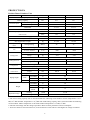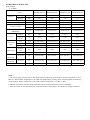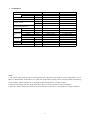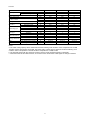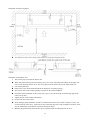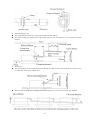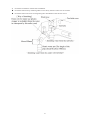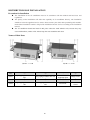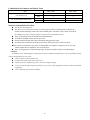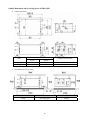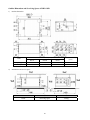
1
SERVICE MANUAL HIGH POWER MULTI SYSTEM MS-E48AI, MS-E56AI Contents PRODUCT ................................................................................................................... 1 1 3 4 5 6 MODELS LIST......................................................................................................................2 FUNCTION ...........................................................................................................................5 PRODUCT DATA..................................................................................................................6 WORKING TEMPERATURE RANGE......................................................................................15 PIPING DIAGRAM.............................................................................................................16 COMTROL.................................................................................................................18 1 2 3 4 OPERATION FLOWCHART..............................................................................................19 MAIN LOGIC......................................................................................................................22 REMOTE CONTROLLER..................................................................................................28 CENTRAL CONTROLLER SCC-16........................................................................................42 INSTALLATION ....................................................................................................... 47 1 2 3 PRECAUTIONS FOR INSTALLATION .............................................................................48 FLOW CHART OF INSTALLATION.................................................................................52 OUTDOOR UNIT INSTALLATION ..................................................................................53 4 5 6 7 8 9 INDOOR UNIT INSTALLATION ......................................................................................58 DISTRIBUTION BOX.................................................................................................................83 REFRIGERATION PIPING WORK ...................................................................................88 ELECTRICAL WIRING WORK....................................................................................... 102 INSTALLATION OF DRAINAGE PIPELINE .................................................................112 INSTALATION OF PIPE INSULATION.........................................................................116 MAINTENANCE .................................................................................................... 118 1 2 3 4 5 6 TESTING BOARD INTRODUCTION..............................................................................119 TROUBLESHOOTING......................................................................................................123 FLOW CHART OF TROUBLESHOOTING ....................................................................128 POWER DISTRIBUTION.................................................................................................134 THE RESISTANCES OF COMMON TEMPERATURE SENSORS ...............................142 DISASSEMBLY AND ASSEMBLY PROCEDURE OF MAIN PARTS ..........................147 PRODUCT 1 PRODUCT MODELS LIST Outdoor Unit Capacity Capacity Model Product code Cooling (kW) Heating (kW) MS-E48AI CN860W0110 14.0 16.0 Refriger ant R410A MS-E56AI CN860W0120 16.0 Power supply Ph, V, Hz Appearance 3,380~415,50 18.0 Distribution box (Dbox) Model DB2-19SB Number of connectable indoor units Min Max 1 2 Refrigerant Ph, V, Hz R410A DB3-19SB 1 Power supply 3 2 1,220~240,50 Appearance Indoor Unit Wall mounted type ¾ Caesar Capacity Model Cooling (kW) Heating (kW) MS-H07AIC PT 2.1 2.6 MS-H09AIC PT 2.6 2.8 MS-H12AIC PT 3.5 3.8 MS-H18AIC PT 5.3 5.8 3 Refrige rant R410A Power supply Ph, V, Hz 1,220~240,50 Appearance Duct type Capacity Model Product code Cooling (kW) Heating (kW) MC-D09AI 2.5 2.8 MC-D12AI 3.5 3.85 MC-D18AI 5.0 5.5 MC-D24AI 7.1 8.0 Refrige rant R410A Power supply Appearance Ph, V, Hz 1,220~240,50 Cassette type Capacity Model Product code Cooling (kW) Heating (kW) MC-C12AI 3.5 4.0 MC-C18AI 4.5 5.0 MC-C24AI 7.1 8.0 Refrige rant R410A Power supply Appearance Ph, V, Hz 1,220~240,50 Floor ceiling type Capacity Model Product code Cooling (kW) Heating (kW) MC-F09AI 2.5 2.8 MC-F12AI 3.5 3.85 MC-F18AI 5.0 5.5 MC-F24AI 7.1 8.0 Refrige rant R410A Power supply Appearance Ph, V, Hz 1,220~240,50 Console type Capacity Model Product code Cooling (kW) Heating (kW) MS-P09AI 2.6 2.8 MS-P12AI 3.5 3.8 MS-P18AI 5.3 5.8 4 Refrige rant Power supply Appearance Ph, V, Hz R410A 1,220~240,50 FUNCTION Wall mounted Duct type Cassette type Floor ceiling type Console type Fan operation Mode ● ● ● ● ● Auto Swing Controller ● / ● ● ● Timer Selector ● ● ● ● ● Auto Mode Operation ● ● ● ● ● Cool Mode Operation ● ● ● ● ● Heat Mode Operation ● ● ● ● ● Dry Mode Operation ● ● ● ● ● Fan Mode Operation ● ● ● ● ● Sleep mode setting ● ● ● ● ● Drain Pump / ● ● / / Wired Controller / ● ● ● / Wireless Remote Controller ● ● ● ● ● Function For Comfortable Air Conditioning For Flexible Control ●: / : Have Functions No Functions 5 PRODUCT DATA Product Data of Outdoor Unit Model Heat pump MS-E48AI MS-E56AI Cooling capacity kW 14.0 16.0 Heating capacity kW 16.0 18.0 Cooling kW 4.40 5.0 Heating kW 4.25 4.7 EER/COP 2.9/3.2 2.8/3.5 Maximum NO. of connectable indoor units 8 9 Min 50 50 Max 135 135 Nominal input Total capacity index of to be connected indoor units Power supply 3Ph,380~415V, 50Hz Dimensions (H×W×D) mm 1345×900×340 1345×900×340 Net weight/Gross weight kg 116/125 116/125 dB(A) 58 58 Sound pressure level cooling/heating Type Fan Air Flow Volume Axial-flow 3 m /h 7000 7000 Name Refrigerant Charge R410A kg 4.95 Control Charge Compressor Operation range FV50S 1.35 1.35 Type Inverter Rotary Quantity 1 mm Φ15.9 Φ19.05 Liquid mm Φ9.52 Φ9.52 System total m 135 145 OU-Dbox m Dbox-IN m Dbox-IN m 15 OU-Dbox m 30 OU-IN m 30 Dbox-Dbox/ IN-IN m 15 Cooling ℃DB 18~48 Heating ℃DB -10~24 total 1 room Height L FV50S Gas Piping connections Piping length Electronic expansion valve Type Refrigerant oil 4.95 55 80 90 Notes: a. The rated cooling capacity data is measured under the following work condition: Indoor Temperature is 27℃ DB, 19℃WB. Outdoor Temperature is 35℃DB. The rated heating capacity data is measured under the following work condition: Indoor Temperature is 20℃DB. Outdoor Temperature is 7℃DB, 6℃WB. b. The data will change with the change of products. Refer to those parameters listed on nameplate. c. Noise was tested in semi-silenced room, so the actual noise value will be a little higher for change of ambient. 6 Product Data of Indoor Unit Wall mounted ¾ Caesar Model MS-H07AIC PT MS-H09AIC PT MS-H12AIC PT MS-H18AIC PT Cooling kW 2.1 2.6 3.5 5.3 Heating kW 2.6 2.8 3.8 5.8 Power supply V-Ph-Hz 220~240-1-50 220~240-1-50 220~240-1-50 220~240-1-50 Motor power input kW 0.03 0.03 0.04 0.045 3 m /h 450 500 630 850 CFM 265 294 371 500 dB(A) 36/34/31/28/- 37/34/31/28/- 38/34/32/30/- 46/43/40/36/- Output kW 0.01 0.01 0.02 0.02 Running current A 0.14 0.14 0.22 0.31 Gas inch 3/8″(Φ9.52mm) 3/8″(Φ9.52mm) 3/8″(Φ9.52mm) 1/2″(Φ12.7mm) Liquid inch 1/4″(Φ6.35mm) 1/4″(Φ6.35mm) 1/4″(Φ6.35mm) 1/4″(Φ6.35mm) Connection method Flare Connection Flare Connection Flare Connection Flare Connection Capacity Air flow volume Sound pressure level (SH/H/M/L) Fan motor Connecting pipe External dia. mm Φ20 Φ20 Φ20 Φ20 Thickness mm 1.5 1.5 1.5 1.5 Outline dimension W×D×H mm 790×170×265 790×170×265 845×180×275 940×200×298 Package dimension W×D×H mm 873×251×370 873×251×370 918×258×370 1013×288×395 kg 9/11 9/11 10/12.5 13/16 Drain pipe Net Weight/ Gross weight Notes: a. The rated cooling capacity data is measured under the following work condition: Indoor Temperature is 27℃ DB, 19℃WB. Outdoor Temperature is 35℃DB. The rated heating capacity data is measured under the following work condition: Indoor Temperature is 20℃DB. Outdoor Temperature is 7℃DB, 6℃WB. b. The data will change with the change of products. Refer to those parameters listed on nameplate. c. Noise was tested in semi-silenced room, so the actual noise value will be a little higher for change of ambient. 7 ¾ SYMPHONY Model Capacity Power supply Motor power input Air flow volume Cooling Heating kW kW V-Ph-Hz kW m3/h CFM Sound pressure level dB(A) (SH/H/MH/M/ML/L/SL) Output kW Fan motor A Running current Gas inch Connecting Liquid inch pipe Connection method External diameter mm Drain pipe Thickness mm WxDxH mm Outline WxDxH mm Package Net Weight/ Gross weight kg MS-H09AISW PT 2,6 2,8 220-240-1-50 0,03 450 265 MS-H12AISW PT 3,5 3,8 220-240-1-50 0,04 560 330 38/35/32/30/28/ 26/25 39/37/34/31/29/ 27/26 0,01 0,136 3/8″(Φ9,52mm) 1/4″(Φ6,35mm) Flare Connection 20 1,5 860x153x299 944x247x386 9,5/12,5 0,02 0,2 3/8″(Φ9,52mm) 1/4″(Φ6,35mm) Flare Connection 20 1,5 896x159x320 973x255x403 10/13 Notes: a. The rated cooling capacity data is measured under the following work condition: Indoor Temperature is 27℃ DB, 19℃WB. Outdoor Temperature is 35℃DB. The rated heating capacity data is measured under the following work condition: Indoor Temperature is 20℃DB. Outdoor Temperature is 7℃DB, 6℃WB. b. The data will change with the change of products. Refer to those parameters listed on nameplate. c. Noise was tested in semi-silenced room, so the actual noise value will be a little higher for change of ambient. 8 Duct type Model Capacity Cooling Heating Power supply Motor power input kW kW V-Ph-Hz kW m3/h CFM Sound pressure level (H/L) dB(A) Output kW Fan motor Running current A Gas inch Connecting pipe Liquid inch Connection method External dia, mm Drain pipe Thickness mm Outline dimension W×D×H mm Package dimension W×D×H mm Net Weight/ Gross weight kg Air flow volume Model Capacity Power supply Motor power input Cooling Heating kW kW V-Ph-Hz kW m3/h CFM Sound pressure level (H/L) dB(A) Output kW Fan motor Running current A Gas inch Connecting pipe Liquid inch Connection method External dia, mm Drain pipe Thickness mm Outline dimension W×D×H mm Package dimension W×D×H mm Net Weight/ Gross weight kg Air flow volume 9 MC-D09AI 2,5 2,8 220~240-1-50 0,065 450 MC-D12AI 3,5 3,85 220~240-1-50 0,075 500 265 37/31 0,03 0,28 3/8″(Φ9,52mm) 1/4″(Φ6,35mm) Flare Connection 031 3 700×615×200 893×743×305 22/27 294 39/32 0,04 0,31 3/8″(Φ9,52mm) 1/4″(Φ6,35mm) Flare Connection 031 3 700×615×200 893×743×305 23/29 MC-D18AI 5 5,5 220~240-1-50 0,08 700 MC-D24AI 7,1 8 220~240-1-50 0,11 1000 412 41/33 0,05 0,41 1/2″(Φ12,7mm) 1/4″(Φ6,35mm) Flare Connection 031 3 900×615×200 1123×743×305 27/36 588,5 42/34 0,061 0,5 5/8″(Φ15,9mm) 3/8″(Φ9,52mm) Flare Connection 031 3 1100×615×200 1323×743×305 31/41 Multi split series- duct indoor nits FAN CHARACTERISTICS MC-D12AI MC-D09AI MC-D18AI MC-D24AI 10 Cassette Model Cooling Heating Capacity Power supply Motor power input Air flow volume Sound pressure level(H/L) Fan motor Connecting pipe Drain pipe Outline dimension Package dimension Body Panel Output Running current Gas Liquid Connection method External dia, Thickness Body WxDxH Panel WxDxH Body WxDxH Panel WxDxH Net Weight/Gross weight Net Weight/Gross weight MC-C12AI 3,5 4 220-240-1-50 0,05 600 353 46/44/42 0,011 0,23 3/8″(Φ9,52mm) 1/4″(Φ6,35mm) Flare Connection 031 3 570x570x230 650x650x50 851x731x325 733x673x117 18,0/23,0 2,5/3,5 kW kW V-Ph-Hz kW m3/h CFM dB(A) kW A inch inch mm mm mm mm mm mm kg kg MC-C18AI 4,5 5 220-240-1-50 0,05 600 353 46/44/42 0,011 0,23 1/2″(Φ12,7mm) 1/4″(Φ6,35mm) Flare Connection 031 3 570x570x230 650x650x50 851x731x325 733x673x117 18,0/23,0 2,5/3,5 MC-C24AI 7,1 8 220-240-1-50 0,1 1180 694 39//37/35 0,035 0,4 5/8″(Φ15,9mm) 3/8″(Φ9,52mm) Flare Connection 031 3 840x840x240 950x950x60 963x963x325 1043x1028x130 28,0/35,0 6,5/10 Notes: a. The rated cooling capacity data is measured under the following work condition: Indoor Temperature is 27ԨDB, 19ԨWB. Outdoor Temperature is 35ԨDB. The rated heating capacity data is measured under the following work condition: Indoor Temperature is 20ԨDB. Outdoor Temperature is 7ԨDB, 6ԨWB. b. The data will change with the change of products. Refer to those parameters listed on nameplate. c. Noise was tested in semi-silenced room, so the actual noise value will be a little higher for change of ambient. 11 Floor ceiling type Model Capacity Cooling Heating Power supply Motor power input kW kW V-Ph-Hz kW m3/h CFM Sound pressure level (H/M/L) dB(A) Output kW Fan motor Running current A Gas inch Connecting pipe Liquid inch Connection method mm External dia. Drain pipe Thickness mm W×D×H mm Outline dimension W×D×H mm Package dimension kg Net Weight/Gross weight Air flow volume Model Capacity Power supply Motor power input Cooling Heating kW kW V-Ph-Hz kW m3/h CFM Sound pressure level (H/M/L) dB(A) Output kW Fan motor Running current A Gas inch Connecting pipe Liquid inch Connection method mm External dia. Drain pipe Thickness mm W×D×H mm Outline dimension W×D×H mm Package dimension Net Weight/Gross weight kg Air flow volume MC-F09AI 2.50 2.80 220~240-1-50 0.055 650 MC-F12AI 3.50 3.85 220~240-1-50 0.055 650 382.5 40/38/36 0.015 0.3 3/8″(Φ9.52mm) 1/4″(Φ6.35mm) Flare Connection 017 1.75 1220×700×225 1343×823×315 40/50 382.5 40/38/36 0.015 0.3 3/8″(Φ9.52mm) 1/4″(Φ6.35mm) Flare Connection 017 1.75 1220×700×225 1343×823×315 40/50 MC-F18AI 5.00 5.50 220~240-1-50 0.11 950 MC-F24AI 7.10 8.00 220~240-1-50 0.11 1250 559 45/42/40 0.02 0.5 1/2″(Φ12.7mm) 1/4″(Φ6.35mm) Flare Connection 017 1.75 1220×700×225 1343×823×315 40/50 736 48/46/44 0.05 0.5 5/8″(Φ15.9mm) 3/8″(Φ9.52mm) Flare Connection 017 1.75 1220×700×225 1343×823×315 45/54 Notes: a. The rated cooling capacity data is measured under the following work condition: Indoor Temperature is 27℃ DB, 19℃WB. Outdoor Temperature is 35℃DB. The rated heating capacity data is measured under the following work condition: Indoor Temperature is 20℃DB. Outdoor Temperature is 7℃DB, 6℃WB. b. The data will change with the change of products. Refer to those parameters listed on nameplate. c. Noise was tested in semi-silenced room, so the actual noise value will be a little higher for change of ambient. 12 Console type Model Capacity Power supply Motor power input Cooling Heating kW kW V-Ph-Hz kW m3/h CFM Sound pressure level dB(A) Output kW Fan motor Running current A Gas inch Connecting pipe Liquid inch Connection method External dia. mm Drain pipe Thickness mm Outline dimension W×D×H mm Package dimension W×D×H mm Net Weight/Gross weight kg Air flow volume MS-P09AI 2.6 2.8 220~240-1-50 0.05 500 MS-P18AI 3.5 3.8 220~240-1-50 0.05 600 MS-P24AI 5.3 5.8 220~240-1-50 0.05 650 294 40/38/36/33/30/27/25 0.03 0.14 3/8″(Φ9.52mm) 1/4″(Φ6.35mm) Flare Connection O20 1.5 700×215×600 791×286×710 15/18 353 42/40/3 8/37/35/32/25 0.03 0.14 3/8″(Φ9.52mm) 1/4″(Φ6.35mm) Flare Connection O20 1.5 700×215×600 791×286×710 15/18 383 48/46/44/41/37/35/32 0.03 0.14 1/2″(Φ12.7mm) 1/4″(Φ6.35mm) Flare Connection O20 1.5 700×215×600 791×286×710 15/18 Notes: a. The rated cooling capacity data is measured under the following work condition: Indoor Temperature is 27℃ DB, 19℃WB. Outdoor Temperature is 35℃DB. The rated heating capacity data is measured under the following work condition: Indoor Temperature is 20℃DB. Outdoor Temperature is 7℃DB, 6℃WB. b. The data will change with the change of products. Refer to those parameters listed on nameplate. c. Noise was tested in semi-silenced room, so the actual noise value will be a little higher for change of ambient. 13 Distribution box Model Maximum number of connectable indoor units Power Supply Connection port to outdoor unit gas/ liquid (inner diameter) Connection port to indoor unit gas/ liquid (inner diameter) Connection Method Sound pressure level Net weight/Gross weight V-Ph-Hz mm mm dB(A) kg DB2-19SB DB3-19SB 2 3 220~240, 50, 1 19,3/ 9,7 19,3/ 9,7 16,3/ 6,2 16,3/ 6,2 Braze Braze 28 28 5,5/ 7,5 6,0/ 8,0 Notes: a. The rated cooling capacity data is measured under the following work condition: Indoor Temperature is 27℃ DB, 19℃WB. Outdoor Temperature is 35℃DB. The rated heating capacity data is measured under the following work condition: Indoor Temperature is 20℃DB. Outdoor Temperature is 7℃DB, 6℃WB. b. The data will change with the change of products. Refer to those parameters listed on nameplate. c. Noise was tested in semi-silenced room, so the actual noise value will be a little higher for change of ambient. 14 Working Temperature Range Sorts Indoor side state Outdoor side state Dry bulb temp. ℃ Wet bulb temp. ℃ Dry bulb temp. ℃ Wet bulb temp. ℃ Rated Cooling 27 19 35 24 Max. cooling 32 23 48 26 Min. cooling 21 15 18 — Rated Heating 20 15 7 6 Max. heating 27 — 24 18 Min. heating 20 15 -10 — 15 PIPING DIAGRAM Schematic Diagram of Super Free Match Series Inverter Heat Pump Multi System Check valve Filter EEV Cooling Heating Service port Presure regulating valve Heat exchanger Capillary 4-way valve Oil separator Compressor Filter Capillary EEV EEV Filter Capillary EEV Branch pipe Outdoor side Liquid side stop valve Gas side stop valve Heat exchanger with centrifugal valve Indoor side Dbox H eat exchanger with centrifugal fan The units start to work once the power is switched on. During the cooling operation, the low temperature, low pressure refrigerant gas from the heat exchanger of each indoor unit gets together and then is taken into the compressor to be compressed into high temperature, high pressure gas, which will soon go to the heat exchanger of the outdoor unit to exchange heat with the outdoor air and then is turned into refrigerant liquid. After passing through the distribution box, the temperature and pressure of the refrigerant liquid will further decrease and then go the main valve. After that, it will be divided and go to the heat exchanger of each indoor unit to exchange heat with the air which needs to be conditioned. Consequently, the refrigerant liquid become low temperature, low 16 pressure refrigerant gas again. Such a refrigeration cycle goes round and round to achieve the desired refrigeration purpose. During the heating operation, the four-way valve is involved to make the refrigeration cycle run reversely. The refrigerant radiates heat in the heat exchanger of the indoor unit (so do the electric heating devices) and absorb heat in the heat exchanger of the outdoor unit for a heat pump heating cycle so as to achieve the desired heating purpose. 17 CONTROL 18 Control OPERATION FLOWCHART 19 Cooling/Dry Operation Cooling Operation No Is there Guide Louver? Yes Guide Louvers Swing Fan Motor:Operation Is the process of preventing restart operation? (3 minutes) Yes No No Temperature Adjustment Fan Motor: Stop Yes Electronic Expansion Valve: Stop Electronic Expansion Valve:Capacity Conctrol Stop (Go to the previous page) 20 Heating Operation 21 MAIN LOGIC Control Function of Outdoor Unit Cooling Mode 1) Cooling conditions and process: If the compressor is in stop status and start the unit for cooling operation, when one of the indoor units reaches the cooling operation condition, the unit starts cooling operation; in this case, the electronic expansion valve, the outdoor fan and the compressor start operation. 2) Stop in cooling operation a) Compressor stops The compressor stops gradually, the outdoor fan stops after 1 min. b) Some of the indoor units reach the stop condition (the compressor does not stop) The compressor operates according to the required frequency. For the indoor unit with no requirement, the corresponding electronic expansion valve is closed to 0P. 3) Cooling mode transfers to heating mode When the unit transfers to heating mode, the 4-way valve is energized after the compressor runs for 40s. The other disposals are the same as stopping in cooling mode. 4) 4-way valve: In this mode, the 4-way valve is closed. 5) Outdoor fan control in cooling mode The outdoor fan starts before 5s of the starting of compressor. The outdoor fan will run in high speed for 40s after starting and then it will run in set speed. The fan shall run at every speed for at least 80s. (When the quantity of indoor unit changes, the control part will adjust the outdoor fan according to the quantity of indoor unit and outdoor temperature.); when the compressor stops, the outdoor fan runs at present speed and stops after 1 min. Dry Mode 1) The dry conditions and process are the same as those in cooling mode; 2) The status of 4-way valve: closed; 3) The temperature setting range: 16 ~ 30℃; 4) Protection function: the same as those in cooling mode; 5) In dry mode, the maximum value A of the capacity requirement percentage of single unit is 90% of that in cooling mode. The open condition of the electronic expansion valve, outdoor fan and compressor is the same as those in cooling mode. Heating Mode 1) Heating conditions and process: When one of the indoor units reaches the heating operation condition, the unit starts heating operation. 2) Stop in heating operation: a) When all the indoor units reach the stop condition, the compressor stops and the outdoor fan stops after 1 min; b) Some of the indoor units reach the stop condition. The compressor reduces the frequency immediately and operates according to the required frequency; c) Heating mode transfers to cooling mode (dry mode), fan mode: The compressor stops; The outdoor fan stops after 1min; 22 The status of 4-way valve: energized; 3) Outdoor fan control in heating mode The outdoor fan starts before 5s of the starting of compressor and then it will run in high speed for 40s; The fan shall run at every speed for at least 80s; When the compressor stops, the outdoor fan stops after 1min. 4) Defrosting function When the defrosting condition is met, the frequency of the compressor starts to decrease and wait for defrosting; the electronic expansion valve of all indoor units open in big angle; the outdoor fan stops after the stop of the 4-way valve, meanwhile, the 4-way valve reverses the direction; after the 4-way valve reverses the direction, the frequency of the compressor starts to rise; then begin to calculate the time of defrosting, the frequency of the compressor rises to reach the defrosting frequency. 5) Oil-returned control in heating mode a) Oil-returned condition The whole unit is operating in low frequency for a long time b) Oil-returned process in heating mode The indoor unit displays “H1”. c) Oil-returned finished condition in heating mode The duration reaches 5min Fan Mode The compressor, the outdoor fan and the 4-way valve are closed; temperature setting range is 16~30℃. Protection Function Mode Conflict Protection of indoor unit When the setting mode is different of different indoor unit, the unit runs in below status: 1) The mode of the first operating indoor unit is the basic mode, when compare the mode of the other indoor units to see if there is a conflict. Cooling mode (dry mode) is in conflict with heating mode. 2) Fan mode is in conflict with heating mode and the heating mode is the basic mode. No matter which indoor unit operates first, the unit will run in heating mode. Overload Protection Function When the tube temperature is a little low, the compressor raises the operation frequency; when the tube temperature is a little high, the compressor frequency is restricted or lows down the operation frequency; when the tube temperature is too high, the compressor protection stops running. If the discharge temperature protection continuously appears for 6 times, the compressor can’t resume running. The compressor can resume running after cutting off the power and then putting through the power. (If the running time of the compressor is longer than 7min, the protection times record will be cleared). Discharge Protection Function When the discharge temperature is a little low, the compressor raises the operation frequency; when the discharge temperature is a little high, the compressor frequency is restricted or lows down the operation frequency; when the discharge temperature is too high, the compressor protection stops running. If the discharge temperature protection continuously appears for 6 times, the compressor can’t resume running. The compressor can resume running after cutting off the power and then putting through the power. (If the running time of the compressor is longer than 7min, the protection times record will be cleared). 23 Communication malfunction Detection of the quantity of installed indoor units and Dbox: After 3min of energizing, if the outdoor unit does not receive the communication data of certain indoor unit, the outdoor unit will judge that indoor unit is not installed and will treat it as it is not installed. If the outdoor unit receives the communication data of that indoor unit later, the outdoor unit will treat that unit as it is installed. Compressor high-pressure protection 1) When the high-pressure switch is detected cut off for 3s continuously, the compressor will enter high-pressure protection as it stops when reaching set temperature. Meanwhile, the outdoor unit will send the signal of “high-pressure protection” to the indoor units; 2) After the appearance of high-pressure protection, the compressor can resume running only after cutting off the power and then putting through the power. Compressor low-pressure protection 1) Low Pressure Protection for Shutdown a). After the compressor stops for five minutes, if it is detected that the low pressure protection is work, then a low pressure protection signal will be send out. b). If it is detected continuously for three seconds that the low pressure protection is work after the compressor stops for less than five minutes, then a low pressure protection signal will be send out. However, if the low pressure protection occurs twice in one hour, then it becomes unrecoverable and has to be recovered by powering the outdoor unit again. 2) Low Pressure Protection during the Operation a) When it is detected continuously for three seconds that the low pressure protection is work, then the whole unit should be shut off and a low pressure protection signal should be sent to the indoor unit. b) On condition that a low pressure protection error occurs and the whole unit has stopped for more than three minutes and it is detected continuously for six seconds that the low pressure protection switch is closed, then this error can be eliminated. However, if the low pressure protection occurs twice in one hour, then it has to eliminate the error by powering the outdoor unit again. Compressor overload protection If the compressor overload switch is detected having movement, the indoor unit will display the corresponding malfunction as it stops when the indoor temperature reaching set temperature. When the compressor stops for more than 3min and the compressor overload switch is reset, the unit will resume operation status automatically. If the protection appears for more than 6 times (if the running time of the compressor is longer than 30min, the protection times record will be cleared), the unit can not resume operation status automatically, but can resume running only after cutting off the power and then putting through the power. Other function Refrigerant Recovery The refrigerant can be recovered from the outdoor unit. When the unit is powered on and runs under the COOL mode, it is available within five minute to go the refrigerant recovery mode by operate the testing board of the outdoor unit with “Fo” displayed. How to quit the refrigerant recovery: When the refrigerant recovery has started, it will quit by operate the testing board of the outdoor unit or the power is cut off. 24 Control Function of Indoor Unit Running Mode 1. COOL 2.DRY 3.HEAT 4.AUTO 5 FAN Basic Functions of the System 1) COOL Mode Under this mode, the fan and swing function goes as the set conditions, and the set temperature range is 16℃ ~30℃. 2) DRY Mode Under this mode, the fan will run at the low speed and the swing function is performed under the set conditions. The set temperature range is 16~30℃. 3) FAN Mode Under this mode, only the fan of the indoor unit runs. And if the auto speed is set, the fan will run under the same condition as the COOL mode. 4) HEAT Mode a) Under this mode, the set temperature range is 16℃~30℃. b) The defrosting symbol “H1” will be displayed when the defrosting signal is received from the outdoor unit. 5) AUTO Mode a) When the ambient temperature is higher than 25℃, the unit will run as the COOL mode. b) For the cooling and heating unit, if the ambient temperature is or lower than 22℃, the unit will run as the HEAT mode. c) When the indoor ambient temperature is higher than 22℃ but lower than 26℃, the unit which starts to work under the AUTO or DRY mode will shift to the FAN mode, while the unit which starts to work under other mode will keep the current running mode. Other Control 1) Beeper Control When the controller is powered on or it receives a valid either press button signal or remote control signal, the beeper will utter a warning tone. 2) Auto Speed Control a). Under the HEAT mode: ◆ If the ambient temperature is equal or higher than the set temperature, the fan will run at the low speed; ◆ If the ambient temperature minus 3℃ is equal or lower than the set temperature, the fan will run at the medium speed; ◆ If the ambient temperature minus 3℃ is lower than the set temperature minus 3℃, the fan will run at the high speed. b). Under the COOL mode: ◆ If the ambient temperature is equal to or lower than the set temperature, the fan will run at the low speed; ◆ If the ambient temperature is between the set temperature and the set temperature minus 3℃, the fan will run at the medium speed; ◆ If the ambient temperature is higher than the set temperature plus 3℃, the fan will run at the high speed. c). Under the FAN mode: ◆ The fan will run at the medium speed constantly. ◆ Once the fan starts, its speed cannot be changed unit it has run for at least 30 seconds at the currently set 25 speed. d) Under the HEAT Mode: (Ambient temperature herein is the temperature without temperature compensation) ◆ When the ambient temperature is or lower than the set temperature, the indoor unit runs at the high speed. ◆ When the ambient temperature is higher than the set temperature but lower than the set temperature plus 2℃, the indoor unit fan runs at the medium speed. ◆ When the ambient temperature is or lower than the set temperature plus 2℃, the fan runs at the low speed. e) Under the COOL and FAN Modes ◆ When the ambient temperature is or higher than the set temperature plus 3℃, the indoor unit runs at high speed. ◆ When the ambient temperature is higher than the set temperature plus 1℃, but lower than the set temperature plus 3℃, the indoor unit fan runs at the medium speed. ◆ When the ambient temperature is or lower than the set temperature plus 1℃, the fan runs at the low speed. f) Once the fan starts at a certain speed, it will keep running at this speed for no less than 30 seconds prior to any changeover stated above. 3) AUTO Press Button The whole unit will run under the AUTO mode by pressing this button when the unit is off. In this condition, the fan of the indoor unit will run at the auto speed with the swing function activated. When the unit is on, it will be turned off by pressing this button. This button is unavailable to the floor/ceiling unit. 4) Sleep Under this mode, the proper sleep curve will be adopted in accordance with different set temperatures. Under the COOL mode or the DRY mode, the temperature will go up by 1℃ after one hour and by another 1 ℃ after another hour, after that, the temperature will be kept on. Under the HEAT mode, the temperature will go down by 1℃ after one hour and by another 1℃ after another hour, after that, the temperature will be kept on. 5) Timer a) Timer On When the unit is powered on but in the idle condition, it is available to set when to start the unit. Then, when the unit starts, it will run as the previously set mod. The set range of the timer is 0.5~24 hours with a interval of 0.5 hour. b) Timer Off When the unit is on, it is available to set when to stop the unit. The set range of timer is 0.5~24 hours with a interval of 0.5 hour. 6) Memory a) Memorizing Objects: modes (AUTO, COOL, DRY, FAN, HEAT), swing, set temperature, set fan speed, etc. b) When the indoor unit works without the wired controller, it will resume the working condition as the power failure occurs after it is powered on again. When the indoor unit is with the wired controller, it is available to set the memory function by pressing the corresponding buttons of the wired controller. 26 c) When the indoor unit works without the wired controller, if the timer is not set for the last remote control instruction, the system will memorize this last instruction and works following it; if the timer is set, it will be canceled as the power failure occurs and will have to be reset. d) When the indoor unit works with the wired controller, it will work as the message sent by the wired controller after it is powered on again. 7) Selection of the Indoor Temperature Sensor a) For the duct type indoor unit: Under the COOL, HEAT, DRY, or FAN mode, the return air temperature sensor is adopted; while under the HEAT mode, it is the receiver temperature sensor. For the cassette type, floor ceiling type indoor unit: Under all modes, the return air temperature sensor is adopted. b) When the duct type, cassette type, or the floor ceiling type indoor unit works with the wired controller, the ambient temperature sensor can be set in the following four ways: 01: The indoor temperature sensor is set for the return air. 02: The indoor temperature sensor is set for the wired controller. 03: The indoor temperature sensor is set for the wired controller under the HEAT mode, and for the return air under any other mode. 04: The indoor temperature sensor is set for the return air under the HEAT mode, and for the wired controller under any other mode. c) Setting of the Ambient Temperature Sensor of the Wired Controller XK19. ◆ When the unit is off, it is available to go to the debugging status by pressing the “Function” and “Timer” buttons for five seconds, and the corresponding code will be displayed on the temperature area of the wired controller. There are four kinds of codes which can be adjusted through the “▼”/“▲” button. ◆ The 03 is the default code. The setting of the ambient temperature sensor of the wired controller should be memorized. ◆ The “Enter/Cancel” button shall be pressed to confirm and leave the setting. If there is no response to the last button press within 20 seconds, then the system will quit the setting and go to the normal “Off” status but with the setting still saved. 8) Switchover of the Defrosting Mode On condition that the unit is off, if “H1” is not displayed on the wireless controller, then the unit will go to the setting status of the “Defrosting Mode 1”as it is turned on through the wired controller. Then, once the indoor unit receives this signal, it will soon send it to the outdoor unit. In contract, if “H1”is displayed, the unit will go the setting status of the “Defrosting Mode 2”, and the indoor unit also will send this signal to the outdoor unit as soon as it receives it. On condition that the unit is off, it is available to switch over the “Defrosting Mode 1” and “Defrosting Mode 2” by pressing the “MODE” and “BLOW” buttons simultaneously. 9) Turbo As soon as the controller receives the “Turbo” instruction, the fan of the indoor unit will run at the high speed. 10) Blow Blow Function: It is a function to automatically blow off the moist inside the exchanger of the indoor unit to prevent mould growing after the unit is shut off. a) On condition that this function is activated, when the “On/Off” press button is operated, the fan of the indoor unit will still run for ten minutes (with the symbol “BLOW” displayed). At this time, the fan will stop as this function is deactivated. b) This function is unavailable under the AUTO, FAN, and HEAT modes. 27 REMOTE CONTROLLER Wired Remote Controller Wired Controller XK19 (Z63351L) It is designed for the cassette type, duct type and floor ceiling type indoor units. ◆ Outside View of the Wired Controller ◆ LCD of the Wired Controller No. Symbols Description 1 Swing function. 2 Sleep function 3 Running modes of the indoor unit (Cooling, Dry, Fan, Heating and Auto). 4 Defrosting function for the outdoor unit. 5 Gate-control function.(this function is yet unavailable for this unit) 6 Lock function. 7 High, middle, low or auto fan speed of the indoor unit. 8 Shield functions (buttons, temperature, On/Off, Mode or Save is shielded or Save is shielded by the remote monitor) 9 Turbo function. 10 Memory function (The indoor unit resumes the original setting state after power failure and then power recovery). 28 Master wired controller (this function is yet unavailable for this unit). 11 12 It blinks under on state of the unit without operation of any button. 13 Energy-saving function.(this function is yet unavailable for this unit) 14 Ambient/preset temperature value. 15 Electric auxiliary heating function.(this function is yet unavailable for this unit) 16 Blow function. 17 Timing value. 18 Quiet function (two types: quiet and auto quiet).(this function is yet unavailable for this unit) 19 SET It will be displayed under the debugging mode. 3.1.2 Buttons Buttons on the Wired Controller No. Name 1 Enter/cancel 2 ▲ 6 ▼ ① Running temperature setting of the indoor unit, range:16~30℃. ② Timer setting, range:0.5-24 hr. 3 Fan Setting of the high/middle/low/auto fan speed. 4 Mode 5 Function 7 Timer Timer setting. 8 On/Off Turn on/off the indoor unit. 4+2 ▲+Mode 3 +6 Fan+▼ 2 +6 ▲+▼ Function ① Function selection and cancellation. ② Press it for 5s to examine the outdoor ambient temperature. Setting of the Cooling/Heating/Fan/Dry mode of the indoor unit. Switchover among the functions of Swing/Sleep/Turbo/Save/E-heater/Blow /Quiet etc. Press them for 5s under off state of the unit to enter/cancel the Memory function (If memory is set, indoor unit after power failure and then power recovery will resume the original setting state. If not, the indoor unit is defaulted to be off after power recovery. Memory off is default before delivery.). will be displayed on By pressing them at the same time under off state of the unit, will be displayed on the the wired remote controller for the cooling only unit, while wired remote controller for the cooling and heating unit. Upon startup of the unit without malfunction or under off state of the unit, press them at the same time for 5s to enter the lock state, in which case, any other buttons won’t respond the press. Repress them for 5s to quit this state. 29 Operation Instructions 1) On/Off Press On/Off to turn on the unit and turn it off by another press. 2) Mode Setting Under the “On” state of the unit, press Mode to switch the operation modes as the following sequence: Cooling-Dry-Fan-Heating. 3) Temperature Setting Press ▲ or ▼ to increase/decrease the preset temperature. If press either of them continuously, the temperature will be increased or decreased by 1℃ every 0.5s. In the Cooling, Dry or Heating mode, the temperature setting range is 16℃~30℃. In the Fan mode, the setting temperature is fixed at 26℃. In the Auto mode, the setting temperature is unadjustable. 4) Fan Setting Under the “On”/“Off” state of the unit, press Fan and then fan speed of the indoor unit will change circularly. 5) Timer Setting Under the “On”/“Off” state of the unit, press Timer to set timer off/on. Timer on setting: press Timer, and then LCD will display “xx.x hour”, with “hour” blinking. In this case, press ▲ or ▼ to adjust the timing value. Then press Enter/cancel to confirm the setting. Timer off setting: press Timer, if LCD won’t display xx.x hour, and then it means the timer setting is canceled. Timer range: 0.5-24hr. Every press of ▲ or ▼ will make the set time increased or decreased by 0.5hr. If either of them is pressed continuously, the set time will increase/ decrease by 0.5hr every 0.5s. 6) Swing Setting Swing On: Press Function under on state of the unit to activate the swing function. In this case, it will blink. After that, press Enter/cancel to make a confirmation. Swing Off: When the Swing function is on, press Function to enter the Swing setting interface, with blinking. After that, press Enter/cancel to cancel this function. Notes: a. Sleep, Save, Turbo, Blow or Quiet setting is the same as the Swing setting. b. After the setting has been done, it has to press the key “Enter/cancel” to back to the setting status or quit automatically five seconds later. 7) Sleep Setting Sleep on: Press Function under on state of the unit till the unit enters the Sleep setting interface. After that, press Enter/cancel to confirm the setting. Sleep off: When the Sleep function is activated, press Function to enter the Sleep setting interface. After that, press Enter/cancel to can this function. Sleep off is default after power failure and then power recovery, and the sleep functions is unavailable under the fan mode. Sleep mode In the Cooling or Dry mode, the temperature will increase by 1℃ after the unit runs under Sleep 1 for 1 hr and 1℃ after another 1hr.After that, the unit will run at this temperature. In the Heating mode, the temperature will decrease by 1℃ after the unit runs under Sleep 1 for 1hr and 1℃ after another 1hr. After that, the unit will run at this temperature. Notes: a. During the above setting, if Function is pressed down or there is not any operation within 5s, sleep curve setting will be canceled. 30 b. 26℃ is the default Sleep curve temperature before delivery. The wired controller will automatically memorize the Sleep curve after the setting. 8) Turbo Setting Turbo function: The unit at the high fan speed can realize quick cooling or heating so that the room temperature can quickly approach the setting value. In the Cooling or Heating mode, press Function till the unit enters the Turbo setting interface and then press Enter/Cancel to confirm the setting. When the Turbo function is activated, press Function to enter the Turbo setting interface and then press Enter/Cancel to cancel this function. Notes: a. When the Turbo function is activated, if the difference between the room temperature and set temperature is at or below 2℃ (detected in successive 1 min.), the Turbo function will be automatically deactivated. b. Turbo function is unavailable in the Dry and Fan mode. And the Turbo function is off after power failure and then power recovery. If Quiet function is on, Turbo function will be canceled subsequently. 9) E-heater Setting E-heater (auxiliary electric heating function): In the Heating mode, E-heater is allowed to be turned on for improvement of efficiency. Once the wired controller or the remote controller enters the Heating mode, this function will be turned on automatically. Press Function in the Heating mode to enter the E-heater setting interface and then press Enter/cancel to cancel this function. Press Function to enter the E-heater setting interface, if the E-heater function is not activated, and then press Enter/Cancel to turn it on. 10) Blow Setting Blow function: After the unit is turned off, the water in evaporator of indoor unit will be automatically evaporated to avoid mildew. In the Cooling or Dry mode, press Function till the unit enters the Blow setting interface and then press Enter/Cancel to active this function. When the Blow function is activated, press Function to the Blow setting interface and then press Enter/Cancel to cancel this function. Notes: a. When the Blow function is activated, if turning off the unit by pressing On/Off or by the remote controller, the indoor fan will run at the low fan speed for 10 min, with “BLOW” displayed on the LCD. While, if the Blow function is deactivated, the indoor fan will be turned off directly. b. Blow function is unavailable in the Fan or Heating mode. 11) Other Functions Lock Upon startup of the unit without malfunction or under the “Off” state of the unit, press ▲ and ▼ at the same time for 5s till the wired controller enters the Lock function. In this case, LCD displays. After that, repress these two buttons at the same time for 5s to quit this function. Under the Lock state, any other button press won’t get any response. Memory Memory switchover: Under the “Off” state of the unit, press Mode and ▲ at the same time for 5s to switch memory states between memory on and memory off. When this function is activated, Memory will be displayed. If this function is not set, the unit will be under the “Off” state after power failure and then power recovery. Memory recovery: If this function has been set for the wired controller, the wired controller after power 31 failure will resume its original running state upon power recovery. Memory contents: On/Off, Mode, set temperature, set fan speed, Save function and Lock function. Enquiry of the Outdoor Ambient Temperature Under the “On” or “Off” state of the unit, press Enter/Cancel for 5s, and the outdoor ambient temperature will be displayed after a sound of click. This enquiry state will quit by pressing Function or On/Off or during the temperature adjustment. If there is not any operation for 10s, it will also quit automatically. Errors If there is an error occurring during the operation of the system, the error code will be displayed on the LCD. If multi errors occur at the same time, their codes will be displayed circularly. Note: In event of any error, please turn off the unit and contact the professionally skilled personnel. Error Error Code High pressure protection E1 Low pressure protection E3 Discharge protection E4 Over-current protection P5 Communication error E6 Indoor water overflow protection E9 Mode conflict E7 Anti-freezing protection E2 Defrosting or oil returning for heating H1 Indoor ambient temperature sensor open/short circuit F1 Evaporator temperature sensor open/short circuit F2 Indoor unit (liquid valve) refrigerant pipe inlet temperature sensor error b5 Indoor unit (gas valve) refrigerant pipe outlet temperature sensor error b7 Condenser coil inlet temperature sensor open/short circuit A5 Condenser coil midway temperature sensor error F4 Condenser coil outlet temperature senor open/short circuit A7 Discharge air temperature sensor error F5 Outdoor ambient temperature sensor error F3 Module temperature sensor error oE Outdoor unit overall error oE 32 Wireless Remote Controller YAA1FB1 Notes: a. Be sure that there are no obstructions between the receiver and the remote controller; b. Do not drop or throw the remote controller; c. Do not let any liquid into the remote controller and expose the remote controller to direct sunlight or any place where is very hot. d. It is only use for symphony and Console type indoor units. If press some button which is not available for the corresponding function, the unit will keep the original running status. Function of Press Buttons 1) ON/OFF Press this button to turn on the unit. Press this button again to turn off the unit. 2) - Press this button to decrease set temperature. Holding it down above 2 seconds rapidly decreases set temperature. In AUTO mode, set temperature is not adjustable. 3) + Press this button to increase set temperature. Holding it down above 2 seconds rapidly increases set temperature. In AUTO mode, set temperature is not adjustable. 4) MODE Each time you press this button, a mode is selected COOL, DRY, FAN, and HEAT *, as the following: *Note: Only for models with heating function. After energization, AUTO mode is defaulted. In AUTO mode, the set temperature will not be displayed on 33 the LED of the indoor, and the unit will automatically select the suitable operation mode in accordance with the room temperature to make indoor room comfortable. 5) FAN , This button is used for setting Fan Speed in the sequence that goes from AUTO, , , , , then back to Auto. Low speed Low-Medium speed Medium speed Medium-High speed High speed 6) SWING Press this button to set up &down swing angle, which circularly changes as below: This remote controller is universal. If any command command as , or is sent out, the unit will carry out the indicates the guide louver swings as: 7) I FEEL: Press this button to turn on I FEEL function. The units automatically adjust temperature according to the sensed temperature. Press this button again to cancel I FEEL function. 8) Press this button to achieve the on and off of healthy and scavenging functions in operation status. Press this button for the first time to start scavenging function; LCD displays“ start healthy and scavenging functions simultaneously; LCD displays“ ”. Press the button for the second time to ” and “ ”. Press this button for the third time to quit healthy and scavenging functions simultaneously. Press the button for the fourth time to start healthy function; LCD display “ 9) ◆ ”. Press this button again to repeat the operation above. SLEEP: Press this button, can select Sleep 1 ( ), Sleep 2 ( ), Sleep 3 ( ) and cancel the Sleep, circulate between these, after electrified, Sleep Cancel is defaulted. ◆ Sleep 1 is Sleep mode 1, in Cool or dry mode: sleep status after run for one hour, the main unit setting temperature will increase 1℃, after 2 hours the setting temperature will increase 2℃, but the maximal setting temperature is 30℃, then the unit will run at this setting temperature all along; In Heat mode: sleep status after run for one hour, the setting temperature will decrease 1℃, after 2 hours the setting temperature will decrease 2℃, but the minimal setting temperature is 16℃, then the unit will run at this setting temperature. ◆ Sleep 2 is sleep mode 2, that is air conditioner will run according to the presetting a group of sleep temperature curve. 34 ◆ Sleep 3- the sleep curve setting under Sleep mode by DIY: ① Under Sleep 3 mode, press "Turbo" button for a long time, remote control enters into user individuation sleep setting status, at this time, the time of remote control will display "1hour ", the setting temperature "88" will display the corresponding temperature of last setting sleep curve and blink (The first entering will display according to the initial curve setting value of original factory); ② Adjust "+" and "-" button, could change the corresponding setting temperature, after adjusted, press "Turbo" button for confirmation; ③ At this time, 1 hour will be automatically increased at the timer position on the remote control, (that are "2 hours " or "3 hours " or "8 hours "), the place of setting temperature "88"will display the corresponding temperature of last setting sleep curve and blink; ④ Repeat the above step (2) ~ (3) operation, until 8 hours temperature setting finished, sleep, curve setting finished, at this time, the remote control will resume the original timer display; temperature display will resume to original setting temperature. Sleep3- the sleep curve setting under SLEEP mode by DIY could be inquired: The user could accord to sleep curve setting method to inquire the presetting sleep curve, enter into user individuation sleep setting status, but do not change the temperature, press "Turbo" button directly for confirmation. Note: In the above presetting or enquiry procedure, if continuously within 10s, there is no button pressed, the sleep curve setting within 10s, there is no button pressed, the sleep curve setting status will be automatically quit and resume to display the original displaying. In the presetting or enquiry procedure, press "ON/OFF" button, "Mode" button, "Timer" button or "Sleep" button, the sleep curve setting or enquiry status will quit similarly. ◆ 10) TEMP: Press this button, could select displaying the indoor setting temperature or indoor ambient temperature. When the indoor unit firstly power on it will display the setting temperature, if the temperature's displaying status is changed from other status to" ",displays the ambient temperature, 5s later or within 5s, it receives other remote control signal that will return to display the setting temperature. If the users haven't set up the temperature displaying status, that will display the setting temperature. 11) QUIET: Press this button, the Quiet status is under the Auto Quiet mode (display " (display " "signal ) and Quiet mode " signal) and Quiet OFF (there is no signal of " "displayed),after powered on, the Quiet OFF is defaulted. Note: the Quiet function cannot be set up in Fan and Dry mode; Under the Quiet mode " Under the Quiet mode (Display " (Display " " signal), the fan speed is not available. 12) CLOCK : Press CLOCK button, blinking . Within 5 seconds, pressing + or - button adjusts the present time. Holding down either button above 2 seconds increases or decreases the time by 1 minute every 0.5 second and then by 10 minutes every 0.5 second. During blinking after setting, press CLOCK button again to confirm the setting, and then will be constantly displayed. 35 13) T-ON/ T-OFF: Press T-ON button to initiate the auto-ON timer. To cancel the auto-timer program, simply press this button again. After press of this button, disappears and "ON "blinks. 00:00 is displayed for ON time setting. Within 5 seconds, press + or - button to adjust the time value. Every press of either button changes the time setting by 1 minute. Holding down either button rapidly changes the time setting by 1 minute and then 10 minutes. Within 5 Seconds after setting, press TIMER ON button to confirm. Press T-OFF button to initiate the auto-off timer. To cancel the auto-timer program, simply press the button again. TIMER OFF setting is the same as TIMER ON. 14) TURBO: Press this button to activate / deactivate the Turbo function which enables the unit to reach the preset temperature in the shortest time. In COOL mode, the unit will blow strong cooling air at super high fan speed. In HEAT mode, the unit will blow strong heating air at super high fan speed. 15) LIGHT: Press LIGHT button to turn on the display's light and press this button again to turn off the display's light. If the light is turned on, is displayed. If the light is turned off, disappears. 16) X-FAN: Pressing X-FAN button in COOL or DRY mode, the icon is displayed and the indoor fan will continue operation for 10 minutes in order to dry the indoor unit even though you have turned off the unit. After energization, X-FAN OFF is defaulted. X-FAN is not available in AUTO, FAN or HEAT mode. Guide for General Operation 1) Combination of "+"and "-" buttons: About lock Press "+" and "-" buttons simultaneously to lock or unlock the keypad. If the remote controller is locked, is displayed. In this case, pressing any button, 2) blinks three times. Combination of "MODE " and "-" buttons : About switch between Fahrenheit and centigrade At unit OFF, press "MODE" and "-" buttons simultaneously to switch between ℃ and ℉. 3) Combination of " TEMP " and "CLOCK" buttons : About Energy-saving Function Press “TEMP” and “CLOCK” simultaneously in COOL mode to start energy-saving function. Nixie tube on the remote controller displays “SE”. Repeat the operation to quit the function. 4) Combination of "TEMP " and "CLOCK" buttons: About 8℃ Heating Function Press “TEMP” and “CLOCK” simultaneously in HEAT mode to start 8℃ Heating Function Nixie tube on the remote controller displays “ ” and a selected temperature of “8℃”. (46℉ if Fahrenheit is adopted). Repeat the operation to quit the function. 5) About Back-lighting Function The unit lights for 4s when energizing for the first time, and 3s for later press. 36 fan mode. About Sleep function Under the Fan and Auto mode, the Sleep function cannot be set up, under Dehumidify mode, only Sleep 1 can be selected. Select and enter into any kind of Sleep mode, the Quiet function will be attached and stared, different Quiet status could be optional and turned off. 3.2 Wireless Remote Controller YT1F (MOTO) Notes: a. Be sure that there are no obstructions between the receiver and the remote controller; b. Do not drop or throw the remote controller; c. Do not let any liquid into the remote controller and expose the remote controller to direct sunlight or any place where is very hot. d. This is a general use remote controller. If press some button which is not available for the corresponding function, the unit will keep the original running status. 3.2.1 Function of Press Buttons ) 1) ON/OFF ( Press this button to turn on/off the unit. After that, the sleep function will be canceled but the preset time is still remained. 2) - The preset temperature can be decreased by pressing this button. If the button is pressed down for more than 2 seconds, the temperature will be decreased quickly until it is released, with ℃ (℉) displayed all the time. Under Auto mode, the temperature adjustment is unavailable. 3) + The preset temperature can be increased by pressing this button. If the button is pressed down for more than 2 seconds, the temperature will be increased quickly until it is released, with ℃(℉) displayed all the time. Unde Auto mode, the temperature adjustment is unavailable. The setting range is 16-30 ℃ or 61-86℉ 4) FAN Auto, Low, Middle, or High fan speed can circularly selected by pressing this button. After powered on, the default is Auto speed. Under Dehumidifying mode, only Low fan speed is available. 37 5) MODE Auto, Cool, Dry Fan, Heat modes can be selected circularly by pressing this button. Auto mode is the default after power on. Under Auto mode, the temperature will not be displayed. Under Heat mode, the initial value is 28 ℃(82℉); Under other modes, the initial value is 25℃(77℉). 6) I FEEL This function can be activated by pressing this button and canceled by another press. When this function is on, the I FEEL information will be sent out in 200ms after each operation on the controller and the remote controller will send the temperature information to the main controller every 10 minutes. 7) HEALTH ( ) This function can be activated or deactivated by pressing this button. After the unit is turned on, the default is HEALTH ON. 8) AIR ( ) AIR ON or Air OFF can be selected by pressing this button. 9) CLOCK The clock can be set up by pressing this button, with the symbol displayed and blinking. In such a case, pressing + or - within 5 seconds can adjust the value. If the button is pressed down for more than 2 seconds, the value on ten's place will increase by 1 in every 0.5 seconds. After that, repressing this button and then symbol stops blinking, which indicates the setting is made successfully. After powered on, the default value is 12:00 with displayed. Once the symbol is displayed, the current time is the Clock value; otherwise it is the Timer value. 10) TIMER ON “ON” will be displayed and blink for 5 seconds by pressing this button, and soon adjust the time by pressing + or - within 5 seconds. Each press will make the time increased or decreased by 1 minute. If the button is pressed down for more than 2 seconds, the time will be changed quickly in such a way: firstly the value on the one’s place is changed and then is the value on the ten’s place. Once Timer ON has been set already, it can be canceled by repressing it. Before the setting, please adjust the CLOCK to the current actual time. 11) SWING UP/DOWN ( ) The swing angle which circularly changes as below can be selected by pressing this button: 38 This kind of remoter controller is universal. And the three swing statuses of are the same as that of . If the swing function is deactivated when the air guide louver is swing up and down, it will stop at the current position indicates that the air guide louver swings up and down among all five positions. indicates that the air guide louver swings up and down among all five positions. 12) X-FAN Pressing X-FAN button in COOL or DRY mode, the icon is displayed and the indoor fan will continue operation for 10 minutes in order to dry the indoor unit even though you have turned off the unit. After energization, X-FAN OFF is defaulted. X-FAN is not available in AUTO, FAN or HEAT mode. 13) TEMP It can be decided by pressing this button which temperature will be displayed, indoor set temperature, or indoor ambient temperature. When the indoor unit is powered on, the indoor set temperature will be displayed, while if the status is changed to, the indoor ambient temperature will be displayed. However, the indoor set temperature will be displayed again when the controller receives other remote controls signals. Without setting this function, the default is the indoor set temperature. 14) TIMER OFF TIME OFF can be activated by pressing this button, with “OFF” blinking. The method of setting is the same as that for TIMER ON. 15) TURBO In Cool or Heat mode, pressing this button can activate or deactivate this function. When this function is on, its symbol will be displayed. Any change of either mode or fan speed will make this function canceled automatically. 16) SLEEP Sleep On and Sleep Off can be selected by pressing this button. After powered on, the default is Sleep Off. After the unit is turned off, the Sleep function is canceled. When the sleep function is set already, the symbol will be displayed. And at this time, the time of timer can be adjusted. Under Fan and Auto modes, this function is not available. 17) LIGHT Light On and Light Off can be set by pressing this button when the unit is at On or Off status. After powered on, the default is Light On. 3.2.2 Guide for General Operation 1) After powered on, press ON/OFF and then the unit will start to run. Note: when powered off, the guide louver of the main unit will close automatically. 2) Press MODE to select the desired running mode. 3) Press + or - to set the desired temperature (it is unnecessary to set the temperature under the AUTO mode.) 4) Press FAN to set the fan speed, Auto, Low, Medium, or High. 39 5) Press to select the swing angle. 3.2.3 Guide for Optional Operation 1) About X-FAN This function indicates that moisture in the evaporator of the indoor unit will be dried after the unit is stopped to avoid mould. ◆ X-FAN ON: When press the ON/OFF button to turn off the unit, the indoor fan will continue running for about another 10 minutes at the low speed. In this case, the indoor fan can be stopped directly by pressing the button X-FAN. ◆ X-FAN OFF: When press the ON/OFF button to turn off the unit, the whole unit will be stopped completely. 2) About AFTERHEAT X-FAN Under the Heat mode or Auto Heat mode, if the unit is turned off, the compressor and outdoor fan will stop running immediately and the upper and lower guide board will rotate to the horizontal position, while the indoor fan will still run at the low fan speed. Then, 10 seconds later, the unit will stop completely. 3) About AUTO RUN When AUTO RUN is selected, the setting temperature will not be displayed on the LCD and the unit will choose the suitable running mode automatically in accordance with the room temperature. ◆ About TURBO If this function is activated, the unit will run at super-high fan speed to cool or heat quickly so that the ambient temperature will approaches the preset temperature as soon as possible. 40 Press " " button and " " button can adjust swing angle. After selecting cool mode, air conditioner operates under cool mode. Cool indicator " " on indoor unit is ON. You can press "+" or "-" button to adjust set temperature. Press "FAN" button can adjust fan speed. Press " " button and " " button can adjust swing angle. After selecting dry mode, air conditioner operates under dry mode at low speed. Dry indicator " indoor unit is ON. Under dry mode, fan speed can’t be adjusted. Press " " button and " " on " button to adjust swing angle. After selecting fan mode, air conditioner operates only under fan mode, All mode indicators on indoor unit is OFF. Press "FAN" button can adjust fan speed. Press " " button and " " button to adjust swing angle. After selecting heat mode, air conditioner operates under heat mode. Heat indicator " " on indoor unit is ON. You can press "+" or "-" button to adjust set temperature. Press "FAN" button to adjust fan speed. Press " " button and " " button to adjust swing angle. (Cooling only unit can’t receive the signal for heating mode.) Note: For preventing cold wind, after starting up heating mode, indoor fan will blow fan afterdelaying 1-5min. (Details time is decided by indoor ambient temperature) Temperature setting range on remote controller: 16℃-30℃. Fan speed setting range: auto, low speed, medium speed and high speed. 3) “+” or “-” After each pressing of "+" or "-" button, it can increase or decrease set temperature 1℃. Hold "+" or "-" button, 2s later, set temperature on remote controller will change quickly. After reaching to your required time, loosen the button. Temperature indicator on indoor unit will also change accordingly. (Temperature can’t be adjusted under auto mode) Under TIMER ON, TIMER OFF or Clock setting, you can press "+" or "-" button to adjust time. (Refer to TIMER button for details) 4) FAN Press this button, Auto, Low, Medium, High speed can be circularly selected. Low speed Medium speed High speed Note: Under AUTO Speed, indoor unit fan motor will adjust the fan speed (high, medium or low speed) according to ambient temperature. Fan speed under dry mode is low speed. 5) SWING UP and DOWN Press this button to set up &down swing angle, which circularly changes as below: 41 When selecting "with remote controller, it’s auto swing. Horizontal louver of air conditioner will swing up & down automatically at the maximum angle. When selecting “ 6) , , , , ”with remote controller, it’s the fixed position swing. Horizontal louver of air conditioner will stop at that position as shown by the icon to swing. SWING LEFT and RIGHT Press this button to set left & right swing angle cycling as below: " with remote controller, it’s auto swing. Horizontal louver of air conditioner will When selecting " swing left&right automatically at the maximum angle. When selecting “ ”with remote controller, it’s the fixed position swing. Horizontal louver of air conditioner will stop at that position as shown by the icon to swing. When selecting " ", it’s the circulating swing. Horizontal louver of air conditioner will swing circularly according to the angle as shown by the icon. 7) HEALTH/SAVE HEALTH function: After pressing HEALTH button, remote controller will switch circularly as below: "HEALTH"→"AIR"→"AIR HEALTH"→"no display" When selecting "HEALTH" by remote controller, HEALTH function will be started up. When selecting "AIR" by remote controller, AIR function will be started up. When selecting "AIT HEALTH", AIR and HEALTH function will be started up. When there’s no display on remote controller, AIR and HEALTH function will be turned off. AIR function is applicable for some models. SAVE function: Under cool mode, press SAVE button and the unit will operate under SAVE mode. Dual-8nixie tube on remote controller displays "SE". Air conditioner will operate at auto speed. Set temperature can’t be adjusted. Press SAVE button again to exit SAVE mode. Air conditioner turn back to original set speed and set temperature. This function is applicable to partial of models. 8) X-FAN: After pressing this button under cooling or dry mode, remote controller displays the character of "X-FAN" and X-FAN function is started up. Press this button again to cancel X-FAN function. The character of "X-FAN" will disappear. Note: After starting up X-FAN function, when turning off the unit, indoor fan will continue to operate for a while at low speed to dry the residual water inside the indoor unit. 42 When the unit operates under X-FAN mode, press "X-FAN" button can turn off X-FAN function. Indoor fan stops operation immediately. 9) TEMP Press this button can see indoor set temperature, indoor ambient temperature or outdoor ambient temperature on indoor unit’s display. Temperature is set circularly by remote controller as below: When selecting " " by remote controller or no display, temperature indicator on indoor unit displays set temperature. When selecting " " by remote controller, temperature indicator on indoor unit displays indoor ambient temperature. When selecting " " by remote controller, temperature indicator on indoor unit displays outdoor ambient temperature. Note: Outdoor ambient temperature display may can’t be selected for some models. When indoor unit receives " " signal, it displays indoor set temperature. Only for the model whose indoor unit has dual-8 display. 10) TIMER At ON status, press this button once can set TIMER OFF. The character of HOUR and OFF will flash. Press "+" or "-" button within 5s can adjust the time of TIMER ON. After each pressing of "+" or " -" button, time will increase or decrease half an hour. When holding "+" or "-" button, 2s later, the time will change quickly until to reach to your required time. After that, press "TIMER" button to confirm it. The character of HOUR and OFF won’t flash again. Cancel TIMER OFF: Press "TIMER" button again under TIMER OFF status. At OFF status, press this button once can set TIMER ON. Please refer to TIMER off for detailed operation. Cancel TIMER ON: Press "TIMER" button again under TIMER ON status. Note: Time setting range: 0.5-24 hours. Time interval between two operations can’t exceed 5s. Otherwise, remote controller will exit the setting status automatically. 11) TURBO When pressing this button under cooling or heating mode, air conditioner will enter into quick cooling or quick heating mode. The character of "TURBO" is displayed on remote controller. Press this button again to exit turbo function and the character of "TURBO" will be disappeared on remote controller. 12) SLEEP Press this button under cooling, heating mode can start up sleep function. " " icon will be displayed on remote controller. Press this button again to cancel sleep function. " 43 "icon on remote controller will be displayed. 13) LIGHT Press LIGHT button to turn on the display's light and press this button again to turn off the display's light. If the light is turned on, is displayed. If the light is turned off, disappears. 3.5.2 Introduction for special Operation 1) Child lock function Press + and - buttons simultaneously can turn on or turn off child lock function. When child lock function is started up, “ ”icon will be displayed on it. If operate remote controller, “ ” icon will flash three times, while remote controller won’t send signal. 2) Switchover function for temperature display After turning off the unit by remote controller, press "-" button and "MODE" button simultaneously to switch between ℃ and °F . 3.5.3 Guide for General Operation 1) After putting through the power, press "ON/OFF " button on remote controller to turn on the air conditioner. 2) Press "MODE" button to select your required mode: AUTO, COOL, DRY, FAN, HEAT. 3) Press "+" or "-" button to set your required temperature. (Temperature can’t be adjusted under auto mode). 4) Press "FAN " button to set your required fan speed: auto, low, medium and high speed. 5) Press " " and " " button to select fan blowing angle. 44 Central Controller SCC-16 General Introduction Function Introduction This centrol controller is a kind of regional controller, which is designed for free match units, capable of controlling up to 3 outdoor units and 16 indoor units. Through this central controller, it is available to view and control those running parameters of the indoor unit, including on/off, running mode, fan speed etc, and also perform the single control and centralized control, further, it also can set the weekly timer and long-distance shielding to realize convenient control to the air conditioning system. a. Single control: it is intended to control the running parameters of a designated indoor unit individually. b. Centralized control: it is intended to control the running parameters of all indoor units at the same time. c. Shielding under single or centralized control: it is intended to shield the running parameter of the indoor unit. d. Weekly timer under single or centralized control: it is intended to set when to start/stop the unit through long-distance control. e. Clock: it is intended to set and display the weekday, hour and minute. After the debugging to the controller is finished, it can check the on-line indoor units and display the parameter setting of the current running mode, set temperature, fan speed, weekly timer, shielding function etc. When some error occurs, the error symbol and the error code will be displayed to warn a quick maintenance. This central controller can be connected to the unit through the communication line without the need of the communication module, which can extremely ease and simplify the installation. Scope of application The central controller cannot be adapted to all kinds of indoor units and the wired remote controller must be used in the indoor units. So the wall mounted and console types are beyond the scope of the central controller. 45 Communication Network Note: The central controller can connect with maximum up to 3 outdoor units and 16 indoor units. However, the total of the indoor units of all four ports cannot exceed 16. LCD Outline of the LCD 46 Design of Control Wiring Central controller SCC-16 47 Introduction to Symbols on the LCD Straight Matter No. Name Description 1 Fan speed 2 Running mode It displays the running mode of the indoor unit, auto, cool, dry, fan and heat. 3 System clock It displays the current time (hour and minute) in 24-hour time system and also the week day. 4 Shield It displays the shielded status, “ALL”, “TEMP”, “MODE” and “ON/OFF”. 5 Weekly timer 6 Set temperature/ Indoor unit code It displays the set temperature, indoor unit code (01-16), and symbols of Celsius and Fahrenheit scale. 7 Control mode It displays “CENTER” under the centralized control mode and no display under the single control mode. 8 Ambient temperature/ Serial port It displays the ambient temperature, serial port as well as symbols of Celsius and Fahrenheit scale. 9 Indoor unit code/ on/ off status Numbers indicate the indoor unit codes which will be displayed when the corresponding indoor unit is online; “□” indicates the on/off status of the indoor unit, that is, when it is bright, it means the unit is “On”; when it is gone out, it means the unit is “Off”. 10 Error , Child lock It displays the error codes when some error(s) arises and also “CHILD LOCK” when this function is activated. It displays the fan speed of the indoor unit, high, medium, low and auto. It displays the timing period (unit: 0.5 hour) which will circulate every week. 4.4 Buttons 4.4.1 Outline of Buttons 48 Introduction to the Function of Buttons No. Name 1 Mode 2 Fan 3 On/Off 4 ▲ 5 ▼ Function Description It is used for the switchover among different modes. It is used to set the fan speed, high, medium, low or auto. It is used to set the on/off status of the indoor unit. 1. Under the single/centralized control status: It is used to set the running temperature of the indoor unit with max.30℃ and min.16℃ ; 2. Under the timing setting status: It is used to set the timing period with max.24 hours and min.0 hour; 3. Under the clock setting status: it is used to set the hour (max.:23, min.: 0) and minute (max.:59, min.: 0) of the clock. 6 Mon 1/9 It is used for the switchover between unit 1 and unit 9; Under the timing or clock setting status, it indicates Monday. 7 Tue 2/10 It is used for the switchover between unit 2 and unit 10; Under the timing or clock setting status, it indicates Tuesday. 8 Wed 3/11 It is used for the switchover between unit 3 and unit 11; Under the timing or clock setting status, it indicates Wednesday. 9 Thu 4/12 It is used for the switchover between unit 4 and unit 12; Under the timing or clock setting status, it indicates Thursday. 10 11 12 Fri 5/13 It is used for the switchover between unit 5 and unit 13; Under the timing or clock setting status, it indicates Friday. Sat 6/14 It is used for the switchover between unit 6 and unit 14; Under the timing or clock setting status, it indicates Saturday. Sun 7/15 It is used for the switchover between unit 7 and unit 15; Under the timing or clock setting status, it indicates Sunday. 13 8/16 It is used for the switchover between unit 8 and unit 16. 14 Timer/Time 15 Central It is used for the switchover between single and centralized control modes. 16 Shield It is used to deactivate some or all functions of a single or a group the indoor unit(s). 17 All on/All off It is used to set the timing or on/off time of the selected indoor unit as well as to set the clock of the system. It is used to start/stop all indoor units. 49 INSTALLATION 50 INSTALLATION PRECAUTIONS FOR INSTALLATION Precautions for Installation Before installation, please ensure the installing site, power ratings, possible operating range (pipe distance, height difference between indoor and outdoor unit, power voltage) and installing space are correct and suitable. To ensure correct installation, please make sure to read the Safety Considerations thoroughly before starting the installation works. After completing the installation and test run and confirming that all are normal, please introduce to the client on how to use and repair the machine according to the Operating Instructions. Besides, please deliver the considerations herein to the clients together with the Operating Instructions, and ask them to keep properly. Warning!:It indicates improper operation which will lead to human casualty or severe injury. Caution!: It indicates improper operation which will lead to injury or property damage. Warning ! The installation should be left to the appointed service center. Otherwise, it maybe cause water leakage, electric shocks or fire etc. Please install the air conditioner according to the instructions given in the installation instructions. Improper installation may cause fall down, water leakage, electric shock or fire etc. To install a large air-conditioning system in a small room, please make sure to take measures to prevent that the refrigerant will not exceed the limit concentration in case of leakage. For the measures to prevent the refrigerant from exceeding the limit concentration, please consult your dealer. If no proper measures, it might cause human suffocation in case of refrigerant leakage. Please install the unit on a solid place where is strong enough to support the weight of the unit; Otherwise, the unit would fall down and cause injury or death. Please keep the room well-ventilated and it could avoid oxygen deficit. Electrical work should be carried out in accordance with the installation manual and the local laws and regulations. Insufficient capacity or incomplete electrical work may cause electrical shock or fire etc. Please use suitable cables and connect them securely. Please fix the terminal joints securely. The terminal connection shall not be affected due to any external force applied onto the cable. Improper connection and fixing may cause heating and fire accidents. The power supply must adopt the special circuit with air switch protection and assure it has enough capacity; The unit will be turned on or off according to your requirement automatically, please do not turn on or off the unit frequently. Otherwise, disadvantage effect may be caused to the unit. Never cut off or damage power cables and control wires. If the power cable and signal control wire were damaged, change them by professional. The electrical work should use a cable length enough to cover the entire distance with no connection. If it is unavoidable, please make sure the connection should be reliable and the external forces will not act on the wires. Otherwise it will cause electrical shock or fire etc. When erecting or relocating the air conditioner, do not let any air enter into cooling circulation system except the specified refrigerant. If any air is mixed, abnormal high pressure will occur in the cooling circulation system, thus causing crack or human injury accidents. 51 Do not use or store flammable, explosive, poisonous or other dangerous substances beside the air conditioner. When installing or relocating the unit. Please contact the appointed service center or the professional installation personnel for the repair or relocation of the unit. The compressor will vibrate sharply if the voltage is too low and damage the refrigerating system. Electrical component are easy to damage if the voltage is too high. The voltage should be stable; there shouldn’t be big fluctuation. Please take notice of the installation foundation of the unit after long use, if it is damaged, it may lead to the fall of the unit and cause the injury. The refrigerant pipes and accessories must be designed exclusively for R410A. Caution! Before installation, please check that whether the power supply corresponds with the requirement specified on the nameplate and also check its security. Before using the unit, please check the piping and wiring, ensure they are correct to avoid water leakage, refrigerant leakage, electric shock, or fire etc. Ground connection: connect to the ground reliably! The ground wire should be connected to the appropriative grounding device of the building. If the appropriative grounding device is not available, please ask a professional to install. Never connect the ground wire to gas pipe, water pipe, lightning rod, telephone line or other unreliable places considered by a professional. It must install an earth leakage breaker. Otherwise, it maybe cause electric shocks or fire etc. Install the air conditioner, the power wire and transmission line must be more than one meter away from televisions or radios which can emit electromagnetic waves to prevent image interference or noise. Otherwise, the unit maybe cannot work. The drain pipe should be installed as instructed in the manual to guarantee the proper drainage; meanwhile it should be insulated to prevent condensing; otherwise the improper installation would cause water leakage and then wet the household wares in the room. Be sure to shut off the power supply when you do not use the air conditioner for a long time. Otherwise, the dusts may accumulate in it, which may cause overheating or fire hazards. Never standing on the outdoor unit or place objects on it. Person or objects falling from the unit may cause injury. The air conditioner is not support to install in the circumstances as the following that where there is full of mist of oil, corrosive gas, flammable gases, the acidic or alkaline vapor and the ocean. Once started, the air conditioner shall not be stopped at least after 5 minutes or longer; otherwise its service life the unit will be shortened. Do not let the children operate the air conditioner. Never operate the unit with wet hands. Otherwise, it may cause electric shock. Before cleaning and repairing, it is necessary to stop working and turn off the power supply. Otherwise, it may cause electric shock or damage. It is suggested to have a power-on test annually. 52 Key Points of Installation Installation Procedures Description and Acceptance Criteria ◆ The materials specified on the engineering drawing shall be purchased as specified (e.g. copper tube, thermal insulation tube, PVC pipe, power cables, air switch, etc). ◆ The materials not specified on the engineering drawing shall be purchased according to the actual quantity of works (e.g. hanger frame, cable duct, etc). ◆ Check if the outdoor unit, indoor unit, Dbox, communication wires and accessories are complete. ◆ The power cables shall be separated from communication wires at a least distance of 2cm. ◆ To avoid breaking the communication wires, please do not use strong force. ◆ ◆ For multiple units, please mark them properly. Switch on the unit, and ensure there is no display of “Communication Wire Error E6”. ◆ Each Dbox and indoor unit under the same system has a unique address dial code. ◆ The wired controller and its corresponding indoor unit have the same address dial code. Remote Control ◆ ◆ Select the remote control mode. The centralized controller and communication module shall be installed free from the source of interference. Power cord ◆ The power cable must meet the specifications. ◆ ◆ The PVC pipes must meet the specifications. A specific gradient must be provided along the water flow direction. ◆ ◆ Carry out water detection after installation. Carry out thermal insulation to the drainage pipe only after the water detection is accepted. ◆ ◆ The thermal insulation tube must meet the specifications. Seal between the thermal insulation pipes to avoid air entry. ◆ ◆ ◆ The copper tube must meet the specifications. Ensure it is dry and clean inside the tube. Make sure to charge nitrogen as required for protection when welding the tubes. ◆ Please keep to the welding process and ensure the system free of leakage. ◆ ◆ ◆ Add a dual-way filter on liquid pipe side For multiple systems, please mark them properly. Carry out leakage detection under pressure after welding. Material Selection and Equipment Inspection Connection Communic ation wire Address dial code Installation of indoor unit Installation Drainage Pipe Thermal insulation Installation of connection pipes Welding 53 Purge and make leakage detection under pressure Thermal insulation Installation of outdoor unit Connection of indoor unit and outdoor unit ◆ ◆ ◆ Purge the system clean. Keep the pressure for 24 hours Except for the influence by temperature, it is deemed acceptable if pressure drop is within 0.02MPa. (With the temperature change by 1℃, the pressure will change by approx. 0.01MPa) ◆ ◆ The thermal insulation tube must meet the specifications. Seal between the thermal insulation pipes to avoid air entry. ◆ ◆ Select the installing position correctly. Build the foundation according to the anchor bolt position and the dimension of outdoor unit ◆ ◆ Build the damping device properly. Avoid sharp knock when handling the outdoor unit. The inclination angle shall not be higher than 15°. ◆ ◆ Tighten the nuts. Provide proper protection to the outdoor connection pipe, communication wires and power supply. ◆ Keep the pressure for 24 hours. Except for the influence by temperature, it is deemed acceptable if pressure drop is within 0.02MPa. (With the temperature change by 1℃, the pressure will change by approx. 0.01MPa). ◆ Establish vacuum simultaneously in the gas pipe and liquid pipe; ◆ ◆ The vacuuming time shall be long enough. Put still for 1 hour after vacuuming. It is deemed acceptable if the pressure will not rise. ◆ Add refrigerant according to the volume as specified on the engineering drawing. Leakage detection under pressure Vacuuming Add refrigerant Open the valve of outdoor unit Commissioning of complete unit Remarks: a. Described above are general working procedures. The procedures might vary with the site conditions. b. For detailed installation rules, please see the description in each chapter 54 FLOW CHART OF INSTALLATION Design kicking-off Material selection Inspection of site installation position Installation of indoor unit Installation of remote controller Connection of power cables Installation of Dbox Installation of outdoor unit Connection of power cables Connection of transmission line Connection of power cables Installation of piping adapter Installation of refrigerant pipes Leakage test Vacuum the system through the gas and liquid valves Refrigerant charging Open the valves Installation of drainage pipes Thermal insulation of connection pipes and drainage pipes Test run Commissioning of complete unit As-bulit drawing Delivery of the operating instructions 55 Connection of transmission line Assign the address OUTDOOR UNIT INSTALLATION Precautions for R410A It is very strict that the refrigerant pipes should be clean and dry. The R410A is a mixed refrigerant, when add the refrigerant to the unit, it must keep the refrigerant in its liquid state. If the refrigerant is in gas state, the composition has been changed and the capability of the unit will decrease. When the refrigerant is leak out, please do not touch the leakage. Otherwise, it will result in frostbite. It does not support to let a lot of refrigerant go into the ambient atmosphere, because it will strengthen the green house effect. Otherwise, it will produce toxic gas when the refrigerant contacts with the fire. Precaution for Installation The unit is so heavy that it is more than 110kg, so more than two persons will be needed to remove the unit. The package cannot bear it, so do not grasping it. When remove the units, please place the hands on the corner and take care not to hurt the hands by the fins. It is very likely to dispose the waste to the garbage bin after the installation. Names of Main Parts NO. ① ② ③ ④ ⑤ Name Fan motor Axial Flow Fan Electric Box Gas side stop valve Liquid side stop valve 56 Parts and Components of Unit For the super free match series system, one outdoor unit is able to drive up to three Dbox and nine indoor units which include cassette type, duct type, wall mounted type, floor ceiling type and console type. The outdoor unit will run as long as any one indoor unit receives the running command, and all indoor units stop once the outdoor unit is turned off. Dbox1 Dbox2 Dbox3 57 Selection of Installation Location The installation of the air conditioner must be in accordance with the national and local laws and regulations. The quality of the installation will affect the capability of air conditioner directly. The installation should be left to the appointed service center. Please contact your dealer after purchasing this machine. Professional installation workers will provide installation and test services according to the installation manual. The air conditioner should not install in this place where the small animals exist, because they may cause malfunctions, smoke or fire. Please keep the area around the unit clean. The outdoor unit must be installed on a firm and solid support which can withstand the weight and the mounting surface must be horizontal plane. There is enough space for the installation and maintenance. The place should be well-ventilated, so the machine can absorb and discharge sufficient air. Outdoor unit shall be installed close to the indoor unit, hence to minimize the length and bends of cooling pipe. Avoid place the outdoor unit under the windows or between the constructions, hence to prevent normal operating noise from entering the room. Do not install in the place where there is flammable or explosive gas exist or a place subject to severe dust, salty fog and polluted air. Installation at the following places might lead to the air conditioner malfunction. If it is unavoidable, please contact the appointed service center. A place which is full of machine oil; A region with saline-sodic soil near the sea; A place where the sulphide fog exists, such as the sulphur spring; A place where the high frequency facilities exist, such as radio equipment, electric welder and medical equipment; An environment with special conditions. 58 Outline Dimension of the Outdoor Unit Installation and Servicing Space 1) When the place of the installation is exposed to strong wind When strong winds of 5 m/sec or more exist in the place of the installation, the outlet of the unit cannot face the wind. If the wind blows against the outdoor unit's air outlet, it will cause deterioration of the operational capacity and maybe break the fan. 2) In case of installing only one unit In case obstacles exist around the unit, the required installation space is in the following figure. The unit of the values is mm. 3) In case of installing multiple units(2 units or more) In case multiple rows of series installation, the required installation space is in the following figure. The unit of the values is mm. 59 Installation of the Outdoor Unit 1) 2) Check the installation location and ensure it is strength and level, so that the unit will not cause any operating vibration or noise after installation. In accordance with the foundation drawing in the following figure, please drill 4 holes in the installation location. 3) 4) 5) A: The outlet side B: Bottom view (mm) C: Drain hole Fix the unit securely with the foundation bolts. You can get the M10 or M8 foundation bolts, nuts and washers from the market. Rubber or spring shock absorbers should be used during the installation of the outdoor unit to meet the noise and vibration requirements. Screw the foundation bolts into the ground and it is better that their length is less than 20mm from the foundation face. 60 INDOOR UNIT INSTALLATION Installation of Wall Mounted Type Important Notices The installation of air conditioner unit must be in accordance with national and local safety codes. Installation quality will directly affect the normal use of air conditioner unit. The user is prohibited from installation by himself. Please contact the dealer after buying this machine. Professional installation workers will provide installation and test services according to installation manual. Do not connect to power until all installation work is completed. Basic Requirements for Installation Position Installing the unit in the following places may cause malfunction. If it is unavoidable, please consult the dealer: The place with strong heat sources, vapors, flammable or explosive gas, or volatile objects spread in the air. The place with high-frequency devices (such as welding machine, medical equipment). Place where a lot of salinities such as coast exists. Place where the oil (machine oil) or fumes is contained in the air. Place where a sulfured gas such as the hot spring zones is generated. The appliance shall not be installed in the laundry. Other place with special circumstance. Indoor Unit Installation Position Selection There should be no obstruction near air inlet and air outlet. Select a position where the condensing water can be dispersed easily and won't affect other people, otherwise the place is easily connected for outdoor unit. Select a location where the children cannot reach. Can select the place where is strong enough to withstand the full weight and vibration of the unit. And will not increase the noise. Be sure to leave enough space to allow access for routine maintenance. The height of the installed location should be 250 cm or more from the floor. Select a place about 1m or more away from TV set or any other electric appliances. Select a place where the filter can be easily taken out. Make sure that the indoor unit installation should accord with installation dimension diagram requirements. Installation and Servicing Space 61 Installation of Mounting Plate 1) Mounting plate should be installed horizontally. As the water drainage pipe for the indoor unit is two-way type, during installation, the indoor unit should slightly slant to water tray's outlet for smooth drainage of condenser water. 2) Fix the mounting plate on the selected location with screws. 3) Be sure that the mounting plate has been fixed firmly enough to withstand the weight of an adult of 60kg, furthermore, the weight should be evenly shared by each screw. Drill piping hole 1) Slant the piping hole (Φ55/Φ70) on the wall slightly downward to the outdoor side. 2) Insert the piping-hole sleeve into the hole to prevent the connection piping and wiring from being damaged when passing through the hole. Installation of drain hose 1) Connect the drain hose to the outlet pipe of the indoor unit. Bind the joint with rubber belt. 62 2) Put the drain hose into insulating tube. 3) Wrap the insulating tube with wide rubber belt to prevent the shift of insulating tube. Slant the drain hose downward slightly for smooth drainage of condensate. Note: The insulating tube should be connected reliably with the sleeve outside the outlet pipe. The drain hose should be slanted downward slightly, without distortion, bulge or fluctuation. Do not put the outlet in the water. 63 Installation of Duct Type Installation Location and Matters Needing Attention The installation of air conditioner unit must be in accordance with national and local safety codes. Installation quality will directly affect the normal use of air conditioner unit. The user is prohibited from installation by himself. Please contact your dealer after buying this machine. Professional installation workers will provide installation and test services according to installation manual. Do not connect to power until all installation work is completed. How to select the installation location for the indoor unit Where there is no direct sunlight. Where the top hanger, ceiling and the building structure are strong enough to withstand the weight of the unit. Where the drain pipe can be easily connected to outside. Where the flow of the air inlet and outlet are not blocked. Where the refrigerant pipe of the indoor unit can be easily led to outside. Where there is no inflammable, explosive substance or their leakage. Where there is no corrosive gas, heavy dust, salt mist, smog or moisture. The unit which is installed in the following places is likely to run abnormally. If unavoidable, please contact the professional personnel at the Sinclair appointed service center: ① Where is full of oil; ② Alkaline soil off the sea; ③ Where there is sulfur gas(like sulfur hot spring); ④Where there are devices with high frequency (like wireless devices, electric welding devices, or medical equipments); ⑤ Special circumstances. Caution for Installation ◆ ◆ ◆ ◆ ◆ Ensure the hanger is strong enough to withstand the weight of the unit. The drainage of the drain pipe is easy. No obstacle is in the inlet/outlet and the air circulation is in good condition. Ensure the installation space is left for the access to maintenance. It should be far away from where there is heat source, leakage of inflammable, explosive substances, or smog. ◆ It is the ceiling type unit (concealed in the ceiling). ◆ The power cords and connection lines of the indoor and outdoor units must be at least 1m away from the TV set or radio to avoid the image interference and noise ( even if 1m is kept, the noise may be produced due to the strong electric wave). 64 Outline Dimension Drawings of the Indoor Unit Note: the unit in the followings figures is mm, unless otherwise specified. Model A B C D E F G H I J 742 491 528 620 700 615 782 121 200 635 MC-D18AI 942 491 728 820 900 615 982 121 200 635 MC-D24AI 1142 491 928 1020 1100 615 1182 121 200 635 MC-D09AI MC-D12AI 4.2.5 Dimension Requirements on the Installation Space of the Indoor Unit 65 Installation of the Indoor Unit 1) Requirements on the Installation Location Ensure the hanger is strong enough to withstand the weight of the unit. The drainage of the drain pipe is easy. No obstacle is in the inlet/outlet and the air circulation is in good condition. Ensure the installation space shown in the following figures is left for the access to maintenance. It should be far away from where there is heat source, leakage of inflammable, explosive substances, or smog. It is the ceiling type unit (concealed in the ceiling). The power cords and connection lines of the indoor and outdoor units must be at least 1m away from the TV set or radio to avoid the image interference and noise ( even if 1m is kept, the noise may be produced due to the strong electric wave). 2) Installation of the Indoor Unit Insert the M10 expansion bolt into the hole, and then knock the nail into the bolt. Refer to the Outline Dimension Drawings of the Indoor Unit for the distance between holes and see the following figures for the installation of the expansion bolt. CAUTION! Prior to the installation, please make a good preparation for all piping (refrigerant pipe, drain pipe) and wiring (wires of the wired controller, wires between the indoor and outdoor unit) of the indoor unit to make the further installation much easier. If there is an opening in the ceiling, it is better to reinforce it to keep it flat and prevent it vibrating. 66 Consult the user and builder for more details. If the strength of the ceiling is not strong enough, a beam made of angle iron can be used and then fix the unit on it. If the indoor unit is not installed in the air conditioning area, please use sponge around the unit to prevent condensing. The thickness of the sponge depends on the actual installation environment. Horizontality Check of the Indoor Unit After the installation of the indoor unit, its horizontality must be checked to make sure the unit keep horizontal fore and aft and keep an inclination of 5°toward the drain pipe right and left. Installation of the Air Supply Duct 1) Installation of the Rectangular Air Supply Duct 2) No. Name No. Name 1 Hanger 5 Filter Screen 2 Return Air Duct 6 Main Air Supply Duct 3 Canvas Duct 7 Air Supply Outlet 4 Return Air Inlet 8 Plenum Box Installation of the Round Air Supply Duct 67 No. Name No. Name 1 Hanger 6 Transition Duct 2 Return Air Duct 7 Air Supply Duct 3 Canvas Duct 8 Diffuser 4 Return Air Louver 9 Diffuser Joint 5 Air Supply Outlet 3) Installation Steps of the Round Air Supply Duct Preinstall the outlet of the round duct on the transition duct and then fix it by the self-tapping screw. Place the transition duct to the air outlet of the unit and fix it with rivet. Connect the outlet to the duct and then tighten them with tape. Other installation details are not covered herein. CAUTION! The maximum length of the duct means the maximum length of the air supply duct plus the maximum length of the return air duct. For the unit with the auxiliary electric heating function, if the round duct is to be adopted, then the straight length of the transition duct cannot be less than 200mm. The duct is either rectangular or round and connected with the air inlet/outlet of the indoor unit. Among all air supply outlets, at least one should be kept open. As for the round duct, it needs a transition duct of which the size should match with the air supply outlet of the unit. After the fitting of the transition duct, it is the turn of the round duct, which is better to be kept 10 meters far away from the corresponding diffuser. The standard accessories supplied by Sinclair is the transition duct 200mm long and round air outlet φ200, however, those of other specifications can be purchased. Installation of the Return Air Duct 1) The default installation location of the rectangular flange is in the back and the return air cover plate is in the bottom. 2) If the downward return air is desired, just change the place of the rectangular flange and the return air cover plate. 3) Connect one end of the return air duct to the return air outlet of the unit by rivets and the other to the return air louver. For the sake of the convenience to freely adjust the height, a cutting of canvas duct will be helpful, which can be reinforce and folded by 8# iron wire. 4) More noise is likely to be produced in the downward return air mode than the backward return air mode, so it is suggestive to install a silencer and a plenum box to minimize the noise. 5) The installation method can be chose with considering the conditions of the building and maintenance etc. 68 4.2.10 No. Name No. Name 1 Return Air Louver(with the filter screen) 4 Indoor Unit 2 Canvas Duct 5 Air Supply Duct 3 Return Air Duct 6 Access Grille Installation of the Condensate Pipe 1) The condensate pipe should keep a inclination angle of 5~10°, which can facilitate the drainage of the condensate water. And the joints of the condensate pipe should be insulated by the insulation material to prevent condensing. 2) There is a condensate outlet on both left and right sides of the unit. Once one is confirmed to be used, the other should be clogged by a rubber plug, bundled by the binding wire and insulated by the insulation material to avoid water leakage. 3) The right outlet is defaulted to be clogged with a plug. CUATION! No water leakage is allowed on the joint of the condensate pipe. Design of the Drain Pipe 1) The drain pipe should always keep an inclination angle(1/50~1/100) to avoid the water gathering in some certain place. 2) During the connection of the drain pipe and device, do not impose too much force on the pipe on one side of the device and the pipe should be fixed as close as to the device. 3) The drain pipe can be the ordinary hard PVC pipe which can be purchased locally. During the connection, inset the end of the PVC pipe to the drain outlet, then tighten it with the drain hose and binding wire but never connect the drain outlet and the drain hose by adhesive. 4) When the drain pipe is used for multiple devices, the public section of the pipe should be 100mm lower than the drain hole of each device and it is better to use the much thicker pipe for such a purpose. 69 Installation of the Drain Pipe 1) The diameter of the drain pipe should be larger or equal to that of the refrigerant pipe (PVC pipe, outer dimater:25mm, wall thickness≥1.5mm. 2) The drain pipe should be as short as possible and with at least a 1/100 degree of slope to avoid forming air pockets. 3) If the proper degree of slope of the drain pipe is not allowed, a lift pipe should be installed. 4) A distance 1-1.5m should be kept between the hangers to avoid the drain hose making a turn. Right Wrong 5) Insert the drain hose into the drain hole and tighten it with clamps. 6) Wrap the clamps with large amount of sponge for thermal insulation. 7) The drain hose inside the room also should be insulated. Precautions for the Lift Pipe The installation height of the lift pipe should be less than 850mm. It is recommended to set an inclination angle 1°~2°for the lift pipe toward the drainage direction. If the lift pipe and the unit form a right angle, the height of the lift pipe must be less than 800mm. 70 Notes: ①. The inclination height of the drain hose should be within 75mm so that the outlet of the drain hose does not suffer the external force. ②. If multiple drain pipes converge, please follow the installation steps below. The specification of the joint of the drain pipe should be suitable to the running capacity of the unit 71 Installation of Cassette Type Installation Location and Matters Needing Attention The installation of air conditioner unit must be in accordance with national and local safety codes. Installation quality will directly affect the normal use of air conditioner unit. The user is prohibited from installation by himself. Please contact your dealer after buying this machine. Professional installation workers will provide installation and test services according to installation manual. Do not connect to power until all installation work is completed. Select install location of the indoor unit Obstruct should put away from the intake or outlet vent of the indoor unit so that the airflow can be blown though all the room. Make sure that the installation had accord with the requirement of the schematic diagram of installation spaces. Select the place where can stand 4 times of the weight of the indoor unit and would not increase the operating noise and oscillate. The horizontally of the installation place should be guaranteed. Select the place where easy drains condensate water, and easy connects with outdoor unit. Make sure that there are enough space for care and maintenance. Make sure that the weight between the indoor unit and ground is above 1800mm. When installing the hanger bolts, check if the install place can stand the weight 4 times of the unit’s. If not, reinforce before installation. (Refer to the install cardboard and find where should be reinforced) There will be lots of lampblack and dust stick on the top, heat exchanger and water pump in dining room and kitchen, which would reduce the capacity of heat exchanger, lead water leakage and abnormal operation of the water pump. The following treatment should be taken under this circumstance: Ensure that the smoke trap above cooker has enough capacity to obviate lampblack to prevent the indraft of the lampblack by the air conditioner. Keep the air conditioner far from the kitchen so that the lampblack would not be indraft by the air conditioner. Important notice: To guarantee the good performance, the unit must be installed by professional personnel according with this instruction. Please contact the local Sinclais special nominated repair department before installation. Any malfunction caused by the unit that is installed by the department that is not special nominated by sinclair would not deal with on time by the inconvenience of the business contact. 72 Outline Dimension Drawings of the Indoor Unit MC-C12AI. MC-C18AI MC-C24AI 73 Installation and Servicing Space The drilling of holes in the ceiling must be done by the professional personnel. Installation of the Indoor Unit 1) The primary step for install the indoor unit. When attach the hoisting stand on hoisting screw, do use nut and gasket individually at the upper and lower of the hoisting stand to fix it. The use of gasket anchor board can prevent gasket break off. 2) Use install cardboard Please refer to the install cardboard about the dimension of ceiling opening. The central mark of the ceiling opening is marked on the install cardboard. Install the install cardboard on the unit by bolt (3 piece), and fix the angle of the drainage pipe at the outlet vent by bolt. 3) Adjust the unit to the suitable install place. 4) Check if the unit is horizontal. Inner drainage pump and bobber switch are included in the indoor unit, check if 4 angle of every unit are horizontal by water lever. (If the unit is slant toward the opposite of the coagulate water flow, there may be malfunction of the bobber switch and lead water drop.) 5) Backout the gasket anchor board used to prevent gasket break off and tighten the nut on it. 74 6) Backout the install cardboard. Note: Please do tighten the nuts and bolts to prevent air conditioner break off. Drainage hose 1) Install the drain hose The diameter of the drain hose should be equal or bigger than the connection pipe’s. (The diameter of polythene pipe: Outer diameter 25mm Surface thickness ≥ 1.5mm) Drain hose should be short and drooping gradient should at less 1/100 to prevent the formation of air bubble. If drain hose cannot has enough drooping gradient, drain raising pipe should be added. To prevent bent of the drain hose, the distance between hoisting stand should is 1 to 1.5m. Use the drain hose and clamp attached. Insert the drain hose to the drain vent, and then tighten the clamp. Entwine the big sponge on the clamp of drain hose to insulate heat. Heat insulation should be done to indoor drain hose. 75 2) Drain stepup pipe note The install height of the drain raising pipe should less than 280mm. The drain raising pipe should form a right angle with the unit, and distance to unit should not beyond 300mm. 3) Instruction The slant gradient of the attached drain hose should be within 75mm so that the drain hole doesn’t have to endure the unnecessary outside force. Please install the drain hose according to the following process if several drain hoses join together. 76 4) Check the smoothness of drain after installation. Check the drain state by immitting 600cc water slowly from the outlet vent or test hole. Check the drain in the state of refrigerating after installation of the electric circuit. 77 Installation of Floor Ceiling Type Important Notices The installation of air conditioner unit must be in accordance with national and local safety codes. Installation quality will directly affect the normal use of air conditioner unit. The user is prohibited from installation by himself. Please contact your dealer after buying this machine. Professional installation workers will provide installation and test services according to installation manual. Do not connect to power until all installation work is completed. Selection of Installation Location Such a place where cool air can be distributed throughout the room. Such a place where is condensation water is easily drained out. Such a place that can handle the weight of indoor unit. Such a place, which has easy access for maintenance. Such a place where is permitting easy connection with the outdoor unit. Such a place where is 1m or more away from other electric appliances such as television, audio, etc. Avoid a location where there is heat source, high humidity or inflammable gas. Do not use the unit in the immediate surroundings of a laundry, a bath, a shower or a swimming pool. Be sure that the installation conforms to the installation dimension diagram. Caution for installation where air conditioner trouble is likely to occur Where there is too much of oil. Where it is acid base area. Where there is irregular electrical supply. Outline Dimension Drawings of the Indoor Unit When installing the indoor unit, you can refer the paper pattern for installation, and make sure that the drainage side must be 10mm lower than the other side in order to drain the condensation water fluently. Model A B H C D 1220 225 700 1158 280 MC-F09AI MC-F12AI MC-F18AI MC-F24AI 78 Installation and Servicing Space 1) The space around the unit is adequate for ventilation. 2) Important notice The unit must be installed by the professional personnel according to this install instruction to ensure the well use. Please contact the local Sinclair special nominated repair department before installation. Any malfunction caused by the unit that is installed by the department that is not special nominated by sinclair would not deal with on time by the inconvenience of the business contact. It should be done by professional personnel when the air conditioner unit is moved to other place. There are 2 styles of installation Ceiling type and Floor type Each type is similar to the other as follows: 1) Determine the mounting position on ceiling or wall by using paper pattern to indicate indoor frame. Mark the pattern and pull out the paper pattern. (Refer to ①) 2) ① ② Remove the return grill, the side panel and the hanger bracket from the indoor unit as per procedure bellow. 79 Press the fixing knob of the air intake grills, the grilles will be opened wider and then pull them out from the indoor. Remove the side panel fixing screw and pull to the front direction (arrow direction) to remove. Side panel fixing screw. (Refer to ②) Loosen two hanger bracket setting bolts(M8) on each side for less than 10mm. Remove two hanger bracket fixing bolts (M6) on the rear side. Detach the hanger bracket by pulling it backward(Refer to ④). 3) Set the suspension bolt. (Use W3/8 or M10 size suspension bolts) Adjust the distance from the unit to the ceiling slab beforehand (Refer to ③ ) 4) Fix the hanger bracket to the suspension bolt. Warning! Make sure that extended suspension bolt from the ceiling stays inside the arrowed position. Readjust the hanger bracket when it is outside the arrowed position. (Refer to ⑤ ) Suspension bolt stays inside the cap of indoor unit. Never remove the cap. 5) Lift the unit and slide forward unit the dent. (Refer to ⑥ ) 6) Screw tightly both hanger bracket-setting bolts (M8). (Refer to ④ ) 7) Screw tightly both hanger bracket-fixing bolts (M6) to prevent the movement of the indoor unit. (Refer to ④) 8) Adjust the height so that rear side of the drainpipe slightly inclines to improve drainage. Caution! Adjust the height by turning the nut with a spanner. Insert the spanner from the hanger bracket opening. (Refer to ⑦) In case of hanging It is possible to install using inward facing hanger brackets by not removing the brackets from the indoor unit. (Refer to ⑧) Be sure to use only the specified accessories and parts for installation work. 80 81 Installation of Console Type Installation Location and Matters Needing Attention The installation of air conditioner unit must be in accordance with national and local safety codes. Installation quality will directly affect the normal use of air conditioner unit. The user is prohibited from installation by himself. Please contact your dealer after buying this machine. Professional installation workers will provide installation and test services according to installation manual. Do not connect to power until all installation work is completed. Selection of installation location Such a place where cool air can be distributed throughout the room. Such a place where condensation water is easily drained out. Such a place that can handle the weight of indoor unit. Such a place which has easy access for maintenance. The appliance shall not be installed in the laundry. There are 2 styles of installation Ceiling type and Floor type Each type is similar to the other as follows: The indoor unit should be sited in a place where: 1) the restrictions on installation specified in the indoor unit installation drawings are met. 2) Both air intake and exhaust have clear paths met. 3) The unit is not in the path of direct sunlight. 4) The unit is away from the source of heat or steam. 5) There is no source of machine oil vapour (this may shorten indoor unit life). 6) Cool(warm) air is circulated throughout the room. 7) The unit is away from electronic ignition type fluorwscent lamps (inverter or rapid stert type) as they may shorten the remote controller range. 8) The unit is at least 1 metre away from any television or radio set(unit may cause interference with the picture or sound). Cautions foe installation where air conditioner troubles liable to occur Where there is toomuch of oil area. Where it is acid base area. Where there is irregular electrical supply. Outline Dimension Drawings of the Indoor Unit 82 Installation and Servicing Space Installation of the Indoor Unit 1) Preparation Open the front panel, remove the 4 screws and dismount the front grille while pulling it forward. Follow the arrows to disengage the clasps on the front case to remove it. Follow the procedure below when removing the slit portions. 2) For Moldings Remove the pillars. (Remove the slit portions on the bottom frame using nippers.) 83 3) For Side Piping Remove the pillars. ① Remove the 7screws. ② Remove the upper casing (2 tabs). ③ Remove the left and right casings (2 tabs on each side ). ④ Remove the slit portions on the bottom frame and casings using nippers . ⑤ Return by following the steps in reverse order(3>2>1). 4) Installation Secure using 6 screws for floor installations.(Do not forget to secure to the rear wall.) For wall installations, secure the mounting plate using 5 screws and the indoor unit using 4 screws. The mounting plate should be installed on a wall which can support the weight of the indoor unit. Temporarily secure the mounting plate to the wall, make sure that the panel is completely level, and mark the boring points on the wall. Secure the mounting plate to the wall with screws. Floor Installation Wall Installation 84 Once refrigerant piping and drain piping connections are complete, fill in the gap of the through hole with putty. A gap can lead to condensation on the refrigerant pipe, and drain pipe, and the entry of insects into the pipes. Attach the front panel and front grille in their original positions once all connections are complete. Connecting the drain hose 1) Use commercial regid polyvinyl chloride pipe general VP 20 pipe, outer diameter 26mm, inner diameter 20mm for the drain pipe. 2) The drain hose (outer diameter 18mm at connecting end, 220mm long)is supplied with the indoor unit. Prepare the drain pipe picture below position. 3) The drain pipe should be inclined downward so that water will flow smoothly without any accumulation.(Should not be trap.) 4) Insert the drain hose to this depth so it won’t be pulled out of the drain pipe. 5) Insulate the indoor drain pipe with 10mm or more of insulation material to prevent condensation. 6) Remove the air filters and pour some water into the drain pan to check the water flows smoothly. 7) 8) Insert the supplied C drain hose into the socket of the drain pan. Fully insert the drain hose until it adheres to a seat of the socket. 85 DISTRIBUTION BOX INSTALLATION Precaution for Installation The installation of the air conditioner must be in accordance with the national and local laws and regulations. The quality of the installation will affect the capability of air conditioner directly. The installation should be left to the appointed service center. Please contact your dealer after purchasing this machine. Professional installation workers will provide installation and test services according to the installation manual. The air conditioner should not install in this place where the small animals exist, because they may cause malfunctions, smoke or fire. Please keep the area around the unit clean. Names of Main Parts a)D B 2 - 1 9 S B b)D B 3 - 1 9 S B NO. ķ ĸ Ĺ ĺ Name Liquid piping of indoor unit side Gas piping of indoor unit side Electrical equipment plate Hanger metal NO. Ļ ļ Ľ ľ Name Liquid piping of outdoor unit side Gas piping of outdoor unit side Drain hole Printed circuit board 86 Combinations for Outdoor and Indoor Units DB2-19SB Sorts No. of connectable Dboxes for each outdoor unit No. of connectable indoor units DB3-19SB Min 1 1 Max 3 3 Min 1 1 Max 2 3 Selection of Installation Location The Dbox is for indoor use. The Dbox must be installed on a firm and solid support which can withstand the weight of the module and the mounting surface must be horizontal plane. The Dbox can be chosen to install in the ceiling, such as the ceiling of parlor, corridor, balcony, storeroom and etc There is enough space for the installation and maintenance. Avoid direct sunlight or other heat sources exist Do not install in location that is hot or humid for long periods of time. Avoid the Dbox installed in the bedroom and study, where these places need to be quiet Dbox cannot be installed in the place of inflammable and explosive materials and severe dust, smoke and the other air pollution, such as the kitchen. There is enough space to install drainage pipe, so that the condensed water can be discharged. Caution! Installation at the following places might lead to the air conditioner malfunction. If it is unavoidable, please contact the appointed service center. A place which is full of machine oil; A region with saline-sodic soil near the sea; A place where the sulphide fog exists, such as the sulphur spring; A place where the high frequency facilities exist, such as radio equipment, electric welder and medical equipment; An environment with special conditions. 87 Outline Dimension and Servicing Space of DB2-19SB 1) Outline dimension Indoor unit side (mm) Sorts 2) Outdoor unit side (mm) Port A Port B Liquid pipe ĭ6.2 ĭ6.2 ĭ9.7 Gas pipe ĭ16.3 ĭ16.3 ĭ19.3 Installation and service space NO. ķ ĸ Name Servicing space Ceiling 88 Outline Dimension and Servicing Space of DB3-19SB 1) Outline dimension Indoor unit side (mm) Port A Port B Port C Outdoor unit side (mm) Liquid pipe ĭ6.2 ĭ6.2 ĭ6.2 ĭ9.7 Gas liquid ĭ16.3 ĭ16.3 ĭ16.3 ĭ19.3 Sorts 2) Installation and service space NO. ķ ĸ Name Servicing space Ceiling 89 Installation Instruction 1) 2) 3) Check the installation location and ensure it is strength and level. Otherwise, there should be enough space to install drainage pipe, so that the condensed water can be discharged. Reference to the size of hanger metal and drill 4 holes in the installation location. Hang the hanger bolts. 4) Fix the modules securely with the hanger bolts. You can get the M10 or M8 hanger bolts, nuts and washers from the market. 5) Adjusting the nuts position, so that the Dbox should be level in front/back and left/right. 90 REFRIGERATION PIPING WORK Manifold Mode of Connecting Pipe 1) For only one Dbox, there will not be more than three indoor units. Indoor unit Outdoor uint Dbox 2) For two Dbox, there will not be more than six indoor units. Dbox1 Dbox2 3) For threeDbox, there will not be more than nine indoor units. Dbox1 Dbox2 Dbox3 91 Allowable Length and Drop Height of Connecting Pipe 92 The sorts Between outdoor unit and Dbox Maximum allowable length Total length between MS-E48AI indoor units and Dbox MS-E56AI Between indoor unit and dbox Length(m) L1+L2+L3+L4+L5 ≤55 1A+1B+1C+2A+2B+2C+ 3A+3B+3C ≤80 ≤90 1A;1B;1C;2A;2B;2C;3A;3B;3C ≤15 Between indoor unit and the 1st branch L4+1B;L2+L5+2A; L2+L3+3B ≤40 Between outdoor and indoor units H1 ≤30 Between outdoor units and dbox H2 ≤30 Between Dbox and Dboxes H3 ≤15 Between indoor and indoor units H4 ≤15 Between outdoor and the 1st branch L1 ≥5 Maximum allowable length Minimum allowable length The pipes L3;L4;L5 as possible as short Gas Pipe(mm) Liquid Pipe(mm) Between Dbox and the branch Dimension of Connecting Pipe Sorts MS-E48AI Φ15.9 MS-E56AI Φ19.05 Between outdoor unit and the 1st branch The pipe L1 Φ19.05 Φ9.52 Between the 1st and the 2nd branch The pipe L2 Φ15.9 Φ9.52 Outdoor unit Φ9.52 Connection of Branch Pipe 1) If two or three Dboxs used, Y-type branch pipe of will be chosen. (Liquid pipe) (Gas pipe) 2) Y-type branch pipe is equipped with auxiliary tubes to adjust the diameter of different pipes. If the dimension of the pipe selected is different from the dimension of branch pipe joint, Cut the copper tube in the middle with tube cutter and clear up burrs. Please do that as following figure. 3) Y-type branch pipe must be installed in vertical or horizontal direction. In the inlet of the branch pipe, keep at least 500mm straight pipe. 93 Branching pipe LN01300110 Gas side Liquid side 74 94 Design Requirements for Oil Trap If the height different between the indoor unit and outdoor unit exceeds 6m, one oil trap shall be installed every 6m from lower to upper on the vertical section of gas pipe. The oil trap shall be fabricated into two U-type elbows or one return-type elbow. The height shall be 3~5 times the piping diameter. See below for details on installation and fabrication of oil trap. ①. The oil trap may be fabricated into U-type or return-type. ②. If outdoor unit is below indoor unit, it is not needed to install oil trap on the vertical pipe of gas piping. ③. If the outdoor unit is below the indoor unit, it is not needed to install oil trap at the highest or lowest position. If the outdoor unit is above the indoor unit, oil trap and stop elbow must be installed at the lowest and highest position of the vertical pipe. See the schematics below: ④. Fabrication dimension of oil trap is as shown below: ⑤. See the schematics below: Outdoor unit lower than indoor unit Dbox1 Dbox2 95 Outdoor unit higher than indoor unit Dbox1 Dbox2 Connection of Outdoor Unit Refrigerant Pipe 96 NO. ① ② ③ ④ Name Coping plate Rear side plate Front side plate Gas side stop valve NO. ⑤ ⑥ ⑦ Name Liquid side stop valve Right connection board Front connection board NO. A B C D Name Front connection Bottom connection Side connection Rear connection 1) 2) 3) 4) 5) 6) Unscrew the coping plate, front side plate, right connection board and front connection board. The refrigerant pipes can be installed in four directions, please choose the proper direction. Knock the holes in the plate of the chosen direction with the drill and hammer. Connect the pipes to the stop valves. Bend the pipes to go through the knockout holes. Cover the through-holes with sealing materials to prevent the water, dust or small animals going into the outdoor unit. Installation of Piping Adapter If the piping connection size of Dbox does not match with that of the outdoor unit and indoor units, it should prevail with the piping connection size of the outdoor unit and indoor units. Install the optional piping adapters to the Dbox, so that the piping connection size of Dbox can match with that of the outdoor unit and indoor units. 1) Piping adapter(Optional) 97 2) NO. Name Port A˄mm˅ Port B˄mm˅ 1 ĭ15.9ĺĭ19.05 ĭ15.9 ĭ19.05 2 ĭ9.52ĺĭ12.7 ĭ9.52 ĭ12.7 3 ĭ9.52ĺĭ15.9 ĭ9.52 ĭ15.9 4 ĭ6.35ĺĭ9.52 ĭ6.35 ĭ9.52 Install the piping adapter ① Refer to the piping connection size of the outdoor unit and indoor units, the appropriate piping adapter should be adopted. ② Align the flared end of copper tube with the center of pipe joint. Tighten the nuts with hands. 3) Sealing the unconnected port If the port of Dbox indoor side does not connected to one indoor unit, the port must be sealed to prevent refrigerant leaks. Please tighten the flaring nuts of the unconnected port with torque wrench until you hear a “click”. 98 Precaution for Connection 6.8.1 Precaution for connection 1) Pipe connections should be follow the following rules: ① Outdoor unit shall be installed close to the indoor unit, hence to minimize the length and bends of connection pipes. The height gap of outdoor unit and indoor units should be as small as possible The brazing operation must be strictly in accordance with the process requirements. During the installation, do not damage the pipeline. The process of flaring ② 2) ① ② ③ Using the tube cutter to cut the connecting pipe in the appropriate place and remove the burrs. Install the nut before the flaring operation. Check the flared portion, whether there is fractured or not. Precaution for elbow operation ① The elbow operation could be done by hands. Be careful and do not damage the pipe. ② The bending diameter of the pipeline must be greater than 200mm. The connection pipe cannot often be bent or straightened. Otherwise it will harden and crack. If the thermal insulation of the refrigerant pipe is not removed, please do not bend the pipe. Otherwise, it maybe leads the pipe to crack. It is better to make an incision with a knife in the thermal insulation and removes it. After elbow operation is finished, recover the thermal insulation with binding band. The process of install refrigerant pipes ③ ① ② Remove the screw caps from the pipes. Align the flared end of copper tube with the center of pipe joint. Tighten the nuts by hands. (If the flared end of copper tube and the center of pipe joint are not in coaxial, it is hard to tighten the nuts by hands, please do not tighten it with spanners, because the screw thread may be broken by force). ③ Tighten the flaring nuts with torque wrench until you hear a “click”. (The spanner and torque wrench should be perpendicular to the refrigerant pipeline). ④ The following table for the torque required to tighten the nuts. 99 Pipe diameter Thickness of copper tube Tightening torque Φ6.35 mm ≥0.8 mm 15~30 N·m Φ9.52 mm ≥0.8 mm 35~40 N·m Φ12.7 mm ≥0.8 mm 45~50 N·m Φ15.9 mm ≥1.0 mm 60~65 N·m Φ19.05 mm ≥1.0 mm 70~75 N·m During the connection of the indoor unit and Dbox to the refrigerant pipe, never pull any joints of the indoor unit and the dbox by force; otherwise the capillary pipe or other pipe may crack, which then would result in leakage. The refrigerant pipe should be supported by brackets, that is, don’t let the unit withstand the weight of it. For the Super Free Match system, each pipe should be labeled to tell which system it belongs to avoid mistaken inaccurate piping. Leak Test 1) 2) 3) 4) 5) Please make sure that the stop valves of the outdoor unit are closed during the operation. The leak test should be made by pressurizing nitrogen gas. Open the pressure reducing valve, pressurize the connection pipes to 1.0 MPa (10 bar) slowly, wait ten minutes, and make sure that the pressure will not drop. Rise the pressure to 4.0 MPa (40 bar) slowly, wait 24 hours, and make sure the pressure will not drop. If the pressure does not decrease, the pipes have passed the test. Otherwise, look for where the gas leaks from. 1: Outdoor unit 2: Liquid side stop valve 3: Gas side stop valve 4: Pressure-vacuum gauge 5: Hi-knob 6: Lo-knob 7: Pressure reducing valve 8: Nitrogen Vacuum Operation 1) 2) Make sure that the liquid and gas stop valve of the outdoor unit are closed fully during the operation. As shown in the following figure, expel the gas from the refrigerant pipes by the vacuum pump. 1: Outdoor unit 2: Liquid side stop valve 3: Gas side stop valve 4: Pressure-vacuum gauge 5: Hi-knob 6: Lo-knob 7: Vacuum pump 100 3) 4) 5) Open the pump and turn on the knobs to evacuate the gas in the liquid and gas pipes. When the pressure of the system is less than -0.1Mpa (-1bar), keep the system for more than one hour under the condition. Then turn off the knobs and then the pump, and if the pressure of the pressure-vacuum gauge does not rise within 2 hours, the system is under a vacuum. Otherwise, the system has leaked, please look for where the gas leaks in. Refrigerant Charging The refrigerant has been charged into the outdoor unit before shipped from the manufacturer, while additional refrigerant still need be charged into the refrigerant pipe during the field installation. Calculation of the Additional Refrigerant Charging 1) Get the refrigerant charge of the outdoor unit from the nameplate. Note: The refrigerant charge of the outdoor unit does not include the charged additionally in the indoor unit, dbox and the refrigerant pipe. For the length of the connecting pipe is decided on the field, the amount of additional refrigerant shall be decided depending on the dimension and the length of the liquid pipe used on the field. Record the additional refrigerant charge for future maintenance. It does not need to add refrigerant if the total length of liquid pipe is within 30m. 2) Calculating the Mass of Additional Refrigerant Additional Refrigerant Charge (kg) = Σ the Liquid Pipe Length of Φ6.35×0.022kg/m +Σ the Liquid Pipe Length of Φ9.52×0.054kg/m-1.47(kg) If the additional refrigerant charge is negative, it does not need to add the refrigerant. 3) Example: MS-E56AI Dbox2 Dbox1 Serial No. Model Indoor unit 1 Cassette type MC-C12AI Indoor unit 2 Duct type MC-D09AI Indoor unit 3 Wall mounted type MS-H07AIC PT Indoor unit 4 Wall mounted type MS-H09AIC PT Indoor unit 5 Duct type Indoor unit 6 Wall mounted type 101 MC-D09AI MS-C09AIC PT Serial No. Diameter(mm) Length(m) L1 Φ9.52 20 L2 Φ9.52 10 L4 Φ9.52 10 1A Φ6.35 5 1B Φ6.35 5 1C Φ6.35 5 2A Φ6.35 5 2B Φ6.35 5 2C Φ6.35 5 The total length of the liquid pipes: 20+10+10+5+5+5+5+5+5=70(m). Thus, the total length is over than 30m, so the air conditioner needs to add refrigerant. Additional refrigerant charge Σ the Liquid Pipe Length of Φ6.35×0.022kg/m +Σ the Liquid Pipe Length of Φ9.52×0.054kg/m-1.47(kg) =(5+5+5+5+5+5)(m)×0.022kg/m+(20+10+10)(m)×0.054kg/m-1.47(kg) =1.35(kg) 4) Additional refrigerant charge record Diameter(mm) Total length(m) Additional refrigerant charge(kg) Φ6.35 Φ9.52 Total Procedures for adding refrigerant NO. 1 2 3 4 5 Name Outdoor unit Service port Liquid side stop valve Gas side stop valve Pressure-vacuum gauge NO. 6 7 8 9 Name Hi-knob Lo-knob R410A tank Scale 1) When the liquid and gas stop valves have not been opened, the system is under the vacuum: ① Refer to the left of the figure; connect the R410A tank to the system. ② Turn on the R410A tank and the Hi-knob; charge the R410A refrigerant into the system from the liquid side stop valve. The Lo-knob should be closed completely. ③ Turn off the R410A tank and the Hi-knob immediately, when the adding refrigerant is enough. ④ Turn on the liquid and gas side stop valves in an anticlockwise direction slowly and completely. 2) If the pressure of the system is too high to charge refrigerant, you can do as follow. ① Turn on the liquid and gas side stop valves in an anticlockwise direction slowly and completely. 102 ② Turn on the power of the air conditioner, and set cooling mode, running more than 0.5h when outside temperature is higher than 18℃ DB. a) Refer to the left of the figure; connect the R410A tank to the system. b) Turn on the R410A tank and the Lo-knob, charge the R410A refrigerant into the system from the gas side stop valve. The Hi-knob should be closed completely. c) Turn off the R410A tank and the Lo-knob immediately, when adding refrigerant is enough. ③ Turn on the power of the air conditioner, and set heating mode, running more than 0.5h when outside temperature is lower than 18℃ DB. a) Refer to the right of the figure, connect the R410A tank to the system. b) Turn on the R410A tank and the Hi-knob, charge the R410A refrigerant into the system from service port. The Lo-knob should be closed completely. c) Turn off the R410A tank and the Hi-knob immediately, when adding refrigerant is enough. Caution! Make sure the liquid and gas side stop valves are opened completely after the installation. Make sure the length of liquid pipe is exactly. Additional refrigerant charge must be measured exactly. Make sure that the refrigerant which charge into the unit is in liquid state. Please prevent the refrigerant leakage from your body when remove the charging hose. Please heat the refrigerant tank with hot water or hot air when the outside temperature is too low. However, it must be forbidden to heat with fire directly, otherwise it may lead to explosion. 103 Electrical Wiring Work Wiring Connection Precept 1 /Dbox Dbox Dbox /Dbox Dbox Dbox Precept 2 /Dbox Dbox Dbox /Dbox 104 Dbox Dbox Electrical Wiring Work Wiring Connection to outdoor unit Dbox1 Dbox2 Dbox3 The “L”, “3” terminals are connected to the live wire, the “N”,”N(1)” terminals are connected to the neutral wire and the”2” terminal is connected to the transmission line. 105 MS-E48AI, MS-E56AI Requirements of Power Circuit and Cable 106 Parameters Outdoor unit Model name Voltage range Compressor Fan motor Power Supply Min Max RLA kW FLA MCA MOCP MS-E48AI 342 456 24 0.09×2 1.0×2 15 / MS-E56AI 342 456 24 0.09×2 1.0×2 15 / Legend: MCA: Minimum Circuit Amps FLA: Full Load Amps RLA: Rated Load Amps MOCP: Maximum Overcurrent Protection (Amps) kW: Fan Motor Rated Output (kW) Note: RLA is based on the following conditions. Indoor temperature: 29℃ (84.2F)DB/19℃ (66.6F)WB Outdoor temperature: 46℃ (114.8F) DB Indoor unit Type Symphony Caesar Model name MS-H09AISW PT MS-H12AISW PT MS-H07AIC PT MS-H09AIC PT MS-H12AIC PT MS-H18AIC PT Nominal voltage (V/Ph/Hz) Voltage range Min Max 220~240/1/50 198 264 220~240/1/50 198 264 107 Fan motor kW FLA 0.01 0.136 0.02 0.2 0.01 0.14 0.01 0.14 0.02 0.22 0.02 0.31 Type Model name Duct type Cassette type Floor ceiling type Console type MC-D09AI MC-D12AI MC-D18AI MC-D24AI MC-C12AI MC-C18AI MC-C24AI MC-F09AI MC-F12AI MC-F18AI MC-F24AI MS-P09AI MS-P12AI MS-P18AI Nominal voltage (V/Ph/Hz) Voltage range Min Max 220-240/1/50 198 264 220-240/1/50 198 264 220-240/1/50 198 264 220-240/1/50 198 264 Legend: kW: Fan Motor Rated Output (kW) Fan motor kW FLA 0.03 0.28 0.04 0.31 0.05 0.41 0.061 0.5 0.011 0.23 0.011 0.23 0.035 0.4 0.015 0.3 0.015 0.3 0.02 0.5 0.02 0.5 0.03 0.14 0.03 0.14 0.03 0.14 FLA: Full Load Amps Distribution box Model name Nominal voltage (V/Ph/Hz) DB2-19SB DB3-19SB 220-240/1/50 Legend: MCA: Minimum Circuit Amps Voltage range Min Max 198 264 Power supply MCA MOCP 1.1 3.15 1.6 3.15 MOCP: Maximum Overcurrent Protection (Amps) 108 Requirements of Power Circuit and Cable Phase and frequency 3Ph,50Hz Voltage 380~415V MS-E48AI Recommended cable of outdoor unit (Pieces × Sectional area) MS-E56AI Recommended cable of Dbox (Pieces × Sectional area) 5×2.5mm2 3×0.75 mm2 Transmission line (Pieces × Sectional area) 2×1.5 mm2 Recommended cable of indoor unit (Pieces × Sectional area) 4×0.75mm2 Capacity of the air switch MS-E48AI 25 A MS-E56AI 25A Dbox 10A Note: The total length of the transmission line between the outdoor unit and the furthest Dbox is not more than 55m. Otherwise, the system cannot work possibility. The specifications of the power cable and transmission line listed in the table above are determined based on the maximum power (maximum amps) of the unit. The specifications of the power cable listed in the table above are applied to the conduit-guarded multi-wire copper cable (like, YJV copper cable, consisting of PE insulated wires and a PVC cable jacket) used at 40℃ and resistible to 90℃, and shall be at least those of ordinary polychloroprene sheathed cords (code designation 60245 IEC 57). If the working condition changes, they should be modified according to the related national standard. The specifications of the air switch listed in the table above are applied to the breaker with the working temperature at 40℃. If the working condition changes, they should be modified according to the related national standard. The length of the recommended power cable should be less than 15 meters; otherwise, the diameter of the power cable is not enough. Mentioned power cable and transmission line length is just a reference value. It may be different depending on the condition of installation, humidity or materials, etc. An all-pole disconnection switch having a contact separation of at least 3mm in all poles should be connected in fixed wiring. Ground Requirements The air conditioner is classified into the Class I appliances, so its ground ways must be reliable. The ground wire must be fixed on the screw hole with the sign as the right figure. The yellow-green wire of the air conditioner is the ground wire and must be fixed by the tapping screw. And it cannot be used for other purpose or cut off. Otherwise, it will cause the hazard of electric shock. The reliable ground terminal should be provided and the ground wire cannot be connected to any of the following places: a. Water pipe; b. Coal gas pipe; c. Sewage pipe; d. Lightning rod e. Telephone line f. Other unreliable places considered by a professional. Precautions of Electrical Wiring Work The ground connection should be reliable and the ground wire should be connected to the dedicated device of the building by the professional. 109 The electric installation should be carried out by the professional as instructed by the local laws, regulations and also this manual. The air switch coupled with the leakage current protection switch must be equipped in the circuits, which is of enough capacity and of both magnetic and thermal tripping functions in case of the short circuit and overload. The power supply of the outdoor unit and all the Dbox should be separately. The electrical work should use a cable length enough to cover the entire distance with no connection. If it is unavoidable, please make sure the connection should be reliable, the external forces will not act on the wires and the joint is not bared. Otherwise it will cause electrical shock or fire etc. The power cable with the rated voltage and exclusive circuit for the air conditioning should be used. Do not pull the power cable by force after it is installed. The diameter of the power cable should be large enough and once it is damaged, it must be replaced by the dedicated one. Precaution of Laying Wires 1) 2) 3) 4) Use a wire stripper to strip off about 25mm of the insulation layer at the end of the wires; Loosen the screws on the terminal block of the air conditioner; Use the pliers to bend the end of the wire into a ring shape corresponding the size of the screw; Pass the screw through the wire ring and fix it onto the terminal block. Electrical Wiring Work for Outdoor Unit 1) 2) 3) 4) Knock the holes in the plate of the chosen direction with the hammer. Place the rubber ring on the knockout hole. Let the power cable and transmission line go through the knockout hole. Connect the power cable of the outdoor unit to the L1, L2, L3, N terminals and as well as the ground screw. 5) Connect the transmission line of the outdoor unit to the N(1), 2 terminals. 6) Fix the power cable and transmission line firmly by cable fixing clip. 7) Screw the coping plate, front side plate, right connection board, front connection board back. 8) Cover the through-holes with sealing materials to prevent the water, dust or small animals going into the outdoor unit. Caution! The transmission line and the power cable must be separated and separated with an interval of at least 2cm; otherwise it may be result in communication problem. In order to protect the power cable and transmission line from damaging by the hole, the rubber ring must be placed on the hole. Otherwise, it may cause electrical shock or fire etc. The power wire and transmission line must be more than one meter away from televisions or radios which can emit electromagnetic waves to prevent image interference or noise. Otherwise, the unit maybe cannot work. 110 Confirm the each cable connected to the terminal screw is exactly and securely after finishing the electric work. Fix each ground wire separately with the ground screw. If the connecting wire is connected to the terminal incorrectly, the unit will not work normally. Electrical Wiring Work for Dbox 1) 2) Unscrew the electrical equipment plate. The structure of behind the electrical equipment plate. DB2-19SB DB3-19SB NO. 1 2 3 Name Printed circuit board DIP switch Terminal black for indoor unit power supply NO. 4 5 6 Name Ground screw Terminal black for transmission line 3) 4) Terminal black for Dbox power supply Let the power cable and transmission line go through the rubber ring. In order to protect the power cable and transmission line from damaging by the hole, the rubber ring cannot fall from that, otherwise, it may cause electrical shock or fire etc. Connect the power cable of the Dbox to the L, N terminals with the sign of Power and as well as 111 the ground screw. Connect the transmission line of the Dbox to the N(1), 2 terminals with the sign of Outdoor unit/Dbox. 6) If the transmission line need to be connected to the other Dbox, please connect the extra line to the N(1), 2 terminals with the sign of Dbox. 7) Connect the power cable of the indoor unit to the N(1), 2 and 3 terminals with the sign of Indoor unit A (B, C, D or E) and as well as the ground screw. 8) Fix the power cable and transmission line firmly by cable fixing clip. 9) Screw the electrical equipment plate. Caution! The transmission line and the power cable must be separated and separated with an interval of at least 2cm; otherwise it may be result in communication problem. Confirm the each cable connected to the terminal screw is exactly and securely after finishing the electric work. Fix each ground wire separately with the ground screw. When connecting indoor units, make sure to connect refrigerant pipes and power cables to the same connection ports marked with matching signs. If the connecting wire is connected to the terminal incorrectly, the unit will not work normally. 5) Instructions for DIP Switch 2 digits DIP is adopted to assign the address when using multi-Dboxes and the address cannot be repeated in the same unit. One outdoor unit can connect to no more than 3 Dboxes. “ON” side means "1" and number represents "0" (Note: The black part is lever.) Number DIP Code Icon Address DIP 1 DIP 2 1 0 0 Dbox 1 2 0 1 Dbox 2 3 1 0 dbox 3 Electrical Wiring Work for Indoor Unit 1) 2) 3) 4) Open surface panel. Remove the electrical box cover. Route the power connection cord from the back of the indoor unit and pull it toward the front through the wiring hole upward. Connect the wiring (communication) through the piping hole of the chassis and the bottom of the appliance upward, then connect the brown wire to the Terminal board “3”;black wire(the communication wire) to the Terminal board“2”;blue wire to the Terminal board “N(1)”,and connect the ground wire to the screw terminal on the electric box. Clamp them with the corresponding wire clamp 112 5) 6) 7) packed in the chassis. Reassemble the electrical box cover. Recover the surface panel. The temperature of refrigerant circuit will be high, please keep the interconnection cable away from the copper tube. 113 INSTALLATION OF DRAINAGE PIPELINE Material Quality Requirements for Condensate Pipe Generally, the condensate pipe shall be water supply U-PVC pipe, adhered by using special glue. The other materials available include: PP-R pipe, PP-C pipe and hot-dipped galvanized steel pipe. It is not allowed to use aluminum plastic composite pipe. Key Points for Condensate Pipe Installation 1) Work Order 2) Determine the direction and elevation of condensate pipe before installation. To ensure the gradient smooth and straight, avoid intersecting with other pipelines. The height of the clamp fixing the pipe hanger frame shall be adjustable and fixed from the outer of thermal insulation. The gradient of condensate pipe shall be over 1% and the gradient of main pipe shall not be less than 0.3%, while there shall be no overhanging slope. 3) 4) When connecting the 3-way section of condensate pipe, the 2-way straight section on 3-way pipe shall be on the same gradient. The two ends of 2-way section shall not have different gradient. See the schematics below: 5) Confluence toward the horizontal pipe shall be best from the upper. Back flow is easy to occur if from the lengthwise direction. 6) 7) 8) Do not tie the condensate pipe and refrigerant pipe together. To ensure smooth drainage of condensate, a vent hole shall be set at the highest point of drainage pipe. Carry out water flow test and full water test after the pipe connection is completed. On one hand, check 114 if the drainage is smooth; on another hand, check the piping system for any leakage. Steel sheath shall be provided to the pipe crossing the wall or slab. The pipe joint shall not be positioned within the sheath. The steel sheath shall be flush with the wall surface or slab base, but 20mm higher than the slab base. The sheath shall not affect the pipe gradient. The clearance between pipe and sheath shall be blocked by using flexible inflammable materials. The sheath shall not be used as the supporting point of the pipe. 10) The joint of thermal insulation materials must be adhered by using special glue and then wrapped with plastic tape having a width not less than 5cm to avoid condensing. 11) Ensure a gradient over 1% when connecting the drainage pipe to the indoor unit. 9) 12) When connecting the drainage pipe to the indoor unit, please fix with the included pipe clamp and do not use glue water, thus to ensure easy repair. 13) Installation requirements for auxiliary drainage pipe The auxiliary drainage pipe must be thermally insulated: 14) The long drainage pipe may be fixed by using hanger bolts, thus to ensure a gradient of 1/100 (PVC cannot be bent). The spacing between the supports of horizontal pipe is 0.8-1.0m. Twisting will be caused and thus air bag will be formed if the spacing is too high. Once the air bag is formed, the pump can only compress the air bag no 115 matter how forcible it pushes, but there is no flowing water, thus resulting in abnormal water level. This will cause flooding of the ceiling. 15) If the air flow of indoor unit is high, this might cause negative pressure and result in return suction of outdoor air. Therefore, U-type water trap shall be designed on the drainage side of each indoor unit. Install water trap as shown below; Install one water trap for each unit. Installation of water trap shall consider easy cleaning in the future. 16) Connection of drainage branch pipe to the standpipe or horizontal pipe of drainage main pipe. The horizontal pipe cannot be connected to the vertical pipe at a same height. It can be connected in a manner as shown below: NO1: 3-way connection of drainage pipe joint 116 NO2: Connection of drain elbow NO3: Connection of horizontal pipe Drainage pipe is requisite for air conditioner unit. During cooling, the moisture in the air will condense on the surface of evaporator. Such condensing water must be drained out of the unit. Meanwhile, the drainage pipe has an important role to determine if the air conditioner can plays its full functions. 17) All the condensate pipes must be installed at a distance over 500mm from the electric box of the unit. 117 Installation of Protective Layer on Connection Pipe 1) 2) 3) The refrigerant pipes should be insulated by the heat insulation material and plastic tape in order to prevent water condensation and leakage. Do not use the foam on the branch pipe as the material for heat insulation. The heat insulation material: Heat resistance to 100℃ or more; Thickness of 9mm or more. The joints of the system should be wrapped with the heat insulation material and no gap is allowed on the joint of the system, as shown in the following figure. 4) Bundle the refrigerant pipe and transmission line together with tape, and separate them from the drain pipe to prevent the condensate water overflowing. 5) Wrap the pipe from the bottom of the outdoor unit to the top of the pipe where it enters the wall. During the wrapping, the later circle should cover half of the former one. 6) At intervals of about 1 meter, fix the refrigerant pipes to the wall with brackets, that is, don’t let the unit withstand the weight of it or float it in the air. Caution! After the pipe is protected well enough, never bend it to form a small angle(<90°), otherwise it would crack or break. Do not wrap the refrigerant pipes very tight, otherwise the insulation effect would be weakened. Additionally, make sure the drain hose is separated from the refrigerant pipes. After that, cover the hole on the wall with sealing materials to prevent wind and noise going into the room. 118 ACCESSORIES Outdoor Unit Accessories name Standard Option Field supplied Power cable √ Transmission line √ Y-shape Branching Joint and Collecting Pipe √ Flexible pipe √ Indoor Unit Accessories name Standard Option Field supplied Power cable √ Wired remote controller √ Wireless remote controller √ Connecting cable for wired remote controller (8m) √ Drain pipe √ Distribution box Accessories name Standard Option Field supplied Power cable √ Transmission line √ Drain pipe √ Pipe adapter √ Controller Accessories name Model name Standard Wired remote controller Z63351L (30296317) √ YT1F (MOTO)(305100491) √ YAA1FB1(30510134) √ Wireless remote controller Central controller SCC-16 Option Caesar/Duct type/Cassette type/Floor ceiling type Symphony/Console type √ 119 Remark Wired remote controller must be used in the indoor units MAINTENANCE 120 MAINTENANCE Testing Board Introduction The testing board is in the front of electrical box and can be observed well. It has several following advantages: Automatically detect indoor unit numbers Automatically assign indoor unit addresses Automatically display real running function and error code Option settings to suit the demand of the customer Compose of Testing Board The testing board is composed of the function section, data section and button section. Instruction of Function and Data Section Running state Stop The display of function section The display of data section ① The section will display the numbers of the indoor units which have established communication with the outdoor unit. For example, if there are seven established indoor units, the section will display “7”. ① If the function section displays the numbers of the indoor units, the data section will display the outside temperature. For example, the “35” is represented of 35℃. ② It will display the address of the indoor units by turns. For example, the “1b” is represented of the indoor unit 1B.(Dbox module:1/2/3,Indoor unit: A/B/C) ② If the function section displays the address of the indoor unit, the data section will display the model of the indoor unit, for example, the “35” is represented of 35 model. The code of running state: Normal Code Running state Code Running state UE Pressure equalization UH Heating UP Pump down F7 Oil returning UC Cooling H1 Defrosting 121 It displays the target gear of the compressor. If the gear is zero, it will display “0”. For example, the gear is the fifteenth; it will display “15”. The range of the gear is from 0 to 60. If the malfunction occurs in the system, the section will display the error code. If there are several malfunctions, it will display the error codes by turns at intervals of 2 seconds. Malfunction ① If the malfunction occurs in the outdoor unit, the section displays nothing; ② If the malfunction occurs in the indoor units, the section displays the address of the indoor unit. Process Control Setting 1.3.1 Button section Key Fuc + - Enter Back Signification Function Increase Decrease Enter Back Caution! ① When entering the menu to set parameters, the function section will flash running codes and the data section will flash value. ② When the menu is set, the data section will flash “=”. After the “=” stops blinking, the unit will run the new parameters. 1.3.2 Flow chart of operation Note: 122 Long press “Fuc” key for more than 2s to enter the first-level menu. The first-level menu includes control unit and display unit. Press “Enter” key to enter the second-level menu. Press “Fuc” key to switch the menu. Press “Back” key to the previous menu. ① ② Control unit operation: When entering into the control unit: The function section flashes the running code and the data section display the current value uninterrupted. Set parameters: Press “Enter” key to enter the second-level menu, and set parameters with the “+” “-” keys. Now the function section displays the running code uninterrupted and the data section flashes the set parameters. Finish setting: After press “Enter” key to the end, the function section will display the running code uninterrupted and the data section display the set parameters uninterrupted. Back: Press “Back” key to the previous menu, and long press the “Back” key to exit the operation. ③ Display unit operation: When entering into the display unit: The function section display running code uninterrupted and the data section display the current value uninterrupted. “+” “-”Keys are invalid in the operation. ④ If no operation is performed within 1min, it will automatically return to the normal display. 1.3.3 For example Set condensation temperature ① Long press “Fuc” key for more than 2s to enter the first-level menu: the function section flashes “CU” code and the data section is blank. ② Press “Enter” key to enter the second-level menu: the function section flashes “AE” code and the data section display the current parameters. ③ Switch with the “Fuc” key to set condensation temperature: the function section flashes “AC” code and the data section display the current parameters. Press “Enter” key: the function section display “AC” code uninterrupted and the data section flashes the current parameters. ⑤ Switch with the “+” “-” to the target value, and then press “Enter” key: the function section display “AC” code uninterrupted and the data section flashes the new parameters uninterrupted. ④ The meaning of running code 123 The meaning of running code Sorts Function section Data section Control Unit CU Blank Remarks Set evaporation temperature AE Default: N Use the “+” “-” keys to switch L, N and H. If you want to get a higher cooling capacity, select L; else select H. Set condensation temperature AC Default: N Use the “+” “-” keys to switch L, N and H. If you want to get a higher heating capacity, select H; else select L. Vacuum operation AU The current parameter Set defrosting mode H1 The current parameter Set refrigerant recovery mode Fo The current parameter Display Unit DI Blank Display suction temperature PU Suction temperature. For example, 15 represents 15℃ Display discharge temperature PC Discharge temperature. For example, 70 represents 70℃ Display low pressure PL Low pressure. For example, 95 represents 0.95Mpa Display high pressure PH High pressure. For example, 280 represents 2.8Mpa Use the “+” “-” keys to switch ON, OF. ON represents that the unit is running the current state. OF represents that the unit isnot running the current state. “+” “-”Keys are invalid in the operation. 1.3.5 The code of data section Set evaporation temperature H(represent High) N(represent Normal) L(represent Low) Vacuum operation OF(represent OFF) ON / Set defrosting mode OF(represent OFF) ON / Set defrosting mode OF(represent OFF) ON / Set condensation temperature 124 Troubleshooting Warning! a. In the event of abnormal conditions (like, stinky smell), please shut off the main power supply immediately and then contact the Sinclair appointed service center; otherwise the continuous abnormal running would damage the air conditioning unit and also would cause electric shock or fire hazard etc. b. Do not repair the air conditioner personally but instead contact the professionally skilled personnel at the Sinclair appointed service center, as the incorrect repair would cause electric shock or fire hazard etc. 2.1 Check before Contacting Maintenance Serviceman Please check the following items before contacting the maintenance serviceman. Conditions The unit does not run at all The unit stops soon after it starts Cooling or heating is abnormal Causes Corrective actions Broken fuse or breaker is off Replace the damaged fuse or close the breaker Power off Restart the unit after power supply resumes Power supply plug is loose Plug the power supply properly The batteries voltage of the remote controller is insufficient Replace with new batteries Remote controller is out of the control scope The distance shall be within 8m Air inlet or outlet of indoor unit or outdoor unit is blocked Remove the obstacles Air inlet or outlet of indoor unit or outdoor unit is blocked Remove the obstacles Temperature setting is improper Adjust the setting of remote controller or wire controller Air speed is set too low Adjust the setting of remote controller or wire controller Improper airflow direction Adjust the setting of remote controller or wire controller Door or window is open Close the door or window Under direct sunshine Hang curtain or blinders over the window Too many people in the room Too many heat sources indoors Reduce the heat sources The filter screen is dirt or blocked Clean the filter screen Note: If the air conditioner still runs abnormally after the above check and handling, please contact the local appointed service center and also give a description of the error occurred as well as the model of the unit. 125 Problem Handling The conditions listed below are not classified into errors. Conditions The unit does not run The unit blows out mist The unit generates noise The unit blows out dust The unit emits odors Causes When restart the unit soon after it is stopped The overload protection switch of the unit let the startup delayed for three minutes As soon as power supply is on The unit will stand by for approximate one minute When the cooling operation starts The hi-humidity air indoor is cooled quickly The unit “clatters” as soon as it starts running It is the sound generated during the initialization of the electronic expansion valve The unit “swishes” during the cooling operation It is the sound when the refrigerant gas runs inside the unit The unit “swishes” when it is started or stopped It is the sound when the refrigerant gas stops running The unit “swishes” when it is in and after the running It is the sound when the draining system is operating The unit “squeaks” when it is in and after the running It is the sound of frication generated by the skin plate etc which swells due to the temperature change When the unit restarts after it is not used for a long time The dust inside the unit is blown out again When the unit is running The odors absorbed in are blown out Error description Outdoor unit If some error occurs when the unit is running, the error code will be displayed on the wired controller, the testing board of the outdoor unit. Check for more details about the meaning of each error. Errors of definition Main control display for outdoor unit Yellow LED Red LED Green LED Indoor unit Testing board code code The compressor is startup Flash 1 time IPM current protection Flash 3 times H5 H5 IPM temperature protection Flash 5 times P8 P8 PFC current protection Flash 7 times HC HC PFC temperature protection Flash 8 times P8 P8 Low voltage protection Flash 9 times PL PL High voltage protection Flash 10 times PH PH Low pressure protection Flash 11 times E3 E3 High pressure protection Flash 12 times E8 E8 High pressure switch protection Flash 13 times E1 E1 Capacitor charging error Flash 14 times PU PU AC current protection Flash 15 times E5 E5 Memory card error Flash 16 times EE EE Compressor demagnetizing protection Flash 17 times HE HE Compressor desynchronizing Flash 18 times H7 H7 Compressor phase lack Flash 19 times U2 U2 Compressor phase circuit detection error Flash 20 times U1 U1 Compressor power protection Flash 21 times L9 L9 Compressor overload protection Flash 22 times H3 H3 126 Compressor discharge temperature protection Flash 23 times Lack of refrigerant or jam protection Flash 31 times E4 E4 F0 F0 Normal operation Flash 1 time Frequency limitation for AC current Flash 2 times Oil returning Flash 3 times F7 F7 Defrosting Flash 4 times H1 H1 Frequency limitation for IPM temperature Flash 5 times EU EU Frequency limitation for PFC temperature Flash 6 times EU EU Frequency limitation for compressor overload Flash 8 times LU Frequency limitation for compressor discharge temperature Flash 9 times F9 Frequency limitation for low pressure Flash 10 times Pn Frequency limitation for high pressure Flash 11 times F6 F6 Discharge temperature sensor error Flash 12 times F5 F5 Outdoor temperature sensor error Flash 13 times F3 F3 Suction temperature sensor error Flash 15 times Condenser temperature sensor error Flash 16 times Sub-cool temperature sensor error Flash 17 times bC Low pressure sensor error Flash 18 times dL High pressure sensor error Flash 19 times e1 Fan motor protection for outdoor unit Flash 20 times F8 dc A7 A7 H6 H6 Indoor unit anti-freeze protection E2 E2 Indoor temperature sensor error F1 F1 Indoor evaporator midway temperature sensor error F2 F2 Temperature sensor error for liquid pipe of Dbox b5 b5 Temperature sensor error for gas pipe of Dbox b7 b7 Driving board is connected Flash 1 time Testing board is connected Flash 2 times Computer is connected Flash 4 times Indoor unit 1 is connected Flash 5 times Indoor unit 2 is connected Flash 6 times Indoor unit 3 is connected Flash 7 times Indoor unit 4 is connected Flash 8 times Indoor unit 5 is connected Flash 9 times Indoor unit 6 is connected Flash 10 times Indoor unit 7 is connected Flash 11 times Indoor unit 8 is connected Flash 12 times Indoor unit 9 is connected Flash 13 times 127 Running mode conflicts Dbox1 Commun-i cation error Dbox2 Dbox3 E7 E7 Indoor unit A E6 1A Indoor unit B E6 1B Indoor unit C E6 1C Indoor unit A E6 2A E6 Indoor unit B E6 2B Indoor unit C E6 2C Indoor unit A E6 3A Indoor unit B E6 3B Indoor unit C E6 3C Communication error between the main board and driving board P6 Communication error between the main board and testing board CE Gas sensor error of indoor unit Fn Humidity sensor error of indoor unit L1 Water full error of indoor unit E9 Jumper terminal error of indoor unit C5 C5 Phase lack of power supply dJ Fan motor error of outdoor unit L3 Refrigerant recovery mode Fo Fo Distribution box (Dbox) Indicating LED flashing times Red LED Indoor unit error code Outdoor unit error code Indoor unit A gas tube temperature sensor error Flash 1 time b7 b7+ indoor unit address Indoor unit A liquid tube temperature sensor error Flash 2 times b5 b5+ indoor unit address Indoor unit B gas tube temperature sensor error Flash 3 times b7 b7+ indoor unit address Indoor unit B liquid tube temperature sensor error Flash 4 times b5 b5+ indoor unit address Indoor unit C gas tube temperature sensor error Flash 5 times b7 b7+ indoor unit address Indoor unit C liquid tube temperature sensor error Flash 6 times b5 b5+ indoor unit address Indoor unit D gas tube temperature sensor error Flash 7 times b7 b7+ indoor unit address Errors Yellow LED Dbox1 is connected Flash 1 time Dbox2 is connected Flash 2 times Dbox3 is connected Flash 3 times Green LED Indoor unit A is connected Flash 1 time Indoor unit B is connected Flash 2 times Indoor unit C is connected Flash 3 times 128 Indoor unit D liquid tube temperature sensor error Flash 8 times b5 b5+ indoor unit address Indoor unit E gas tube temperature sensor error Flash 9 times b7 b7+ indoor unit address Indoor unit E liquid tube temperature sensor error Flash 10 times b5 b5+ indoor unit address 129 Service personnel shall collect the malfunction information as much as possible and research them thoroughly, list these electrical parts which may cause malfunction, service personnel shall be able to determine the specific reason and solve the faulted parts. Observe the status of the complete device and do not observe the partial. It is advised to start from the simple operation during analyzing, judging and confirming malfunction reason, then conduct the complicated operations such removal of device, part replacement and refrigerant filling. Find the malfunction reason carefully as unit may occur several malfunction at the same time and one malfunction may develop into several malfunction, so entire system analysis shall be established to make the judged result exact and credible. Malfunction display: High Pressure Protection 130 Malfunction display: Low Pressure Protection Low pressure protection No Check the pressure with a manometer: is it really low? Check the low pressure sensor: is it normal? No Replace the outdoor unit mainboard Yes Replace the low pressure sensor Yes Check refrigerant in the system: is it sufficient? No Charge refrigerant according to the amount specified in the nameplate and calculated additional amount Yes Check work mode of indoor unit: is it properly set? No Refer to Instruction Manual of indoor unit Yes Check stop valves: are they completely open? No Completely open the valve Yes Check the panel of outdoor unit: is it firmly closed? No Close the panel Yes Check the flow of the air inlet/outlet: is it not blocked? No Remove the barrier Yes Check the fans of indoor unit and outdoor unit: is it run? No Measure the fan motor and signal input Yes Check the swing louver of indoor unit: is it completely open? No Measure swing motor and signal input Yes Check the indoor/outdoor filter and heat exchange fin: is there filth blockage? No Refrigerant pipe is blocked Yes Refer to Care and Maintenance Mainly check the inlet and outlet of main pipe connecting with each indoor unit and capillary of indoor and outdoor units. Replace the parts like filter, capillary and so on 131 Malfunction display: Discharge temperature protection Discharge temperature protection Measure the discharge temperature: does it have reached 125℃? Measure resistance value of discharge temperature sensor: is it correct(50KΩ)? No Yes No Yes Are the electronic expansion valves broken? Yes Replace the oudoor unit mainboard Replace relevant discharge temperature sensor Replace relevant electronic expansion valve No When the discharge temperature is higher than 110℃, whether the compressor reduces its capacity? No Replace the oudoor unit mainboard Yes Check the capacity demand of indoor units: is it in the range of outdoor unit capacty ? No Refer to the dial-up of indoor and outdoor unit Yes Check and repair the leakage of the unit. Charge refrigerant according to the required volume Malfunction display: Current protection Current protection Check the wiring of the compressor: is it properly connected? No Adjust the compressor wiring No Replace the overcurrent protector No Refer to high voltage protection No Contact the power supply company Yes Is the current value higher than the preset value of protector? Yes Is the high pressure normal? Yes Is the voltage normal? Yes Replace the mainboard 132 Malfunction display: Communication error Communication error Yes Check the cable of indoor unit: is it properly connected? No Check the orientation of plug and socet Yes Check the transmission line between outdoor unit and Dbox: is it properly connected? No Check the orientation of plug and socet Yes Measure the transmission line: is it through? No Replace the transimission line Yes Check the power of the unit: is it turn on? No Turn on the power Yes Are the address of Dboxes in the same system repeated? No Change the repeated address codes Yes Is there any equipment which can emit electromagnetic waves near the unit? No Remove the equipments 1 meter away from the unit Yes Refer to the recommended transmission line The transimission line is too long 133 Malfunction display: Indoor unit water full protection Water full protection No Maintain the liquid level switch Yes Replace the mainboard of the indoor unit No Maintain the cables of water drainage pump Yes Replace the mainboard of the indoor unit Yes Check the Voltage of liquid level switch : is it ok? No Is the water overflow? Yes Check the water drainage pump: is it works? No Check the Voltage of water drainage pump : is it ok? Yes Is the water drainage pipe jammed or water flows smoothly? No Adjust the water drainage pipe Yes Clear the water drainage pipe Malfunction display: Temperature sensor error The resistance value of discharge temperature sensor is 50 KΩ; The resistance value of outside temperature sensor and inside temperature sensor are all 15 KΩ; The others are 20 KΩ. Temperature sensor error The plug on temperature sensor is correctly connected to the socket on mainboard, is it? No Check the orientation of plug and socket No Replace the temperature sensor Yes Remove the temperature and measure its resistance value: is it within normal range? Yes Replace the mainboard of unit 134 Malfunction display: High/Low pressure sensor error Pressure sensor error The plug on pressure sensor is correctly connected to the socket on mainboard, is it? No Check the orientation of plug and socket Yes Measure the DC voltage value between black line and green line of the sensor: is it OK?(0.5~4.5V) Yes Replace the mainboard of outdoor unit 135 No Replace the pressure sensor POWER DISTRIBUTION Diagram of Power Distribution Dbox (The thick line represents power line while thin line represents the control line.) 136 Wiring diagram Note: This drawing is just for reference; please always refer to the electric wiring stuck to the unit for actual wiring. Outdoor unit MS-E48AI, MS-E56AI Dbox1 Dbox2 Dbox3 137 Indoor unit 1) Wall mounted type ◆ Symphony MS-H09AISW PT, MS-H12AISW PT 138 ◆ Caesar MS-H07AIC PT, MS-H12AIC PT, MS-H18AIC PT, MS-H24AIC PT 139 2) Duct type MC-D09AI, MC-D12AI, MC-D18AI, MC-D24AI 3) Cassette MC-C12AI, MC-C18AI 140 MC-C24AI 4) Floor ceiling MC-F09AI, MC-F18AI, MC-F24AI 141 5) Console MS-P09AI, MS-P12AI, MS-P18AI 142 DISTRIBUTION BOX DB2-19SB /Dbox Dbox DB3-19SB /Dbox Dbox 143 THE RESISTANCES OF COMMON TEMPERATURE SENSORS 15 KΩ Temp. (℃) Resistance (kΩ) Voltage (15K/5V) Voltage (15K/3.3V) Temp. (℃) Resistance (kΩ) Voltage (15K/5V) Voltage (15K/3.3V) -20 144.000 0.472 0.311 20 18.750 2.222 1.467 -19 138.100 0.490 0.323 21 17.930 2.278 1.503 -18 128.600 0.522 0.345 22 17.140 2.334 1.540 -17 121.600 0.549 0.362 23 16.390 2.389 1.577 -16 115.000 0.577 0.381 24 15.680 2.445 1.613 -15 108.700 0.606 0.400 25 15.000 2.500 1.650 -14 102.900 0.636 0.420 26 14.360 2.554 1.686 -13 97.400 0.667 0.440 27 13.740 2.610 1.722 -12 92.220 0.699 0.462 28 13.160 2.663 1.758 -11 87.350 0.733 0.484 29 12.600 2.717 1.793 -10 82.750 0.767 0.506 30 12.070 2.771 1.829 -9 78.430 0.803 0.530 31 11.570 2.823 1.863 -8 74.350 0.839 0.554 32 11.090 2.875 1.897 -7 70.500 0.877 0.579 33 10.630 2.926 1.931 -6 66.880 0.916 0.605 34 10.200 2.976 1.964 -5 63.460 0.956 0.631 35 9.779 3.027 1.998 -4 60.230 0.997 0.658 36 9.382 3.076 2.030 -3 57.180 1.039 0.686 37 9.003 3.125 2.062 -2 54.310 1.082 0.714 38 8.642 3.172 2.094 -1 51.590 1.126 0.743 39 8.297 3.219 2.125 0 49.020 1.172 0.773 41 7.653 3.311 2.185 1 46.800 1.214 0.801 42 7.352 3.355 2.215 2 44.310 1.265 0.835 43 7.065 3.399 2.243 3 42.140 1.313 0.866 44 6.791 3.442 2.272 4 40.090 1.361 0.899 45 6.529 3.484 2.299 5 38.150 1.411 0.931 46 6.278 3.525 2.326 6 36.320 1.461 0.965 47 6.038 3.565 2.353 7 34.580 1.513 0.998 48 5.809 3.604 2.379 8 32.940 1.564 1.033 49 5.589 3.643 2.404 9 31.380 1.617 1.067 50 5.379 3.680 2.429 10 29.900 1.670 1.102 51 5.179 3.717 2.453 11 28.510 1.724 1.138 52 4.986 3.753 2.477 12 27.180 1.778 1.174 53 4.802 3.787 2.500 13 25.920 1.833 1.210 54 4.625 3.822 2.522 14 24.730 1.888 1.246 55 4.456 3.855 2.544 15 23.600 1.943 1.282 56 4.294 3.887 2.566 16 22.530 1.998 1.319 57 4.139 3.919 2.586 17 21.510 2.054 1.356 58 3.990 3.949 2.607 18 20.540 2.110 1.393 59 3.848 3.979 2.626 19 19.630 2.166 1.429 60 3.711 4.008 2.646 144 Temp. (℃) Resistance (kΩ) Voltage (15K/5V) Voltage (15K/3.3V) Temp. (℃) Resistance (kΩ) Voltage (15K/5V) Voltage (15K/3.3V) 61 3.579 4.037 2.664 66 2.998 4.167 2.750 62 3.454 4.064 2.682 67 2.898 4.190 2.766 63 3.333 4.091 2.700 68 2.797 4.214 2.781 64 3.217 4.117 2.717 69 2.702 4.237 2.796 65 3.105 4.143 2.734 70 2.611 4.259 2.811 Temp. (℃) Resistance (kΩ) Voltage (15K/5V) Voltage (15K/3.3V) Temp. (℃) Resistance (kΩ) Voltage (15K/5V) Voltage (15K/3.3V) -30 361.8 0.262 0.173 2 59.08 1.265 0.835 -29 339.8 0.278 0.183 3 56.19 1.313 0.866 -28 319.2 0.295 0.195 4 53.46 1.361 0.898 -27 300 0.313 0.206 5 50.87 1.411 0.931 -26 282.2 0.331 0.218 6 48.42 1.462 0.965 -25 265.5 0.350 0.231 7 46.11 1.513 0.998 -24 249.9 0.371 0.245 8 43.92 1.564 1.033 -23 235.3 0.392 0.259 9 41.84 1.617 1.067 -22 221.6 0.414 0.273 10 39.87 1.670 1.102 -21 208.9 0.437 0.288 11 38.01 1.724 1.138 -20 196.9 0.461 0.304 12 36.24 1.778 1.174 -19 181.4 0.497 0.328 13 34.57 1.833 1.209 -18 171.4 0.522 0.345 14 32.98 1.888 1.246 -17 162.1 0.549 0.362 15 31.47 1.943 1.282 -16 153.3 0.577 0.381 16 30.04 1.998 1.319 -15 145 0.606 0.400 17 28.68 2.054 1.356 -14 137.2 0.636 0.420 18 27.39 2.110 1.393 -13 129.9 0.667 0.440 19 26.17 2.166 1.429 -12 123 0.699 0.462 20 25.01 2.222 1.466 -11 116.5 0.733 0.484 21 23.9 2.278 1.503 -10 110.3 0.767 0.507 22 22.85 2.334 1.540 -9 104.6 0.803 0.530 23 21.85 2.389 1.577 -8 99.13 0.839 0.554 24 20.9 2.445 1.614 -7 94 0.877 0.579 25 20 2.500 1.650 -6 89.17 0.916 0.605 26 19.14 2.555 1.686 -5 84.61 0.956 0.631 27 18.32 2.610 1.722 -4 80.31 0.997 0.658 28 17.55 2.663 1.758 -3 76.24 1.039 0.686 29 16.8 2.717 1.793 -2 72.41 1.082 0.714 30 16.1 2.770 1.828 -1 68.79 1.126 0.743 31 15.43 2.822 1.863 0 65.37 1.171 0.773 32 14.79 2.874 1.897 1 62.13 1.218 0.804 33 14.18 2.926 1.931 20 KΩ 145 Temp. (℃) Resistance (kΩ) Voltage (15K/5V) Voltage (15K/3.3V) Temp. (℃) Resistance (kΩ) Voltage (15K/5V) Voltage (15K/3.3V) 34 13.59 2.977 1.965 55 5.942 3.855 2.544 35 13.04 3.027 1.998 56 5.726 3.887 2.565 36 12.51 3.076 2.030 57 5.519 3.919 2.586 37 12 3.125 2.063 58 5.32 3.949 2.607 38 11.52 3.173 2.094 59 5.13 3.979 2.626 39 11.06 3.220 2.125 60 4.948 4.008 2.646 40 10.62 3.266 2.155 61 4.773 4.037 2.664 41 10.2 3.311 2.185 62 4.605 4.064 2.682 42 9.803 3.355 2.215 63 4.443 4.091 2.700 43 9.42 3.399 2.243 64 4.289 4.117 2.717 44 9.054 3.442 2.272 65 4.14 4.143 2.734 45 8.705 3.484 2.299 66 3.998 4.167 2.750 46 8.37 3.525 2.326 67 3.861 4.191 2.766 47 8.051 3.565 2.353 68 3.729 4.214 2.781 48 7.745 3.604 2.379 69 3.603 4.237 2.796 49 7.453 3.643 2.404 70 3.481 4.259 2.811 50 7.173 3.680 2.429 71 3.364 4.280 2.825 51 6.905 3.717 2.453 72 3.252 4.301 2.838 52 6.648 3.753 2.477 73 3.144 4.321 2.852 53 6.403 3.787 2.500 74 3.04 4.340 2.865 54 6.167 3.822 2.522 75 2.94 4.359 2.877 Temp. (℃) Resistance (kΩ) Voltage (15K/5V) Voltage (15K/3.3V) Temp. (℃) Resistance (kΩ) Voltage (15K/5V) Voltage (15K/3.3V) -30 911.56 0.054 0.036 -14 342.83 0.142 0.094 -29 853.66 0.058 0.038 -13 323.94 0.150 0.099 -28 799.98 0.062 0.041 -12 306.23 0.158 0.104 -27 750.18 0.066 0.043 -11 289.61 0.167 0.110 -26 703.92 0.070 0.046 -10 274.02 0.176 0.116 -25 660.93 0.075 0.049 -9 259.37 0.186 0.123 -24 620.94 0.079 0.052 -8 245.61 0.196 0.129 -23 583.72 0.084 0.056 -7 232.67 0.206 0.136 -22 549.04 0.089 0.059 -6 220.5 0.217 0.143 -21 516.71 0.095 0.063 -5 209.05 0.228 0.151 -20 486.55 0.101 0.066 -4 198.27 0.240 0.158 -19 458.4 0.107 0.070 -3 188.12 0.252 0.167 -18 432.1 0.113 0.075 -2 178.65 0.265 0.175 -17 407.51 0.120 0.079 -1 169.68 0.278 0.184 -16 384.51 0.127 0.084 0 161.02 0.292 0.193 -15 362.99 0.134 0.088 1 153 0.307 0.202 50 KΩ 146 Temp. (℃) Resistance (kΩ) Voltage (15K/5V) Voltage (15K/3.3V) Temp. (℃) Resistance (kΩ) Voltage (15K/5V) Voltage (15K/3.3V) 2 145.42 0.322 0.212 45 21.425 1.591 1.050 3 138.26 0.337 0.223 46 20.601 1.634 1.078 4 131.5 0.353 0.233 47 19.814 1.677 1.107 5 126.17 0.367 0.242 48 19.061 1.721 1.136 6 119.08 0.387 0.256 49 18.34 1.764 1.164 7 113.37 0.405 0.267 50 17.651 1.808 1.193 8 107.96 0.424 0.280 51 16.99 1.853 1.223 9 102.85 0.443 0.292 52 16.358 1.897 1.252 10 98.006 0.463 0.306 53 15.753 1.942 1.281 11 93.42 0.483 0.319 54 15.173 1.986 1.311 12 89.075 0.505 0.333 55 14.618 2.031 1.340 13 84.956 0.527 0.348 56 14.085 2.076 1.370 14 81.052 0.549 0.362 57 13.575 2.121 1.400 15 77.349 0.572 0.378 58 13.086 2.166 1.429 16 73.896 0.596 0.393 59 12.617 2.211 1.459 17 70.503 0.621 0.410 60 12.368 2.235 1.475 18 67.338 0.647 0.427 61 11.736 2.300 1.518 19 64.333 0.673 0.444 62 11.322 2.345 1.548 20 61.478 0.700 0.462 63 10.925 2.389 1.577 21 58.766 0.727 0.480 64 10.544 2.434 1.606 22 56.189 0.755 0.499 65 10.178 2.478 1.635 23 53.738 0.784 0.518 66 9.8269 2.522 1.664 24 51.408 0.814 0.537 67 9.4896 2.565 1.693 25 49.191 0.845 0.558 68 9.1655 2.609 1.722 26 47.082 0.876 0.578 69 8.9542 2.638 1.741 27 45.074 0.908 0.599 70 8.5551 2.695 1.778 28 43.163 0.941 0.621 71 8.2676 2.737 1.806 29 41.313 0.974 0.643 72 7.9913 2.779 1.834 30 39.61 1.008 0.665 73 7.7257 2.821 1.862 31 37.958 1.043 0.688 74 7.4702 2.862 1.889 32 36.384 1.078 0.711 75 7.2245 2.903 1.916 33 34.883 1.114 0.735 76 6.9882 2.943 1.943 34 33.453 1.151 0.759 77 6.7608 2.983 1.969 35 32.088 1.188 0.784 78 6.542 3.023 1.995 36 30.787 1.226 0.809 79 6.3315 3.062 2.021 37 29.544 1.264 0.835 80 6.1288 3.100 2.046 38 28.359 1.303 0.860 81 5.9336 3.138 2.071 39 27.227 1.343 0.886 82 5.7457 3.175 2.096 40 26.147 1.383 0.913 83 5.5647 3.212 2.120 41 25.114 1.424 0.940 84 5.3903 3.249 2.144 42 24.128 1.465 0.967 85 5.2223 3.285 2.168 43 23.186 1.507 0.994 86 5.0605 3.320 2.191 44 22.286 1.549 1.022 87 4.9044 3.355 2.214 147 Temp. (℃) Resistance (kΩ) Voltage (15K/5V) Voltage (15K/3.3V) Temp. (℃) Resistance (kΩ) Voltage (15K/5V) Voltage (15K/3.3V) 88 4.7541 3.389 2.237 110 2.4983 4.001 2.640 89 4.6091 3.423 2.259 111 2.4308 4.022 2.655 90 4.4693 3.456 2.281 112 2.3654 4.044 2.669 91 4.3345 3.488 2.302 113 2.3021 4.064 2.682 92 4.2044 3.520 2.323 114 2.2409 4.085 2.696 93 4.0789 3.551 2.344 115 2.1816 4.105 2.709 94 3.9579 3.582 2.364 116 2.1242 4.124 2.722 95 3.841 3.612 2.384 117 2.0686 4.143 2.734 96 3.7283 3.642 2.404 118 2.0148 4.162 2.747 97 3.6194 3.671 2.423 119 1.9626 4.180 2.759 98 3.5143 3.700 2.442 120 1.9123 4.197 2.770 99 3.4128 3.728 2.460 121 1.8652 4.214 2.781 100 3.3147 3.755 2.478 122 1.8158 4.232 2.793 101 3.22 3.782 2.496 123 1.7698 4.248 2.804 102 3.1285 3.809 2.514 124 1.7253 4.264 2.814 103 3.0401 3.834 2.531 125 1.6821 4.280 2.825 104 2.9547 3.860 2.547 126 1.6402 4.295 2.835 105 2.8721 3.884 2.564 127 1.5996 4.310 2.845 106 2.7922 3.909 2.580 128 1.5602 4.325 2.855 107 2.715 3.932 2.595 129 1.522 4.340 2.864 108 2.6404 3.956 2.611 130 1.485 4.354 2.873 109 2.5682 3.978 2.626 148 DISASSEMBLY AND ASSEMBLY PROCEDURE OF MAIN PARTS Outdoor Unit Disassembly and Assembly of the plates Remarks: Prior to the assembly of the plates, make sure the power supply is cut off. Steps Illustrations Operation Instructions a) 1.Disconnect the coping plate b) Unscrew the fixed screws of the coping plate; Remove the coping plate. a) 2.Disconnect the front side plate Unscrew the fixed screw of the front side plate; b) Remove the front side plate. a) 3.Disconnect the outer case Unscrew the fixed screws of the outer case; b) Remove the outer case. 149 a) 4.Disconnect the left side plate and rear side plate Unscrew the fixed screws of left side plate and rear side plate; b) Remove left side plate and rear side plate. Assembly and Disassembly of the Compressor Remarks: Prior to the assembly of the compressor, make sure there is no refrigerant in the pipeline and the power supply is cut off. Steps Illustrations Operation Instructions a) Unscrew the fixed screws of power code; b) Remove the power code. Note: when removing the power cord, please label the power cord and the terminals to avoid misconnecting next time. 1.Remove the power code of the compressor a) Solder the joint of connecting pipe of the compressor. b) Pull out the connecting pipe Note: never let the flame contact any other component. 2.Remove the connecting pipe of the compressor 150 3.Loose the fixed screws of the compressor base Unscrew the fixed screw of the compressor base 4.Remove the compressor away from the seating Remove and replace the compressor. Note: never let the flame contact any other component during the replacement. 5.Fix the new compressor on the seating Tighten the screws on the seating of the new compressor. 151 Solder the connecting pipe to make them connected Note: never let the flame contact any other component. 6.Solder the pipeline with the suction and discharge ports of the compressor a) Tighten the fixing screw of the power cord. b) Connect the power cord. Note: mark the color of the power cord and corresponding terminal. 7.Reconnect the power cords 8.Put back the electric heating belt and the discharge temperature sensor etc. a) 9.Check and screw back the plates b) c) 152 Check if the pipe is well connected. Check if the parts and wire well connected. If there is no problem, fix the cover. Disassembly and Assembly of 4-way valve Remarks: Prior to the assembly of the compressor, make sure there is no refrigerant in the pipeline and the power supply is cut off. Steps Illustrations Operation Instructions 1.Remove the magnet coil of the 4-way valve a) Unscrew the fixed screws of the magnet coil; b) Remove the magnet coil. 2.Disconnect the 4-way valve and the connecting pipe Solder off the connecting pipes. Note: never let the flame contact any other component. 3.Replace the new 4-way valve Install the new 4-way valve 4.Solder the new 4-way valve and install the magnet coil. Solder the connecting pipes Note: To avoid heat damage the internal structure of the 4-way, wrap it to be brazed with sufficient wet cloths. 153 Indoor unit Wall mounted type ◆ Removal and Assembly of Fan Motor Remark: Prior to the assembly of the motor, make sure the power supply is cut off. Steps Illustrations Operation Instructions a) b) 1.Remove the front panel, front case and electric box Loosen the screws; Unplug the motor terminals in the electric box. Loosen the earth screws and lift up Unscrew the fixed screws of the evaporator, and then remove it 2.Remove the evaporator a) 3.Remove the motor and cross flow fan b) 154 Unscrew the fixed screws of the motor press plate and cross flow fan Separate the motor from the cross flow fan. Ducted type ◆ Removal and Assembly of Fan Motor Remark: Prior to the assembly of the motor, make sure the power supply is cut off. Steps Illustrations Operation Instructions Open the cover plate of the electric box and then pull out the electric wire inside the box. 1.Pull out the electric wire of the motor a) 2.Remove the cover plate for return air b) Remove the filter screen Unscrew the fixed screws of the return air Undo the buckle of the rear and front volutes and then remove the rear volute away. 3.Remove the rear volute Unscrew the fixed screws of the front volute and then remove it away 4. Remove the front volute 155 Unscrew the fixed screws of the fan blades and then undo the buckle of the motor 5.Loosen the fan blade and fan motor a) Separate the motor away from the motor support. b) Remove the fan blade c) Take the motor out from the return air frame Note: the motor support shall be removed in advance and then changed to the unit. 6. Remove the motor away. Assemble the fan as the reverse disassembly order and then take a power-on test. 7.Replace with a new motor 156 Four-way cassette type ◆ Removal and Assembly of Fan Motor Remark: Prior to the assembly of the motor, make sure the power supply is cut off. Steps Illustrations Operation Instructions 1.Unscrew the fixed screws of the water tray Unscrew the fixed screws of the water tray 2.Remove the water tray Remove the water tray 3.Unscrew the fixed bolts of the fan Unscrew the fixed bolts of the fan with the spanner 157 4.Remove the fan Remove the fan 5.Loosen the fixed bolts of the fan motor Loosen the fixed bolts of the fan motor 6.Remove the motor and replace it Remove the motor and replace it 158 7.Screw the fixed bolts of the motor Screw the fixed bolts of the motor 8.Mount the fan and screw the fixing bolts Mount the fan and screw the fixing bolts 9.Mount the water tray and screw the screws Mount the water tray and screw the screws 159 ◆ Removal and Assembly of drainage pump Remark: Prior to the assembly of the drainage pump, make sure the power supply is cut off. Steps Illustrations Operation Instructions 1.Unscrew the fixed screws of the water tray Unscrew the fixed screws of the water tray 2.Remove the water tray Remove the water tray 3. Pull out the drainage pipe and unscrew the fixed screws the water pump. Pull out the drainage pipe and unscrew the fixed screws the water pump. 4.Take out the pump and replace it Take out the pump and replace it 160 5. Connect the drainage pipe and screw the fixed screws the water pump. Connect the drainage pipe and screw the fixed screws the water pump. 6.Mount the water tray and tighten the screws Mount the water tray and tighten the screws 161 Floor ceiling type Remark: Prior to the assembly of the indoor unit, make sure the power supply is cut off. ◆ Removal panel grating module Steps Illustrations Move down the clip of the sub-assy of fromt grill until the front grill is open. (As is shown in the graph, arrow represents the position of bottons. There are two clips for each grating.) Remove sub-assy of front grill ◆ Remove right and left finishing plates Steps Illustrations Operation Instructions Remove the screws as shown in the graph with screwdriver and then push upward to remove the right and left finishing plates. (As is shown in the graph, arrow represents the position of screws.) Remove right and left finishing plates ◆ Operation Instructions Remove panel parts Steps Illustrations Operation Instructions Remove the screws shown by the arrow in the graph with screwdriver (two on both right and left and 4 in the front) and then remove the panel parts. Remove panel parts 162 ◆ Remove sub-assy of electric box Steps Illustrations Operation Instructions Remove 3 screws as shown by the arrow in the graph on left and remove the electric box cover. Remove of electric box cover ◆ Remove air deflecting plate modules Steps Illustrations Remove the air deflecting plates from the air deflecting plate support assembly, and then remove both ends from the air sweeping motor. joint (As is shown in the graph, arrow represents the support assembly and circle the air sweeping motor joint.) Remove sub-assy of air deflecting plate ◆ Operation Instructions Remove the water tray Steps Illustrations Operation Instructions Remove the water tray ◆ Remove the water tray Remove the evaporator Steps Illustrations Operation Instructions Remove the screws as shown by the arrow in the graph (There are 6 screws on left and right of the evaporator and 5 on evaporator outlet press plate modules) Remove the evaporator 163 ◆ Remove fixing plate sub-assy for air sweeping fans Steps Illustrations Operation Instructions Remove fixing plate sub-assy for air sweeping fans ◆ Remove the screws shown in the graph Remove fan and motor components Steps Illustrations Operation Instructions Press the buckle at the joints of front and back scroll cases with hands and pull upward to remove the front scroll case. Then remove the screws on the back scroll case. Lift the buckle of back scroll case with hands and remove it.(As is shown in the graph, circle represents 2 screws on left and right.) 1. Remove front and back scroll cases Remove the fixed screws of fan wheel with inner hexagonal and remove the wheel. The inner hexagonal and its direction of effect are shown by the arrow in the graph. 2.Remove fans Remove 4 screws on the bearing fixing plates with screwdriver. (As shown in the box in the graph) 3. Remove bearing fixing plates 164