1
Hardware Guide
HP Notebook Series
Document Part Number: 355386-001
November 2003
This guide explains how to identify and use notebook hardware
features, including connectors for external devices. It also
includes power and environmental specifications, which might
be helpful when traveling with the notebook.
© 2003 Hewlett-Packard Development Company, L.P.
Microsoft® and Windows® are U.S. registered trademarks of Microsoft
Corporation. SD Logo is a trademark of its proprietor. Bluetooth® is a
trademark owned by its proprietor and used by Hewlett-Packard Company
under license.
The information contained herein is subject to change without notice. The
only warranties for HP products and services are set forth in the express
warranty statements accompanying such products and services. Nothing
herein should be construed as constituting an additional warranty. HP shall
not be liable for technical or editorial errors or omissions contained herein.
Hardware Guide
HP Notebook Series
First Edition November 2003
Reference Number: zx5000/zv5000/nx9100/nx9105/nx9110
Document Part Number: 355386-001
Contents
1 Hardware Components
Identifying Parts of the Notebook . . . . . . . . . . . . . . . . . . 1–1
Display . . . . . . . . . . . . . . . . . . . . . . . . . . . . . . . . . . . . . . . 1–1
TouchPad . . . . . . . . . . . . . . . . . . . . . . . . . . . . . . . . . . . . . 1–3
Top Components . . . . . . . . . . . . . . . . . . . . . . . . . . . . . . . 1–5
Power Lights . . . . . . . . . . . . . . . . . . . . . . . . . . . . . . . 1–5
Keyboard and Drive Lights . . . . . . . . . . . . . . . . . . . . 1–7
Power and Volume Controls . . . . . . . . . . . . . . . . . . . 1–9
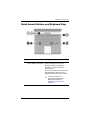
Quick Launch Buttons and Keyboard Keys . . . . . . 1–11
Wireless On/Off Button and Application Keys. . . . 1–13
Function and Keypad Keys . . . . . . . . . . . . . . . . . . . 1–14
Front Components . . . . . . . . . . . . . . . . . . . . . . . . . . . . . 1–16
Rear Components . . . . . . . . . . . . . . . . . . . . . . . . . . . . . . 1–20
Left-Side Components . . . . . . . . . . . . . . . . . . . . . . . . . . 1–22
Right-Side Components . . . . . . . . . . . . . . . . . . . . . . . . . 1–26
Bottom Components. . . . . . . . . . . . . . . . . . . . . . . . . . . . 1–30
Labels. . . . . . . . . . . . . . . . . . . . . . . . . . . . . . . . . . . . 1–32
Additional Standard Components . . . . . . . . . . . . . . . . . 1–33
Documentation Library CD . . . . . . . . . . . . . . . . . . . 1–33
Cords, Cables and Adapters. . . . . . . . . . . . . . . . . . . 1–34
2 TouchPad and Keyboard
Using the TouchPad . . . . . . . . . . . . . . . . . . . . . . . . . . . . .
Setting TouchPad Preferences . . . . . . . . . . . . . . . . . .
Using the Hotkeys . . . . . . . . . . . . . . . . . . . . . . . . . . .
Hotkey Quick Reference . . . . . . . . . . . . . . . . . . . . . .
Hardware Guide
2–1
2–4
2–5
2–7
iii
Contents
Hotkey Procedures. . . . . . . . . . . . . . . . . . . . . . . . . . . 2–8
Hotkey Commands . . . . . . . . . . . . . . . . . . . . . . . . . . 2–8
Using Quick Launch Buttons . . . . . . . . . . . . . . . . . . . . . 2–11
Reprogramming the Quick Launch Buttons . . . . . . 2–12
Keypad . . . . . . . . . . . . . . . . . . . . . . . . . . . . . . . . . . . . . . 2–13
Using the Keypad . . . . . . . . . . . . . . . . . . . . . . . . . . 2–13
3 Battery Packs
Running the Notebook on Battery Power . . . . . . . . . . . . 3–1
Inserting or Removing the Battery Pack . . . . . . . . . . . . . 3–2
Charging a Battery Pack. . . . . . . . . . . . . . . . . . . . . . . . . . 3–4
Obtaining Accurate Charge Information . . . . . . . . . . 3–5
Accessing the Battery Charge Display . . . . . . . . . . . 3–5
Placing the Power Meter Icon on the Taskbar . . . . . . . . . 3–6
Managing Low-Battery Conditions . . . . . . . . . . . . . . . . . 3–6
Identifying a Low-Battery Condition . . . . . . . . . . . . 3–6
Identifying a Critical Low-Battery Condition . . . . . . 3–6
Verifying Hibernation Settings . . . . . . . . . . . . . . . . . 3–7
Resolving Low-Battery Conditions . . . . . . . . . . . . . . . . . 3–7
Calibrating a Battery Pack . . . . . . . . . . . . . . . . . . . . . . . . 3–8
When to Calibrate . . . . . . . . . . . . . . . . . . . . . . . . . . . 3–8
How to Calibrate . . . . . . . . . . . . . . . . . . . . . . . . . . . . 3–8
Battery Conservation Procedures and Settings . . . . . . . 3–10
Conserving Power as You Work . . . . . . . . . . . . . . . 3–10
Storing a Battery Pack . . . . . . . . . . . . . . . . . . . . . . . 3–11
Disposing of a Used Battery Pack . . . . . . . . . . . . . . . . . 3–12
Finding More Power Information . . . . . . . . . . . . . . . . . 3–12
4 Drives
About Drive Terms . . . . . . . . . . . . . . . . . . . . . . . . . . . . .
Caring for Drives and Drive Media . . . . . . . . . . . . . . . . .
Caring for Drives . . . . . . . . . . . . . . . . . . . . . . . . . . . .
Caring for Drive Media . . . . . . . . . . . . . . . . . . . . . . .
iv
4–1
4–3
4–3
4–4
Hardware Guide
Contents
Using Drive Media. . . . . . . . . . . . . . . . . . . . . . . . . . . . . . 4–4
Avoiding Standby and Hibernation . . . . . . . . . . . . . . 4–4
Displaying Media Contents . . . . . . . . . . . . . . . . . . . . 4–5
Adding a Drive to the System . . . . . . . . . . . . . . . . . . . . . 4–6
Using the IDE Drive Light. . . . . . . . . . . . . . . . . . . . . . . . 4–7
Inserting and Removing Drive Media . . . . . . . . . . . . . . . 4–8
Inserting a CD or DVD . . . . . . . . . . . . . . . . . . . . . . . 4–8
Removing a CD or DVD (With Power) . . . . . . . . . 4–10
Removing a CD or DVD (Without Power) . . . . . . . 4–12
Inserting a Diskette (Select Models) . . . . . . . . . . . . 4–14
Removing a Diskette (Select Models) . . . . . . . . . . . 4–15
Installing an Optional HP USB Digital Drive
(Select Models) . . . . . . . . . . . . . . . . . . . . . . . . . . . . . . . 4–16
Installing an Optional SD Memory Card. . . . . . . . . 4–17
Connecting an Optional Digital Drive to the
USB Port . . . . . . . . . . . . . . . . . . . . . . . . . . . . . . . . . 4–18
Inserting an Optional Digital Drive into an
Optional Digital Bay . . . . . . . . . . . . . . . . . . . . . . . . 4–22
Removing an Optional Digital Drive from an
Optional Digital Bay . . . . . . . . . . . . . . . . . . . . . . . . 4–24
Finding Optional Drive Software Information . . . . 4–25
5 Audio and Video
Adjusting Volume . . . . . . . . . . . . . . . . . . . . . . . . . . . . . .
Using the Volume Buttons . . . . . . . . . . . . . . . . . . . .
Using the Volume Control Icon. . . . . . . . . . . . . . . . .
Using the Internal Speakers . . . . . . . . . . . . . . . . . . . . . . .
Connecting an Audio Device . . . . . . . . . . . . . . . . . . . . . .
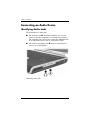
Identifying Audio Jacks. . . . . . . . . . . . . . . . . . . . . . .
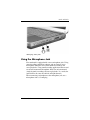
Using the Microphone Jack . . . . . . . . . . . . . . . . . . . .
Using the Audio-Out Jack . . . . . . . . . . . . . . . . . . . . .
Connecting an S-Video Device . . . . . . . . . . . . . . . . . . . .
Connecting the Audio . . . . . . . . . . . . . . . . . . . . . . . .
Turning a Video Device On and Off . . . . . . . . . . . . .
Changing the Color Television Format . . . . . . . . . . .
Hardware Guide
5–1
5–1
5–2
5–3
5–4
5–4
5–5
5–6
5–7
5–7
5–9
5–9
v
Contents
6 External Device Connections
Connecting a Standard Device . . . . . . . . . . . . . . . . . . . . .
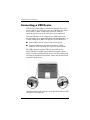
Connecting a USB Device . . . . . . . . . . . . . . . . . . . . . . . .
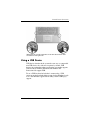
Using a USB Device . . . . . . . . . . . . . . . . . . . . . . . . .
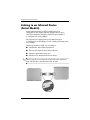
Linking to an Infrared Device (Select Models) . . . . . . . .
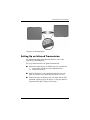
Setting Up an Infrared Transmission. . . . . . . . . . . . .
Avoiding Standby While Using Infrared. . . . . . . . . .
Connecting an Optional Cable Lock . . . . . . . . . . . . . . . .
6–1
6–2
6–3
6–4
6–5
6–6
6–7
7 Modem and Network Connections
Using the Modem (Select Models) . . . . . . . . . . . . . . . . . 7–1
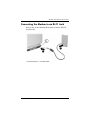
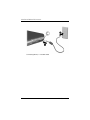
Connecting the Modem to an RJ-11 Jack . . . . . . . . . 7–3
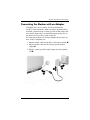
Connecting the Modem with an Adapter. . . . . . . . . . 7–5
Special Restrictions in Certain Countries . . . . . . . . . 7–6
Changing Your Modem Settings . . . . . . . . . . . . . . . . 7–6
Connecting to a Local Area Network (LAN). . . . . . . . . . 7–7
Turning a Network Connection Off and On . . . . . . . 7–9
Making Wireless Network Connections
(Select Models) . . . . . . . . . . . . . . . . . . . . . . . . . . . . . . . 7–10
Turning Wireless Communication On and Off . . . . 7–12
Connecting to a Wireless Network . . . . . . . . . . . . . 7–14
Checking the Wireless Connection Status. . . . . . . . 7–14
Making Bluetooth Wireless Connections
(Select Models) . . . . . . . . . . . . . . . . . . . . . . . . . . . . . . . 7–15
8 Hardware Upgrades
Obtaining Upgrades . . . . . . . . . . . . . . . . . . . . . . . . . . . . .
Using PC Cards . . . . . . . . . . . . . . . . . . . . . . . . . . . . . . . .
Selecting a PC Card. . . . . . . . . . . . . . . . . . . . . . . . . .
Configuring a PC Card . . . . . . . . . . . . . . . . . . . . . . .
Inserting a PC Card . . . . . . . . . . . . . . . . . . . . . . . . . .
Stopping and Removing a PC Card. . . . . . . . . . . . . .
vi
8–1
8–2
8–2
8–2
8–3
8–5
Hardware Guide
Contents
Using Digital Media Cards (Select Models) . . . . . . . . . . 8–6
Inserting an Optional Digital Media Card . . . . . . . . . 8–7
Removing an Optional Digital Media Card. . . . . . . . 8–9
Disabling an Optional Digital Media Card . . . . . . . 8–10
Increasing Memory . . . . . . . . . . . . . . . . . . . . . . . . . . . . 8–11
Displaying Memory Information. . . . . . . . . . . . . . . 8–11
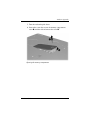
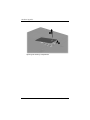
Removing or Inserting a Memory Module . . . . . . . 8–12
Replacing the Hard Drive. . . . . . . . . . . . . . . . . . . . . . . . 8–21
Finding More Upgrade Information. . . . . . . . . . . . . . . . 8–28
9 Specifications
Operating Environment . . . . . . . . . . . . . . . . . . . . . . . . . . 9–1
Rated Input Power . . . . . . . . . . . . . . . . . . . . . . . . . . . . . . 9–2
Index
Hardware Guide
vii
1
Hardware Components
Identifying Parts of the Notebook
Components included with the notebook vary by geographical
region and by model. This guide includes illustrations for
the different models and features. In each section, refer to the
illustrations that closely match your notebook.
The illustrations in Chapter 1 identify the standard external
features included in most notebook models.
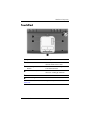
Display
Component
Description
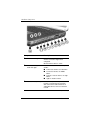
Display release latch
Opens the notebook.
Hardware Guide
1–1
Hardware Components
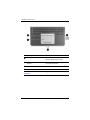
1–2
Component
Description
Display release latch
Opens the notebook.
Hardware Guide
Hardware Components
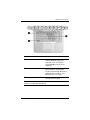
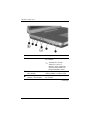
TouchPad
Component
Description
1
TouchPad*
Moves the pointer and selects or
activates items on the screen.
2
Left and right TouchPad
buttons
Function like the left and right buttons
of an external mouse.
3
TouchPad scroll pad
Functions like the wheel of an external
mouse for scrolling up and down.
4
TouchPad on/off button
Turns TouchPad on or off.
5
TouchPad light
On: TouchPad is enabled.
*For information about TouchPad settings, see Chapter 2, “TouchPad and
Keyboard.”
Hardware Guide
1–3
Hardware Components
Component
Description
1
TouchPad*
Moves the pointer and selects or
activates items on the screen.
2
Left and right TouchPad
buttons
Function like the left and right buttons
on an external mouse.
3
TouchPad on/off button
Turns TouchPad on or off.
4
TouchPad light
On: TouchPad is enabled.
*For information about TouchPad settings, see Chapter 2, “TouchPad and
Keyboard.”
1–4
Hardware Guide
Hardware Components
Top Components
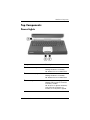
Power Lights
Component
Description
1
Power button light
On: Notebook is turned on.
Blinking: Notebook is in Standby.
Off: Notebook is off or in Hibernation.
2
Power/Standby light
On: Notebook is turned on.
Blinking: Notebook is in Standby.
Off: Notebook is off or in Hibernation.
3
Battery light
On: Battery pack is charging.
Blinking: Battery pack has reached a
low-battery condition.
Off: AC power is applied, with battery
pack either fully charged or not
installed, or no AC power is applied.
Hardware Guide
1–5
Hardware Components
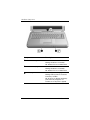
1–6
Component
Description
1
Power button light
On: Notebook is turned on.
Blinking: Notebook is in Standby.
Off: Notebook is off or in Hibernation.
2
Power/Standby light
On: Notebook is turned on.
Blinking: Notebook is in Standby.
Off: Notebook is off or in Hibernation.
3
Battery light
On: Battery pack is charging.
Blinking: Battery pack has reached a
low-battery condition.
Off: AC power is applied, with battery
pack either fully charged or not
installed, or no AC power is applied.
Hardware Guide
Hardware Components
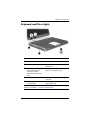
Keyboard and Drive Lights
Component
Description
1
Caps lock light
On: Caps lock is on.
2
Num lock light
On: Num lock or the internal
keypad is on.*
3
IDE (Integrated Drive
Electronics) light; also
referred to as hard
drive/optical drive activity
light
On: The internal hard drive or optical
drive bay is being accessed.
4
Optical disk drive light
On: The optical drive bay is being
accessed.
5
5-in-1 Digital Media slot light
(select models).
On: Slot is accessing an optional
digital media card.
*For information about using num lock, the internal keypad, or an external
keypad, see Chapter 2, “TouchPad and Keyboard.”
Hardware Guide
1–7
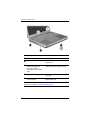
Hardware Components
Component
Description
1
Caps lock light
On: Caps lock is on.
2
Num lock light
On: Num lock or the internal
keypad is on.*
3
IDE (Integrated Drive
Electronics) light; also
referred to as hard
drive/optical drive activity
light
On: The internal hard drive or the
optical drive bay is being accessed.
4
Optical disk drive light
On: The optical drive bay is being
accessed.
5
5-in-1 Digital Media slot light
(select models)
On: Slot is accessing an optional
digital media card.
*For information about using num lock, the internal keypad, or an external
keypad, see Chapter 2, “TouchPad and Keyboard.”
1–8
Hardware Guide
Hardware Components
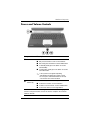
Power and Volume Controls
Component
1
Description
Power button* When the notebook is:
■
■
■
Off, press the button to turn on the notebook.
■
In Hibernation, briefly press the button to resume
from Hibernation.
✎
2
Volume
buttons (3)
On, briefly press the button to initiate Hibernation.
In Standby, briefly press the button to resume
from Standby.
If the system has stopped responding
and Windows shutdown procedures cannot
be used, press and hold the button for at least
4 seconds to turn off the notebook.
Decrease, mute, and increase the system volume:
■
■
■
To decrease volume, use the left button.
To mute or restore volume, use the middle button.
To increase volume, use the right button.
*This table describes default settings. For information about changing the
function of the power button, refer to the “Power” chapter in the Software
Guide on this CD.
Hardware Guide
1–9
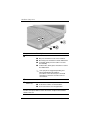
Hardware Components
Component
Description
1 Power button*
When the notebook is:
■
■
■
Off, press the button to turn on the notebook.
■
In Hibernation, briefly press the button to resume
from Hibernation.
✎
On, briefly press the button to initiate Hibernation.
In Standby, briefly press the button to resume
from Standby.
If the system has stopped responding and
Microsoft® Windows® shutdown
procedures cannot be used, press and hold
the button for at least 4 seconds to turn off
the notebook.
2 Mute button
On: Audio is muted.
3 Volume
Decrease and increase the system volume:
buttons (2)
■
■
To decrease volume, use the left button.
To increase volume, use the right button.
*This table describes default settings. For information about changing the
function of the power button, refer to the “Power” chapter in the Software
Guide on this CD.
1–10
Hardware Guide
Hardware Components
Quick Launch Buttons and Keyboard Keys
Component
1
Description
Quick Launch buttons:
From left to right: 3 programmable
Picture, Media, and Internet buttons enable you to access the
My Pictures folder, a multimedia
application, and the Internet with
one keystroke.
The icon on each button represents the
default destination. Buttons can be
programmed to point to other locations.
✎
See the instructions on
changing the destination of
Quick Launch buttons in
Chapter 2, “TouchPad and
Keyboard.”
(continued)
Hardware Guide
1–11
Hardware Components
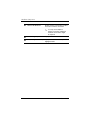
2
Wireless On/Off button
Enables wireless functionality, but does
not create a wireless connection.
✎
To set up and complete a
wireless connection, additional
hardware and software might
be required.
3
Windows logo key
Displays Windows Start menu.
4
Windows Applications key
Displays shortcut menu for any
highlighted items.
1–12
Hardware Guide
Hardware Components
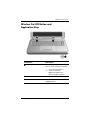
Wireless On/Off Button and
Application Keys
Component
Description
1
Enables wireless functionality, but
does not create a wireless connection.
Wireless On/Off button
✎
To set up and complete a
wireless connection,
additional hardware and
software might be required.
2
Windows logo key
Displays Windows Start menu.
3
Windows Applications key
Displays shortcut menu for any
highlighted items.
Hardware Guide
1–13
Hardware Components
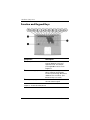
Function and Keypad Keys
Component
Description
1
Fn key
Combines with the function keys to
perform additional system and
application tasks. For example,
pressing Fn+F8 increases screen
brightness.
2
Function keys (11)*
Perform system and application tasks.
When combined with the Fn key,
function keys F1 through F12 perform
additional tasks as hotkeys. (The
F2 function key is not used.)
3
Keypad keys (15)
Can be used like the keys on an
external numeric keypad.
*For more information, refer to the “Hotkey Quick Reference” section in
Chapter 2, “TouchPad and Keyboard.”
1–14
Hardware Guide
Hardware Components
Component
Description
1
Fn key
Combines with the function keys to
perform additional system and
application tasks. For example,
pressing Fn+F8 increases screen
brightness.
2
Function keys (11)*
Perform system and application tasks.
When combined with the Fn key,
function keys F1 through F12 perform
additional tasks as hotkeys. (The
F2 function key is not used.)
3
Keypad keys (15)
Can be used like the keys on an
external numeric keypad.
*For more information, refer to the “Hotkey Quick Reference” section in
Chapter 2, “TouchPad and Keyboard.”
Hardware Guide
1–15
Hardware Components
Front Components
Component
Description
1
Display release latch
Opens the notebook.
2
Power/Standby light
On: Notebook is turned on.
Blinking: Notebook is in Standby.
Off: Notebook is off or in Hibernation.
3
IDE (Integrated Drive
Electronics) light; also
referred to as hard
drive/optical drive activity
light
On: The internal hard drive or optical
drive bay is being accessed.
(continued)
1–16
Hardware Guide
Hardware Components
4
Battery light
On: Battery pack is charging.
Blinking: Battery pack has reached a
low-battery condition.
Off: AC power is applied, with battery
pack either fully charged or not
installed, or no AC power is applied.
5
Stereo speakers (2)
Produce stereo sound.
6
Volume and mute buttons (3)
Decrease, mute, and increase the
system volume:
Hardware Guide
■
To decrease volume, use the
left button.
■
To mute or restore volume, use
the middle button.
■
To increase volume, use the
right button.
1–17
Hardware Components
Component
Description
1
Stereo speakers (2)
Produce stereo sound.
2
Power/Standby light
On: Notebook is turned on.
Blinking: Notebook is in Standby.
Off: Notebook is off or in Hibernation.
3
Display release latch
Opens the notebook.
4
IDE (Integrated Drive
Electronics) light; also
referred to as hard
drive/optical drive activity
light
On: The internal hard drive or optical
drive bay is being accessed.
1–18
Hardware Guide
Hardware Components
5
Battery light
On: Battery pack is charging.
Blinking: Battery pack has reached a
low-battery condition.
Off: AC power is applied, with battery
pack either fully charged or not
installed, or no AC power is applied.
6
Wireless On/Off button
Enables wireless functionality, but
does not create a wireless connection.
✎
Hardware Guide
To set up and complete a
wireless connection, additional
hardware and software might be
required.
1–19
Hardware Components
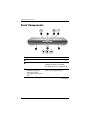
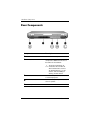
Rear Components
Component
Description
1
Power connector
Connects an AC adapter.
2
Exhaust vent
Allows airflow to cool internal
components. Additional vents are on
the bottom of the notebook.
Ä
To prevent overheating, do
not obstruct the vent. Do not
allow a hard surface, such as
an adjoining printer, or a soft
surface, such as bedding or
clothing, to block airflow.
3
External monitor connector
Connects an optional external monitor
or overhead projector.
4
Parallel connector
Connects an optional parallel device,
such as a printer.
5
RJ-11 jack
Connects the modem cable.
1–20
Hardware Guide
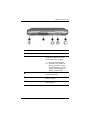
Hardware Components
Component
Description
1
Power connector
Connects an AC adapter.
2
Exhaust vent
Allows airflow to cool internal
components. Additional vents are
on the bottom of the notebook.
Ä
To prevent overheating, do
not obstruct the vent. Do not
allow a hard surface, such as
an adjoining printer, or a soft
surface, such as bedding or
clothing, to block airflow.
3
External monitor connector
Connects an optional external monitor
or overhead projector.
4
Parallel connector
Connects an optional parallel device,
such as a printer.
5
RJ-11 jack (select models)
Connects the modem cable.
(select models)
Hardware Guide
1–21
Hardware Components
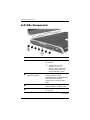
Left-Side Components
1
Component
Description
1
Attaches an optional security cable to
the notebook.
Security cable slot
✎
The purpose of security
solutions is to act as a
deterrent. These solutions do
not prevent the product from
being mishandled or stolen.
2
5-in-1 Digital Media slot and
light (select models)
Supports 5 optional digital media
formats: SD Memory Card,
MultiMediaCard, SmartMedia, Memory
Stick, and Memory Stick Pro.
Light On: Slot is accessing digital
media.
3
PC Card slot
Supports an optional Type I or Type II
32-bit (CardBus) or 16-bit PC Card.
4
PC Card eject button
Ejects an optional PC Card from the
PC Card slot.
(continued)
1–22
Hardware Guide
Hardware Components
5
USB connectors (2)
Connect optional USB device, such as
printers.
6
Three drive configurations:
optional Digital Bay, optional
diskette drive, no drive
Digital Bay: Supports optional
pocket-sized HP USB Digital Drive.
Diskette drive: Supports standard
1.4-MB diskette.
No drive: No drive is installed.
7
One of 4 optical drive bay
configurations
■
■
■
CD-ROM drive
■
DVD+RW/R and CD-RW combo
drive—Can write to both
recordable CDs and DVDs.
Hardware Guide
DVD-ROM drive
DVD/CD-RW combo drive—Can
write to recordable CDs, but
cannot write to recordable DVDs.
(Type of drive varies by model.)
1–23
Hardware Components
Component
Description
1
Attaches an optional security cable to
the notebook.
Security cable slot
✎
The purpose of security
solutions is to act as a
deterrent. These solutions do
not prevent the product from
being mishandled or stolen.
2
PC Card slot (1 or 2 slots,
select models)
Supports an optional Type I or Type II
32-bit (CardBus) or 16-bit PC Card.
3
PC Card eject button (1 or
2 buttons, select models)
Ejects an optional PC Card from the
PC Card slot.
(continued)
1–24
Hardware Guide
Hardware Components
4
USB connectors (2)
Connect optional USB devices, such
as printers.
5
Three drive configurations:
optional Digital Bay, optional
diskette drive, no drive
Digital Bay: Supports optional
pocket-sized HP USB Digital Drive.
Diskette drive: Supports standard
1.4-MB diskette.
No drive: No drive is installed.
6
One of 4 optical drive bay
configurations
■
■
■
CD-ROM drive
■
DVD+RW/R and CD-RW combo
drive—Can write to both
recordable CDs and DVDs.
Hardware Guide
DVD-ROM drive
DVD/CD-RW combo drive—Can
write to recordable CDs, but
cannot write to recordable DVDs.
(Type of drive varies by model.)
1–25
Hardware Components
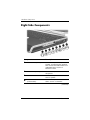
Right-Side Components
Component
Description
1
Audio-out headphone jack
Connects an optional headphone, a
headset, or powered stereo speakers.
Also connects the audio function of an
audio/video device, such as a
television or VCR.
2
Audio-in microphone jack
Connects an optional external
microphone.
3
USB connector
Connects an optional USB device,
such as a printer.
4
1394 connector
(select models)
Connects an optional IEEE1394
device, such as a camcorder.
(continued)
1–26
Hardware Guide
Hardware Components
5
Infrared port
(select models)
Provides wireless communication
between the notebook and an optional
IrDA-compliant device.
6
Expansion port
Connects an optional HP Notebook
Expansion Base.
7
RJ-45 network jack
Connects an optional network cable.
8
S-Video-out jack
Connects an optional S-Video device,
such as a television, VCR,
camcorder, overhead projector, or
video capture card.
Hardware Guide
1–27
Hardware Components
Component
Description
1
Wireless on/off light
On: Wireless functionality is enabled, but
wireless connection might not be
configured.
Off: No wireless device is active.
2
Volume buttons (3) and
audio mute light
Decrease, mute, and increase the system
volume:
3
Audio-out headphone jack
■
■
To decrease volume, use left button.
■
To mute or restore volume, use right
button.
■
Light on: Audio is muted.
To increase volume, use middle
button.
Connects an optional headphone, a
headset, or powered stereo speakers.
Also connects the audio function of an
audio/video device, such as a television
or VCR.
(continued)
1–28
Hardware Guide
Hardware Components
4
Audio-in microphone jack
Connects an optional external
microphone.
5
USB connector
Connects an optional USB device, such
as a printer.
6
1394 connector
(select models)
Connects an optional IEEE 1394 device,
such as a camcorder.
7
Infrared port
(select models)
Provides wireless communication
between the notebook and an optional
IrDA-compliant device.
8
Expansion port
Connects an optional HP Notebook
Expansion Base.
9
RJ-45 network jack
Connects an optional network cable.
-
S-Video-out jack
Connects an optional S-Video device,
such as a television, VCR, camcorder,
overhead projector, or video capture card.
Hardware Guide
1–29
Hardware Components
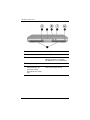
Bottom Components
Component
Description
1
Battery release latch
Releases the battery pack from the
battery bay.
2
Battery bay
Holds the battery pack.
3
Exhaust vents
Allow airflow to cool internal components.
Ä
1–30
To prevent overheating, do not
obstruct the vent. Do not allow a
hard surface, such as an
adjoining printer, or a soft
surface, such as bedding or
clothing, to block airflow.
4
Hard drive bay
Holds the primary hard drive.
5
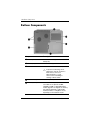
Memory compartment
Contains 2 memory slots, one of which is
accessible for an optional 128-MB,
256-MB, 512-MB, or 1024-MB memory
module upgrade. As shipped, the memory
slot might be filled with a replaceable
memory module, or it might be vacant,
depending on the notebook model.
Hardware Guide
Hardware Components
Component
Description
1
Battery release latch
Releases the battery pack from the
battery bay.
2
Battery bay
Holds the battery pack. (Battery shipment
and type vary by model.)
3
Exhaust vents
Allow airflow to cool internal components.
Ä
To prevent overheating, do not
obstruct the vent. Do not allow a
hard surface, such as an
adjoining printer, or a soft
surface, such as bedding or
clothing, to block airflow.
4
Hard drive bay
Holds the primary hard drive.
5
Memory compartment
Contains 2 memory slots, one of which is
accessible for an optional 128-MB,
256-MB, 512-MB, or 1024-MB memory
module upgrade. As shipped, the memory
slot might be filled with a replaceable
memory module, or it might be vacant,
depending on the notebook model.
Hardware Guide
1–31
Hardware Components
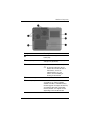
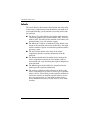
Labels
The labels affixed to the bottom of the notebook and to the inside
of the battery compartment provide information you might need
when troubleshooting system problems or traveling abroad with
the notebook.
1–32
■
The Service Tag label affixed to the bottom of the notebook
contains the product name, product number (P/N), and serial
number (S/N). You will need the notebook serial number and
product number if you call customer support.
■
The Microsoft Certificate of Authenticity label affixed to the
bottom of the notebook contains the Product Key. You might
need this number to update or troubleshoot problems with the
operating system.
■
The System label affixed to the inside of the battery
compartment provides regulatory information about the
notebook.
■
The Product identification label affixed to the inside of the
battery compartment contains the serial number (S/N) of
the notebook and a code describing the original configuration
of the notebook.
■
The Modem approval label affixed to an optional internal
modem provides regulatory information.
■
The wireless certification labels affixed to the inside of the
battery compartment are specific to various types of optional
wireless devices. These labels provide regulatory information
and list the countries in which the optional wireless devices
have been approved for use. You might need the wireless
device information in order to use the wireless device while
traveling.
Hardware Guide
Hardware Components
Additional Standard Components
The components included with the notebook vary by geographic
region and by model. The following illustrations and tables
identify the standard external components included with most
notebook models.
Documentation Library CD
Your notebook Documentation Library CD includes the
following guides:
■
Hardware Guide (the document you are viewing)
■
Software Guide
■
Maintenance, Shipping and Travel guide
■
Regulatory and Safety Notices
■
Safety & Comfort Guide
■
Troubleshooting guide
■
Modem and Networking guide
For information about using the Documentation Library CD,
refer to the printed Startup Guide included with the notebook.
Hardware Guide
1–33
Hardware Components
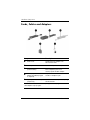
Cords, Cables and Adapters
Component
Description
1
Power cord*
Connects the AC adapter to an
AC electrical outlet.
2
AC adapter**
Converts AC power to DC power.
3
Modem cables
(select models)*
Connects the modem to an
RJ-11 telephone jack or to a
country-specific modem adapter.
4
Country-specific modem
adapter (included by region
as required)
Adapts the modem cable to a
non-RJ-11 telephone jack.
5
Japan-specific outlet adapter
(Japan only)
Connects the AC adapter to a 2-prong
electrical outlet.
*Power cords and modem cables vary in appearance by region.
**AC adapters vary by region.
1–34
Hardware Guide
2
TouchPad and Keyboard
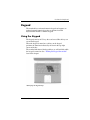
Using the TouchPad
The TouchPad duplicates the functions of an optional external
mouse.
Hardware Guide
2–1
TouchPad and Keyboard
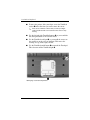
■
To move the pointer, slide your finger across the TouchPad
surface 1 in the direction you want to move the cursor.
✎
If the cursor continues to move after you take your finger
off the TouchPad, wait a few seconds for the cursor to stop
moving.
■
Use the left and right TouchPad buttons 2 as you would the
left and right buttons on an external mouse.
■
Use the TouchPad scroll pad 3 as you would the arrows on
the scroll bars on the edges of windows. This moves the
viewing area up, down, right, and left.
■
Use the TouchPad on/off button 4 to turn off the Touchpad.
This also turns off the TouchPad light 5.
Identifying TouchPad components
2–2
Hardware Guide
TouchPad and Keyboard
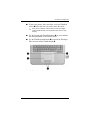
■
To move the pointer, slide your finger across the TouchPad
surface 1 in the direction you want to move the cursor.
✎
If the cursor continues to move after you take your finger
off the TouchPad, wait a few seconds for the cursor to stop
moving.
■
Use the left and right TouchPad buttons 2 as you would the
left and right buttons on an external mouse.
■
Use the TouchPad on/off button 3 to turn off the Touchpad.
This also turns off the TouchPad light 4.
Identifying TouchPad components
Hardware Guide
2–3
TouchPad and Keyboard
Setting TouchPad Preferences
The TouchPad is supported by the mouse software in the
operating system. To access the Mouse Properties window, select
Start > Control Panel > Printers and Other Hardware > Mouse.
Among the settings you can select are:
■
TouchPad tapping, which enables you to tap the TouchPad
once or twice to select an object.
■
Inertial Movement, which enables you to continue to scroll
even though your finger has reached the edge of the
TouchPad.
■
Typing, which prevents inadvertent tapping when typing on
the keyboard.
Other features, such as sensitivity, virtual scrolling, mouse trails,
and mouse speed preferences, are available in the Mouse
Properties window.
2–4
Hardware Guide
TouchPad and Keyboard
Using the Hotkeys
this guide, the function keys are capitalized (Fn, F5). The
✎ Infunction
keys on your keyboard might be lowercase (fn, f5).
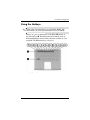
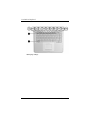
Hotkeys are preset combinations of the Fn key 1 and one of
the function keys 2. Excluding function key F2, the icons on
F1 through F12 represent the hotkey functions available on your
notebook. The F2 function key is not used.
Identifying hotkeys
Hardware Guide
2–5
TouchPad and Keyboard
Identifying hotkeys
2–6
Hardware Guide
TouchPad and Keyboard
Hotkey Quick Reference
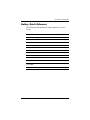
The following table identifies the hotkey functions set at the
factory.
Default Function
Hotkey
Open Help and Support Center.
Fn+F1
Not used.
Fn+F2
Open Microsoft Internet Explorer.
Fn+F3
Switch display image.
Fn+F4
Initiate Standby.
Fn+F5
Initiate QuickLock.
Fn+F6
Decrease screen brightness.
Fn+F7
Increase screen brightness.
Fn+F8
Play, pause, or resume an audio CD or DVD.
Fn+F9
Stop an audio CD or DVD.
Fn+F10
Play the previous track or chapter of an audio
CD or DVD.
Fn+F11
Play the next track of an audio CD or DVD.
Fn+F12
Hardware Guide
2–7
TouchPad and Keyboard
Hotkey Procedures
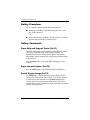
To use a hotkey command on the notebook keyboard:
■
Briefly press the Fn key, and then briefly press the second
key of the command.
-or-
■
Press and hold down the Fn key, briefly press the second key,
and then release both keys simultaneously.
Hotkey Commands
Open Help and Support Center (Fn+F1)
The Help and Support Center provides a comprehensive online
resource tool for contacting an HP support specialist, for
downloading the latest software driver updates and product
information, and for learning more about using and maintaining
your notebook.
Press the Fn+F1 hotkey to open the Help and Support Center
window.
Open Internet Explorer (Fn+F3)
Press the Fn+F3 hotkey to open Microsoft Internet Explorer.
Switch Display Image (Fn+F4)
The Fn+F4 hotkey switches the image among display devices
connected to the notebook. For example, if an external monitor
is connected to the notebook, pressing Fn+F4 multiple times
switches the image among the notebook display, the external
monitor display, and a simultaneous display on both the notebook
and the external monitor.
2–8
Hardware Guide
TouchPad and Keyboard
Initiate Standby (Fn+F5)
The Fn+F5 hotkey is set by default to initiate Standby.
■
When the notebook is on, press the Fn+F5 hotkey to initiate
Standby. When Standby is initiated, your work is saved in
random access memory (RAM), the screen is cleared, and
power is conserved. While the notebook is in Standby,
the power/Standby light blinks.
■
To exit Standby, briefly press the power button, or tap the
TouchPad, a key on the keyboard, or other pointing device
component.
The function of the Fn+F5 hotkey, called the “sleep button” in
Windows, can be changed. For example, the Fn+F5 hotkey can
be set to initiate Hibernation instead of Standby. For more
information about Standby, Hibernation, and changing the
function of the Fn+F5 hotkey, see the “Power” chapter in the
Software Guide on this CD.
Initiate QuickLock (Fn+F6)
The QuickLock operating system security feature disables the
keyboard and displays the logon screen. QuickLock does not
disable the TouchPad.
Before you can use this feature, you must set a Windows system
password. For instructions, refer to your operating system
documentation.
To initiate QuickLock, press the Fn+F6 hotkey. To disable
QuickLock, enter your Windows system password.
Hardware Guide
2–9
TouchPad and Keyboard
Decrease Screen Brightness (Fn+F7)
Press the Fn+F7 hotkey to decrease the brightness of the notebook
screen. Decreasing brightness conserves power.
Increase Screen Brightness (Fn+F8)
Press the Fn+F8 hotkey to increase the brightness of the
notebook screen.
Play, Pause or Resume an Audio CD or DVD (Fn+F9)
If an audio CD or DVD is inserted into the optical drive, press
the Fn+F9 hotkey to play it.
If an audio CD or DVD is playing in the optical drive, press the
Fn+F9 hotkey to pause it.
If you have paused an audio CD or DVD in the optical drive
by pressing the Fn+F9 hotkey, press the Fn+F9 hotkey again to
resume play.
Stop an Audio CD or DVD (Fn+F10)
If an audio CD or DVD is playing in the optical drive, press
the Fn+F10 hotkey to stop it.
Play Previous Track of an Audio CD or DVD (Fn+F11)
Press the Fn+F11 hotkey to select the previously played track of
an audio CD or DVD that is playing in the optical drive.
Play Next Track of an Audio CD or DVD (Fn+F12)
Press the Fn+F12 hotkey to play the next track of an audio CD or
DVD playing in the optical drive.
2–10
Hardware Guide
TouchPad and Keyboard
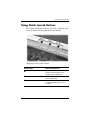
Using Quick Launch Buttons
The 3 Quick Launch buttons enable you to use a single keystroke
to access default software applications or the Internet.
Identifying the Quick Launch buttons
Button Name
Default Assignment
1
Picture
Opens My Pictures folder and then
launches the default photo and
imaging software application.
2
Media
Launches the default multimedia
software application.
3
Internet
Opens to Microsoft Internet Explorer or
to a personal Web page you can
customize.
Hardware Guide
2–11
TouchPad and Keyboard
Reprogramming the Quick Launch Buttons
Your notebook Quick Launch buttons can be assigned to an
Internet location, a network destination, a software application,
or a data file. For example, a Quick Launch button can be
assigned to open your Internet browser to a favorite Web page
or to open an application, such as Microsoft Word, or even a
document, such as an Excel worksheet.
Button assignments can be grouped into schemes. When you
select a scheme, only the button assignments within that scheme
are active. Button assignments and schemes are set up, changed,
or deleted in the Quick Launch buttons window.
To reprogram a button:
1. Select Start > All Programs > Utilities > Quick Launch.
2. On the Quick Launch tab, select the button you want to
reprogram.
3. Type a label for the button, and then select the application,
document, folder, or Web site you want the button to open.
If you want an icon for the button to appear on the taskbar or on
the desktop, select that option on the Onscreen Display tab.
2–12
Hardware Guide
TouchPad and Keyboard
Keypad
The notebook has an internal numeric keypad and supports an
optional external numeric keypad or an optional external
keyboard that includes a numeric keypad.
Using the Keypad
The keypad consists of 15 keys that can be used like the keys on
an external keypad.
When the keypad is turned on, each key on the keypad
performs the functions indicated by the icon in the top-right
corner of the key.
The standard functions of the keypad keys are still available while
the keypad is turned on. See “Turning the Keypad On and Off”
later in this chapter.
Identifying the keypad keys
Hardware Guide
2–13
TouchPad and Keyboard
Identifying the keypad keys
2–14
Hardware Guide
TouchPad and Keyboard
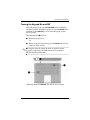
Turning the Keypad On and Off
When the keypad is off, press Fn+num lk 1 on the notebook to
turn the keypad on. When the keypad is on, press Fn+num lk on the
notebook (or the num lock key on an external keypad) to turn
the keypad off.
The num lock light 2 turns on:
■
When the keypad is on
-or-
■
When an optional external keypad with num lock turned on is
connected to the system.
keypad cannot be turned on while an optional external
✎ The
keypad is connected to the USB connector on an optional
HP Notebook Expansion Base.
Identifying the Fn and num lock keys and the num lock light
Hardware Guide
2–15
TouchPad and Keyboard
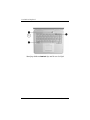
Identifying the Fn and num lock keys and the num lock light
2–16
Hardware Guide
TouchPad and Keyboard
Switching Key Functions on the Keypad
You can temporarily switch the functions of keys on the keypad
between the standard function and the keypad function by using
the Fn key or the Fn+shift key combination.
■
To make a standard key function as a keypad key (when the
keypad is turned off), press and hold the Fn key while
pressing the keypad key.
■
To make a keypad key function as a standard key (while
the keypad is turned on):
❏ Press and hold the Fn key to type in lowercase.
❏ Press and hold Fn+shift to type in uppercase.
When the Fn key is released, the keys return to their
original mode.
Turning Num Lock Mode On or Off as You Work
To turn num lock on or off on an external keypad as you work,
press the num lock key on the external keypad (not on the
notebook keypad).
Hardware Guide
2–17
3
Battery Packs
Running the Notebook on Battery
Power
The notebook switches between AC power and battery power
according to the availability of an external AC power source,
always preferring AC power. If the notebook contains a charged
battery pack and is running on external AC power, the notebook
will switch to battery power only if the AC adapter is
disconnected from the notebook.
Keeping a battery pack in the notebook enables the battery pack
to charge whenever the notebook is connected to external power
and also protects your work in case of a power outage.
On the other hand, a battery pack in the notebook slowly
discharges even when the notebook is powered off. Whether to
leave a battery pack in the notebook or in storage depends on how
you work.
Hardware Guide
3–1
Battery Packs
Inserting or Removing the
Battery Pack
Ä
CAUTION: When removing a battery pack that is the only power
source, initiate Hibernation or turn off the notebook to prevent loss
of work.
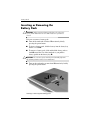
To insert or remove a battery pack:
Ä
■
Turn off the notebook or initiate Hibernation by briefly
pressing the power button.
■
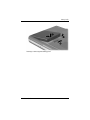
To insert a battery pack, slide the battery into the battery bay
until it is seated 1.
■
To remove a battery pack, slide and hold the battery release
latch 2 toward the rear of the notebook as you pull the
battery pack from the battery bay 3.
CAUTION: Do not restore power until the power/Standby light turns
off, indicating that the notebook is in Hibernation.
■
Turn on the notebook or resume from Hibernation by briefly
pressing the power button.
Inserting or removing the battery pack
3–2
Hardware Guide
Battery Packs
Inserting or removing the battery pack
Hardware Guide
3–3
Battery Packs
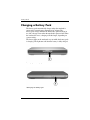
Charging a Battery Pack
The battery pack automatically charges when the notebook is
connected to external power through an AC adapter. The
battery pack charges whether the notebook is powered off or in
use, but it charges faster when the notebook is powered off. When
the notebook is in use, charging will take longer, depending on
system activity.
The battery light on the notebook stays on while the battery pack
is charging. The light turns off when the battery is fully charged.
Identifying the battery light
Identifying the battery light
3–4
Hardware Guide
Battery Packs
Obtaining Accurate Charge Information
Charging the battery pack prolongs battery life and increases the
accuracy of the battery gauge. When charging the battery:
■
Allow the battery pack to fully discharge before charging it.
■
Charge the battery pack fully. Even a new battery pack can
display charge information inaccurately if it has not been
charged fully.
■
Fully charging and discharging the battery pack will reduce
the need for battery calibration.
■
A battery pack in a notebook that has been idle for over
one month might need calibrating. See “Calibrating a Battery
Pack” in this chapter for details.
Accessing the Battery Charge Display
To see the amount of charge remaining in the battery pack:
»
Select Start > Control Panel > Performance and
Maintenance > Power Options > Power Meter.
the Power Meter icon is placed on the taskbar, it will change
✎ Ifshape
according to whether a battery pack or AC power is the
primary power source.
Interpreting Battery Charge Displays
Most battery charge displays report battery status in terms of
percent of charge remaining and run time remaining.
The run time remaining indicates the approximate running time
left if the battery pack continues to provide power at the current
level. For example, battery run time will decrease if you start
playing a DVD and will increase if you stop playing a DVD.
Hardware Guide
3–5
Battery Packs
Placing the Power Meter Icon on the
Taskbar
To place the Power Meter icon on the taskbar, access the Power
Options window.
»
Select the Advanced tab, and then select the Always show
icon on the taskbar check box.
the Power Meter icon is on the taskbar, it will change shape
✎ Ifdepending
on whether a battery pack or AC power is the primary
power source.
Managing Low-Battery Conditions
It is important to respond to a low-battery or critical low-battery
condition. This section describes default battery settings and
ways to protect your work in a low-battery condition.
Identifying a Low-Battery Condition
When the battery pack is the only power source for the notebook
and drops to 5 percent of a full charge, the notebook has reached a
low-battery condition. When this condition occurs, the battery
light blinks and a text warning message is displayed.
The Power Options utility allows you to redefine a low-battery
condition, set audio warnings, and change other power defaults.
For details, see the “Power” chapter in the Software Guide on the
Documentation Library CD.
Identifying a Critical Low-Battery Condition
If you do not resolve a low-battery condition, the notebook enters
a critical low-battery condition. By default, the notebook defines
a critical low-battery condition as 3 percent of a full battery
charge remaining.
3–6
Hardware Guide
Battery Packs
The battery light continues to blink and:
■
If Hibernation is enabled (the default setting) and the
notebook is on or in Standby, the system initiates Hibernation
and saves system memory to the hard drive. Unsaved work
might be lost.
■
If Hibernation is disabled and the notebook is on or in
Standby, the notebook remains briefly in Standby, then
shuts down. The power/Standby light turns off, and the
notebook cannot save system memory to the hard drive.
Verifying Hibernation Settings
Hibernation, enabled by default, is an important safeguard in
low-battery situations. To verify that Hibernation is enabled,
access the Power Meter icon, or:
»
Select Start > Control Panel > Performance and
Maintenance > Power Options > Hibernate. Make sure that
the Enable Hibernate support check box is selected.
Resolving Low-Battery Conditions
Ä
CAUTION: If the notebook has reached a critical low-battery condition
and initiated Hibernation, do not restore power until the power/Standby
light turns off, indicating that the notebook is in Hibernation.
■
If external power is available to the notebook, connect the
AC adapter.
■
If a charged battery pack is available, shut down the notebook
or initiate Hibernation. Then insert a charged battery pack,
and turn the notebook back on.
■
If no power source is available, save your work. Then initiate
Hibernation or shut down the notebook.
If you cannot resume from Hibernation when power is restored to
the system, you will be prompted to delete the restoration data
and proceed with system boot. Unsaved data will be lost.
Hardware Guide
3–7
Battery Packs
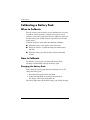
Calibrating a Battery Pack
When to Calibrate
Even if a battery pack is heavily used, it should not be necessary
to calibrate it more than once a month. It is not necessary to
calibrate a new battery pack before first use. However, make sure
that the battery pack is fully charged, especially if it is the only
power source.
Calibrate the battery pack under the following conditions:
■
When the battery status display seems inaccurate.
■
When you observe a significant change in normal battery
run time.
■
When the battery pack has not been used for one month
or more.
How to Calibrate
To calibrate a battery pack, you must fully charge, fully
discharge, and then fully recharge the battery pack.
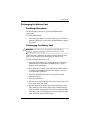
Charging the Battery Pack
Fully charge the battery pack when the notebook is in use. To
charge the battery pack:
1. Insert the battery pack into the notebook.
2. Connect the notebook to external power through an
AC adapter. (The battery light turns on.)
The battery light turns off when the battery pack is fully charged.
3–8
Hardware Guide
Battery Packs
Discharging the Battery Pack
Disabling Hibernation
To fully discharge the battery pack, disable Hibernation
temporarily.
To disable Hibernation:
»
Select the Power Meter icon on the taskbar or access Power
Options > Hibernate, and clear the Enable Hibernate support
check box.
Discharging the Battery Pack
Ä
CAUTION: If you plan to leave the notebook unattended during
discharge, save your work before starting the discharge procedure.
After the battery light turns off, which indicates that the battery
pack is fully charged, begin discharging the battery pack.
To fully discharge the battery pack:
1. Select the Power Meter icon on the taskbar, or select Start >
Control Panel > Performance and Maintenance > Power
Options > Power Schemes.
2. Write down the 3 settings in the Plugged In column and the
3 settings in the Running on Batteries column, so you can
reset them after calibration.
3. Select the drop-down lists and set all 6 options in both
columns to Never.
4. Select the OK button.
5. Disconnect the notebook from the external power source, but
do not turn off the notebook.
6. Run the notebook on battery power until the battery pack is
fully discharged. The battery light begins to blink when the
battery pack has discharged to a low-battery condition. When
the battery pack is fully discharged, the power/Standby light
turns off and the notebook shuts down.
Hardware Guide
3–9
Battery Packs
Recharging the Battery Pack
1. Connect the notebook to external power and keep the
notebook connected until the battery pack is fully recharged
and the battery light turns off.
can use the notebook while the battery pack is recharging, but
✎ You
the battery pack will charge faster if the notebook is turned off.
2. Select the Power Meter icon on the taskbar or select Start >
Control Panel > Performance and Maintenance > Power
Options > Power Schemes.
3. Reenter the 3 settings you wrote down for the 3 options in the
Plugged In column and for the 3 options in the Running on
Batteries column.
4. Select the OK button.
Ä
CAUTION: To reenable Hibernation after calibrating the battery pack,
select Start > Control Panel > Performance and Maintenance > Power
Options > Hibernate, and then select the Enable Hibernation check box.
Battery Conservation Procedures and
Settings
Using the battery conservation procedures and settings described
in the following section extends the run time of the battery pack.
Conserving Power as You Work
To conserve power while you use the notebook:
3–10
■
Plug in the AC adapter, especially if you are using a
CD-ROM or DVD-ROM drive, or any external connections.
■
Turn off wireless and local area network (LAN) connections
and exit modem applications when you are not using them.
■
Set the automatic timeout settings to emphasize saving
power.
Hardware Guide
Battery Packs
■
Unplug external devices not connected to external power
when you are not using them.
■
Stop or remove a PC Card or a digital media card that you are
not using.
■
Decreasing screen brightness by pressing Fn+F7 saves power.
See “Hotkey Commands” in the “TouchPad and Keyboard”
chapter for more about using Fn+F7.
■
Use optional powered speakers instead of the internal
speakers, or use the volume buttons to quickly increase and
decrease system volume as you need it.
■
Turn off a device connected to the S-Video connector.
■
If you leave your work, initiate Standby or Hibernation or
shut down the notebook.
■
Select a short wait time, 5 minutes or less, for the display
timeout. To change display timeout settings, select Start >
Control Panel > Performance and Maintenance > Power
Options > Power Meter. Select a short wait time from the
Turn Off Monitor drop-down list, and then select OK.
For more details about using power options, refer to the “Power”
chapter in the Software Guide on the this CD.
Storing a Battery Pack
Ä
CAUTION: To prevent damage to the battery pack, do not expose it to
high temperatures for extended periods of time.
If the notebook will be unused and unplugged for more than
2 weeks, remove and store the battery pack.
High temperatures accelerate the self-discharge rate of a stored
battery pack, so place it in a location that is cool and dry.
Before using a battery pack that has been stored for one month or
more, calibrate it. This insures that the battery information
displayed by your notebook is accurate.
Hardware Guide
3–11
Battery Packs
Disposing of a Used Battery Pack
Å
WARNING: There is a risk of fire and chemical burn if a battery pack
is handled improperly. Do not disassemble, crush, or puncture a battery
pack or short the contacts on it. Do not expose a battery pack to
temperatures higher than 60°C (140°F), or dispose of it in water or fire.
When a battery pack has reached the end of its useful life, do not
dispose of it in general household waste.
■
In Europe, dispose of or recycle battery packs by using the
public collection system or by returning them to HP, your
authorized HP, or their agents.
■
In other regions, refer to the Worldwide Telephone Numbers
booklet included with the notebook to contact a reseller or
service provider and request information about battery pack
disposal.
For more information about battery pack precautions and disposal
and the complete text of governmental agency notices, refer to the
Regulatory and Safety Notices guide on this CD.
Finding More Power Information
For more information about conserving power, setting power
preferences, and using Standby and Hibernation, refer to the
“Power” chapter in the Software Guide on this CD.
3–12
Hardware Guide
4
Drives
About Drive Terms
Hard drives are for permanent storage of data files and software,
such as system files, applications, and drivers. A hard drive is
sometimes called a hard disk drive.
Optional disk drives (select models) include diskette drives. A
diskette drive is sometimes called a floppy disk drive or floppy
drive. Drives are often used to store or transport data.
Optical drives include CD and DVD drives. Optical drives are
used to store or transport data and to play music and movies.
DVD drives have a higher storage capacity than CD drives.
DVD+RW/R and CD-RW combo drive can write to both
✎ Arecordable
CDs and recordable DVDs.
combo drive can write to recordable CDs (CD-R
✎ AandDVD/CD-RW
CD-RW media) but cannot write to recordable DVDs
(DVD+R, DVD+RW, DVD-R, or DVD-RW media).
Hardware Guide
4–1
Drives
Depending on your model, the notebook can read or write to
optical drives as described in the following table.
Optical Drive
Read
Write
CD-ROM
Yes
No
DVD-ROM
Yes
No
DVD/CD-RW combo
Yes
Yes, but only CD media
DVD+RW/R and CD-RW
combo
Yes
Yes
Optional HP USB Digital Drives (select models) are
pocket-sized, SD (Secure Digital) Memory Card drives for
storing and transferring files such as digital pictures, music,
video, or large data files. An HP USB Digital Drive can be
connected to an optional Digital Bay or to a USB port with the
HP USB Digital Drive cable either retracted or extended.
A diskette, disk, or disc that can be inserted or removed from a
drive is referred to as a drive medium. In this guide, a diskette
is used in a diskette drive, a disk is used in a high-capacity
disk drive, and a disc is used in an optical drive, such as a
CD-ROM drive or DVD-ROM drive. Drive media include
diskettes, CDs, and DVDs.
4–2
Hardware Guide
Drives
Caring for Drives and Drive Media
Drives and drive media are fragile notebook components that
must be handled with care. The following cautions apply to all
drives. Cautions that concern specific procedures are included
with the procedures.
Caring for Drives
Ä
CAUTION: To prevent damage to the notebook or a drive and loss
of work:
■ Do not remove the internal hard drive except for repair or
replacement.
■ Do not try to remove a Digital Drive while it is still in use.
■ Electrostatic discharge can damage electronic components. To
prevent electrostatic damage to the notebook or a drive, follow
these 2 precautions: (1) Before handling a drive, discharge yourself
from static electricity by touching a grounded metal object, and
(2) Avoid touching the connectors on a drive. For more information
about preventing electrostatic damage, refer to the “Electrostatic
Discharge” section in the Regulatory and Safety Notices guide on
the Documentation Library CD.
■ Excessive force can damage drive connectors. When you insert a
drive, use only enough force to seat the drive.
■ Handle a drive carefully. Do not drop it.
■ Avoid exposing a hard drive or a diskette to devices with magnetic
fields. Products with magnetic fields include video and audio tape
erasure products, monitors, and speakers. Security devices with
magnetic fields include airport walk-through devices and security
wands. The airport security devices that check carry-on luggage,
usually while it is placed on a conveyor belt, use x-rays instead of
magnetism and will not damage a hard drive or a diskette.
■ Do not spray a drive with cleaners.
■ Avoid exposing a drive to liquids or temperature extremes.
■ If you mail a drive, ship it in packaging that protects it from shock,
vibration, extreme temperatures, and high humidity. Label the
package “FRAGILE.”
Hardware Guide
4–3
Drives
Caring for Drive Media
Ä■
CAUTION: To prevent damage to drive media:
Do not open the metal shutter of a diskette or touch the disk within
the diskette case.
■ Do not expose a diskette to a strong magnetic field, such as the
security field used by a walk-through security device or a handheld
security wand.
■ Clean a CD or DVD only with a disc cleaning kit, available from
most electronics retailers.
Using Drive Media
Avoiding Standby and Hibernation
Ä
CAUTION: Initiating Standby or Hibernation while playing optical
drive media might stop the play or diminish the quality of the play.
Turn off all media before initiating Standby or Hibernation. If
Standby or Hibernation is accidentally initiated when an optical
drive is in use, you might see a warning message: “Putting the
computer into Hibernation or Standby might stop the playback.
Do you want to continue?” Select No.
Resume from Hibernation or Standby by pressing the power
button briefly. Audio and video might resume or you might need
to restart the drive media.
For details about Standby and Hibernation, refer to the “Power”
chapter in the Software Guide on this CD.
4–4
Hardware Guide
Drives
Displaying Media Contents
AutoPlay, sometimes called Autorun, is a feature of the operating
system. AutoPlay displays the contents of your media on the
screen when you insert a CD or DVD into an optical drive and
close the tray.
AutoPlay is enabled by default, but can be disabled.
Setting AutoPlay Preferences
AutoPlay is enabled or disabled through the operating system:
1. Select Start > My Computer.
2. Right-click the optical drive.
3. Select Properties > AutoPlay, and follow the instructions on
the screen.
Canceling AutoPlay on an Audio CD
To prevent an audio CD from opening when AutoPlay is enabled,
press the shift key as you insert the CD.
Displaying the Contents of a CD or DVD
If AutoPlay is disabled and the contents of a CD or DVD are not
displayed when you insert it, you can display the contents
manually:
1. Select Start > Run, and then type:
X:
(where X = the drive containing the CD or DVD)
2. Press enter.
designation is a letter of the alphabet that the notebook
✎ Ausesdriveto identify
a drive. To display the drive designation of every
drive in the system, select Start > My Computer.
Hardware Guide
4–5
Drives
Adding a Drive to the System
The internal hard drive and optical drive are standard features of
the notebook. The type of optical drive varies by notebook model.
Hard drive capacity can also be added with a microdrive PC Card
or an external hard drive.
Some notebook models include an optional diskette drive or
an optional HP USB Digital Drive. The HP USB Digital Drive
can be connected to one of the USB connectors or to the optional
Digital Bay.
An optional disk drive can also be added to the system by
attaching it to one of the USB connectors or to the
1394 connector.
For more on connecting external devices, see Chapter 6,
“External Device Connections.” For details about PC Cards,
see Chapter 8, “Hardware Upgrades.”
4–6
Hardware Guide
Drives
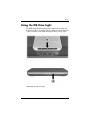
Using the IDE Drive Light
The IDE (Integrated Drive Electronics) light turns on when the
internal hard drive or an optical drive is being accessed. The light
is also referred to as the hard drive/optical drive activity light.
Identifying the IDE drive light
Identifying the IDE drive light
Hardware Guide
4–7
Drives
Inserting and Removing Drive Media
Ä
CAUTION: To avoid playback distortion or damage to optical media,
stop the CD or DVD and exit media software before inserting or
removing an optical drive.
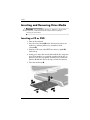
Inserting a CD or DVD
1. Turn on the notebook.
2. Press the release button 1 on the drive bezel to release the
media tray, and then pull the tray out until it is fully
extended 2.
3. Position a CD or one-sided DVD over the tray spindle 3,
label side up.
4. Gently press on the disc near the hole until the disc snaps into
place. If the media tray is not fully extended, tilt the disc to
position it over the tray spindle, and then press it down into
position. Handle the disc by the edges, not the flat surfaces.
5. Close the media tray 4.
Inserting a CD or DVD into an optical drive
4–8
Hardware Guide
Drives
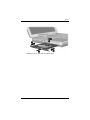
Inserting a CD or DVD into an optical drive
Hardware Guide
4–9
Drives
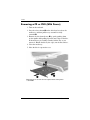
Removing a CD or DVD (With Power)
1. Turn on the notebook.
2. Press the release button 1 on the drive bezel to release the
media tray, and then pull the tray out until it is fully
extended 2.
3. Remove the disc from the tray 3 by gently pushing down
on the spindle while pulling up on the outer edges of the disc.
If the media tray is not fully extended, tilt the disc as you
remove it. Handle the disc by the edges, not the flat surfaces.
4. Close the media tray.
5. Place the disc in a protective case.
Removing a CD or DVD from an optical drive when power
is available
4–10
Hardware Guide
Drives
Removing a CD or DVD from an optical drive when power
is available
Hardware Guide
4–11
Drives
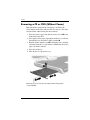
Removing a CD or DVD (Without Power)
If the notebook is turned off or if no power is available, the
release button on the drive will not work. To remove a disc from
an optical drive without using the release button:
1. Insert the end of a paper clip into the release access 1 in the
front bezel of the drive.
2. Press gently on the paper clip until the media tray is released,
then pull the tray out until it is fully extended 2.
3. Remove the disc from the tray 3. If the media tray is not fully
extended, tilt the disc as you remove it. Handle the disc by the
edges, not the flat surfaces.
4. Close the media tray.
5. Place the disc in a protective case.
Removing a CD or DVD from an optical drive when power
is not available
4–12
Hardware Guide
Drives
Removing a CD or DVD from an optical drive when power
is not available
Hardware Guide
4–13
Drives
Inserting a Diskette (Select Models)
To insert a diskette into a diskette drive, gently slide the diskette,
label side up, into the drive until it clicks into place.
The media eject button extends when the diskette is correctly
inserted.
Identifying the media eject button on a diskette drive
4–14
Hardware Guide
Drives
Identifying the media eject button on a diskette drive
Removing a Diskette (Select Models)
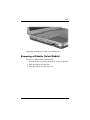
To remove a diskette from a diskette drive:
1. Press the media eject button on the drive to eject the diskette.
2. Slide the diskette from the drive.
3. Place the diskette in a protective case.
Hardware Guide
4–15
Drives
Installing an Optional HP USB Digital
Drive (Select Models)
Optional HP USB Digital Drives are pocket-sized, SD (Secure
Digital) Memory Card drives for storing and transferring files
such as digital pictures, music, video, or data files. An HP USB
Digital Drive can be connected to the optional Digital Bay or to
the USB port.
An SD Memory Card must be installed in the HP USB Digital
Drive before you can install the Digital Drive in your notebook.
Depending on your notebook model, you might or might not have
an SD Memory Card. You can purchase SD Memory Cards from
computer or electronics retailers.
4–16
Hardware Guide
Drives
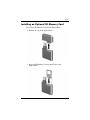
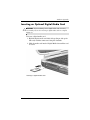
Installing an Optional SD Memory Card
To install an SD Memory Card into the Digital Drive:
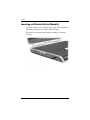
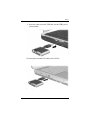
1. Remove the cap of the Digital Drive.
2. Insert an SD Memory Card into the SD slot of the
Digital Drive.
Hardware Guide
4–17
Drives
Connecting an Optional Digital Drive to the
USB Port
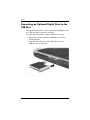
The optional Digital Drive can be connected to the USB port with
the USB cable either retracted or extended.
To connect the Digital Drive with the USB cable retracted:
1. Ensure that you have installed an SD Memory Card into
the Digital Drive.
2. Insert the USB connector on the Digital Drive into the
USB port on your notebook.
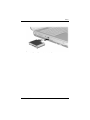
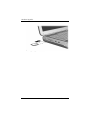
Connecting the Digital Drive to the USB port
4–18
Hardware Guide
Drives
Connecting the Digital Drive to the USB port
Hardware Guide
4–19
Drives
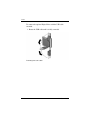
To connect the optional Digital Drive with the USB cable
extended:
1. Rotate the USB cable until it is fully extended.
Extending the USB Cable
4–20
Hardware Guide
Drives
2. Insert the connector on the USB cable into the USB port on
your notebook.
Connecting the extended USB cable to the USB Port
Connecting the extended USB cable to the USB Port
Hardware Guide
4–21
Drives
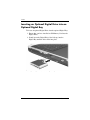
Inserting an Optional Digital Drive into an
Optional Digital Bay
To insert an optional Digital Drive into the optional Digital Bay:
1. Ensure that you have installed an SD Memory Card into the
Digital Drive.
2. Gently insert the Digital Drive, label side up, into the
Digital Bay until the drive clicks into place.
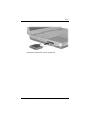
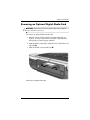
Inserting the Digital Drive into the Digital Bay
4–22
Hardware Guide
Drives
I
Inserting the Digital Drive into the Digital Bay
Hardware Guide
4–23
Drives
Removing an Optional Digital Drive from an
Optional Digital Bay
To remove the optional Digital Drive from the optional
Digital Bay:
1. Press the Digital Drive release button 1 to eject the
Digital Drive.
2. Remove the Digital Drive from the bay 2.
Removing the Digital Drive from the Digital Bay
4–24
Hardware Guide
Drives
Removing the Digital Drive from the Digital Bay
Finding Optional Drive Software
Information
Software you need to play CDs and DVDs is available on the
notebook. For more information, refer to the “Multimedia”
chapter in the Software Guide on this CD.
Hardware Guide
4–25
5
Audio and Video
Adjusting Volume
Volume can be adjusted by using the volume buttons on the
notebook or by accessing the volume control software. Volume
adjustment is also available within some applications.
Using the Volume Buttons
To adjust volume using the volume buttons:
■
To decrease volume, press the left volume button 1.
■
To increase volume, press the right volume button 1.
■
To mute or restore volume, press the middle volume
button 2.
Identifying the volume buttons
Hardware Guide
5–1
Audio and Video
■
To decrease volume, press the left volume button 1.
■
To increase volume, press the middle volume button 1.
■
To mute or restore volume, press the right volume button 2.
Identifying the volume buttons
Using the Volume Control Icon
To place the Volume Control icon on the taskbar, select Start >
Control Panel > Sounds, Speech, and Audio Devices > Volume.
Select the Place Volume icon in the taskbar check box.
To adjust volume, select the icon. To increase or decrease volume,
drag the slide bar up or down. To mute or restore volume, select
or clear the Mute check box.
cannot see an icon you have placed on the taskbar, it might
✎ Ifbeyou
hidden. Select the arrow or thick vertical bar on the taskbar
and expand to view icons.
5–2
Hardware Guide
Audio and Video
Using the Internal Speakers
The internal speakers play stereo sound from applications, the
operating system, games, drive media, the Internet, and other
sources.
an external device, such as a headset, is connected to the
✎ Ifaudio-out
jack, sometimes called the line-out jack, the internal
speakers are disabled.
Identifying the internal speakers
I
Identifying the internal speakers
Hardware Guide
5–3
Audio and Video
Connecting an Audio Device
Identifying Audio Jacks
The notebook has 2 audio jacks:
■
The audio-out jack 1, sometimes called the line-out jack,
connects a headset, headphones, or external stereo speakers.
The audio-out jack is also used to connect the audio functions
of an audio/video device such as a television or VCR.
■
The audio-in microphone jack 2 connects a monoaural or
stereo external microphone.
Identifying audio jacks
5–4
Hardware Guide
Audio and Video
Identifying audio jacks
Using the Microphone Jack
Your notebook is equipped with a stereo microphone jack. Using
sound recording application software and an external, stereo
microphone allows for stereo (dual channel) recordings and
stereo playbacks. Using sound recording application software and
an external, monoaural microphone allows for only monoaural
(single channel) recordings and stereo playbacks. As a result, the
sound will be the same on both left and right channels.
When connecting a microphone to the microphone jack, use a
microphone with a 3.5-mm plug.
Hardware Guide
5–5
Audio and Video
Using the Audio-Out Jack
Å
WARNING: To reduce the risk of personal injury, adjust the volume
before putting on headphones or a headset.
Ä
CAUTION: To prevent possible damage to an external device, do not
plug a monaural plug into the audio-out jack.
When connecting a device to the audio-out jack:
■
Use only a 3.5-mm stereo plug.
■
For best sound quality, use 24-ohm to 32-ohm headphones.
an external audio device is connected to the audio-out jack,
✎ When
the internal speakers are disabled.
5–6
Hardware Guide
Audio and Video
Connecting an S-Video Device
Connecting the Audio
The S-Video-out jack supports video signals only.
If you are setting up a configuration that combines audio and
video functions, such as playing a DVD movie on your notebook
and displaying it on your television screen, you will need a
standard 3.5-mm audio cable available from most computer or
electronics retailers.
Plug the stereo end of the audio cable into the notebook audio-out
jack. Plug the other end of the cable into the audio input jack on
the external device.
Connecting the Video
To transmit video signals through the S-Video-out jack, you will
need a standard S-Video cable available from most computer or
electronics retailers.
Plug either end of the S-Video cable into the notebook
S-Video-out jack. Plug the other end of the cable into the
S-Video input (not the video output) jack on the external device.
Hardware Guide
5–7
Audio and Video
Identifying the S-Video-out jack
Identifying the S-Video-out jack
5–8
Hardware Guide
Audio and Video
Turning a Video Device On and Off
When an S-Video device is turned on, an image is displayed.
When the device is off, an image is not displayed.
To turn on a video device, use one of the following methods:
■
Start or restart the notebook.
■
Access the ATI Displays tab:
1. Select Start > Control Panel > Appearance and Themes >
Display > Settings.
2. Select the Advanced button.
3. Select the ATI Displays tab and select the TV Power
button.
conserve power, turn off the device before disconnecting the
✎ Todevice
from the system.
Changing the Color Television Format
Color television formats are modes by which television video
signals are sent and received. To send signals between the
notebook and a television, both the notebook and the television
must be using the same color television format.
The NTSC format is common in the United States, Canada,
Japan, and South Korea. The PAL format is common in Europe,
China, Russia, and Africa, and the PAL-M format is common in
Brazil. Other South American and Central American countries
might use NTSC, PAL, or PAL-M.
Region-specific formats are set at the factory for most notebooks,
but the region setting can be changed on any notebook.
Hardware Guide
5–9
Audio and Video
To change the color television format:
1. Select Start > Control Panel > Appearance and Themes >
Display > Settings. Select the Advanced button and then the
ATI Displays tab.
2. Select the TV button, and then select the Format tab.
3. Select a television format either by name or by
Country/Region:
a. To select a format by name, select Format, select a format
name in the list, and select the OK button.
b. To select the default format for a region or country, select
Country/Region, select a location from the list, and
select the OK button.
4. At the prompt, restart the notebook.
5–10
Hardware Guide
6
External Device Connections
Connecting a Standard Device
The jacks, connectors, and ports described in this guide support
standard external devices.
■
For information about which jack, connector, or port to use,
refer to the documentation included with the device.
■
For information about installing or loading any software,
such as drivers required by the device, refer to the device
documentation, the operating system Help files, or the
device manufacturer’s Web site.
To connect a standard external device to the notebook:
1. If you are connecting a powered device, be sure that the
device is turned off.
2. Connect the device to the correct jack or connector on
the notebook.
3. If you are connecting a powered device, plug the device
power cord into a grounded electrical outlet.
4. Turn on the device.
connected external monitor or other display device
✎ Ifdoesa properly
not display an image, try pressing the Fn+F4 hotkey to switch
the image to the new device.
To disconnect a standard external device from the notebook, turn
off the device (if it is powered), and then disconnect the device
from the notebook.
Hardware Guide
6–1
External Device Connections
Connecting a USB Device
USB (Universal Serial Bus) is a hardware interface that can be
used to connect external devices such as a USB keyboard, mouse,
drive, printer, scanner, or hub to the notebook. A hub is a
connecting device that can be either powered or unpowered.
Optional USB hubs can be connected to a USB connector on
the notebook or on an optional HP Notebook Expansion Base, or
to other USB devices. Hubs can support several USB devices.
■
Powered hubs must be connected to external power.
■
Unpowered hubs must be connected either to a USB
connector on the notebook or to a port on a powered hub.
The USB connectors support USB 2.0 and earlier devices.
Some USB devices might require additional support software,
which is usually included with the device. For more information
and software installation instructions, refer to the documentation
included with the device.
Identifying the two USB connectors on the left side and the one USB
connector on the right side
6–2
Hardware Guide
External Device Connections
Identifying the 2 USB connectors on the left side and one USB
connector on the right side
Using a USB Device
USB devices function in the system the same way as comparable
non-USB devices do, with one exception: by default, USB
devices do not function unless an operating system that supports
USB is loaded. Windows XP Home and Windows XP
Professional do support USB.
To use a USB keyboard or hub that is connected to a USB
connector on the notebook during startup (before Windows loads)
or in a non-Windows application or utility, enable USB legacy
support.
Hardware Guide
6–3
External Device Connections
Linking to an Infrared Device
(Select Models)
Some notebook models are IrDA-compliant and can
communicate with another infrared-equipped device that is
also IrDA-compliant. The IrDA connection speed standard
is 4 megabits per second (Mbps).
The infrared port supports low-speed connections up to
115 kilobits per second (Kbps) as well as high-speed connections
up to 4 Mbps.
Infrared performance might vary according to:
■
Performance of the infrared peripheral
■
Distance and angle between infrared devices
■
Software applications being used
■
Interference or obstruction between devices
signals are sent through an invisible beam of infrared
✎ Infrared
light and must have an unobstructed line of sight.
Linking to an infrared device
6–4
Hardware Guide
External Device Connections
Linking to an infrared device
Setting Up an Infrared Transmission
For information about using infrared software, refer to the
operating system Help files.
To set up infrared devices for optimal transmission:
■
Prepare the infrared ports on both devices for transmission.
✎
The notebook infrared port is fully enabled when the
notebook is turned on.
■
Position the devices so that their infrared ports face each
other at a distance of no more than one meter (3.3 feet).
■
Position the ports so that they face each other directly. The
maximum capture angle is 30 degrees, so the ports must be
aligned no more than 15 degrees off center.
Hardware Guide
6–5
External Device Connections
■
Shield the ports from direct sunlight, flashing incandescent
light, and fluorescent light.
■
Be sure that signals from a remote control or other wireless
device (such as a cell phone, headphones, or audio device)
do not aim at either port.
■
During the transmission, do not move either device and
do not allow objects or movement to disrupt the beam.
Avoiding Standby While Using Infrared
If the notebook is in Standby, an infrared transmission cannot
be initiated.
If Standby initiates during an infrared transmission, the
transmission stops. To resume from Standby, briefly press
the power button. When the notebook resumes from Standby,
the transmission might resume. If the transmission does not
resume, restart the notebook.
6–6
Hardware Guide
External Device Connections
Connecting an Optional Cable Lock
purpose of security solutions is to act as a deterrent. These
✎ The
solutions do not prevent the product from being mishandled or
stolen.
To install a security cable lock:
1. Loop the security cable 1 around a secured object.
2. Insert the key 2 into the cable lock 3.
3. Insert the cable lock (with the key inserted) into the security
cable slot 4 on the notebook.
4. Turn the key counterclockwise and remove the key.
Connecting a security lock
Hardware Guide
6–7
External Device Connections
Connecting a security lock
For more information about other security features of your
notebook, refer to the “Security” chapter in the Software Guide
on this CD.
6–8
Hardware Guide
7
Modem and Network
Connections
Using the Modem (Select Models)
Some notebook models include an RJ-11 telephone jack,
modem cable, and a preinstalled V.92 modem. You can connect
your modem to a telephone line and communicate throughout the
world. You can explore the Internet, send and receive email
messages, and use your notebook to send and receive faxes. Your
notebook contains several software programs that work with
your modem:
■
Internet Explorer, for browsing the World Wide Web
■
Outlook Express, for sending and receiving email messages
■
Windows Fax Console, for sending and receiving faxes
For best performance, you can connect to any Internet service
provider (ISP) or modem network that has V.90 or V.92
interoperable modems. Check with your ISP for a list of
telephone numbers that support V.90 or V.92. (V.92 enables
modem on-hold technology that allows an Internet session to be
interrupted to answer a phone call, then resumes the Internet
session after the call is completed.)
Hardware Guide
7–1
Modem and Network Connections
Å
WARNING: To reduce the risk of electric shock, fire, or damage to the
equipment, do not plug a telephone cable into the RJ-45 network jack.
Å
WARNING: Connecting the notebook to a digital line can
permanently damage the modem. Immediately disconnect your modem
cable if it is accidentally connected to a digital line.
Ä
CAUTION: Your built-in modem might not work with multiple phone
lines or a private branch exchange (PBX), cannot be connected to a
coin-operated telephone, and does not work with party lines. Some of
these connections might result in excess electrical voltage and could
cause a malfunction in the internal modem. Check your telephone line
type prior to connecting your phone line.
Ä
CAUTION: Jacks for digital PBX systems might resemble RJ-11
telephone jacks, but they are not compatible with the modem.
A modem must be connected to an analog telephone line.
The maximum speed for faxing is 14.4 Kbps, even though the
modem is capable of downloading at higher speeds.
For more information on connecting and configuring your
modem, refer to the Modem and Networking guide on this CD.
7–2
Hardware Guide
Modem and Network Connections
Connecting the Modem to an RJ-11 Jack
Refer to one of the following illustrations to connect an RJ-11
modem cable.
Connecting the RJ-11 modem cable
Hardware Guide
7–3
Modem and Network Connections
Connecting the RJ-11 modem cable
7–4
Hardware Guide
Modem and Network Connections
Connecting the Modem with an Adapter
Telephone jacks vary by country. To use the modem and
the RJ-11 cable outside the country in which you purchased the
notebook, you must obtain a country-specific modem adapter. For
more details about using your notebook internationally, refer to
the Modem and Networking guide on this CD.
To connect the modem to an analog telephone line that does not
have an RJ-11 telephone jack:
1. Plug the modem cable into the RJ-11 jack on the notebook 1.
2. Plug the modem cable into the country-specific modem
adapter 2.
3. Plug the country-specific modem adapter into the telephone
jack 3.
Connecting a modem cable using a modem adapter
Hardware Guide
7–5
Modem and Network Connections
Connecting a modem cable using a modem adapter
Special Restrictions in Certain Countries
■
Many countries impose a blackout period after a modem
repeatedly fails to connect to a service provider. The number
of failed attempts and the period you must wait before trying
again differ from country to country. Check with your
telephone company.
■
When you use a modem, an external surge protector can
prevent notebook damage by lightning or other electrical
surges. Connect any approved surge protector to the modem
cable whenever you are using the modem.
Changing Your Modem Settings
The modem is already set up to be compatible with telephone
systems and modems in most areas. However, in some situations,
you might have to change modem settings to match local
conditions. If you have questions about local requirements,
contact your telephone company.
7–6
Hardware Guide
Modem and Network Connections
To change your modem settings:
■
Control Panel. Open Phone and Modem Options in Control
Panel to change modem settings by selecting Start > Control
Panel > Network and Internet Connections. Select Phone and
Modem Options from the left hand panel. On the Modems
tab, select Properties to set connection speeds, or on the
Dialing Rules tab, select Edit to set dialing options.
■
Communications software. Many communications
applications provide options for controlling modem settings.
See the Help for your software.
■
AT commands. You can control some conditions of
the modem operation using modem AT commands. AT
commands are special strings of characters sent to the modem
to set up specific conditions. Those command strings
normally start with “AT.”
To open Phone and Modem Options in Control Panel select
Start > Control Panel > Network and Internet Connections.
Select Phone and Modem Options from the left hand panel.
On the Modems tab, select Properties. You can type AT
commands on the Advanced tab in the space for extra
settings.
Connecting to a Local Area
Network (LAN)
Your notebook has an RJ-45 network jack and preinstalled
10BASE-T/100BASE-TX Ethernet circuity. The notebook
supports network speeds up to 10 Mbps when connected to
a 10BASE-T network and 100 Mbps when connected to a
100BASE-TX network. A network cable is not included with
your notebook but is available from most electronics retailers.
You can connect to local area networks (LANs) that give you
access to shared network resources, such as printers and file
servers on your corporate network, and possibly to the Internet.
Hardware Guide
7–7
Modem and Network Connections
To connect to a LAN:
1. Check that the existing LAN supports Ethernet
10BASE-T/100BASE-TX connections.
2. Plug the purchased network cable into the notebook
RJ-45 jack 1.
3. Plug the other end into the LAN network jack 2.
4. Windows automatically detects and sets up a LAN
connection. To edit settings, open Network Connections in
Control Panel.
Two lights on the RJ-45 jack indicate the connection status 3:
■
The yellow light indicates network activity.
■
The green light indicates that a link is present.
Connecting an RJ-45 network cable
7–8
Hardware Guide
Modem and Network Connections
Connecting an RJ-45 network cable
See Windows Help for information about setting up and using
LAN connections. Select Start > Help and Support. Contact your
network administrator for network information.
Turning a Network Connection Off and On
To conserve power, turn off a network connection you are not
using.
■
To turn off a network connection, log off the network, and
then disconnect the network cable.
■
To turn on a network connection, connect the network cable,
and then log on to the network.
Hardware Guide
7–9
Modem and Network Connections
Making Wireless Network
Connections (Select Models)
Some notebook models are equipped with a wireless network
device that can connect by radio signals to an 802.11a, 802.11b,
or 802.11g wireless local area network (WLAN) and then access
computers and other resources on the network (not all
available/accessible in all countries).
A wireless network provides all the functions of a typical “wired”
network, but also provides for “roaming.” To roam, the notebook
must be connected to the network by radio rather than through
cables. This connection allows you to move from place to place
within the network—from your office to a conference room, for
example—and remain on the network the entire time.
Identifying the wireless antenna
7–10
Hardware Guide
Modem and Network Connections
Identifying the wireless antenna
Å
WARNING: Exposure to Radio Frequency Radiation
The radiated output power of this device is below the FCC radio
frequency exposure limits. Nevertheless, the device should be used in
such a manner that the potential for human contact during normal
operation is minimized. To avoid the possibility of exceeding the FCC
radio frequency exposure limits, human proximity to the antennae
should not be less than 20 cm (8 inches) during normal operation,
including when the notebook display is closed.
Hardware Guide
7–11
Modem and Network Connections
Turning Wireless Communication
On and Off
Wireless networks and cellular modems are examples of devices
that use wireless communication. The use of some devices might
be restricted in certain situations or environments, such as when
traveling in an airplane. If in doubt, be sure to ask for
authorization before turning on your notebook wireless
networking.
Certain countries, such as Italy and Singapore, might require you
to purchase a license before using the wireless function.
Press the Wireless On/Off button to enable wireless 802.11a,
802.11b, or 802.11g functionality. This button also enables the
optional Bluetooth® wireless functionality. However, pressing
the Wireless On/Off button does not create a wireless connection.
To establish a wireless connection, additional hardware and
software might be required.
The wireless indicator light on the Wireless On/Off button or on
the front-right corner turns on when any wireless functionality is
turned on. The location of the light varies by model.
7–12
Hardware Guide
Modem and Network Connections
Putting the notebook in Standby or Hibernation, or shutting it
down, also turns off the wireless function.
Pressing the Wireless On/Off button
Pressing the Wireless On/Off button
Hardware Guide
7–13
Modem and Network Connections
Connecting to a Wireless Network
You can connect to an access point that gives you access to a local
area network, or you can connect directly to other computers in
an “ad hoc” network.
Before you can connect your notebook to an existing 802.11a,
802.11b, or 802.11g wireless network, you have to configure the
notebook. For details on how to configure your notebook for
wireless networking, open the Windows Help and Support Center
and enter “wireless” as a search topic. This provides you with
overviews, tutorials, articles, and step-by-step information on
setting up your wireless device.
To check the status of your wireless connection:
»
Select Start > Control Panel > Network and Internet
Connections, and then select the connection.
Checking the Wireless Connection Status
If you are within range of your wireless network, your notebook
automatically connects.
To check the status of your wireless connection:
»
7–14
Open Network and Internet Connections in Control Panel,
and then select the connection.
Hardware Guide
Modem and Network Connections
Making Bluetooth Wireless
Connections (Select Models)
If your notebook includes Bluetooth wireless capabilities,
you can use it to make short-range radio connections to a
wireless personal area network (PAN) and access other
Bluetooth-compatible devices, such as other notebooks, cell
phones, and printers.
For details on how to use your notebook for Bluetooth wireless
networking, refer to the Bluetooth CD included with your
notebook. This CD will provide you with the overviews and
step-by-step information on setting up and using your Bluetooth
wireless device.
Hardware Guide
7–15
8
Hardware Upgrades
Obtaining Upgrades
To order notebook hardware or to learn more about upgrades and
accessories, visit the HP Web site at http://www.hp.com/support.
You can contact an authorized dealer, reseller, or HP service
provider by referring to the Worldwide Telephone Numbers
booklet (English only) included with the notebook.
Compatible hardware upgrade information is also available
online by accessing the Help and Support Center on your
notebook. Press Fn+F1 to open the Help and Support Center
window.
Å
WARNING: The FCC does not allow unauthorized Mini PCI devices to
be used in this notebook. Installing a PCI device can prevent your
notebook from operating properly and might result in a warning
message. To resume proper notebook operation, remove the
unauthorized device. Contact your HP Customer Care Center if a
warning message about your Mini PCI device displays in error.
Hardware Guide
8–1
Hardware Upgrades
Using PC Cards
An optional PC Card is a credit card–sized accessory designed to
conform to the standard specifications of the Personal Computer
Memory Card International Association (PCMCIA). The
notebook supports both 32-bit (CardBus) and 16-bit PC Cards,
which will vary by notebook model.
PC Cards can be used to add modem, sound, memory, storage,
and digital camera functions to the notebook. PC Smart Card
Reader and biometric identification PC Cards can add security.
Selecting a PC Card
The type of PC card (Type I or Type II) to use in your notebook
varies by model. Zoomed video cards are not supported.
Configuring a PC Card
Ä
8–2
CAUTION: If you install all of the software or any of the enablers
provided by a PC Card manufacturer, you might not be able to use other
PC Cards. If you are instructed by the documentation included with your
PC Card to install device drivers:
■ Do not install other software, such as card services, socket services,
or enablers, that might also be supplied by the PC Card
manufacturer.
■ Install only the device drivers for your operating system.
Hardware Guide
Hardware Upgrades
Inserting a PC Card
Ä
CAUTION: To prevent damage to the PC Card connectors, use minimal
force when inserting a PC Card into a PC Card slot.
1. Hold the PC Card label-side up with the connectors facing
the notebook.
2. Gently slide the card into the slot until it is seated.
Inserting a PC Card
Hardware Guide
8–3
Hardware Upgrades
Inserting a PC Card
8–4
Hardware Guide
Hardware Upgrades
Stopping and Removing a PC Card
Ä
CAUTION: To prevent loss of work or an unresponsive system, stop the
PC Card before removing it.
✎ Stopping a PC Card, even if it is not in use, conserves power.
1. To stop a PC Card, you might need to select the Safely
Remove Hardware icon on the taskbar, and then select the
PC Card you want to stop. (To display the Safely Remove
Hardware icon, select the Show Hidden Icons icon on the
taskbar.)
2. To release the PC Card, press the PC Card eject button 1.
3. Gently slide the card out 2.
Removing a PC Card
Hardware Guide
8–5
Hardware Upgrades
Removing a PC Card
Using Digital Media Cards
(Select Models)
Optional digital media cards are removable storage devices that
provide a convenient method of storing data and sharing it with
other devices such as PDAs, cameras, and other memory
card-equipped PCs.
The 5-in-1 Digital Media slot supports the following digital
media formats:
8–6
■
Secure Digital (SD)
■
MultiMediaCard
■
Memory Stick
■
Memory Stick Pro
■
SmartMedia
Hardware Guide
Hardware Upgrades
Inserting an Optional Digital Media Card
Ä
CAUTION: To prevent damage to the digital media card connectors,
use minimal pressure when inserting a digital media card into a Digital
Media slot.
To insert a digital media card:
1. Hold the digital media card label-side up (finger-side up for
SD cards) with the connectors facing the notebook.
2. Slide the media card into the Digital Media slot until the card
is seated.
Inserting a digital media card
Hardware Guide
8–7
Hardware Upgrades
Inserting a digital media card
8–8
Hardware Guide
Hardware Upgrades
Removing an Optional Digital Media Card
Ä
CAUTION: To prevent loss of work or system lockup, stop the digital
media card before removing it.
To remove an optional digital media card:
1. Stop the card by closing all files and applications that are
using it. (To stop a data transfer, select the cancel button in
the operating system Copying window.)
2. Push the media card in fully, and then release. The media card
will eject 1.
3. Slide the media card out of the slot 2.
Removing a digital media card
Hardware Guide
8–9
Hardware Upgrades
Removing a digital media card
Disabling an Optional Digital Media Card
A digital media card inserted into the Digital Media slot uses
power even when the card is not in use. Disabling the card
conserves power. To disable a media card:
»
8–10
Select Start > My Computer. Right-click the drive assigned to
the card and then select Eject. (The card is stopped but is not
released from the Digital Media slot.)
Hardware Guide
Hardware Upgrades
Increasing Memory
You can increase the amount of RAM (random access memory)
in the notebook with an optional memory module approved
by HP.
The notebook contains 2 memory slots, one of which is
accessible for an optional 128-MB, 256-MB, 512-MB, or
1024-MB memory module upgrade.
Depending on the notebook model, the notebook might ship with
a vacant memory slot. On other models the memory slot contains
a preinstalled memory module that can be replaced at any time.
Displaying Memory Information
When RAM is increased, the operating system increases the hard
drive space reserved for the Hibernation file.
If you experience problems with Hibernation after increasing
RAM, verify that your hard drive has enough free space for the
larger hibernation file.
■
To display the amount of RAM in the system:
Select Start > Control Panel > Performance and
Maintenance > System > General.
■
To display both the amount of free space on your hard drive
and the amount of space required by the Hibernation file.
Select Start > Control Panel > Performance and
Maintenance > Power Options > Hibernate.
Hardware Guide
8–11
Hardware Upgrades
Removing or Inserting a Memory Module
Å
WARNING: To prevent exposure to electrical shock, access only the
memory compartment during this procedure. The hard drive bay and
the memory compartment are the only user-accessible internal
compartments on the notebook. All other areas that require a tool to
access should be opened only by an authorized HP service provider.
Å
WARNING: To prevent exposure to electrical shock and damage to
the notebook, shut down the notebook, unplug the power cord, and
remove all battery packs before installing a memory module.
Ä
CAUTION: To prevent electrostatic discharge from damaging electronic
components: Before beginning this procedure, discharge yourself of
static electricity by touching a grounded metal object. For more
information about preventing electrostatic damage, refer to the
Regulatory and Safety Notices guide on this CD.
1. Save your work and shut down the notebook. If you are not
sure whether the notebook is off or in Hibernation, briefly
press the power button. If your work returns to the screen,
save your work, exit all applications, and then shut down the
notebook.
2. Disconnect all external devices connected to the notebook.
3. Disconnect the power cord.
4. Remove the battery pack.
8–12
Hardware Guide
Hardware Upgrades
5. Turn the notebook upside down.
6. Loosen the screw that secures the memory compartment
cover 1, and then tilt and remove the cover 2.
Opening the memory compartment
Hardware Guide
8–13
Hardware Upgrades
Opening the memory compartment
8–14
Hardware Guide
Hardware Upgrades
7. Remove or insert the memory module.
To remove a memory module:
a. Pull away the retention clips on each side of the
module 1. (The module tilts up.)
b. Grasp the edges of the memory module and gently pull it
out of the memory slot 2.
c. To protect a memory module after removal, place it in an
electrostatic-safe container.
Removing a memory module
Hardware Guide
8–15
Hardware Upgrades
Removing a memory module
8–16
Hardware Guide
Hardware Upgrades
To insert a memory module:
a. Align the keyed (notched) edge of the module with the
keyed area in the expansion slot 1.
b. From a 45-degree angle, press the module into the slot
until it is seated 2.
c. Press the module down until the retention clips snap
into place.
Inserting a memory module
Hardware Guide
8–17
Hardware Upgrades
Inserting a memory module
8–18
Hardware Guide
Hardware Upgrades
8. Align the tabs on the memory compartment cover with
the cover slots on the notebook.
9. Tilt the cover down until it is seated 1.
10. Reinsert and tighten the screw that secures the cover to the
notebook 2.
11. Replace the battery pack, reconnect AC power, and then
restart the notebook.
Closing the memory compartment
Hardware Guide
8–19
Hardware Upgrades
Closing the memory compartment
8–20
Hardware Guide
Hardware Upgrades
Replacing the Hard Drive
Remove the hard drive only for replacement. To replace the
primary hard drive:
1. Save your work and shut down the notebook. If you are not
sure whether the notebook is off or in Hibernation, briefly
press the power button. If your work returns to the screen,
save your work, exit all applications, and then shut down the
notebook.
2. Disconnect all external devices connected to the notebook.
3. Disconnect the power cord or other external power source.
4. Remove any battery packs in the notebook.
5. Turn the notebook upside down.
6. Loosen the 2 hard drive assembly retaining screws 1, and
then tilt the hard drive upward 2.
Loosening the hard drive assembly retaining screws
Hardware Guide
8–21
Hardware Upgrades
Loosening the hard drive assembly retaining screws
8–22
Hardware Guide
Hardware Upgrades
7. Remove the hard drive assembly from the bay.
8. Remove the 4 hard drive bracket screws 1.
9. Remove the hard drive from the bracket 2.
Removing the hard drive from the hard drive bracket
Hardware Guide
8–23
Hardware Upgrades
Removing the hard drive from the hard drive bracket
8–24
Hardware Guide
Hardware Upgrades
10. Insert the new hard drive into the hard drive bracket 1.
11. Replace the 4 hard drive bracket screws 2.
Inserting the hard drive into the hard drive bracket
Hardware Guide
8–25
Hardware Upgrades
Inserting the hard drive into the hard drive bay
8–26
Hardware Guide
Hardware Upgrades
12. Reinsert the hard drive assembly into the hard drive bay until
it is seated 1.
13. Tighten the 2 hard drive assembly retaining screws 2.
Inserting the hard drive assembly into the hard drive bay
Inserting the hard drive assembly into the hard drive bay
Hardware Guide
8–27
Hardware Upgrades
Finding More Upgrade Information
For additional information about installing, removing, or
operating an optional device, refer to the documentation included
with the device.
8–28
Hardware Guide
9
Specifications
Operating Environment
Factor
Metric
U.S.
0° to 35°C (non
writing optical)
5° to 35°C (writing
optical)
32° to 95°F
Temperature
Operating
Nonoperating
-20° to 60°C
41° to 95°F
-4° to 140°F
Relative humidity (noncondensing)
Operating
10% to 90%
10% to 90%
Nonoperating
5% to 95%
5% to 95%
Altitude (unpressurized)
Operating
-15 to 3,048 m
-50 to 10,000 ft
Nonoperating
-15 to 12,192 m
-50 to 40,000 ft
Hardware Guide
9–1
Specifications
Rated Input Power
Input Power
Rating
Operating voltage
100–240 VAC RMS
Operating frequency range
50 to 60 Hz AC
When powered by a DC source
18.5 Vdc
6.5 A
✎
9–2
This product is designed for IT power systems in Norway
with phase-to-phase voltage not exceeding 240 Vrms.
Hardware Guide
Index
A
AC adapter
disconnecting 3–1
identifying 1–34
adapter, modem 7–5
airport security devices 4–3
altitude specifications 9–1
AT commands 7–7
audio devices, connecting 5–4
audio-out jack
connecting devices 5–6
location 5–4
AutoPlay/Autorun 4–5
battery release latch 1–30, 1–31
blackout periods, modem 7–6
Bluetooth wireless 7–15
bottom components 1–30, 1–31
buttons
PC Card eject 1–22, 1–24, 8–5
power 1–9, 1–10
Quick Launch 1–11
scroll 2–2, 2–3
TouchPad 2–2, 2–3
volume 1–9, 1–10, 1–17, 1–28,
5–1, 5–2
wireless 1–13, 1–19
B
C
battery bay 1–31
battery light 1–5, 1–6, 1–17, 1–19
battery packs
calibrating 3–8
charge displays 3–5
charging 3–4
conserving power 3–10
disposing of 3–12
inserting/removing 3–2
low-battery condition 3–6
recycling 3–12
storing 3–11
switching power sources 3–1
cable lock 6–7
cables
audio 5–7
modem 1–34, 7–3
power 1–20, 1–21
security 6–7
S-Video 5–7
caps lock light 1–7, 1–8
CD-ROM drive
cancelling AutoPlay 4–5
definition 4–1
displaying contents 4–5
inserting/removing discs 4–8
Hardware Guide
Index–1
Index
Certificate of Authenticity label
1–32
connectors
1394 1–26, 1–29
expansion 1–27, 1–29
drive 4–3
external monitor 1–20, 1–21
modem 7–2
parallel 1–20, 1–21
power 1–20, 1–21
USB 1–23, 1–26, 1–29, 6–2
See also infrared port; jacks
conserving power, tips 3–10
cords 1–34
country-specific modem cable
adapter 7–5
D
digital media cards 8–6
Digital Media slot 1–22, 8–10
Digital Media slot light 1–8
disc drive. See optical drive
disc, definition 4–2, 4–3
disk, diskette, defined 4–2, 4–3
diskette drive
identifying 1–23
inserting/removing diskettes
4–14
display, internal
brightness 2–8, 2–9, 2–10
component location 1–1, 1–2
display switch 1–9, 1–10, 1–17
switching image to or from 2–8
See also monitor, external
(optional)
drive light 1–7, 1–8
Index–2
drive media
affected by airport security 4–3
caring for 4–4
drives
affected by airport security 4–3
caring for 4–3
CD-ROM 4–1, 4–2
diskette 1–23, 1–25, 4–14
DVD+RW/R and CD-RW
combo 4–2
DVD/CD-RW combo 4–2
DVD-ROM 4–1, 4–2
hard drive 8–21
HP USB Digital Drive 1–23,
1–25, 4–2
optical 1–23
shipping 4–3
See also optical drive
DVD-ROM drive
definition 4–1
displaying contents 4–5
inserting/removing discs 4–8
E
electrostatic discharge (ESD) 8–12
expansion port 1–27, 1–29
external devices (optional)
connecting/disconnecting 6–1
infrared 6–4
USB 6–2, 6–4
F
floppy disk drive, floppy drive.
See diskette drive
Fn key, in hotkeys 2–5
function keys 1–14, 1–15, 2–5
Hardware Guide
Index
H
hard drive
defined 4–1
replacing 8–21
hard drive bay
1–30, 1–31
hard drive, internal
displaying amount of free space
on 8–11
space required for Hibernation
file 8–11
hardware
cords and cables 1–34
display components 1–1, 1–2
front components 1–16, 1–18
left-side components 1–22,
1–24
rear components 1–20, 1–21
right-side components 1–26,
1–28
top components 1–5, 1–7, 1–8
upgrades 8–1
headphone jack 1–26, 1–28
headphones, headset (optional),
connecting 5–4
Help and Support Center 2–8
Hibernation
avoiding when playing media
4–4
exiting 1–9, 1–10
initiating 1–9, 1–10
low-battery conditions 3–7
hotkeys
adjusting display brightness
2–8, 2–9, 2–10
Hardware Guide
entering on external keyboard
2–8
identifying 2–5
initiating Standby 2–9
media 2–10
Quick Reference 2–7
switching among displays 2–8
HP USB Digital Drives
connecting to USB port 4–18
inserting into optional Digital
Bay 4–22
inserting SD card 4–16
installing 4–16
hub, USB 6–2
I
IDE light 1–7, 1–8, 1–16, 1–18
identifying notebook parts 1–1
infrared port
linking to 6–4
location 1–27, 1–29
See also connectors; jacks
J
jacks
audio-out 5–4
headphone 1–26, 1–28
microphone 1–26, 1–29, 5–4
RJ-11 telephone 1–20, 1–21
RJ-45 network 1–27, 1–29, 7–8
S-Video-out 1–27, 1–29, 5–7
See also connectors; infrared
port
Japan-specific modem adapter
1–34
Index–3
Index
K
keyboard light 1–7, 1–8
keyboard, external (optional)
numeric keypad 2–13
USB connection 6–3
keypad keys 1–14, 1–15
keypad, numeric 2–13
keys
Fn 2–5
function 1–14, 1–15
hotkeys 2–5
keypad 1–14, 1–15, 2–13
num lock 2–15
Quick Launch 1–11, 1–12,
1–13
Windows applications 1–12,
1–13
Windows logo 1–12, 1–13
See also buttons
L
labels
Microsoft Certificate of
Authenticity 1–32
Modem approval 1–32
product identification 1–32
Service Tag 1–32
System 1–32
wireless certification 1–32
LAN connection 7–7
left-side components 1–22, 1–24
lights
battery 1–5, 1–6, 1–17, 1–19
caps lock 1–7, 1–8
Digital Media slot 1–8
Index–4
IDE 1–7, 1–8, 1–16, 1–18, 4–7
keyboard 1–7, 1–8
num lock 1–7, 1–8, 2–15
power 1–5, 1–6
power/Standby 1–5, 1–6, 1–16,
1–18
wireless on/off 1–28, 7–12
line-out jack. See audio-out jack
lock, security cable (optional) 6–7
M
media hotkeys 2–10
media, drive
affected by airport security 4–3
caring for 4–3, 4–4
displaying contents of 4–5
inserting/removing CD or DVD
4–8
types and terms 4–2
memory
compartment location 1–30,
1–31
displaying amount of 8–11
Memory Stick 8–6
Memory Stick Pro 8–6
microphone jack 1–26, 1–29
microphone, external 5–4, 5–5
Microsoft Certificate of
Authenticity label 1–32
modem
AT commands 7–7
blackout periods 7–6
cable 1–34, 7–3
configuring 7–6
connecting 7–2
Hardware Guide
Index
country-specific adapter 1–34,
7–5
settings 7–6
Modem approval label 1–32
modem cable 1–34
monitor, external (optional)
connector 1–20, 1–21
switching display to or from
2–8
MultiMediaCard 8–6
N
NTSC television format 5–9
num lock 2–15, 2–17
num lock light 1–7, 1–8
number
Product Key 1–32
serial 1–32
numeric keypad
switching key functions 2–17
turning on and off 2–15
O
operating system, Product Key
1–32
optical drive
AutoPlay 4–5
avoiding Standby and
Hibernation with 4–4
cancelling AutoPlay 4–5
inserting/removing media 4–8
types available 4–1
using media hotkeys with 2–10
See also media, drive
optical drive bay configurations
1–23, 1–25
overhead projector (optional)
Hardware Guide
external monitor connector
1–20, 1–21
switching display to or from
2–8
P
PAL, PAL-M television formats
5–9
parallel connector, identifying
1–20, 1–21
PC Card
component locations 1–22,
1–24
configuring 8–2
functions 8–2
increasing RAM 8–11
inserting/removing 8–3
peripherals. See external devices
(optional)
pointing devices
setting preferences 2–4
TouchPad 2–2, 2–3
power
conserving 3–10
light 1–5, 1–6
Power Options window 3–6
rated input 9–2
resolving low-battery
conditions 3–7
switching between AC and
battery 3–1
power button 1–9, 1–10
power cord 1–34
power/Standby light 1–6, 1–16,
1–18
Product Key 1–32
Index–5
Index
Q
Quick Launch buttons
assigning 2–12
function 1–11
R
RAM (Random Access Memory)
8–11
regulatory information
Modem approval label 1–32
System label 1–32
wireless certification label
1–32
right-side components 1–26, 1–28
RJ-11 telephone jack
location 1–20
modem cable 7–3
purpose 1–21, 1–34
RJ-45 network jack
connection status 7–8
location 1–27, 1–29
S
scroll button 2–2, 2–3
Secure Digital (SD) 8–6
security cable slot 1–22, 1–24
security features 6–7
security, PC Smart Card Reader
(optional) 8–2
serial number 1–32
Service Tag label 1–32
sleep button. See Standby
SmartMedia 8–6
Index–6
software
AutoPlay/Autorun/auto insert
notification 4–5
infrared 6–4
USB support 6–3
speakers 5–3
external (optional) 5–4
internal stereo 1–17, 1–18
Standby
avoiding when playing media
4–4
avoiding with infrared 6–6
exiting 1–9, 1–10, 2–9
initiating 2–9
power/Standby light 1–5, 1–6,
1–16
S-Video cable, connecting video
5–7
S-Video-out jack 1–27, 1–29, 5–7
system label 1–32
T
television (optional)
changing color format 5–9
connecting audio 5–4
temperature, operating 9–1
top components 1–5
TouchPad. See pointing devices
traveling with notebook
battery pack temperature 3–11
environmental specifications
9–1
Modem approval label 1–32
serial number 1–32
wireless certification label
1–32
Hardware Guide
Index
U
W
USB connectors 1–23, 1–26, 1–29
USB devices (optional)
connecting 6–2
enabling 6–3
Windows applications key 1–12,
1–13
Windows logo key 1–12
wireless antenna 7–10
wireless certification label 1–32
wireless device
connecting LAN 7–7
turning on and off 7–12
wireless indicator light 1–28, 7–12
Wireless On/Off button 1–13,
1–19, 7–12
V
VCR (optional), audio-out jack
function 5–4
vents 1–20, 1–21, 1–22, 1–30,
1–31
video device
connecting audio 5–7
S-Video-out jack 5–8
turning on and off 5–9
volume, adjusting 5–1
Hardware Guide
Index–7