1
Installing the ribbon cartridge
Now install the ribbon with the following procedure.
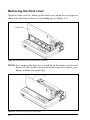
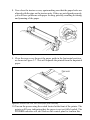
1. Take the slack out of the ribbon by turning the tension knob on the ribbon
cartridge clockwise as shown by the arrow.
Figure 2-5. Take out the slack of the ribbon by turning the tension knob on the ribbon cartridge.
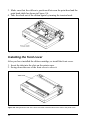
2. Guide the ribbon between the print head and the silver print head shield,
making certain that the spindles on the cartridge holder fit into th esockets
on the cartridge itself.
Figure 2-6. Installing the ribbon cartridge.
11