1
3 - Embosser Module Replacement Procedure
3.5.4 Set Embossed Character Height Using Software
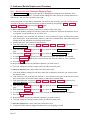
Using the numbers on the label on the replacement embosser’s base, set the cam angle settings by
following these steps:
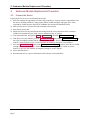
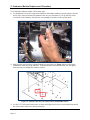
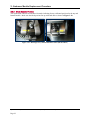
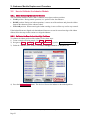
1) Locate the factory default knuckle and Cam Angle settings on the base of the embosser, as shown in
Figure 3-11.
Figure 3-11 - Factory Default Knuckle and CamAngle Settings (TOP VIEW FROM FRONT)
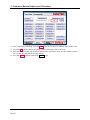
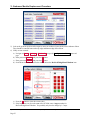
2) In the ExpressCard 2000 Utility, navigate to Menu > Settings > Edit Config to open the
Configuration Editing password page.
3) Use the onscreen keypad to enter password 1234567 and press the E key.
4) Use the onscreen keypad to enter password 7654321 and press the E key.
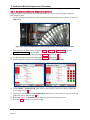
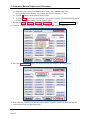
5) Scroll through the settings list to find CamAngleTop and CamAngleBottom.
6) Select FontID1 > CamAngleTop, enter the new value in the text entry box at the top right of the
screen, and press the E key.
7) Otherwise, select FontID1 > CamAngleBottom, enter the new value in the text entry box at the top
right of the screen, and press the E key.
8) Repeat the process for FontID2 and any other fonts shown on the embosser base.
9) Press the Save button to save the new settings.
ExpressCard 2000| Instant Issuance Card Personalization System | Embosser Module Replacement Procedure
Page 21