1
5
Using the iSleep 20
5.1 Checking the iSleep 20 before Use
Always make the following checks before using the iSleep 20:
1 Connect a cleaned or a new patient circuit to the iSleep 20.
2 Connect the iSleep 20 to the mains supply.
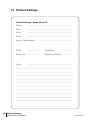
3 Check patient settings.
4 Switch on the iSleep 20 by pressing the Start/Stop button on the front
panel. Ensure that the iSleep 20 is running.
5 Put on the mask and adjust its fit.
6 Ensure that the settings are adjusted as prescribed.
The iSleep 20 is ready for use.
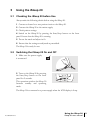
5.2 Switching the iSleep 20 On and Off
1 Make sure the power supply
is connected.
2 Turn on the iSleep 20 by pressing
the Start/Stop button on the front
panel for 2 seconds.
This operation switches the iSleep 20
between standby and operating
mode.
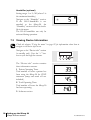
The iSleep 20 is connected to a power supply when the LCD display is lit up.
Doc. 004268 En-Eu T-3
Using the iSleep 20 21
iSleep 20 users manual