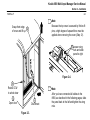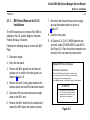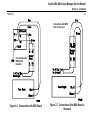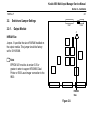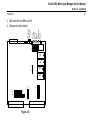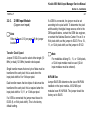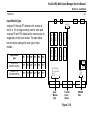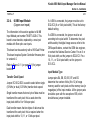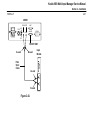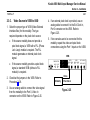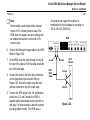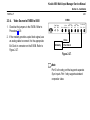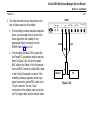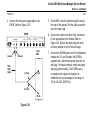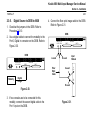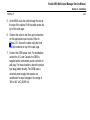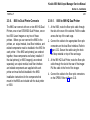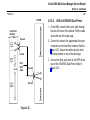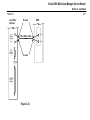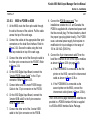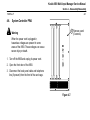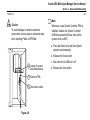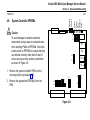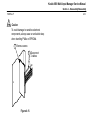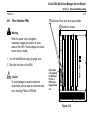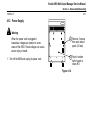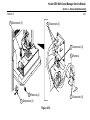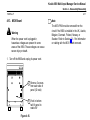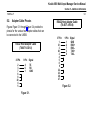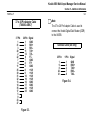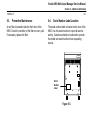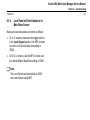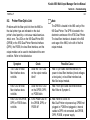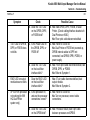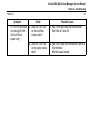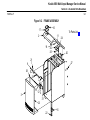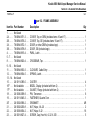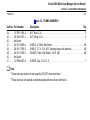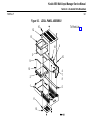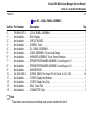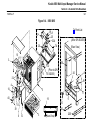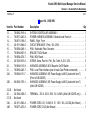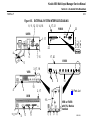
1
Return to CD-ROM Collection Menu Kodak DryView 8800 Multi-Input Manager Service Manual Revision History Warnings and Cautions for 8800 Warnings and Cautions for External Interface Box Accessories Section 1 – Specifications Section 2 – Installation Section 3 – Adjustments Section 4 – Disassembly/Reassembly Section 5 – Additional Information Section 6 – Theory of Operation Section 7 – Diagrams Section 8 – Troubleshooting Section 9 – Illustrated Parts Breakdown Kodak 8800 Multi-Input Manager Service Manual Revision History 1999 Rev. F i Revision History The original issue and revisions of this manual are identified as follows: Issue Date (Rev. A): 01/95 (Rev. B): 03/96 (Rev. C) 09/96 (Rev. D) 05/97 (Rev. E) 02/98 (Rev. F) 03/99 The conversion to Kodak content and format included in this revision has resulted in a complete reprint of the existing Service Manual. All pages are dated March, 1999 Kodak 8800 Multi-Input Manager Service Manual Warnings and Cautions for 8800 1999 Rev. F Warnings and Cautions for 8800 Safety Instructions Read and understand all instructions before using. ! WARNING This equipment can be an explosive hazard. Do not use in the presence of flammable anesthetics, Oxygen, or Nitrous Oxide. ! WARNING This equipment is operated with hazardous voltage which can shock, burn, or cause death. Remove wall plug before servicing equipment. Never pull on cord to remove from outlet. Grasp plug and pull to disconnect. Do not operate equipment with a damaged power cord. Do not use an extension cord to power this equipment. Position the power cord so it will not be tripped over or pulled. Connect this equipment to a grounded outlet. i Kodak 8800 Multi-Input Manager Service Manual Warnings and Cautions for 8800 1999 Rev. F ii Warnings and Cautions for 8800 (Continued) ! WARNING Not Protected Against Ingress of Liquids, including bodily fluids. ! WARNING For Continued Protection against Fire, Replace Fuses with only the Same Type and Fuse Rating. ! CAUTION General External Cleaning: This equipment may be cleaned with a damp cloth using water with mild detergent, or commercial electronic equipment cleaner. ! CAUTION This equipment is intended to connect to other medical devices. Installation and service maintenance are to be performed only by qualified service personnel. The equipment must be installed no closer than 1.8 meters from a patient bed or chair. Kodak 8800 Multi-Input Manager Service Manual Warnings and Cautions for 8800 1999 Rev. F iii Warnings and Cautions for 8800 (Continued) ! CAUTION Do not substitute or modify any part of this equipment without approval of Eastman Kodak Company. ! CAUTION This equipment generates, uses, and can radiate radio frequency energy, and if not installed by qualified service personnel and used in accordance with the User Guide, may cause interference to radio communications and other electronic devices. Operation of this equipment in a residential area may cause interference, in which case the user at their own expense will be required to take whatever measures may be required to correct the interference. Kodak 8800 Multi-Input Manager Service Manual Warnings and cautions for External Interface Box Accessories 1999 Rev. F iv Warnings and Cautions for External Interface Box Accessories Read and understand all instructions before using. Classifications UL Classified File Number E183646 Control Number 9R46 Medical Equipment UL 2601-1 ! CAN/CSA No. 601.1 Classified by Underwriters Laboratories Inc. With Respect to Electric Shock, Fire, Casualty and Medical Hazards only in Accordance with UL 2601-1, CAN/CSA C22.2 No. 601.1 and IEC 601.1. Kodak 8800 Multi-Input Manager Service Manual Warnings and cautions for External Interface Box Accessories 1999 Rev. F v Warnings and Cautions for External Interface Box Accessories (Continued) ! WARNING This equipment can be an explosive hazard. Do not use in the presence of flammable anesthetics, Oxygen, or Nitrous Oxide. ! WARNING This equipment is operated with hazardous voltage which can shock, burn, or cause death. Remove wall plug before servicing equipment. Never pull on cord to remove from outlet. Grasp plug and pull to disconnect. Do not operate equipment with a damaged power cord. Do not use an extension cord to power this equipment. Position the power cord so it will not be tripped over or pulled. Connect this equipment to a grounded outlet. Kodak 8800 Multi-Input Manager Service Manual Warnings and cautions for External Interface Box Accessories 1999 Rev. F vi Warnings and Cautions for External Interface Box Accessories (Continued) ! WARNING Not Protected Against Ingress of Liquids, including bodily fluids. ! WARNING For Continued Protection against Fire, Replace Fuses with only the Same Type and Fuse Rating. ! CAUTION This equipment generates, uses, and can radiate radio frequency energy, and if not installed by qualified service personnel, may cause interference to radio communications and other electronic devices. Operation of this equipment in a residential area may cause interference, in which case the user at their own expense will be required to take whatever measures may be required to correct the interference. ! CAUTION General External Cleaning: This equipment may be cleaned with a damp cloth using water with mild detergent, or commercial electronic equipment cleaner. Kodak 8800 Multi-Input Manager Service Manual Warnings and cautions for External Interface Box Accessories 1999 Rev. F Warnings and Cautions for External Interface Box Accessories (Continued) ! CAUTION Do not substitute or modify any part of this equipment without approval of Eastman Kodak Company. Type B Applied Part vii Kodak 8800 Multi-Input Manager Service Manual Agency, Regulatory and CE Marking Compliance 1999 Rev. F Agency, Regulatory and CE Marking Compliance All agency, regulatory and CE marking information may be found in the User’s Guide for this model. viii Kodak 8800 Multi-Input Manager Service Manual Section 1 – Specifications 1999 Rev. F 1-1 Section 1 – Specifications 1-1. Dimensions 1-3. Environmental (Operating) Height: 69 cm [27 in] Temperature: 15° to 40° C Width: 51 cm [20 in] Humidity: 15% to 90% RH, Non-condensing Depth: 70 cm [27.5 in] (Front door closed) 112 cm [44 in] (Front door open) Magnetic Field: 50 Gauss (Outside of a magnetically shielded room) Weight: 68 kg [150 lbs] (Unpackaged, fully loaded) Noise: 1-2. Electrical Voltage: 115/230 " 10% VAC Frequency: 60/50 " 3% Hz Current: 8.0/4.0 Amperes (Maximum) 60 dBA (Maximum) Kodak 8800 Multi-Input Manager Service Manual Section 1 – Specifications 1999 Rev. F 1-4. Control Source Options 1-2 1-5. Image Input Options 969 HQ User Keypad Digital Interface (Kodak Protocol Standard) Main operator control Controls image formatting, acquisition, and printing One or two parallel, RS422 inputs – Host to Digital EIB 8.75 Mpixels/sec data transfer rate (maximum) Controls image processing parameters (contrast, density, border, rotation, etc.) Fiber optic connection – Digital EIB to 8800 Video Interface RS232/RS422 Host Control (Kodak Protocol Standard) One or two RS170 compatible inputs – Host to Video EIB Use is dependent on modality source Real-time frame grab Controls image formatting, acquisition, and printing Interlaced or non-interlaced 5 MHz to 110 MHz frequency response Contrast, density, border, and film destination selections are made via the 8800 local panel or by host commands Two control source user inputs (any type) per input module supported One or two External Pixel Clock inputs (Host to Video EIB) or Optional Phase Lock Loop (PLL) module provides 7.5 MHz to 110 MHz internal clock Fiber optic connection – Video EIB to 8800 One Video or Digital EIB input per input module supported Kodak 8800 Multi-Input Manager Service Manual Section 1 – Specifications 1999 Rev. F 1-6. Printer Output Options 969 HQ Dual Printer (one or two) 8700/8500 Dual Printer (one or two) 8300 Laser Imager (one or two) Any two of the above printers (different types) 8 input modules/16 users maximum with one output module for one dual printer 7 input modules/ 14 users maximum with two output modules for two Dual Printers Fiber optic connection (8800 to Dual Printer) 1-3 Kodak 8800 Multi-Input Manager Service Manual Section 2 – Installation 1999 Rev. F 2-1 Section 2 – Installation 2-1. Unpacking Remove 5 power cord 6 Remove Cover 3 Remove 8 Remove Operator Guide Separate two pieces of styrofoam 7 2 Unfold 1 Cut Figure 2-1. 4 Roll 8800 to installation location Figure 2-2. Kodak 8800 Multi-Input Manager Service Manual Section 2 – Installation 1999 Rev. F 2-2 Note Because the top cover is secured by friction-fit pins, a high degree of upward force must be applied when removing the cover (Step 12). Grasp front edge 12 of cover and lift up 13 Loosen wing nuts and slide panel to right Figure 2-4. 9 Rotate CCW to unlock door 10 Open door 11 Disconnect Figure 2-3. Note After you have connected all cables to the 8800, as described in the following pages, slide the panel back to the left and tighten the wing nuts. Kodak 8800 Multi-Input Manager Service Manual Section 2 – Installation 1999 Rev. F 2-1-1. MOV Board Removal for O.U.S. Installations The MOV board must be removed if the 8800 is installed in the UK, Austria, Belgium, Denmark, Finland, Norway, or Sweden. Complete the following steps to remove the MOV PWA: 2-3 7. Reconnect the blue and brown power supply wires at the breaker switch as shown in Figure 2-7. 8. Close the rear panel. 9. All Outside U.S. (O.U.S.) 8800 shipments are sent with a label (78-8094-9085-3 Label MOV). See Figure 2-5. Place this sticker somewhere on the back of the unit near the power switch. 1. Disconnect power. 2. Open the rear panel. 3. Remove the MOV ground wire and discard (replace nut on stud for the other ground) as shown in Figure 2-6. 4. Remove the short 2-wire jumper between the breaker switch and the MOV board and discard. 5. Disconnect the blue and brown power supply wires on the MOV end. 6. Remove the MOV board from the bracket and discard the MOV (leave the bracket in place). DryView 8800 Multi-Input Manager Field Service Instructions: Remove the MOV board per the installation instructions in the service manual and apply the label below to the back of the unit if it is being installed in one of these countries: Austria, Belgium, Denmark, Finland, Norway, Sweden, United Kingdom ATTENTION In accordance with EN60950 section 1.5.1 the transient protection devices connected to the AC mains have been disconnected on this equipment. Figure 2-5. Kodak 8800 Multi-Input Manager Service Manual Section 2 – Installation 1999 Rev. F 2-4 Connections after MOV board is removed Connections with MOV board installed Figure 2-6. Connections with MOV Board Figure 2-7. Connections After MOV Board is Removed Kodak 8800 Multi-Input Manager Service Manual Section 2 – Installation 1999 Rev. F 2-2. 2-5 Switch and Jumper Settings Com 1 2-2-1. Com 2 Output Module J1 2K 8K U31 NVRAM Size Jumper J1 specifies the size of NVRAM installed on the output module. This jumper should be factory set for 2K NVRAM. Note EPROM U31 must be at version 3.05 or greater in order to support 8700/8500 Dual Printer or 8300 Laser Imager connection to the 8800. NVRAM Size Figure 2-8. Kodak 8800 Multi-Input Manager Service Manual Section 2 – Installation 1999 Rev. F 2-2-2. System Controller PWA Jumper Settings All the jumpers on the system controller should be factory set as shown in Figure 2-9. Note EPROM U1 and U2 must be at version 5.0 or greater in order to support 8700/8500 Dual Printer or 8300 Laser Imager connection to the 8800. 2-6 System Controller Reset During troubleshooting, the system controller can be reset by pressing and releasing the Reset switch (rather than power cycling the 8800). A reset causes all images in memory to be lost. System Controller NVRAM Initialize Whenever a new system controller is installed, initialize the system controller NVRAM as described below, then set the system clock via MPC. 1. Press the Reset (red) and Abort (black) switches simultaneously. 2. Release the Reset switch. Kodak 8800 Multi-Input Manager Service Manual Section 2 – Installation 1999 Rev. F 2-7 3. Wait until the red LEDs turn off. J13 Fuse Scan Run Status Fail Reset Abort 4. Release the Abort switch. S2 S1 J9 J7 J8 U1 U2 J10 U3 J11 U5 J12 J19 J20 J15 J16 J17 Figure 2-9. J5 J1 J2 J3 J6 J4 Kodak 8800 Multi-Input Manager Service Manual Section 2 – Installation 1999 Rev. F 2-2-3. 32 MB Input Module (Copper user inputs) Note Refer to Figure 2-10 (on page 2-9) for jumper locations. Transfer Clock Speed Jumper E1-E2-E3 is used to select either single (10 MHz) or dual (12.5 MHz) transfer clock speed. Single transfer means that one byte of data must be transferred for each pixel; this is used when the input pixel width is 8 or 9 bits per pixel. Dual transfer means that two bytes of data must be transferred for each pixel; this is required when the input pixel width is 10, 11, or 12 bits per pixel. If a VEIB is connected, the jumper must be set to E2-E3 (8- or 9-bit pixel width). This is the factory default setting. 2-8 If a DEIB is connected, the jumper must be set according to the pixel width. To determine the pixel width used by the digital image source, refer to the OEM specifications, contact the OEM site engineer, or contact the National Service Center. For an 8- or 9-bit pixel width, set the jumper to E2-E3. For a 10-, 11-, or 12-bit pixel width, set the jumper to E1-E2. Note For modalities utilizing 10-, 11-, or 12-bit pixels, a 12-bit input module must be used (12-bit input modules must be ordered). NVRAM Size Jumper E4-E5-E6 determines the size of NVRAM installed on the input module. All 32 MB input modules have 8K NVRAM. The jumper should be factory set to E4-E5. Kodak 8800 Multi-Input Manager Service Manual Section 2 – Installation 1999 Rev. F 2-9 Input Module Type Input Module Type P4 P5 P6 P7 P9 P10 32 MB, 9 Bit (78-8077-4146-3) OFF ON ON ON ON OFF 32 MB,12 Bit (78-8063-3959-0) OFF OFF OFF OFF ON OFF E1 E2 E3 O O O R A M R A M R A M R A M R A M R A M R A M R A M U171 Jumpers P4 through P7 determine the number of bits (9 or 12) of image memory used for each pixel. Jumpers P9 and P10 determine the memory size (in megabytes) of the input module. The table below lists the factory settings for each type of input module. OO OO OO OO P4 OO P9 P7 OO P10 P5 P6 Input Module Type U172 U173 O E6 O E5 O E4 Transfer Clock Speed Figure 2-10. NVRAM Size Kodak 8800 Multi-Input Manager Service Manual Section 2 – Installation 1999 Rev. F 2-2-4. 64 MB Input Module (Copper user inputs) The information in this section applies to 64 MB Input Module part number 78-8077-4020-0. This board is now obsolete, replaced by a new input module with fiber optic user inputs. This board can be used only with a 969 Dual Printer. This board requires System Controller firmware prior to version 4.0. Refer to Figure 2-11 (on page 2-11) for jumper locations. Transfer Clock Speed Jumper EC1-EC2-EC3 is used to select either single (10 MHz) or dual (12.5 MHz) transfer clock speed. Single transfer means that one byte of data must be transferred for each pixel; this is used when the input pixel width is 8 or 9 bits per pixel. Dual transfer means that two bytes of data must be transferred for each pixel; this is required when the input pixel width is 10, 11, or 12 bits per pixel. 2-10 If a VEIB is connected, the jumper must be set to EC2-EC3 (8- or 9-bit pixel width). This is the factory default setting. If a DEIB is connected, the jumper must be set according to the pixel width. To determine the pixel width used by the digital image source, refer to the OEM specifications, contact the OEM site engineer, or contact the National Service Center. For an 8- or 9-bit pixel width, set the jumper to EC2-EC3. For a 10-, 11-, or 12-bit pixel width, set the jumper to EC1-EC2. Input Module Type Jumper pairs EA, EB, ED, EE, EF, and EG determine the number of bits (8 to 12) of image memory used for each pixel and the memory size (in megabytes) of the input module. All the jumper pairs should be open with the exception of EB, which should have a jumper installed. Kodak 8800 Multi-Input Manager Service Manual Section 2 – Installation 1999 Rev. F 2-11 O EC1 O EC2 O EC3 U368 EG2 O O EG1 EF2 O O EF1 EE2 O O EE1 ED2 O O ED1 EB2 O O EB1 EA2 O O EA1 U369 Input Module Type U370 Transfer Clock Speed Figure 2-11. Kodak 8800 Multi-Input Manager Service Manual Section 2 – Installation 1999 Rev. F 2-2-5. 2-12 New Input Modules (Fiber optic user inputs) for video images or 8- or 9- bit digital images. Single/Dual Transfer Jumper Background Input Module Type Service Part Number 32 megapixel x 9-bit 78-8094-9132-3 32 megapixel x 12-bit 78-8094-9136-4 There is just one configuration jumper on these modules. Jumper pins W9-1/W9-2/W9-3 select either single (10 MHz transfer clock speed) or dual (12.5 MHz) transfer mode. Single-transfer mode is always used for video image sources and for digital image sources with 8- or 9-bit pixel widths. Dual-transfer mode is used only for digital image sources with 10-, 11-, or 12-bit pixel widths. In these cases the DEIB transfers 2 data bytes to the input module for each pixel. 64 megapixel x 9-bit 78-8079-9798-2 Jumper Positions: 64 megapixel x 12-bit 78-8079-0735-3 W9-1 to W9-2 Dual Transfer W9-2 to W9-3 Single Transfer (factory setting) The four input modules listed below have fiber optic input connectors for both image data and user comm inputs. Only fiber input cables can be used with these modules. Figure 2-12 shows the board layout. The 64-bit versions of this module can be used only with IMS System Controller firmware V4.0 or above. Nine-bit versions of the board are used with video image sources or with digital image sources that have 8- or 9-bit pixel widths. The 12-bit versions are required for digital image sources with 10-, 11-, or 12-bit pixel widths. 12-bit versions can also be used Kodak 8800 Multi-Input Manager Service Manual Section 2 – Installation 1999 Rev. F Setting the Single/Dual Transfer Jumper 1. For 9-bit modules: Check that the Single/Dual jumper is in the Single position (shorted across W9-2 and W9-3). This is the factory setting. 2-13 Jumper Pins User Control Input Fiber Optics Image Data Input Fiber Optics COMM 1 COMM 2 2. For 12-bit modules: a. If the image source is video or 8- or 9-bit digital, check that the Single/Dual jumper is in the Single position (shorted across W9-2 and W9-3). This is the factory setting. b. If the image source is 10-, 11- or 12-bit digital, set the Single/Dual jumper to the Dual position (shorted across W9-1 and W9-2). W9–1 W9–2 W9–3 32 MP Memory Expansion Board (On 64–MP Versions Only) 8800–30L Figure 2-12. New Input Module Kodak 8800 Multi-Input Manager Service Manual Section 2 – Installation 1999 Rev. F 2-2-6. IMS Backplane VME Bus Request/Grant Each board slot, with the exception of Slot 0 (farthest to the left) and the system controller slot (farthest to the right), has a set of 5 jumpers to enable/disable the VME Bus Request/Grant signals. The jumpers are located to the right of each slot near the bottom of the VME connector. Note The first output module must always be installed in the slot farthest to the left and the system controller must always be installed in the slot farthest to the right. 2-14 The jumpers are factory set and should not need to be changed unless a module is added or removed. If a board is installed in a slot, the top jumper to the right of the slot must be open (to enable the slot). Install the jumper block on a single jumper pin. If a slot is empty, the top jumper to the right of the slot must be closed (to disable the slot). Install the jumper block to short across the two jumper pins. Refer to Figure 2-13 (on page 2-15) for sample jumper settings. Kodak 8800 Multi-Input Manager Service Manual Section 2 – Installation 1999 Rev. F 2-15 0 1 2 3 4 5 6 7 8 System Controller Slot Slots 1 through 4 are enabled. Slots 5 through 10 are disabled. Figure 2-13. Kodak 8800 Multi-Input Manager Service Manual Section 2 – Installation 1999 Rev. F 2-2-7. ! ! UKEIB Caution The switches in the UKEIB must be set before any cables are connected to it. If the switches are not set correctly when cables are connected, components within the UKEIB may be damaged. 2-16 Note Refer to Figure 2-14 (on page 2-17) for switch locations. Signal Path SW1 determines which signal path is enabled within the UKEIB. The various control sources require different signal paths. Set the switches as indicated in the table on page 2-17. Host Connector Signals Caution Use only approved cables and ensure that the cables are connected to the proper connectors on the UKEIB. If unapproved cables are used, or cables are connected incorrectly, components within the UKEIB may be damaged. SW2 determines which signals will be present on Pins 5 and 9 of the HOST connector. For normal operation, set SW2 to the center position. If an OEM fiber optic kit is being installed, set SW2 as directed in the kit instructions. Kodak 8800 Multi-Input Manager Service Manual Section 2 – Installation 1999 Rev. F Signal Path Enabled 2-17 SW1 Switch Positions 1 2 3 4 5 6 SW2 Position Keypad to Input Module On Off On On On On RS232 Host to Input Module Off On Off Off On Off RS422 Host to Input Module Off On Off On On On RS232 Host to Translator Keypad to Input Module On Off On Off Off On RS422 Host to Translator Keypad to Input Module On Off On On On On HOST Connector (P3) Signals Pin 5 Pin 9 Left 5V GND Center KP-IN KP-OUT Right +12V –12V SW1 1 2 3 4 5 6 SW2 ON FIBER OPTIC HOST XMT FTSW A-CH B-CH IMAGER KEYPAD RCV Figure 2-14. Kodak 8800 Multi-Input Manager Service Manual Section 2 – Installation 1999 Rev. F 2-2-8. 2-18 VEIB VEIB Main PWA Pixel Clock Source PLL Module PS Two jumpers in the VEIB specify the pixel clock source. The clock may be external (provided by the source modality) or internal (generated by a Phase Lock Loop module installed in the VEIB). The jumpers are factory set, and should not need to be changed unless a PLL module is added or removed. Refer to Figure 2-15. Internal Clock External Clock Figure 2-15. Kodak 8800 Multi-Input Manager Service Manual Section 2 – Installation 1999 Rev. F 2-2-9. EVEIB Pixel Clock Source Jumpers W5 and W6 specify the pixel clock source. The clock may be external (provided by the source modality) or internal (generated by a Phase Lock Loop module installed in the EVEIB). The jumpers are factory set, and should not need to be changed unless a PLL module is added or removed. Refer to Figure 2-16. Termination Jumpers W1 through W4 determine whether or not the Video In and Sync ports are terminated at 75 ohms. For each port, if the jumper is installed, termination is provided. This is the default setting. The jumper should only be removed if a T-connector is being used on the port. Refer to Figure 2-16. 2-19 Sync Detect Potentiometer Jumper W8 determines whether or not the manual sync detect potentiometer (R6) is enabled. Refer to Figure 2-16. By default, R6 is disabled. The following paragraphs describe the situation in which R6 might need to be enabled. The width of the horizontal sync pulse should be approximately 7.5% of the horizontal line time. If it is significantly different (<5% or >10%), the EVEIB may not be able to detect horizontal or vertical sync. Two modalities known to have this problem are the ADAC 4100 and the Toshiba X-Vision. Before enabling R6 and performing a manual sync detect adjustment, be sure to try each of the 16 combinations of settings for Vertical Sync Detect and Black Level Window available in the Advanced Video Parameters screen in MPC for Windows. Refer to the MPC help screens for details. If a manual sync detect adjustment is required, refer to the EVEIB Installation Instructions. Kodak 8800 Multi-Input Manager Service Manual Section 2 – Installation 1999 Rev. F 2-20 When manual sync detect adjustment is required. W8 1 When manual sync detect adjustment is not required (default setting). W7 (Not jumpered) With PLL Module P S Without PLL Module W5 Main PWA PLL Module 1 W3 V-Sync W6 W4 H-Sync/Comp W1 Video In Port 0 W2 Video In Port 1 W1, W2, W3, W4: Jumper on = 75 ohm termination; Jumper off = High Z. Figure 2-16. 1 With PLL Module Without PLL Module Kodak 8800 Multi-Input Manager Service Manual Section 2 – Installation 1999 Rev. F 2-21 DEIB 2-2-10. DEIB Main PWA Transfer Clock Speed Two jumpers in the DEIB specify either single (10 MHz) or dual (12.5 MHz) transfer clock speed. PS Single transfer means that one byte of data must be transferred for each pixel; this is used when the input pixel width is 8 or 9 bits per pixel. This is the factory default setting. Dual transfer means that two bytes of data must be transferred for each pixel; this is required when the input pixel width is 10, 11, or 12 bits per pixel. Determine the pixel width used by the digital image source (refer to the OEM specifications, contact the OEM site engineer, or contact the National Service Center), then set the jumpers as indicated in Figure 2-17. 8- or 9-Bit Pixel Width (10 MHz) 10-, 11-, or 12-Bit Pixel Width (12.5 MHz) Figure 2-17. Kodak 8800 Multi-Input Manager Service Manual Section 2 – Installation 1999 Rev. F 2-3. 2-22 Cable Connections 2-3-1. When connecting cables to the 8800, as described in the following paragraphs, route cables through the access slot. Leave enough slack to reach the appropriate input module or output module at the front of the IMS card cage. Refer to Figure 2-18. Secure the bundle of cables with hook and loop fastener on top of the card cage. Cables Access Slot Keypad to KFEIB to 8800 Note The KFEIB (Keypad/Fiber External Interface Box) only supports keypad control users. A UKEIB is required for host control users. 1. Connect the keypad cable to the KFEIB. Refer to Figure 2-19. Loosen wing nuts and slide panel to right KFEIB FTSW FIBER OPTIC XMT A-CH B-CH RCV KEYPAD ........ ........ ... Keypad Cable 969 HQ Keypad Figure 2-18. After you have connected all cables to the 8800, slide the panel back to the left and tighten the wing nuts. Figure 2-19. Kodak 8800 Multi-Input Manager Service Manual Section 2 – Installation 1999 Rev. F ! 2-23 Caution Do not disconnect the keypad cable to power cycle the Keypad. Instead unplug the KFEIB power cord or UKEIB power cord (if a UKEIB is used in place of a KFEIB). 4. At the 8800, install a fiber optic converter (if required) on the Comm 0 port of the appropriate input module. Set the switch on the converter toward the fiber optic connectors. 5. Route the cable from the KFEIB through the slot at the rear of the cabinet. Pull the cable across the top of the card cage. 2. If an optional footswitch is to be used, connect it to the KFEIB. Refer to Figure 2-20. KFEIB FIBER OPTIC XMT FTSW A-CH KEYPAD ......... ......... ........ . B-CH KFEIB RCV FIBER OPTIC A-CH B-CH KEYPAD ......... ......... ........ . A-Lead B-Lead Input Module RCV A-Lead A-Ch Footswitch Fiber Optic Cable B-Ch Figure 2-20. B-Lead 3. Connect the fiber optic cable to the KFEIB. Refer to Figure 2-21. .... .... . COMM 1 XMT FTSW Figure 2-21. Kodak 8800 Multi-Input Manager Service Manual Section 2 – Installation 1999 Rev. F 6. Connect the cable to the fiber optic converter installed in Step 4. Refer to Figure 2-21. Secure the cable using the hook and loop material on top of the card cage. 7. Connect the KFEIB power cord. For installations outside the U.S. and Canada, the KFEIB is supplied with a harmonized power cord with no wall plug. For these locations, attach the proper type plug (obtain locally). The KFEIB uses a universal power supply that requires no modification for input voltages in the range of 100 to 240 VAC (50/60 Hz). 8. If two consoles are using this input module, repeat Steps 1 through 7, but connect to the Comm 1 port of the input module. 2-24 2-3-2. ! Host Control to UKEIB to 8800 Caution The switches in the UKEIB must be set before any cables are connected to it. Use only approved cables and ensure that the cables are connected to the proper connectors on the UKEIB. If the switches are not set correctly when cables are connected, or unapproved cables are used, or cables are connected incorrectly, components within the UKEIB may be damaged. Note Refer to subsection 5-2 for pinouts of the various host adapter cables. Note A translator keypad is required for hosts programmed with OEM commands. The translator keypad translates the OEM commands to Imation commands that can be interpreted by the 8800. Different translator keypads are required for different OEMs. Kodak 8800 Multi-Input Manager Service Manual Section 2 – Installation 1999 Rev. F 2-25 1. Set the switches in the UKEIB (Universal Keypad External Interface Box) as required. Refer to Procedure 2-2-7. 3. If a translator keypad is required, connect the keypad cable to the UKEIB. Refer to Figure 2-22. 2. Connect the host adapter cable to the UKEIB. Refer to Figure 2-22. 4. If an optional footswitch is to be used, connect it to the UKEIB. Refer to Figure 2-23. Host UKEIB FIBER OPTIC Host Adapter Cable HOST XMT FTSW A-CH B-CH UKEIB RCV FIBER OPTIC XMT FTSW A-CH B-CH HOST ..... .... IMAGER ..... .... KEYPAD ......... ......... ........ . RCV Footswitch Figure 2-23. Keypad Cable Translator Keypad Figure 2-22. ..... .... ..... .... IMAGER KEYPAD ......... ......... ........ . Kodak 8800 Multi-Input Manager Service Manual Section 2 – Installation 1999 Rev. F 5. Connect the fiber optic cable to the UKEIB. Refer to Figure 2-24. Note For agency reasons, only fiber optic cables are to be used when connecting the UKEIB to the 8800. Do not connect a copper cable to the IMAGER connector on the UKEIB. 6. At the 8800, install a fiber optic converter (if required) on the Comm 0 port of the appropriate input module. Check the switch on the converter to ensure that it is set toward the fiber optic connectors. 7. Route the cable from the UKEIB through the slot at the rear of the cabinet. Pull the cable across the top of the card cage. 8. Connect the cable to the fiber optic converter installed in Step 6. Refer to Figure 2-24. Secure the cable using the hook and loop material on top of the card cage. 2-26 9. Connect the UKEIB power cord. For installations outside the U.S. and Canada, the UKEIB is supplied with a harmonized power cord with no wall plug. For these locations, attach the proper type plug (obtain locally). The UKEIB uses a universal power supply that requires no modification for input voltages in the range of 100 to 240 VAC (50/60 Hz). 10. If two consoles are using this input module, repeat Steps 1 through 9, but connect to the Comm 1 port of the input module. Kodak 8800 Multi-Input Manager Service Manual Section 2 – Installation 1999 Rev. F 2-27 UKEIB FIBER OPTIC XMT FTSW A-CH B-CH HOST ..... .... ..... .... IMAGER KEYPAD ......... ......... ........ . RCV DO NOT USE B-Lead Fiber Optic Cable Input Module .... .... . COMM 1 A-Lead A-Lead A-Ch B-Ch B-Lead Figure 2-24. Kodak 8800 Multi-Input Manager Service Manual Section 2 – Installation 1999 Rev. F 2-3-3. Video Source to VEIB to 8800 1. Select the proper type of VEIB (Video External Interface Box) for the modality. The type required depends on the pixel clock source: If the source modality does not provide a pixel clock signal, a VEIB with a PLL (Phase Lock Loop) module is required. The PLL module generates an internal pixel clock signal. 2-28 4. If an external pixel clock is provided, use an analog cable to connect it to the Ext Clock In, Port 0 connector on the VEIB. Refer to Figure 2-25. 5. If two consoles are to be connected for this modality, repeat the video and pixel clock connections using the Port 1 inputs on the VEIB. VEIB PORT 0 VIDEO VIDEO IN OUT FIBER OPTICS If the source modality provides a pixel clock signal, a standard VEIB (without a PLL module) is required. 2. Check/set the jumpers in the VEIB. Refer to Procedure 2-2-8. 3. Use an analog cable to connect the video signal from the modality to the Port 0, Video In connector on the VEIB. Refer to Figure 2-25. A-CH B-CH Video Modality Pixel Clock Figure 2-25. PORT 1 VIDEO VIDEO OUT IN EXT CLOCK IN PORT 0 PORT 1 Kodak 8800 Multi-Input Manager Service Manual Section 2 – Installation 1999 Rev. F Note Both modality inputs require either external clocks or PLL internal clocks be used. The VEIB does not support one input running with an external clock and the other with a PLL internal clock. 2-29 universal power supply that requires no modification for input voltages in the range of 100 to 240 VAC (50/60 Hz). VEIB PORT 0 VIDEO VIDEO IN OUT FIBER OPTICS A-CH B-CH 6. Connect the fiber optic image cable to the VEIB. Refer to Figure 2-26. 7. At the 8800, route the cable through the slot at the rear of the cabinet. Pull the cable across the top of the card cage. 8. Connect the cable to the fiber optic connectors on the appropriate input module. Refer to Figure 2-26. Secure the cable using the hook and loop material on top of the card cage. 9. Connect the VEIB power cord. For installations outside the U.S. and Canada, the VEIB is supplied with a harmonized power cord with no wall plug. For these locations, attach the proper type plug (obtain locally). The VEIB uses a A-Lead Fiber Optic Cable B-Lead A-Lead Input Module A CH B CH B-Lead Figure 2-26. PORT 1 VIDEO VIDEO OUT IN EXT CLOCK IN PORT 0 PORT 1 Kodak 8800 Multi-Input Manager Service Manual Section 2 – Installation 1999 Rev. F 2-3-4. 2-30 EVEIB Video Source to EVEIB to 8800 1. Check/set the jumpers in the EVEIB. Refer to Procedure 2-2-9. 2. If the modality provides a pixel clock signal, use an analog cable to connect it to the appropriate Ext Clock In connector on the EVEIB. Refer to Figure 2-27. Fiber Optics A-Ch B-Ch Port 0 H–Sync Video Video V–Sync Composite IN OUT Port 1 Video Video OUT IN Ext Clock IN Port-0 Port-1 Video Modality Pixel Clock Figure 2-27. Note Port 0 is the only port that supports separate Sync inputs. Port 1 only supports standard composite video. Kodak 8800 Multi-Input Manager Service Manual Section 2 – Installation 1999 Rev. F 3. The video connections vary depending on the type of video output by the modality: If the modality provides standard composite video, use an analog cable to connect the video signal from the modality to the appropriate Video In connector on the EVEIB. Refer to Figure 2-27. If the modality provides SVGA output (like the PowerPC), an adaptor cable is required. Refer to Figure 2-28. Connect the green BNC cable to the Video In Port 0 connector on the EVEIB. Connect the black BNC cable to the H-Sync/Composite connector. If the modality provides a separate vertical sync signal, connect the yellow BNC cable to the V-Sync connector. The two 15-pin connectors on the adapter cable connect to the PC (longer cable) and the monitor cable. 2-31 EVEIB Fiber Optics A-Ch B-Ch Port 0 H–Sync Video Video V–Sync Composite IN OUT Yellow Port 1 Video Video OUT IN Green Black Monitor PC Figure 2-28. Ext Clock IN Port-0 Port-1 Kodak 8800 Multi-Input Manager Service Manual Section 2 – Installation 1999 Rev. F 2-32 4. Connect the fiber optic image cable to the EVEIB. Refer to Figure 2-29. 5. At the 8800, route the cable through the slot at the rear of the cabinet. Pull the cable across the top of the card cage. EVEIB Fiber Optics A-Ch B-Ch A-Lead Fiber Optic Cable Port 0 H–Sync Video Video V–Sync Composite IN OUT Port 1 Video Video OUT IN Ext Clock IN Port-0 Input Mod B-Lead A-Lead A–Ch B-Lead B–Ch Figure 2-29. Port-1 6. Connect the cable to the fiber optic connectors on the appropriate input module. Refer to Figure 2-29. Secure the cable using the hook and loop material on top of the card cage. 7. Connect the EVEIB power cord. For installations outside the U.S. and Canada, the EVEIB is supplied with a harmonized power cord with no wall plug. For these locations, attach the proper type plug (obtain locally). The EVEIB uses a universal power supply that requires no modification for input voltages in the range of 100 to 240 VAC (50/60 Hz). Kodak 8800 Multi-Input Manager Service Manual Section 2 – Installation 1999 Rev. F 2-3-5. 2-33 Digital Source to DEIB to 8800 1. Check/set the jumpers in the DEIB. Refer to Procedure 2-2-10. 4. Connect the fiber optic image cable to the DEIB. Refer to Figure 2-31. DEIB 2. Use a digital cable to connect the modality to the Port 0, Digital In connector on the DEIB. Refer to Figure 2-30. FIBER OPTICS A-CH B-CH DIGITAL IN PORT 0 ................... .................. DEIB A-Lead FIBER OPTICS A-CH B-CH Modality B-Lead PORT 1 ................... .................. Input Module DIGITAL IN PORT 0 ................... .................. PORT 1 ................... .................. Fiber Optic Cable A-Lead Digital Image B CH B-Lead Figure 2-30. 3. If two consoles are to be connected for this modality, connect the second digital cable to the Port 1 input on the DEIB. A CH Figure 2-31. Kodak 8800 Multi-Input Manager Service Manual Section 2 – Installation 1999 Rev. F 5. At the 8800, route the cable through the slot at the rear of the cabinet. Pull the cable across the top of the card cage. 6. Connect the cable to the fiber optic connectors on the appropriate input module. Refer to Figure 2-31. Secure the cable using the hook and loop material on top of the card cage. 7. Connect the DEIB power cord. For installations outside the U.S. and Canada, the DEIB is supplied with a harmonized power cord with no wall plug. For these locations, attach the proper type plug (obtain locally). The DEIB uses a universal power supply that requires no modification for input voltages in the range of 100 to 240 VAC (50/60 Hz). 2-34 Kodak 8800 Multi-Input Manager Service Manual Section 2 – Installation 1999 Rev. F 2-3-6. 8800 to Dual Printer Connects The 8800 can connect with one or two 969 HQ Dual Printers, one or two 8700/8500 Dual Printers, one or two 8300 Laser Imagers or any two of these printers. Before you can connect the 8800 to the printers, an output module, local fiber interface, and related components must be installed in the 8800 for each printer. If the 8800 and printer(s) are ordered together, these components are factory installed. If the dual printer(s) or 8300 imager(s) are ordered separately, an output module, local fiber interface and related components are supplied with each printer and must be field-installed in the 8800. Installation instructions for the components that mount in the 8800 are included with the dual printer or 8300. 2-35 2-3-6-1. 8800 to 969 HQ Dual Printer 1. At the 8800, route the fiber optic cable through the slot at the rear of the cabinet. Pull the cable across the top of the card cage. 2. Connect the cable to the appropriate fiber optic connectors on the local fiber interface. Refer to Figure 2-32. Secure the cable using the hook and loop material on top of the card cage. 3. At the 969 HQ Dual Printer, route the fiber optic cable through the slot at the rear of the imager. Pull the cable to the front of the imager. 4. Connect the cable to the fiber optic connectors on the DPEIB. Refer to Figure 2-32. Kodak 8800 Multi-Input Manager Service Manual Section 2 – Installation 1999 Rev. F 2-36 DPEIB B-Lead 2. Connect the cable to the appropriate fiber optic connectors on the local fiber interface. Refer to Figure 2-33. Secure the cable using the hook and loop material on top of the card cage. CH-B REMOTE PRINTER 0 CH-A A-Lead PRINTER Fiber Optic Cable 3. Connect the fiber optic cable to the DPRI at the rear of the 8700/8500 Dual Printer. Refer to Figure 2-33. A-Lead CH-A CH-B PRINTER OUTPUT MODULE 0 8800 to 8700/8500 Dual Printer 1. At the 8800, route the fiber optic cable through the slot at the rear of the cabinet. Pull the cable across the top of the card cage. Local Fiber Interface PROC OUTPUT MODULE 0 2-3-6-2. B-Lead PROC Figure 2-32. Kodak 8800 Multi-Input Manager Service Manual Section 2 – Installation 1999 Rev. F Local Fiber Interface CH-B REMOTE PRINTER 0 CH-A PROC OUTPUT MODULE 0 2-37 B-Lead Fiber Optic Cable DPRI CH-B CH-A A-Lead PRINTER OUTPUT MODULE 0 Figure 2-33. Kodak 8800 Multi-Input Manager Service Manual Section 2 – Installation 1999 Rev. F 2-3-6-3. 2-38 8800 to POEIB to 8300 1. At the 8800, route the fiber optic cable through the slot at the rear of the cabinet. Pull the cable across the top of the card cage. 2. Connect the cables to the appropriate fiber optic connectors on the local fiber interface. Refer to Figure 2-34. Secure the cable using the hook and loop material on top of the card cage. 3. Connect the other end of the fiber optic cable to the fiber optic connectors on the POEIB*. Refer to Figure 2-34. 8. Connect the POEIB power cord.* For installations outside the U.S. and Canada, the POEIB is supplied with a harmonized power cord that has no wall plug. For these locations, attach the proper type plug (obtain locally). The POEIB uses a universal power supply that requires no modification for input voltages in the range of 100 to 240 VAC (50/60 Hz). 9. Connect the 9-pin interconnect cable* from the local fiber interface to one of the output modules as shown in Figure 2-36 (on page 2-40). a. If the POEIB/8300 is connected as the first printer on the 8800, connect the interconnect cable as shown in Figure 2-36-a. 4. On the 8300 Digital Input Board, connect the 3-meter POEIB Image Cable* to the 37-pin connector. Refer to Figure 2-35. b. If the POEIB/8300 is connected as the second printer on the 8800, connect the interconnect cable (shown in Figure 2-36-b). 5. Connect other end of 3-meter POEIB Image Cable to the 37-pin connector on the POEIB. 6. On the 8300 Digital Input Board, connect the 3-meter KEIB cable* to the 9-pin connector. Refer to Figure 2-35. 7. Connect the other end of the 3-meter KEIB cable to the 9-pin connector on the POEIB. * The 5 items on this page marked with asterisks are provided in a POEIB Interface Kit that is supplied in a 8300-to-8800 Interface Sales Package. Kodak 8800 Multi-Input Manager Service Manual Section 2 – Installation 1999 Rev. F 2-39 Local Fiber Interface Fiber Optic Cable B-Lead CH-B REMOTE PRINTER 0 CH-A Digital Input Module A-Lead 3-Meter POEIB Image Cable PROC OUTPUT MODULE 0 PRINTER OUTPUT MODULE 0 A-Lead 3-Meter KEIB Cable B-Lead 8300 POEIB POEIB 8800 CH-A IMAGE CH-B COMM 8800–26L 8800–25L Figure 2-34. Figure 2-35. Kodak 8800 Multi-Input Manager Service Manual Section 2 – Installation 1999 Rev. F 2-40 First Printer Connection Local Fiber Interface Second Printer Connection Local Fiber Interface 0 1 2 3 0 1 2 3 This 37-Pin Cable Should Already Be In Place This 37-Pin Cable Should Already Be In Place Install 9-pin Interconnect Cable Output Module Install 9-pin Interconnect Cable Output Modules a b 8800–27L Figure 2-36. Kodak 8800 Multi-Input Manager Service Manual Section 2 – Installation 1999 Rev. F 2-4. System Configuration After all cables have been connected, and all switch and jumper settings have been verified, perform the following configuration procedures. Note If the 8800 is installed in the UK, Austria, Belgium, Denmark, Finland, Norway, or Sweden, the MOV PWA must be removed from the circuit according to the procedures described in 2-1-1. 2-4-1. 2-41 wall plug. For these locations, attach the proper type plug (obtain locally). The 8800 uses a universal power supply that requires no modification for input voltages in the range of 100 to 240 VAC (50/60 Hz). 2. Turn on the 8800. AC Input Power Up the POEIB and 8300 If you have connected a POEIB/8300 to the 8800, power up the POEIB and 8300. 2-4-2. Power Switch Power Up the 8800 1. Connect the 8800 power cord. For installations outside the U.S. and Canada, the 8800 is supplied with a harmonized power cord with no Figure 2-37. Kodak 8800 Multi-Input Manager Service Manual Section 2 – Installation 1999 Rev. F 2-4-3. Connect the MPC to the 8800 1. Connect a straight-through serial cable (9-pin female to 9-pin male) between the serial port of the MPC and the MPC connector on the right front panel of the card cage (Figure 2-38). 2. On U.S. supplied modem interface boards, set the toggle switch to the MPC OPERATION (upper) position. On O.U.S. interface boards there are no RJ11 jacks. There are just two connectors, one for the MPC and the other for the local panel. Note When the toggle switch is set to the MPC OPERATION position, the local panel is disabled. When finished using the MPC, be sure to set the toggle switch back to the LOCAL KEYPAD (NORMAL) position. 3. Turn on the MPC, and start the MPC for Windows program. 2-42 Note If a “Subsystem Not Communicating” message is displayed, select Preferences from the Operations menu, then check the Direct Connect Baud and Com settings. Note The MPC for Windows program is used to load configuration parameters into NVRAM within the various system components. Context sensitive help is available throughout the program via the F1 key. For example, for a description of a particular parameter, move the highlight to that parameter, then press F1. The MPC for Windows Help file will open and display the topic associated with the highlighted parameter. 2-4-4. Set the System Clock 1. Select Clock from the Utilities menu. 2. Enter the date and time in the Clock window, then select the OK button. Kodak 8800 Multi-Input Manager Service Manual Section 2 – Installation 1999 Rev. F 2-43 2-4-5. Right Front Panel MPC Connector Toggle Switch + Figure 2-38. 8800/8300 Setup If you are setting up the 8800 to drive a POEIB/8300, see the 8300 Service Manual for setup procedures. Refer to the procedure titled 8300/8800 or 969 Setup Procedures, located in section 2 of the 8300 Service Manual. If you are setting up the 8800 for any printer other than the 8300, go on to the setup procedures on the following pages. Kodak 8800 Multi-Input Manager Service Manual Section 2 – Installation 1999 Rev. F 2-4-6. Load IMS Parameters 1. Select the IMS subsystem. 2. Select Output 0 Comm 0 from the component select dropdown list box (to the right of the subsystem buttons). 3. Select the Config window display button. 4. Select the desired printer (969, 8700, 8500 or 8300), then select the Save button. 5. Select the Comm window display button. 6. Select the Printer button, then select the Save button. If you selected the 8300 printer, in Step 4 above, the MPC will display a message reminding you to change the 8300 comm parameters to match the comm parameters displayed in the MPC Comm window. You must do this on the 8300 Local Panel. Refer to the 8300 Service Manual, for 8300 setup instructions. See the procedure titled 8800/8300 Setup Procedures, in Section 2. 2-44 7. Select Output 0 Comm 1 from the component select dropdown list box. 8. Select the Comm window display button. 9. Select the Printer button, then select the Save button. 10. If the 8800 contains a second output module, repeat Steps 2 through 9, substituting Output 1 for Output 0. 11. Select the first user from the component select dropdown list box. Note Users are identified by slot/comm (e.g., Input 1 Comm 0) or modality name, depending on the User Display setting in the Preferences window. 12. If a script file is available for this user, select the Script window display button. Specify the script file name and location in the Select Script File window, then select the OK button. If a script file is not available, or the script file settings need to be modified, proceed to the next step. Kodak 8800 Multi-Input Manager Service Manual Section 2 – Installation 1999 Rev. F 2-45 13. Select the Comm window display button. Select the appropriate Keypad Defaults button, modify the parameter settings as needed for host control users, then select the Save button. 2-4-7. 14. Select the Image window display button. Modify the parameter settings as needed, then select the Save button. 2. Select the Config window display button. Modify the parameter settings as needed, then select the Save button. 15. Select the Host window display button. Modify the parameter settings as needed, then select the Save button. 3. If the system includes two Dual Printers, select the second printer from the component select dropdown list box, then repeat Step 2. 16. Select the System window display button. Modify the parameter settings as needed, then select the Save button. 17. Repeat Steps 11 through 16 for each user listed in the component select dropdown list box. 18. After all the IMS parameters have been loaded, power cycle the 8800. Load MCS Parameters (Does not apply for 8300 connect.) 1. Select the MCS subsystem. Kodak 8800 Multi-Input Manager Service Manual Section 2 – Installation 1999 Rev. F 2-4-8. Load Processor Parameters (Does not apply for 8300 connect.) 2-46 2-4-9. Load AIQC Parameters (Does not apply for 8300 connect.) 1. Select the Processor (PROC) subsystem. 1. Select the AIQC subsystem. 2. Select the Config window display button. Modify the parameter settings as needed, then select the Save button. 2. Select the Config window display button. Select the Display Defaults button. Modify the parameter settings as needed, then select the Save button. 3. Select the Media window display button. Modify the parameter settings as needed, then select the Save button. 4. If the system includes two Dual Printers, select the second processor from the component select dropdown list box, then repeat Steps 2 and 3. 3. If the system includes two Dual Printers, select the second output from the component select dropdown list box, then repeat Step 2. Kodak 8800 Multi-Input Manager Service Manual Section 2 – Installation 1999 Rev. F 2-4-10. Load Keypad Parameters 1. Select the Keypad (KPD) subsystem. 2. Select the first keypad from the component select dropdown list box. 3. Select the Config window display button. Modify the parameter settings as needed, then select the Save button. 4. If custom formats are to be loaded for this keypad, select the Load window display button. Select the format (the letter designations correspond to the labels displayed on the keypad’s custom format buttons). Specify the custom format file name and location in the Load Keypad Custom Format window, then select the OK button. 5. Repeat Steps 2 through 4 for each keypad listed in the component select dropdown list box. 2-47 Kodak 8800 Multi-Input Manager Service Manual Section 2 – Installation 1999 Rev. F 2-4-11. Digital Modality Setup Note Load digital parameters from a script file whenever possible (refer to Step 12 of Procedure 2-4-6). If a script file is not available for the modality, enter parameters manually. To determine the correct settings, refer to the OEM specifications, contact the OEM site engineer, or contact the National Service Center. 1. Select the EIB subsystem. 2. Select the first DEIB user from the component select dropdown list box. 3. Select the Config window display button. Modify the parameter settings as needed, then select the Save button. 2-48 Note When the Save button is selected, the digital parameters are loaded into the DEIB. If the save operation fails, check the fiber optic cables (A to A, B to B – use a flashlight), the DEIB power supply, and input module communications (use MPC for WIndows diagnostics). Power cycle the DEIB, then try saving again. 4. Verify that the modality is generating an image. 5. Select the Acquire button. Note If the acquire fails, recheck the digital parameter settings. Modify the settings as needed. Save the new settings, then try to acquire again. 6. Select the Print button. Verify that the image is printed successfully. Kodak 8800 Multi-Input Manager Service Manual Section 2 – Installation 1999 Rev. F 2-4-12. Video Modality Setup 2-4-12-1. Inspect Signals from Modality 1. Verify that the modality is generating an image. 2. Inspect the video and pixel clock signals: a. Check for two video modes. Check with the OEM to determine if the modality can operate in two different modes that require different video parameters. Some OEMs have one set of video parameters for Live (Scan) mode and another set for Review (Off Tape) mode. Set up for one or the other. b. Check for double termination. Observe the host monitor while connecting the video cable to a powered up VEIB/EVEIB. If the monitor image improves or stays the same, there is no problem. If the monitor image suddenly goes bad (ghosting, blurring, faint, etc.), the video signal may already be terminated once, and connecting the VEIB/EVEIB causes a double termination problem. If so, resolve this problem before proceeding. 2-49 c. Check the pixel clock signal. Connect the pixel clock cable to the oscilloscope (do not terminate the scope). The pixel clock signal must be above 0.5 volts peak to peak and must be stable. (A pixel clock filter may help eliminate glitches in the pixel clock, but it may also make it worse!) If the signal is okay, connect the pixel clock cable to the VEIB/EVEIB. d. Avoid ground loops. To prevent a possible ground loop, connect the VEIB/EVEIB power cord to the same power source as the OEM modality. If this cannot be done, and image noise problems are experienced later during image fine tuning, check for a ground loop problem as follows: Temporarily disconnect the ground wire from the VEIB/EVEIB. Run a ground wire from the VEIB/EVEIB to the OEM ground. If the noise goes away, there is a ground loop problem. Kodak 8800 Multi-Input Manager Service Manual Section 2 – Installation 1999 Rev. F 2-4-12-2. Enter Rough Video Parameters Note Load video parameters from a script file whenever possible (refer to Step 12 of Procedure 2-4-6). If a script file is not available for the modality, enter parameters manually. This requires that an oscilloscope be used to measure some parameters; other parameters are calculated based on these measurements. Refer to the video parameter help screens in MPC for Windows. 1. Select the EIB subsystem. 2. Select the first VEIB/EVEIB user from the component select dropdown list box. 2-50 Note If an EVEIB is being used, verify that the Video Input parameter setting (in the Video Parameters window) is correct. Also verify that the Passes parameter setting is correct. (The EVEIB digitizes incoming video slightly slower than the VEIB. The VEIB would sometimes work with the number of passes set lower than the recommended setting, but the EVEIB will not acquire if the setting is incorrect.) 3. Select the Config window display button. Enter rough parameter settings, then select the Save button. Kodak 8800 Multi-Input Manager Service Manual Section 2 – Installation 1999 Rev. F Note When the Save button is selected, the video parameters are loaded into the VEIB/EVEIB. If the save operation fails, check the fiber optic cables (A to A, B to B – use a flashlight), the VEIB/EVEIB power supply, and input module communications (use MPC for WIndows diagnostics). Also, in the MPC IMS/System screen, make sure the proper EIB (VEIB or EVEIB) is selected. 4. Select the Acquire button. If successful, proceed to Step 12. If not successful, proceed to Step 5. 2-51 5. Temporarily set framing parameters to crop the image to a 100 line by 100 pixel square. (This is done to ensure that a vertical or horizontal sync pulse is not sampled; the parameters will be set for a full frame in Step 12.) Set Image Lines to 100 and Horiz Active Pixels to 100. Set Horizontal Delay and Vertical Delay to select this 100 x 100 square from the center of the image. 6. Connect the host video cable to the oscilloscope (use a T connector with a 75 ohm terminator attached). Measure the video signal from sync tip to maximum white level. If less than 1 volt, set the Double Gain parameter to 0.5 to 1.0. If more than 1 volt, set the Double Gain parameter to 1.0 to 2.0 volts. Kodak 8800 Multi-Input Manager Service Manual Section 2 – Installation 1999 Rev. F 7. Set the following parameters to midpoints as indicated: Clock Delay to 6. Fine Pixel Delay to 180. Black Level to 100. 2-52 PS Main PWA Enable LED #11 Go LED #10 Acquire LED #1 8. Select the Save button. 9. Verify that the Enable LED is on. This indicates that the parameter set has been loaded and the VEIB/EVEIB is in a ready state. Refer to Figure 2-39 (VEIB), or Figure 2-40 (EVEIB). Sync LED #9 LED #8 Port 0 Gain Figure 2-39. Port 1 Gain Kodak 8800 Multi-Input Manager Service Manual Section 2 – Installation 1999 Rev. F 2-53 EVEIB PS Main PWA Note The following Step refers to the gain pot in the VEIB. The EVEIB has no gain pots; it adjusts the gain automatically. With this exception, the following Step applies to the VEIB and the EVEIB. 10. Adjust the gain pot until the Sync LED turns on, then continue turning the pot in the same direction for at least three full turns. Refer to Figure 2-39. The Sync LED must stay on without flickering or acquires will fail! There must be at least three full turns of the pot during which the Sync LED remains on steadily. If not, check the video amplitude. The Double Gain parameter may need to be changed to the other setting. SYNC AQU ENABLE CONFIG OVER Figure 2-40. UNDER When the Sync LED is on, it indicates that the VEIB sees the video signal, and is successfully detecting horizontal and vertical sync pulses. The pixel clock has no effect on the state of the Sync LED. Kodak 8800 Multi-Input Manager Service Manual Section 2 – Installation 1999 Rev. F If the Sync LED does not turn on when the gain pot is turned (and the Enable LED is on), either no video is present, or the video that is present is completely unrecognizable to the VEIB/EVEIB (the VEIB/EVEIB cannot detect horizontal or vertical sync pulses.) In this case: The video cable may be on the wrong port. The video signal amplitude may be less than 0.5 volts (this could have several causes: double or triple termination, bad cables, bad video, etc.). The video signal amplitude may be okay, but the signal may be bad. One or more of the following parameters may be set incorrectly: Double Gain, Black Level, and/or Source. 2-54 11. Try acquiring (be sure the Sync, Enable, and Acquire LEDs are all on). If successful, proceed to Step 12. If unsuccessful, try acquiring two or three more times. If still unsuccessful, reset the 8800 and the MPC, and try two or three more times. If still unsuccessful, double check Steps 1 through 10. 12. Adjust the following framing parameters to obtain the full frame (rough draft only; this will be done again during fine tuning): Vertical Delay and Image Lines Horizontal Delay and Horiz Active Pixels 13. Perform video fine tuning. Kodak 8800 Multi-Input Manager Service Manual Section 2 – Installation 1999 Rev. F 2-4-12-3. Fine Tune Video Parameters Note When printing images from MPC, the images are replicated. Replicate reproduces the image from the host exactly, without any smoothing. This is done so that any blurring or ghosting will be evident and not disguised by processing the image. When printing images from the keypad, the selected interpolation value (smooth to sharp) is used to process the image. This may make the image look better, but may also hide other problems. Therefore, it is best to print from MPC when performing fine tuning. 1. Display a SMPTE pattern on the OEM monitor. Be sure the SMPTE image is at OEM defined window and level. If a SMPTE pattern is not available, try using a customer image with all text removed and define the sampling area to include the grey scale. Another alternative is to window and level the customer image so that there are extreme blacks and whites across the whole image. 2-55 2. Select the Tune window display button. 3. Select the Gain/Black Level button in the Video Fine Tuning window. 4. An image is acquired, and then the Gain and Black Level Rectangle Selection window opens. Select the Retrieve button to download the acquired image to the MPC. Note Each time the Gain and Black Level Rectangle Selection window is opened, an image is acquired and the most recently downloaded (not the most recently acquired) image is displayed. This means that the window can be opened multiple times while configuring a modality without having to download an image each time. However, be sure to download an image for each modality, and be aware that the downloaded image may not match the most recently acquired image (for example, if the modality’s screen saver kicks in after the image has been downloaded). Kodak 8800 Multi-Input Manager Service Manual Section 2 – Installation 1999 Rev. F 5. Examine the downloaded image: a. Identify an area that includes maximum blacks, but does not include any border (video blanking) area. This is critical. (The only area on a SMPTE pattern that contains maximum black is the 100% square; the other black bars are not maximum black.) b. Identify an area that includes maximum whites, but does not include any overwhite text. This is critical. 6. Click and drag to create a rectangle that surrounds the true black and true white areas identified in the previous step, then select the OK button. 2-56 Note At this point, the IMS samples the video and passes the digital values to the MPC. The MPC adjusts the black level based on the sample and turns on the appropriate LED in the VEIB to indicate the gain (white level). This sampling and adjusting continues at approximately 4 second intervals. 7. The Gain and Black Level Fine Tune window opens, and displays the minimum and maximum digital values and the black level (EVEIB only). Note If all the values are zero, the acquire has failed, and the cause should be investigated. Note The following Step does not apply to the EVEIB. Kodak 8800 Multi-Input Manager Service Manual Section 2 – Installation 1999 Rev. F 8. At the VEIB, adjust the appropriate gain pot until LED 6 or LED 7 turns on. Remember that the state of the LEDs is updated at approximately 4 second intervals. 9. At the MPC, select the OK button in the Gain & Black Level Fine Tune window. Note Because this is a rough gain and black level adjustment, the digital values displayed at this point are not important. They will become important when the final adjustment is performed later in this procedure. 10. Select the Bad Clock Delay button in the Video Fine Tuning window. Select the OK button when the Successful Acquire and Successful Print messages are displayed. 2-57 11. The image is acquired using each of 16 different coarse clock delay settings. The 16 images are printed on one or multiple sheets depending on the printer type connected. The coarse delay setting is printed above each image. Identify any images that exhibit vertical line pixel shifting. Ignore any other image problems at this time. 12. In the Bad Clock Delays window, select those images identified in the previous step, then select the OK button. 13. Select the Fine Pixel/Clock Delay button in the Video Fine Tuning window. Select the OK button when the Successful Acquire and Successful Print messages are displayed. 14. The image is acquired and printed using 16 different combinations of fine pixel and clock delays. The 16 images are printed in a 4:1 format on 4 sheets of film. The clock delay and fine pixel delay are printed above each image. Identify the single best image, then proceed to Step 18. Kodak 8800 Multi-Input Manager Service Manual Section 2 – Installation 1999 Rev. F 2-58 Note Perform Steps 15 through 17 only if a single best image cannot be identified when the images are printed in a 4:1 format. 15. Select the Print 1-Up button in the Video Fine Tuning window. 16. Select an image to print in the Video Fine Tuning - Print Full Size window (image numbers are printed above each image on the 4:1 prints), then select the OK button. Select the OK button when the Successful Print message is displayed. Examine the image on the film. 17. Repeat Step 16 as needed. When the single best image has been identified, select the Cancel button in the Video Fine Tuning – Print Full Size window. 18. Select the Config window display button. Enter the clock delay and fine pixel delay settings that are printed above the previously identified image. Select the Save button. 19. Repeat Steps 2 through 7. Note The following Step does not apply to the EVEIB. 20. At the VEIB, adjust the appropriate gain pot/wait/adjust/wait/etc. until LEDs 7 and 8 toggle. Wait for 3 or more flashes of the Sync LED between each adjustment; this allows the VEIB time to sample and adjust to the new gain level. 21. At the MPC, if the adjustment is correct, the following values will be displayed in the Gain & Black Level Fine Tune window: For a VEIB, the maximum value will be below 511, and will be around 508 to 510. The minimum value will toggle between 0 and 4. For an EVEIB, the maximum value will be below 1023, and should be 1016 for 8–bit pixels and 1020 for 12–bit pixels. The minimum value will be above 0, and should be 4 for 8–bit pixels and 2 for 12–bit pixels. Kodak 8800 Multi-Input Manager Service Manual Section 2 – Installation 1999 Rev. F 22. When the values listed in the previous Step are displayed, select the Auto Adjust – Stop button to stop the continuous sampling of the video. If the values are close, but not right on, select the Auto Adjust – Once button to perform a single sample and adjust cycle (this can be repeated as required). Note The sampling circuitry in the VEIB/EVEIB is susceptible to video noise which can affect image Dmin values. To ensure that image Dmin will be acceptable, the following Step will increase the gain slightly to clip the noise from the video signal. This will decrease image Dmin (and Dmax) slightly. 2-59 23. To ensure that image Dmin will be acceptable, increase the gain as follows: a. At the VEIB, rotate the appropriate gain pot slightly counterclockwise, then select the Manual Adjust – Once button. The intent now is to produce a maximum value of 1023. b. For a EVEIB, add one to the displayed Digital Gain value, then select the Manual Adjust – Once button. The intent now is to produce a maximum value of 1023. c. Repeat the previous two steps as required to produce a maximum digital value of 511. 24. Increasing the gain decreases Dmax as well as Dmin. To offset the gain increase, increase the displayed Black Level value by one, then select the Manual Adjust – Once button. 25. Select the Close button to accept the displayed values. Kodak 8800 Multi-Input Manager Service Manual Section 2 – Installation 1999 Rev. F 26. Acquire and print a SMPTE test pattern using the lowest available contrast setting (usually contrast #1). Check the black and white levels on the film. If the levels are set correctly, the 95% and 5% patches on the film will be equally visible. If a SMPTE pattern is not available, use a customer image and check the grey scale steps. Again, using the lowest available contrast setting, inspect the film for visual distinction of the first two and last two steps of the grey scale. ( Note: A low contrast setting produces low contrast in the middle of the scale and high contrast at the ends of the scale.) Step 2 should not blend into Step 1, and Step 15 should not blend into Step 16. If the OEM monitor is adjusted properly (refer to Procedure 2-4-14), it’s grey scale can be used for comparison purposes. 2-60 If the VEIB/EVEIB is set up CORRECTLY: What is normally seen (using a contrast test with LUT 693C0, 713C0 or 723C0) is that the contrast test #1 Dmax (0% square) is lighter than a dark border and Dmin (100% square) is equal to or slightly darker than a clear border. It is not until later contrast tests that image Dmax and Dmin equal film Dmax and Dmin. This is acceptable, gives good quality images, and results in the 95% and 5% patches on a SMPTE test film being equally visible. If desired, the image Dmax can be forced to match the border Dmax; there are two steps to accomplish this: a. In the Image Parameters window, set the Match Border parameter to Yes. b. Increase the Black Level value by one or two digits. This will darken up the image Dmax, and will also darken up the image Dmin slightly. Do not go past the point of just matching image Dmax to border Dmax or the 5% patch will start to disappear. Kodak 8800 Multi-Input Manager Service Manual Section 2 – Installation 1999 Rev. F If the VEIB/EVEIB is set up INCORRECTLY: Using contrast #1, either the 95% or 5% patch will be gone or faint. If not using a customer image, Step 2 of the grey scale will blend with or be only faintly darker than Step 1, or Step 15 will blend with or be only faintly lighter than Step 16. (See Step 27 of this procedure for possible solutions.) The other possible incorrect setup of the VEIB is that image Dmax is significantly lighter than film Dmax or that image Dmin is significantly darker than film Dmin. Using a contrast test, this can be seen by the fact that image Dmax and Dmin do not match film Dmax and Dmin until the last few contrast levels, or they never reach film Dmax and Dmin. (See Step 27 of this procedure for possible solutions.) 2-61 If the VEIB/EVEIB is set up PERFECTLY: All of the following will be true (with Match Border set to Yes): Contrast #1 Dmax and Dmin will match the border Dmax and Dmin. Increasing the final Black Level setting by one will make the contrast #1 Dmin slightly darker than a clear border. Decreasing the final Black Level setting by one will make the contrast #1 Dmax slightly lighter than a dark border. This would be the perfect situation; however, in most cases, the VEIB/EVEIB does not seek black and white level this accurately. Kodak 8800 Multi-Input Manager Service Manual Section 2 – Installation 1999 Rev. F 27. If the black or white level is unacceptable, try any of the following: Assuming that fine tuning has been done, try selecting a different sampling area (use different row and column settings) when performing the MPC gain adjustment. Try a different image (see Step 1 of this procedure). The Black Level setting can be increased by one or two digits to darken up the image Dmax. This will also darken up the image Dmin slightly. If still having problems, contact TAC, a PST member, or the local video expert. 2-62 28. Make final adjustments to framing parameters to obtain the full frame. The preceding fine tuning steps may have shifted the horizontal delay so that a pixel is lost on the right or left side of the image. To check for this, print a film (with clear borders) and view the image. If a pixel is missing from the left or right side, add or subtract one pixel from the Horizontal Delay setting. Note In order to print a film with clear borders on an 8700/8500 Dual Printer, the Border setting in the Image Parameters window must be set to 4095. Be sure to change the Border setting back to 0 when fine tuning is complete. 29. Proceed to Procedure 2-4-13. Kodak 8800 Multi-Input Manager Service Manual Section 2 – Installation 1999 Rev. F 2-4-13. Set Customer Preferences When performing the following procedure, note that the method of setting customer preferences varies depending on the control source. For keypad control users, preferences are set at the Imation User Keypad. Refer to the 8800 User Guide for details. For 969 command set users, default preference settings are entered in the Image Parameters window of MPC for Windows. For 831/952 (959) command set host control users, preferences are set at the Local Panel of the 8800. Refer to the 8800 User Guide (Section 3) for details. Note The functions provided by the Local Panel of the 8800 apply only to 831/952 (959) command set host control users. Note Preference settings entered at the Local Panel can be overridden by host commands. 2-63 1. Have the customer select a typical image that contains the range of contrasts they will be looking for. 2. Acquire the image and print a contrast test. 3. If everything looks too light or too dark, adjust the density setting. If the density setting looks okay, have the customer select a contrast setting. 4. If the customer finds the image unacceptable at any combination of density and contrast levels, it is possible that the OEM monitor may be misadjusted (refer to Procedure 2-4-14). 5. Have the customer select clear or dark borders. 6. Have the customer select smooth or sharp image processing. If neither smooth nor sharp is acceptable to the customer, the interpolation settings may need to be changed. Refer to the MPC for Windows Help file for details on how to change interpolation settings. Kodak 8800 Multi-Input Manager Service Manual Section 2 – Installation 1999 Rev. F 2-4-14. OEM Monitor Adjustment If the customer likes the images there is no need to adjust the OEM monitor even though it may be slightly off. However, if the customer is unable to get an acceptable contrast on the images, it may be necessary to make the following checks and/or adjustments. Theory The OEM’s video generator board outputs a video signal to the OEM monitor. This same video signal is sent to the VEIB/EVEIB. The window and level controls adjust this video signal, which affects both the image displayed on the OEM monitor and the image printed on the film. If the monitor’s brightness and contrast are out of adjustment, the customer will compensate by adjusting the window and level controls until the image looks good on the monitor. The result of this is that the image on the film and the image on the monitor do not match. Therefore, it is important that after the brightness and contrast have been set correctly, the customer does not turn 2-64 the brightness and contrast knobs. (Over time the monitor will tend to drift, and the brightness and contrast may have to be adjusted by the OEM.) Check With the SMPTE pattern at OEM defined window and level values, the 5% patches (both black and white) should be visible, and should have equal contrast to the enveloping 100% and 0% boxes around them. If the 5% patches are not visible, or are not equally visible, the OEM monitor should be adjusted. Ask the OEM to adjust the monitor. Be there when the OEM adjusts the monitor, and ensure that the ambient lighting is the same as the normal lighting the customer uses when filming. Kodak 8800 Multi-Input Manager Service Manual Section 2 – Installation 1999 Rev. F Adjustment 1. Adjust the white first. Looking at the text, turn the OEM contrast knob until the whites just start to smear. Then back off the contrast just to the threshold of smearing. The 95%/100% patch in the SMPTE should now be visible. 2. Adjust the black. Turn the brightness knob until the image starts to fill in. Continue until the black in the image starts to turn grey. At this point, the 5%/0% patch should be visible. Back off the brightness until there is an equal balance in the visual ratio of 0% to 5% as 100% to 95%. These two patches are the key. 2-65 Kodak 8800 Multi-Input Manager Service Manual Section 2 – Installation 1999 Rev. F 2-5. Input Module Memory Expansion Board Installation (for input modules with fiber user inputs) This procedure upgrades a 32-MP Input Module to 64-MP. The procedure applies only to 32-MP Input Modules with fiber user inputs. 2-66 Memory Expansion Connectors Memory Expansion Board W9–1 W9–2 W9–3 Required parts: A memory expansion kit containing a 32-MP Memory Expansion Board and mounting hardware. ! Input Module Board Caution To avoid damage to sensitive electronic components, always wear an anti-static strap when handling PWAs or EPROMs. 1. Remove the Input Module to be upgraded. Refer to procedure 4-4, page 4-4. 8800–31L 2. Plug the Memory Expansion Board onto the three memory expansion connectors (see Figure 2-41). Be sure that the board is fully seated on each of the three connectors. Figure 2-41. Kodak 8800 Multi-Input Manager Service Manual Section 2 – Installation 1999 Rev. F 3. Install the mounting hardware (4 sets) as shown in Figure 2-42. 2-67 Screw Standoff Nut Washer 4. Reinstall the input module in the IMS card cage. Washer Component Side Memory Expansion Board Input Module Board 8800–32L Figure 2-42. Kodak 8800 Multi-Input Manager Service Manual Section 3 – Adjustments 1999 Rev. F 3-1 Section 3 – Adjustments 3-1. ! Power Supply Warning When the power cord is plugged in, hazardous voltages are present in some areas of the 8800. These voltages can cause severe injury or death. Specification The power supply voltages must be set as follows: +5 " 0.2 VDC +12 " 0.5 VDC –12 " 0.5 VDC Test Points GND +5VDC +12VDC –12VDC Measurement/Adjustment 1. Open the front door of the 8800. 2. Connect a voltmeter to the appropriate test points on the front of the card cage. Refer to Figure 3-1. Measure each voltage. If any of the voltages require adjustment, perform the remaining steps of this procedure. 8800–21A Figure 3-1. Kodak 8800 Multi-Input Manager Service Manual Section 3 – Adjustments 1999 Rev. F 3-2 3 Remove 3 screws from each side of panel (12 total) 4 Push in bottom half of panel to rotate 90_ Figure 3-2. 5. Adjust the voltages as required. The voltages are adjusted by inserting a small flat blade screwdriver through the access holes on the power supply. Turn the screwdriver clockwise to increase the voltage, counterclockwise to decrease the voltage. Refer to Figure 3-3. +12V (No. 2) –12V (No. 3) Figure 3-3. +5V (No. 1) Kodak 8800 Multi-Input Manager Service Manual Section 4 – Disassembly/Reassembly 1999 Rev. F 4-1 Section 4 – Disassembly/Reassembly 4-1. ! Top Cover Warning Grasp front edge of cover and lift up 5 When the power cord is plugged in, hazardous voltages are present in some areas of the 8800. These voltages can cause severe injury or death. 1. Turn off the 8800 and unplug its power cord. Note Because the top cover is secured by friction-fit pins, a high degree of upward force must be applied when removing the cover (Step 5). 2 Rotate CCW to unlock door 3 Open door 4 Disconnect Figure 4-1. Kodak 8800 Multi-Input Manager Service Manual Section 4 – Disassembly/Reassembly 1999 Rev. F 4-2. ! Output Module Warning 4-2 3 Disconnect 2 cables (see note on page 4-3) 4 Remove 2 retaining screws 5 Push 2 levers to eject module When the power cord is plugged in, hazardous voltages are present in some areas of the 8800. These voltages can cause severe injury or death. 1. Turn off the 8800 and unplug its power cord. 2. Open the front door of the 8800. ! Caution To avoid damage to sensitive electronic components, always wear an anti-static strap when handling PWAs or EPROMs. Note When replacing IMS modules, the screws which secure the module to the card cage must be used to ensure proper grounding. Figure 4-2. Kodak 8800 Multi-Input Manager Service Manual Section 4 – Disassembly/Reassembly 1999 Rev. F 4-3. ! Xilinx Code EPROM Com 1 J1 2K 8K Output Module EPROM Caution To avoid damage to sensitive electronic components, always wear an anti-static strap when handling PWAs or EPROMs, and check the polarity notch on EPROMs to ensure that they are oriented correctly. 1. Remove the output module from the card cage (refer to procedure 4-2). 2. Remove the EPROM from the output module. Com 2 U31 Note When performing Step 3 on the previous page: If the output module in Slot 0 is being removed, and a second output module is present in Slot 1, the cables must be disconnected from both output modules. 4-3 Figure 4-3. Kodak 8800 Multi-Input Manager Service Manual Section 4 – Disassembly/Reassembly 1999 Rev. F 4-4. ! Input Module Warning 4-4 3 Disconnect image and communication cables 4 Remove 2 retaining screws 5 Push 2 levers to eject module When the power cord is plugged in, hazardous voltages are present in some areas of the 8800. These voltages can cause severe injury or death. 1. Turn off the 8800 and unplug its power cord. 2. Open the front door of the 8800. ! Caution To avoid damage to sensitive electronic components, always wear an anti-static strap when handling PWAs or EPROMs. Note When replacing IMS modules, the screws which secure the module to the card cage must be used to ensure proper grounding. Figure 4-4. Kodak 8800 Multi-Input Manager Service Manual Section 4 – Disassembly/Reassembly 1999 Rev. F 32 MP Input Module EPROMs (Copper user inputs) This procedure applies to 32-MP Input modules with copper user inputs. ! Caution To avoid damage to sensitive electronic components, always wear an anti-static strap when handling PWAs or EPROMs, and check the polarity notch on EPROMs to ensure that they are oriented correctly. 1. Remove the input module from the card cage (refer to procedure 4-4). 2. Remove the appropriate EPROM(s) from the input module. E1 E2 E3 O O O R A M R A M R A M R A M R A M R A M R A M R A M U171 4-5. 4-5 OO OO OO OO P4 OO P9 P7 OO P10 P5 P6 U172 U173 O E6 O E5 O E4 Xilinx Code EPROM Figure 4-5. Transfer Function EPROMs Kodak 8800 Multi-Input Manager Service Manual Section 4 – Disassembly/Reassembly 1999 Rev. F 4-6. 4-6 64 MP Input Module EPROMs (Copper user inputs) O EC1 O EC2 O EC3 This procedure applies to 64-MP input modules with copper user inputs (now obsolete). Caution To avoid damage to sensitive electronic components, always wear an anti-static strap when handling PWAs or EPROMs, and check the polarity notch on EPROMs to ensure that they are oriented correctly. 1. Remove the input module from the card cage (refer to procedure 4-4). 2. Remove the appropriate EPROM(s) from the input module. U368 U369 EG2 O O EG1 EF2 O O EF1 EE2 O O EE1 ED2 O O ED1 EB2 O O EB1 EA2 O O EA1 ! U370 Xilinx Code EPROM Figure 4-6. Transfer Function EPROMs Kodak 8800 Multi-Input Manager Service Manual Section 4 – Disassembly/Reassembly 1999 Rev. F 4-7. 32/64 MP Input Module EPROMs (Fiber user inputs) This procedure applies to 32-MP and 64-MP input modules with fiber user inputs. ! Caution To avoid damage to sensitive electronic components, always wear an anti-static strap when handling PWAs or EPROMs, and check the polarity notch on EPROMs to ensure that they are oriented correctly. 4-7 Jumper Pins User Control Input Fiber Optics Image Data Input Fiber Optics COMM 1 COMM 2 W9–1 W9–2 W9–3 U60 U35 1. Remove the input module from the card cage (refer to procedure 4-4). 2. Remove the appropriate EPROM(s) from the input module. 32 MP Memory Expansion Board (On 64–MP Versions Only) Xilinx Code EPROM U172 U173 8800–30L Transfer Function EPROMs Kodak 8800 Multi-Input Manager Service Manual Section 4 – Disassembly/Reassembly 1999 Rev. F 4-8. ! 4-8 System Controller PWA 4 Remove panel (5 screws) Warning When the power cord is plugged in, hazardous voltages are present in some areas of the 8800. These voltages can cause severe injury or death. 1. Turn off the 8800 and unplug its power cord. 2. Open the front door of the 8800. 3. Disconnect the local panel cable and telephone line (if present) from the front of the card cage. Figure 4-7. Kodak 8800 Multi-Input Manager Service Manual Section 4 – Disassembly/Reassembly 1999 Rev. F ! 4-9 Caution To avoid damage to sensitive electronic components, always wear an anti-static strap when handling PWAs or EPROMs. Note Whenever a new System Controller PWA is installed, initialize the System Controller NVRAM as described below, then set the system clock via MPC. a. Press the Reset (red) and Abort (black) switches simultaneously. b. Release the Reset switch. c. Wait until the red LEDs turn off. 6 Loosen 2 screws and slide plate up 7 Remove PWA 5 Disconnect cable Figure 4-8. d. Release the Abort switch. Kodak 8800 Multi-Input Manager Service Manual Section 4 – Disassembly/Reassembly ! System Controller EPROMs Caution To avoid damage to sensitive electronic components, always wear an anti-static strap when handling PWAs or EPROMs. Check the polarity notch on EPROMs to ensure that they are oriented correctly. Note that U3 and U5 are not as long as their sockets; install them as shown in Figure 4-9. J13 S2 S1 J9 J7 J8 U1 U2 J10 U3 J11 U5 1. Remove the system controller PWA from the card cage (refer to procedure 4-8). 2. Remove the appropriate EPROM(s) from the PWA. Fuse Scan Run Status Fail 4-9. 4-10 Reset Abort 1999 Rev. F J12 J19 J20 J15 J16 J17 Figure 4-9. J5 J1 J2 J3 J6 J4 Kodak 8800 Multi-Input Manager Service Manual Section 4 – Disassembly/Reassembly 1999 Rev. F 4-11 4-10. Local Panel Interface ! Warning 5 Remove panel (5 screws) When the power cord is plugged in, hazardous voltages are present in some areas of the 8800. These voltages can cause severe injury or death. This procedure applies to either the U.S. version (which contains a modem) or the O.U.S. version (which does not contain a modem). 4 Remove 4 connector standoffs 1. Turn off the 8800 and unplug its power cord. 2. Open the front door of the 8800. 3. Disconnect the local panel cable and telephone line (if present) from the front of the card cage. Figure 4-10. Kodak 8800 Multi-Input Manager Service Manual Section 4 – Disassembly/Reassembly 1999 Rev. F ! 4-12 Caution To avoid damage to sensitive electronic components, always wear an anti-static strap when handling PWAs or EPROMs. 7 Remove screw 6 Disconnect 2 cables Figure 4-11. Kodak 8800 Multi-Input Manager Service Manual Section 4 – Disassembly/Reassembly 1999 Rev. F 4-11. Fiber Interface PWA ! 4-13 3 Disconnect fiber optic and copper cables 4 Remove 3 screws Warning When the power cord is plugged in, hazardous voltages are present in some areas of the 8800. These voltages can cause severe injury or death. 1. Turn off the 8800 and unplug its power cord. 2. Open the front door of the 8800. ! Caution To avoid damage to sensitive electronic components, always wear an anti-static strap when handling PWAs or EPROMs. 9-pin cable only required for 969 Dual Printer or 8300 Laser Imagerconne cts. Figure 4-12. Kodak 8800 Multi-Input Manager Service Manual Section 4 – Disassembly/Reassembly 1999 Rev. F 4-14 5 Disconnect cables 6 Remove nuts and washers 7 Remove connector standoffs Figure 4-13. Kodak 8800 Multi-Input Manager Service Manual Section 4 – Disassembly/Reassembly 1999 Rev. F 4-15 4-12. Power Supply ! Warning When the power cord is plugged in, hazardous voltages are present in some areas of the 8800. These voltages can cause severe injury or death. 1. Turn off the 8800 and unplug its power cord. 2 Remove 3 screws from each side of panel (12 total) 3 Push in bottom half of panel to rotate 90° Figure 4-14. Kodak 8800 Multi-Input Manager Service Manual Section 4 – Disassembly/Reassembly 1999 Rev. F 4-16 8 Disconnect (5) 4 Disconnect (3) 5 Disconnect (2) 6 Remove 10 Remove (4) 7 Disconnect (2) 9 Disconnect (2) Figure 4-15. Kodak 8800 Multi-Input Manager Service Manual Section 4 – Disassembly/Reassembly 1999 Rev. F 4-17 4-13. MOV Board ! Warning When the power cord is plugged in, hazardous voltages are present in some areas of the 8800. These voltages can cause severe injury or death. 1. Turn off the 8800 and unplug its power cord. 2 Remove 3 screws from each side of panel (12 total) 3 Push in bottom half of panel to rotate 90_ Figure 4-16. Note The MOV PWA must be removed from the circuit if the 8800 is installed in the UK, Austria, Belgium, Denmark, Finland, Norway, or Sweden. Refer to Section 2-1-1 for information on cabling with the MOV board removed. Kodak 8800 Multi-Input Manager Service Manual Section 4 – Disassembly/Reassembly 1999 Rev. F 4-18 4 Disconnect (5) 5 Remove (4) Figure 4-17. Kodak 8800 Multi-Input Manager Service Manual Section 4 – Disassembly/Reassembly 1999 Rev. F 4-19 4-14. Circuit Breaker ! Warning When the power cord is plugged in, hazardous voltages are present in some areas of the 8800. These voltages can cause severe injury or death. 1. Turn off the 8800 and unplug its power cord. 2 Remove 3 screws from each side of panel (12 total) 3 Push in bottom half of panel to rotate 90_ Figure 4-18. Kodak 8800 Multi-Input Manager Service Manual Section 4 – Disassembly/Reassembly 1999 Rev. F 4-20 Note The MOV board is not present in the UK, Austria, Belgium Denmark, Finland, Norway, or Sweden. Refer to Section 2 for connections, if no MOV board is present. 4 Disconnect (4) 5 Remove Figure 4-19. Kodak 8800 Multi-Input Manager Service Manual Section 4 – Disassembly/Reassembly 1999 Rev. F 4-21 4-15. Bottom Fan Assembly ! Warning When the power cord is plugged in, hazardous voltages are present in some areas of the 8800. These voltages can cause severe injury or death. 1. Turn off the 8800 and unplug its power cord. 4 Disconnect (4) Figure 4-21. 2 Remove 3 screws from each side of panel (12 total) 3 Push in bottom half of panel to rotate 90_ Figure 4-20. 5. Open the front door of the 8800. Kodak 8800 Multi-Input Manager Service Manual Section 4 – Disassembly/Reassembly 1999 Rev. F 4-22 9 Remove 4 screws 7 Remove 5 screws 10 Remove connector from frame 8 Slide fan assembly out of card cage 6 Remove L-shaped bracket (3 screws) Figure 4-22. Figure 4-23. Note Ensure that the replacement fan is oriented correctly before mounting the fan to the housing. Airflow is from the bottom to the top of the card cage. Kodak 8800 Multi-Input Manager Service Manual Section 4 – Disassembly/Reassembly 1999 Rev. F 4-23 4-16. Top Fan Assembly ! 7 Remove (4) 5 Disconnect Warning 6 Remove connector from bracket When the power cord is plugged in, hazardous voltages are present in some areas of the 8800. These voltages can cause severe injury or death. 1. Turn off the 8800 and unplug its power cord. Figure 4-25. 2. Remove the top cover. Refer to procedure 4-1. 3 Remove 3 screws 4 Slide fan assembly out of card cage Figure 4-24. Note Ensure that the replacement fan is oriented correctly before mounting the fan to the housing. Airflow is toward the top of the card cage (into the bottom side of the top cover). Kodak 8800 Multi-Input Manager Service Manual Section 4 – Disassembly/Reassembly 1999 Rev. F 4-17. Card Cage ! 4-24 1. Turn off the 8800 and unplug its power cord. Warning When the power cord is plugged in, hazardous voltages are present in some areas of the 8800. These voltages can cause severe injury or death. 2 Remove (5) Figure 4-26. 3. Remove the top cover. Refer to procedure 4-1. 4. Disconnect the telephone line (if present) and all fiber optic cables from the front of the card cage. Kodak 8800 Multi-Input Manager Service Manual Section 4 – Disassembly/Reassembly 1999 Rev. F 4-25 Remove crossbar 5 (2 nuts) Remove bracket 6 (3 screws) 7 Remove (2) 8 Slide cage forward Figure 4-27. Kodak 8800 Multi-Input Manager Service Manual Section 4 – Disassembly/Reassembly 1999 Rev. F 4-26 4-18. Local Panel Assembly ! Remove (4) 4 Warning When the power cord is plugged in, hazardous voltages are present in some areas of the 8800. These voltages can cause severe injury or death. Disconnect 3 1. Turn off the 8800 and unplug its power cord. 2. Remove the top cover. Refer to procedure 4-1. Figure 4-28. Kodak 8800 Multi-Input Manager Service Manual Section 4 – Disassembly/Reassembly 1999 Rev. F 4-27 4-19. Local Panel EPROMs ! 4 Remove Warning When the power cord is plugged in, hazardous voltages are present in some areas of the 8800. These voltages can cause severe injury or death. 1. Turn off the 8800 and unplug its power cord. 2. Remove the top cover. Refer to procedure 4-1. ! Caution To avoid damage to sensitive electronic components, always wear an anti-static strap when handling PWAs or EPROMs. 3 Remove 3 screws and loosen 1, then rotate plate Figure 4-29. Kodak 8800 Multi-Input Manager Service Manual Section 5 – Additional Information 1999 Rev. F 5-1 Section 5 – Additional Information 5-1. Required Tools In addition to standard hand tools (screwdrivers, wrenches, etc.), the tools listed in this subsection are required to service the 8800. Note the following: The listed tools are a subset of the tools required to service the 969 HQ. Items 1 through 3 are provided to Kodak service technicians. Non-Kodak service technicians must obtain them locally. Items 4 through 7 are available from the Service Parts Center (SPC). Items 8 through 11 are available from TECHNI-TOOL, Inc. If equivalent tools cannot be obtained from other sources, contact TECHNI-TOOL at the following address: TECHNI-TOOL, Inc. 5 Apollo Rd. P.O. Box 368 Plymouth Meeting, PA 19462 Attn: Bill Bezar (215) 825-4990 1. Toshiba T3300 notebook personal computer (or equivalent) with: 386SL 25 MHz processor 4 MB RAM 120 MB hard disk PCMCIA modem Note The specifications listed above reflect the minimum configuration required to run the MPC for Windows 95 software. Kodak 8800 Multi-Input Manager Service Manual Section 5 – Additional Information 1999 Rev. F 5-2 2. Fluke DVM, Model 87 (or equivalent) 3. Dual trace oscilloscope meeting the following specifications: Band Width: Sensitivity: Accuracy: 0 to 100 MHz 0.5 mv " 3% 4. Cable, MPC Serial Port 26-1011-4592-3 5. Connector Assembly, 9-Pin Input/Output Module Loopback (two required) 78-8075-2585-8 6. Connector Assembly, 37-PIn Output Module Loopback 78-8077-4211-5 7. DEIB Test Pattern (SMPTE) EPROM Kit 78-8063-3993-9 8. Connector, BNC T, F-M-F 458TE266 9. Terminator, BNC, 75 Ohm 458TE841 10. Adapter, BNC 458TE1468 11. Static Protection Kit (includes a static dissipative work surface, a ground cord, two sizes of wrist bands, and an alligator clip) 780ST8501 12. MPC for Windows 95 software (version 1.20 or higher) Distributed by Kodak Service 13. Hardlock Key Distributed by Kodak Service Kodak 8800 Multi-Input Manager Service Manual Section 5 – Additional Information 1999 Rev. F 5-2. 5-3 Adapter Cable Pinouts Figures Figure 5-1 through Figure 5-4 provide the pinouts for the various host adapter cables that can be connected to the UKEIB. RS232 Host Adapter Cable (78-8071-8331-0) 25 Pin 2 3 7 6 8 20 4 5 9 Pin 4 6 1 Signal TX RX GND RS422 Host Adapter Cable (78-8077-4159-6) 37 Pin 1 21 3 20 2 4 5 8 9 22 23 26 27 9 Pin 1 2 7 3 8 Signal GND RXD+ RXD– TXD+ TXD– Figure 5-2. Figure 5-1. Kodak 8800 Multi-Input Manager Service Manual Section 5 – Additional Information 1999 Rev. F 5-4 37 to 26 Pin Adapter Cable (78-8063-4008-7) 37 Pin 1 21 3 20 2 22 7 4 11 25 30 31 32 13 14 35 17 5 9 23 27 26 Pin Signal 1 GND 2 RX1+ 3 RX1– TX1+ 11 12 TX1– 6 FT– 7 GND 4 FT+ GND 5 8 +12V 9 +12V 10 +12V 19 +12V 16 GND 17 GND 26 +12V 25 GND Figure 5-3. Note The 37 to 26 Pin Adapter Cable is used to connect the Kodak Digital Disk Reader (DDR) to the UKEIB. Genesis Cable (GE only) 25 Pin 1 9 8 22 21 9 Pin 1 2 3 7 8 Signal GND RXD+ TXD+ RXD– TXD– Figure 5-4. Kodak 8800 Multi-Input Manager Service Manual Section 5 – Additional Information 1999 Rev. F 5-3. Preventive Maintenance An air filter is located inside the front door of the 8800. Check the condition of the filter on every visit. If necessary, replace the filter. 5-5 5-4. Serial Number Label Location The serial number label is located on the rear of the 8800. Use this serial number to report all service activity. Customers should be instructed to provide the model and serial number when requesting service. Serial Number Label Figure 5-5. Kodak 8800 Multi-Input Manager Service Manual Section 6 – Theory of Operation 1999 Rev. F 1-i Section 6 – Theory of Operation 6-1. VEIB The VEIB (Video External Interface Box) serves as the image interface between a video modality and the input module. The VEIB is designed to work only with standard composite video signals (which contain embedded sync pulses). The VEIB samples the incoming video data when an image acquisition is requested. The timing of this sampling is based on the pixel clock frequency. The pixel clock signal can be generated by the host and sent to the VEIB, or generated internal to the VEIB by a phase lock loop (PLL) module. Each time the VEIB samples the incoming video signal, it detects an analog voltage level. These analog readings are then converted to digital values. The digital data is run through a parallel to serial converter, then passed on to a fiber optic transmitter that sends the data to the input module. 6-2. EVEIB The EVEIB (Enhanced Video External Interface Box) is similar to the VEIB with the difference that the EVEIB has optional external sync inputs for one of its two input ports. The EVEIB can be ordered with or without the external sync inputs. There are two external sync inputs: Vertical Sync. Horizontal/Composite Sync. These two sync inputs apply only to port 0. Port 0 can be used with three types of sync formats: Separate horizontal and vertical sync signals. Composite horizontal/vertical sync signal applied to the Horizontal/Composite Sync input. In this case the Vertical Sync input is unused. Kodak 8800 Multi-Input Manager Service Manual Section 6 – Theory of Operation 1999 Rev. F Standard composite video. In this case neither of the external sync inputs are used. Sync pulses are embedded in the standard video signal and are detected by circuitry within the EVEIB. During installation, the MPC must be used to configure the EVEIB for the appropriate type of sync format. Port 1 can be used only with a standard composite video signal, which contains internal embedded sync pulses. (This is the same type of video signal that the VEIB expects.) If the EVEIB does not have the optional external sync inputs, both port 0 and port 1 are limited to standard composite video signals. 1-ii 6-3. DEIB The DEIB (Digital External Interface Box) serves as the image interface between a digital modality and the input module. The host digital signal connects to the DEIB. The digital data from the host is run through a parallel to serial converter, then passed on to a fiber optic transmitter that sends the data to the input module. Note The digital data from the host computer must conform to the Kodak digital interface protocol standard. Kodak 8800 Multi-Input Manager Service Manual Section 6 – Theory of Operation 1999 Rev. F 6-4. UKEIB The UKEIB (Universal Keypad External Interface Box) serves as the control interface between a host control modality and the input module. The UKEIB accepts RS232 or RS422 signals from the host. These signals are converted to TTL levels and passed on to a fiber optic transmitter that sends the data to the input module. The UKEIB also receives signals from the input module. These signals are converted from TTL levels to RS232 or RS422, and are then sent on to the host. The UKEIB also supports the use of a Kodak translator keypad. The translator keypad is required for hosts that are programmed with OEM commands. The translator keypad translates the OEM commands into a format that can be understood by the 8800. In this case the incoming host signals are routed through the UKEIB and out to the translator keypad. The translated commands are then sent back through the UKEIB and on to the input module. The routing of the signals within the UKEIB is determined by a set of switches. 1-iii 6-5. KFEIB The KFEIB (Keypad/Fiber External Interface Box) serves as the control interface between a 969 HQ User Keypad and the input module. The KFEIB accepts RS422 signals from the keypad. These signals are converted to TTL levels and passed on to a fiber optic transmitter that sends the data to the input module. The KFEIB also receives signals from the input module. These signals are converted from TTL levels to RS422, and are then sent on to the keypad. 6-6. System Controller The system controller controls data flow within and between the input and output modules. It includes a microprocessor and EPROMs that contain the IMS system software. It also includes a real-time clock that is used to time/date stamp errors, and a pair of serial ports that allow the MPC or a local keypad to be connected to the IMS. Kodak 8800 Multi-Input Manager Service Manual Section 6 – Theory of Operation 1999 Rev. F 6-7. Input Module The input module receives image and control data from the various EIBs via fiber optic cable. The input module includes 32 or 64 megapixels (9- or 12-bit) of image memory for storing acquired images. It also includes EPROMs that contain film models and transfer function tables. The 8800 can accommodate up to 8 input modules (7 if two Dual Printers are connected). 1-iv 6-8. Output Module The output module accepts and interpolates image data from the input modules. The output module includes two communication ports. The 37-pin connector is for the printer. In addition to sending image data to the printer, this port also handles communication between the printer and the output module. The 9-pin connector is for additional communications when a 969 Dual Printer or 8300 Laser Imager is present. The 8800 can accommodate one or two output modules. One output module is required for each printer connected to the 8800. Kodak 8800 Multi-Input Manager Service Manual Section 6 – Theory of Operation 1999 Rev. F 6-9. Local Fiber Interface The local fiber interface installs in the 8800. The local fiber interface connects to the output module via copper cable, and connects to the Dual Printer via fiber optic cable. The local fiber interface receives differential signals from the output module, converts them to a serial stream of light pulses, and sends them to the Dual Printer or POEIB. The local fiber interface also receives serial light signals from the Dual Printer or POEIB, converts them to differential electrical signals, and sends them on to the output module. The 8800 can accommodate one or two local fiber interface boards. One board is required for each printer connected to the 8800. 6-10. DPEIB The DPEIB (Dual Printer External Interface Box) installs in the 969 HQ Dual Printer. The DPEIB connects to the local fiber interface via fiber optic cable, and connects to the printer and processor via 1-v copper cable. The DPEIB receives a serial stream of light pulses from the local fiber interface in the 8800, converts them to electrical differential signals, and sends them to the printer and the processor. The DPEIB also receives differential signals from the printer and the processor, converts them to light pulses, and sends them on to the local fiber interface in the 8800. 6-11. DPRI The DPRI (Dual Printer Remote Interface) installs in the 8700/8500 Dual Printer. The DPRI connects to the 8800 local fiber interface via fiber optic cable. Within the 8700/8500 Dual Printer, the DPRI connects to the Host Interface Board (HIB) via copper cable. The DPRI receives a serial stream of light pulses from the local fiber interface, converts them to differential signals, and sends them to the 8700/8500 System Controller Board (SCB) via the HIB. The DPRI also receives differential signals from the SCB/HIB, converts them to light pulses, and sends them on to the local fiber interface. Kodak 8800 Multi-Input Manager Service Manual Section 6 – Theory of Operation 1999 Rev. F 1-vi 6-12. POEIB The POEIB has three main functions: The POEIB (Protocol Output External Interface Box) is a bridging device that allows an 8800 Multi-Input Manager or a 969 HQ Laser Imager to drive a 8300 Laser Imager. The 969 must have an 8800 Printer Interface Kit, which adds a second output module and local fiber interface, installed. Signal Conversion – The POEIB converts the stream of light pulses it receives from the local fiber interface to electrical levels used within the POEIB. Serial-to-Parallel Conversion – The POEIB converts the protocol of the image data sent from the output module, via the local fiber interface, to an 8-bit Kodak standard digital protocol required by the 8300. Command Communication – The POEIB passes on acquire and print command sequences, sent from the 8800 or 969, to the 8300 Laser Imager. These commands cause the 8300 to acquire an image from the output module (via the POEIB) and to print it. On the input side, the POEIB connects by a fiber optic cable to the local fiber interface in an 8800 or 969. On the output side, two copper cables connect the POEIB to a Digital Input Board in the 8300. The local fiber interface, in the 8800 or 969, transmits image data in the form of a fiber optic serial bit stream. The 8300 Digital Input Board conforms to the standard Kodak digital interface which expects image data in an 8-bit parallel format at standard RS-422 signal levels. The POEIB translates between these two interfaces. Kodak 8800 Multi-Input Manager Service Manual Section 7 – Diagrams 1999 Rev. F Section 7 – Diagrams 7-1. IMS Functional Diagram This is an oversized drawing, see printed manual for art. 7-2. Keypad, UKEIB, KFEIB Diagrams This is an oversized drawing, see printed manual for art. 7-1 Kodak 8800 Multi-Input Manager Service Manual Section 7 – Diagrams 1999 Rev. F 7-3. VEIB Diagram 7-2 Kodak 8800 Multi-Input Manager Service Manual Section 7 – Diagrams 1999 Rev. F 7-4. EVEIB Diagram 7-3 Kodak 8800 Multi-Input Manager Service Manual Section 7 – Diagrams 1999 Rev. F 7-5. POEIB Diagram 7-4 Kodak 8800 Multi-Input Manager Service Manual Section 7 – Diagrams 1999 Rev. F 7-6. DEIB Diagram 7-5 Kodak 8800 Multi-Input Manager Service Manual Section 7 – Diagrams 1999 Rev. F 7-7. IMS Power Distribution Diagram (Prior to Serial Number 002055) 7-6 Kodak 8800 Multi-Input Manager Service Manual Section 7 – Diagrams 1999 Rev. F 7-7 Note: For certain European countries, the MOV/GAS Tube PCB needs to be wire bypassed. See procedure 4-13. NOTE 1. ENSURE THAT THE 1,000 OHM RESISTOR HAS BEEN REMOVED AND A WIRE JUMPER INSTALLED ON THE BACKPLANE (LEFT SIDE). Kodak 8800 Multi-Input Manager Service Manual Section 8 – Troubleshooting 1999 Rev. F 8-1 Section 8 – Troubleshooting 8-1. 8800 Local Panel Error Messages For 831/952 command set users: The 8800 local panel does not display any system wide errors. It only sets parameters. Note System wide error codes are displayed on the 969 HQ Local Panel, 8700/8500 Dual Printer Local Panel, 8300 Local Panel or Kodak User Keypad. To troubleshoot using error codes, refer to the 969 HQ or 8700 Service Manual. 8-1-1. Test Print Unsuccessful This message indicates that an attempt to place a contrast or density test print in the print queue was unsuccessful. This message applies only to test prints initiated from the 8800 Local Panel. To clear this message, perform the following steps. After each step, initiate another test print. If the test print fails, proceed to the next step. 1. Verify that the toggle switch on the front of the card cage is in the LOCAL KEYPAD position. (For the U.S. Local Panel interface version only.) 2. Power cycle the 8800 (notify users first; all images in memory will be lost). 3. Try to isolate the faulty component by running IMS diagnostics from MPC for Windows. 4. Initialize system controller NVRAM. Refer to subsection 8-3. Kodak 8800 Multi-Input Manager Service Manual Section 8 – Troubleshooting 1999 Rev. F 8-1-2. Unable to Set Default Parameters This message is displayed if an attempt to write to input module NVRAM fails. Customer preference settings (contrast, density, border, and media size) are written to input module NVRAM when the SET button is pressed on the Local Panel. To clear this message, perform the following steps. After each step, try setting parameters again. If the attempt fails, proceed to the next step. 1. Verify that the toggle switch on the front of the card cage is in the LOCAL KEYPAD position. (For the U.S. Local Panel interface version only.) 2. Power cycle the 8800 (notify users first; all images in memory will be lost). 3. Try to isolate the faulty component by running IMS diagnostics from MPC for Windows. 4. Initialize system controller NVRAM. Refer to subsection 8-3. 8-2 8-1-3. K1: The Laser Imager is Not Communicating This message indicates the 8800 local panel cannot communicate with the IMS. This message is normal when either the modem or MPC port (on U.S. local panel interface PWA, the toggle switch would be in the MPC position) is active. Once the modem or MPC disconnects (on U.S. local panel interface PWA, the toggle switch is moved back to the Local Keypad position) the message disappears after a 10 second delay. Then, operation resumes. If the K1 message persists: On U.S. versions, make sure the toggle switch is in the Local Keypad position. Use MPC to make sure the Local Connect Baud rate setting is 19200. On O.U.S. versions, use the MPC to make sure the Internal Modem Baud Rate setting is 19200. Note The Local Panel baud rate default is 19200 and cannot be set using MPC. Kodak 8800 Multi-Input Manager Service Manual Section 8 – Troubleshooting 1999 Rev. F 8-1-4. Local Panel will Not Initialize to its Main Menu Screen Make sure baud rate setups are correct as follows: On U.S. versions, make sure the toggle switch is in the Local Keypad position. Use MPC to make sure the Local Connect Baud rate setting is 19200. On O.U.S. versions, use the MPC to make sure the Internal Modem Baud Rate setting is 19200. Note The Local Panel baud rate default is 19200 and cannot be set using MPC. 8-3 Kodak 8800 Multi-Input Manager Service Manual Section 8 – Troubleshooting 1999 Rev. F 8-2. 8-4 Printer Fiber Optic Link Note The DPEIB is located in the IMS cavity of the 969 Dual Printer. The DPRI is located in the electronics enclosure of the 8700 Dual Printer. The local fiber interface is located in the IMS card cage of the 8800, to the left of the first output module. Problems with the fiber optic link from the 8800 to the dual printer type are indicated on the dual printer’s local panel by a Printer Malfunction P910 error. The LEDs on the 969 Dual Printer EIB (DPEIB) or the 8700 Dual Printer Remote Interface (DPRI), the POEIB, the local fiber interface, and the output module can be used to troubleshoot this error condition. Refer to the table below. 1. Symptom TXD1 LED on local fiber interface does not blink. 1. Check Does the TXD1 LED on the output module blink? 2. RXD1 LED on local fiber interface does not blink. 2. Does the RXD1 LED on the DPEIB, DPRI, or, POEIB blink 3. RXD1 LED on DPEIB, DPRI, or POEIB does not blink. 3A. Is the Power LED on the DPEIB, DPRI, or POEIB lit? 1. 2. Possible Cause Yes: 37-pin cable disconnected/bad, no power to local fiber interface (check voltages at test jacks), or local fiber interface bad. No: Bad output module. Yes: Fiber optic cable disconnected/bad. No: Refer to Symptom 3. 3A. Yes: Refer to Check 3B. No: Dual Printer not powered up, DPEIB not plugged in, POEIB not plugged in, internal cables to DPRI not connected, bad DPEIB, DPRI, POEIB, or power supply. Kodak 8800 Multi-Input Manager Service Manual Section 8 – Troubleshooting 1999 Rev. F Symptom 4. TXD1 LED on DPEIB, DPRI, or POEIB does not blink. 8-5 Check 3B. Does the TXD1 LED on the DPEIB, DPRI, or POEIB blink? Possible Cause 3B. Yes: Bad DPEIB, DPRI, POEIB, or Dual Printer. (Check cabling/interface boards to/in Dual Printers or 8300.) No: Fiber optic cable disconnected/bad. 4A. Is the Power LED on the DPEIB, DPRI, or POEIB lit? 4A. Yes: Refer to Check 4B. No: Dual Printer or POEIB not powered up, DPEIB internal cables to DPRI not connected, bad DPEIB, DPRI, POEIB, or power supply. 4B. Does the TXD1 LED on the local fiber interface blink? 4B. Yes: Fiber optic cable disconnected/bad, bad DPEIB, DPRI, or POEIB. No: Refer to Symptom 1. 5. RXD1 LED on output 5. module does not blink. Does the RXD1 LED on the local fiber interface blink? 6. XP 535 Film processor 6A. Is the processor on, not working (for 969 and are the processor HQ Dual Printer connections correct? system only). 6B. Does the TXD0 LED on the DPEIB blink? 5. Yes: 37-pin cable disconnected/bad, bad output module. No: Refer to Symptom 2. 6A. Yes: Refer to Check 6B. No: Turn on processor, correct cable connections. 6B. Yes: Processor failure, bad 9-pin cable between processor and DPEIB. Kodak 8800 Multi-Input Manager Service Manual Section 8 – Troubleshooting 1999 Rev. F 6. 8-6 Symptom Check XP 535 Film processor 6C. Does the TXD0 LED not working (for 969 on the local fiber HQ Dual Printer interface blink? system only). 6D. Does the TXD0 LED on the output module blink? Possible Cause 6C. Yes: Fiber optic cable disconnected/bad. No: Refer to Check 6D. 6D. Yes: 9-pin cable disconnected/bad, bad local fiber interface. No: Bad output module. Kodak 8800 Multi-Input Manager Service Manual Section 8 – Troubleshooting 1999 Rev. F 8-3. ! Initialize System Controller NVRAM Warning When the power cord is plugged in, hazardous voltages are present in some areas of the 8800. These voltages can cause severe injury or death. If the MPC will not connect, check the following items: Is the cabling correct? Is the system controller running (red light is flashing)? Is the MPC port in use set to 19200 baud? 8-7 If the previous items are all right, perform the following procedure to initialize the system controller and reestablish the MPC connection. NVRAM is initiated at the factory and should normally not be required in the field, unless replacing a system controller board. 1. Open the front door of the 8800. 2. To gain access to the system controller, remove the right front panel from the card cage. 3. Turn on the 8800. 4. Simultaneously press the Reset (red) and Abort (black) switches on the system controller. 5. Release the Reset switch. 6. Wait until the red LEDs turn off. 7. Release the Abort switch. Kodak 8800 Multi-Input Manager Service Manual Section 8 – Troubleshooting 1999 Rev. F 8-8 8. Secure the right front panel to the card cage. This procedure causes the system controller maintenance port (B) values to be set as follows: Internal modem baud set to 2400 Local connect baud set to 19200 Number of modem rings set to 4 Port mode set to Maint Boot set to Normal Right Front Panel Refer to MPC help messages for more information on these parameters. Note After initializing system controller NVRAM, be sure to set the system clock via MPC. Figure 8-1. Kodak 8800 Multi-Input Manager Service Manual Section 9 – Illustrated Parts Breakdown 1999 Rev. F 9-1 Section 9 – Illustrated Parts Breakdown Figure 9-1. CABINETRY To Parts List 11 4 10 14 16* 25 TELCO (LINE) 1 TEL SET (PHONE) 6 OFF HOOK POWER MPC (EXTERNAL MODEM) MPC OPERATION LOCAL KEYPAD (NORMAL) LOCAL KEYPAD 9 7 13 Note: 5 * Item 16 is located on inside of top cover. Kodak 8800 Multi-Input Manager Service Manual Section 9 – Illustrated Parts Breakdown 1999 Rev. F 9-2 Figure 9-1. CABINETRY Item No. Part Number Description 1 ...... 2–3 .. 4 ...... 5 ...... 6 ...... 7 ...... 8 ...... 9 ...... 10 . . . . . 11 . . . . . 12 . . . . . 13 . . . . . 14* . . . . 15 . . . . . 16* . . . . 17 – 24 25* . . . . 8800 IMS ASSEMBLY (See Figure 4) . . . . . . . . . . . . . . . . . . . . . . . . . . . . . . . . . 1 Not Available . . . . . . Not Used 78-8094-9107-5 . . . . 78-8094-8844-4 . . . . 78-8094-9112-5 . . . . 26-1003-9522-2 . . . . Not Used 26-1003-9514-9 . . . . 26-1006-3701-1 . . . . 70-0701-4367-5 . . . . Not Used 78-8094-8821-2 . . . . 26-1001-9299-1 . . . . Not Used 26-1011-7021-0 . . . . Not Used 26-1002-8943-3 . . . . Qty LOCAL PANEL ASSEMBLY (See Figure 3) . . . . . . . . . . . . . . . . . . . . . . . . . . . . FILTER, 6.0 X 19.0 . . . . . . . . . . . . . . . . . . . . . . . . . . . . . . . . . . . . . . . . . . . . . . . . . CABLE ASSEMBLY, Local Keypad, I/O Interconnect . . . . . . . . . . . . . . . . . . . . SCREW, Sems, Pan Hd., Phil, Ext. Tooth, 1/4–20 X .500 . . . . . . . . . . . . . . . . 1 1 1 2 SCREW, Sems, Pan Hd., Phil, Ext. Tooth, 8–32 X .375 . . . . . . . . . . . . . . . . . . 5 NUT, Keps, Ext. Tooth, 6–32 . . . . . . . . . . . . . . . . . . . . . . . . . . . . . . . . . . . . . . . . . 4 STRIP, Accent, Kodak yellow . . . . . . . . . . . . . . . . . . . . . . . . . . . . . . . . . . . . . . . . 1 CROSSBAR, Bottom . . . . . . . . . . . . . . . . . . . . . . . . . . . . . . . . . . . . . . . . . . . . . . . . 1 TAPE, Foam, 2.00” Wide X .125” Thick, 5’ Long . . . . . . . . . . . . . . . . . . . . . . AR FASTENER, Loop, 1.0” Wide, Adhesive back, Nylon, Black . . . . . . . . . . . . AR FASTENER, Hook, 1.0” Wide, Press Sens backing, Nylon, Black . . . . . . . AR Note * These items are stocked in bulk quantity. DO NOT order more than 1. Kodak 8800 Multi-Input Manager Service Manual Section 9 – Illustrated Parts Breakdown 1999 Rev. F 9-3 Figure 9-2. FRAME ASSEMBLY 16 17 To Parts List 2 11 18 20 25 20 21 27 8 29 28 19 3 24 12 4 31 23 15 22 Kodak 8800 Multi-Input Manager Service Manual Section 9 – Illustrated Parts Breakdown 1999 Rev. F 9-4 Figure 9-2. FRAME ASSEMBLY Item No. Part Number 1 ...... 2A . . . . . 2B . . . . . 3A . . . . . 3B . . . . . 4 ...... 5-7 ... 8 ...... 9 - 10 . . 11 . . . . . 12 . . . . . 13 - 14 . 15 . . . . . 16** . . . 17** . . . 18 . . . . . 19 . . . . . 20* . . . . 21 . . . . . 22 . . . . . 23 . . . . . Not Used 78-8094-9071-3 . . . . 78-8094-9076-2 . . . . 78-8094-9072-1 . . . . 78-8094-9078-8 . . . . 78-8094-8815-4 . . . . Not Used 78-8094-8820-4 . . . . Not Used 78-8094-8830-3 . . . . 78-8094-8834-5 . . . . Not Used 26-1011-6385-0 . . . . Not Available . . . . . Not Available . . . . . 26-1006-0058-9 . . . . 26-1011-6845-3 . . . . 26-1002-6586-2 . . . . 26-1002-8200-8 . . . . 26-1000-6654-2 . . . . 26-1001-8627-4 . . . . Description Qty COVER, Top, or OEM (includes items 16 and 17) . . . . . . . . . . . . . . . . . . . . . . . COVER, Top, GE (includes items 16 and 17) . . . . . . . . . . . . . . . . . . . . . . . . . . . DOOR, or other OEM’s (includes logo) . . . . . . . . . . . . . . . . . . . . . . . . . . . . . . . . DOOR, GE (includes logo) . . . . . . . . . . . . . . . . . . . . . . . . . . . . . . . . . . . . . . . . . . . PAWL, Latch . . . . . . . . . . . . . . . . . . . . . . . . . . . . . . . . . . . . . . . . . . . . . . . . . . . . . . . 1 1 1 1 1 CROSSBAR, Top . . . . . . . . . . . . . . . . . . . . . . . . . . . . . . . . . . . . . . . . . . . . . . . . . . . 1 CLOSURE, Cable Entry . . . . . . . . . . . . . . . . . . . . . . . . . . . . . . . . . . . . . . . . . . . . . 1 SPRING, Latch . . . . . . . . . . . . . . . . . . . . . . . . . . . . . . . . . . . . . . . . . . . . . . . . . . . . . 1 CASTER . . . . . . . . . . . . . . . . . . . . . . . . . . . . . . . . . . . . . . . . . . . . . . . . . . . . . . . . . . 4 BEZEL, Display (included with item 2) . . . . . . . . . . . . . . . . . . . . . . . . . . . . . . . . . 1 GASKET, Flange (included with item 2) . . . . . . . . . . . . . . . . . . . . . . . . . . . . . . . 1 PIN, Tinnerman . . . . . . . . . . . . . . . . . . . . . . . . . . . . . . . . . . . . . . . . . . . . . . . . . . . . 6 FASTENER, Quarter-Turn . . . . . . . . . . . . . . . . . . . . . . . . . . . . . . . . . . . . . . . . . . . 1 GROMMET . . . . . . . . . . . . . . . . . . . . . . . . . . . . . . . . . . . . . . . . . . . . . . . . . . . . . . AR NUT, Keps, 1/4–20 . . . . . . . . . . . . . . . . . . . . . . . . . . . . . . . . . . . . . . . . . . . . . . . . . 2 NUT, Keps, 8–32 . . . . . . . . . . . . . . . . . . . . . . . . . . . . . . . . . . . . . . . . . . . . . . . . . . 16 SCREW, Cap, Hex Hd., 6–32 X .250 . . . . . . . . . . . . . . . . . . . . . . . . . . . . . . . . . . 5 Kodak 8800 Multi-Input Manager Service Manual Section 9 – Illustrated Parts Breakdown 1999 Rev. F 9-5 Figure 9-2. FRAME ASSEMBLY Item No. Part Number 24 . . . . . 25 . . . . . 26 . . . . . 27 . . . . . 28 . . . . . 29* . . . . 30 . . . . . 31 . . . . . 12-7991-1506-3 26-1002-3197-1 Not Used 26-1011-6585-5 26-1011-7029-3 26-1011-7028-5 Not Used 12-7999-5457-8 Description Qty . . . . NUT Hex, 6–32 . . . . . . . . . . . . . . . . . . . . . . . . . . . . . . . . . . . . . . . . . . . . . . . . . . . . 3 . . . . NUT, Wing, 6–32 . . . . . . . . . . . . . . . . . . . . . . . . . . . . . . . . . . . . . . . . . . . . . . . . . . . 2 . . . . SHIELD, .6” Wide, Slot Mount . . . . . . . . . . . . . . . . . . . . . . . . . . . . . . . . . . . . . . AR . . . . SHIELD, .37 X .14 X .003, Teardrop shape with adhesive . . . . . . . . . . . . . AR . . . . GASKET, Foam, EMI Shield, .376 X .250 . . . . . . . . . . . . . . . . . . . . . . . . . . . . AR . . . . SCREW, Cap, 10–32 X .5 . . . . . . . . . . . . . . . . . . . . . . . . . . . . . . . . . . . . . . . . . . . 1 Note * These items are stocked in bulk quantity. DO NOT order more than 1. **These items are not stocked as individual parts and are included with item 2. Kodak 8800 Multi-Input Manager Service Manual Section 9 – Illustrated Parts Breakdown 1999 Rev. F 9-6 Figure 9-3. LOCAL PANEL ASSEMBLY 10 To Parts List 12 13 14 3 6 10 9 10 2 4 7 8 1 5 11 10 Kodak 8800 Multi-Input Manager Service Manual Section 9 – Illustrated Parts Breakdown 1999 Rev. F 9-7 Figure 9-3. LOCAL PANEL ASSEMBLY Item No. Part Number Description 0 ...... 1* . . . . . 2* . . . . . 3* . . . . . 4* . . . . . 5* . . . . . 6* . . . . . 7* . . . . . 8* . . . . . 9* . . . . . 10 . . . . . 11* . . . . 12* . . . . 13* . . . . 14* . . . . LOCAL PANEL ASSEMBLY . . . . . . . . . . . . . . . . . . . . . . . . . . . . . . . . . . . . . . . . . 1 BOX, Display . . . . . . . . . . . . . . . . . . . . . . . . . . . . . . . . . . . . . . . . . . . . . . . . . . . . . . 1 CIRCUIT BOARD, . . . . . . . . . . . . . . . . . . . . . . . . . . . . . . . . . . . . . . . . . . . . . . . . . . 1 SCREEN, Touch . . . . . . . . . . . . . . . . . . . . . . . . . . . . . . . . . . . . . . . . . . . . . . . . . . . 1 E.L. PANEL ASSEMBLY . . . . . . . . . . . . . . . . . . . . . . . . . . . . . . . . . . . . . . . . . . . . 1 CABLE ASSEMBLY, 16-pin Local Display . . . . . . . . . . . . . . . . . . . . . . . . . . . . . 1 HARNESS ASSEMBLY, Touch Screen Extension . . . . . . . . . . . . . . . . . . . . . . . 1 EPROM PROGRAMMED ASSEMBLY, Local Keypad, U1 . . . . . . . . . . . . . . . 1 EPROM PROGRAMMED ASSEMBLY, Local Keypad, U2 . . . . . . . . . . . . . . . 1 MASK/SPACER . . . . . . . . . . . . . . . . . . . . . . . . . . . . . . . . . . . . . . . . . . . . . . . . . . . . 2 SCREW, SEMS, Pan Head, Phil, Ext Tooth, 6–32 X .250 . . . . . . . . . . . . . . 16 COVER, Display Box (Bottom) . . . . . . . . . . . . . . . . . . . . . . . . . . . . . . . . . . . . . . . 1 COVER, Display Box (Top) . . . . . . . . . . . . . . . . . . . . . . . . . . . . . . . . . . . . . . . . . . 1 SEAL, Touch Pad . . . . . . . . . . . . . . . . . . . . . . . . . . . . . . . . . . . . . . . . . . . . . . . . . . 1 CONNECTOR, Strip . . . . . . . . . . . . . . . . . . . . . . . . . . . . . . . . . . . . . . . . . . . . . . . . 1 78-8094-9107-5 . . . . Not Available . . . . . . Not Available . . . . . . Not Available . . . . . . Not Available . . . . . . Not Available . . . . . . Not Available . . . . . . Not Available . . . . . . Not Available . . . . . . Not Available . . . . . . 26-1003-9506-5 . . . . Not Available . . . . . . Not Available . . . . . . Not Available . . . . . . Not Available . . . . . . Note * These items are not stocked as individual parts and are included with item 0. Qty Kodak 8800 Multi-Input Manager Service Manual Section 9 – Illustrated Parts Breakdown 1999 Rev. F 9-8 Figure 9-4. 8800 IMS (After S/N 002055) 7A 20 10 To Parts List 18 8 25 22A 17 (Rear View) 11 1 3 7B 16 9 (Prior to S/N 15 002055) 26 21 8 18 4 2 14 5 17 40 19 9 15 13 20 39 6 12 3 (Rear View) 22B Kodak 8800 Multi-Input Manager Service Manual Section 9 – Illustrated Parts Breakdown 1999 Rev. F 9-9 Figure 9-4. 8800 IMS Item No. Part Number 1 ...... 2A . . . . . 2B . . . . . 2C . . . . 2D . . . . 2E* . . . . ........ 2F* . . . . 3 ...... 4A . . . . . 4B . . . . . 5** . . . . 6 ...... 7A . . . . . 7B . . . . . 8 ...... 9 ...... 10 . . . . . 78-8079-0724-7 78-8077-4146-3 78-8063-3959-0 78-8094-9132-3 78-8094-9136-4 78-8079-9798-2 Description .... .... .... .... .... .... 78-8079-0735-3 . . . . 78-8077-4189-3 78-8056-4251-5 78-8056-4254-9 78-8094-9150-5 78-8071-8319-5 78-8077-4188-5 96-0000-1962-8 26-1003-6372-5 26-1003-9514-9 78-8094-9115-8 .... .... .... .... .... .... .... .... .... .... 11 . . . . . 78-8077-4186-9 . . . . Qty OUTPUT MODULE . . . . . . . . . . . . . . . . . . . . . . . . . . . . . . . . . . . . . . . . . . . . . . . . . INPUT MODULE, (32MP, 9-bit) (old) . . . . . . . . . . . . . . . . . . . . . . . . . . . . . . . . . . INPUT MODULE, (32MP, 12-bit) (old) . . . . . . . . . . . . . . . . . . . . . . . . . . . . . . . . . INPUT MODULE, (32MP, 9-bit) (Fiber only) . . . . . . . . . . . . . . . . . . . . . . . . . . . . INPUT MODULE, (32MP, 12-bit) (Fiber only) . . . . . . . . . . . . . . . . . . . . . . . . . . . INPUT MODULE/MEMORY EXPANSION BOARD KIT, (64MP, 9-bit) (includes fiber only input module and memory expansion board) . . . . . . . . . INPUT MODULE/MEMORY EXPANSION BOARD KIT, (64MP, 12-bit) (includes fiber only input module and memory expansion board) . . . . . . . . . FAN, Top/Bottom . . . . . . . . . . . . . . . . . . . . . . . . . . . . . . . . . . . . . . . . . . . . . . . . . . . MODEM/LOCAL PANEL INTERFACE (US) . . . . . . . . . . . . . . . . . . . . . . . . . . . . MPC/LOCAL PANEL INTERFACE (OUS) . . . . . . . . . . . . . . . . . . . . . . . . . . . . . . CARD CAGE, (Multi-User) (Includes IMS Backplane) . . . . . . . . . . . . . . . . . . . HARNESS, System Controller to Modem . . . . . . . . . . . . . . . . . . . . . . . . . . . . . . POWER SUPPLY with Fan (Prior to S/N 002055) . . . . . . . . . . . . . . . . . . . . . . . POWER SUPPLY with Fan (After S/N 002055) . . . . . . . . . . . . . . . . . . . . . . . . . SCREW, Sems, Pan Hd., Phil., Ext. Tooth, 6–32 X .312 . . . . . . . . . . . . . . . . . SCREW, Sems, Pan Hd., Phil., Ext. Tooth, 8–32 X .375 . . . . . . . . . . . . . . . . . CABLE, Output Module to Local Fiber Interface, 9-pin, 16” Long, (969 DP or 8300 only) . . . . . . . . . . . . . . . . . . . . . . . . . . . . . . . . . . . . . . . . . . . . . . . CABLE, Output Module to Local Fiber Interface, 37-pin . . . . . . . . . . . . . . . . . 1 1 1 1 1 1 1 6 1 1 1 1 1 1 4 2 1 1 Kodak 8800 Multi-Input Manager Service Manual Section 9 – Illustrated Parts Breakdown 1999 Rev. F 9-10 Figure 9-4. 8800 IMS Item No. Part Number 12 . . . . . 13 . . . . . 14 . . . . . 15 . . . . . 16 . . . . . 17 . . . . . 18 . . . . . 19 . . . . . 20 . . . . . 21 . . . . . 22A . . . 22B . . . 23–25 . 26 . . . . . 27–33 . 34A . . . 34B . . . 78-8063-3919-4 78-8077-4243-8 78-8071-0196-5 26-1011-6844-6 78-8056-4248-1 78-8094-8827-9 78-8056-4274-7 26-1003-9515-6 78-8094-9110-9 78-8056-4245-7 78-8094-9111-7 Description .... .... .... .... .... .... .... .... .... .... .... Qty SYSTEM CONTROLLER ASSEMBLY . . . . . . . . . . . . . . . . . . . . . . . . . . . . . . . . POWER HARNESS ASSEMBLY, Modem/Local Panel Int. . . . . . . . . . . . . . . . PANEL, Right, Front . . . . . . . . . . . . . . . . . . . . . . . . . . . . . . . . . . . . . . . . . . . . . . . . CIRCUIT BREAKER, 2 Pole, 10A, 250V . . . . . . . . . . . . . . . . . . . . . . . . . . . . . . . PWA, Switchable Fiber Convertor . . . . . . . . . . . . . . . . . . . . . . . . . . . . . . . . . . . . BRACKET, MOV Board . . . . . . . . . . . . . . . . . . . . . . . . . . . . . . . . . . . . . . . . . . . . . PWA, MOV Board . . . . . . . . . . . . . . . . . . . . . . . . . . . . . . . . . . . . . . . . . . . . . . . . . . SCREW, Sems, Pan Hd., Phil., Ext. Tooth, 8–32 X .500 . . . . . . . . . . . . . . . . . HARNESS ASSEMBLY, MOV Board to On/Off Switch . . . . . . . . . . . . . . . . . . . PWA, Local Fiber Interface (one for each Dual Printer connected) . . . . . . . . HARNESS ASSEMBLY, IEE Power Supply to MOV (Used with Item 7) (Prior to S/N 002055) . . . . . . . . . . . . . . . . . . . . . . . . . . . . . . . . . . . . . . . . . . . . . . . 96-0000-1970-1 . . . . HARNESS ASSEMBLY, IEE Power Supply to MOV (Used with Item 7) (After S/N 002055) . . . . . . . . . . . . . . . . . . . . . . . . . . . . . . . . . . . . . . . . . . . . . . . . . Not Used 26-1004-3438-5 . . . . TERMINAL, .250 X .032 X .855, 16–14 AWG (After S/N 002055 only) . . . . . Not Used 26-1011-4940-4 . . . . POWER CORD, US, 18 AWG X 10’, 125V, 10A, UL/CSA (Not Shown) . . . . 78-8077-4272-5 . . . . POWER CORD, OUS (Not Shown) . . . . . . . . . . . . . . . . . . . . . . . . . . . . . . . . . . . 1 1 1 1 1 1 1 5 1 2 1 1 2 1 1 Kodak 8800 Multi-Input Manager Service Manual Section 9 – Illustrated Parts Breakdown 1999 Rev. F 9-11 Figure 9-4. 8800 IMS Item No. Part Number Description Qty 35–38 . Not Used 39 . . . . . 26-1003-9551-1 . . . . SCREW, Mach., Sems, Phil., 8–32 X .250 . . . . . . . . . . . . . . . . . . . . . . . . . . . . . 1 40 . . . . . 26-1004-3945-9 . . . . FASTENER, 4–40 Thd. X .5 . . . . . . . . . . . . . . . . . . . . . . . . . . . . . . . . . . . . . . . . . 2 Note * Order this “kit” if replacing a 64MP Input Module (Memory Expansion Board is not available separately). **Card Cage includes: IMS Backplane, Power Supply, Top/Bottom Fans, and System Controller Board. Contact Service Engineering before ordering this part. Kodak 8800 Multi-Input Manager Service Manual Section 9 – Illustrated Parts Breakdown 1999 Rev. F 9-12 Figure 9-5. EXTERNAL SYSTEM INTERFACES/CABLING 8, 11, 12, 13, 14, 16 4, 17, 21 6 POEIB 23 UKEIB 1, 17 IMAGE POWER TXD1 RXD1 TXD0 FIBER OPTICS COMM 22 4 6 17, 20 7, 15 EVEIB 5 3, 17, 18 VEIB 4 10 10 6 4 6 To Parts List 2, 17 DEIB 19 4 6 9 VEIB or EVEIB with PLL Module Installed 8800–34L Kodak 8800 Multi-Input Manager Service Manual Section 9 – Illustrated Parts Breakdown 1999 Rev. F 9-13 Figure 9-5. EXTERNAL SYSTEM INTERFACES/CABLING Item No. Part Number Description Qty 1 . . . . . . 78-8077-4135-6 . . . . ............................ ............................ 2 . . . . . . 78-8077-4201-6 . . . . 3 . . . . . . 78-8077-4199-2 . . . . ............................ ............................ 4A . . . . . 78-8063-3751-1 . . . . 4B . . . . . 78-8077-4272-7 . . . . 5 . . . . . . 78-8075-2572-6 . . . . 6A . . . . . 78-8075-2605-4 . . . . 6B . . . . . 78-8063-3684-4 . . . . 6C . . . . 78-8063-3685-1 . . . . 6D . . . . 78-8063-3686-9 . . . . 6E . . . . . 78-8063-3687-7 . . . . 6F . . . . . 78-8075-2606-2 . . . . 6G . . . . 78-8075-2607-0 . . . . 6H . . . . 78-8075-2608-8 . . . . 6J . . . . . 78-8063-3688-5 . . . . 6K . . . . . 78-8063-3689-3 . . . . 6L . . . . . 78-8063-3956-6 . . . . UNIVERSAL KEYPAD EXTERNAL INTERFACE BOX (UKEIB) (The Keypad Fiber Electronic Interface Box (KFEIB) is not stocked as a service part. If a KFEIB fails, order a UKEIB to replace it.) . . . . . . . . . . . 1 DIGITAL EXTERNAL INTERFACE BOX (DEIB) . . . . . . . . . . . . . . . . . . . . . . . . 1 VIDEO EXTERNAL INTERFACE BOX (VEIB) (Do not order a VEIB to replace an installed EVEIB. Order an EVEIB – Item 20A or 20B) . . . . . . . . . . . . . . . . . . . . . . . . . . . . . . . . . . 1 POWER CORD ASSY (U.L./CSA Rated Only) . . . . . . . . . . . . . . . . . . . . . . . . . 1 POWER CORD ASSY (International) . . . . . . . . . . . . . . . . . . . . . . . . . . . . . . . AR FOOTSWITCH . . . . . . . . . . . . . . . . . . . . . . . . . . . . . . . . . . . . . . . . . . . . . . . . . . . AR CABLE, Fiber Optic, 3m (10 Ft.) . . . . . . . . . . . . . . . . . . . . . . . . . . . . . . . . . . . . AR CABLE, Fiber Optic, 10m (33 Ft.) . . . . . . . . . . . . . . . . . . . . . . . . . . . . . . . . . . . AR CABLE, Fiber Optic, 30m (98 Ft.) . . . . . . . . . . . . . . . . . . . . . . . . . . . . . . . . . . . AR CABLE, Fiber Optic, 60m (198 Ft.) . . . . . . . . . . . . . . . . . . . . . . . . . . . . . . . . . . AR CABLE, Fiber Optic, 100m (330 Ft.) . . . . . . . . . . . . . . . . . . . . . . . . . . . . . . . . AR CABLE, Fiber Optic, l50m (495 Ft.) . . . . . . . . . . . . . . . . . . . . . . . . . . . . . . . . . AR CABLE, Fiber Optic, 200m (660 Ft.) . . . . . . . . . . . . . . . . . . . . . . . . . . . . . . . . AR CABLE, Fiber Optic, 250m (825 Ft.) . . . . . . . . . . . . . . . . . . . . . . . . . . . . . . . . AR CABLE, Fiber Optic, 300m (1090 Ft.) . . . . . . . . . . . . . . . . . . . . . . . . . . . . . . . AR CABLE, Fiber Optic, 500m (1652 Ft.) . . . . . . . . . . . . . . . . . . . . . . . . . . . . . . . AR CABLE, Fiber Optic, 1000m (3300 Ft.) . . . . . . . . . . . . . . . . . . . . . . . . . . . . . . AR Kodak 8800 Multi-Input Manager Service Manual Section 9 – Illustrated Parts Breakdown 1999 Rev. F 9-14 Figure 9-5. EXTERNAL SYSTEM INTERFACES/CABLING Item No. Part Number 7 ...... 8A . . . . . 8B . . . . . 8C . . . . 9A . . . . . 9B . . . . . 9C . . . . 9D . . . . 10A . . . 10B . . . 10C . . . 10D . . . 11 . . . . . 12 . . . . . 13 . . . . . 14 . . . . . 15 . . . . . 16A . . . 16B . . . 16C . . . 16D . . . 78-8077-4097-8 78-8053-4646-3 78-8053-4647-1 78-8053-4648-9 78-8053-4697-6 78-8053-4134-0 78-8053-4135-7 78-8053-4139-9 78-8053-4695-0 78-8053-4059-9 78-8053-4034-2 78-8053-4033-4 78-8071-8331-0 78-8077-4159-6 26-1007-4918-8 26-1007-0924-0 78-8063-4088-7 78-8075-2603-9 78-8075-2542-9 78-8075-2543-7 78-8075-2604-7 Description .... .... .... .... .... .... .... .... .... .... .... .... .... .... .... .... .... .... .... .... .... Qty CABLE, Keypad, 3m (10 Ft.) . . . . . . . . . . . . . . . . . . . . . . . . . . . . . . . . . . . . . . . . . 1 CABLE, RS232, 15 Ft. . . . . . . . . . . . . . . . . . . . . . . . . . . . . . . . . . . . . . . . . . . . . AR CABLE, RS232, 25 Ft. . . . . . . . . . . . . . . . . . . . . . . . . . . . . . . . . . . . . . . . . . . . . AR CABLE, RS232, 50 Ft. . . . . . . . . . . . . . . . . . . . . . . . . . . . . . . . . . . . . . . . . . . . . AR CABLE, Digital, 3m (10 Ft.) . . . . . . . . . . . . . . . . . . . . . . . . . . . . . . . . . . . . . . . . AR CABLE, Digital, 10m (33 Ft.) . . . . . . . . . . . . . . . . . . . . . . . . . . . . . . . . . . . . . . . AR CABLE, Digital, 30m (98 Ft.) . . . . . . . . . . . . . . . . . . . . . . . . . . . . . . . . . . . . . . . AR CABLE, Digital, 60m (197 Ft.) . . . . . . . . . . . . . . . . . . . . . . . . . . . . . . . . . . . . . . AR CABLE, Analog, 3m (10 Ft.) . . . . . . . . . . . . . . . . . . . . . . . . . . . . . . . . . . . . . . . AR CABLE, Analog, 10m (33 Ft.) . . . . . . . . . . . . . . . . . . . . . . . . . . . . . . . . . . . . . . AR CABLE, Analog, 30m (98 Ft.) . . . . . . . . . . . . . . . . . . . . . . . . . . . . . . . . . . . . . . AR CABLE, Analog, 60m (197 Ft.) . . . . . . . . . . . . . . . . . . . . . . . . . . . . . . . . . . . . . AR RS232 to UKEIB Host Contr. Adapt. Cable (25-pin to 9-pin) . . . . . . . . . . . . AR RS422 to UKEIB Host Contr. Adapt. Cable (37-pin to 9-pin) . . . . . . . . . . . . AR ADAPTER, RS422 Connector (Male/Male) . . . . . . . . . . . . . . . . . . . . . . . . . . . AR ADAPTER, RS422 Connector (Female/Female) . . . . . . . . . . . . . . . . . . . . . . AR DDIU to UKEIB Adapter Cable (37-pin M to 26-pin M) . . . . . . . . . . . . . . . . . AR CABLE, Genesis (GE), 10m (33 Ft.) . . . . . . . . . . . . . . . . . . . . . . . . . . . . . . . . AR CABLE, Genesis (GE), 30m (98 Ft.) . . . . . . . . . . . . . . . . . . . . . . . . . . . . . . . . AR CABLE, Genesis (GE), 60m (197 Ft.) . . . . . . . . . . . . . . . . . . . . . . . . . . . . . . . AR CABLE, Genesis (GE), 100m (330 Ft.) . . . . . . . . . . . . . . . . . . . . . . . . . . . . . . AR Kodak 8800 Multi-Input Manager Service Manual Section 9 – Illustrated Parts Breakdown 1999 Rev. F 9-15 Figure 9-5. EXTERNAL SYSTEM INTERFACES/CABLING Item No. Part Number Description 17 . . . . . 78-8077-4026-7 . . . . 18 . . . . . 78-8063-3672-9 . . . . 19 . . . . . 78-8077-4363-4 . . . . 20A . . . 78-8079-0747-8 . . . . ............................ 20B . . . 78-8094-8860-0 . . . . ............................ 21A . . . 78-8079-9807-1 . . . . 21B . . . 78-8114-2457-7 . . . . 22 . . . . . 96-0000-2994-0 . . . . 23 . . . . . 78-8075-2602-1 . . . . POWER SUPPLY, EIB . . . . . . . . . . . . . . . . . . . . . . . . . . . . . . . . . . . . . . . . . . . . . . 1 FAN, VEIB . . . . . . . . . . . . . . . . . . . . . . . . . . . . . . . . . . . . . . . . . . . . . . . . . . . . . . . . . 1 PLL, 110 MHZ (Used in VEIB or EVEIB) . . . . . . . . . . . . . . . . . . . . . . . . . . . . . AR ENHANCED VIDEO EXTERNAL INTERFACE BOX (EVEIB with external Sync) . . . . . . . . . . . . . . . . . . . . . . . . . . . . . . . . . . . . . . . . . . 1 ENHANCED VIDEO EXTERNAL INTERFACE BOX (EVEIB without external Sync) . . . . . . . . . . . . . . . . . . . . . . . . . . . . . . . . . . . . . . . 1 PROTOCOL OUTPUT EXTERNAL INTERFACE BOX (POEIB) US . . . . . . . 1 PROTOCOL OUTPUT EXTERNAL INTERFACE BOX (POEIB) OUS . . . . . . 1 CABLE ASSEMBLY, POEIB Image . . . . . . . . . . . . . . . . . . . . . . . . . . . . . . . . . . . 1 CABLE ASSEMBLY, KEIB, 4 wire . . . . . . . . . . . . . . . . . . . . . . . . . . . . . . . . . . . . 1 Note The Keypad Fiber Electronic Interface Box (KFEIB) is not stocked as a service part. If a KFEIB fails, order a UKEIB to replace it (See Item 1). Qty Kodak 8800 Multi-Input Manager Service Manual Section 9 – Illustrated Parts Breakdown 1999 Rev. F 9-16 Figure 9-6. KEYPAD To Parts List Kodak 8800 Multi-Input Manager Service Manual Section 9 – Illustrated Parts Breakdown 1999 Rev. F 9-17 Figure 9-6. KEYPAD Item No. Part Number Description Qty 1 . . . . . . 78-8077-4087-9 . . . . KEYPAD, User . . . . . . . . . . . . . . . . . . . . . . . . . . . . . . . . . . . . . . . . . . . . . . . . . . . AR 2 . . . . . . 78-8077-4097-8 . . . . CABLE, Keypad, 3m (10 ft.) . . . . . . . . . . . . . . . . . . . . . . . . . . . . . . . . . . . . . . . AR 3 . . . . . . 78-8079-0111-7 . . . . KEYPAD, Translator, GE Sytec (5115-Y) . . . . . . . . . . . . . . . . . . . . . . . . . . . . AR