1
Technicians Manual
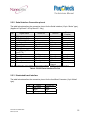
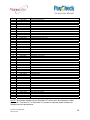
2.2.2 Serial Interface Connection pin-out
The table below describes the connection pin-out for the Serial interface (12-pin: “Molex” type),
(Applies to PayCheck™ & PayCheck 2™ only)
Pin
1
2
3
4
5
6
7
8
9
10
11
12
Shell
Signal Name
Printer I/O
24V
PRT_RS232_TXD
PRT_RS232_RXD
n/a
Signal Ground
RS232_DSR
n/a
PRT_RS232_RTS
(host CTS)
Bezel pwm
Signal Ground
Signal Ground
24V
Frame Ground
Host I/O
Power Input
Output
Input
No connect
Signal Ground
4K7 pull up to 24V
No connect
Output
n/a
Input
Output
n/a
Signal Ground
Input
n/a
Input
24V Output
Signal Ground
Signal Ground
Power Input
Frame Ground
n/a
Signal Ground
Signal Ground
n/a
Frame
Ground
Printer
Function
Power Input
Data transmit
Data receive
None
Signal Ground
Printer Ready
none
Handshake
Bezel driver
Signal Ground
Signal Ground
Power Input
Shield
Note: Bezel illumination control jumper must be present for Bezel modulation to be present on pin 9
Table 8: RS-232 Serial Interface Pin-Out
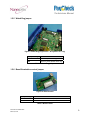
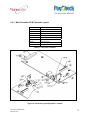
2.2.3 Illuminated bezel interface
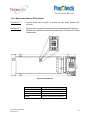
The table below describes the connection pin-out for the front Bezel Connector (3-pin “Molex”
type).
Pin
1
2
3
Signal
Bezel PWM
24VDC
GND
Printer I/O
Output
Output
GND
Table 9: Bezel Interface
Document # 720004-0000
March 6, 2013
15