1
Installation
2-05.4.
Model: GHC
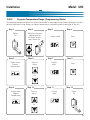
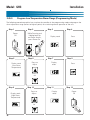
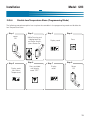
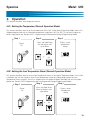
Disable Low Temperature Alarm (Programming Mode)
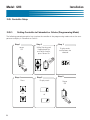
The following procedure explains how to place the controller in the programming mode and disable the
Low Temperature Alarm
Step 1
Power
Off
Step 2
While Pressing and
Holding both Up
and Down Arrows,
press Power On
Step 3
Display reads
Step 4
Press
+
Step 5
Display reads
(Low Alarm
Temperature)
Step 6
Press and hold
until display
reads “OFF”
Step 7
Display
reads
Step 8
Power
Off
11