1
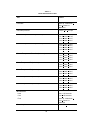
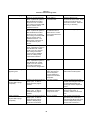
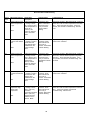
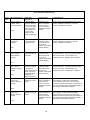
Table 6.4
Alarm and Alert Troubleshooting
Alarm/
Alert
Message Displayed
Alarm/Alert
Description
System Status
Troubleshooting
23
Patient Temperature
2 low. Check patient
temperature.
Patient Temperature
2 reading is below
32.0◦C (89.6°F) and
water temperature is
below 32.0◦C
(89.6°F) and the
system is unable to
heat in Automatic
Mode
Changes to Stop
Mode. Audio alarm
half second tone
every 10 seconds.
Alarm/Alert indicator
flashing
Operate the system in Manual Mode with a setpoint
above 32°C until the water temperature is greater
than 32°C. Press Automatic and retest. . If the
error persists, see General Troubleshooting - Will
Not Heat.
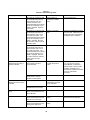
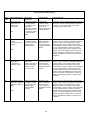
Patient Temperature
2 reading is equal or
less than the userdefined value
established in the
custom settings
menu.
Current Mode
continues. Audio
alarm half second
tone every 2
minutes. Alarm/Alert
indicator flashing.
Adjust Patient High Temperature Alert in the
custom menu if desired.
Patient Temperature
2 reading is above
38.0◦C (100.4°F)
and water
temperature is above
38.0◦C (100.4°F)
and the system is
unable to cool in
Manual Mode
Current Mode
continues. Audio
alarm half second
tone every 2
minutes. Alarm/Alert
indicator flashing.
Operate the system in Manual Mode with a setpoint
below 38°C until the water temperature is less than
38°C. If the error persists, see General
Troubleshooting - Will Not Cool.
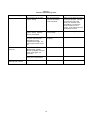
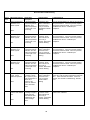
Patient Temperature
2 reading is below
32.◦C (89.6°F) and
water temperature is
below 32.0◦C
(89.6°F) and the
system is unable to
heat in Manual
Mode.
Current Mode
continues. Audio
alarm half second
tone every 2
minutes. Alarm/Alert
indicator flashing.
Operate the system in Manual Mode with a setpoint
above 32°C until the water temperature is greater
than 32°C. If the error persists, see General
Troubleshooting - Will Not Heat.
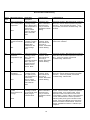
Patient Temperature
2 reading is outside
the lower limits of the
display range in
Automatic Mode.
Changes to Stop
Mode. Audio alarm
half second tone
every 10 seconds.
Alarm/Alert indicator
flashing.
Use the CTU to verify the accuracy of the Control
Module. Check connection of patient temperature
probe and cable. If wet, replace cable. Check
temperature cable connection at the rear of the
Control Module. Flex the cable to ensure that there
is not an intermittent fault. Test the input with a
cable and probe proven good on another Control
Module. If the Control Module proves inaccurate,
replace the Isolation Card and retest. If the error
persists, call Medivance Service. Calibrate upon
completion.
Alarm
24
Patient Temperature
2 below user defined
limit.
Alert
25
System is warming
and Patient
Temperature 2 high.
Alert
26
System is cooling
and Patient
Temperature 2 low.
Alert
27
Patient Temperature
2 probe
disconnected or out
of range.
Alarm
47