1
Console Programming and Calibration
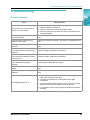
Menu Option
Function
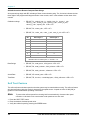
Used to set the maximum desired RPM or hydraulic output of the Pulse-Width
Modulated (PWM) control valve.
HIGH PWM OFFSET
253
1.
In the DATA MENU, use the arrow keys to advance to HIGH PWM OFFSET
253.
2.
Move the product switch to MAN and the boom switches and master switch
to ON.
3.
Hold the INC/DEC switch to increase the RPMs. If the motor exceeds the
desired RPMs, decrease the number by 10 and push INC again.
4.
Decrease the 253 value displayed until the motor runs at the desired RPM.
5.
Enter a number of 10 or greater.
6.
Press the arrow up key to advance to LOW PWM OFFSET 1.
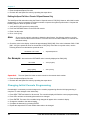
Used to set the minimum desired RPM or hydraulic output of the control valve. Used to
set the zero point or shut-off point of the PWM control valve.
LOW PWM OFFSET 1
1.
In the DATA MENU, use the arrow keys to advance to LOW PWM OFFSET
1.
2.
Move the product switch to MAN and the boom switches and master switch
to ON.
3.
Hold the INC/DEC switch to decrease the RPMs until the motor stops.
4.
Increase the value displayed until the motor runs at the desired RPMs.
5.
Enter a number of 10 or fewer.
6.
Hold the INC/DEC switch to decrease. If the motor does not stop, lower the
offset number by 10 and push DEC again.
7.
Press the arrow up key to advance to LOW PWM OFFSET 1.
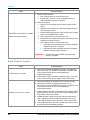
PWM FREQUENCY
122
Used to enter the coil frequency of the PWM valve type being used. The default
frequency is 122 Hz.
PRESS ENTER FOR
DATA-LOCK
Sequence to activate the data lock code, the feature that prohibits data entry without the
data lock code. The four-digit code must be entered within 15 seconds.
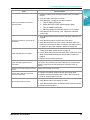
Data Logger On/Off
The data logger uses communication strings to pass data through the serial port based on the values entered
in DATA LOGGER TRIGGER VALUE and DATA LOGGER TRIGGER UNITS. Whenever a value or console
switch is changed, data strings are sent by the console to the remote computer.
Some options within the Data Menu are unavailable when certain other features are active. The console data
printout is not available when the data logger is on.
Remote Computer to SCS 450 Console Data Strings
All request strings begin with $R, indicating a Raven communication string.
Rate 1 Change Request = $R, RC, <rate_1_cal> <CR> <LF>
Calibration String Values Request = $R, CR <CR> <LF>
Data String Request = $R, DR <CR> <LF>
Manual No. 016-0159-831
33