1
2
Manuale installatore Zolo
Contenuti del manuale
1. Introduzione a ZOLO GSM Security System . . . . . . . . . . . . . . . . . . . . . . . . . . 3
1.1. Garanzia . . . . . . . . . . . . . . . . . . . . . . . . . . . . . . . . . . . . . . . . . . . . . . 3
1.2. Informazioni sulla sicurezza . . . . . . . . . . . . . . . . . . . . . . . . . . . . . . . . . 3
1.4. Leggere il manuale d’installazione e guarda il video . . . . . . . . . . . . . . . . . 3
1.5. Importanti raccomandazioni riguardo la SIM Card . . . . . . . . . . . . . . . . . . . 3
1.6. Supporto tecnico . . . . . . . . . . . . . . . . . . . . . . . . . . . . . . . . . . . . . . . . 3
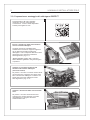
2. Preparazione e montaggio di un nebbiogeno PROTECT . . . . . . . . . . . . . . . . . 4
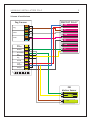
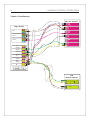
Schema di installazione . . . . . . . . . . . . . . . . . . . . . . . . . . . . . . . . . . . . . . . 5
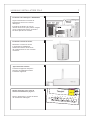
Visuale d’installazione . . . . . . . . . . . . . . . . . . . . . . . . . . . . . . . . . . . . . . . . 6
Montaggio del nebbiogeno . . . . . . . . . . . . . . . . . . . . . . . . . . . . . . . . . . . . . 7
Montaggio del sensore di verifica . . . . . . . . . . . . . . . . . . . . . . . . . . . . . . . . . 7
Montaggio dell’antenna . . . . . . . . . . . . . . . . . . . . . . . . . . . . . . . . . . . . . . . 7
Impostazione DIP Switch . . . . . . . . . . . . . . . . . . . . . . . . . . . . . . . . . . . . . . . 7
3. Preparazione e montaggio di ZOLO . . . . . . . . . . . . . . . . . . . . . . . . . . . . . . . 8
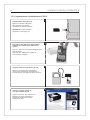
Preparazione della SIM Card . . . . . . . . . . . . . . . . . . . . . . . . . . . . . . . . . . . . 8
Allacciamento di ZOLO alla rete elettrica . . . . . . . . . . . . . . . . . . . . . . . . . . . 8
Inserimento della SIM Card e della batteria tampone . . . . . . . . . . . . . . . . . . . . 8
Download del software di configurazione . . . . . . . . . . . . . . . . . . . . . . . . . . . . 8
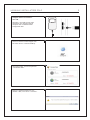
Collegamento di ZOLO al PC tramite cavo USB . . . . . . . . . . . . . . . . . . . . . . . . 9
Modifica della password Admin . . . . . . . . . . . . . . . . . . . . . . . . . . . . . . . . . . . 9
Primo collegamento . . . . . . . . . . . . . . . . . . . . . . . . . . . . . . . . . . . . . . . . . 10
Come rimuovere un dispositivo wireless dal sistema . . . . . . . . . . . . . . . . . . . 10
Come associare un nebbiogeno a ZOLO . . . . . . . . . . . . . . . . . . . . . . . . . . . . 10
Aprire la sezione “gestione dispositivi wireless” . . . . . . . . . . . . . . . . . . . . . . 10
Montaggio di ZOLO . . . . . . . . . . . . . . . . . . . . . . . . . . . . . . . . . . . . . . . . . 10
Ora ZOLO è pronto all’uso . . . . . . . . . . . . . . . . . . . . . . . . . . . . . . . . . . . . . 11
4. Test completo . . . . . . . . . . . . . . . . . . . . . . . . . . . . . . . . . . . . . . . . . . . . 11
5.Trouble-shooting . . . . . . . . . . . . . . . . . . . . . . . . . . . . . . . . . . . . . . . . . . 12
6. Dati tecnici . . . . . . . . . . . . . . . . . . . . . . . . . . . . . . . . . . . . . . . . . . . . . . 13