1
Chapter 4: Configuration and Setup
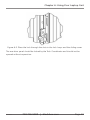
Figure
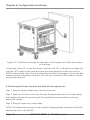
Figure 4-15. Electrical schematic for the back of the Laptop Cart. Note the location
of the timer.
In the back of the LTC, insert the power cord from the 10- or 16-electrical outlet unit
into the LEFT outlet on the timer and plug the other electrical outlet unit into the
RIGHT outlet on the timer. Push the timer tabs (located at the edges of the timer dial)
inward towards the center of the dial. This will turn one side of the outlets on while
turning the other off.
4.4 Routing the Power Cords at the Back of the Laptop Cart
Step 1: Plug the laptop outlet strips into the timer unit.
Step 2: Feed the cord from the timer through the grommet hole on the side nearest
the handle and wrap the cord around the handle itself or around the cord wrap
below the handle.
Step 3. Plug the timer into a wall outlet.
NOTE: The outlet strips are only to be used for charging laptop computers while the
devices are not in use (full off).
Page 18
724-746-5500 | blackbox.com
LTC20-R2