1
TOOL COMPONENTS
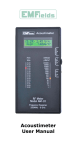
1. Ultrasonic sensor aperture
2. Laser pointer
3. Two row LCD‑‑‑the data of
upper line is the current
measuring result, and the
data of lower line is the
memory/computing result
1
2
4. ON/OFF ‑On/Off key.
5. MODE ‑‑‑Clear/function
select key: Softly press
the key to clear or select
length/area/volume
measurement computing
mode. Keep pressing the
key for 2 seconds to store
the length/area/volume
value.
6. FT/M ‑‑‑Unit conversion
key: Softly press the key to
unit as British measurement
(ft./in.) or metric system (m).
Press this key for 2 seconds,
the current environment
temperature will display on
the LCD.
7. +/= ‑‑‑Addition key: Softly
press the key to add the
measured length, area or
volume. Press the key for 2
seconds to read and display
the data which was stored
the last time.
8. READ ‑‑‑Read key: Press
the key to read the measured
distance, keep pressing the
key and move the tool to
read values dynamically.
9. Level bubbles
0.Measuring reference ‑‑‑
1
Distance measurement is
counted from end of the tool
3
4
5
8
6
9
10
7