1
621538-00 FW3000 MANUAL 1/5/04 11:02 AM Page 9
Step by step instruction to developing GROUP SETTINGS
A Quick Note before You Program the Mood Settings:
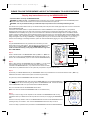
In the Lamp Receiver section you learned how to set up individual LAMP RECEIVERs. These LAMP RECEIVERs are turned on and off by
pressing the appropriate rocker switch that corresponds to the receivers unique UNIT CODE. The purpose of the GROUP buttons (blue) are to
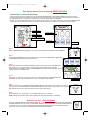
link multiple receivers (up to 4) so that they can be turned on or off by the GROUP button. See Figure 16.
Example: If you have a LAMP RECEIVER in one room and it is set to the number 7 on its UNIT CODE and you have another LAMP RECEIVER
in another room and it is set up to the number 13 on its UNIT CODE, the two lamps can be turned on at the same time using a GROUP.
2
14
13
Unit Code Dial
Rocker Switch
House Code Dial
4
3
ON
5
OFF
ON
ON
ON
OFF
OFF
OFF
ON
ON
ON
MOOD 1
MOOD 2
HOUSE
OFF
OFF
OFF
Run / Learn Slide Switch
Group Button
House Button
15
Step1:
With the MESSENGER HUB still plugged into an AC outlet, set the slide switch to LEARN as shown in Figure 15.
ON
ON
ON
MOOD 1
MOOD 2
HOUSE
OFF
OFF
OFF
3
Step 3:
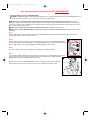
Set the UNIT CODE dial of the INDOOR REMOTE to match the UNIT CODE of the LAMP RECEIVER
that you want to turn on and off. Press on the rocker switch (white) corresponding to that LAMP
RECEIVER as shown in Figure 17. Wait for the MESSENGER HUB indicator to flash indicating the code
has been stored in the GROUP function.
16
9
Step 2:
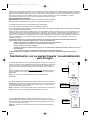
While facing the MESSENGER HUB, press GROUP 1 ON switch on the INDOOR REMOTE. Figure 16 The MESSENGER HUB’s green indicator light will flash.
17
4
ON
ON
Step 4:
Repeat step 3 a maximum of 3 more times to link up to 4 LAMP RECEIVERs / BULB RECEIVERs with
that GROUP key. The 4 LAMP RECEIVERs can be in any combination of UNIT CODES.
5
6
7
8
ON
OFF
ON
Rocker Switch
Step 5:
Return the slide switch on the MESSENGER HUB to RUN - Figure 18. The ON/OFF button of GROUP 1 will now turn 18
on and off all of the LAMP RECEIVERs / BULB RECEIVERs that were linked in Step 4. There may be up to a 3 second
delay between the time that you press the button and the time that the lights respond.
Step 6:
To set up GROUP 2 key, repeat steps 1 thru 5 substituting GROUP 2 key for GROUP 1.
NOTE: Pressing either GROUP ON key while in LEARN mode clears all stored codes for that GROUP.
Using ALL on, ALL off House Button
Pressing the INDOOR REMOTE HOUSE BUTTON (figure 19) “on” will activate the MESSENGER HUB, LAMP RECEIVERs
and BULB RECEIVERs set to the system’s HOUSE CODE. OUTDOOR LAMP RECEIVERs and APPLIANCE RECEIVERs will
not respond to the all “on” command. Pressing the INDOOR REMOTE HOUSE BUTTON “off” will deactivate the above
receivers as well as all OUTDOOR LAMP RECEIVERs and APPLIANCE RECEIVERs.
9
19
ON
HOUSE
OFF