1
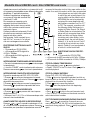
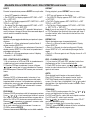
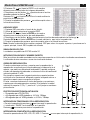
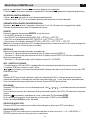
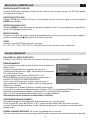
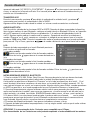
Funzionalità • Features
IT/GB
IT
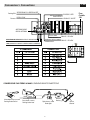
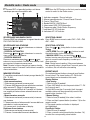
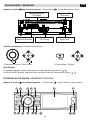
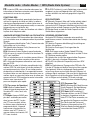
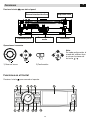
1. Apertura frontalino
2. Accensione/Spegnimento (pressione 3 secondi).
Silenziamento audio (pressione breve).
3. Premere per navigare all’interno delle opzioni in DVD, CD e MP3/WMA.
Seleziona la stazione precedente in modalità RADIO.
4. Ruotare la manopola per regolare il volume.
Premere brevemente per selezionare impostazioni audio/video e ruotare per effettuare le regolazioni.
Premere 3 sec. per entrare nel menù impostazioni.
5. Scansione frequenze radio In modalità RADIO.
Scansione automatica con memorizzazione delle
stazioni radio, in modalità radio, premendo più di 2 secondi.
Stop in modalità CD, MP3/WMA e DVD video.
Termina chiamata in modalità Bluetooth.
6. Display 3” TFT.
7. Sensore IR per telecomando.
8. Conferma operazione.
Interrompe ricerca automatica in modalità RADIO.
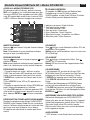
9. Premere brevemente per cambiare la sorgente.
Premere 3 sec. per tornare al menù sorgenti, spostarsi con i tasti e premere OK per confermare.
10.Ricerca automatica stazione precedente (premere brevemente).
Ricerca manuale stazione precedente (premere più di 2 secondi).
Traccia/Capitolo precedente (CD, MP3/WMA, DVD)
Riproduzione veloce indietro x2, x4, x8, x20
(premere più di 2 secondi).
Spostamento a sinistra tra le opzioni.
11.Spostamento in basso tra le opzioni (Modalità DVD,
CD, MP3/WMA).
Riproduce la stazione memorizzata successiva Modalità RADIO).
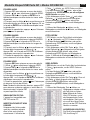
12.Ricerca automatica stazione successiva (premere brevemente).
Ricerca manuale stazione successiva (premere più di 2 secondi).
Traccia/Capitolo successiva (CD, MP3/WMA, DVD)
Riproduzione veloce avanti x2, x4, x8, x20 (premere più di 2 secondi).
Spostamento a destra tra le opzioni.
13. Riproduzione/Pausa (Modalità DVD, CD, MP3/
WMA)
Seleziona banda radio: FM1 - FM2 - FM3 - AM1 - AM2 (Modalità radio).
Invia/Accetta chiamata bluetooth.
Seleziona programma RDS (Premere più di 2 sec.).
14.Ritorna al menù precedente.
15.Ingresso Audio/Video.
16.Porta USB.
5
GB
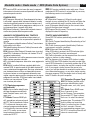
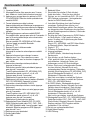
1. Panel open
2. Power on/off (press more than 2 seconds)
Mute
3. Press to navigate up among option items
(in DVD, CD and MP3/WMA modes)
Play the previous preset radio station.
4. Rotate the knob to adjust volume level.
Press to select Audio/video Setting, and rotate the knob to adjust level.
Press more than 2 seconds to enter Setting menu.
5. Preset scan (press briefly, in Radio mode)
Auto preset (press more than 2 sec., in Radio mode)
Stop (in CD, MP3/WMA, and DVD video mode)
Terminate call (in BT mode)
6. 3” inch TFT display.
7. Remote sensor.
8. Confirm operation.
Stop auto seeking (in Radio mode).
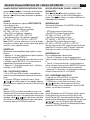
9. Short press to select playing mode.
Long press to return to main source menu use navigate button to select the desired mode and press OK button to confirm.
10.Search the previousstation automatically
(press briefly, in Radio mode).
Search the previous station manually, and each
press to seek step by step (press more than 2 seconds, in Radio mode).
Press to search the previous track or chapter (in CD, MP3/WMA, and DVD video mode).
Fast backward by 2, 4, 8, 20 step (press more than
2 seconds, in CD, MP3/WMA and DVD video mode).
Press to navigate left among option items
11.Press to navigate down among option
items (in DVD, CD and MP3/WMA modes).
Play the next preset radio station (in Radio mode).
12.Search the next station automatically (press briefly,
in Radio mode).
Search the next station manually, and each press to
seek step by step (press more than 2 seconds, in
Radio mode).
Search the next track or chapter (in CD, MP3/WMA,
and DVD video mode).
Fast forward by 2, 4, 8, 20 step (press more than 2 seconds, in CD, MP3/WMA and DVD video mode).
Press to navigate right among option items.
13.Play/Pause (in DVD, CD and MP3/WMA modes).
Band switch: FM1-FM2-FM3-AM1- AM2
Dial/Receive call.
RDS program type (press and hold more than 2 sec.)
14.Cancel source select menu and return to previous.
15.AV in.
16.USB port.