1
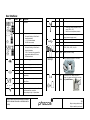
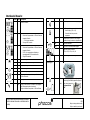
User Interface: LCD: Status: LED: Description: LCD: Status: All Symbols LED: Description: ON Over temperature Load output turn off ON Normal operation: Sun symbol flashing Solar Panel is charging the battery --- h no load connected No USB load connected Normal operation with load connected: Sun symbol flashing Solar Panel is charging the battery 5:28 h the load can be operated for approximately additional 5:28 hours USB load connected Flash Battery temperature in low charging current range (reduced charging current) ON USB load connected OFF No USB load connected, output turn off Battery State of Charge: >75%; >50%; >25%; >0%; 0% Flash Flash Backlight Solar Panel charging ON Solar Panel charging, Battery fully charged OFF No panel, no charging ON Load output ON OFF Load output turn OFF Battery empty ON Load connected, remaining load operation time 5hours 28min Flash ON Load overcurrent Load output turn off Auto-Reconnect after one minute Battery voltage too high System failure Litio-Solar user manual and assembly instruction Litio-Solar manual de usuario e instrucciones de montaje Battery low State of charge Turn on Backlight by pushing “ON” button Flash No load connected No charging, battery temperature out of range (>65 or <-20) Electronic over temperature protection Load output turn off, battery low state of charge, can operate small loads for some time after push ON button + Version: User Manual-Phocos-Lisol-2014-01-13-En-Es 3/6 Subject to change without notice Sujeto a cambio sin previo aviso


![10780-90006 - 10780A Laser Receiver for 5501A [Prefix 1948] (Mar](http://vs1.manualzilla.com/store/data/006009643_1-6e2f54ebb2199ef6df634558ba4c1bb6-150x150.png)