1
Getting Started
PLAYSTATION 3 system
®
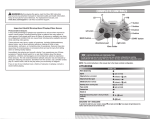
Starting a game: Before use, carefully read the instructions supplied with the PS3™ computer entertainment
system. The documentation contains information on setting up and using your system as well as important
safety information.
Check that the MAIN POWER switch (located on the system rear) is turned on. Insert the FIFA Soccer 11 disc
with the label facing up into the disc slot. Select the icon for the software title under [Game] in the PS3™
system’s home menu, and then press the S button. Refer to this manual for information on using the software.
Quitting a game: During gameplay, press and hold down the PS button on the wireless controller for at least
2 seconds. Then select “Quit Game” from the screen that is displayed.
Hint: To remove a disc, touch the eject button after quitting the game.
Saved data for PS3™ format software
Saved data for PS3™ format software is saved on the system’s hard disk.
The data is displayed under “Saved Game Utility” in the Game menu.
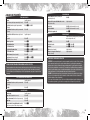
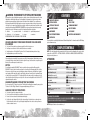
Complete Controls [cont.]
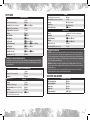
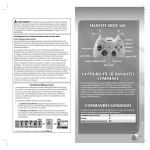
Shoot/Volley/Header
Finesse/Placed shot
Chip shot
Shooting
A button
E button + A button
Q button + A button
Coaching Tip: Give and Go
To initiate a one-two pass, press the S button while holding the Q button to make your player pass
to a nearby teammate and move the left stick to continue his run. Then press the S button (ground pass),
the D button (through ball), the F button (lobbed pass), or the Q button + the D button (lobbed
through ball) to immediately return the ball to him, timing the pass perfectly to avoid
conceding possession.
First touch (while receiving the ball)
Cancel pass/shot
Free Move
Cross (hold to determine distance)
Low cross (within cross zone)
Ground cross (within cross zone)
Early cross (outside cross zone)
Early low cross (outside cross zone)
Early ground cross (outside cross zone)
Fake shot (in opposition half)
Fake lob
Ball Control
Right stick (hold for more distance)
W button + R button
W button + R button (press and hold)
Crossing
F button
F button (double tap)
F button (triple tap)
Q button + F button
Q button + F button (double tap)
Q button + F button (triple tap)
Tricks
A button, then S button + left stick
F button, then S button + left stick
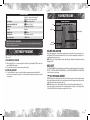
Passing
Choose direction of pass/cross
Left stick
Short pass/Header (hold to pass to further player)
S button
Lobbed pass (hold to determine distance)
F button
Through ball (hold to pass to further player)
D button
Bouncing lob pass
E button + F button
Lobbed through ball (hold to pass to further player) Q button + D button
Give and Go
Q button + S button
WWW.EASPORTS.COM
2
3