1
INSTALLATION MANUAL
Catalog File
VAN STORAGE SOLUTIONS
WWW.WEATHERGUARD.COM
FOR THE WAY YOU WORK TM
ATTENTION: PLEASE READ AND UNDERSTAND ALL INSTRUCTIONS AND WARNINGS
BEFORE ASSEMBLING, INSTALLING OR USING THIS PRODUCT.
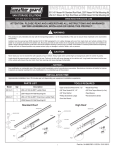
INSTALLATION STEPS
NOTE: Mount Catalog File against a bulkhead, shelf unit, or between other units.
STEP 1. Bolt Base to Body.
STEP 2. Position one side against a bulkhead or shelf unit, flush with it's face. Mark three floor mounting
holes and one upper side hole.
STEP 3. Remove unit and drill.
STEP 4. Replace unit and bolt.
NOTE: A Blind Fastener and 1/4" Lock Washer are provided for use in areas where standard fasteners
can't be used, such as heat shields and floor supports. See Blind Fastener installation instructions.
STEP 5. Bolt top side to bulkhead or shelf unit.
STEP 6. Slide Shelves into unit and push down to lock onto shelf clips.
INSTALLING BLIND FASTENERS
Place a drop of oil on the black oxide bolt before
assembling as shown on right. Place the Blind
Fastener in the hole and use a 7/16 wrench to
tighten black hex bolt until the Blind Fastener is
fully seated. When setting black hex bolt, it will start
out hard. As the Blind Fastener “bulbs” out it will
get easier, until it bottoms out or sets. Make sure
the Blind Fastener and Installation Tool do not turn
during installation.
7/16 Wrench
(Or 7/16 Socket)
Black Oxide Bolt
Flat Washer
9/16 Wrench
Installation Tool
WARNING
Prior to drilling, check under vehicle for
fuel tanks, fuel lines, brake lines, electric
wires, etc. to avoid cutting or puncturing
them. Do not use Blind Fasteners in these
areas.
Blind Fastener
CAUTION
Be safe - always wear protective eyewear to keep debris out of your eyes
when installing Weather Guard®
Van Products.
*24-0117*
2
Part No. 24-0117 Rev C 03/12