1
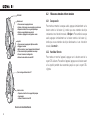
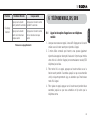
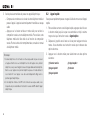
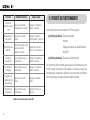
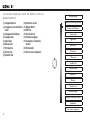
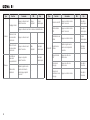
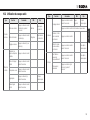
10R Déplacer le joystick vers le haut /bas Appuyer sur le DQWVQPCTTKÂTG Appuyer sur le bouton avant !DVANCED.OISE Control !CTIVER $SACTIVER !NNULATIONCOUPLAGES %XCUTER !UCUN Réinitialisation %XCUTER !UCUN Couplage de la commande a distance %XCUTER !UCUN Sortir du menu CONlGURATION %XCUTER !UCUN (QPEVKQPU*CPFNGDCT4GOQVGRQWTNCEQPſIWTCVKQPXQECNG 54 Appuyer sur le bouton (+) ou le bouton (-) Appuyer sur le bouton central Booster audio !CTIVER$SACTIVER 6/8TLPHONE !CTIVER$SACTIVER 6/8INTERCOM !CTIVER$SACTIVER 3ENSIBILIT6/8 - Passer au mode de réglage %NREGISTRERETQUITTER )NSTRUCTIONSVOCALES !CTIVER$SACTIVER 2GLAGE2$3!& !CTIVER$SACTIVER %FFETLOCAL !CTIVER$SACTIVER Appuyer sur le bouton (+) ou le bouton (-) !DVANCED.OISE#ONTROL !CTIVER$SACTIVER Appuyer sur le bouton central !NNULATIONCOUPLAGES %XCUTER Couplage téléphone !UCUN Réinitialisation %XCUTER Couplage d’un second téléphone mobile !UCUN Couplage de la commande a distance %XCUTER Couplage sélectif téléphone !UCUN 3ORTIRDUMENUCONlGURATION %XCUTER Couplage média !UCUN !PPELRAPIDE %XCUTER (QPEVKQPUFWECUSWGCWFKQRQWTNCEQPſIWTCVKQPXQECNG