1
G Operating instruction
1. Explanation of Warning Symbols and Notes
Warning
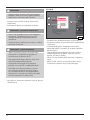
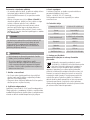
This symbol is used to indicate safety instructions or to
draw your attention to specific hazards and risks.
3
4
2
Note
This is used to indicate additional information or
important notes.
1
5
2. Package Contents
••Hama mySCAN Mouse
••CD-ROM
••Quick Start Guide
••Flyer with web link and contact data
••Scanning template
3. Safety Notes
••Protect the product from dirt, moisture and overheating
and use it in dry rooms only.
••Lay all cables so that they do not pose a tripping hazard.
••Do not bend or crush the cable.
••Do not open the device or continue to operate it if it
becomes damaged.
7
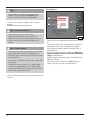
Warning - Laser Klasse 1
6
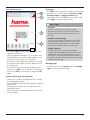
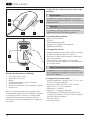
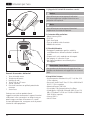
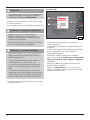
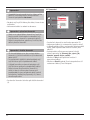
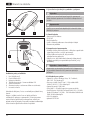
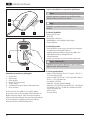
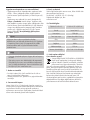
Controls and Displays
1. Left mouse button
2. Right mouse button
3. Scroll wheel
4. Scan button with red LED
5. Scanning area
6. Scanning window with removable protective film
7. Laser sensors
Thank you for choosing a Hama product.
Take your time and read the following instructions and
information completely. Keep these operating instructions
in a safe place for future reference. If you sell the device,
please pass these operating instructions on to the new
owner.
2
Do not look directly at the laser beam! Do not look
directly at the laser beam using optical instruments!
4. System Requirements
••Operating system: Windows Vista, XP, 7 or 8; Mac OS X
10.6 or later
••Processor: Intel® Core™ Duo 1.2 GHz or AMD Athlon™
64 X2 1.7 GHz or better
••RAM: 2 GB
••Hard drive: 1 GB of available hard disk space
••Graphics card: NVIDIA® GeForce® 8400 GS with 128
MB or ATI Radeon™ X1300 with 128 MB or 384 MB
Intel GMA X3000 or better
••USB 2.0 connection
••CD-ROM drive