1
Additional Information
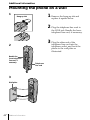
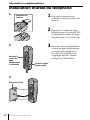
Mounting the phone on a wall
1
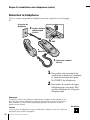
1 Remove the hang-up tab and
Hang-up tab
replace it upside down.
2 Plug the telephone line cord to
the LINE jack. Bundle the loose
telephone line cord, if necessary.
3 Plug the other end of the
telephone line cord into the
telephone outlet, and hook the
phone to the wall plate as
illustrated.
2
Bundle the
loose telephone
line cord, if
necessary.
3
Wall plate
42US
Additional Information
Telephone
line cord