1
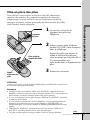
Inserting the batteries
To activate the display, use the Caller ID function, back up the
memory for one-touch dialing and Phone Directory or use visual
message waiting service, insert four alkaline size AA (LR6) batteries
(not supplied) into the phone.
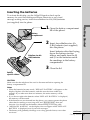
lid of the phone.
Battery
compartment
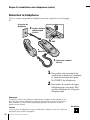
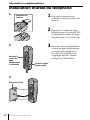
2 Insert four alkaline size AA
(LR6) batteries (not supplied)
into the phone.
Alkaline size AA
(LR6) batteries
Getting Started
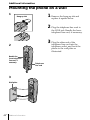
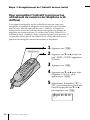
1 Open the battery compartment
Insert batteries after first laying
down the battery ejection
ribbon, and make sure the 3
and # on the batteries match
the markings in the battery
compartment.
3 Close the lid.
Battery
ejection ribbon
CAUTION
Make sure that the telephone line cord is disconnected before opening the
battery compartment lid.
Notes
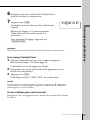
• When the batteries become weak, “REPLACE BATTERY” will appear on the
display. Replace all of the batteries, and this must be done within two
minutes. If you take more than two minutes, the entire memory will be
erased.
• If you do not replace the batteries when “REPLACE BATTERY” is displayed,
the memory will be erased.
• If the batteries are not inserted into the phone, you cannot operate the phone
other than for making or receiving calls, and (DIAL/ON HOOK) does not
function. You should use the handset when making or receiving calls.
• “MESSAGES WAITING” on the display does not appear while “REPLACE
BATTERY” is displayed even if you have messages.
• The battery will gradually discharge over a long period of time, even when
not in use.
continued
Getting Started
7US