1
5
7
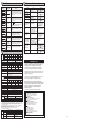
Error Messages
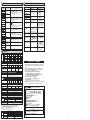
The following table shows the error details and remedies displayed on the digital display.
Error Name/
Display
LD malfunction error
e-ld
System error
e-5y5
Cause (Described in
Operation Manual)
Laser diode is
deteriorated.
Phenomena
No digital display.
Sensor setting
memory error
Turn OFF the power and check if the Sensor is
correctly wired; and turn ON the power again. If
the error persists, the Sensor is faulty. Replace it
with a new Sensor.
Sensor setting
memory error
Hold the
Load short-circuit
detection error
Judgment output
short-circuit
Turn OFF the power and check if OUT1/OUT2
lines are not short-circuited; then, turn ON the
power again.
Tuning execution
error
Tuning failure
Set the response time to a slower value and
retry tuning. Check if the distance between the
Sensor and the workpiece is within the
measurement range; then retry tuning.
Insufficient incident
light level error
Insufficient
incident light level
Delay response time or adjust the distance between Sensor
and workpiece so that the S ensor can detect it. The light
reception level is equal to or less than the limited sentivity
during background suppression function operation.
Incident light level
saturation error
Measurement error
due to saturated
incident light level
Avoid regular reflected light from entering into the sensor. The
light reception level is equal to or more than the limited sentivity
during background suppression function operation.
EEPROM error 1
e-me1
EEPROM error 2
e-me2
e-brt
e-%Ur
6
Display is blank.
The Sensor restarts
during operation.
Laser is not emitted.
Is LD OFF input not
] appears in the display. short-circuited?
Input signal is not received. Individual wires may not be
correctly connected; or there
may be a broken line.
Measured value is not
Temperature characteristic
stable, fluctuating depending may be the cause.
on the day or time.
key for 3 sec. or longer to reset the
settings. If the error is not solved, the Sensor is
faulty. Replace it with a new Sensor.
[
] appears in the
display.
OUT1 indicator/OUT2
indicator blinks.
OUT1 indicator/OUT2
indicator keeps turning ON
even when the values are
outside the measurement
range.
An abnormal distance is
detected in an area
apparently out of the
measurement range.
Measurement value Set the distance between the Sensor and
outside the
workpiece within the measurement range.
measurement range
Want to reset to the
initial setting.
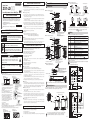
Ratings and Specifications
ZX1-LD ZX1-LD
ZX1-LD ZX1-LD ZX1-LD ZX1-LD ZX1-LD
Pre-wire model ZX1-LD
50A61
50A61L 100A61
100A61L 300A61 300A61L 600A61 600A61L
NPN
ZX1-LD
ZX1-LD
ZX1-LD
output Connector joint ZX1-LD
model
50A66
100A66
300A66
600A66
Model
ZX1-LD
ZX1-LD
ZX1-LD
ZX1-LD
ZX1-LD
ZX1-LD
ZX1-LD
ZX1-LD
PNP Pre-wire model 50A81
50A81L 100A81
100A81L 300A81 300A81L 600A81 600A81L
output Connector joint ZX1-LD
ZX1-LD
ZX1-LD
ZX1-LD
model
50A86
100A86
300A86
600A86
52.5mm x 47mm x 24.1mm
66mm x 50.1mm x 27.2mm
Dimensions
50 ± 10 mm
Measurement range
100 ± 35 mm
300 ± 150 mm
600 ± 400 mm
Light source (wavelength)
Visible-light semiconductor laser (660 nm)
class 2
class 1
class 2
class 1
class 2
class 1
class 2
class 1
FDA class *2
(1mW max.) (0.24mW max.) (1mW max.) (0.24mW max.) (1mW max.) (0.24mW max.) (1mW max.) (0.24mW max.)
class
2
class
1
class
2
class
1
class
2
class
1
class
2
class 1
JIS standard IEC/EN class
(1mW max.) (0.24mW max.) (1mW max.) (0.24mW max.) (1mW max.) (0.24mW max.) (1mW max.) (0.24mW max.)
Spot diameter (Typical)
(Defined at the center of
the sensing distance) *1
Power supply voltage
Current consumption
Analog output
Dia. 0.17 mm
Dia. 0.33 mm
Dia. 0.52 mm
Dia. 0.56 mm
10 to 30 VDC, including 10% ripple (p-p)
250 mA max. (Power supply voltage: 10 VDC)
Current output: 4 to 20 mA, max. load resistance: 300 Ω
Check the Sensor
installation environment.
Check the installation environment
and take measures to prevent the
interference by other sensors
such as laser beam path or
reflected stray lights.
The Keep function may be set:
Set the Keep function to:
[
] = [ ], and reception light [
] = [ ].
level may be insufficient:
[
] or the value may be outside
the measurement range: [
].
Set the Background Suppression
A characteristic phenomenon
] = [ ] and
that can sometimes occur with function to: [
perform smart tuning.
sensors.
Refer to " Detailed Settings".
Check the measurement distance
between the target object and the Sensor.
Reset the settings.
−
Refer to " Detailed Settings".
NEVER USE THE PRODUCTS FOR AN APPLICATION INVOLVING
SERIOUS RISK TO LIFE OR PROPERTY WITHOUT ENSURING THAT THE
SYSTEM AS A WHOLE HAS BEEN DESIGNED TO ADDRESS THE RISKS,
AND THAT THE OMRON PRODUCT IS PROPERLY RATED AND
INSTALLED FOR THE INTENDED USE WITHIN THE OVERALL
EQUIPMENT OR SYSTEM.
See also Product catalog for Warranty and Limitation of Liability.
EUROPE
OMRON EUROPE B.V. Sensor Business Unit
Carl-Benz Str.4, D-71154 Nufringen Germany
Phone:49-7032-811-0 Fax: 49-7032-811-199
NORTH AMERICA
OMRON ELECTRONICS LLC
One Commerce Drive Schaumburg,IL 60173-5302 U.S.A.
Phone:1-847-843-7900 Fax : 1-847-843-7787
ASIA-PACIFIC
OMRON ASIA PACIFIC PTE. LTD.
No. 438A Alexandra Road #05-05-08(Lobby 2),
Alexandra Technopark, Singapore 119967
Phone : 65-6835-3011 Fax :65-6835-2711
CHINA
OMRON(CHINA) CO., LTD.
Room 2211, Bank of China Tower,
200 Yin Cheng Zhong Road,
PuDong New Area, Shanghai, 200120, China
Phone : 86-21-5037-2222 Fax :86-21-5037-2200
Case and cover: PBT (polybutylene terephtahalate), Optical window: Glass, Cable: PVC
EC standard conformity, RoHS compliance
*1. Spot size: Defined at the 1/e2 (13.5%) of the central intensity at the measurement center distance. Measurement may be influenced if there
is light leakage outside the defined region and the surroundings of the target object have a high reflectance in comparison to the target
object. Correct measured values may not be obtained if a workpiece with smaller diameter than the spot size is detected.
*2. It shows the error in relation to the ideal curve of the displacement output when measuring OMRON's standard physical object (white
ceramic) under the environment at 25°C.
*3. Temperature characteristics at the center of sensing distance when the space between the sensor and workpiece is locked with aluminum jig.
*4. Static definition with the background suppression function ON for tuning with STND mode and standard white ceramic.
*5. Connector-joint model cable: Use it together with a 10 m or 20 m extension cable.
*6. The connector joint model connector section can achieve IP67 if it is connected via an extension cable.
*7. Only 2 m (Pre-wired type) is available for ZX1-LD□□L.
External
inputs
Perform warming up at least
for 30 minutes. Periodically
zero-reset the value using
a standard target object
for compensation.
Take all necessary steps to determine the suitability of the product for the
systems, machines, and equipment with which it will be used.
Know and observe all prohibitions of use applicable to this product.
1,000 VAC, 50/60 Hz for 1 min.
10 to 150 Hz, 1.5-mm double amplitude, 2 hours, each in X, Y, and Z directions
500 m/s2, 3 times each in X, Y, and Z directions
NPN open-collector outputs
PNP open-collector outputs
30 VDC, 100 mA max resistive.
Rated output
30 VDC, 100 mA max resistive.
Residual
1 V max. (Load current ≤ 10 mA)
1 V max. (Load current ≤10 mA)
voltage
2 V max. (10 mA < Load current ≤ 100 mA) 2 V max. (10 mA < Load current ≤ 100 mA)
ON
Short-circuited with 0-V terminal or 1.5 V or less Supply voltage short-circuited or within supply
voltage -1.5 V max.
OFF
Open (Leakage current: 0.1 mA max.)
Open (Leakage current: 0.1 mA max.)
Check the wiring.
Refer to " Installation 1-3".
OMRON shall not be responsible for conformity with any standards, codes, or
regulations that apply to the combination of the products in the customer's
application or use of the product.
Standard cable length *5 2 m (Pre-wired model), 5 m (Pre-wired model) *7, 0.5 m (Connector-joint model) *7
Degree of protection *6
IEC 60529, IP67
Connection method
Pre-wired
Weight
Approx. 270 g/Approx. 210 g
Approx. 240 g/Approx. 180 g
model (2 m)
(packed state/
Connector joint
Approx. 170 g/Approx. 110 g
Approx. 200 g/Approx. 140 g
main unit only) model (0.5 m)
Judgment
outputs
Check the wiring.
Refer to " Installation 1-3".
Suitability for Use
Digital display (Red), Output indicators (OUT1, OUT2) (Orange), Zero reset
indicator (Orange), Menu indicator (Orange), Laser ON indicator (Green), and
Smart tuning indicator (Blue)
Super high-speed (SHS) mode: 1 ms, High-speed (HS) mode:10 ms,
Judgment
Standard (STND) mode: 100 ms
Response output
200 ms max.
Laser OFF input
time
ZERO input
200 ms max.
Incandescent Incandescent Incandescent Incandescent Incandescent Incandescent Incandescent Incandescent
Ambient Illumination
lamp:
lamp:
lamp:
lamp:
lamp:
lamp:
lamp:
lamp:
7,500 lux max. 5,000 lux max. 7,500 lux max. 5,000 lux max. 5,000 lux max. 2,500 lux max. 5,000 lux max. 2,500 lux max.
30 min. after power ON; analog output fluctuation ± 0.1% F.S. max.
Warming up
±0.25%F.S.(Near side)
Linearity *2
±0.15%F.S.
±0.15%F.S.
±0.25%F.S.
±0.5%F.S.(All ranges)
Temperature characteristics *3
±0.03%F.S./°C
±0.03%F.S./°C
±0.03%F.S./°C
±0.04%F.S./°C
7 µm
30 µm
80 µm
2 µm
Static resolution *4
Surrounding air temperature Operating: -10 to +55°C, Storage: -15 to +70°C (with no icing or condensation)
Ambient humidity
Operating and storage: 35% to 85% (with no condensation)
Materials
Standards
Is the detection distance
not too long and out of the
measurement range?
Is the emitter surface not
blocked by dust, dirt or a jig?
There may be mutual
interference with other
sensors.
Remedy
Turn OFF the Eco function.
Refer to " Detailed Settings".
Check the wiring, the power
supply voltage and capacity.
Refer to " Installation 1-3".
THE PRODUCTS CONTAINED IN THIS SHEET ARE NOT SAFETY RATED.
THEY ARE NOT DESIGNED OR RATED FOR ENSURING SAFETY OF
PERSONS, AND SHOULD NOT BE RELIED UPON AS A SAFETY
COMPONENT OR PROTECTIVE DEVICE FOR SUCH PURPOSES.
Please refer to separate catalogs for OMRON's safety rated products.
Indications
Dielectric strength
Vibration resistance
Shock resistance
Cause
Is the Eco function not
turned ON?
Is the power supply ON?
Are the cables not broken?
[
MODE
e-tUn
Measurement
out-of-range error
The table below describes non permanent hardware errors and their troubleshooting.
Remedy
Turn OFF the power and check if the Sensor is
correctly wired; and turn ON the power again. If
the error persists, the Sensor is faulty. Replace it
with a new Sensor.
Sensor is faulty
Maintenance: Troubleshooting
OMRON Corporation
-7-
D o O CT, 2009
-8-