1
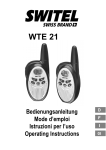
Operating the Walkie−Talkies
4 Operating the Walkie−Talkies
Display and explanation of operation sequences
, , Press the button displayed
Press and hold the button
displayed
Release the button displayed
2 Display indicator flashes
Speak into the microphone
Switching the walkie−talkies on/off
Switching
on
23
Turn the volume control clockwise. An acoustic signal is issued.
The currently active channel appears in the display and the Ready
LED flashes.
Switching
24
off
Turn the volume control anticlockwise until the display content disappears.
Volume control
Turn the volume control until the required volume is set.
Transmitting and receiving
Send
25
After pressing the button, the Ready LED lights up.
If the button is pressed longer than 60 seconds, a warning
signal is issued. Transmission is interrupted.
, , Transmit
Hold the walkie−talkie approx. 5 to 7 cm from your mouth
and speak at a normal volume. In order to talk to other subscribers, the respective walkie−talkies must be set to the
same channel and CTCSS code.
Receiving
26
, Receive
Radio signals cannot be received when the button
is being pressed.
51