1
English
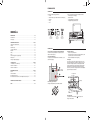
NETWORK SETUP
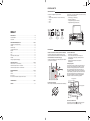
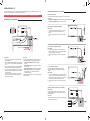
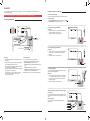
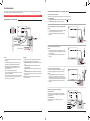
Alternative TV setup 2: TV without hdmi arc
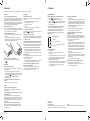
Overview
When to use this configuration
Playing music wirelessly with AirPlay or DLNA requires the Model XXL to be connected to a local network via Ethernet or Wi-Fi. The following
pages describe different methods on how to configure the Model XXL so it can access the network.
The TV does not have an HDMI ARC connector and you want to use the Model XXL remote control to select the video source with the DVD and
GAME buttons. If your TV supports CEC, this setup allows you to control the volume of the Model XXL and change the HDMI input sources using
the TV's remote control.
Limitation: All video sources must be connected to the Model XXL, a video source connected directly to the TV will have no audio output on the
Model XXL.
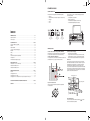
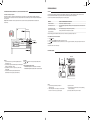
The Model XXL supports both wired ( Ethernet ) and wireless ( Wi-Fi ) network connection.
Setup method
When to use this method
Ethernet setup
An Ethernet cable is available for the Model XXL.
Wi-Fi setup with WPS
The Wi-Fi access point ( wireless router ) has a WPS push button for easy network setup.
Wi-Fi setup with Model XXL
as a temporary
WI-FI access point
Wi-Fi access points ( wireless router ) has no WPS push button,
this method works with all Wi-Fi access points.
Additional setup methods such as static IP addresses and Auto-IP are described in the Support secton on genevalab.com.
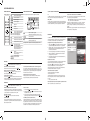
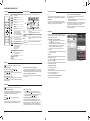
How to check the network status of the Model XXL
1. Press the
2. Hold the
button on the remote control.
button on the remote control for a few seconds.
3. Press the
button to view the following: software version, IP address, IP type ( DHCP/static ), network connection status and
Wi-Fi network name.
Troubleshooting
See Network section in the chapter “Troubleshooting”.
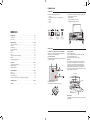
Ethernet setup
To set it up
How to use it
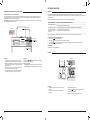
1. Connect a DVD player or Blu-ray player with an HDMI cable to the
“DVD” HDMI connector on the Model XXL.
Press the
or
the HDMI inputs.
2. Connect a game console, set top box or satellite receiver to the
“GAME” HDMI connector on the Model XXL with an HDMI cable.
3. Connect the Model XXL ( “TV” HDMI connector ) to the TV ( “HDMI
IN” connector ) with an HDMI cable.
buttons on the Model XXL remote control to select
How to use it ( with CEC )
•
•
TV remote control: use to select HDMI sources on Model XXL.
TV remote control: use to change volume of Model XXL.
4. In the TV setup menu of the TV, turn off the TV speakers by
selecting “external speakers”.
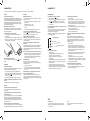
Instructions
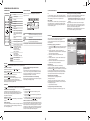
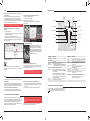
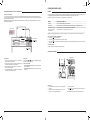
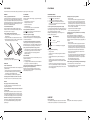
1. Connect the Ethernet cable between the router and the back panel
on the Model XXL.
2. Set the “Network” switch on the back panel to “Ethernet”. The
Wi-Fi function is now disabled.
10
3. Turn the Model XXL on.
4. Press
on the remote control. Wait until the display
shows “Connected”.
Now you are ready to play music via AirPlay or DNLA.
11