1
Поиск и устранение неисправностей
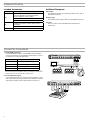
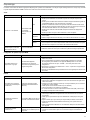
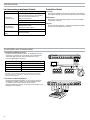
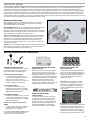
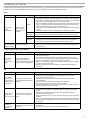
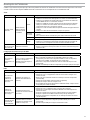
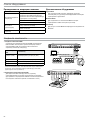
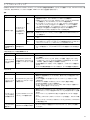
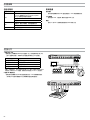
Следующая таблица содержит типичные решения, рекомендуемые для поиска и устранения неисправностей беспроводной системы Microflex
(MXW). Дополнительную информацию по каждому вопросу вы найдете в полном руководстве по эксплуатации MXW на сайте www.shure.com и на
USB флэш-накопителю
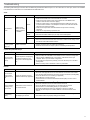
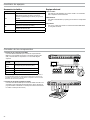
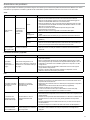
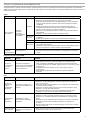
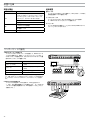
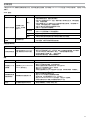
Аудио
Проблема
Звук отсутствует
или искажен
РЧ помехи
вызывают
пропадание звука
Признак
Светодиод
аудиосети
на сетевом
аудиоинтерфейсе
или SCM820
Решение
Зеленый
• Проверьте кабели
• Убедитесь, что передатчики включены, и каналы не заглушены.
• На вкладке Monitor управляющего ПО MXW проверьте, что все измерители
входного уровня работают нормально. Если канал клиппируется, введите
ослабление.
• Проверьте измерители выходного уровня на передней панели ANI и в
управляющем ПО ANI. Используйте наушники для прослушивания звука от
ANI. Если канал клиппируется, введите ослабление.
• Убедитесь, что выходной уровень ANI согласован с входом подключенного
оборудования.
• Убедитесь, что APT в данный момент не сканирует спектр.
Мигающий
зеленый
• Убедитесь, что все устройства включены, и их сетевые соединения стабильны
и надежны.
• Проверьте абонирование каналов при помощи ПО Dante Controller (DC).
Красный
• Проверьте в DC задающий генератор (им должен быть MXWAPT)
Выключен
• Поместите устройство в группу, чтобы маршрутизация аудиосигнала
происходила автоматически.
• Проследите, чтобы сетевые аудионастройки подсети приемопередатчика узла
доступа согласовались с подсетью сетевого аудиоинтерфейса
Звук прерывается
• Выполните сканирование спектра, чтобы проверить РЧ помехи
• Уменьшите число каналов, чтобы проверить, не перегружает ли система РЧ
спектр
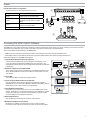
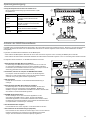
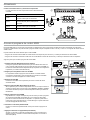
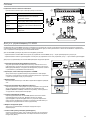
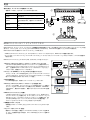
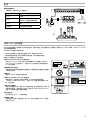
Настройка системы и группы MXW
Проблема
Признак
Решение
На вкладке Configuration в
строке группы раскрывающийся
список устройств не содержит
нужного компонента.
• Убедитесь, что устройства включены и подсоединены к одной сети и подсети.
• Чтобы вывести в список все устройства MXW в сети, откройте вкладку
Utility управляющего ПО MXW и снимите флажок Configuration Filter. Если
устройство фигурирует как «OTHER» (Другая), значит, оно относится к другой
конфигурации.
• Отсоедините компонент, выбрав «none» в строке группы в другой
конфигурации.
• Чтобы отменить любую связь, восстановите в устройстве заводские
настройки.
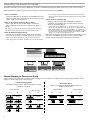
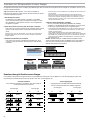
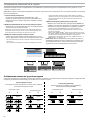
Признак
Решение
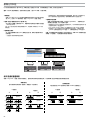
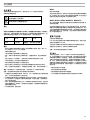
Устройство не появляется в
приложении Shure Web Device
Discovery
• Убедитесь, что устройства включены.
• Убедитесь, что ПК и оборудование находятся в одной сети и настроены на
одну и ту же подсеть.
• Выключите другие сетевые интерфейсы, не используемые для подключения к
устройству (в том числе WiFi)
• Проверьте, что DHCP-сервер работает (если это имеет отношение к делу)
• Убедитесь, что на ПК выполняется Bonjour.
• Если соединение выполнено через порт 4 интерфейса аудиосети (ANI),
убедитесь, что порт настроен на сетевой режим Switched Mode.
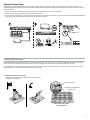
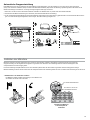
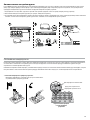
Управляющее
ПО долго
загружается
Веб-браузер не может
подключиться к интерфейсу
управления
• Загрузите последнюю версию Adobe® Flash®
• Убедитесь, что ПК и устройство находятся в одних и тех же сети и подсети.
• Проверьте, что настройки межсетевого экрана Windows не блокируют ПО
Shure
• Блокируйте посылку маршрутизатором стандартного шлюза как части DHCP
• Настройте приложение Shure Web Device Discovery на открывание по
IP-адресу
• Вручную задайте компьютеру статический IP-адрес в той же сети, в которой
находится устройство
Управляющее ПО
плохо работает
Индикаторы действуют
медленно или не в реальном
времени.
• Уменьшите число окон или вкладок, открытых в одной конфигурации
• Правильную настройку сети см. раздел «Сеть».
Не удается
ассоциировать
компонент с
группой
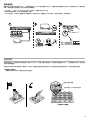
Сеть
Проблема
Не удается
подключиться
на ПК к
управляющей
программе
71