1
HAMGSM133
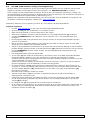
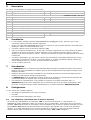
Note: the caller ID of the used mobile phone must not be hidden (callers’ phone number must be visible when
calling another mobile phone).
At the end of the hold mode the yellow LEDs are switched off and the device waits for a configuration SMS.
With the same phone used to make the first setup call, it is also possible to switch the relay status.
8.2
Through SMS
This mode takes full advantage of the device with operations as output switch, output status query, inclusion of
additional phone numbers to activate the relay, inclusion of numbers for door opening function, reception of
reply messages; change output signals timing and, in general, set the HAMGSM133 with all parameters via
simple SMS. A full reset to restore the default settings can also be made via SMS. See below for the syntax for
all available commands.
8.3
SMS syntax
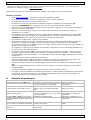
•
Commands and settings can be sent from any mobile phone as long as the message includes the
password.
•
For some commands a password is not required when the message was sent from a telephone number
which is stored in the HAMGSM133. However, some commands that change critical information always
require a password.
•
The HAMGSM133 replies with a confirmation or information SMS.
•
Multiple commands can be combined in 1 SMS by placing a comma in between.
•
Note: commands never contain spaces.
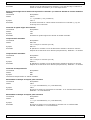
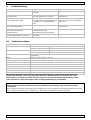
Refer to overview of all configuration SMS commands below.
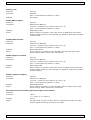
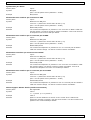
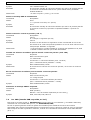
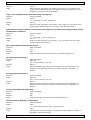
Change password
Password
required
Command
PWDxxxxx;pwd
xxxxx = new password (5 digits)
pwd = current password (default = 12345)
Example
PWD54321;12345
Store numbers
Password
required for overwrite or from unknown phone
Command
NUMx+YYnnnnnnnnnn;pwd
YY = country code
x = position of the number in the list (1~8)
nnnnnnnnnn = phone number (max. 19 digits)
pwd = current password (default = 12345)
Example
NUM7+324851234567;12345
Result
Number +324851234567 is stored on location 7 in the master list.
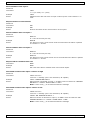
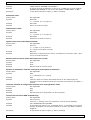
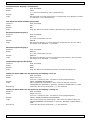
Remove numbers
Password
Command
Required
NUMx;pwd
x = position of the number in the list (1~8)
pwd = current password (default = 12345)
Example
NUM5;12345
Result
The number on location 5 is removed from the master list.
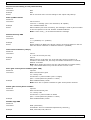
List stored numbers
Password
required
Command
NUM?;pwd
Example
NUM?;12345
Result
Show the master list.
pwd = current password (default = 12345)
V. 02 – 15/05/2012
8
©Velleman nv